Choosing between laptops for programmers is less about raw specs and more about fit. The right machine depends on your operating system, your toolchain, how much you travel, and whether you compile large projects, run containers or train models locally.
This list covers the 10 laptop lines developers most often choose in 2026, from Apple’s MacBook Pro and MacBook Air to Lenovo ThinkPads, the revived Dell XPS, modular Framework laptops and Linux-first System76 machines. We focus on product lines rather than single configurations.
It is aimed at students, professional developers and anyone setting up a coding machine for the next few years.
Related guide: How to choose a laptop for programming, a step-by-step walkthrough.
How we ranked this list
We compared publicly documented features, official specs and widely reported user feedback from developers. Our main criteria were operating system and tooling support, keyboard and screen quality, portability and battery life, memory and storage options, Linux compatibility, repairability, and how long a line has been trusted by programmers.
We did not run our own lab tests, and we have left out prices because they vary widely by region and configuration.

The Top 10 Programmer Laptops
1. Apple MacBook Pro
Best for: all-round power and long battery life
The MacBook Pro remains the default choice for many developers, and the 2026 lineup is Apple’s strongest yet. It comes in 14-inch and 16-inch sizes, with the M5 chip in the base 14-inch model and the more powerful M5 Pro and M5 Max chips announced in March 2026 for heavier workloads.
For programmers, the appeal is a mix of performance, quiet operation and battery life that comfortably lasts a working day. macOS is Unix-based, so the terminal, Homebrew, Git and most open-source tools feel natural, and it is the only practical way to build and ship iOS and macOS apps with Xcode. Apple silicon’s unified memory also makes higher-memory configurations useful for running local AI models.
There are trade-offs. Apple silicon uses the Arm architecture, so some x86-only Docker images need emulation, and upgrades after purchase are not possible because memory and storage are built in. Buy enough RAM for the next few years, especially for containers and VMs.
Official site: Apple MacBook Pro
- Excellent performance and battery life
- Only practical option for iOS work
- Bright, high-quality displays
- No memory or storage upgrades
- Some x86 containers need emulation
2. Lenovo ThinkPad X1 Carbon
Best for: travelling developers who type all day
The ThinkPad X1 Carbon has been a favourite of programmers for years, mostly because of its keyboard. ThinkPad keyboards are widely praised for their travel and feel, and the red TrackPoint lets you move the cursor without leaving the home row.
The current Gen 14 model, unveiled at CES 2026, uses Intel Core Ultra Series 3 processors and weighs just under 1 kg. It is offered with up to 64 GB of fast LPDDR5x memory and a 14-inch screen, with IPS and OLED options. That combination makes it a strong choice for developers who split time between the office, home and travel.
ThinkPads also have a good reputation with Linux users, and Lenovo certifies many ThinkPad models for distributions such as Ubuntu and Fedora. Business features such as a webcam privacy shutter and enterprise security tools make it easy to deploy in companies. The main downside is that memory is soldered, so choose your RAM carefully at purchase.
Official site: Lenovo ThinkPad X1 Carbon
- Class-leading keyboard and TrackPoint
- Very light for a 14-inch laptop
- Strong Linux support
- Soldered memory
- No discrete graphics option
3. Apple MacBook Air
Best for: students and lightweight web development
If you do not need the sustained performance of a MacBook Pro, the MacBook Air is one of the easiest laptops to recommend for coding. Apple introduced the MacBook Air with M5 in March 2026, in 13-inch and 15-inch sizes.
The Air is fanless, so it is completely silent, and Apple silicon gives it long battery life. For web development, scripting, data analysis in Python, learning to code and most everyday software work, it has plenty of power. You get the same macOS developer environment as the MacBook Pro, including Xcode for Apple platform development.
The fanless design is also its limit. Long compiles, large test suites or heavy container workloads can cause the chip to slow down as it heats up, where a MacBook Pro would keep going. Like other Macs, memory and storage cannot be upgraded later, so choose a configuration with headroom if you plan to keep it for years. The 15-inch model gives more room for split editors.
Official site: Apple MacBook Air
- Silent, fanless design
- Light and long-lasting on battery
- Same macOS tooling as the Pro
- Slows under long, heavy workloads
- No upgrades after purchase

4. Dell XPS
Best for: premium Windows laptop with a Linux path
Dell briefly retired the XPS name in 2025, then brought it back at CES 2026 with new XPS 14 and XPS 16 models, and an XPS 13 promised for later in the year. The redesign uses a machined recycled aluminium body, OLED display options and modern Intel Core Ultra processors.
XPS laptops have long been popular with developers who want a sleek Windows machine with a large, sharp screen. Dell has also highlighted repair-friendly changes in the new generation, including an easier-to-remove keyboard and modular USB-C ports, which can make some repairs simpler.
Linux fans will be interested that Dell announced an Ubuntu version of the XPS 14 for 2026, continuing a tradition of developer-focused Linux XPS models. On Windows, WSL gives you a full Linux environment alongside native Windows tools. The XPS line sits at the premium end of the market, and the 16-inch model is the better choice if you want maximum screen space for coding.
Official site: Dell XPS
- Premium design and OLED options
- Ubuntu model announced for XPS 14
- More repair-friendly than before
- Lineup still being rebuilt after rebrand
- Premium positioning
5. Framework Laptop 13
Best for: repairable, upgradeable Linux machines
Framework’s 13-inch laptop is built around a simple promise: you should be able to repair and upgrade your own computer. Almost every part, from the battery and screen to the keyboard and mainboard, can be replaced with a screwdriver that comes in the box, and ports are swappable Expansion Cards that slot into the chassis.
In April 2026 Framework introduced the Framework Laptop 13 Pro, a ground-up redesign with Intel Core Ultra Series 3 processors, a larger battery, a CNC aluminium chassis, a haptic touchpad and LPCAMM2 memory, which keeps fast memory replaceable. AMD Ryzen AI 300 mainboards are also offered.
Framework is a favourite among Linux developers because the company officially supports popular distributions such as Fedora and Ubuntu, and its DIY Edition lets you bring your own memory, storage and operating system. Because older laptops can be upgraded with new mainboards, a Framework can follow you through several hardware generations instead of being replaced.
Official site: Framework Laptop 13
- Fully repairable and upgradeable
- Swappable ports via Expansion Cards
- Official Linux support
- Ships to a limited set of countries
- Fewer in-person service options
6. Lenovo ThinkPad T series
Best for: reliable workhorse for company fleets
The ThinkPad T series, including the T14, T14s and T16, is the mainstream business ThinkPad and the laptop many developers receive from their employer. It shares the excellent ThinkPad keyboard and TrackPoint with the X1 Carbon, but focuses on practicality over thinness.
T series models are offered with Intel and AMD processors, and some recent T14s models have also used Qualcomm Snapdragon chips. They tend to offer a wider range of ports than ultra-thin laptops, which helps if you connect docks, external monitors and test devices. Larger T16 models give you more room for side-by-side editors.
Like the X1 Carbon, many T series models are certified for Linux, making them a safe choice if you want to run Ubuntu or Fedora full time. Lenovo has also put more focus on serviceability in recent generations, making parts such as batteries easier to replace. They are not the most exciting laptops, but they are dependable machines that IT departments and developers both trust.
Official site: Lenovo ThinkPad T series
- Great keyboard at a mainstream level
- Good port selection
- Many models certified for Linux
- Plainer design than premium rivals
- Specs vary a lot by model
7. Framework Laptop 16
Best for: modular power with optional GPU
The Framework Laptop 16 takes the same repairable philosophy as the 13 and applies it to a larger, more powerful machine. Its biggest trick is a swappable graphics module at the back: you can run it with integrated graphics for better battery life, or add a dedicated NVIDIA GeForce RTX 5070 module when you need GPU power.
It uses AMD Ryzen AI 300 Series processors, and a 2026 update added a one-piece haptic touchpad and keyboard. The input area is also modular, so you can position the keyboard and add a numpad or other modules where you want them.
That makes it interesting for game developers, CUDA-based machine learning and anyone who wants one laptop for coding and GPU-heavy tasks. As with the 13, Linux is officially supported and parts can be upgraded over time. The downside is size and weight: with the graphics module fitted, it is not one you will want to carry everywhere.
Official site: Framework Laptop 16
- Optional dedicated NVIDIA graphics
- Modular keyboard and input area
- Upgradeable over time
- Large and heavy with GPU fitted
- Shorter battery life under GPU load
8. Microsoft Surface Laptop
Best for: Windows on Arm and long battery life
Microsoft’s Surface Laptop is a clean, well-built Windows laptop with a high-quality touchscreen and a comfortable keyboard. The 2026 consumer models use Qualcomm Snapdragon X2 processors, which are based on the Arm architecture and are designed for long battery life, while business versions are also offered with Intel Core Ultra Series 3 chips.
For developers, Windows on Arm has matured a lot. Visual Studio, VS Code, Git, Python, Node.js and WSL all run natively on Arm, and Microsoft’s Prism emulator handles many x86 apps. This makes the Surface Laptop a good fit for .NET, web and cloud developers who live in the Microsoft ecosystem.
Check your toolchain first, though. Some older SDKs, drivers, and x86-only tools still do not run perfectly on Arm, and some Docker images may need Arm builds. If your work depends on any of those, an Intel-based model is the safer choice. Linux is not a realistic option on the Arm models today.
Official site: Microsoft Surface Laptop
- Long battery life on Snapdragon
- Polished design and touchscreen
- Native Arm builds of key dev tools
- Some x86-only tools still struggle
- Poor fit for running Linux natively
9. HP EliteBook
Best for: secure, managed corporate laptops
HP simplified its laptop brands in 2025, retiring names such as Spectre, Envy and Dragonfly. The business line is now EliteBook, while consumer laptops sit under OmniBook. At CES 2026, HP introduced the EliteBook X G2 series, which focuses on AI performance, enterprise security, serviceability and portability.
EliteBooks are common in large companies, and for developers that means solid build quality, good keyboards, plenty of business ports and strong management and security features such as HP Wolf Security. HP offers business models with Intel, AMD and Qualcomm processors across its range, so you can choose a traditional x86 machine or an Arm laptop focused on battery life.
If you are buying for yourself rather than through work, the OmniBook range, including the new OmniBook Ultra 14, covers similar ground with a more consumer-friendly design. Linux runs on many HP business laptops, but check compatibility for your exact model before you commit, as support varies.
Official site: HP EliteBook
- Strong security and management tools
- Choice of Intel, AMD or Arm
- Good business build quality
- Confusing model names after rebrand
- Linux support varies by model
10. System76 Lemur Pro
Best for: Linux-first developers who want it ready
System76 is a US company that designs computers specifically for Linux, and the Lemur Pro is its lightweight laptop. Instead of installing Linux yourself and hunting for drivers, you get a machine that ships with Pop!_OS, System76’s own Ubuntu-based distribution, tuned for the hardware.
The 2026 Lemur Pro refresh, launched in July, uses Intel Core Ultra Series 3 processors and now comes in both 14-inch and 16-inch versions. Pop!_OS 24.04 LTS ships with COSMIC, the company’s new Rust-based desktop environment, and Ubuntu LTS options are also offered.
For developers who already live in Linux, the attraction is simple: everything works out of the box, and System76 provides Linux-focused support if something goes wrong. Pop!_OS also includes useful touches for programmers, such as window tiling built into the desktop. The trade-offs are fewer retail options outside the US and a smaller range of designs than the big brands. If you need a GPU, System76’s larger Oryx Pro is an alternative.
Official site: System76 Lemur Pro
- Linux preinstalled and supported
- Light design in two sizes
- COSMIC desktop with tiling
- Limited retail presence outside US
- No macOS or Windows by default
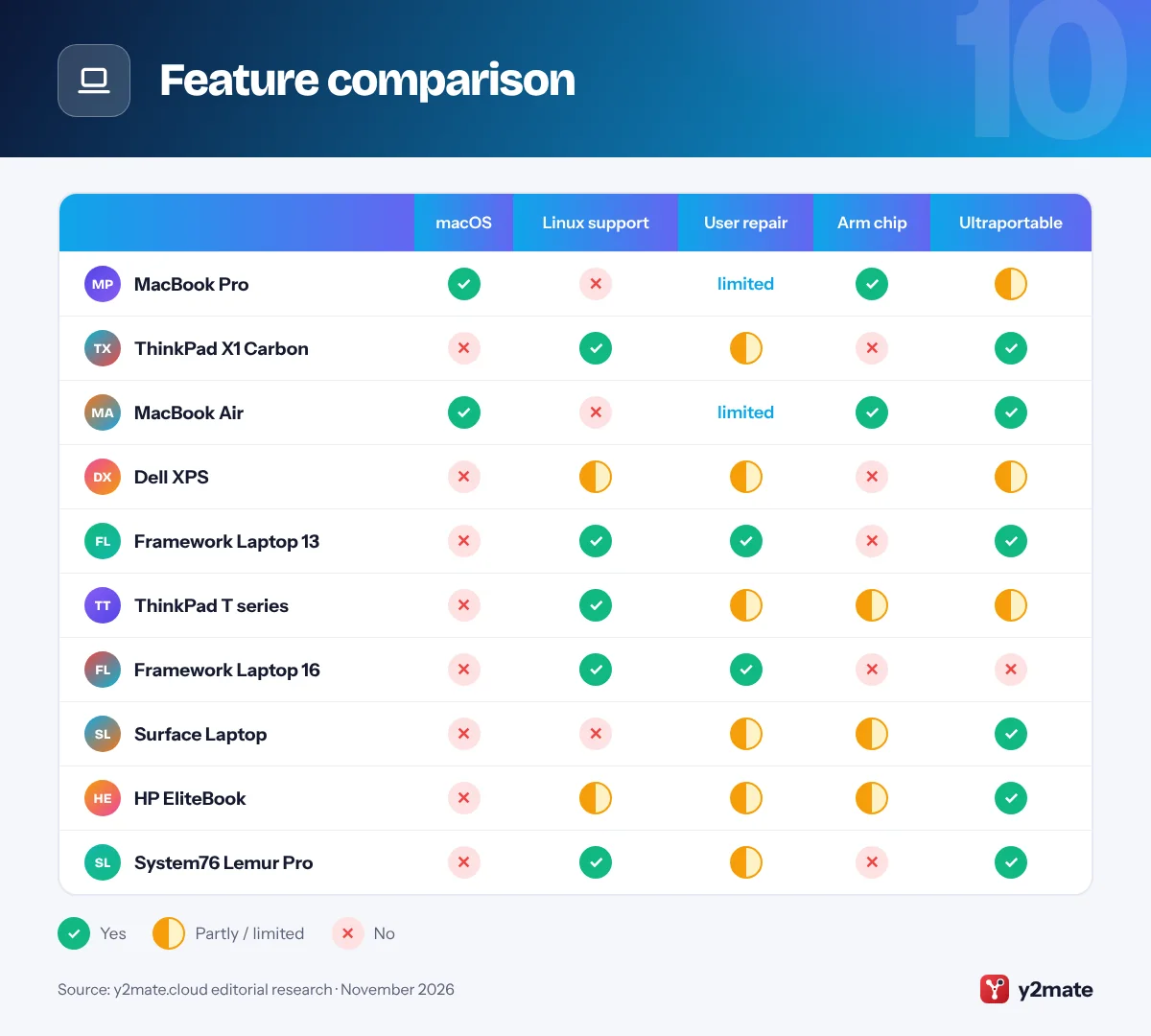
Feature comparison
What to look for in laptops for programmers
Most modern laptops are fast enough to write code. The differences that matter show up when you run builds, containers and tests all day, or carry the machine everywhere.

Memory comes first
RAM is the spec developers most often regret skimping on. Browsers, IDEs, Docker, emulators and local AI models all compete for it. Many thin laptops, including all current MacBooks, have memory that cannot be upgraded later, so buy for the next few years, not just today.
Pick your operating system deliberately
- macOS is required for iOS and macOS development and offers a Unix-style terminal.
- Windows suits .NET and game development, and WSL adds a real Linux environment.
- Linux is closest to most servers. Choose hardware the maker certifies or ships with Linux.
x86 or Arm?
Arm chips in MacBooks and Snapdragon laptops deliver excellent battery life, but check that your languages, SDKs and container images support Arm.
Comfort and connectivity
A good keyboard and a sharp screen of 14 inches or more make long sessions easier. Count the ports you need for monitors and docks, and consider warranty and repair options, since a laptop you can fix is a laptop you keep longer.
Frequently asked questions
Is a MacBook good for programming?
Yes, for most developers. macOS has a Unix-based terminal, excellent battery life on Apple silicon, and it is required for building iOS and macOS apps with Xcode. The main caveats are that memory cannot be upgraded later and that some x86-only Docker images need emulation on Apple's Arm chips. Windows-specific development is usually better on a Windows laptop.
How much RAM do I need for programming?
It depends on your work. Simple web development and learning to code are comfortable on a mid-range configuration, but running Docker, Android emulators, virtual machines or local AI models quickly uses more. Because many laptops have soldered memory, it is safer to buy more RAM than you need today rather than discover you are short in a year.
Which laptop is best for Linux programming?
Look for hardware that the maker supports on Linux. System76 laptops ship with Pop!_OS, Framework officially supports popular distributions, and Lenovo certifies many ThinkPads for Ubuntu and Fedora. Dell has also announced an Ubuntu version of the XPS 14. Buying supported hardware saves time otherwise spent troubleshooting Wi-Fi, sleep and graphics drivers.
Can I program on a Windows on Arm laptop?
Yes. Visual Studio, VS Code, Git, Python, Node.js and WSL run natively on Windows on Arm, and Microsoft's emulation handles many x86 apps. Problems usually come from older SDKs, hardware drivers or x86-only tools and container images. Check that everything in your toolchain supports Arm, or choose an Intel or AMD model if you depend on legacy software.
Do programmers need a dedicated graphics card?
Most do not. Web, backend, mobile and data work run well on integrated graphics. A dedicated GPU helps for game development, 3D work and machine learning that relies on NVIDIA CUDA. If you only need a GPU occasionally, cloud GPUs or a modular option such as the Framework Laptop 16 graphics module can be more flexible.
Final verdict
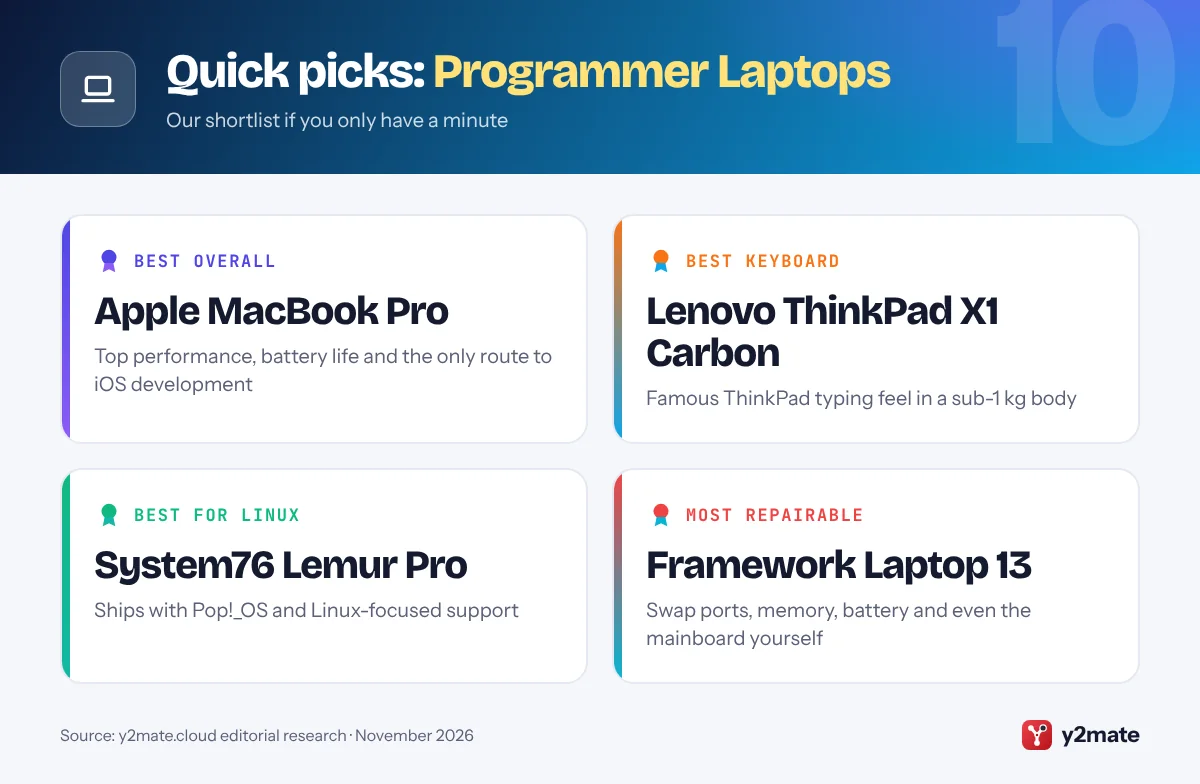
For most developers, the Apple MacBook Pro is the best all-round choice in 2026, and the MacBook Air is the sensible pick if your workloads are lighter. If you prefer Windows or Linux, the ThinkPad X1 Carbon offers the best typing experience in a light body, while Framework and System76 lead for repairability and Linux-first setups.
Whichever you choose, prioritise memory, OS fit and keyboard comfort over headline specs. Those are what make a coding laptop pleasant to use every day.
Sources and further reading
- Xcode system requirements: Apple's official list of the macOS versions and SDKs each Xcode release needs for building iPhone and Mac apps.
- Ubuntu certified laptops: Canonical's searchable list of laptops tested and certified to run Ubuntu Linux out of the box.
- Docker Desktop: Docker's official page for Docker Desktop, the container tool many developers run on Mac, Windows, and Linux laptops.
- Android Studio install guide: Google's official Android Studio setup guide, including minimum RAM, storage, and CPU requirements for each operating system.

Leave a Reply