
The best smart home gadgets do not just add novelty. They save energy, make your home safer and remove small daily chores, like checking whether you locked the door or turning off lights in an empty room. The trick is choosing devices that work well together instead of a drawer full of apps.
That has become easier thanks to Matter, the industry standard backed by Apple, Google, Amazon, Samsung and many others. Matter-certified devices can work across Apple Home, Google Home, Amazon Alexa and SmartThings, and many use Thread, a low-power mesh network that makes battery devices faster and more reliable.
This list covers one strong example in each of the ten device categories that matter most, from smart speakers and thermostats to robot vacuums and mesh Wi-Fi. For each, we note whether it supports Matter and Thread so you can build a system that will not lock you into one brand.
Related guide: How to build a Matter smart home, a step-by-step walkthrough.

How we ranked this list
We did not test these devices in a lab. We compared publicly documented features, official specifications and compatibility lists, and widely reported reviewer and user feedback. We focused on how useful each category is day to day, how easy the device is to install and whether it works across the major smart home platforms.
Matter and Thread support counted in a device’s favour, as did avoiding mandatory subscriptions for core features. Where a category has several good options, we name alternatives so you can stay within your preferred ecosystem.
The Top 10 Smart Home Gadgets
1. Google Nest Learning Thermostat (4th gen)
Best for: cutting heating and cooling waste
A smart thermostat is one of the few smart home upgrades that can pay you back over time, because heating and cooling are among the largest energy uses in most homes. Google’s fourth-generation Nest Learning Thermostat learns your schedule, adjusts automatically when you are away and lets you control the temperature from your phone.
This model added Matter support, which means it is no longer limited to Google Home. You can add it to Apple Home or Samsung SmartThings, although some platforms only expose basic controls such as setting the temperature. It also uses Soli radar sensing to light up its display as you approach.
Installation is usually straightforward if you already have a compatible heating system, and Google’s online compatibility checker will tell you before you buy. If your system is unusual or you are not comfortable with wiring, a professional installer is worth considering. Alternatives include ecobee thermostats, which are popular with Apple Home users.
Official site: Google Nest Learning Thermostat (4th gen)
- Learns your schedule automatically
- Matter support for other platforms
- Clear, attractive display
- Full features work best in Google Home
- Not compatible with every HVAC system
2. Philips Hue smart lighting
Best for: reliable lighting that grows with you
Smart lighting is the easiest way to start a smart home, and Philips Hue remains the benchmark. The range covers bulbs, light strips, lamps and outdoor fixtures, all controlled from one app with scenes, schedules and routines such as lights that slowly brighten in the morning.
Hue bulbs can be used on their own with Bluetooth, but the Hue Bridge unlocks the full system: control away from home, more lights and more reliable automations. The Bridge also brings Hue lights into Matter, so they can appear in Apple Home, Google Home, Alexa and SmartThings. In 2025 Philips introduced the more powerful Hue Bridge Pro and new bulbs that add Thread radios alongside Zigbee and Bluetooth.
Hue is not the cheapest option, but its long track record, wide product range and dependable connections make it a safe long-term investment. Alternatives include Nanoleaf and LIFX, and budget brands such as TP-Link Tapo for simple Matter bulbs.
Official site: Philips Hue smart lighting
- Huge range of bulbs and fixtures
- Works with all major platforms via Matter
- Very reliable once set up
- Bridge needed for the full experience
- Costs more than budget brands
3. Amazon Echo Dot Max
Best for: an affordable voice hub for Alexa homes
A smart speaker is the control centre of many homes, letting you turn on lights, check cameras, set timers and play music by voice. Amazon’s Echo Dot Max, released in 2025, sits between the compact Echo Dot and the larger Echo speakers, with fuller sound than the classic Dot.
For smart home use, its most important feature is what is built in. Amazon lists the Echo Dot Max as a Matter controller and a Thread border router, so it can set up and run Matter devices, including battery-powered Thread sensors and locks, without a separate hub. It is also designed for Alexa+, Amazon’s newer conversational assistant.
If you live in a different ecosystem, there are strong alternatives. Google’s Gemini-powered Google Home Speaker, launched in 2026, acts as a Thread border router and Matter hub for Google Home. Apple’s HomePod mini plays the same role for Apple Home. Pick the speaker that matches your phone and the assistant you prefer.
Official site: Amazon Echo Dot Max
- Built-in Matter controller
- Thread border router
- Fuller sound than the standard Dot
- Best features tied to Alexa
- Privacy concerns for some buyers

4. Ring Battery Doorbell
Best for: seeing who is at the door from anywhere
A video doorbell lets you see and talk to visitors from your phone, check on deliveries and keep a record of activity at your front door. Ring popularised the category, and its battery-powered doorbells are designed for easy installation, with no need for existing doorbell wiring.
Ring works best with Amazon Alexa. You can get announcements on Echo speakers and see the camera feed on Echo Show displays. Keep in mind that recorded video history and some smart alerts require a Ring subscription plan; without one, you mainly get live view and notifications.
On Matter, cameras and doorbells are still early. Matter 1.5, released in November 2025, added support for cameras and video doorbells for the first time, but Ring doorbells do not yet support Matter. If you use Google Home, the Google Nest Doorbell is the natural alternative. Apple Home users may prefer doorbells that support HomeKit Secure Video, such as models from Aqara.
Official site: Ring Battery Doorbell
- Easy wire-free installation
- Tight integration with Alexa and Echo
- Mature, reliable app
- Recordings need a subscription
- No Matter support yet
5. TP-Link Tapo P125M smart plug
Best for: making ordinary devices smart
Smart plugs are the cheapest and simplest connected devices, and among the most useful. Plug in a lamp, fan, coffee maker or holiday lights, and you can control them by voice, on a schedule or from your phone. They are also a handy way to cut standby power from devices you rarely use.
TP-Link’s Tapo P125M is a compact Matter-certified plug that connects over Wi-Fi. Because it uses Matter, it can be added directly to Apple Home, Google Home, Alexa or SmartThings, and it does not need a Thread border router. Setup is quick, and schedules and away mode are built in. It does not offer energy monitoring.
If you want to track power use, Eve Energy is a strong alternative. It runs on Matter over Thread and includes a built-in power meter, and as a mains-powered Thread device it also strengthens your Thread network. It does need a Thread border router, such as a recent smart speaker or mesh router.
Official site: TP-Link Tapo P125M smart plug
- Matter over Wi-Fi, no hub needed
- Compact design
- Works with every major platform
- No energy monitoring
- Indoor use only
6. Roborock Saros 10
Best for: hands-off daily floor cleaning
A robot vacuum takes one of the most repetitive chores off your list. Modern models map your home, avoid obstacles and many also mop, with docks that empty dust automatically. Roborock is one of the leading brands, and its Saros range sits at the top of its lineup.
Roborock rolled out Matter support to several models in 2025, including the Saros 10 and Saros 10R. Apple added Matter robot vacuum control to the Home app in iOS 18.4, so you can start cleaning, change modes and include the vacuum in routines without opening Roborock’s app. In Apple Home, this requires a home hub such as a HomePod or Apple TV. Matter control is basic, so detailed room maps and settings still live in the Roborock app.
Newer Saros models, such as the Saros 20, also support Matter. Check Roborock’s current compatibility list before buying, as support varies by model and firmware. Alternatives include robot vacuums from Ecovacs, Dreame and Eufy.
Official site: Roborock Saros 10
- Matter support for Apple Home and more
- Advanced mapping and obstacle avoidance
- Vacuums and mops
- Matter controls are basic
- Dock takes up floor space
7. Aqara Smart Lock U200
Best for: keyless entry without replacing your lock
A smart lock lets you unlock the door from your phone, give temporary access to guests or cleaners and check whether you remembered to lock up. The Aqara Smart Lock U200 is a retrofit lock: it fits over many existing deadbolts on the inside of the door, so you keep your current keys and exterior hardware.
The U200 uses Matter over Thread natively, so it works with Apple Home, Google Home, Alexa and SmartThings without an Aqara hub, as long as you have a Thread border router. It is also one of the first Matter over Thread locks to support Apple Home Key, which lets iPhone and Apple Watch users unlock with a tap. A separate wireless keypad adds fingerprint and NFC unlocking.
Installation is a do-it-yourself job for most doors, but check compatibility with your deadbolt first. Alternatives include Yale’s Matter-enabled locks, which suit people who want to replace the whole lock.
Official site: Aqara Smart Lock U200
- Matter over Thread, no Aqara hub needed
- Apple Home Key support
- Keeps your existing keys
- Bulky on the inside of the door
- Not compatible with every deadbolt
8. Google Nest Cam
Best for: indoor and outdoor monitoring in Google Home
A security camera helps you keep an eye on pets, packages and the outside of your home. Google’s Nest Cam range includes indoor wired and battery-powered models that can be used indoors or outdoors, with smart alerts that can distinguish people, animals and vehicles.
Nest Cams fit naturally into Google Home, with live feeds on Nest Hub displays and Google TV. Some event history is included, but longer video history and extra smart features require a Google Home Premium subscription, so factor that into your decision.
Matter 1.5 added camera support in late 2025, promising cross-platform live video, two-way talk and local access, and Samsung SmartThings was first to support it. However, Google and Amazon had not added Matter support to their own cameras at the time of writing, so pick a camera that matches your ecosystem. Apple Home users may prefer cameras with HomeKit Secure Video, and Alexa users will find Ring and Blink easier.
Official site: Google Nest Cam
- Smart person, animal and vehicle alerts
- Tight Google Home integration
- Indoor and outdoor options
- Longer history needs a subscription
- No Matter support yet
9. eero Pro 7
Best for: fast Wi-Fi that doubles as a smart home hub
Every connected device depends on a solid network. Mesh Wi-Fi systems use several units placed around your home to remove dead zones, which helps cameras, doorbells and plugs stay connected. The eero Pro 7 is a tri-band Wi-Fi 7 mesh system from Amazon-owned eero.
It is also a useful smart home hub. eero says the Pro 7 can act as a Thread border router, and its support pages list it as a Matter controller, with Matter devices typically added through the Alexa app. That means it can run Thread devices such as locks, sensors and plugs without a separate hub, and many people will not need one at all.
Setup is handled through a simple app, and eero offers an optional subscription for extra security and parental controls. Alternatives include Google Nest Wifi Pro, which also includes a Thread border router, and TP-Link Deco mesh systems. Whichever you choose, place the units in open areas between your router and the rooms that need coverage.
Official site: eero Pro 7
- Wi-Fi 7 mesh coverage
- Built-in Thread border router
- Very easy app setup
- Matter setup runs through Alexa
- Extra features need a subscription
10. Amazon Echo Show 11
Best for: a touchscreen control panel for the home
A smart display combines a speaker with a touchscreen, making it easier to check cameras, see who is at the door, follow recipes and control devices with a tap instead of your voice. Amazon’s Echo Show 11, released in 2025, offers a larger screen than the Echo Show 8 and is built for Alexa+.
It is also a capable smart home hub. Amazon lists it as a Thread border router and Matter controller, and it keeps a built-in Zigbee hub, so it can connect a wide range of lights, sensors and plugs directly. In a kitchen or hallway, it works well as a shared control panel for the whole household.
If you prefer Google, the Nest Hub (2nd gen) remains a smaller, simpler smart display for Google Home. Whichever you choose, check privacy settings such as the camera shutter and microphone mute, and decide where in the home a screen will actually be useful.
Official site: Amazon Echo Show 11
- Zigbee, Thread and Matter built in
- Larger screen for cameras and recipes
- Great shared control panel
- Best experience requires Alexa
- Takes up counter space
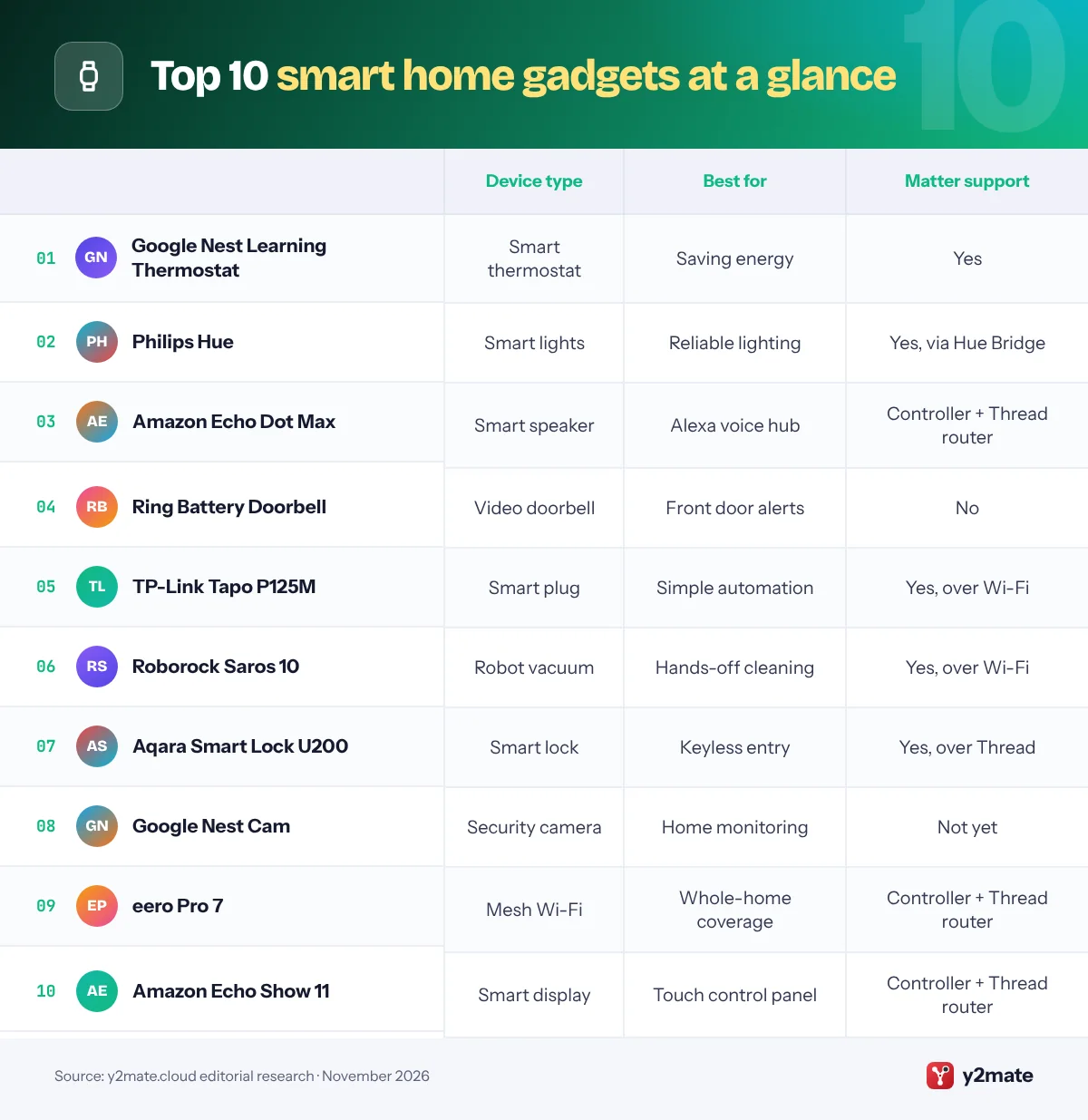
Smart home feature comparison

How to buy smart home gadgets that work together
The biggest mistake new smart home buyers make is collecting devices that each need their own app. A little planning avoids that.

Choose an ecosystem first
Decide whether your home will be run mainly from Apple Home, Google Home, Amazon Alexa or Samsung SmartThings. iPhone households often prefer Apple Home, while Android users usually lean towards Google Home or Alexa. You can mix platforms, but one main app keeps things simple.
Understand Matter and Thread
Matter is a shared standard that lets certified devices work across all the major platforms. Thread is a low-power mesh network used by many Matter devices, especially battery-powered locks and sensors. Thread devices need a Thread border router, which is often built into smart speakers, displays, streaming boxes and some mesh Wi-Fi routers.
- Matter over Wi-Fi: no border router needed, but uses more power.
- Matter over Thread: needs a border router, but is efficient and responsive.
Watch for ongoing costs
Cameras and doorbells often need a subscription for recorded video. Check what works without one before you buy.
Think about privacy and reliability
Look for devices that keep working locally if your internet drops, and review microphone and camera settings. Buy from brands with a track record of software updates, since smart devices can stay in your home for many years.
Frequently asked questions
What is Matter and do I need it?
Matter is an open smart home standard backed by Apple, Google, Amazon, Samsung and many device makers. A Matter-certified device can be controlled from any supporting platform, such as Apple Home, Google Home, Alexa or SmartThings. You do not strictly need it, but choosing Matter devices makes it much easier to switch platforms or share control in a mixed iPhone and Android household.
What is a Thread border router?
Thread is a low-power wireless mesh network used by many Matter devices, especially battery-powered locks, sensors and some plugs. A Thread border router connects that network to your home Wi-Fi and the internet. Many devices already include one, such as Apple HomePod mini, Google Home Speaker, recent Amazon Echo speakers and displays, and eero mesh routers.
Which smart home gadget should I buy first?
Smart plugs and smart bulbs are the easiest place to start. They are inexpensive, simple to install and immediately useful for schedules and voice control. If you already have a smart speaker, add a Matter plug or a few bulbs first. Once you are comfortable, move on to a smart thermostat, lock or video doorbell, which deliver bigger benefits but need a little more planning.
Do smart home devices work without internet?
It depends on the device and platform. Matter was designed to support local control, so many Matter devices keep working on your home network if the internet drops, as long as your hub or controller is local. Cloud-based features such as remote access, voice assistants and video recording usually stop working until the connection returns, so check each product before relying on it.
Are smart home cameras and doorbells safe for privacy?
They can be, if you set them up carefully. Use a strong, unique password and turn on two-factor authentication for the account. Review who has access, choose privacy zones where available and position indoor cameras away from private areas. Some brands offer end-to-end encryption options, and Matter 1.5 adds a standard way for cameras to stream locally.
Final verdict
The smart home gadgets worth buying are the ones that solve a real problem and work with the rest of your home. For most people, a Nest Learning Thermostat and Philips Hue lights deliver the most noticeable everyday benefits, while a Tapo P125M plug is the easiest, lowest-risk first step.
Choose a main platform, favour Matter-certified devices, and make sure you have a Thread border router, which an Echo Dot Max, Echo Show 11 or eero Pro 7 can provide. Build gradually, and your smart home will stay flexible for years.
Sources and further reading
- pair Matter accessories: Apple's support steps for adding Matter smart home devices to the Home app and managing them across apps.
- Matter support on Apple devices: Apple's developer overview of how iPhone and iPad support the Matter standard and Thread networking.
- set up a home hub: Apple's guide to using HomePod or Apple TV as a home hub, which Thread-based Matter devices need.
- the Matter standard: The Connectivity Standards Alliance's official page on Matter, the shared standard that lets smart home devices work across Apple, Google, and Amazon.
- what Thread is: The Thread Group's overview of Thread, the low-power mesh network many Matter locks, sensors, and plugs use to stay connected.

Leave a Reply