- For UK small firms, AI built into accounting software such as Xero, Sage and FreeAgent is often more valuable than a standalone chatbot, because it works on records already kept for HMRC.
- Making Tax Digital for Income Tax began in April 2026 for sole traders and landlords with qualifying income over 50,000 pounds, and the threshold falls to 30,000 pounds from April 2027.
- Sage, FreeAgent, Dext and Synthesia are UK-built options, while Microsoft, Google, OpenAI and Anthropic provide the main general-purpose assistants.
- Any AI tool that processes personal data must comply with UK GDPR, and the ICO publishes guidance on AI and data protection for organisations of every size.
- AI can prepare figures and drafts, but a person should still check VAT returns, quarterly updates and anything sent to customers.
The best AI tools for small businesses in the UK in 2026 combine a general assistant, usually Microsoft 365 Copilot or ChatGPT, with the AI now built into British accounting and admin software: Xero’s JAX, Sage Copilot, FreeAgent and Dext. For most UK firms, those finance tools deliver the quickest wins, because Making Tax Digital already requires digital records that AI can work on.
Here, an AI tool means software that uses generative AI to draft text, summarise information, answer questions or carry out multi-step tasks on your behalf, often called agents. The UK picture has some local twists: Sage has built a Making Tax Digital agent for sole traders and landlords, FreeAgent is free with several NatWest Group business accounts, and London-based Synthesia leads in AI video.
This list is for owners and managers of UK businesses with one to a few hundred staff, from sole traders and tradespeople to agencies, shops and consultancies. Every pick is available in the UK, and we flag UK-built options where they genuinely fit.
How we ranked this list
We did not carry out lab testing. We compared publicly documented features, official product pages and announcements, and widely reported feedback from UK users and accountants. We weighed usefulness for everyday UK small business work, support for Making Tax Digital and UK accounting workflows, integrations with tools such as Xero, Sage, FreeAgent and Microsoft 365, data protection controls relevant to UK GDPR, and whether there is a free or included way to start.
Rankings reflect broad usefulness for typical UK small firms. If you already use a particular accounting package, its built-in AI may be the best first step for you regardless of where it sits on this list.
The Top 10 AI Tools for Business
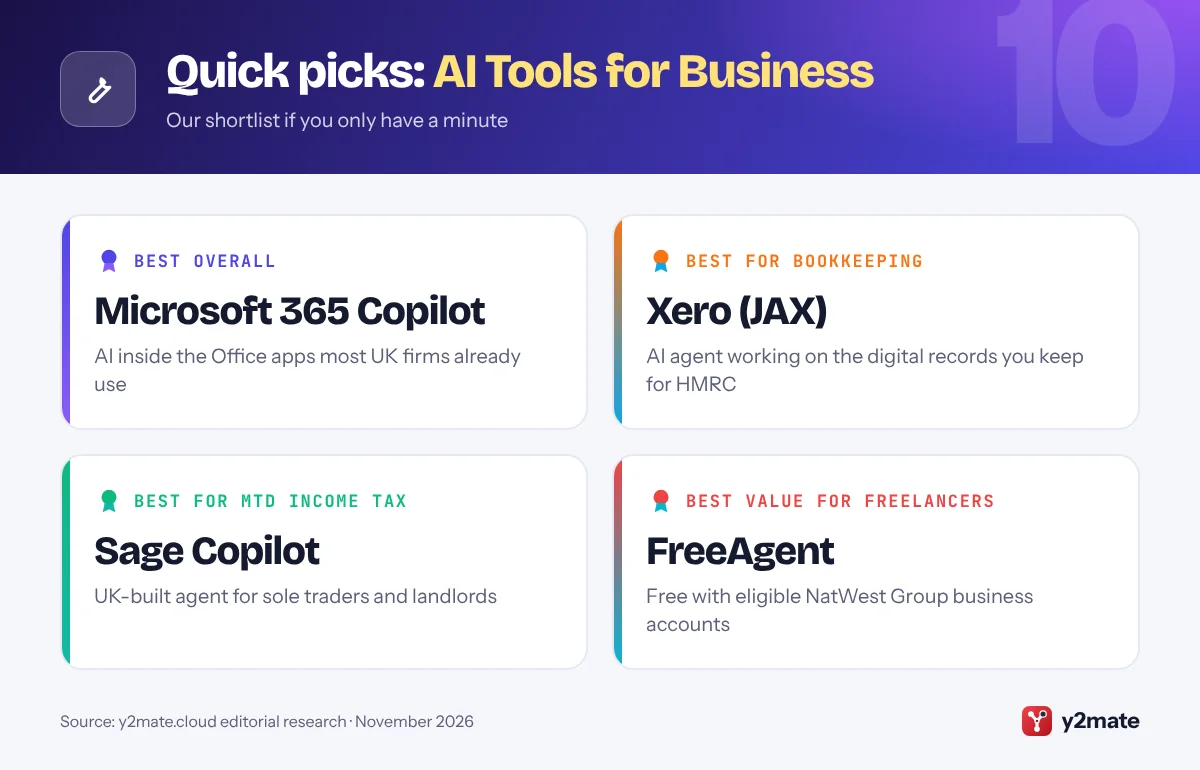
1. Microsoft 365 Copilot
Best for: firms already on Outlook, Word and Excel
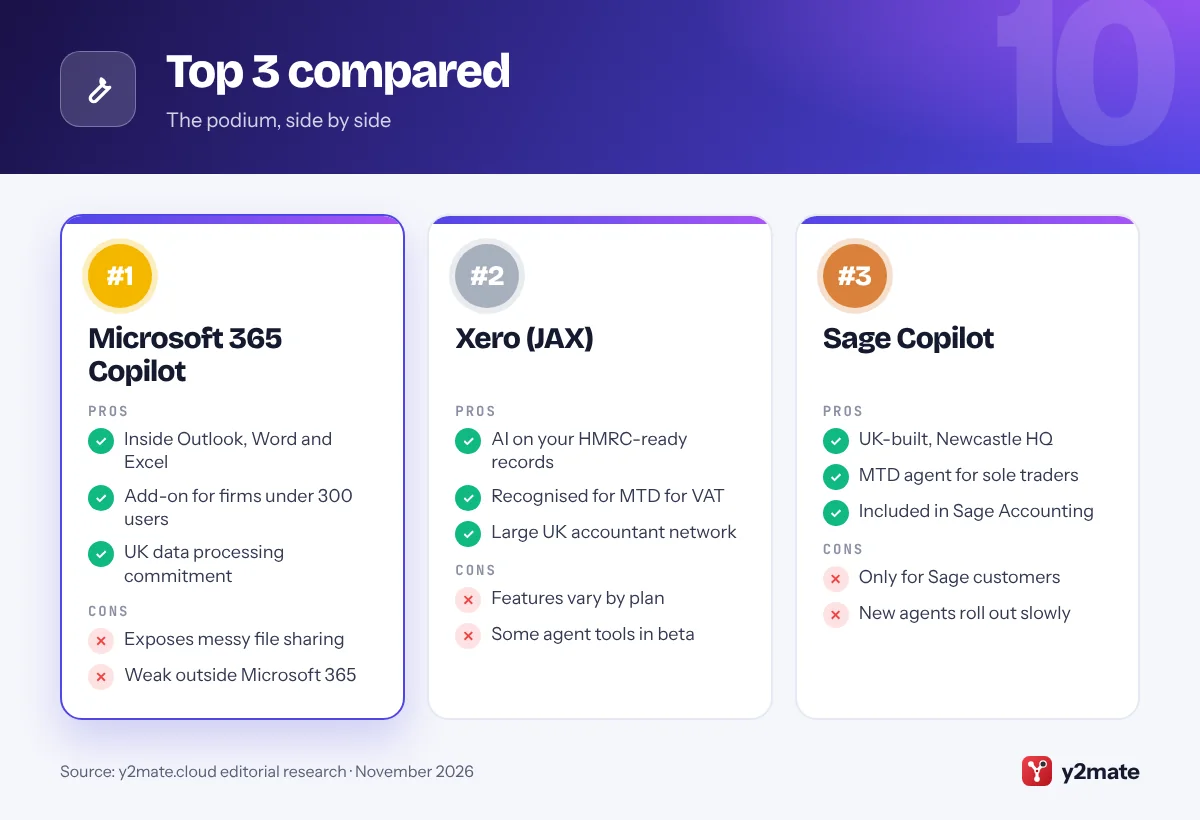
Microsoft 365 is the default office suite for a great many UK small businesses, which makes Copilot the most natural place to start. It works inside Outlook, Word, Excel, PowerPoint and Teams, so it can summarise a long email chain, draft a tender response from your notes, analyse a spreadsheet or recap a Teams meeting.
Microsoft 365 Copilot Business is an add-on for organisations with fewer than 300 users on a Microsoft 365 Business Basic, Standard or Premium plan, and Microsoft says it has the same core functionality as the enterprise licence. Staff with a business account can also use Copilot Chat at no extra cost. For data protection, Microsoft has committed to in-country processing of Copilot interactions for UK customers, which helps firms with strict data residency requirements.
Copilot follows your existing file permissions, so tidy up SharePoint and OneDrive sharing first or it may surface documents people should not see. It adds much less if your team works mainly in Google Workspace.
Official site: Microsoft 365 Copilot
- Works inside familiar Office apps
- Add-on for firms under 300 users
- UK data processing commitment
- Exposes messy file permissions
- Limited value outside Microsoft 365
2. Xero (JAX)
Best for: bookkeeping, VAT and Making Tax Digital
Xero is one of the most widely used accounting platforms among UK small businesses and their accountants, and JAX is its AI agent. Short for Just Ask Xero, JAX can answer questions about your figures in plain English, help with bank reconciliation, draft invoices and quotes, and surface insights about cash flow.
Xero has made the UK a priority. At Xerocon London in 2026 it showed an agent builder, in beta, that lets businesses describe custom AI agents connecting Xero to other apps, and it has been expanding UK compliance features, with Corporation Tax support announced. Xero is recognised for Making Tax Digital for VAT, and because JAX works on the same digital records you keep for HMRC, its suggestions are grounded in real data rather than guesswork.
The limits: JAX features differ by plan and region, and some agent tools are still in beta. Treat JAX as a fast assistant, not a replacement for your accountant, especially when VAT schemes or year-end adjustments are involved.
Official site: Xero (JAX)
- AI on records you keep for HMRC
- Huge UK accountant network
- Agent builder on the way
- Features vary by plan
- Some agent tools still in beta
3. Sage Copilot
Best for: sole traders and landlords facing MTD
Sage is a UK-built accounting company headquartered in Newcastle, and Sage Copilot is the generative AI assistant inside Sage Accounting. Sage made it generally available to UK small businesses in 2025 and later included it in every Sage Accounting plan, so customers do not need a separate AI subscription.
Copilot can flag errors and anomalies in your books, help chase late payments, draft customer messages and answer questions about your accounts. Its most distinctly British feature is the Making Tax Digital agent built on Copilot, designed to help self-employed people and landlords prepare the quarterly updates required under Making Tax Digital for Income Tax, which began in April 2026 for those with qualifying income over 50,000 pounds.
Sage also announced broader AI agents across finance, HR and operations in 2026, though availability for small business plans may lag the larger products. As with any accounting AI, you remain responsible for what is submitted to HMRC, so review quarterly figures before they go.
Official site: Sage Copilot
- UK-built with MTD focus
- Included in Sage Accounting plans
- Flags errors and late payments
- Only for Sage customers
- Newer agents roll out gradually
4. ChatGPT
Best for: a flexible assistant for everyday admin
ChatGPT from OpenAI remains the most flexible general assistant for UK small firms. It drafts emails, quotes, job adverts, website copy and policies, summarises long documents, analyses spreadsheets and explains unfamiliar topics in plain English. The free version is a good way to learn what it can do.
For teams, ChatGPT Business, previously called ChatGPT Team, adds a shared workspace, admin controls and central billing, and OpenAI says it does not train on Business workspace data by default. Connectors let it search files in Google Drive or SharePoint, and agent features can carry out multi-step research. Ask it to write in British English and it will use UK spelling and conventions.
Be careful with UK-specific rules. ChatGPT can explain VAT, IR35 or employment law in general terms, but it can be out of date or mix up UK and US practice. Check anything important against gov.uk or a professional, and do not paste personal data into a personal account, since UK GDPR still applies.
Official site: ChatGPT
- Handles almost any writing task
- Business plan with admin controls
- Free version to start
- Can mix up UK and US rules
- Needs connectors to see your data
5. FreeAgent
Best for: freelancers and micro-businesses
FreeAgent is an Edinburgh-based accounting app designed around UK freelancers, contractors, sole traders and small limited companies, and it is owned by NatWest Group. One unusual advantage is that it is free for customers with an eligible business current account from NatWest, Royal Bank of Scotland, Ulster Bank or Mettle.
FreeAgent is not an AI-first platform, but its AI features target the jobs small firms dislike most. Smart Capture reads receipts and bills you photograph or upload and extracts the details, transactions are categorised automatically, and the app shows real-time estimates of what you owe in tax. In 2026 FreeAgent added an AI tool to help landlords capture rental statements, which suits property owners preparing for Making Tax Digital for Income Tax.
The trade-off is breadth. FreeAgent has fewer conversational AI features than Xero or Sage, and the standard Smart Capture allowance is limited each month unless you add the unlimited option. For a freelancer who wants simple, UK-focused bookkeeping, it remains an excellent fit.
Official site: FreeAgent
- Free with NatWest Group accounts
- Built for UK sole traders
- Smart Capture reads receipts
- Fewer AI features than rivals
- Smart Capture capped on standard
6. Dext
Best for: clearing receipts and supplier bills
Dext, founded in London as Receipt Bank, is a receipt and invoice capture tool widely used by UK bookkeepers and accountants. You photograph a receipt, forward a supplier invoice to your Dext inbox or upload a file, and its AI extracts the supplier, date, amounts and VAT, then publishes the result to your accounting software.
It connects with Xero, QuickBooks and Sage, among others, and keeps a digital image of each document linked to the transaction. That helps with the digital record-keeping expected under Making Tax Digital and makes year-end much less painful. Many UK accountants offer Dext to their clients as part of a bookkeeping package, so ask yours before buying separately.
Dext does one job rather than many. It will not write your marketing or answer general questions, and extraction from some PDF bank statements can be hit and miss, so spot-check what it posts. For a business drowning in paper receipts, though, it is one of the most practical AI purchases you can make.
Official site: Dext
- UK-founded, accountant favourite
- Extracts VAT from receipts
- Links to Xero, QuickBooks, Sage
- Single-purpose tool
- Extraction still needs spot checks
7. Synthesia
Best for: training and explainer videos
Synthesia is a London-based company that has become one of the best-known AI video platforms in the world. You type a script, choose an AI avatar and voice, and it produces a presenter-style video without cameras, studios or editing skills. Videos can be produced in many languages, which helps firms with international customers or multilingual staff.
For UK small businesses, the strongest use cases are staff training, onboarding, health and safety briefings, product walkthroughs and customer how-to videos. Updating a video means editing the script rather than reshooting, which keeps training material current when processes change. Templates and brand settings help keep everything consistent.
There are limits. Avatar videos suit information more than emotion, so they are a weaker fit for brand storytelling. Free access is restricted, and serious use needs a paid plan. If you create an avatar of a real employee, get their written consent and think about how the likeness will be used if they leave, since that involves personal data under UK GDPR.
Official site: Synthesia
- UK-built AI video leader
- No filming or editing needed
- Many languages supported
- Avatars feel less personal
- Serious use needs a paid plan
8. Gemini in Google Workspace
Best for: teams that run on Gmail and Google Docs
If your business email runs on Gmail, Gemini may already be part of your Google Workspace subscription, because Google has folded it into its paid business plans. Depending on your tier, it can draft and summarise emails in Gmail, write and rewrite in Docs, help with formulas in Sheets and take meeting notes in Google Meet.
The Gemini app gives staff a chat assistant that can draw on files in Drive, and NotebookLM can turn a set of documents, such as supplier contracts or an employee handbook, into a searchable notebook with citations back to the source. For UK firms already paying for Workspace, that is a low-effort way to introduce AI across the team.
Feature depth varies by plan, with entry-level tiers receiving less, and Google has changed its packaging several times, so check your admin console. If your accountant and clients work in Excel and Outlook, Microsoft 365 Copilot will usually fit better.
Official site: Gemini in Google Workspace
- Built into Gmail, Docs and Meet
- Included in paid Workspace plans
- NotebookLM for document research
- Features vary by Workspace tier
- Less useful outside Google apps
9. Claude
Best for: long documents, contracts and analysis
Claude, made by Anthropic, is a strong choice when the work involves long or careful reading: tender documents, supplier contracts, policies, lengthy customer complaints or detailed spreadsheets. It tends to give structured, measured answers and writes well in British English when asked.
In May 2026 Anthropic launched Claude for Small Business, a set of ready-made workflows and connectors that runs in Claude Cowork, its desktop agent. Connectors include QuickBooks, PayPal, HubSpot, Canva, DocuSign, Google Workspace and Microsoft 365. Much of the launch publicity focused on the US, so UK firms should check that the specific connectors they need work with their UK accounts before relying on them.
A free plan is available for trying it out, while team admin and the deeper agent features require paid plans. As with any assistant, do not upload personal data without a lawful basis under UK GDPR, and review anything Claude proposes to send or change in a connected account before it happens.
Official site: Claude
- Excellent with long documents
- Writes well in British English
- Free plan to try
- Launch connectors US-focused
- Agent features need a paid plan
10. Square AI
Best for: cafes, shops and salons on Square
Square is a popular card reader and point-of-sale system among UK cafes, market traders, salons and independent shops, and Square AI began rolling out to UK sellers in February 2026. It is built into the Square Dashboard at no extra cost, so if you already use Square you can start straight away.
Square AI lets you ask questions about your business in plain English, such as which products sold best last month, how this week’s takings compare with last week or when your busiest hours are, and answers using your own sales data. That is useful for small retailers and hospitality businesses that do not have time to dig through reports between serving customers.
Its scope is narrow by design: it only helps if Square is your till, and newer features such as Square’s proactive business agent and AI ordering channels launched first in the US, so UK availability may lag. Treat it as a quick way to understand your trading, alongside proper bookkeeping in Xero, Sage or FreeAgent.
Official site: Square AI
- Included with Square
- Answers from your own sales data
- Now rolling out in the UK
- Only for Square sellers
- Newest features reach the US first
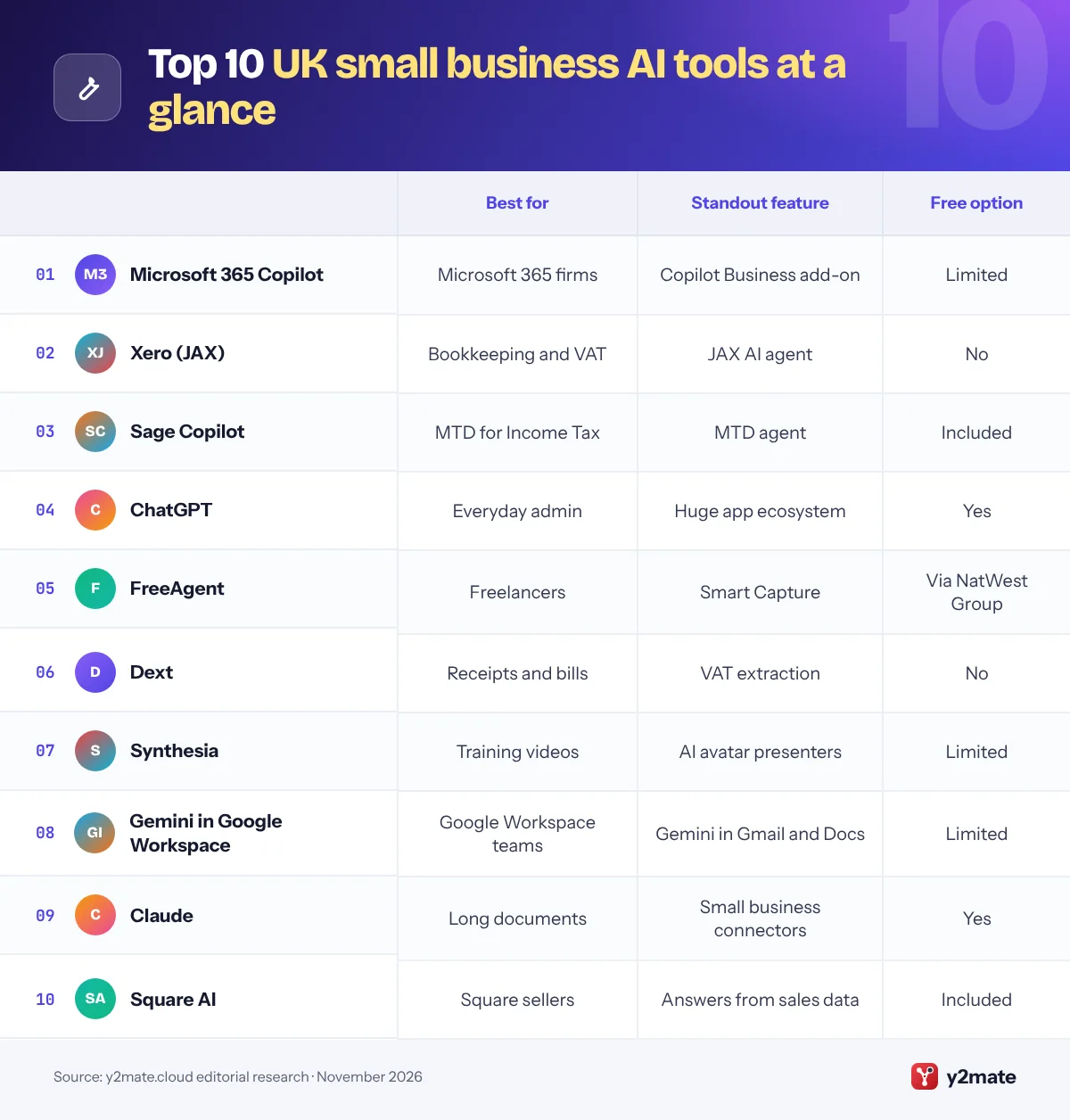
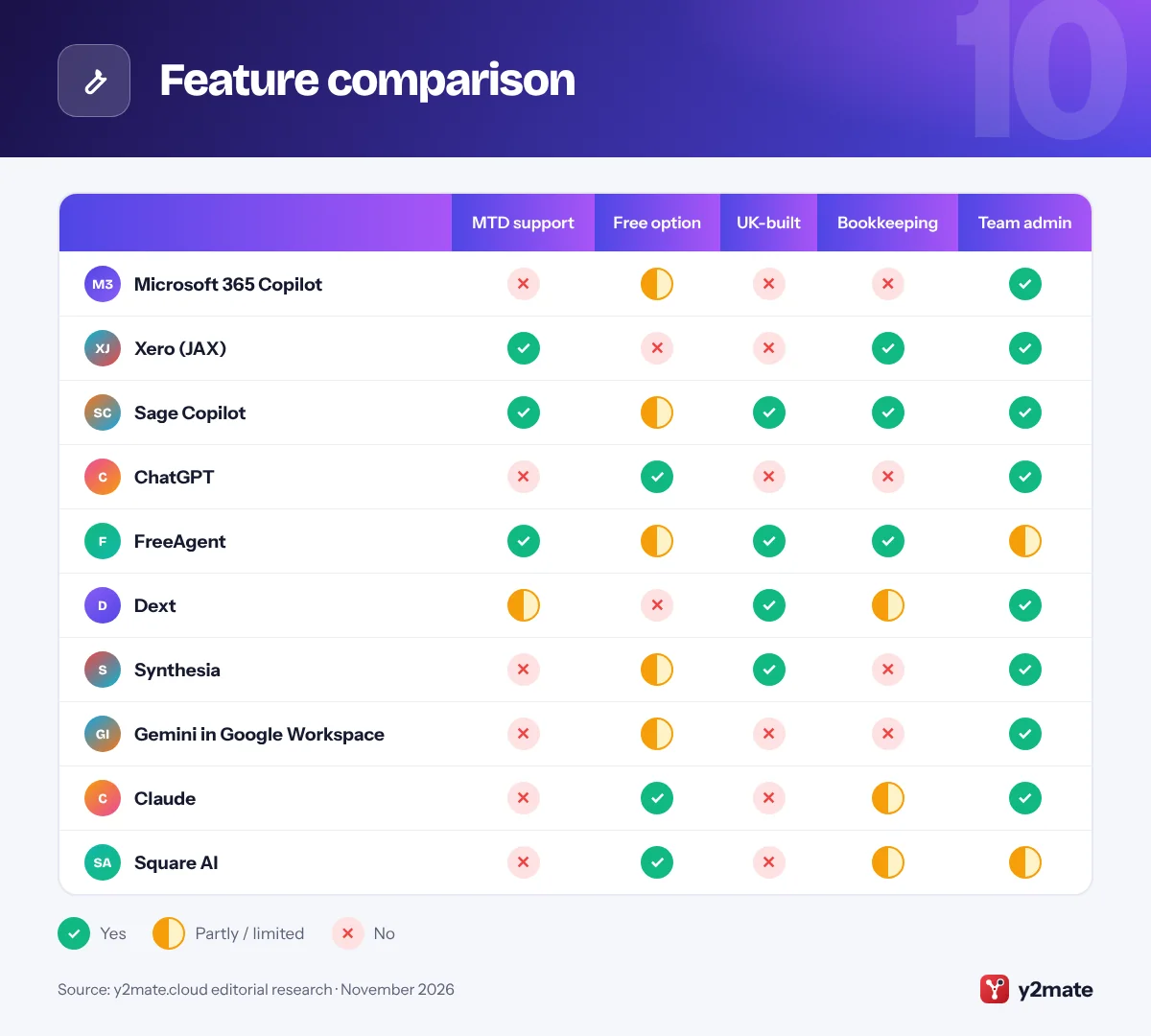
Feature comparison
How to choose AI tools for small businesses in the UK
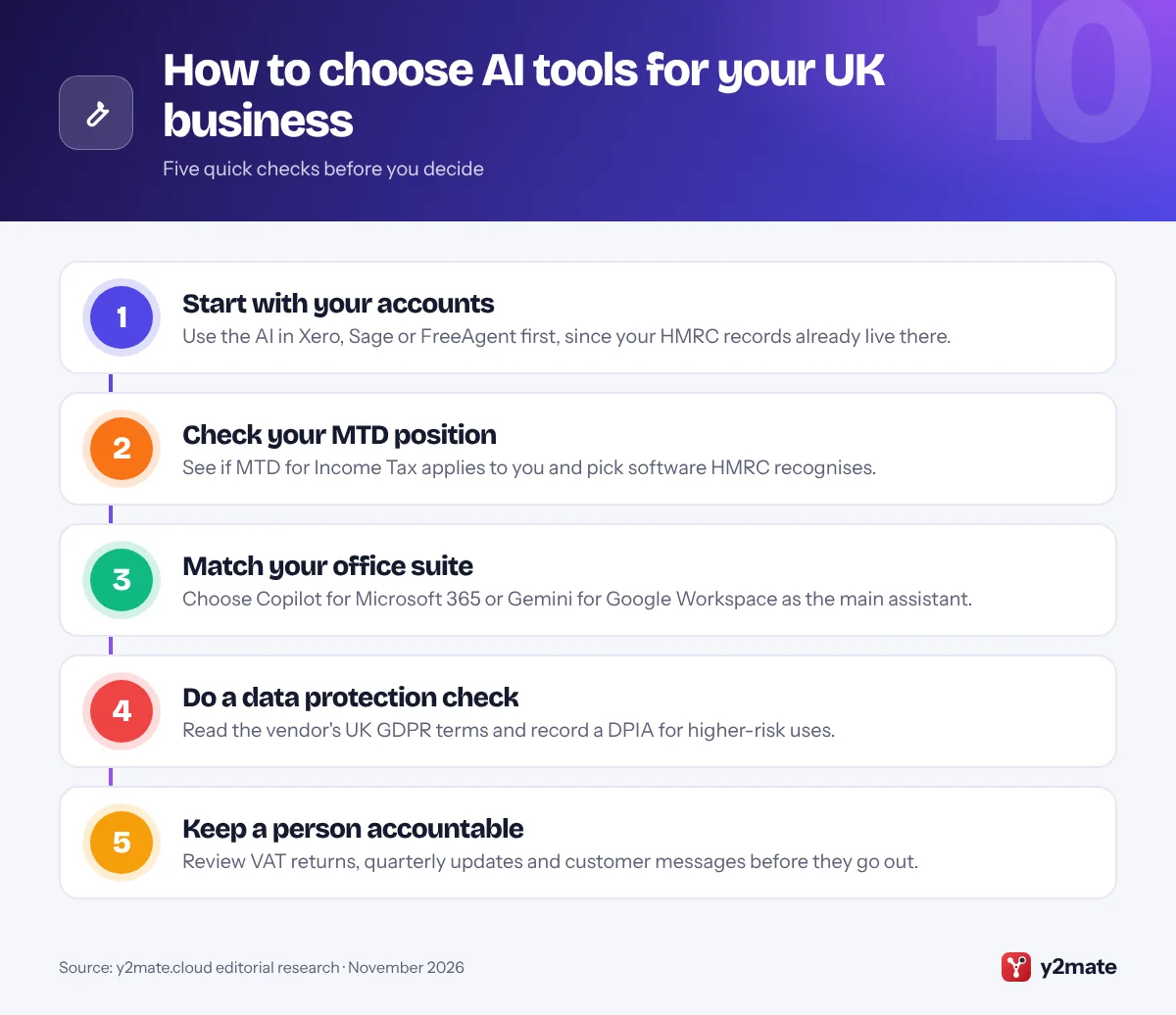
Begin with your accounting software. If you already use Xero, Sage or FreeAgent, switch on their AI features before buying anything else, because they work on the digital records Making Tax Digital already requires. Then pick one general assistant that matches your office suite.
Making Tax Digital comes first
MTD for VAT applies to VAT-registered businesses, and MTD for Income Tax began in April 2026 for sole traders and landlords with qualifying income over 50,000 pounds, falling to 30,000 pounds from April 2027. Whatever AI you use, your submissions must come from software HMRC recognises, and you remain responsible for the figures.
UK GDPR and the ICO
If an AI tool processes personal data about customers or staff, UK GDPR applies. The ICO expects you to have a lawful basis, to be transparent with people, and to carry out a data protection impact assessment for higher-risk uses such as screening job applicants. In practice:
- Use business plans, not personal accounts, for work data.
- Check where data is processed and whether it trains the vendor’s models.
- Update your privacy notice if AI handles customer data.
- Do not paste bank details, health information or National Insurance numbers into chatbots.
Watch costs and lock-in
Many AI features are priced per user or per credit. Start small, review usage after a month, and ask your accountant which tools they already support before you commit.
Frequently asked questions
What is the best AI tool for a small business in the UK?
For most UK small businesses, Microsoft 365 Copilot is the best general assistant because so many firms already use Outlook, Word and Excel. The bigger time savings often come from AI inside accounting software, such as Xero's JAX, Sage Copilot or FreeAgent, because those tools work on the digital records you already keep for HMRC.
Can AI help with Making Tax Digital?
Yes. Accounting platforms recognised by HMRC are adding AI to help prepare digital records and submissions. Sage has an MTD agent for sole traders and landlords, Xero's JAX helps with reconciliation and VAT records, and Dext extracts VAT details from receipts. You remain legally responsible for what is submitted, so review quarterly updates and VAT returns before sending them to HMRC.
Is it legal to use ChatGPT with customer data in the UK?
It can be, but UK GDPR applies whenever you process personal data. You need a lawful basis, must be transparent with customers, and should use a business plan with suitable data protection terms rather than a personal account. The ICO recommends a data protection impact assessment for higher-risk AI uses. Avoid entering sensitive data such as health details or bank information.
Are there UK-built AI tools for small businesses?
Yes. Sage, headquartered in Newcastle, offers Sage Copilot inside its accounting software. FreeAgent is based in Edinburgh and owned by NatWest Group. Dext was founded in London as Receipt Bank and automates receipt capture, while London-based Synthesia makes AI presenter videos for training and marketing. Most general assistants, such as Copilot and ChatGPT, come from US companies.
Is FreeAgent really free for small businesses?
FreeAgent is free for customers who hold an eligible business current account with NatWest, Royal Bank of Scotland, Ulster Bank or Mettle, subject to the banks' terms. Other businesses pay a subscription. The free licence includes core accounting and Making Tax Digital features, though some optional add-ons, such as unlimited Smart Capture, may cost extra.
Final verdict
For most UK small businesses, the strongest combination is Microsoft 365 Copilot or ChatGPT as an everyday assistant, paired with the AI inside your accounting software: Xero’s JAX, Sage Copilot or FreeAgent. Those finance tools are where AI saves the most time, because Making Tax Digital has already pushed your records into digital form.
Add Dext if receipts pile up, Synthesia if you produce training videos, and Gemini, Claude or Square AI where they suit how you work. Keep UK GDPR in mind from day one, and keep a person accountable for anything that goes to HMRC or your customers.
Sources and further reading
- ICO guidance on AI and data protection: The Information Commissioner's Office explains how UK GDPR applies when organisations use AI systems that process personal data.
- ICO advice for small organisations: Practical data protection help from the ICO aimed at small businesses, sole traders and charities.
- Making Tax Digital for Income Tax: HMRC guidance on who must use Making Tax Digital for Income Tax, the income thresholds and when they apply.
- MTD-compatible software list: HMRC's official list of software that can keep VAT records and submit returns under Making Tax Digital.
- NCSC Small Business Guide: The National Cyber Security Centre's low-cost steps to protect a small business from common cyber attacks.

Leave a Reply