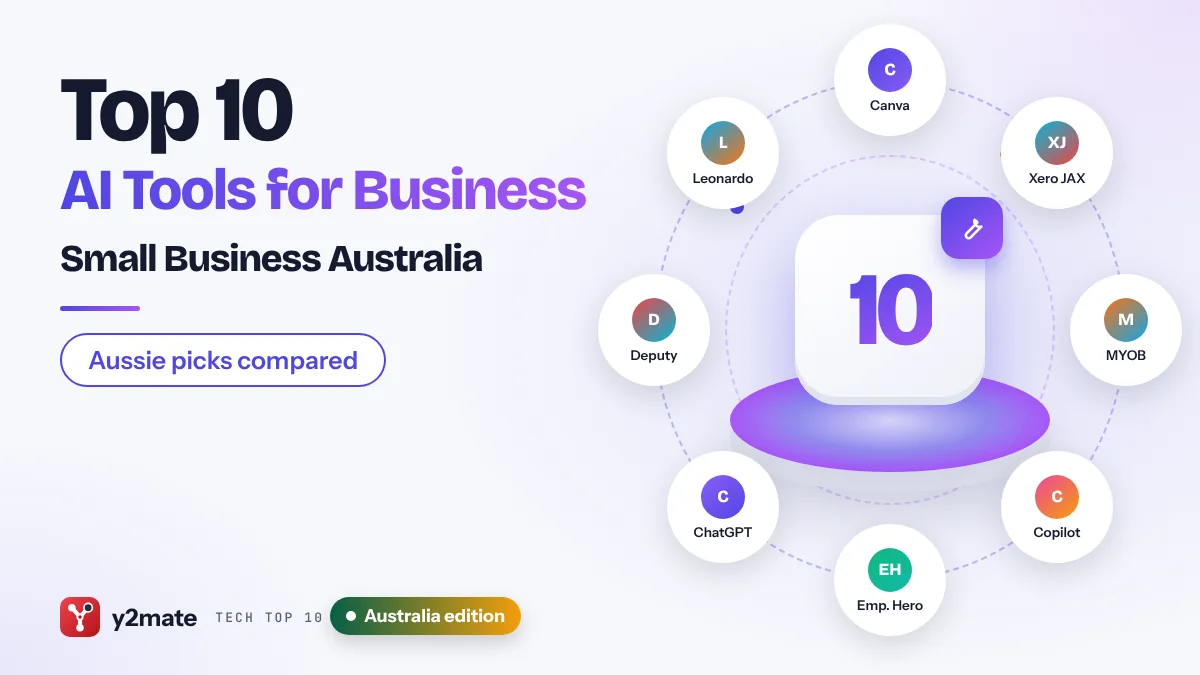
- Australia has an unusually strong line-up of home-grown business software with AI built in, including Canva, MYOB, Employment Hero, Deputy and Leonardo.Ai.
- AI inside accounting and payroll tools such as Xero, MYOB and Employment Hero is most useful when it works on data already used for BAS, Single Touch Payroll and super.
- MYOB's AI BAS tool helps prepare business activity statements but does not lodge with the ATO by itself, so a person still reviews and approves.
- Many small businesses with annual turnover of 3 million dollars or less are currently exempt from the Privacy Act 1988, but there are important exceptions and the OAIC supports removing the exemption.
- The OAIC has published guidance on privacy and the use of commercially available AI products, which is a sensible checklist for any business adopting AI.
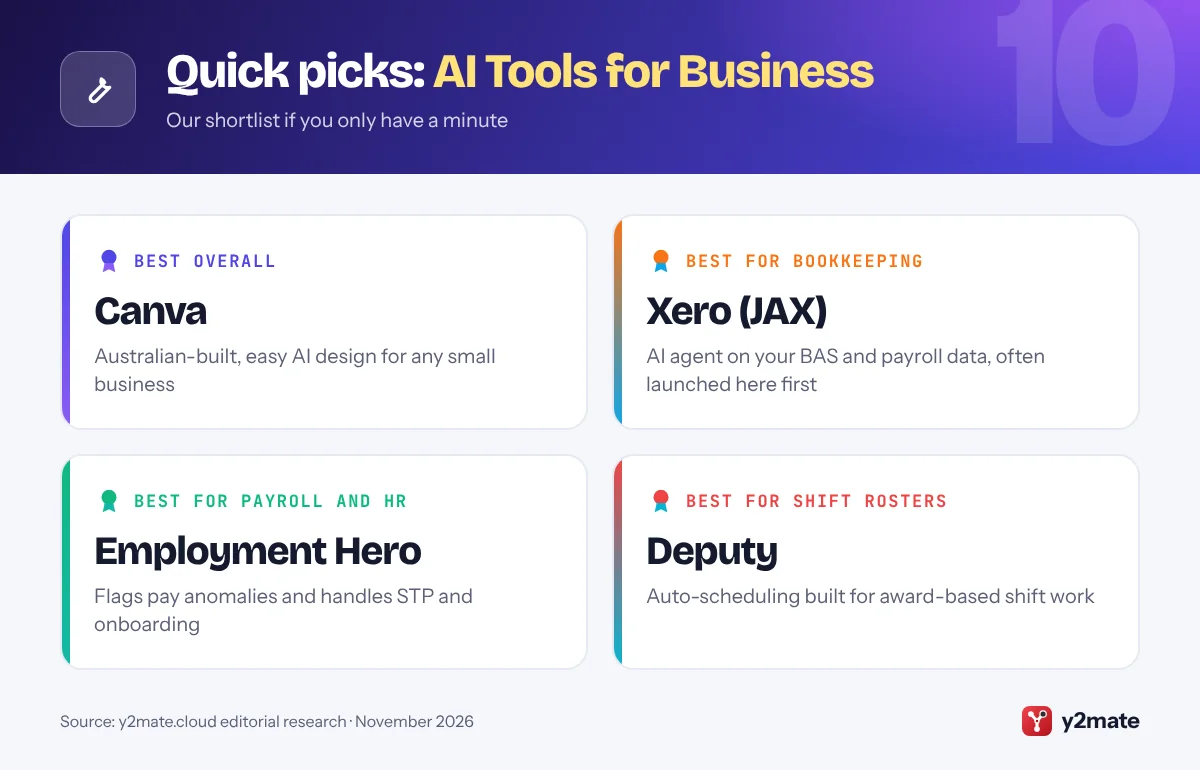
The best AI tools for small businesses in Australia in 2026 lean heavily on local software: Canva for marketing, Xero and MYOB for bookkeeping and BAS, Employment Hero for payroll and HR, and Deputy for rostering, alongside general assistants such as Microsoft 365 Copilot, ChatGPT, Gemini and Claude. For most Australian firms, the quickest wins come from switching on the AI already inside the tools that handle GST, Single Touch Payroll and super.
In this list, an AI tool means software that uses generative AI to draft content, summarise information, answer questions or complete multi-step tasks, often called agents. Australia is a launch market for several of these features: Xero has rolled out some JAX features here first, MYOB has introduced an AI BAS product, and Employment Hero has added AI that flags payroll anomalies before a pay run.
This guide is for owners and managers of Australian businesses with one to a few hundred staff, from sole traders and tradies to cafes, clinics, retailers and agencies. Every pick is available in Australia, and Australian-built options are flagged where they genuinely fit.
How we ranked this list
We did not carry out lab testing. We compared publicly documented features, official product pages and announcements, and widely reported feedback from Australian users and advisers. We weighed everyday usefulness for Australian small businesses, support for local obligations such as BAS, Single Touch Payroll and Modern Awards, integrations with Xero, MYOB and Microsoft 365, privacy and data controls, and whether there is a free or included way to start.
Rankings reflect broad usefulness. If your books are in MYOB or your payroll runs through Employment Hero, the AI inside those systems may be the best starting point for you whatever its position here.
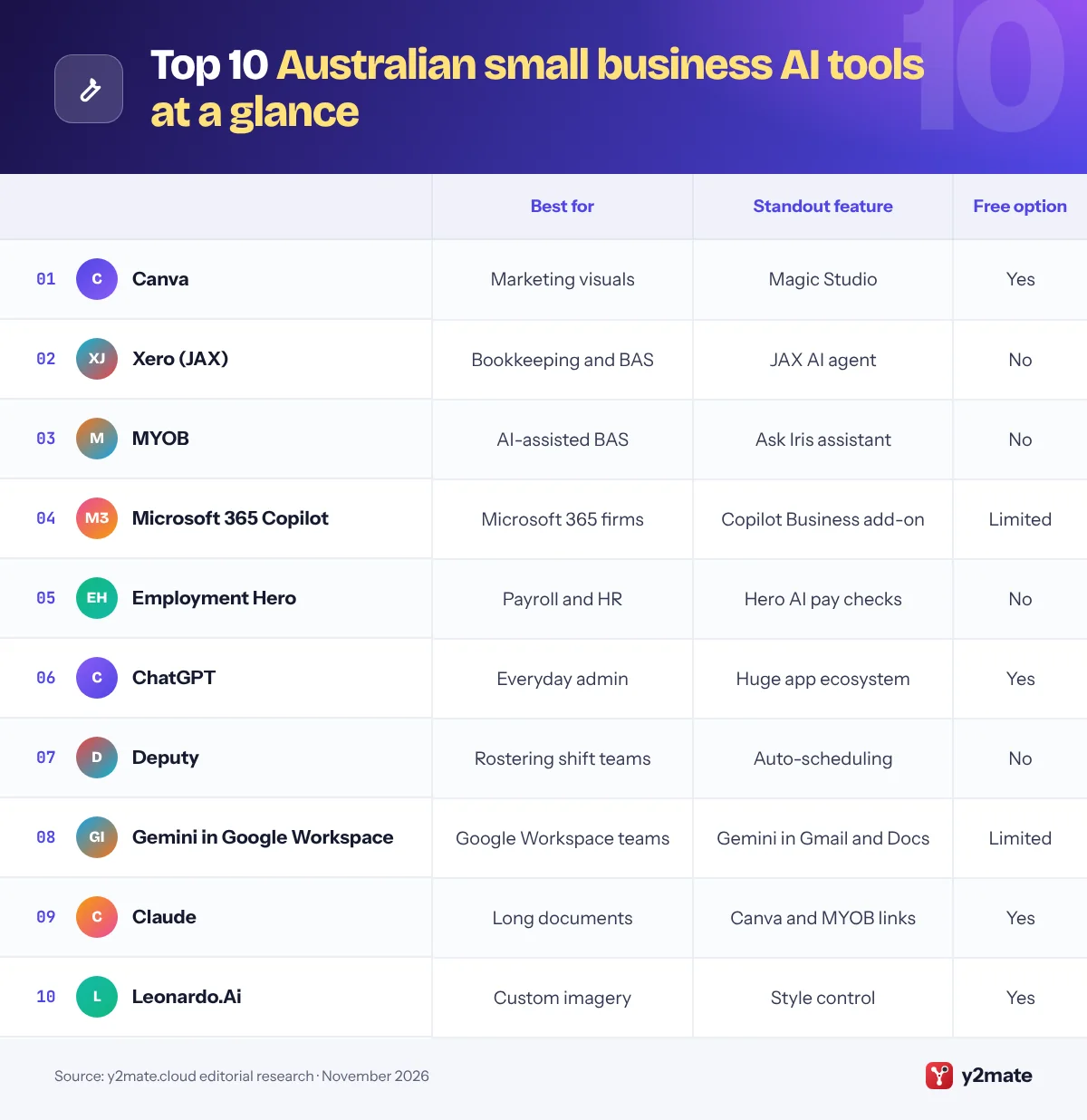
The Top 10 AI Tools for Business
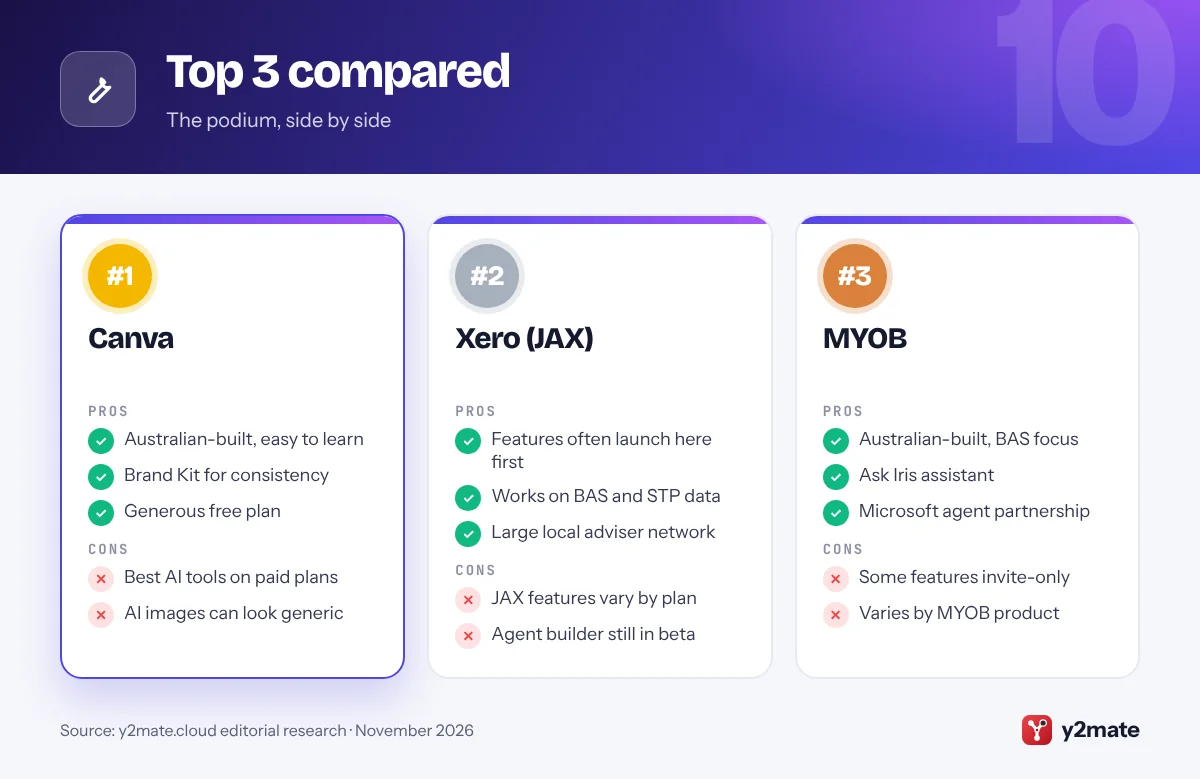
1. Canva
Best for: marketing visuals without a designer
Canva was founded in Perth and is headquartered in Sydney, and it is one of the most useful AI tools any Australian small business can adopt. Its AI features, grouped under Magic Studio and the Canva AI assistant, can produce a first draft of a design from a prompt, resize one design for Instagram, Facebook and print, remove backgrounds from product photos and write copy with Magic Write.
Brand Kits keep your logo, fonts and colours in one place so staff create on-brand menus, flyers, signage and social posts. Canva is also part of Anthropic’s Claude for Small Business, so a campaign brief written in Claude can become editable Canva designs, and Canva owns Leonardo.Ai, another Australian AI company on this list.
The free plan is generous, but many AI tools and brand controls require a paid plan. AI images can look generic, and under Australian Consumer Law your marketing must not mislead customers, so avoid AI imagery that misrepresents your actual products or premises.
Official site: Canva
- Australian-built and easy to use
- Brand Kit keeps work consistent
- Generous free plan
- Best AI tools need a paid plan
- AI images can look generic
2. Xero (JAX)
Best for: bookkeeping, BAS and cash flow
Xero began in New Zealand but has a huge Australian customer base and accountant network, and Australia is often where its new features appear first. JAX, short for Just Ask Xero, is its AI agent: it answers questions about your figures in plain English, helps with bank reconciliation, drafts invoices and quotes, and surfaces cash flow insights. An earlier JAX insights feature launched in Australia before other markets.
Xero Ultra, a platform aimed at growing small businesses, also launched first in Australia, and in 2026 Xero showed an agent builder, in beta, for creating custom AI agents that link Xero to other apps. Because Xero already handles GST, BAS preparation, payroll and Single Touch Payroll reporting, JAX works on the same data your accountant uses.
Availability varies by plan, and some agent features are still in beta. JAX can speed up the routine work, but your BAS agent or accountant should still review lodgements, especially if you use cash versus accruals reporting or have complex GST.
Official site: Xero (JAX)
- New features often launch in Australia
- Works on BAS and payroll data
- Large local adviser network
- JAX features vary by plan
- Agent builder still in beta
3. MYOB
Best for: Australian firms that want AI-assisted BAS
MYOB is a Melbourne-based accounting and payroll provider used by a great many Australian small businesses, and it has moved quickly on AI. It introduced an AI-enabled business activity statement product, which it described as an Australian first, along with Smart Reconciliation for matching bank transactions, smart invoice reminders and AI business insights with charts and plain-English commentary.
These features are being pulled together under an AI layer called Iris, including a chat assistant named Ask Iris inside MYOB. MYOB has also announced a five-year partnership with Microsoft to build agents for cash flow forecasting and compliance readiness, and a phased rollout of access to MYOB data from Claude and ChatGPT.
The important caveat is that AI BAS does not lodge with the ATO on its own; a person reviews and signs off. Several features began in beta or by invitation, so availability depends on your MYOB product and plan. Check what is switched on in your account before changing your month-end routine.
Official site: MYOB
- Australian-built with BAS focus
- Ask Iris assistant built in
- Microsoft partnership for agents
- Some features in beta or invite-only
- Availability varies by product
4. Microsoft 365 Copilot
Best for: businesses already on Outlook and Excel
Microsoft 365 is widely used by Australian small businesses, so Copilot is an easy assistant to add. It works inside Outlook, Word, Excel, PowerPoint and Teams to summarise email threads, draft quotes and tenders, analyse spreadsheets and recap meetings.
Microsoft 365 Copilot Business is an add-on for organisations with fewer than 300 users on a Microsoft 365 Business plan, with what Microsoft describes as the same core functionality as the enterprise licence, and staff can use Copilot Chat at no extra cost. Microsoft has committed to in-country processing of Copilot interactions for Australian customers, which matters to firms in health, finance or government supply chains with data residency expectations. Its partnership with MYOB also means more AI features should appear in the accounting tools many Australian firms use.
Copilot respects existing file permissions, so tidy up SharePoint and OneDrive sharing first or it may surface sensitive documents. It is a weaker fit if your business runs on Google Workspace.
Official site: Microsoft 365 Copilot
- Inside familiar Office apps
- Australian data processing commitment
- Add-on for firms under 300 users
- Exposes messy file permissions
- Limited value outside Microsoft 365
5. Employment Hero
Best for: payroll, HR and STP compliance
Employment Hero is a Sydney-founded HR and payroll platform built around Australian employment rules, and its assistant, Hero AI, is woven through the product. On the payroll side, Hero AI processes pay runs and flags unusual patterns, such as overtime spikes, for you to approve before the pay run is finalised.
In 2026 Hero AI moved from answering HR questions to taking actions: managers can approve, reject or cancel leave from Hero AI, and it can use your company values when drafting feedback and performance guidance. Employment Hero is also a registered ATO Digital Service Provider, supporting tax file number validation and stapled super fund lookup during onboarding, and its payroll reports through Single Touch Payroll. That matters even more with Payday Super, which from 1 July 2026 requires employers to pay super alongside wages.
The trade-off is that Hero AI only helps if Employment Hero runs your HR and payroll. Pay decisions and award interpretation still need a careful human check against the Fair Work Ombudsman’s guidance.
Official site: Employment Hero
- Built for Australian payroll rules
- Flags anomalies before pay runs
- ATO-registered onboarding
- Only for Employment Hero users
- Pay changes still need checking
6. ChatGPT
Best for: a flexible assistant for everyday admin
ChatGPT from OpenAI is the most flexible general assistant for Australian small businesses. It drafts emails, quotes, job ads, website copy and policies, summarises long documents, analyses spreadsheets and explains new topics in plain English. Ask for Australian English and it will use local spelling and terms.
ChatGPT Business, previously ChatGPT Team, adds a shared workspace, admin controls and central billing, and OpenAI says it does not train on Business workspace data by default. Connectors let it search Google Drive or SharePoint, and MYOB has announced a phased rollout that lets customers bring MYOB financial insights into ChatGPT, which could make it more useful for finance questions.
Be careful with Australian rules. ChatGPT can explain GST, awards or the Privacy Act in general terms, but it can be out of date or mix in overseas practice. Check important answers against ato.gov.au, fairwork.gov.au or an adviser, and do not enter tax file numbers, health information or customer records into a personal account.
Official site: ChatGPT
- Handles almost any writing task
- MYOB data access on the way
- Free version to start
- Can mix up local and overseas rules
- Needs connectors to see your data
7. Deputy
Best for: rostering shift-based teams
Deputy is a Sydney-founded workforce management platform used by cafes, restaurants, retailers, clinics and other shift-based businesses. It has offered AI-driven auto-scheduling for years, building rosters from demand signals such as sales and staff availability, and it is now developing Deputy AI, an assistant that draws on schedules, timesheets, employee records and compliance rules.
For Australian employers, rostering is tightly linked to Modern Awards, penalty rates, breaks and overtime. Deputy is designed to help managers see labour costs and compliance issues as they build rosters, and its timesheets can flow into payroll systems such as Xero, MYOB and Employment Hero. Deputy AI was in beta with a broader rollout planned during 2026.
The limits are clear: Deputy handles rostering and time rather than accounting or marketing, and newer AI features may not be available on every plan yet. Award interpretation should always be checked, because underpaying staff is a serious matter under the Fair Work Act, whatever software produced the roster.
Official site: Deputy
- Australian-built for shift work
- Auto-scheduling from demand data
- Links to Xero, MYOB, Employment Hero
- Rostering and time only
- Deputy AI still rolling out
8. Gemini in Google Workspace
Best for: teams that run on Gmail and Google Docs
If your business uses Gmail, Gemini may already be included in your Google Workspace subscription, because Google has folded it into its paid business plans. Depending on your tier, it can draft and summarise emails in Gmail, write and rewrite in Docs, help with formulas in Sheets and take notes in Google Meet.
The Gemini app gives staff a chat assistant that can draw on files in Drive, and NotebookLM can turn a stack of documents, such as supplier contracts, safety procedures or a staff handbook, into a searchable notebook with citations. For Australian firms already paying for Workspace, it is a low-cost way to introduce AI across a team.
Feature depth varies by plan, with entry-level tiers getting less, and Google has changed its packaging several times, so check your admin console. If your bookkeeper and suppliers live in Excel and Outlook, Microsoft 365 Copilot will usually be the better fit.
Official site: Gemini in Google Workspace
- Built into Gmail, Docs and Meet
- Included in paid Workspace plans
- NotebookLM for document research
- Features vary by Workspace tier
- Less useful outside Google apps
9. Claude
Best for: contracts, policies and careful analysis
Claude, made by Anthropic, is well suited to work that needs careful reading and writing: leases, supplier contracts, tender documents, policies and long spreadsheets. It tends to give structured answers and writes naturally in Australian English when asked.
In May 2026 Anthropic launched Claude for Small Business, a set of ready-made workflows and connectors running in Claude Cowork, its desktop agent. Two links matter for Australian firms: Canva is built into the package for campaign design, and MYOB has announced a phased rollout that lets customers surface MYOB financial insights inside Claude. Other launch connectors, such as QuickBooks and PayPal, were aimed mainly at the US market.
A free plan is available, while team administration and deeper agent features need paid plans. Before connecting financial or customer systems, consider the Australian Privacy Principles and the OAIC’s guidance on commercially available AI, start with read-only tasks and review anything Claude proposes to send or change.
Official site: Claude
- Excellent with long documents
- Canva and MYOB connections
- Free plan to try
- Some connectors US-focused
- Agent features need a paid plan
10. Leonardo.Ai
Best for: custom product and marketing imagery
Leonardo.Ai is a Sydney-founded AI image and video generation platform, now owned by Canva. It gives businesses more control over AI imagery than a general design tool, with options for consistent styles, product concept shots, backgrounds, social content and short video clips.
For Australian small businesses, it suits online stores, hospitality venues, creative agencies and product makers who want to explore visual ideas quickly before paying for a photo shoot. A free plan with a daily token allowance lets you experiment, and paid plans add more capacity and features. Note that from September 2026 new Canva Business subscriptions no longer include Leonardo.Ai’s Essential plan, so it is now a separate subscription for most users.
Leonardo.Ai is a specialist tool rather than an everyday assistant, and it has a steeper learning curve than Canva. Australian Consumer Law still applies to advertising, so do not use AI images that misrepresent a real product, and check licence terms before using generated images commercially.
Official site: Leonardo.Ai
- Australian-built, Canva-owned
- Fine control over AI imagery
- Free daily allowance
- Steeper learning curve
- No longer bundled with Canva Business
Feature comparison

How to choose AI tools for small businesses in Australia
Start with the systems that handle your money and people. If you use Xero, MYOB, Employment Hero or Deputy, switch on their AI features first, because they already hold the data behind your BAS, Single Touch Payroll reports and rosters. Then add one general assistant that matches your office suite, and Canva for marketing.

Privacy Act and the OAIC
Many small businesses with annual turnover of 3 million dollars or less are currently exempt from the Privacy Act 1988, but health service providers, businesses that trade in personal information and some others are covered regardless of size. The OAIC supports removing the exemption, and reform is under way, so it is sensible to follow the Australian Privacy Principles now. The OAIC’s guidance on commercially available AI products advises against entering personal information, especially sensitive information, into public AI tools.
Tax, payroll and awards
- AI can prepare BAS figures, but you or your registered agent remain responsible for what is lodged with the ATO.
- Payday Super applies from 1 July 2026, so payroll tools must pay super alongside wages.
- Check AI-built rosters and pay against the relevant Modern Award.
Consumer law and costs
Under Australian Consumer Law, AI-written ads and product descriptions must not mislead. Finally, start with a few seats, review usage after a month and cancel tools nobody uses.
Frequently asked questions
What is the best AI tool for a small business in Australia?
Canva is the best all-round pick for most Australian small businesses because it is easy to learn, has a strong free plan and covers everyday marketing. For finance, the AI inside Xero or MYOB delivers the biggest time savings, and Employment Hero or Deputy suit businesses with payroll and rosters to manage. Add Copilot, ChatGPT or Gemini as a general assistant.
Can AI lodge my BAS with the ATO?
AI can help prepare a business activity statement, but you should not rely on it to lodge without review. MYOB's AI BAS product prepares figures but does not lodge by itself, and Xero's JAX helps with reconciliation and reporting. You or your registered tax or BAS agent remain responsible for the accuracy of anything lodged with the ATO.
Does the Privacy Act apply to small businesses using AI?
Many small businesses with annual turnover of 3 million dollars or less are currently exempt, but health service providers, businesses that trade in personal information and some others must comply regardless of size. Reform is under way and the OAIC supports removing the exemption. Following the Australian Privacy Principles and the OAIC's AI guidance is the safest approach for every business.
Are there Australian-built AI tools for business?
Yes. Canva is headquartered in Sydney and owns Leonardo.Ai, which is also Sydney-founded. MYOB is based in Melbourne and has added AI BAS and the Ask Iris assistant. Employment Hero and Deputy, both founded in Sydney, use AI for payroll checks and rostering. Xero began in New Zealand but has a very large Australian presence.
Can AI help with Single Touch Payroll and super?
Payroll platforms such as Employment Hero, Xero and MYOB report through Single Touch Payroll, and their AI features can flag unusual pay items before a pay run is finalised. With Payday Super starting on 1 July 2026, employers must pay super alongside wages. AI can help catch errors, but someone should still review each pay run and award interpretation.
Final verdict
Australian small businesses are well served by local software. For most, the best mix is Canva for marketing, Xero or MYOB for bookkeeping and BAS, and Employment Hero or Deputy for payroll and rosters, topped up with Microsoft 365 Copilot, ChatGPT, Gemini or Claude as a general assistant.
Start with the AI already inside the tools you pay for, follow the OAIC’s guidance on using AI with personal information, and keep a person signing off anything that goes to the ATO, your staff’s pay or your customers.
Sources and further reading
- OAIC guidance on commercial AI products: The Australian privacy regulator explains how the Privacy Act applies when businesses use off-the-shelf AI products.
- OAIC small business privacy guidance: OAIC guidance on when the Privacy Act applies to small businesses and which businesses are covered regardless of turnover.
- ATO Single Touch Payroll: The Australian Taxation Office's official guide to reporting wages, tax and super through Single Touch Payroll.
- Voluntary AI Safety Standard: The Australian Government's voluntary guardrails to help organisations adopt AI safely and responsibly.

Leave a Reply