
AI coding assistants have changed shape fast. A couple of years ago most of them suggested the next line of code. In 2026 the leading tools plan multi-step tasks, edit many files at once, run tests in a terminal and open pull requests for you to review.
The market has also been reshuffled. Windsurf is now Devin Desktop under Cognition, Amazon is moving developers from Q Developer to Kiro, and Google has pulled its coding tools together under Antigravity. This list reflects where things stand in November 2026.
It is written for professional developers, students and team leads who want a clear view of the options, whether you prefer an editor plugin, an AI-first IDE or an agent that works from the command line.
Related guide: How to write better AI prompts, a step-by-step walkthrough.
How we ranked this list
We did not run lab tests. Instead we compared publicly documented features, official product pages and release notes, and widely reported feedback from developers. We weighed agent capability, editor and platform support, how well each tool handles large codebases, team and privacy controls, and whether there is a way to try it without paying.
Rankings reflect broad usefulness for most developers. The best choice for you depends on your editor, your stack and your company’s rules on code and data.
The Top 10 AI Coding Assistants
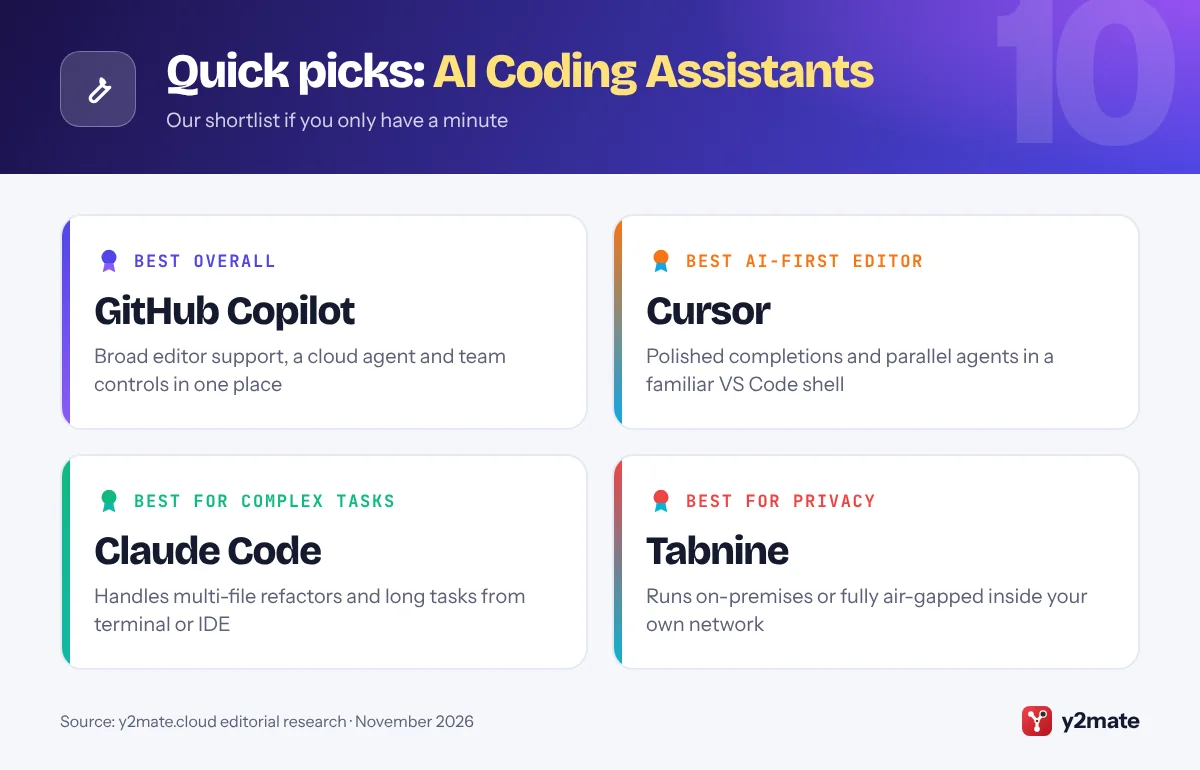
1. GitHub Copilot
Best for: teams already working on GitHub
GitHub Copilot remains the most widely adopted AI coding assistant, largely because it lives where many developers already work. It plugs into VS Code, Visual Studio, JetBrains IDEs, Xcode and other editors, and it is built into GitHub itself.
Beyond inline completions and chat, Copilot now offers an agent mode in the editor and a cloud coding agent you can assign GitHub issues to. The agent works in the background, pushes commits to a branch and opens a pull request for review. Copilot also lets you choose between models from several AI labs rather than locking you to one.
For organizations, the appeal is governance: admins can manage policies, seats and model access centrally, and the tool fits naturally into existing pull request and code review workflows. A free tier with monthly limits makes it easy to try on personal projects before rolling it out across a team or organization.
Official site: GitHub Copilot
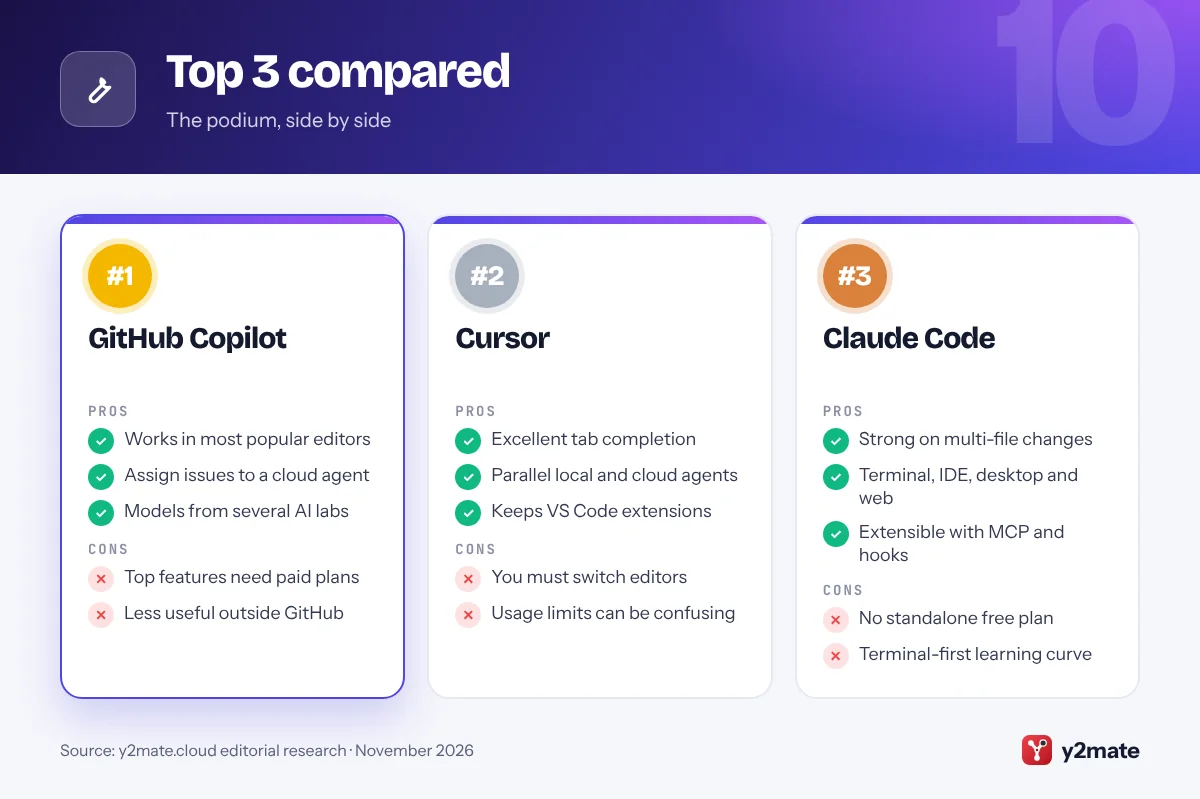
- Works in most popular editors
- Deep GitHub integration
- Choice of AI models
- Best features need a paid plan
- Less useful outside GitHub
2. Cursor
Best for: an AI-first editor with parallel agents
Cursor, built by Anysphere, is a code editor based on VS Code that was designed around AI from the start. Because it shares VS Code’s foundations, most extensions, themes and keyboard shortcuts carry over, which makes switching relatively painless.
Cursor 3, released in April 2026, moved to an agent-first interface. Its Agents window lets you run several agents in parallel, locally, in separate git worktrees or in cloud machines. What used to be called background agents are now Cloud Agents, which clone your repo, work on a branch and hand changes back for review. Cursor also trains its own Composer coding models alongside offering models from major labs.
Its tab completion and codebase-aware chat are still widely praised. The trade-off is that you need to adopt Cursor as your editor, which may not suit teams standardized on JetBrains, Visual Studio or other IDEs, and usage limits on paid plans can take some getting used to.
Official site: Cursor
- Fast, codebase-aware completions
- Parallel local and cloud agents
- Familiar VS Code experience
- Requires switching editors
- Usage limits can be hard to track
3. Claude Code
Best for: agentic work on large, complex codebases
Claude Code is Anthropic’s agentic coding tool. It started in the terminal, where it reads your project, edits files, runs commands and tests, and works through multi-step tasks with your approval. It has since expanded to IDE extensions for VS Code and JetBrains, a desktop app and a web version that can run tasks in the cloud.
Developers often reach for it on work that spans many files, such as refactors, migrations, debugging tricky failures or building features end to end. It supports project instruction files, custom commands, subagents, hooks and the Model Context Protocol (MCP) for connecting external tools and data.
Because it is driven by Anthropic’s Claude models, it suits teams that want a capable agent rather than an autocomplete engine. There is no standalone free plan; access comes through paid Claude subscriptions or API usage, and its terminal-first roots can feel unfamiliar to developers who live entirely in a graphical IDE.
Official site: Claude Code
- Strong on multi-file tasks
- Terminal, IDE, desktop and web
- Highly customizable with MCP
- No standalone free plan
- Terminal-first style has a learning curve
4. OpenAI Codex
Best for: ChatGPT users who want a coding agent
OpenAI Codex is a coding agent you can reach through several surfaces: an open-source command-line tool, an IDE extension for VS Code and compatible editors, JetBrains integration, a desktop app and a cloud agent inside ChatGPT. Tasks can run locally on your machine or be delegated to the cloud and returned as changes to review.
The CLI can read, modify and run code in your project, and the same configuration is shared across surfaces, so it is easy to move between the terminal and the editor. Cloud tasks run in isolated environments, which makes it practical to hand off several jobs at once and check back later.
Codex is included with ChatGPT plans, so many developers already have access through an existing subscription. It runs on OpenAI’s own models, which is a plus if you prefer them, but it does not offer the multi-vendor model choice found in tools like Copilot or Cursor.
Official site: OpenAI Codex
- Local and cloud task modes
- Open-source CLI
- Included with ChatGPT plans
- OpenAI models only
- Limits depend on ChatGPT plan
5. Google Antigravity
Best for: orchestrating many agents with Gemini
Google Antigravity launched in November 2025 as an agent-first development environment, and at Google I/O in May 2026 Google expanded it into a wider platform. Antigravity 2.0 added a standalone desktop app for running multiple agents in parallel, plus a command-line tool and developer SDK.
Antigravity is now the centre of Google’s coding strategy. The Antigravity CLI replaced Gemini CLI for individual users, and Google has stopped selling new Gemini Code Assist business subscriptions, pointing buyers to Antigravity instead. Jules, Google’s asynchronous agent that turns tasks into pull requests, remains available for background work.
Individuals can use Antigravity for free with a personal Google account, subject to rate limits, while paid Google AI plans raise those limits. Its main strength is managing several agents and reviewing their output in one place. Because Google’s lineup has changed several times in a year, teams should check current plan details, data policies and availability in their region before committing.
Official site: Google Antigravity
- Free for individuals with limits
- Built for parallel agents
- Tight Gemini integration
- Product lineup still shifting
- Business plan details changing
6. Devin Desktop (formerly Windsurf)
Best for: pairing an IDE with an autonomous agent
Windsurf began as an AI-native editor from the team behind Codeium. Cognition, the company behind the autonomous agent Devin, acquired it in 2025, and in June 2026 the editor was renamed Devin Desktop through an automatic update that carried over existing settings and extensions.
The rebrand reflects a shift in focus. Devin Desktop opens on an agent command centre where you can manage agent sessions, while still giving you a full VS Code-style editor for hands-on work. Cognition has replaced the old Cascade agent with a new local Devin agent and uses its own SWE family of coding models alongside third-party ones.
The appeal is a single product that spans quick edits and longer autonomous tasks handed to Devin. The downside is churn: long-time Windsurf users have had to adapt to a new name, a new default agent and changing workflows within a short period, and teams should confirm current plan terms after the change.
Official site: Devin Desktop (formerly Windsurf)
- Editor and autonomous agent in one
- Settings migrated from Windsurf
- Strong agent session management
- Recent rebrand means churn
- Workflows still evolving
7. Kiro
Best for: AWS teams and spec-driven development
Kiro is Amazon’s agentic IDE and the official successor to Amazon Q Developer. AWS has announced that Q Developer IDE plugins and paid subscriptions reach end of support on April 30, 2027, and new Q Developer sign-ups have already closed, so Kiro is where AWS is investing.
Kiro’s signature idea is spec-driven development. Instead of jumping straight into code, it helps turn a prompt into written requirements, a design and a task list, then implements the tasks step by step. Hooks can trigger agent actions automatically, for example when files are saved. It also keeps the core Q Developer features AWS customers relied on, including agentic coding, inline chat, terminal integration and MCP support, and it offers a command-line tool.
Kiro is a natural fit for teams building on AWS or anyone who wants more structure and documentation around AI-generated code. Note that it requires its own subscription separate from Q Developer.
Official site: Kiro
- Spec-driven planning built in
- Clear path from Q Developer
- Agent hooks automate routine work
- Separate subscription from Q
- Structured flow can feel slow
8. JetBrains AI (Junie)
Best for: developers who live in JetBrains IDEs
JetBrains AI brings AI features directly into IntelliJ IDEA, PyCharm, WebStorm, Rider and the rest of the JetBrains family. It combines AI Assistant, for code completion, chat, explanations and refactoring, with Junie, JetBrains’ coding agent that can plan and carry out multi-step tasks inside the IDE.
The big advantage is integration. JetBrains IDEs already understand your project’s structure deeply, and the AI tools build on that, including inspections, refactoring tools and test runners. Junie also gained a command-line version in 2026, so it can be used from a terminal or in CI pipelines.
A free tier includes unlimited code completion using JetBrains’ own models plus a small monthly allowance of cloud AI credits for chat and Junie. Heavy agent use draws down credits quickly, so frequent users will want a paid plan. If you work mainly in VS Code or another editor, the tools higher on this list are a more natural fit.
Official site: JetBrains AI (Junie)
- Deep IDE and refactoring integration
- Free unlimited local completion
- Junie agent plus CLI
- Agent credits run out quickly
- Little value outside JetBrains
9. Replit Agent
Best for: building and deploying apps from a prompt
Replit Agent is aimed less at editing an existing codebase and more at creating working applications from a description. You explain what you want, and the agent sets up the project, writes the code, configures a database and deploys it, all inside Replit’s browser-based environment.
Through 2026 Replit has continued to expand the agent, adding parallel task execution, workspace instructions and skills to customize its behaviour, and custom connectors for teams. It also announced a Windows desktop preview built with Microsoft and NVIDIA that lets users build and run apps locally.
This makes Replit a strong choice for prototypes, internal tools, students and non-specialists who want something running quickly without managing infrastructure. Experienced developers working in large existing repositories will usually prefer an IDE-based tool, and usage is credit-based, so costs can rise with heavy agent use. It is best judged by building a small project first and watching how credits are consumed.
Official site: Replit Agent
- Prompt to deployed app
- No local setup needed
- Good for beginners and prototypes
- Less suited to large existing repos
- Credit-based usage adds up
10. Tabnine
Best for: privacy-first and air-gapped enterprises
Tabnine is one of the longest-running AI coding assistants, and it has carved out a clear niche: organizations that cannot send code to a third-party cloud. It supports SaaS, private cloud, on-premises and fully air-gapped deployments, so models can run entirely inside a company’s own infrastructure.
It works across popular IDEs, including VS Code and JetBrains, and has added agent capabilities over time. In 2026 Tabnine made its Context Engine generally available, which helps the assistant understand an organization’s codebases and standards, and added skills and subagents to its command-line tooling.
For regulated industries such as finance, healthcare, government and defence, those deployment options can matter more than having the very latest frontier model. For individual developers, though, Tabnine is less compelling: it no longer offers a free tier, and its agent features are not as far along as the leaders in this list. Larger teams should request a trial to evaluate it.
Official site: Tabnine
- Air-gapped and on-prem options
- Strong admin and compliance focus
- Works across major IDEs
- No free tier
- Agent features trail the leaders
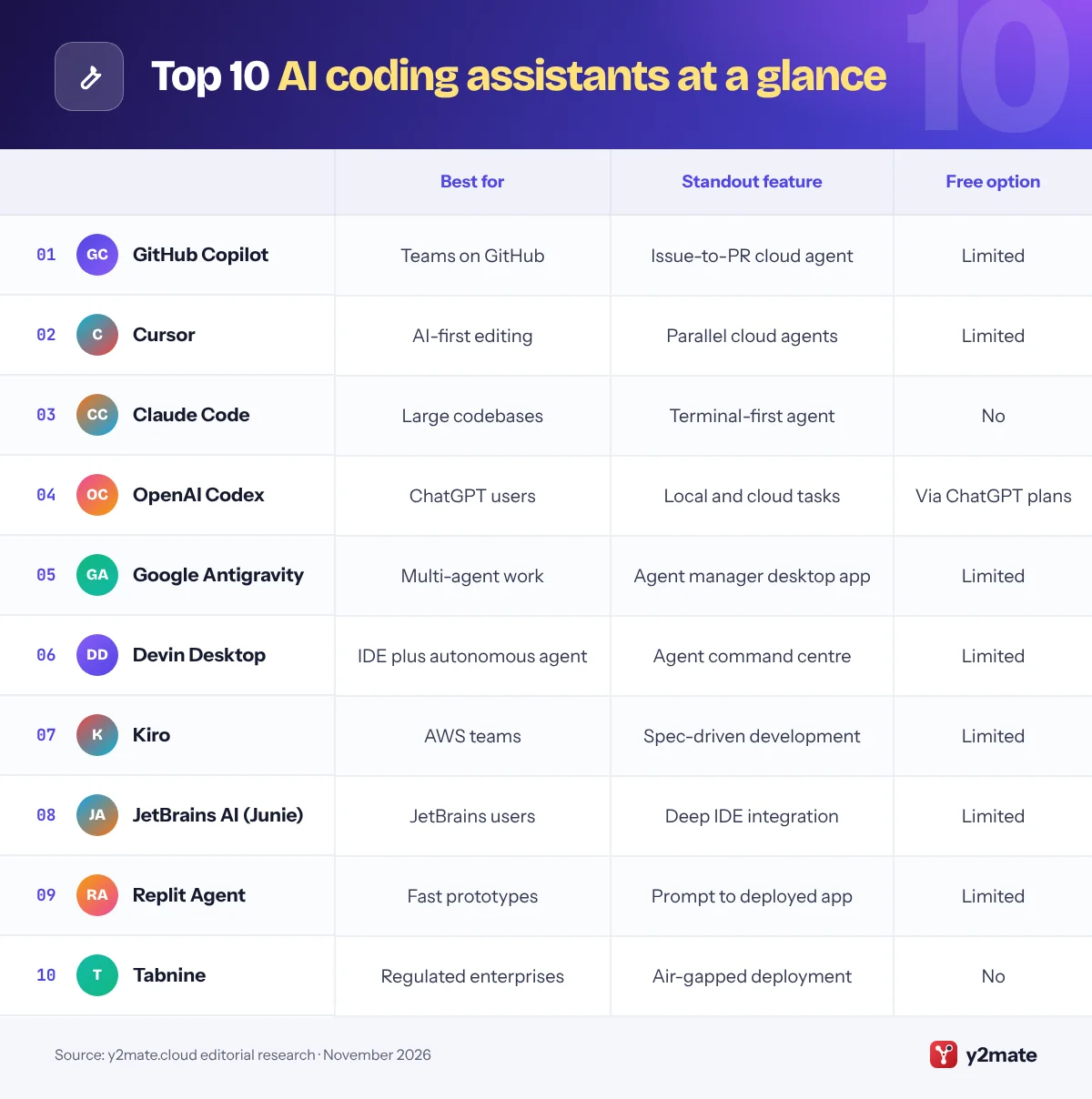
Feature comparison
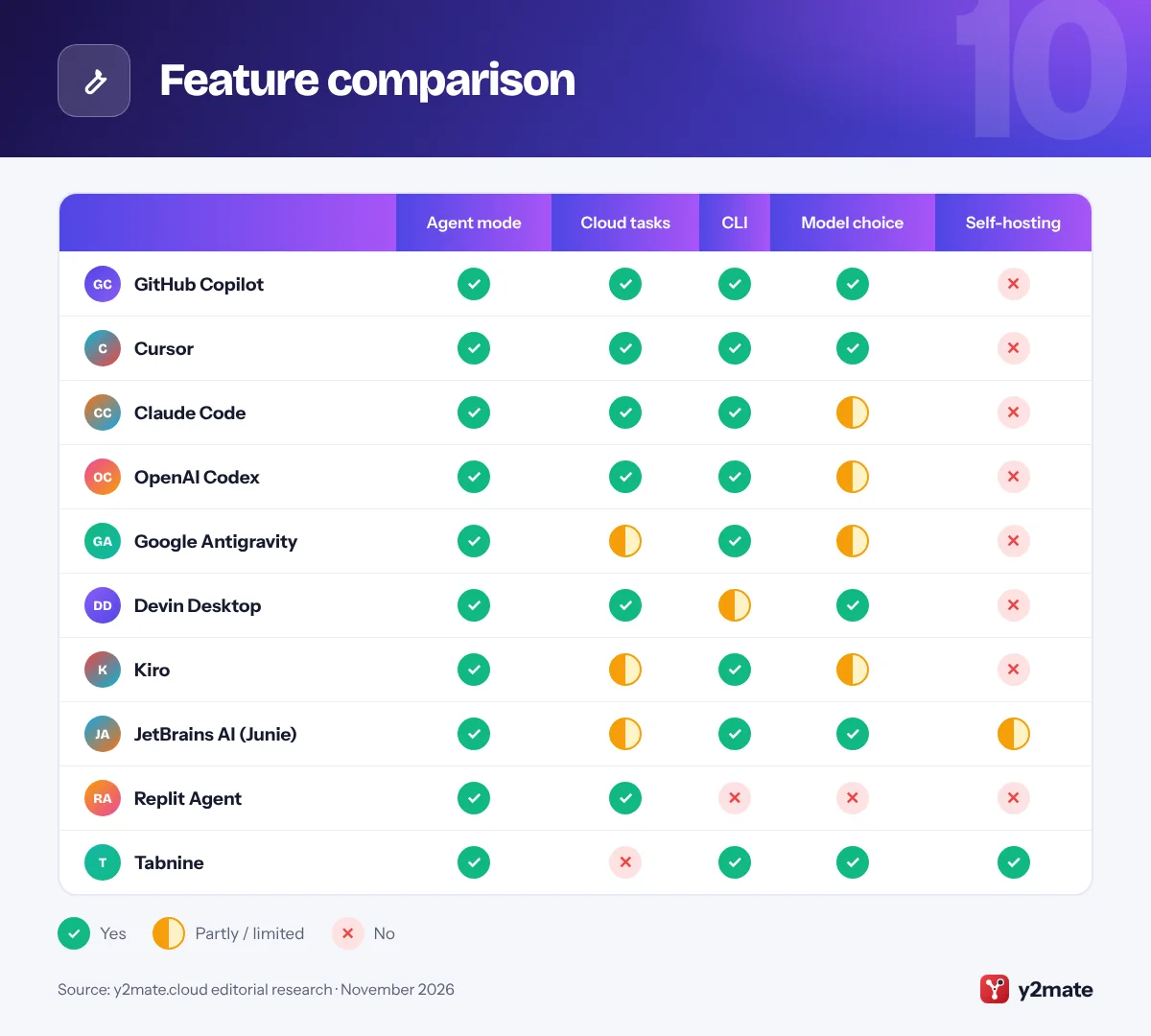
How to pick between AI coding assistants
The best AI coding assistant is the one that fits how you already work. Start with three questions: which editor do you use, how much do you want the AI to do on its own, and what are the rules on where your code can go?
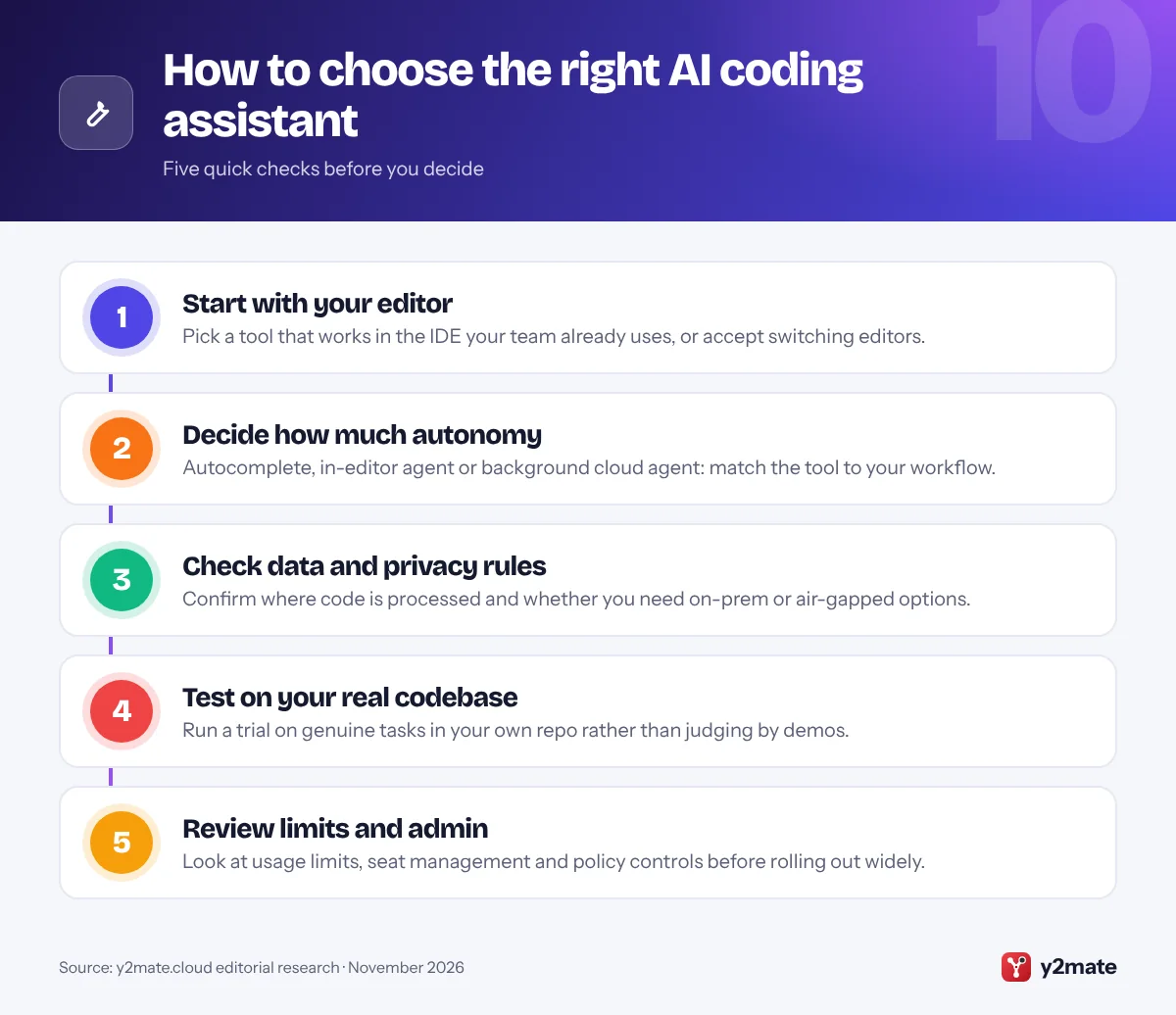
Plugin, AI-first editor or agent?
- Editor plugins such as GitHub Copilot, JetBrains AI and Tabnine add AI to your current IDE with minimal disruption.
- AI-first editors such as Cursor, Devin Desktop and Kiro rebuild the editor around AI and agents, at the cost of switching tools.
- Agents such as Claude Code, OpenAI Codex and Google Antigravity can take on whole tasks, run commands and return finished changes for review.
Many developers now combine two of these, for example a plugin for everyday completions and an agent for larger tasks.
Think about teams and compliance
If you are choosing for a company, check admin controls, audit logs, single sign-on and data retention policies. Regulated organizations should ask whether code is used for training and whether self-hosted deployment is available.
Plan for change
This market moves quickly. In 2026 alone, Windsurf was renamed, Amazon began retiring Q Developer and Google consolidated its tools under Antigravity. Avoid long commitments until you have tested a tool on real work, and keep your project instructions in plain files so they are easy to reuse if you switch.
Always review the output
Even the strongest tools make mistakes. Keep tests, code review and security scanning in place, and treat AI-generated changes like any other contribution.
Frequently asked questions
What is the best AI coding assistant in 2026?
There is no single winner for everyone. GitHub Copilot is the safest all-round choice because it works in most editors and integrates with GitHub. Cursor suits developers who want an AI-first editor, while Claude Code and OpenAI Codex are strong when you want an agent to handle larger, multi-step tasks.
Are there free AI coding assistants?
Yes, several have free tiers with usage limits. GitHub Copilot, Cursor, JetBrains AI, Replit and Kiro offer limited free plans, and Google Antigravity is free for individuals with rate limits. Free tiers are good for trying a tool, but regular professional use usually needs a paid plan.
What happened to Windsurf?
Windsurf was acquired by Cognition, the company behind the Devin agent, in 2025. In June 2026 Cognition renamed the editor Devin Desktop through an automatic update that carried over user settings and extensions. The product now focuses more on managing agent sessions alongside a traditional code editor.
Is Amazon Q Developer being discontinued?
AWS has announced that Amazon Q Developer IDE plugins and paid subscriptions will reach end of support on April 30, 2027, and new sign-ups have closed. Amazon is directing developers to Kiro, its agentic IDE, which keeps the core Q Developer features and adds spec-driven development.
Can AI coding assistants replace developers?
No. AI coding assistants can write, refactor and test code quickly, but they still make mistakes and need clear direction. Developers remain responsible for design decisions, reviewing changes, security and understanding the business problem. The tools are best seen as a way to speed up routine work.
Final verdict
For most developers and teams, GitHub Copilot is the easiest place to start: it works in the editors you already use and now includes capable agent features. If you are happy to switch editors, Cursor offers the most polished AI-first experience, and Claude Code or OpenAI Codex are excellent when you want an agent to take on bigger jobs.
Google Antigravity is worth a look for its free individual access, Kiro is the natural next step for AWS teams, JetBrains AI suits JetBrains loyalists, Replit is ideal for quick prototypes, and Tabnine remains the pick for strict privacy requirements. Try two or three on real work before you commit.
Sources and further reading
- Claude Code documentation: Anthropic's official docs explaining how to install Claude Code and use it to read, edit and run code from your terminal.
- Cursor documentation: Cursor's official docs covering its agent, project rules, MCP integrations and command-line tool.
- building effective AI agents: Anthropic's practical guide to how AI agents and agentic workflows are designed, with patterns that coding tools rely on.
- NIST AI Risk Management Framework: NIST's voluntary framework that helps organizations identify and manage the risks of building and using AI systems.

Leave a Reply