
- The most useful AI help for US job seekers now sits inside the big job sites, such as LinkedIn's conversational job search and Indeed's Career Scout coach, alongside general assistants like ChatGPT, Gemini and Claude.
- In New York City, employers that use automated hiring tools must have a bias audit within the past year, publish a summary and notify city-resident candidates at least 10 business days before use.
- Under the Americans with Disabilities Act, you can ask for a reasonable accommodation, such as another way to complete an AI-scored test or video interview.
- Some employers restrict AI in applications; the State Department, for example, bars Foreign Service candidates from using AI tools in their written responses.
- The FTC says honest employers never ask you to pay to get a job or to deposit a check and send part of the money back.
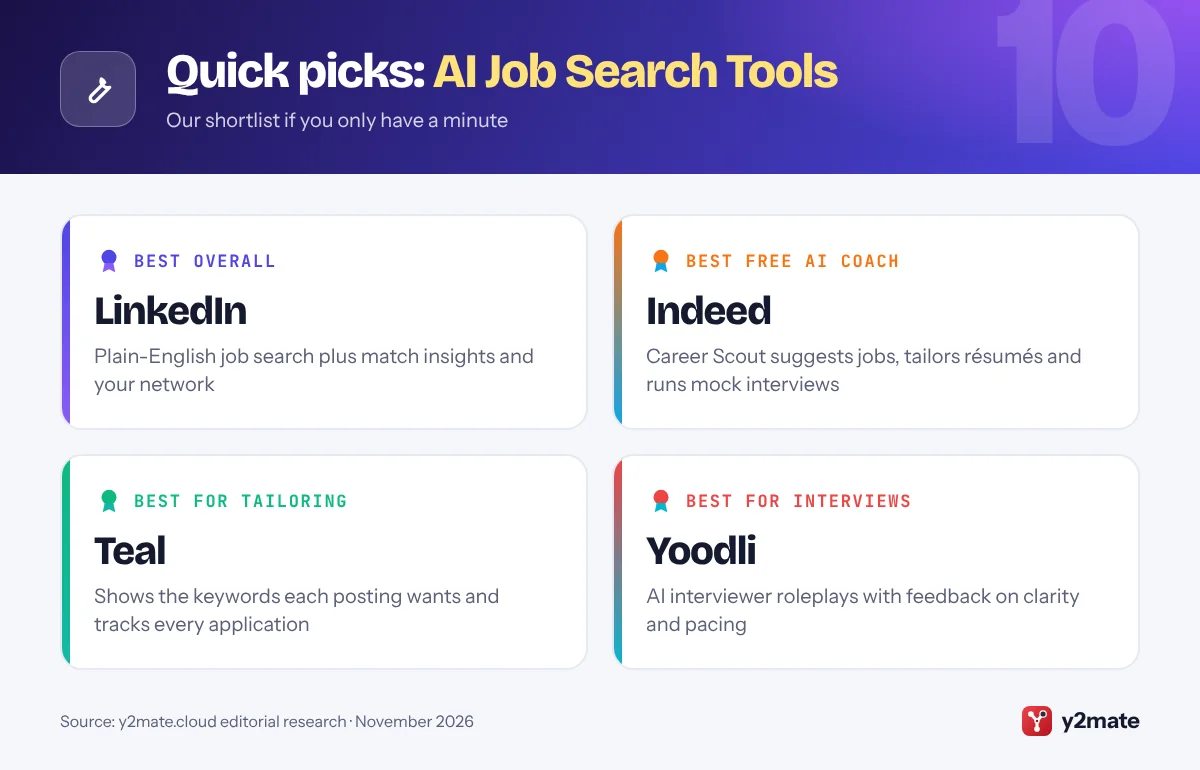
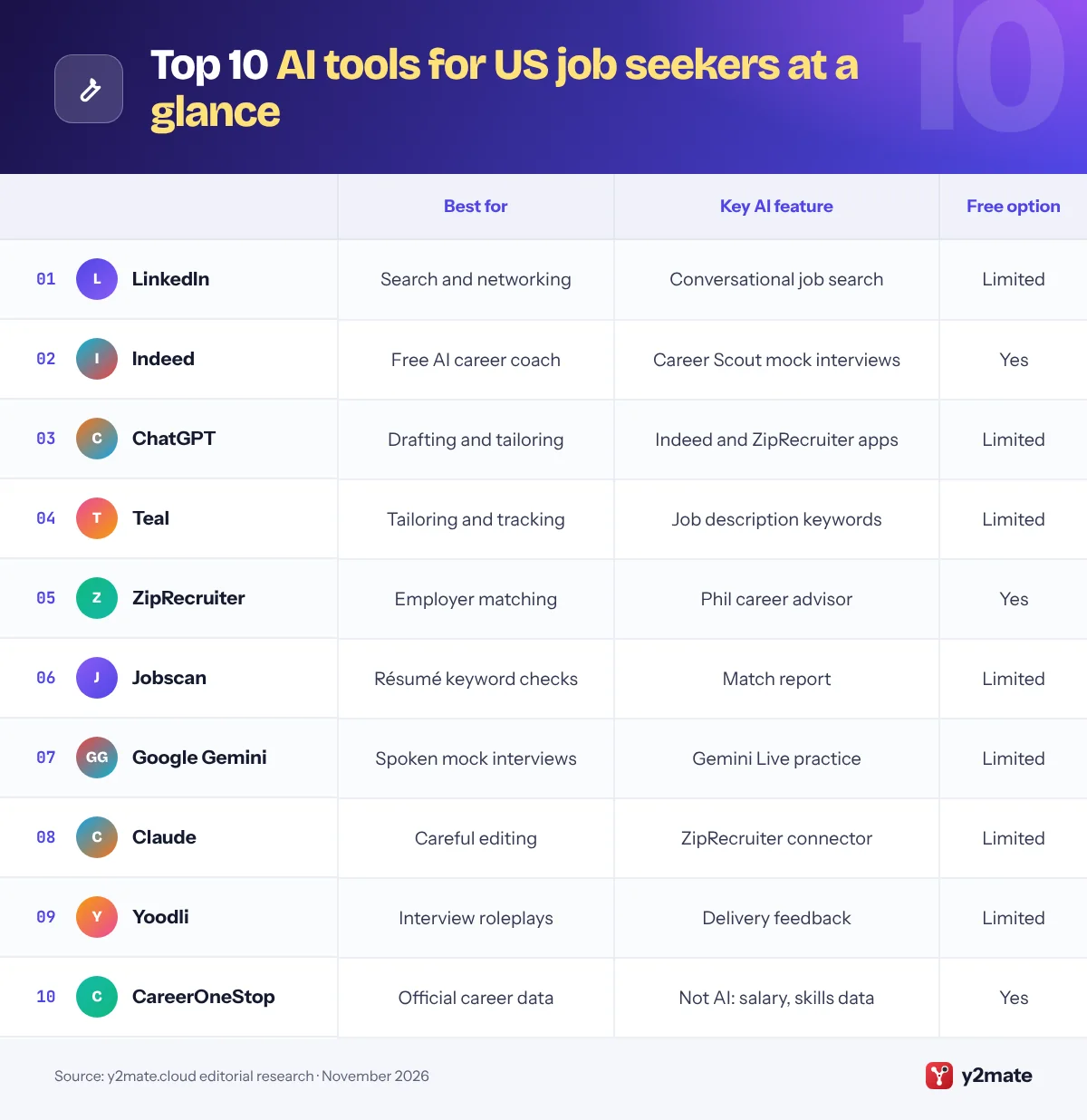
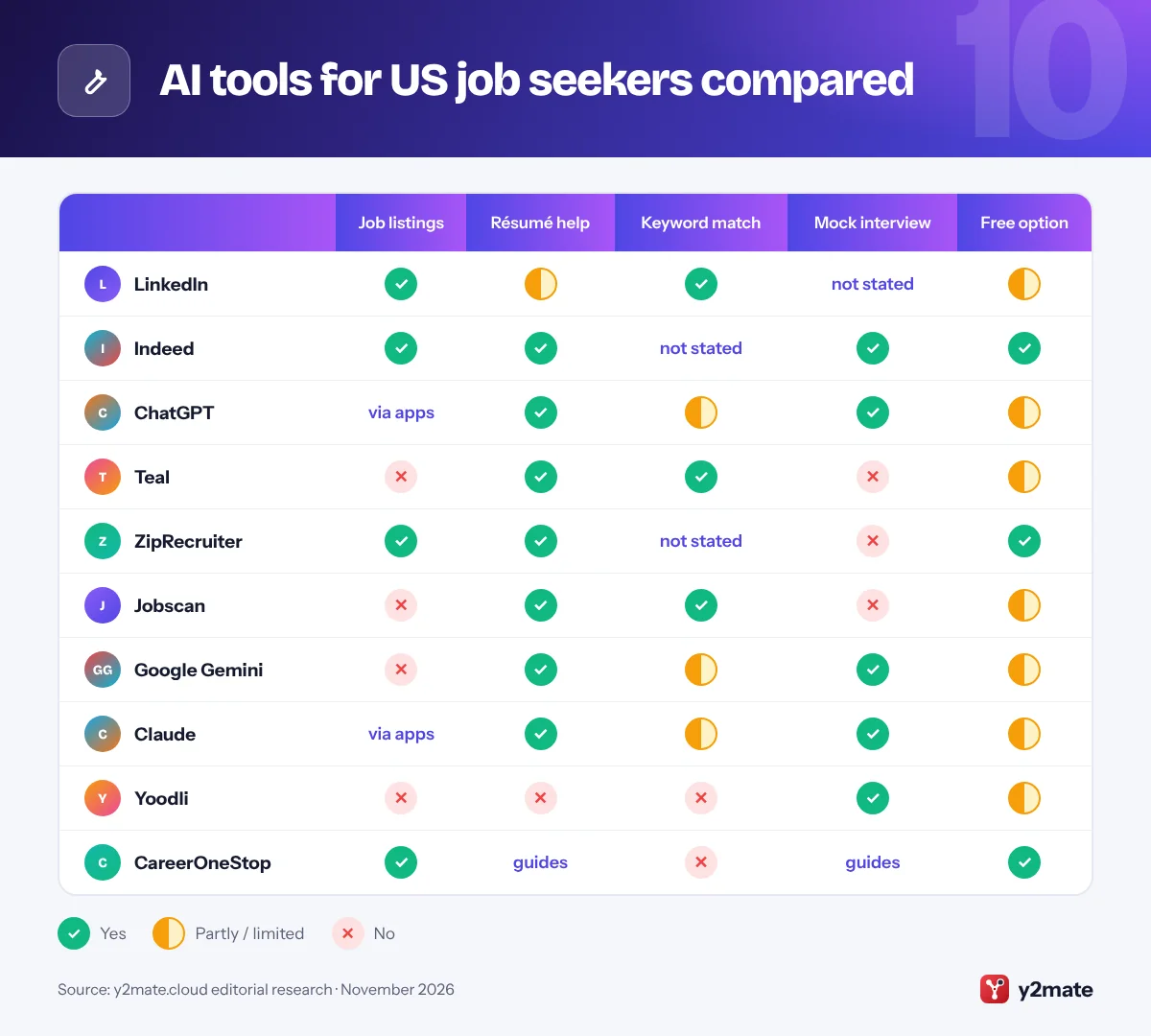
The best AI tools for job seekers in the USA in 2026 are LinkedIn and Indeed for AI-assisted job search, ChatGPT, Google Gemini and Claude for drafting and practice, Teal and Jobscan for matching a résumé to a posting, ZipRecruiter for AI job matching, Yoodli for interview roleplays and the Labor Department’s CareerOneStop for checking facts. Used well, they save time on the repetitive parts of applying. Used carelessly, they produce generic applications that recruiters skip.
Three terms come up constantly. An applicant tracking system (ATS) is the software employers use to collect, store and sort applications. Keyword matching means comparing the words in your résumé, such as skills and job titles, with the words in a job posting, which is how many recruiters search an ATS. An AI interview is one where software asks the questions, by chatbot, voice or one-way video, and may record, transcribe or score your answers.
The rules on employers’ AI depend on where you live. New York City requires bias audits and advance notice, Illinois requires notice when AI is used in hiring decisions, and federal disability law lets you ask for an accommodation. This guide covers those rights, US résumé norms and the job scams to avoid.
How we ranked this list
We ranked tools on publicly documented criteria only: what each tool does for a job seeker (job search, résumé and cover letter help, keyword matching, interview practice), whether there is a free option, how much US job coverage it offers, and which privacy controls it provides, such as opting out of AI training or limiting who sees your profile. Job sites with built-in AI ranked higher because that is where US employers post roles.
We did not test these tools ourselves, and we do not quote prices, which change often. Features vary by plan and device, so check the details before you rely on them.
The Top 10 AI Job Search Tools
1. LinkedIn
Best for: searching in plain English and using your network
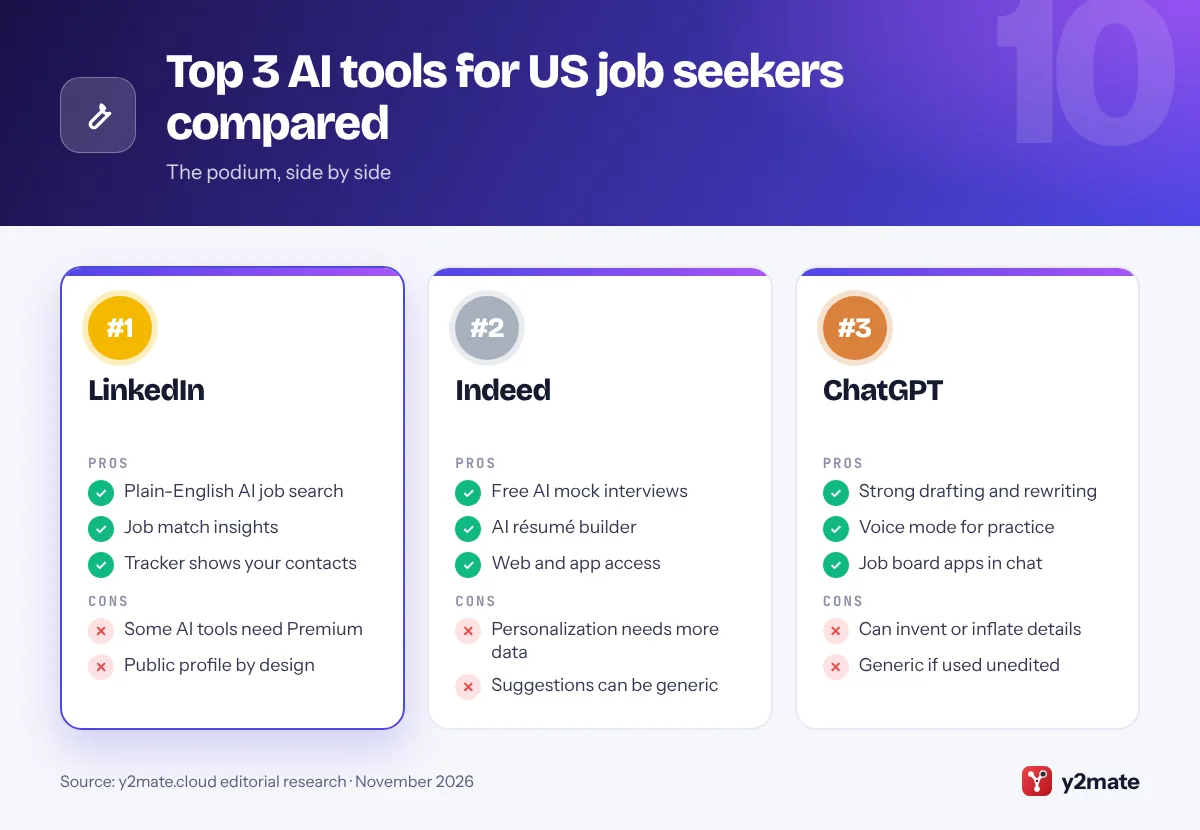
LinkedIn is where many US recruiters already look for candidates, and its AI features now cover most of the search. AI-powered job search lets you describe the role you want in your own words, such as a remote product designer job at a health startup, instead of guessing keywords and filters. LinkedIn says it is rolling out globally in English, Spanish, French, German and Portuguese. Job match insights show how the skills and qualifications on your profile line up with a posting, and a job tracker introduced in January 2026 keeps saved roles, notes and the contacts who could refer you in one place.
Some tools, such as AI-drafted cover letters, are part of LinkedIn Premium, so try the free features before you pay. Treat match insights as a guide, not a verdict: they only reflect what your profile says.
Privacy matters because your profile is public by design. Under Data privacy in Settings, the Data for Generative AI Improvement option lets you choose whether your data helps train LinkedIn’s content-creation AI. If you want to search and network in one place, LinkedIn is the best starting point.
Official site: LinkedIn
- Plain-English AI job search
- Job match insights on postings
- Job tracker shows your contacts
- Some AI tools need Premium
- Profile is public by design
2. Indeed
Best for: a free AI career coach built into a big job board
Indeed is one of the largest job boards in the USA, and Career Scout is its AI career coach. Working from your Indeed Profile, it can suggest career paths after a short quiz, recommend jobs, answer questions about companies and pay, help tailor your résumé with an AI résumé builder and run AI mock interviews. In the USA you can use it on the web as well as in the Indeed app. Indeed says Career Scout draws on your profile, what you type in chat and how you use Indeed, so a complete profile gives more relevant suggestions.
Indeed also offers an app inside ChatGPT, so you can search Indeed listings from a ChatGPT conversation once you connect your account. Applications still happen on Indeed.
The catch is that personalization depends on sharing more data with Indeed, and a fast, AI-tailored application is not automatically a better one. Read every suggested edit before you accept it, and keep the details specific to you. For a free assistant tied directly to a major US job board, Career Scout is the most complete option.
Official site: Indeed
- Free AI mock interviews
- AI résumé builder and job matches
- Works on web and in the app
- Personalization needs more data
- Suggestions can be generic
3. ChatGPT
Best for: drafting and tailoring résumés and cover letters
ChatGPT, from OpenAI, is the best-known general AI assistant, and it handles the writing-heavy parts of a job search well: turning rough notes into résumé bullet points, tailoring a summary to a posting, drafting a cover letter you then rewrite, and preparing interview answers with the STAR method of situation, task, action and result. Voice mode lets you rehearse answers out loud. Apps from Indeed and ZipRecruiter let you search their listings without leaving the chat.
Its weaknesses are those of any chatbot. It can invent details, inflate your experience or produce polished but generic phrasing, so feed it facts from your own record and edit everything it writes.
For privacy, switch off Improve the model for everyone in Data Controls if you do not want your chats used for training, or use Temporary Chat, which OpenAI says is not used to train its models. Remove your phone number, home address and Social Security number before pasting in a résumé. The free plan is enough for most job seekers, and paid plans raise usage limits. For all-round drafting help, ChatGPT is the most versatile pick.
Official site: ChatGPT
- Strong drafting and rewriting
- Voice mode for interview practice
- Indeed and ZipRecruiter apps
- Can invent or inflate details
- Generic text if used unedited
4. Teal
Best for: tailoring résumés and tracking applications
Teal combines an AI résumé builder with a job tracker. You attach a job description to a résumé and Teal highlights the skills and keywords the employer is asking for, showing which ones your résumé already covers and which are missing. Its Chrome extension saves postings from many job boards into one tracker, with stages from bookmarked through to accepted, plus notes, contacts and follow-up dates.
This is keyword matching in practice. Recruiters often search their ATS for skills and job titles, so using the employer’s wording for skills you really have helps your résumé surface. Teal’s own guidance is to add a missing keyword only where you have real experience to back it up, which is the right rule for every tool on this list.
The free plan includes résumé building and job tracking but limits keyword matching and AI writing, while the paid Teal+ plan unlocks the rest. Teal does not apply for jobs on your behalf, which keeps you in control of each application. If you apply to many roles and want one organized place to tailor and track them, Teal is the most practical choice.
Official site: Teal
- Shows keywords each posting wants
- Tracker with Chrome extension
- Free plan with job tracking
- Full keyword list needs Teal+
- No interview practice
5. ZipRecruiter
Best for: being matched to employers by an AI advisor
ZipRecruiter is a major US job marketplace, and Phil is its AI-powered career advisor. Phil asks open-ended questions about your experience and goals, recommends roles that may fit, and can draft profile and résumé descriptions from a few answers about past jobs. ZipRecruiter says Phil also looks for employers seeking your skills, presents your résumé to them, and tells you when an employer views your application or gives it a thumbs-up.
In 2026 ZipRecruiter launched apps for ChatGPT and Claude, so you can search its listings inside either assistant, filter by pay, distance, remote work or job type, and then apply on ZipRecruiter’s own site.
Two cautions. Matching means your résumé may be shown to employers proactively, so keep it accurate and current. And a description that Phil drafts is a starting point; rewrite it with concrete results so it does not read like everyone else’s. ZipRecruiter is free for job seekers and focused on the US market, which makes it a sensible second board alongside LinkedIn and Indeed.
Official site: ZipRecruiter
- Phil matches you to employers
- Apps in ChatGPT and Claude
- Free for job seekers
- Résumé shared proactively
- Drafted text needs rewriting
6. Jobscan
Best for: checking a résumé against one specific posting
Jobscan focuses on one job: comparing your résumé with a specific posting the way keyword-based screening might. Paste in both and its free match report lists the keywords the posting uses, how often your résumé includes them and which are missing. Alongside it sit an AI résumé builder, a cover letter generator and a LinkedIn optimizer that compares your profile with the roles you want.
The free plan includes a small number of scans each month. AI Optimize, which suggests skills-based bullet points tailored to the posting for you to accept or reject, and fuller LinkedIn help need Jobscan Premium.
Do not chase a perfect score. A match report measures overlap of words, not whether you can do the job, and stuffing keywords into a résumé makes it read badly to the human who opens it next. Use the report to spot real skills you forgot to mention or described in different words, then fix them in plain language. For people who keep hearing nothing back from online applications, Jobscan is the clearest way to see what an employer’s search might miss.
Official site: Jobscan
- Free keyword match report
- Shows missing skills clearly
- LinkedIn profile optimizer
- Few free scans each month
- Scores reward keyword overlap
7. Google Gemini
Best for: spoken mock interviews on your phone
Gemini, Google’s AI assistant, now pitches itself directly at job seekers. Google’s career coach page shows it drafting résumés and sample cover letters in Canvas, a side-by-side editing space, and using Gemini Live, its spoken conversation mode, to run mock interviews on your phone, ask behavioral questions and give feedback on the clarity of your answers. A Career Coach Gem helps you explore transferable skills and new fields.
Gemini Live is the standout, because speaking answers aloud is much closer to a real interview than typing them. If you use Gmail and Google Docs, Gemini also fits into tools you already have.
On privacy, Gemini’s Keep Activity setting controls whether your chats are saved and used to improve Google’s services, and Google says Temporary Chats are not used to train its models. As with any assistant, check its feedback against the job ad rather than treating it as fact, and never let it invent experience you do not have. Gemini is free to use, with paid Google AI plans adding higher limits. For practicing out loud, it is the most natural option.
Official site: Google Gemini
- Gemini Live mock interviews
- Canvas for résumé drafts
- Fits Gmail and Google Docs
- Feedback can be generic
- Best features in mobile app
8. Claude
Best for: careful editing and honest critique
Claude, made by Anthropic, is a general AI assistant that suits the slower, more careful parts of applying: tightening a résumé without losing your voice, checking whether a cover letter actually answers the posting, or turning a long application into clear, specific examples. You can upload your résumé and a job description together and ask what is missing, what is vague and which claims need evidence, then rewrite those parts yourself.
Through a connector added in June 2026, Claude can also search ZipRecruiter listings filtered by pay, location or remote work, and you then apply on ZipRecruiter.
Like any chatbot, it can be wrong or overly polished, so treat its output as a draft and check every fact. For privacy, the Help improve Claude setting lets you choose whether your chats are used to train models, and Anthropic says incognito chats are not used to improve Claude. Strip out personal identifiers before uploading documents. The free plan covers occasional use, and paid plans raise limits. If you want a second opinion that pushes back on vague wording, Claude is a strong pick.
Official site: Claude
- Good at critique and editing
- Reads résumé and posting together
- ZipRecruiter connector
- Can sound overly polished
- Free plan limits heavy use
9. Yoodli
Best for: realistic interview roleplays with feedback
Yoodli is an AI speaking coach built around practice. For interviews, you choose the role and company, and an AI interviewer asks preset questions plus follow-ups based on your answers. You can pick the interviewer’s demeanor, add your own questions and, in multi-persona roleplays, face more than one AI interviewer at once. Afterward it gives feedback on structure, clarity, conciseness, pacing and filler words, and on body language if you allow camera access.
That makes it good preparation for AI interviews and one-way video interviews, where software rather than a person asks the questions and may record or score your answers. Rehearsing without human cues makes those formats feel less strange.
The free plan allows only a handful of practice sessions, so save them for the interviews that matter most; paid plans add more. Yoodli coaches your delivery rather than feeding you lines, which is the right approach. Some products sell live answer prompts during real interviews, and many employers treat that as misrepresentation that can end your candidacy, so keep AI to practice.
Official site: Yoodli
- Realistic AI interviewer
- Feedback on pacing and fillers
- Panel-style roleplays
- Very limited free sessions
- No résumé or job search tools
10. CareerOneStop
Best for: free, official career data to check AI against
CareerOneStop is the US Department of Labor’s free career site, and it earns its place here as the official reference point for what AI tools tell you. Its Job Finder searches listings, its Salary Finder shows typical pay by occupation and location, mySkills myFuture links your past jobs to related occupations, and its résumé and interview guides cover the basics. It also points you to your nearest American Job Center for free, in-person help.
Its tools are not AI-powered today, and that is the point: when a chatbot suggests a salary range, a license requirement or a career switch, you can check it against government data before you act. That may change. In June 2026 the Department of Labor asked for public input on a modernized CareerOneStop with AI features and skills-aware career exploration, so expect updates.
Everything is free, with no paid tier or upsell. If you are changing careers, returning to work or need local help, CareerOneStop is the free, trustworthy starting point.
Official site: CareerOneStop
- Official Labor Department data
- Salary and skills tools
- Links to American Job Centers
- No AI features yet
- Basic résumé guidance only
AI tools for US job seekers compared
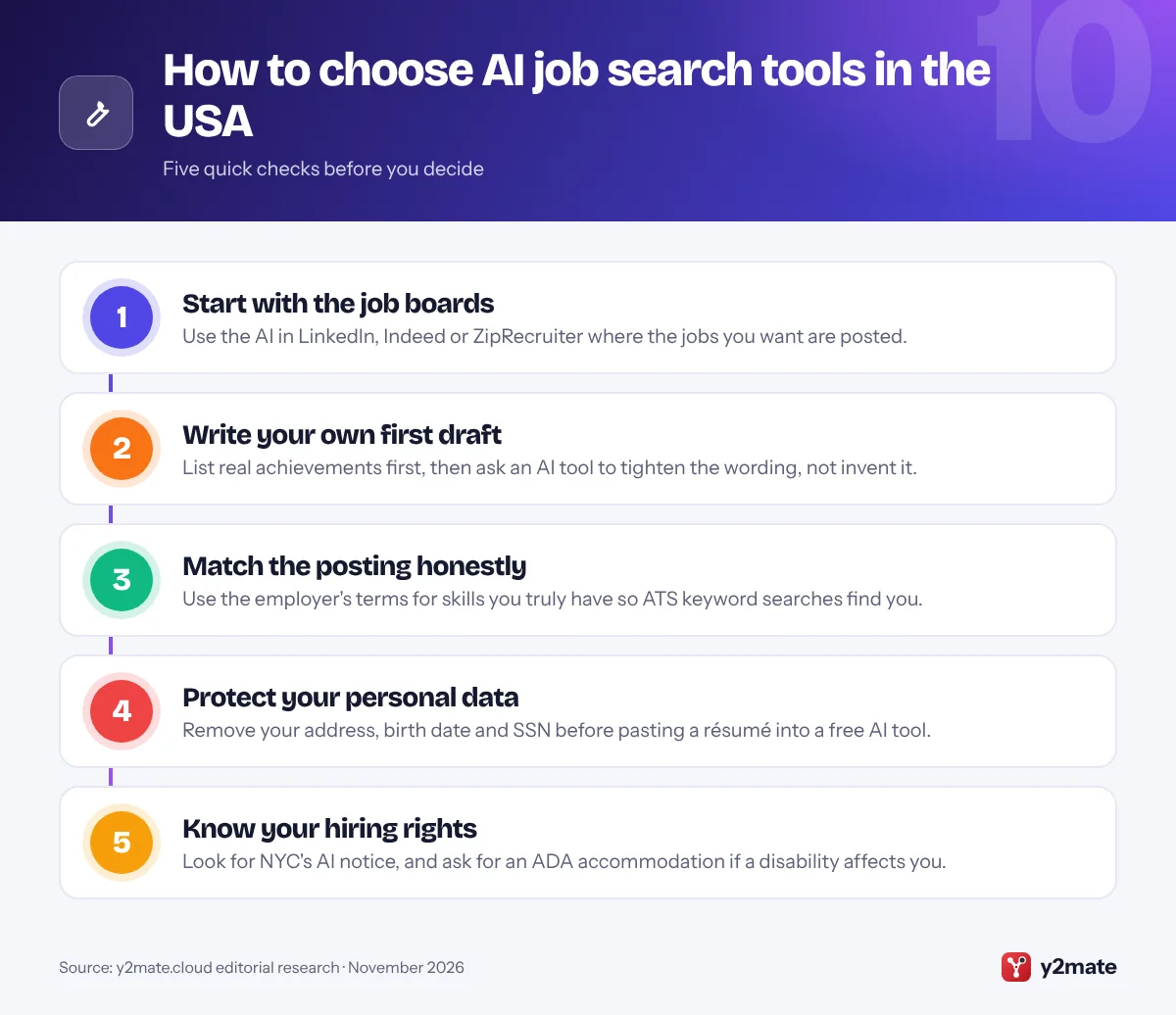
How to choose AI tools for job seekers in the USA
Pick one job site with built-in AI, one general assistant for writing and one way to practice interviews; more tools rarely mean better applications. Write your own first draft from real achievements, use AI to tighten it, and read every line before you send it. Check each application’s instructions too: some employers set rules on AI, and the State Department bars Foreign Service candidates from using it in their written responses.
Your rights when employers use AI
- New York City: under Local Law 144, an automated employment decision tool needs a bias audit within the past year and a published summary, and city-resident candidates must be notified at least 10 business days before it is used.
- Illinois: employers must give notice when they use AI in hiring decisions, and must explain and get your consent before AI analyzes a recorded video interview.
- Colorado and California: Colorado’s automated decision-making law is due to start on January 1, 2027, and California’s civil rights rules have covered automated-decision systems in hiring since October 2025.
- Disability: under the ADA you can ask for a reasonable accommodation, such as another way to take an AI-scored test.
Résumé norms and scams
US résumés are usually one or two pages, with no photo, date of birth or marital status, and references supplied only when asked. Never pay to get a job, and never deposit a check for an employer and send money back: the FTC says those are classic scam signs.
Frequently asked questions
What is the best AI tool for job seekers in the USA?
For most people, LinkedIn is the best starting point because its AI job search, job match insights and your network sit where US recruiters already look. Add Indeed's free Career Scout coach for résumé help and mock interviews, a general assistant such as ChatGPT for drafting, and Teal or Jobscan if you tailor your résumé to many postings.
Can employers tell if my résumé was written with AI?
There is no reliable way to prove it from the text alone, but generic wording without specific results stands out, and interviews quickly expose claims you cannot back up. Some employers set rules; the State Department bars Foreign Service candidates from using AI in written responses. Follow each application's instructions and answer honestly if a form asks whether you used AI.
Do US employers use AI to screen job applications?
Many do, usually through an applicant tracking system that sorts or ranks applications, and sometimes through chatbots or one-way video interviews that record and score answers. In New York City, such tools need a bias audit and advance notice to candidates. Illinois requires notice when AI is used in hiring decisions, and the ADA lets you request an accommodation.
Is it safe to paste my résumé into ChatGPT or another chatbot?
It is reasonably safe if you first remove details you would not want stored, such as your home address, phone number, date of birth and Social Security number. Then check the privacy settings: ChatGPT, Gemini and Claude each let you limit whether chats are used to train their models, and each offers a temporary or incognito chat mode.
How can I spot a fake job offer?
Be wary of unexpected texts offering easy, well-paid work, interviews held only by chat, and any request to pay upfront fees, buy equipment or deposit a check and send money back. The FTC says honest employers never ask for that. Contact the company using details you find yourself, and report scams at ReportFraud.ftc.gov.
Final verdict
For most people, the best AI tools for job seekers in the USA are LinkedIn for search and networking, Indeed’s Career Scout for free coaching and mock interviews, and ChatGPT, Gemini or Claude for drafting. Add Teal or Jobscan to tailor résumés, ZipRecruiter for proactive matching and Yoodli to rehearse, and use CareerOneStop to check what AI tells you.
Whatever you use, keep every claim true, protect your personal data and know your rights when an employer’s AI is doing the screening.
Sources and further reading
- NYC rules on AI hiring tools: New York City's Department of Consumer and Worker Protection explains Local Law 144 bias audits, candidate notices and how to file a complaint.
- ADA guidance on AI hiring: The Justice Department explains how algorithms and AI in hiring can lead to disability discrimination and how to ask for accommodations.
- FTC advice on job scams: The Federal Trade Commission describes common job scams, from fake recruiters and task scams to fake checks, and how to report them.
- State Department AI rule: The State Department's careers FAQ explains why Foreign Service candidates may not use AI tools to draft their written responses.

Leave a Reply