
- SEEK, LinkedIn and Indeed all use AI to personalise job matches, and Indeed launched its free Career Scout coach for Australian jobseekers in July 2026.
- From 10 December 2026, organisations covered by the Privacy Act must explain in their privacy policies when computer programs make, or substantially and directly help make, significant decisions, which can include ranking job applicants.
- Federal and state anti-discrimination laws and the Fair Work Act protect job applicants whether a person or an AI tool makes the decision.
- The Australian Public Service Commission's April 2026 principles let candidates use AI to polish their own drafts but not to misrepresent their skills.
- Scamwatch warns that genuine employers do not ask you to pay recruitment fees or top up an account with your own money or cryptocurrency.
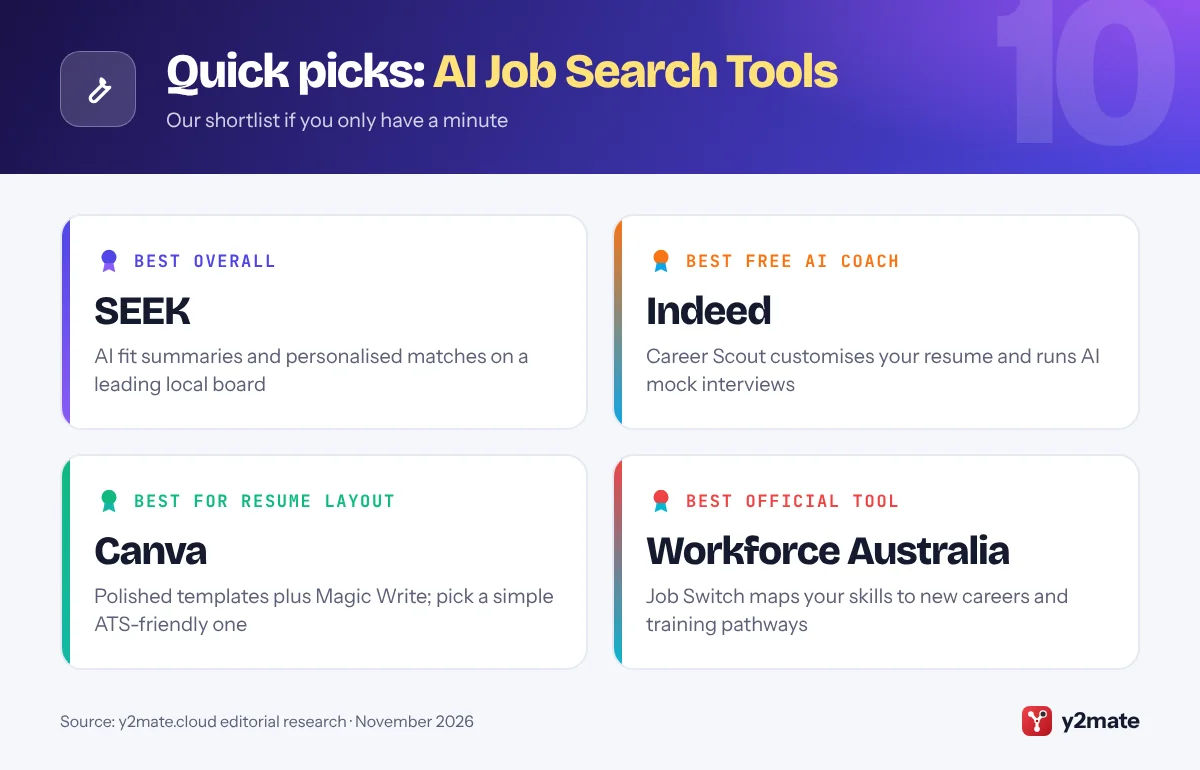
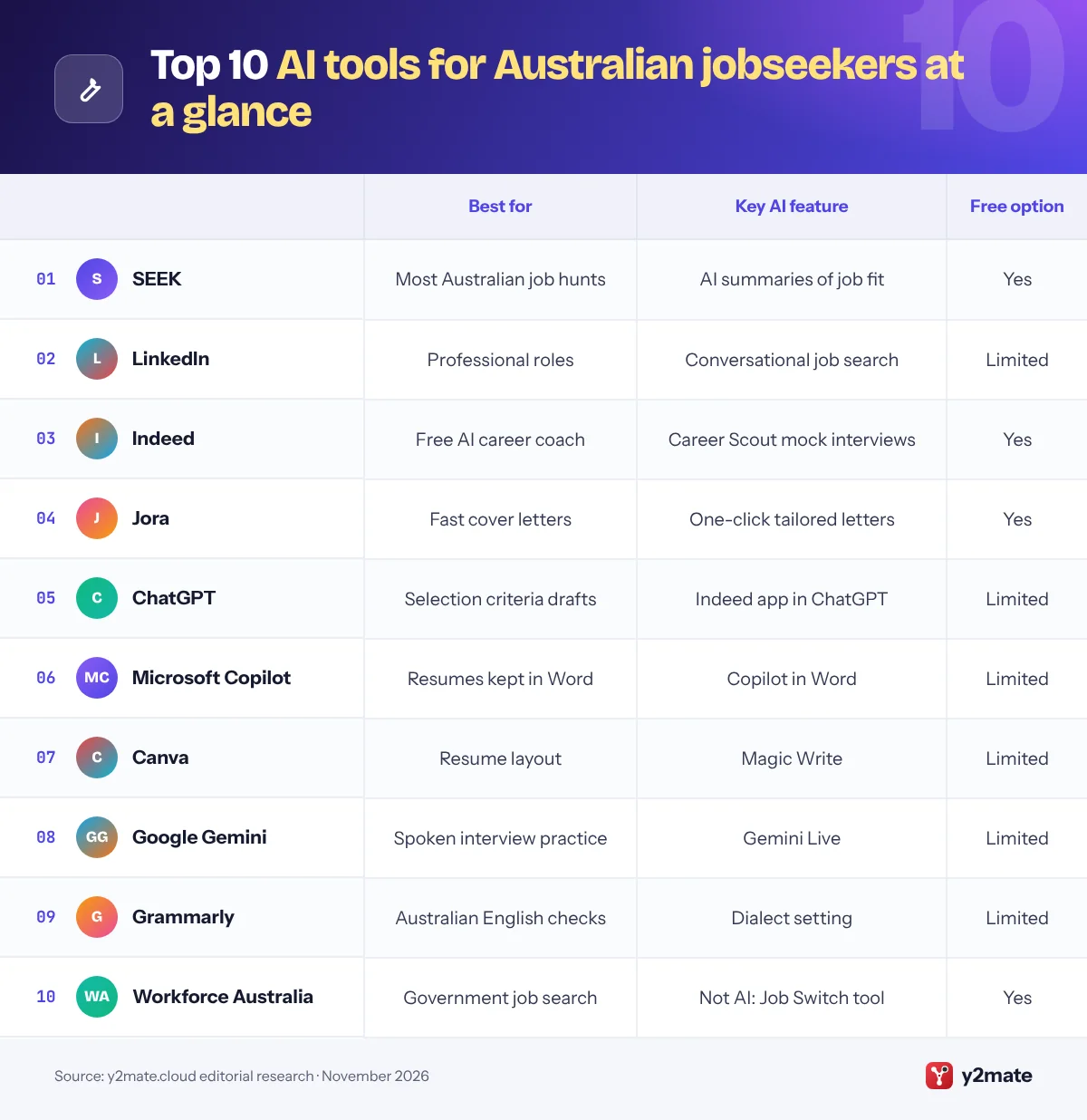
The best AI tools for job seekers in Australia in 2026 are SEEK, LinkedIn and Indeed for AI-assisted job search and matching, Jora for quick tailored cover letters, ChatGPT, Microsoft Copilot and Google Gemini for drafting and interview practice, Canva for a clean resume layout and Grammarly set to Australian English for proofreading. Workforce Australia, the government’s free employment service, completes the list with skills-based career ideas.
Some plain definitions. An applicant tracking system (ATS) is the software employers and recruitment agencies use to collect, store and sort applications. Keyword matching means comparing the skills and job titles in your resume with those in a job ad, which is how many recruiters search an ATS. An AI interview is one where software, such as a chatbot, voice agent or one-way video platform, asks the questions and may record or score your answers.
Australian rules are tightening. From 10 December 2026, organisations covered by the Privacy Act must say in their privacy policies when software makes or substantially helps make significant decisions about people, and anti-discrimination laws already apply to AI-assisted hiring. This guide covers those rules, resume conventions and the job scams Scamwatch warns about.
How we ranked this list
We ranked tools only on publicly documented criteria: what each does for a jobseeker (job search, resume and cover letter help, AI matching, interview practice), whether there is a free option, how well it covers Australian jobs, and which privacy controls it offers, such as profile visibility settings or opting out of AI training. Local job boards with built-in AI ranked highest because that is where Australian employers advertise.
We did not test any tool ourselves and do not quote prices, which change often. Features vary by plan and device, so check the details before relying on them.
The Top 10 AI Job Search Tools
1. SEEK
Best for: AI job matching on Australia’s best-known board
SEEK is Australia’s best-known job site, and most of its AI works behind the scenes to improve which jobs you see. When you are logged in, SEEK personalises matches and recommendations from your profile and activity, and its Career Feed shows AI-generated bullet points on recommended jobs explaining why a role might suit you, drawn from the job ad, your resume and related data. That makes it quicker to decide what is worth a tailored application.
SEEK Pass lets you verify credentials such as work rights, police checks, licences and qualifications, and an English proficiency credential can sit on your profile, which helps employers trust what they see.
Privacy is in your hands through Profile visibility. Standard lets advertisers find your profile and contact you, Limited hides your resume and contact details, Hidden removes you from talent searches, and Public makes your profile visible more widely. Pick the setting that matches how actively you are looking. Remember that AI fit summaries are a guide, not a promise. For most Australian job hunts, SEEK remains the first place to look.
Official site: SEEK
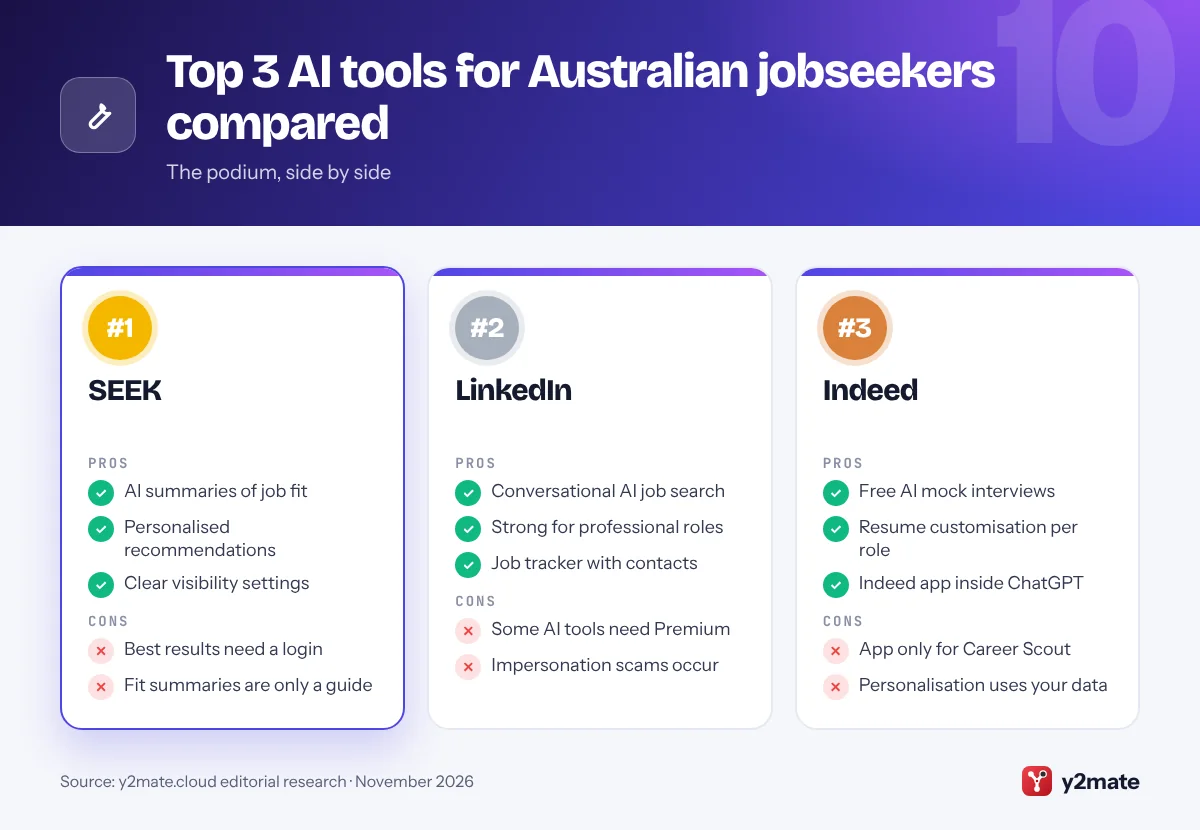
- AI summaries of job fit
- Personalised recommendations
- Clear profile visibility options
- Best results need a login
- Fit summaries are only a guide
2. LinkedIn
Best for: professional roles and recruiter networks
LinkedIn is widely used by Australian recruiters and corporate hiring teams, especially for professional and office-based roles. Its AI-powered job search lets you describe the job you want in everyday language, such as a hybrid policy role in Canberra that uses your research background, instead of guessing exact titles, and LinkedIn says it is rolling out globally in English and four other languages. Job match insights show how your profile lines up with each listing, and a job tracker introduced in January 2026 keeps saved jobs, notes and useful contacts in one place.
Some AI tools, including AI-drafted cover letters, require LinkedIn Premium, so check which features you actually need before paying.
LinkedIn’s Data for Generative AI Improvement setting, under Data privacy, controls whether your data is used to train its content-creation AI. Keep your profile consistent with your resume, because recruiters check both, and be wary of recruiters you cannot verify, as scammers impersonate real companies on job platforms. For professional roles and networking, LinkedIn is the essential companion to SEEK.
Official site: LinkedIn
- Conversational AI job search
- Strong for professional roles
- Job tracker with contacts
- Some AI tools need Premium
- Impersonation scams occur
3. Indeed
Best for: a free AI career coach in an app
Indeed launched Career Scout, its AI career coach, for Australian jobseekers in July 2026, and it lives in the Indeed mobile app. It can suggest career paths based on your skills and interests, recommend jobs, answer questions about companies and salaries, help customise your resume for a role and run AI mock interviews with personalised feedback. Indeed says Career Scout uses your Indeed Profile, what you tell it in chat and how you use Indeed, so completing your profile improves its suggestions.
Indeed also brought its app inside ChatGPT to Australia in 2026, letting you search Indeed listings in a ChatGPT conversation after linking your account; you still apply on Indeed.
The cost is more data shared with Indeed, so read its privacy policy and keep details such as your tax file number, Medicare number and health information out of chats. The mock interview is a useful warm-up, but it cannot predict what a real panel will ask. For a free coach on a major Australian job board, Career Scout is the most complete option.
Official site: Indeed
- Free AI mock interviews
- Resume customisation per role
- Indeed app inside ChatGPT
- App only for Career Scout
- Personalisation uses your data
4. Jora
Best for: quick, tailored cover letters
Jora is a job search site owned by SEEK that brings together listings from many sources, including employer career pages and recruiters. Its AI Assistance feature drafts a tailored cover letter for each job in one click, highlighting the experience from your profile that best fits the ad. For listings that link out to another site, SEEK says you can enter your details once and Jora completes the application in the background while you keep searching.
That speed is both the appeal and the risk. A one-click cover letter is only as good as the profile behind it, and generic letters are easy for employers to spot, so read and edit each one before it goes. Background applications also mean less visibility of exactly what was sent, so keep your own record of where you applied and check unfamiliar employers before sharing personal details.
Jora is free for jobseekers. Use it to widen your search beyond the biggest boards and to save time on first drafts that you then personalise. If you apply for many roles, Jora is the fastest helper on this list.
Official site: Jora
- One-click tailored cover letters
- Listings from many sources
- Background applications
- Letters need careful editing
- Less control over what is sent
5. ChatGPT
Best for: drafting resumes and selection criteria
ChatGPT, from OpenAI, is a flexible assistant for the writing-heavy parts of Australian applications: turning notes into resume bullet points, drafting a cover letter you then personalise, and structuring responses to selection criteria using the STAR method of situation, task, action and result. Ask for Australian English, or it may default to US spelling. Voice mode lets you practise interview answers aloud, and the Indeed app inside ChatGPT can bring in Australian listings.
If you apply for Australian Public Service roles, read the Australian Public Service Commission’s April 2026 principles for candidate use of AI. You can use it to polish your own drafts, such as checking spelling and grammar, but not in ways that misrepresent you or undermine merit-based selection, and you should not enter classified or sensitive information. Other employers may ask you to declare AI use.
The OAIC advises organisations not to enter personal information into publicly available AI tools, which is sound advice for individuals too. Turn off Improve the model for everyone in Data Controls, or use Temporary Chat. The free plan suits most jobseekers.
Official site: ChatGPT
- Good at selection criteria
- Voice mode for practice
- Indeed app with local listings
- Defaults to US spelling
- Generic if used unedited
6. Microsoft Copilot
Best for: resume edits inside Word
Microsoft Copilot is free as an app and on the web, and some Microsoft 365 home plans add Copilot inside Word, which suits anyone who keeps their resume as a Word document. You can ask it to tighten your career summary, rewrite duties as achievements or draft a cover letter from your resume and the job ad without copying text between apps. Set Word’s proofing language to English (Australia) so your spelling stays local.
Check your subscription before paying for AI features. The ACCC has taken Microsoft to court, alleging it did not clearly tell Microsoft 365 subscribers about a cheaper Classic plan without Copilot when prices rose; the court has not yet decided the case. If you only need occasional help, the free Copilot app may be enough.
As with any assistant, Copilot can overstate your experience, which interviewers quickly test, so keep every claim accurate. Its privacy settings include controls over whether your conversations are used to train models, and your tax file number and home address should stay out of chats. For people who already work in Word, Copilot is the most convenient pick.
Official site: Microsoft Copilot
- Works inside Word
- Free app for quick help
- Model training controls
- Word features need Microsoft 365
- Can overstate experience
7. Canva
Best for: a clean, well-designed resume layout
Canva, the Sydney-headquartered design platform, offers an AI resume builder that pairs resume templates with Magic Write, an AI writing tool that can draft and rewrite sections such as your career summary or key achievements. It is a quick way to get a polished, readable layout, many templates are free, and the free plan includes a limited allowance of AI use.
The main caution is the ATS. Heavily designed resumes with columns, text boxes, icons or graphics can be harder for applicant tracking systems to read, which may scramble or drop sections. Choose a simple single-column template, use standard headings such as Experience and Education, and keep important text out of images. If an employer asks for a Word document, check the export options or rebuild the final version in Word.
Leave out a photo, your date of birth and your full street address, which Australian resumes do not need, and Scamwatch warns about sharing those details. Use Canva for layout and first drafts, then edit the wording yourself. For presentation, Canva is the strongest choice on this list.
Official site: Canva
- Polished resume templates
- Magic Write AI drafting
- Free templates available
- Fancy layouts can confuse ATS
- Limited AI on free plan
8. Google Gemini
Best for: practising interview answers out loud
Gemini, Google’s AI assistant, stands out for interview practice. In the mobile app, Gemini Live, its spoken conversation mode, can play a mock interviewer, asking behavioural questions and giving feedback on how clearly you answer, which is good preparation for the behavioural and panel interviews many Australian employers use. Google’s career coach page also shows Gemini drafting resumes and sample cover letters in Canvas, a side-by-side editing space, and a Career Coach Gem for mapping transferable skills to new fields.
For the best results, give Gemini the job ad, the selection criteria and the organisation’s values, then ask it to question you on each one and point out where your examples lack detail or results.
Its feedback is still generic and cannot replace advice from someone who knows your industry. Gemini’s Keep Activity setting controls whether chats are saved and used to improve Google’s services, and Google says Temporary Chats are not used to train its models. Keep personal identifiers out. The free version is enough for regular practice, and paid Google AI plans raise the limits. For rehearsing aloud, it is the most natural choice.
Official site: Google Gemini
- Gemini Live mock interviews
- Canvas for resume drafts
- Questions you on criteria
- Feedback can be generic
- Best features in mobile app
9. Grammarly
Best for: Australian English proofreading
Grammarly checks spelling, grammar, clarity and tone across browsers, Word and email, and it lets you choose Australian English instead of the default American English. That means it leaves words such as organisation, licence and colour alone, and it helps keep your resume and cover letter consistent, which Australian recruiters notice. Its generative AI features can rewrite sentences or adjust tone, with limited use on the free plan.
Grammarly’s parent company changed its name to Superhuman in late 2025, but the Grammarly product and its free plan continue under the same name.
Use Grammarly as the last step. Write your resume and cover letter in your own words, use an assistant for structure if you need it, then run Grammarly to catch typos and awkward phrasing. Do not accept every suggestion, because it can make writing sound flat or alter industry terms. If you are applying from a work computer, check whether your employer allows browser extensions. For a fast Australian English check, Grammarly is the simplest option.
Official site: Grammarly
- Australian English setting
- Works across apps and browsers
- Free plan for basic checks
- Limited AI on free plan
- Can flatten your voice
10. Workforce Australia
Best for: free government job search and career switching
Workforce Australia is the Australian Government’s employment service, and its website lists job vacancies alongside free career tools. Its Job Switch tool highlights careers that share skills with your work experience, points out skills gaps and shows training pathways to close them; you need a free account to use it. The related Your Career website, run by the Department of Employment and Workplace Relations, adds a career quiz, the Career Explorer and advice on resumes and interviews.
These are not generative AI tools, and that is their value. They draw on official labour market information, so you can test a chatbot’s career suggestion or pay claim against government data before you act on it.
If you receive income support with mutual obligation requirements, your job search may run through Workforce Australia, so follow your provider’s instructions. The government consulted on redesigning employment services in 2026, so expect changes. For free, ad-free career and job search help, Workforce Australia and Your Career are the best official starting point.
Official site: Workforce Australia
- Free government job search
- Job Switch skills matching
- Links to Your Career tools
- No generative AI features
- Job Switch needs an account
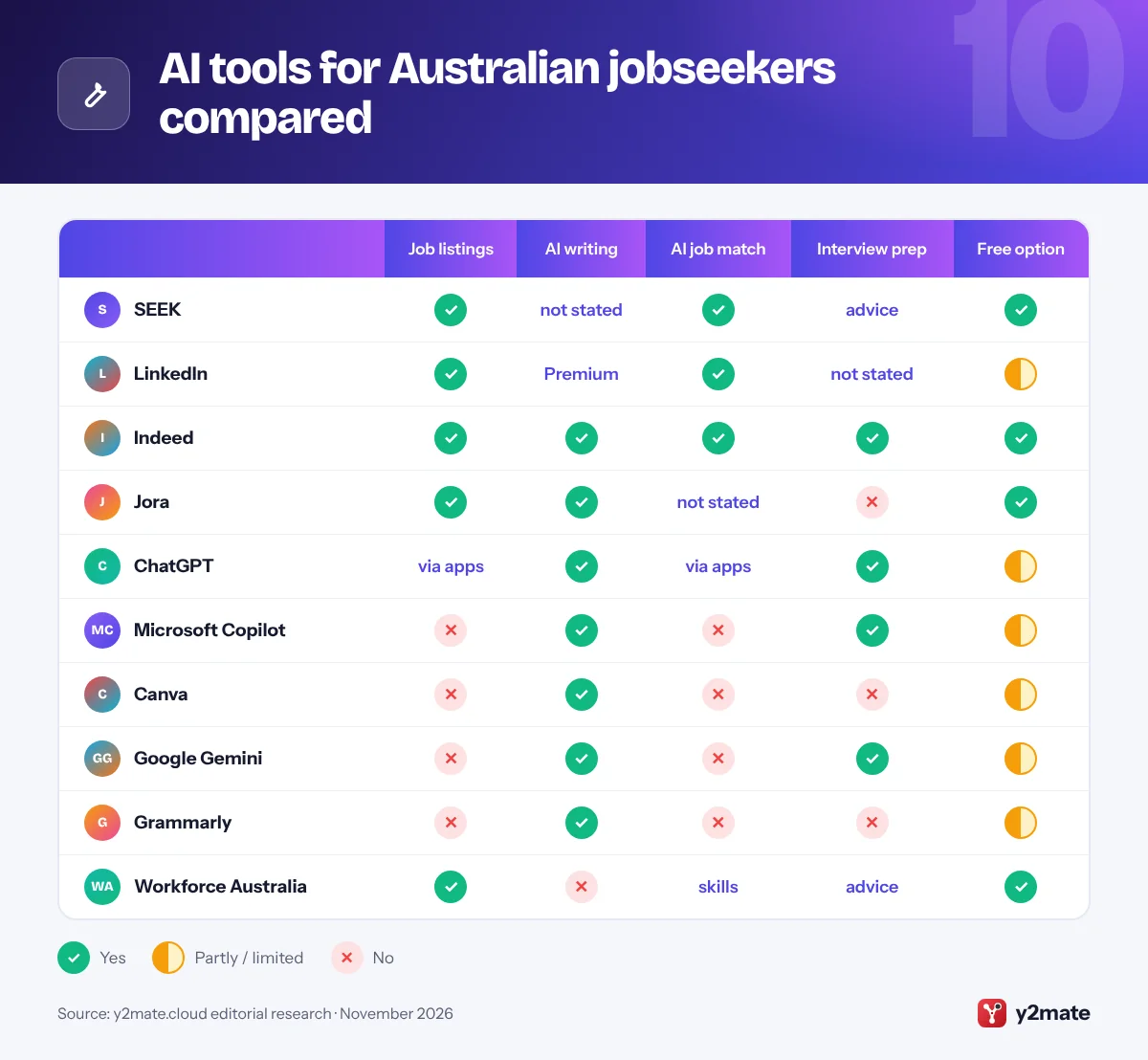
AI tools for Australian jobseekers compared
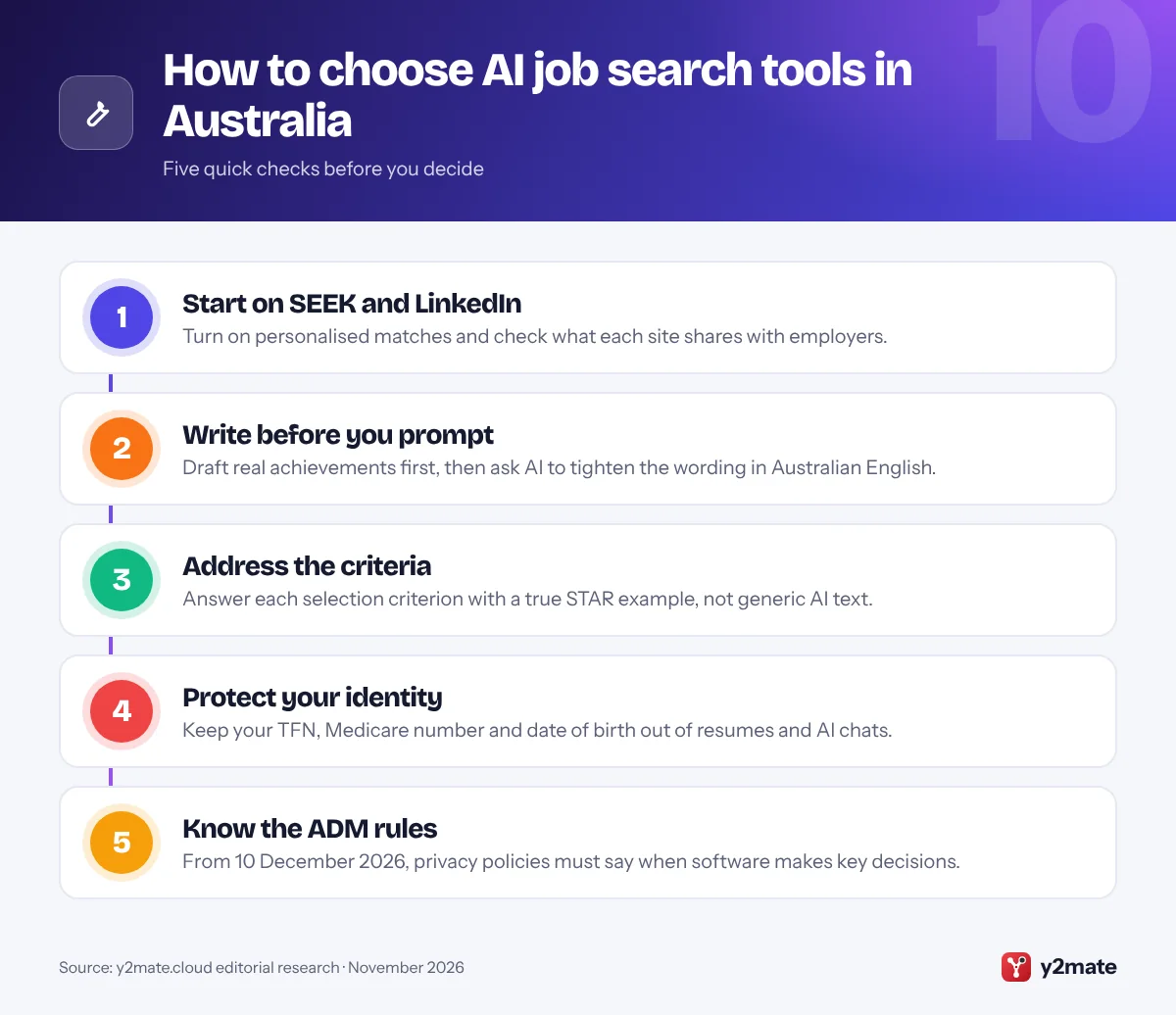
How to choose AI tools for job seekers in Australia
Pick one or two job boards, one assistant and one way to practise interviews. Use AI to organise and polish your own material, never to invent experience, and read each employer’s instructions on AI; the Australian Public Service, for example, publishes principles for candidates.
Your rights when employers use AI
- Privacy Act: from 10 December 2026, organisations covered by the Act must explain in their privacy policies when computer programs make, or substantially and directly help make, decisions that significantly affect people, which can include software that ranks applicants. It is a transparency rule and does not by itself create a right to human review, and many small businesses are exempt.
- Discrimination: federal and state anti-discrimination laws apply to AI-assisted hiring, and the Fair Work Act protects prospective employees from adverse action because of attributes such as age, disability or pregnancy. You can ask for reasonable adjustments, such as an alternative to a recorded video interview.
Resume conventions and scams
Australian resumes usually list referees, such as former managers who have agreed to speak about your work, or say they are available on request, and leave out photos and dates of birth. Scamwatch warns about task-based job scams, money mule jobs and recruitment fees. Never pay to get a job, and report scams to Scamwatch.
Frequently asked questions
What is the best AI tool for job seekers in Australia?
For most people, SEEK is the best place to start because its AI personalises job matches and explains why a role might suit you. Add LinkedIn for professional networking, Indeed's free Career Scout for resume help and mock interviews, and a general assistant such as ChatGPT, Copilot or Gemini for drafting, with Grammarly set to Australian English.
Can I use AI to write selection criteria for a government job?
You can use it to help, within limits. The Australian Public Service Commission's principles let candidates use AI to polish their own drafts, such as checking spelling and grammar, but not in ways that misrepresent their skills or undermine merit-based selection. Write each example from your own experience, check every claim, and never enter sensitive or classified information into an AI tool.
Do Australian employers have to tell me if AI screens my application?
From 10 December 2026, organisations covered by the Privacy Act must explain in their privacy policies when computer programs make, or substantially help make, decisions that significantly affect people, such as software that ranks applicants. That does not require a notice on each application or a right to human review, so ask the employer directly. Many small businesses are exempt from the Act.
Is it safe to upload my resume to ChatGPT or other AI tools?
It can be, if you first remove details identity thieves want, such as your date of birth, home address, tax file number and licence numbers. The OAIC recommends that organisations avoid putting personal information into public AI tools, which is sensible advice for individuals too. Use the privacy settings that stop chats being used for training, or a temporary chat mode.
How do I spot a fake job offer in Australia?
Scamwatch lists the warning signs: easy money for little effort, hiring with no interview, contact through WhatsApp or text, requests to top up an account with your own money or cryptocurrency, and recruitment or training fees. Never move money through your account for an employer. Check the company yourself and report scams to Scamwatch and the platform where you found them.
Final verdict
For most people, the best AI tools for job seekers in Australia are SEEK for personalised matches, LinkedIn for professional roles and Indeed’s Career Scout for free coaching and mock interviews, with ChatGPT, Copilot or Gemini for drafting and Canva and Grammarly for a polished resume in Australian English. Jora speeds up cover letters, and Workforce Australia offers free government tools.
Keep every claim true, keep identity details out of AI tools, and look for the new privacy policy disclosures on automated decisions from 10 December 2026.
Sources and further reading
- OAIC automated decision transparency: The OAIC's consultation on guidance for the Privacy Act rules on automated decision-making transparency that start on 10 December 2026.
- APSC guidance on AI in recruitment: The Australian Public Service Commission's principles and guidance on how candidates and agencies may use AI in APS recruitment.
- Fair Work discrimination protections: The Fair Work Ombudsman explains how workplace laws protect employees and prospective employees from discrimination, and where to get help.
- Scamwatch on job scams: Scamwatch describes task-based job scams, money mule offers and other employment scams, with warning signs and how to report them.
- Your Career website: The Australian Government's career information site, with a career quiz, occupation profiles and advice on resumes and job searching.

Leave a Reply