
- Self-custody means you hold your own keys, so your crypto does not depend on an exchange staying solvent, but a lost seed phrase cannot be reset by anyone.
- The Financial Claims Scheme protects bank deposits, not crypto, whether it is held on an exchange or in your own wallet.
- AUSTRAC's travel rule for crypto transfers took effect on 1 July 2026, so exchanges now collect details about transfers, including withdrawals to self-hosted wallets.
- The ATO does not treat moving crypto between your own wallets as a disposal, but it expects you to keep records of every transfer.
- Buy hardware wallets from the maker or a seller it names, and never use a device that arrives with a seed phrase already filled in.
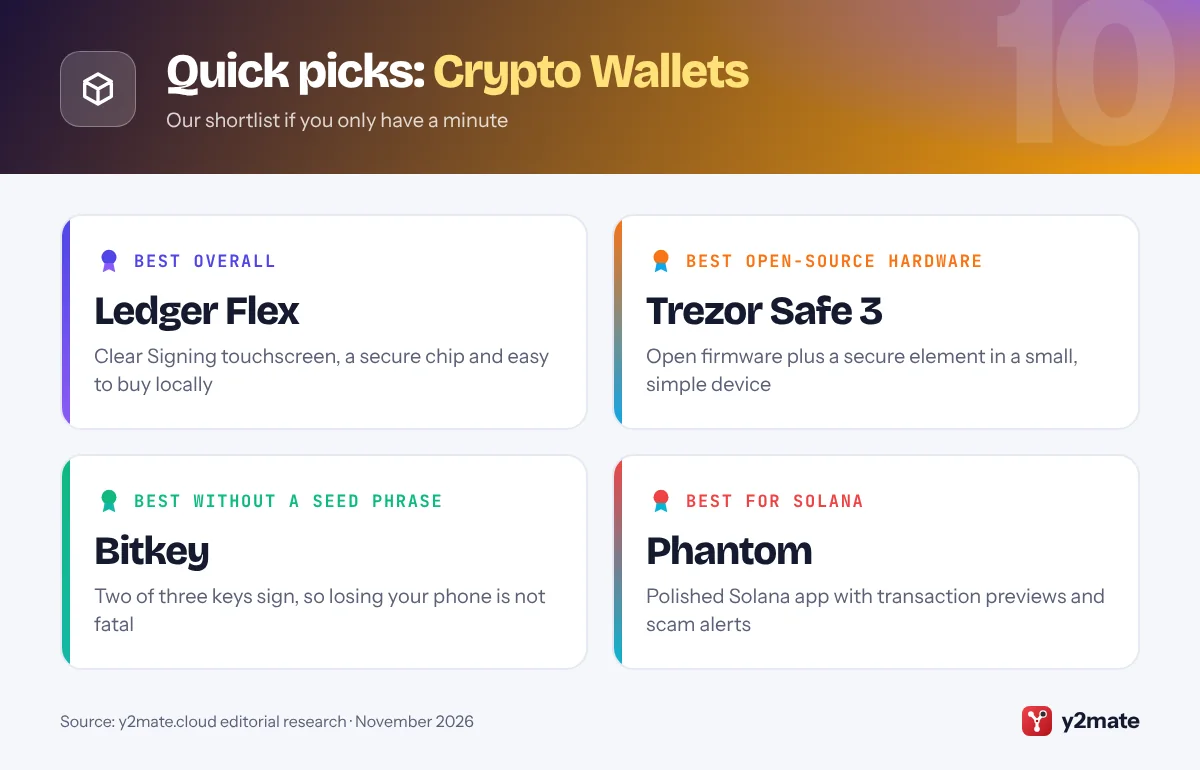
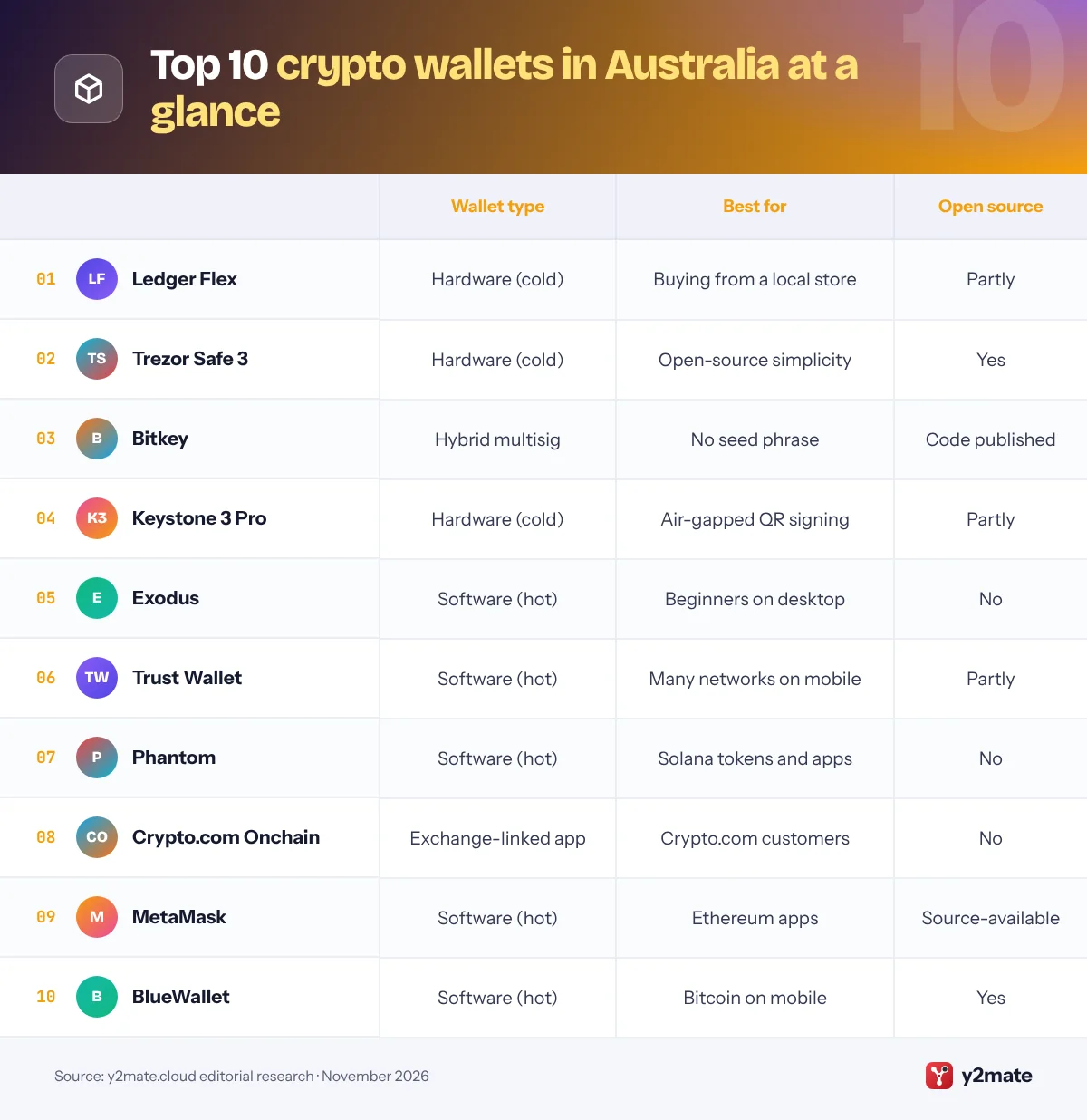
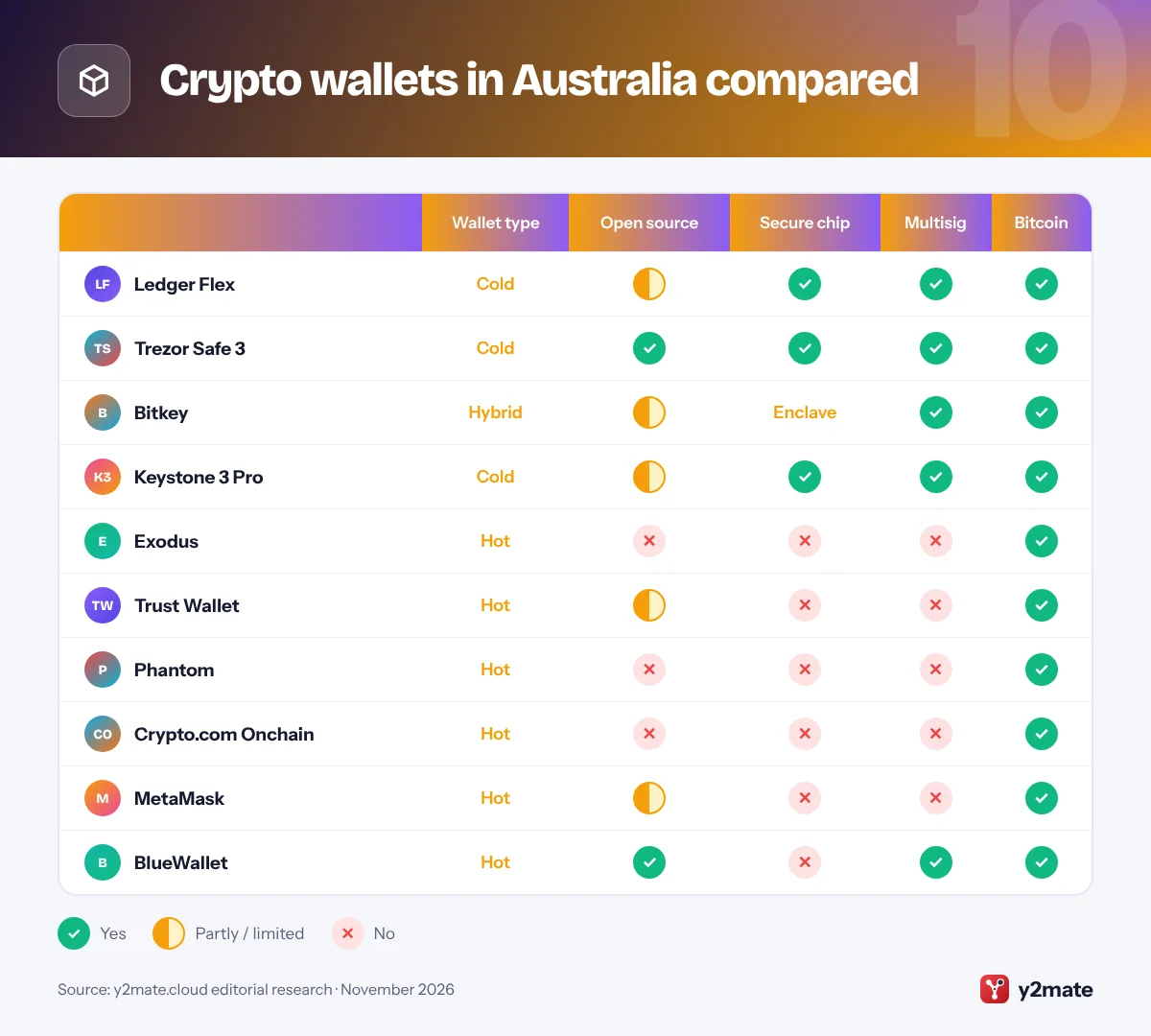
The best crypto wallets in Australia in 2026 are the Ledger Flex for a secure touchscreen device you can buy from major local retailers, the Trezor Safe 3 for open-source security in a simple button-operated design, and Bitkey for bitcoin savers who would rather not manage a seed phrase. Keystone 3 Pro, Exodus, Trust Wallet, Phantom, Crypto.com Onchain, MetaMask and BlueWallet complete the list, and all ten are available to Australians through official channels.
A few plain definitions. A crypto wallet stores the private keys that control your coins on a blockchain, not the coins themselves. Self-custody means you hold those keys rather than an exchange. Most wallets back them up as a seed phrase, a list of words that can restore the wallet anywhere, so anyone who sees it can empty it. A hardware wallet is a small device that keeps keys offline, making it a cold wallet, while a phone app or browser extension is a hot wallet because its keys sit on a device connected to the internet.
Since 1 July 2026, Australian exchanges have applied the travel rule, which requires them to collect and pass on details about who sends and receives crypto transfers. Self-custody is not covered by the Financial Claims Scheme. This article is general information, not financial advice.
How we ranked this list
Every wallet here was judged on publicly documented facts: its custody type (hardware, software or exchange-linked), whether its code is open source, the blockchains it supports, and security features such as a secure element chip, passphrase support and multisignature (multisig) set-ups. We also considered how easy it is to use and whether it is officially sold in Australia, either directly or through local retailers and resellers the maker names.
These are not lab results: we did not test the wallets ourselves, and prices are left out because they change often. Check the maker’s official website for current models and authorised sellers before you buy.
The Top 10 Crypto Wallets
1. Ledger Flex
Best for: a touchscreen device sold by local retailers
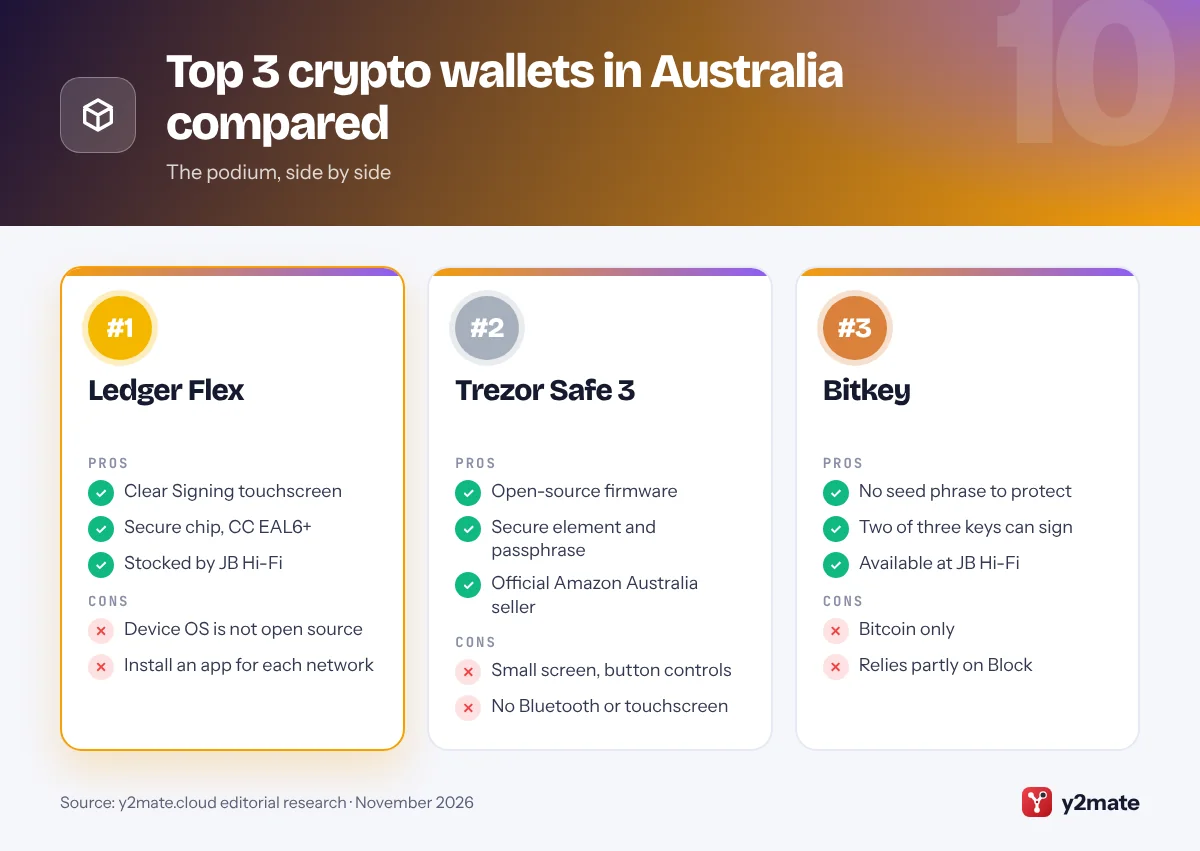
Ledger’s Flex is the mid-sized touchscreen hardware wallet from the French company, sitting between the compact Nano Gen5 and the larger Stax. Its E Ink touchscreen is big enough to read transaction details comfortably, and Ledger’s Clear Signing turns complex smart-contract requests into plain language, so you can see what you are approving before you confirm it on the device.
Keys are stored in a secure element chip certified to CC EAL6+. The Flex connects to phones by Bluetooth and computers by USB-C, and uses NFC with the Ledger Recovery Key, a PIN-protected backup card that comes in the box. Ledger Wallet, the app formerly called Ledger Live, manages your accounts, and the Flex also works with MetaMask, Phantom, Crypto.com Onchain and many other wallets across bitcoin, Ethereum, Solana and beyond.
In Australia, Ledger devices are stocked by JB Hi-Fi as well as Ledger’s own online store, so it is easy to buy from a known source rather than an unknown marketplace seller. The catch is that Ledger’s secure element operating system is not open source, so you trust the company and its chip certification rather than code you can inspect yourself.
Official site: Ledger Flex
- Clear Signing touchscreen
- Secure chip, CC EAL6+
- Stocked by JB Hi-Fi
- Device OS is not open source
- Install an app for each network
2. Trezor Safe 3
Best for: open-source security without extra features
The Safe 3 is Trezor’s entry model and the successor to the original Model One, which Trezor stopped selling through its online shop in January 2026. It is a small device with two buttons and a monochrome screen, connected by USB-C, and it pairs Trezor’s open-source firmware with a secure element chip certified to EAL6+, which protects your PIN and keys if the device is lost or stolen.
It offers the same backup choices as Trezor’s touchscreen models, including passphrases and multi-share backups that split your recovery words into several parts, and there is a Bitcoin-only edition. Trezor Suite handles setup and everyday use, and the Safe 3 also works with Sparrow, Electrum, MetaMask and Exodus, so you can change software later without changing devices.
The small screen and buttons make long addresses slower to check than on a touchscreen device. Trezor lists Amazon Australia among its official resellers, alongside its own online shop, so buy from one of those rather than an unlisted seller. A genuine device never arrives with recovery words already filled in.
Official site: Trezor Safe 3
- Open-source firmware
- Secure element and passphrase
- Official Amazon Australia seller
- Small screen, button controls
- No Bluetooth or touchscreen
3. Bitkey
Best for: bitcoin savings without a seed phrase
Bitkey, from Block, the company behind Cash App and Square, takes the seed phrase out of the picture. Your bitcoin sits in a 2-of-3 multisig wallet: one key lives in the Bitkey phone app, one in the Bitkey hardware device and one on Block’s servers, and any two can approve a transaction. Losing one key, such as your phone, can therefore be fixed rather than becoming a disaster.
You confirm sensitive actions with a fingerprint on the hardware device, which talks to your phone over NFC. Block cannot move your funds by itself because it holds only one of the three keys, and an inheritance feature lets you name a beneficiary. Block has published the source code for the firmware, app and server, though under a licence that limits commercial reuse.
Bitkey is bitcoin-only and relies partly on Block’s recovery service, so it is not for people who hold other coins or want no company involved at all. In Australia it is sold through its own website and JB Hi-Fi, which lists the second-generation device.
Official site: Bitkey
- No seed phrase to protect
- Two of three keys can sign
- Available at JB Hi-Fi
- Bitcoin only
- Relies partly on Block
4. Keystone 3 Pro
Best for: air-gapped signing with QR codes
Keystone’s 3 Pro is built around one idea: your keys should never share a data connection with an internet-connected device. It has no Bluetooth, NFC or USB data link. Instead, your wallet app shows a QR code, the Keystone’s camera reads it, you approve on its touchscreen, and the device displays a signed QR code for the app to scan back.
Three secure element chips and a fingerprint sensor protect the device. It works with well-known software wallets, including MetaMask and Rabby for Ethereum networks and Sparrow for bitcoin, where it can also be one signer in a multisig vault, and it supports Solana through compatible wallets. A bitcoin-only firmware option is available if you want the smallest possible codebase.
Keystone publishes its firmware code, but parts such as the secure element software remain closed, so it is only partly open source. Scanning codes back and forth is slower than tapping approve on a Bluetooth device, which matters if you transact often. Buy from Keystone’s official store, which ships internationally, or a reseller listed on its website.
Official site: Keystone 3 Pro
- Air-gapped by design
- Three secure chips
- Works with MetaMask and Sparrow
- Partly open source
- QR signing takes longer
5. Exodus
Best for: beginners who want a polished desktop app
Exodus is a self-custody wallet for desktop and mobile with one of the friendliest designs in crypto. Its portfolio screen, built-in swaps through third-party providers and clear send and receive screens make it approachable for people moving crypto off an Australian exchange for the first time. It supports bitcoin, Ethereum, Solana and many other networks.
For better security, Exodus works with Trezor hardware wallets. You can connect Trezor devices to Exodus Desktop, and Exodus Mobile supports the Trezor Safe 7 over Bluetooth, so the keys stay on the Trezor while you use the Exodus interface. The company behind it is listed on the NYSE American exchange in the US.
Exodus is not open source, so you rely on the company’s own security practices, and swaps go through outside providers that set their own rates. Scammers often pose as Exodus support on social media, so seek help only through the help centre on exodus.com, and never share your recovery phrase with anyone who messages you.
Official site: Exodus
- Polished desktop and mobile apps
- Works with Trezor devices
- Built-in swaps
- Not open source
- Hot wallet on its own
6. Trust Wallet
Best for: holding many networks in one mobile app
Trust Wallet is a free mobile wallet, with a browser extension, that lets you hold bitcoin, Ethereum, Solana, BNB Chain tokens and many other assets in one place. Binance owns it, but it is a self-custody wallet: your keys stay on your device, and you do not need a Binance account to use it.
Its built-in browser connects you to apps on mobile, and swaps run through third-party providers. Its Wallet Core library, which handles the cryptography, is open source, although the app as a whole is not. You protect access with a passcode or biometrics, and the recovery phrase it creates is your only backup.
In December 2025, a tampered version of the Trust Wallet Chrome extension, version 2.68, was pushed to the Chrome Web Store and stole funds from some users. The mobile app was not affected, and Trust Wallet released a fix and pledged to reimburse those affected. It is a reminder to update browser extensions promptly, install as few as you can and keep larger amounts on a hardware wallet.
Official site: Trust Wallet
- Huge range of networks
- Simple mobile setup
- No Binance account needed
- App is not fully open source
- Extension breach in 2025
7. Phantom
Best for: Solana tokens and apps
Phantom is the best-known wallet for Solana, the fast network behind many popular apps and token launches, and it now also supports Ethereum, bitcoin, Base, Polygon and a few other networks in the same app. It runs on iPhone and Android and as a browser extension, with a clean design that suits newcomers.
Phantom previews what a transaction will do before you sign it and warns about known malicious sites and tokens, which matters on Solana, where scam tokens and fake airdrops are common. ASIC’s Moneysmart warns that a mystery token appearing in your wallet can be a trap that drains your real tokens if you try to sell it; Phantom lets you hide unwanted tokens instead of interacting with them.
Its code is not open source, and its network list changes: Phantom dropped Sui and Monad in 2026, so check before sending anything unusual. For larger balances, connect a Ledger so the keys stay offline while you keep using Phantom’s interface.
Official site: Phantom
- Polished Solana experience
- Transaction previews and alerts
- Pairs with Ledger
- Not open source
- Supported networks change
8. Crypto.com Onchain
Best for: Crypto.com customers wanting their own keys
Crypto.com Onchain, called the DeFi Wallet until a 2024 rename, is the self-custody wallet from Crypto.com, one of the larger exchanges serving Australians. It is a separate product from the Crypto.com App: the keys are generated and stored on your device, and you do not need a Crypto.com account to use it.
It supports bitcoin, Ethereum, Solana, Cronos and many other networks, runs on iPhone and Android and as a Chrome extension, and pairs with Ledger hardware wallets. If you already use the Crypto.com App, moving some crypto across to Onchain is a simple way to learn self-custody with a familiar brand, while keeping trading funds on the exchange.
Onchain is not open source, and its optional cloud backup of your recovery phrase trades some security for convenience, so weigh that choice carefully. Under AUSTRAC’s travel rule, a withdrawal from the Crypto.com App to any self-hosted wallet, including Onchain, may prompt questions about who owns the wallet.
Official site: Crypto.com Onchain
- Keys stay on your device
- No exchange account needed
- Pairs with Ledger
- Not open source
- Cloud backup adds risk
9. MetaMask
Best for: Ethereum apps with Solana and bitcoin built in
MetaMask, made by Consensys, is a standard choice for Ethereum apps on desktop browsers and is also available on iPhone and Android. Its multichain accounts, introduced in late 2025, put an Ethereum-compatible address, a Solana address and a bitcoin address under one account, so you can manage several ecosystems without juggling separate apps.
MetaMask can connect to Ledger, Trezor and Keystone hardware wallets, letting you sign with keys stored offline. Its code can be read publicly but is licensed with commercial restrictions, so it is source-available rather than open source. Buying crypto inside the app relies on third-party providers, which run their own identity checks.
Scammers copy MetaMask more than almost any other wallet, with fake extensions, fake support staff and phishing pages that ask for your Secret Recovery Phrase. Moneysmart advises against signing any request that shows only raw code or numbers you cannot read. Install MetaMask only from metamask.io, and keep larger holdings on a hardware wallet.
Official site: MetaMask
- Widely supported by apps
- Works with hardware wallets
- Ethereum, Solana and bitcoin
- Keys live on your device
- Common target for phishing
10. BlueWallet
Best for: open-source bitcoin on your phone
BlueWallet is a free, open-source bitcoin wallet for iPhone and Android that suits both newcomers and more advanced users. It covers the basics well, with clear sending and receiving, and adds features usually found in desktop software, such as watch-only wallets that track a balance without holding keys, and coin control.
Its standout feature is the multisig vault, which requires signatures from several keys or hardware wallets before bitcoin can move. BlueWallet works with hardware wallets that sign by QR code, such as Keystone, and you can connect it to your own node for extra privacy.
BlueWallet closed its hosted Lightning service in 2023, so Lightning payments now need your own node or a self-hosted setup. It is bitcoin-only and, used on its own, a hot wallet, so pair it with a hardware wallet or a multisig vault for larger sums. Download it only through links on bluewallet.io, because copycat apps can appear in app stores.
Official site: BlueWallet
- Open source and free
- Multisig vaults on mobile
- Watch-only and coin control
- Bitcoin only
- Lightning needs your own node
Crypto wallets in Australia compared
How to choose between crypto wallets in Australia
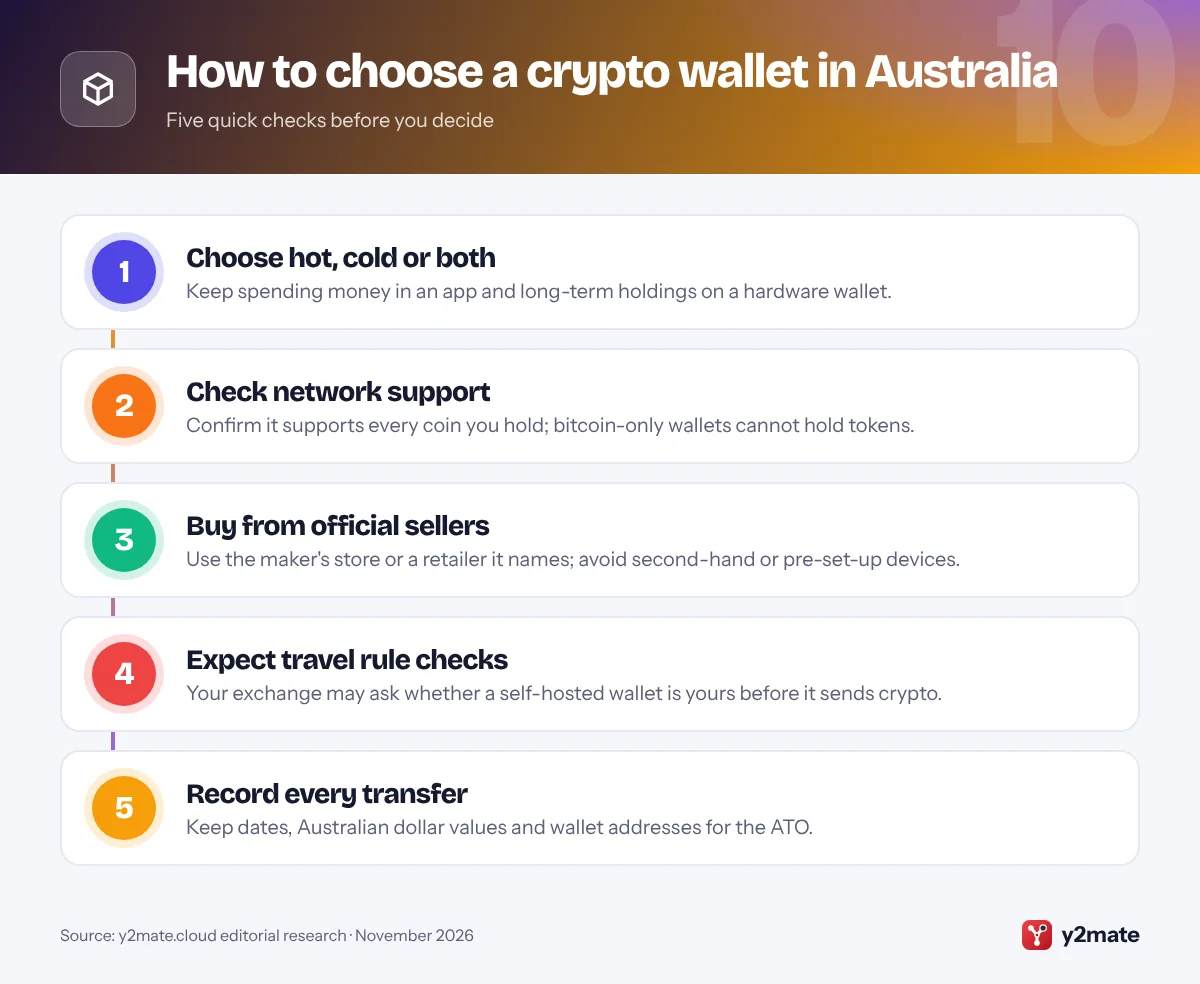
Decide how much you will keep in self-custody and how often you will move it. A hardware wallet such as the Ledger Flex, Trezor Safe 3, Keystone 3 Pro or Bitkey suits savings, while Exodus, Trust Wallet, Phantom or MetaMask suit everyday use. Most people end up with one of each.
Withdrawing from an Australian exchange
- Travel rule: AUSTRAC’s expanded anti-money-laundering rules began on 31 March 2026, and travel rule obligations for crypto transfers started on 1 July 2026. Exchanges must collect details about transfers, including to self-hosted wallets, so expect to be asked who owns a wallet.
- More to come: from 31 March 2029, exchanges must also report certain transfers involving self-hosted wallets they have not verified.
- No government guarantee: the Financial Claims Scheme covers bank deposits only, so crypto in your own wallet has no backstop.
Scams to watch for
Scamwatch has warned about criminals posing as police or exchange staff who pressure people to move crypto to a so-called safe wallet that the scammer controls. Moneysmart also warns about fake wallet websites and signature requests you cannot read. Never share your seed phrase, and report scams to Scamwatch and ReportCyber.
Keep records for the ATO
The ATO says moving crypto between wallets you own is not a disposal, but you still need records of every transaction, including dates, Australian dollar values and wallet addresses. Crypto tax software can help match transfers across your wallets and exchanges.
Frequently asked questions
What is the best crypto wallet in Australia?
For most Australians, the best setup is a hardware wallet for savings, such as the Ledger Flex, which JB Hi-Fi stocks, or the open-source Trezor Safe 3, plus a software wallet for everyday use, such as Exodus, Trust Wallet, Phantom or MetaMask. If you hold only bitcoin and dread losing a seed phrase, Bitkey's two-of-three key design is the simplest option.
How does the travel rule affect withdrawals to my own wallet?
Since 1 July 2026, Australian exchanges have had to apply the travel rule to crypto transfers, collecting information about the sender and recipient. When you withdraw to a self-hosted wallet, the exchange may ask whether the wallet belongs to you or someone else and may ask you to show you control it. Transfers can be delayed if the exchange cannot get what it needs.
Is crypto in my own wallet protected by the government?
No. The Financial Claims Scheme protects deposits at banks and other authorised deposit-taking institutions, not crypto, whether it sits on an exchange or in your own wallet. Self-custody protects you from an exchange collapse, but if you lose your seed phrase or approve a scam transaction, there is usually no way to recover the funds.
Where should I buy a hardware wallet in Australia?
Buy directly from the maker's official website or from a seller the maker names. Trezor lists Amazon Australia among its official resellers, and JB Hi-Fi stocks Ledger and Bitkey devices. Avoid second-hand devices and unknown marketplace sellers, and never use a wallet that arrives with a seed phrase already written down or a card asking you to enter one online.
Do I need to report wallet-to-wallet transfers to the ATO?
Moving crypto between wallets you own is not a disposal, so it does not create a capital gain to report. However, the ATO expects you to keep records of every transaction, including transfers, with dates, Australian dollar values and wallet addresses, generally for five years. Selling, swapping or spending crypto can trigger capital gains tax.
Final verdict
The best crypto wallets in Australia start with a hardware device bought from a trusted source: the Ledger Flex for its touchscreen and wide app support, the Trezor Safe 3 for open-source simplicity, or Bitkey if you would rather not manage a seed phrase. Add a software wallet such as Exodus, Trust Wallet, Phantom or MetaMask for everyday use.
Expect travel rule questions when you withdraw from an exchange, keep your seed phrase offline, send a small test first and keep records for the ATO. With self-custody, no one can reverse a mistake, so slow down before every transfer.
Sources and further reading
- AUSTRAC transitional rules for 2026: AUSTRAC explains the 2026 transitional rules, including the 1 July 2026 start of travel rule obligations for virtual asset transfers.
- AUSTRAC summary of the AML/CTF changes: AUSTRAC summarises the 2026 reforms, including new reporting of transfers involving unverified self-hosted wallets from 31 March 2029.
- Moneysmart on crypto scams: ASIC's Moneysmart describes fake wallets, mystery tokens and malicious signature requests, and how to protect your crypto.
- Scamwatch police impersonation alert: Scamwatch warns about scammers posing as police and crypto exchange staff to trick people into handing over their crypto.
- ATO: keeping crypto records: The ATO lists the records you need to keep for crypto transactions, including transfers between your own wallets.

Leave a Reply