
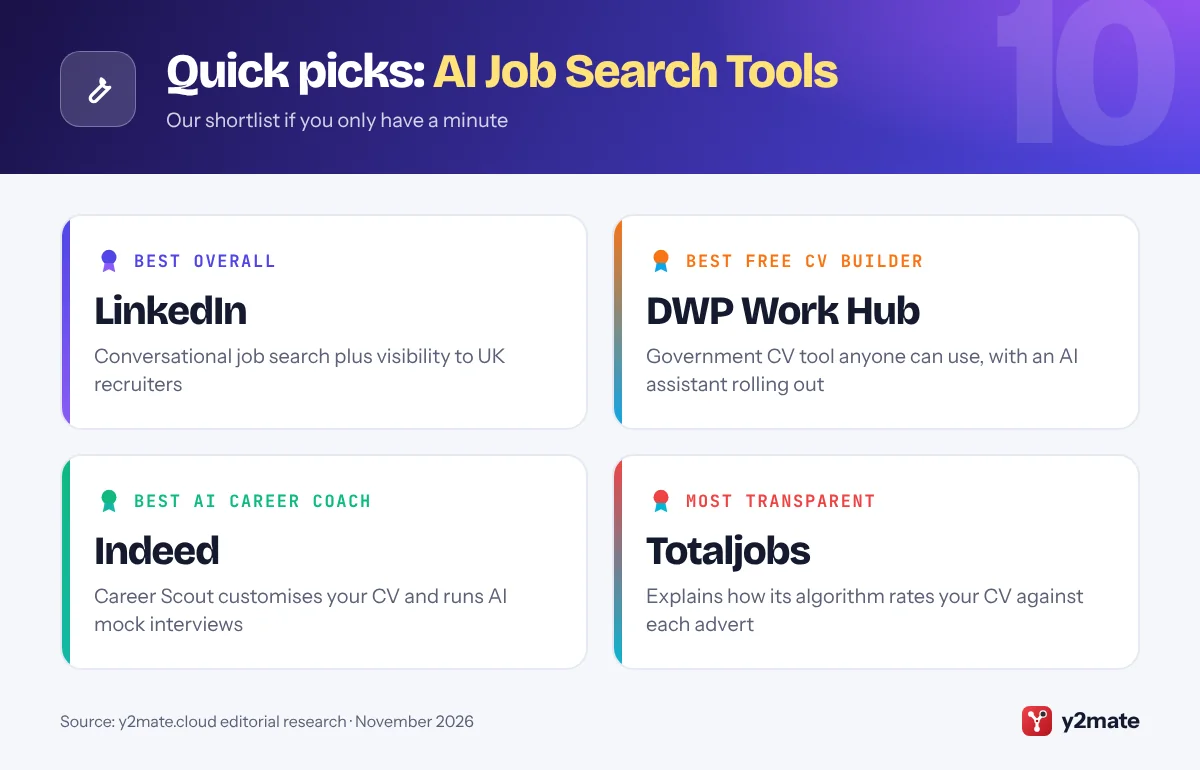
- LinkedIn and Indeed now build AI into job search, and Indeed's free Career Scout coach offers CV help and AI mock interviews in its UK app.
- The DWP's Work Hub, launched in June 2026, offers a free Build a CV tool to everyone and an AI Work Assistant that is being rolled out gradually.
- Since 5 February 2026, UK GDPR safeguards let you make representations, obtain human intervention and contest significant decisions made solely by automated means, such as an automatic CV rejection.
- The Equality Act 2010 requires employers to make reasonable adjustments for disabled candidates, including in AI-based assessments.
- Fake job offers should be reported to Report Fraud, which replaced Action Fraud, or to Police Scotland on 101 if you live in Scotland.
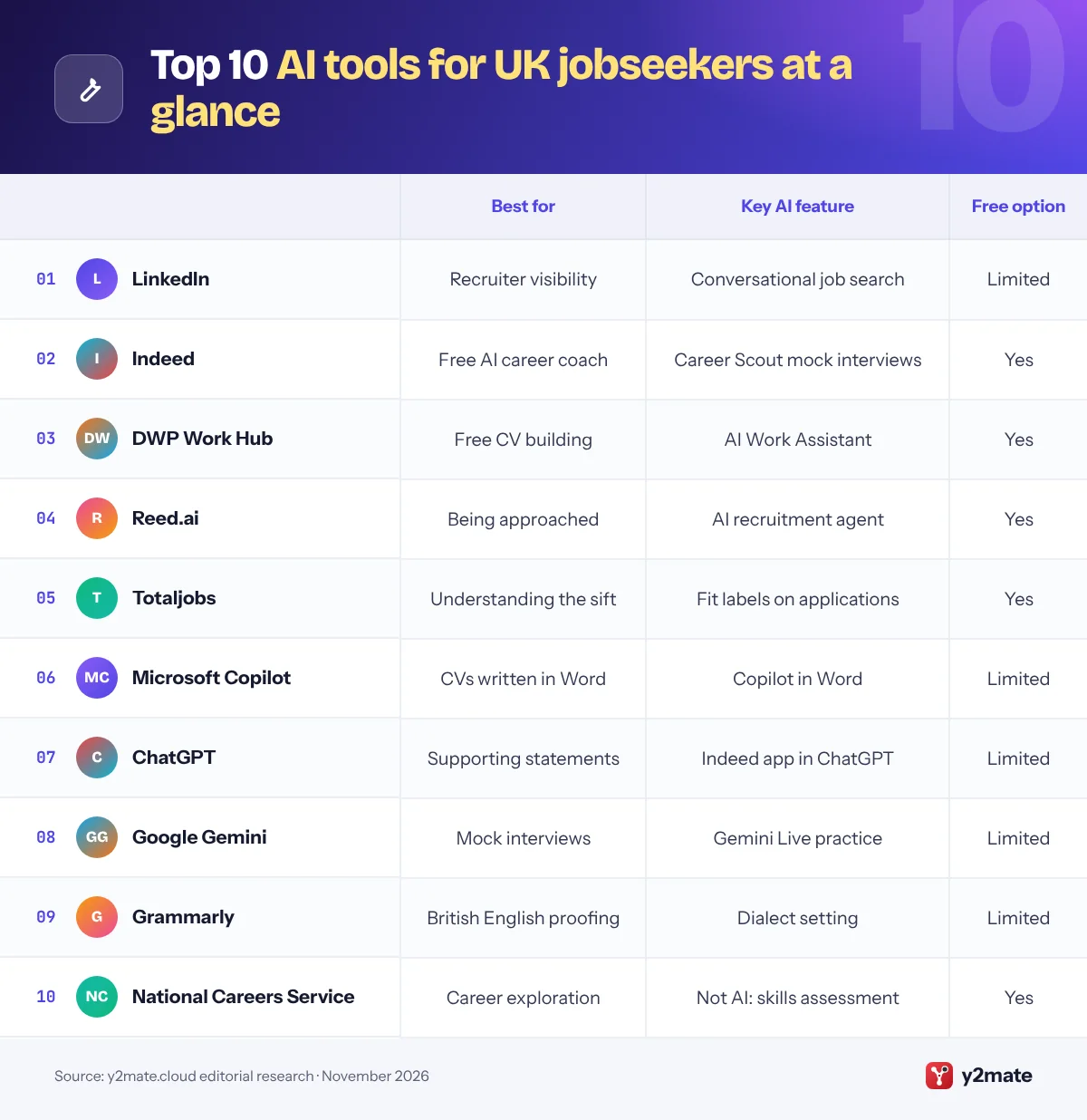
The best AI tools for job seekers in the UK in 2026 are LinkedIn and Indeed for AI-assisted job search, the Department for Work and Pensions’ free Work Hub for building a CV, Reed.ai and Totaljobs for AI job matching, and Microsoft Copilot, ChatGPT and Google Gemini for drafting and interview practice, with Grammarly set to British English for a final check. The National Careers Service completes the list as a free, official way to explore careers.
A few terms first. An applicant tracking system (ATS) is the software employers and agencies use to receive, store and sift applications. Keyword matching means comparing the skills and job titles on your CV with those in the advert, which is how many recruiters search an ATS and how some job boards score applications. An AI interview is one run by software rather than a person, such as a chatbot, a voice agent or a one-way video interview that may be recorded and scored.
UK law gives you real protections. Data protection rules cover decisions made solely by automated means, and the Equality Act 2010 requires reasonable adjustments for disabled candidates. This guide explains those rights, UK CV conventions and where to report fake job offers.
How we ranked this list
We ranked tools only on publicly documented criteria: what each one does for a jobseeker (job search, CV and covering letter help, AI matching, interview practice), whether a free option exists, how well it covers UK vacancies, and what privacy controls it offers, such as hiding your profile or opting out of AI training. Free tools from UK job boards and the government ranked highly because they reach UK employers directly.
We did not test any tool ourselves and do not quote prices, which change frequently. Features differ by plan and device, so check before relying on them.
The Top 10 AI Job Search Tools
1. LinkedIn
Best for: AI job search plus visibility to UK recruiters
LinkedIn is where many UK recruiters and in-house hiring teams search for candidates, so it works as both an AI job search tool and a shop window for your experience. Its AI-powered job search lets you type what you want in everyday language, for example a part-time marketing role in Bristol using your events experience, instead of guessing job titles. LinkedIn says this search is rolling out globally in English and four other languages. Job match insights compare the skills on your profile with each advert, and a job tracker launched in January 2026 shows saved roles alongside people in your network who might refer you.
AI-drafted covering letters and some deeper insights sit behind LinkedIn Premium, so make the most of the free features first.
Two cautions. Your profile is visible by design, so keep it consistent with your CV, because recruiters compare the two. And review the Data for Generative AI Improvement setting under Data privacy, which controls whether your data helps train LinkedIn’s content-creation AI. For visibility with UK recruiters, LinkedIn remains essential.
Official site: LinkedIn
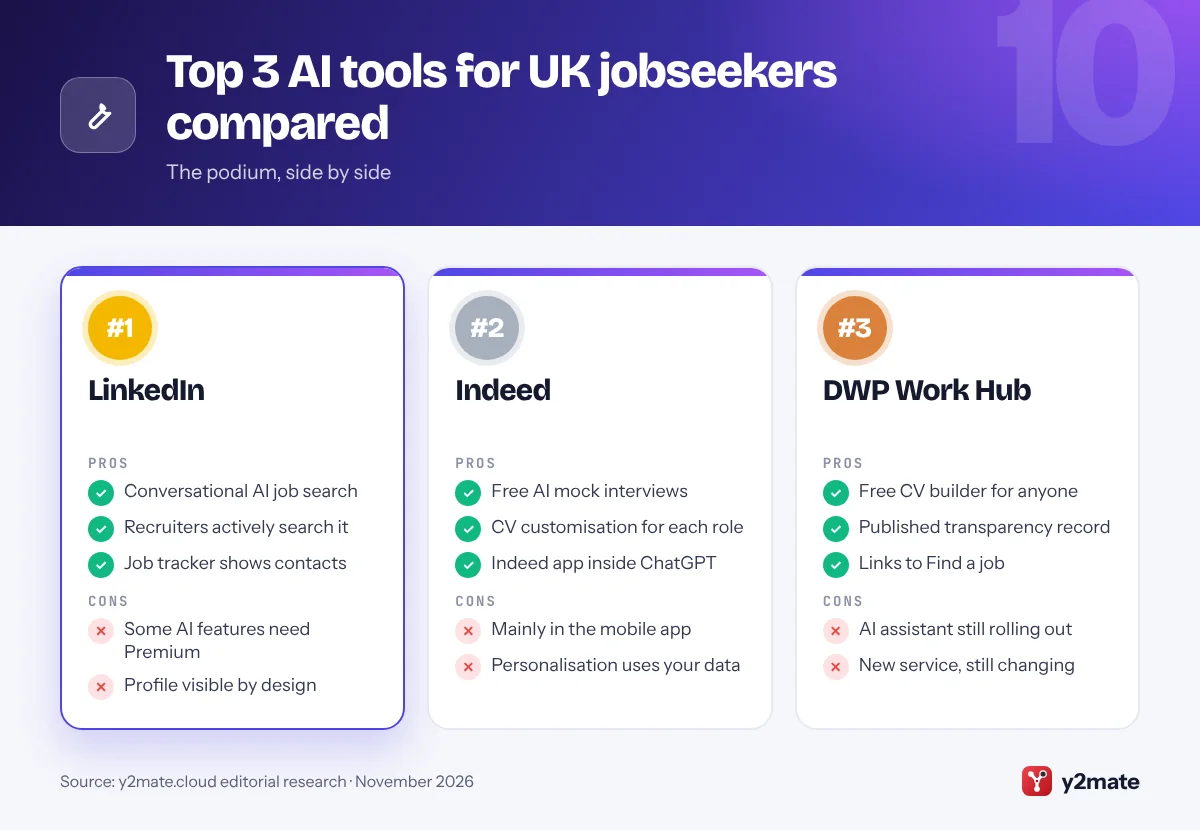
- Conversational AI job search
- Recruiters actively search it
- Job tracker shows contacts
- Some AI features need Premium
- Profile visible by design
2. Indeed
Best for: a free AI coach with CV help and mock interviews
Indeed is one of the UK’s largest job boards, and Career Scout, its AI career coach, is available to UK jobseekers in the Indeed app. It can suggest career paths based on your skills and interests, recommend jobs, answer questions about companies and salaries, help customise your CV for a role and run AI mock interviews with personalised feedback. Indeed says it draws on your Indeed Profile, what you tell it in chat and how you use Indeed, so a complete profile produces more relevant results.
Since April 2026, UK users can also search Indeed through its app inside ChatGPT after linking their account, although applications still go through Indeed.
The trade-off is data. Personalisation works by learning from your activity, so read Indeed’s privacy policy and keep sensitive details, such as health information, out of the chat unless you are discussing an adjustment. Treat its CV edits as suggestions, and keep British spelling and UK job titles. For a free coach linked directly to a big UK job board, Career Scout is the strongest choice.
Official site: Indeed
- Free AI mock interviews
- CV customisation for each role
- Indeed app inside ChatGPT
- Mainly in the mobile app
- Personalisation uses your data
3. DWP Work Hub
Best for: free government CV help and an AI work assistant
Work Hub is the Department for Work and Pensions’ new digital service, launched in June 2026 as part of its Jobs and Careers Service and described by the government as a jobcentre in your pocket. Its Build a CV tool turns your skills, experience and achievements into a CV tailored to the roles you want, and anyone can use it, whether or not they claim benefits. It also connects to the Find a job service, which lists vacancies in England, Scotland and Wales.
The AI Work Assistant is a chatbot that suggests jobs, training and career paths, helps with applications and interview preparation, and builds an action plan. DWP’s algorithmic transparency record says it runs on an Anthropic Claude model through Amazon Bedrock, strips out personal details before processing, does not let your data be used for model training and makes no decisions about benefits. It began as a private beta and is being widened gradually, so you may not see it yet.
It does not replace your work coach, and Universal Credit work search requirements are unchanged. For a free CV builder from a source you can trust, start here.
Official site: DWP Work Hub
- Free CV builder open to anyone
- Published AI transparency record
- Links to Find a job vacancies
- AI assistant still rolling out
- New service, still changing
4. Reed.ai
Best for: letting an AI recruiter pitch you to employers
Reed.ai is an AI recruitment agent from Reed, the long-established UK recruitment group behind reed.co.uk. Instead of scrolling through adverts, you type or talk to it about the kind of role you want, and it asks follow-up questions much as a recruitment consultant would. It then presents an anonymised version of your profile to employers with relevant roles, tells you when one is interested and can schedule interviews for you. Reed says it is free for jobseekers and that an ethical advisory board oversees how it treats people.
There is a privacy point worth knowing. If your reed.co.uk profile is set to discoverable, employers using Reed.ai can ask to view your full profile, although you need a Reed.ai account to accept the request. Check your visibility settings on both sites so you are found only when you want to be.
Because it acts on your behalf, keep your details accurate and reply promptly to employer requests. Reed.co.uk also offers a CV builder and plain-English advice on AI in recruitment. If you would rather be approached than trawl listings, Reed.ai is worth setting up.
Official site: Reed.ai
- Talk or type to an AI recruiter
- Anonymised profile for employers
- Free for jobseekers
- Matches depend on your profile
- Check reed.co.uk visibility
5. Totaljobs
Best for: seeing how an algorithm rates your application
Totaljobs, run by Stepstone Group UK, is a major UK job board and unusually open about its AI. Its terms explain that when you apply, an algorithm compares your CV with the advert, mainly on skills and job titles, and labels you a Strong fit, Good fit or Poor fit for the recruiter, who may use that to prioritise applicants. A separate Probability to Interview feature, shown only to you, places your chances in a High, Medium or Low band with a short explanation covering competition, activity on the advert and how well you match.
If your profile is searchable, an automated recommender may also suggest you to recruiters, and the site uses your profile to recommend jobs and send alerts.
This transparency is genuinely useful, because it shows exactly why tailoring the skills and job titles on your CV matters. You stay in control: you can make your profile non-searchable, and you can edit or delete the CV in your profile if you do not want it scored. For understanding how an automated sift sees you, Totaljobs is the clearest UK example.
Official site: Totaljobs
- Explains its fit scoring
- Private interview-odds band
- Searchability can be switched off
- Recruiters see your fit label
- Scoring centres on skills, titles
6. Microsoft Copilot
Best for: CV and covering letter help inside Word
Microsoft Copilot is Microsoft’s AI assistant, free as an app and on the web, and built into Word for some Microsoft 365 home subscribers. That suits UK jobseekers who keep their CV in Word: you can ask Copilot to rewrite a personal statement, shorten a bullet point or draft a covering letter from your CV and the advert without copying text between apps. Set Word’s proofing language to English (UK) and ask Copilot for British spelling, or it may slip into American forms.
The free Copilot app is also handy for practising competency-based interview questions, which many UK employers structure around the STAR method of situation, task, action and result.
Treat everything it writes as a draft. Copilot can make your experience sound grander than it was, which backfires when an interviewer asks for detail. Review its privacy settings, which include controls over whether your conversations are used for model training, and never paste in your National Insurance number or home address. For people who already work in Word, Copilot is the most seamless option.
Official site: Microsoft Copilot
- Works inside Word
- Free app for interview practice
- Model training controls
- May default to US spelling
- Word features need Microsoft 365
7. ChatGPT
Best for: flexible drafting for any kind of application
ChatGPT, from OpenAI, is a flexible assistant for the writing-heavy parts of UK applications: turning notes into a concise CV, drafting a supporting statement that addresses each point of a person specification, or preparing competency examples. Ask for British English and UK conventions, such as no photo or date of birth, or it may produce a US-style résumé. Voice mode lets you rehearse answers aloud, and the Indeed app inside ChatGPT brings in live UK listings.
Be careful where rules apply. The Civil Service’s guidance for candidates allows AI for refining ideas, researching the organisation and checking spelling, but not for inventing experience, producing generic answers, completing assessments such as situational judgement tests or answering questions during interviews, and applications can be rejected for misuse. Other employers may ask you to declare any AI use.
For privacy, switch off Improve the model for everyone in Data Controls, or use Temporary Chat, which OpenAI says is not used for training. The free plan covers most jobseekers’ needs. For all-round drafting help, ChatGPT is a dependable choice.
Official site: ChatGPT
- Strong at supporting statements
- Voice mode for rehearsal
- Indeed app with UK listings
- Defaults to US conventions
- Generic if used unedited
8. Google Gemini
Best for: spoken mock interviews with instant feedback
Gemini, Google’s AI assistant, is particularly good for interview practice. Gemini Live, its spoken conversation mode in the mobile app, can act as a mock interviewer, asking behavioural questions and giving feedback on the clarity and structure of your answers, which suits the competency-based interviews used by many UK employers. Google’s career coach page also shows Gemini drafting CVs and sample covering letters in Canvas, a side-by-side editing space, plus a Career Coach Gem for exploring transferable skills.
If you use Gmail and Google Docs, Gemini fits into the tools you already have, so adverts, drafts and notes can stay together.
Mind the limits. Its feedback is generic unless you give it the job description and the organisation’s values, and it cannot know what a particular panel wants. Gemini’s Keep Activity setting controls whether your chats are saved and used to improve Google’s services, and Google says Temporary Chats are not used for training. Gemini is free to use, with paid plans for higher limits. For rehearsing out loud before a panel, it is the most natural option.
Official site: Google Gemini
- Gemini Live mock interviews
- Canvas for CV drafts
- Fits Gmail and Google Docs
- Feedback can be generic
- Best features in mobile app
9. Grammarly
Best for: a final British English proofread
Grammarly is a writing assistant that checks spelling, grammar, clarity and tone wherever you type, including browsers, Word and email. Its key setting for UK jobseekers is the English dialect: you can choose British English instead of the default American, so it stops nudging organise towards organize. That matters because a CV with mixed spellings looks careless to UK recruiters. Its generative AI features can also rewrite sentences or adjust tone, though the free plan limits how much of that you can use.
Grammarly’s parent company renamed itself Superhuman in late 2025, but the Grammarly product keeps its name.
Use Grammarly last, not first. Write your CV and covering letter yourself, use a chatbot sparingly for structure, then run Grammarly to catch errors. Do not accept every suggestion, because it can flatten your voice or change technical terms. If you install it on a work device, check that your employer allows it. For a free, quick British English proofread, Grammarly is the easiest tool to add.
Official site: Grammarly
- British English dialect setting
- Works across apps and browsers
- Free plan for basic checks
- Limited AI on free plan
- Can flatten your voice
10. National Careers Service
Best for: free skills checks and official career information
The National Careers Service website, renamed Get careers information and advice from 1 October 2026, is the government’s free careers site for England. It is not an AI tool, but it belongs here as a trusted check on what AI tells you. Its skills assessment, Discover your skills and careers, asks what you enjoy and are good at and suggests careers to compare, and its job profiles explain typical duties, entry routes and training for a wide range of roles.
The service is changing. From 1 October 2026, face-to-face careers advice for adults moved to the DWP Careers Service, and webchat and email support ended, while the website’s digital tools remain. Scotland, Wales and Northern Ireland have their own services in My World of Work, Careers Wales and nidirect.
Use it alongside an AI assistant: ask a chatbot for ideas, then check entry requirements and training against the official job profiles before you commit to a course or a career change. For impartial, ad-free information, it is the best free starting point in England.
Official site: National Careers Service
- Free skills assessment
- Official job profiles
- Impartial and ad-free
- No AI features
- Covers England only
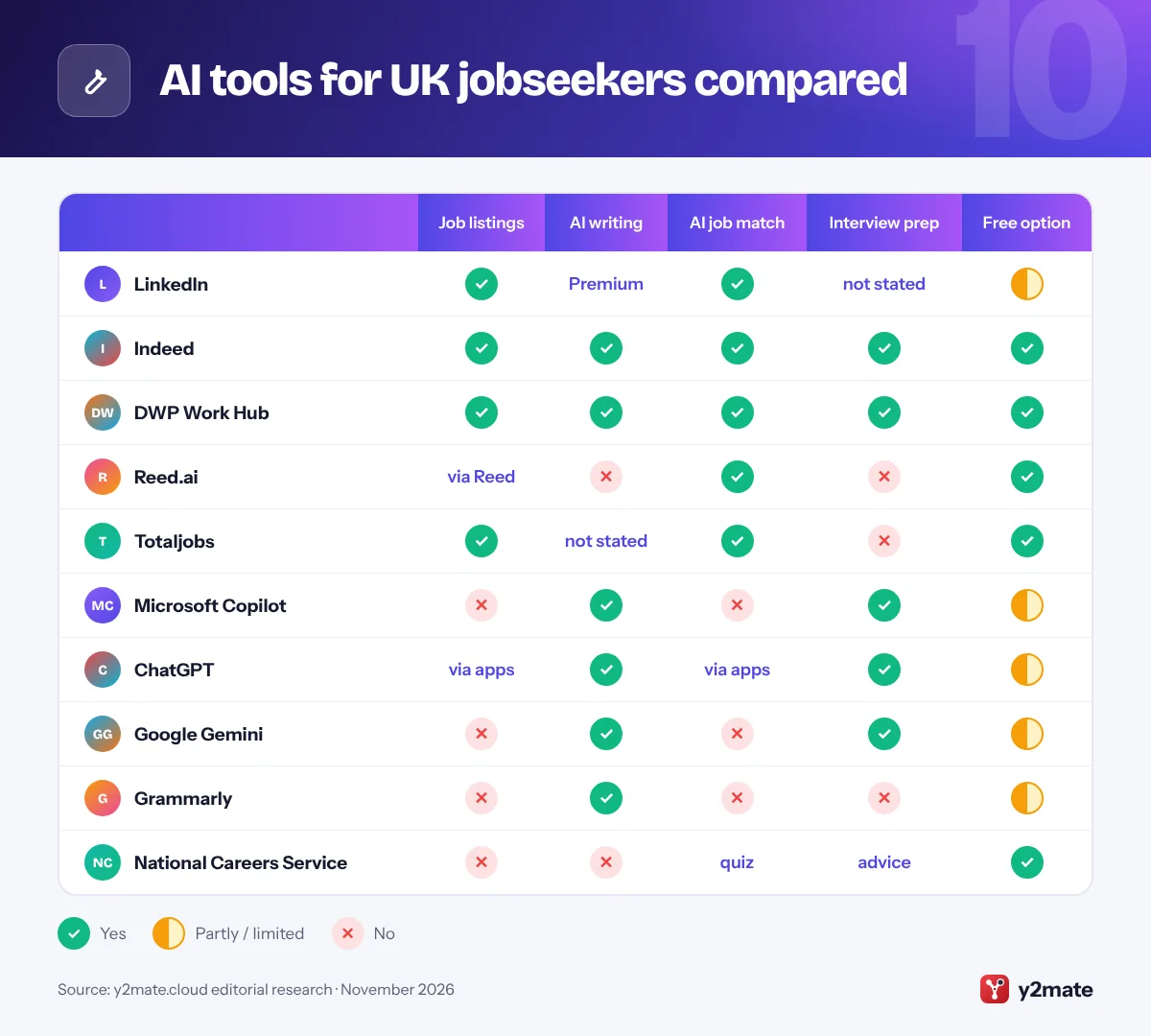
AI tools for UK jobseekers compared
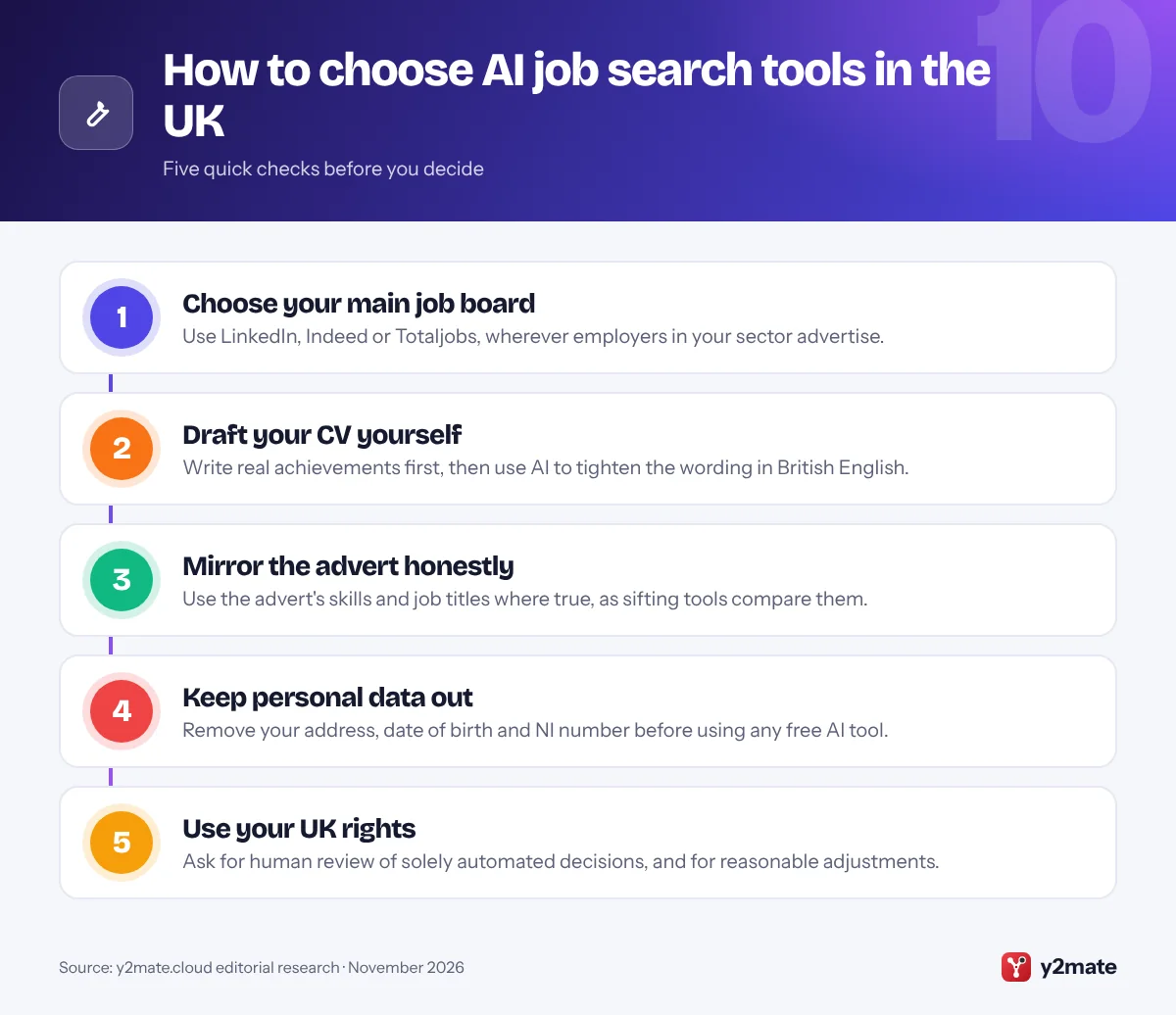
How to choose AI tools for job seekers in the UK
Start with one job board, one assistant and one way to practise interviews. Use AI to structure and polish your own material, not to invent it, and read each employer’s instructions, because some, including the Civil Service, publish rules on acceptable AI use and may ask you to declare it.
Your rights when employers use AI
- Automated decisions: since 5 February 2026, if a significant decision such as rejecting your application is made solely by automated means, UK GDPR safeguards require that you are told and let you make representations, obtain human intervention and contest it.
- Equality Act 2010: employers must not discriminate and must make reasonable adjustments for disabled candidates, for example an alternative to a one-way video interview or extra time on an online test.
- ICO scrutiny: the ICO’s 2024 audits of AI recruitment tools found some could filter candidates by protected characteristics or infer gender and ethnicity from names, and it made recommendations to the providers.
CV conventions and scams
UK CVs are usually no longer than two pages, with no photo, date of birth or marital status, and references can be available on request. Never pay for training, checks or equipment to secure a job. Report fake offers to Report Fraud, which replaced Action Fraud, or to Police Scotland on 101.
Frequently asked questions
What is the best free AI tool for job seekers in the UK?
For a completely free option, the DWP's Work Hub is the best starting point: its Build a CV tool is open to everyone, and its AI Work Assistant is being rolled out. Indeed's Career Scout adds free CV help and mock interviews, while the free versions of Copilot, ChatGPT and Gemini handle drafting. Set every tool to British English.
Can I use ChatGPT to write my CV or job application?
Yes, for structure, wording and spelling, but the content must be true and your own. The Civil Service, for example, allows AI for refining ideas and checking grammar but not for inventing experience, generating generic answers or completing assessments, and it can reject applications that misuse it. Some employers ask whether you used AI, so answer honestly.
Can a UK employer reject me using only AI?
It can, but since 5 February 2026 UK GDPR requires safeguards when a significant decision is made solely by automated means: you must be told, and you can make representations, ask for human intervention and contest the outcome. If a person genuinely reviews the AI's recommendation, those specific rules do not apply, but equality law still does.
Can I ask for an adjustment to an AI interview?
Yes, if a disability affects how you would perform. Under the Equality Act 2010, employers must make reasonable adjustments in recruitment, which could mean extra time, a live interview instead of a one-way video, or a different assessment format. Ask early, explain what you need and keep a written record of your request and the reply.
Where do I report a fake job offer in the UK?
Report it to Report Fraud, the national fraud reporting service run by the City of London Police that replaced Action Fraud, or to Police Scotland on 101 if you live in Scotland. Report the advert to the job site too. Warning signs include upfront fees, interviews held only by text or chat, and requests for bank details before any offer.
Final verdict
For most people, the best AI tools for job seekers in the UK are LinkedIn for visibility, Indeed’s Career Scout for free coaching and the DWP’s Work Hub for a trustworthy CV builder, with Copilot, ChatGPT or Gemini for drafting and practice and Grammarly for a British English proofread. Reed.ai and Totaljobs show how AI matching works from the recruiter’s side.
Keep your CV truthful, keep personal data out of free tools, and use your rights to human intervention and reasonable adjustments if an algorithm stands between you and the job.
Sources and further reading
- ICO audit of AI recruitment tools: The Information Commissioner's Office reports what its audits of AI recruitment tools found and what it asked providers to change.
- UK GDPR Article 22C safeguards: The legal text of the safeguards for significant decisions made solely by automated means, including human intervention and the right to contest.
- DWP Work Hub transparency record: The government's algorithmic transparency record explains how the Work Hub AI Work Assistant works, what data it uses and its safeguards.
- Civil Service guide to AI: The Civil Service sets out acceptable and unacceptable uses of AI tools by candidates when applying and preparing for interviews.
- Report Fraud service: The national service run by the City of London Police, which replaced Action Fraud, for reporting fraud such as fake job offers.

Leave a Reply