
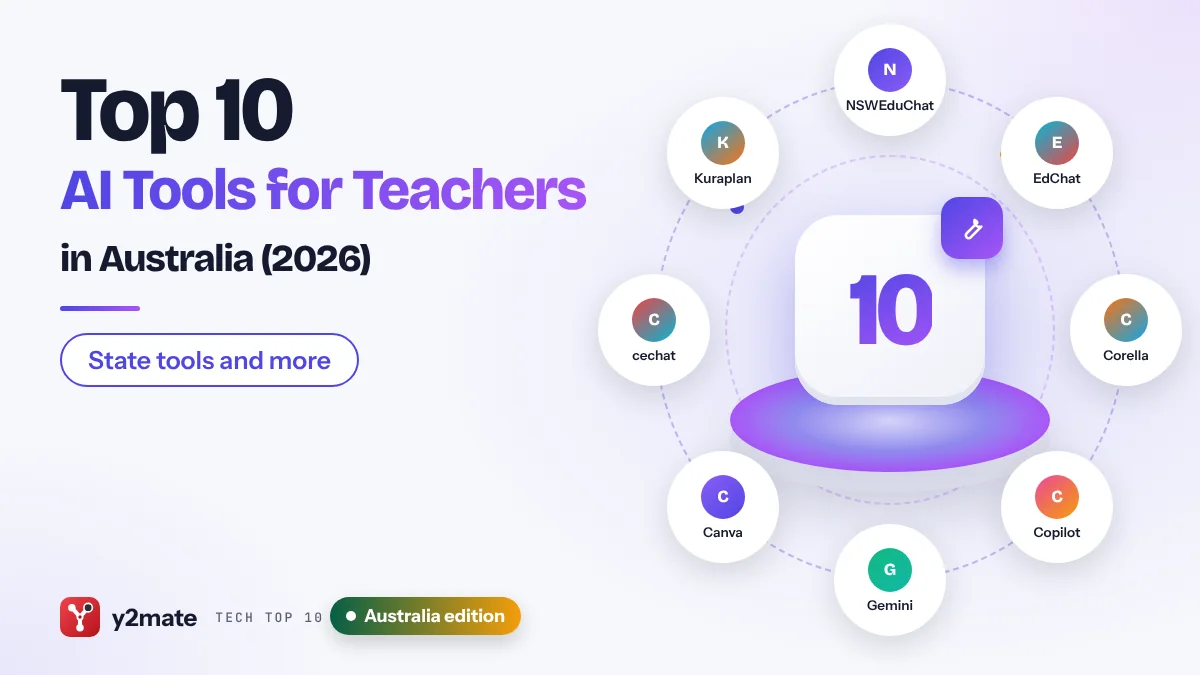
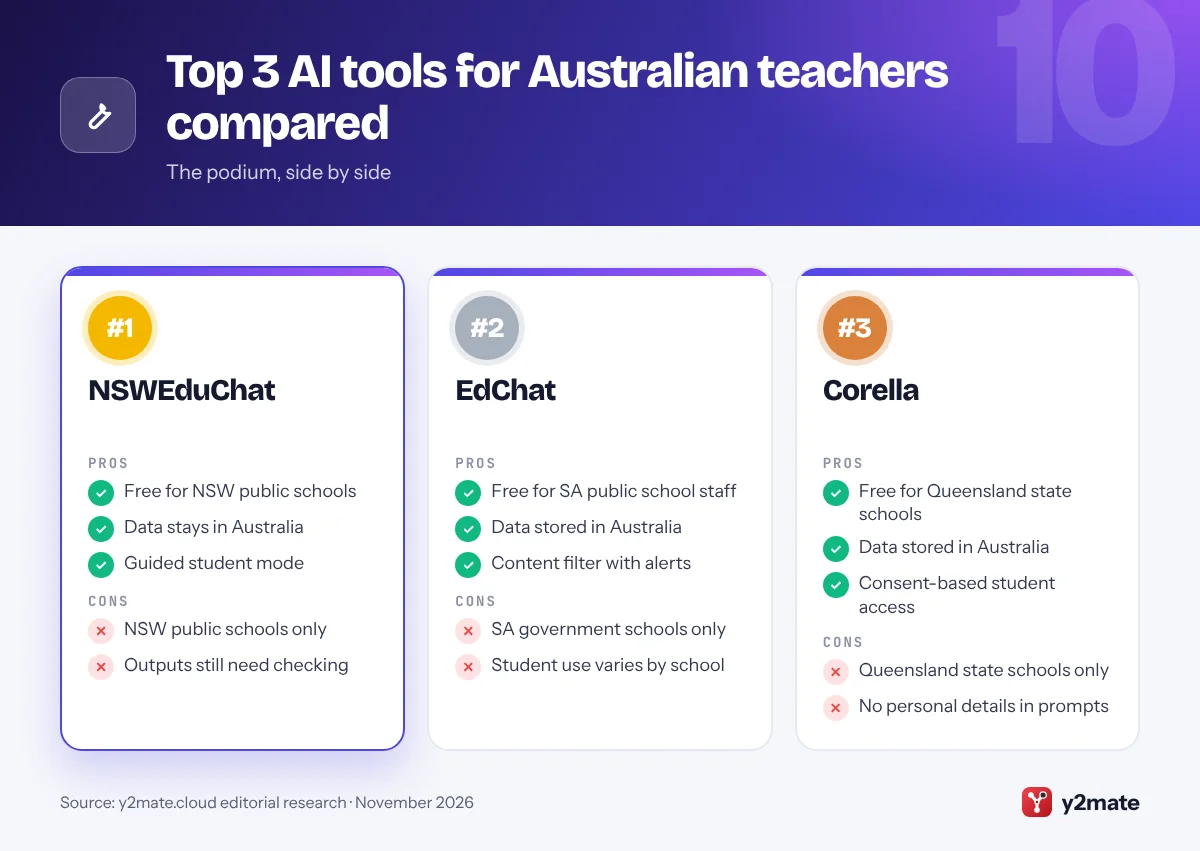
- Public school teachers in NSW, South Australia and Queensland have free department-built AI tools, NSWEduChat, EdChat and Corella, which store data in Australia.
- NSWEduChat is available to NSW public school staff and to students in Years 5 to 12, and the department says user input is not used to train it.
- The Australian Framework for Generative AI in Schools sets six principles for every school sector, including privacy, security and safety.
- The OAIC recommends, as best practice, not entering personal information into publicly available generative AI tools.
- Microsoft and Google both say school-account data in Microsoft 365 Copilot Chat and Gemini for Education is not used to train their AI models.
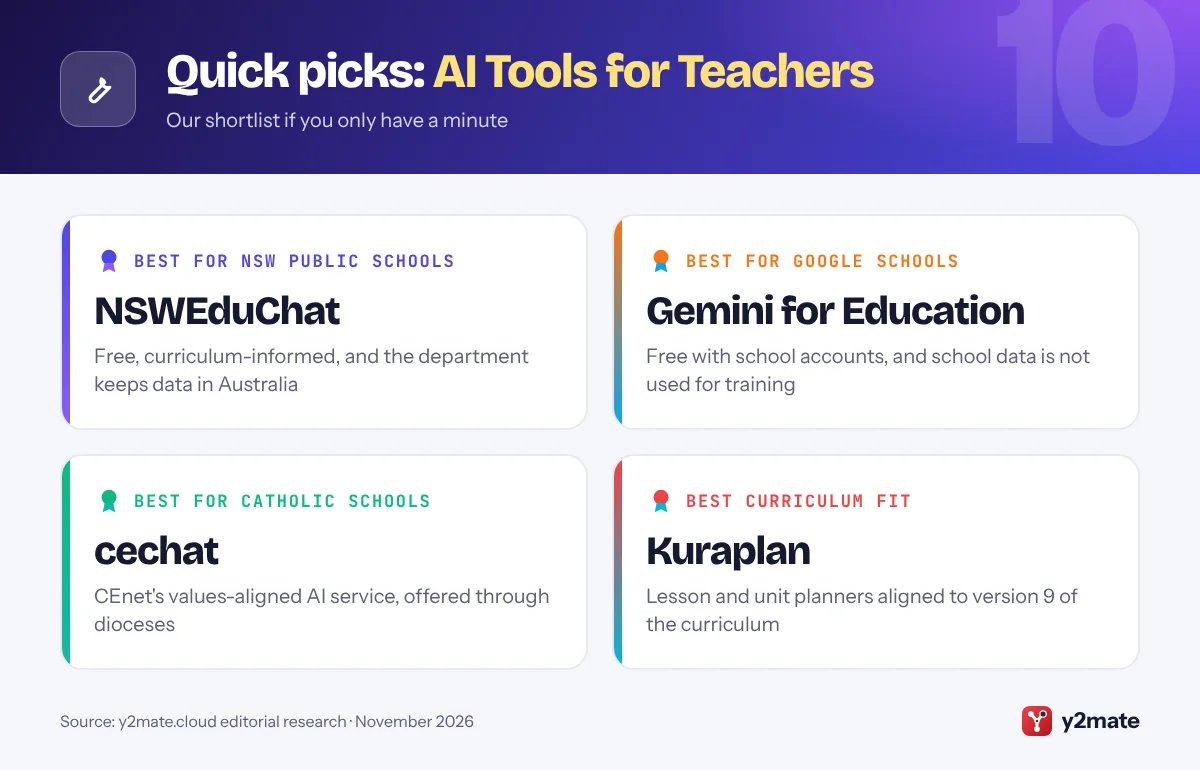
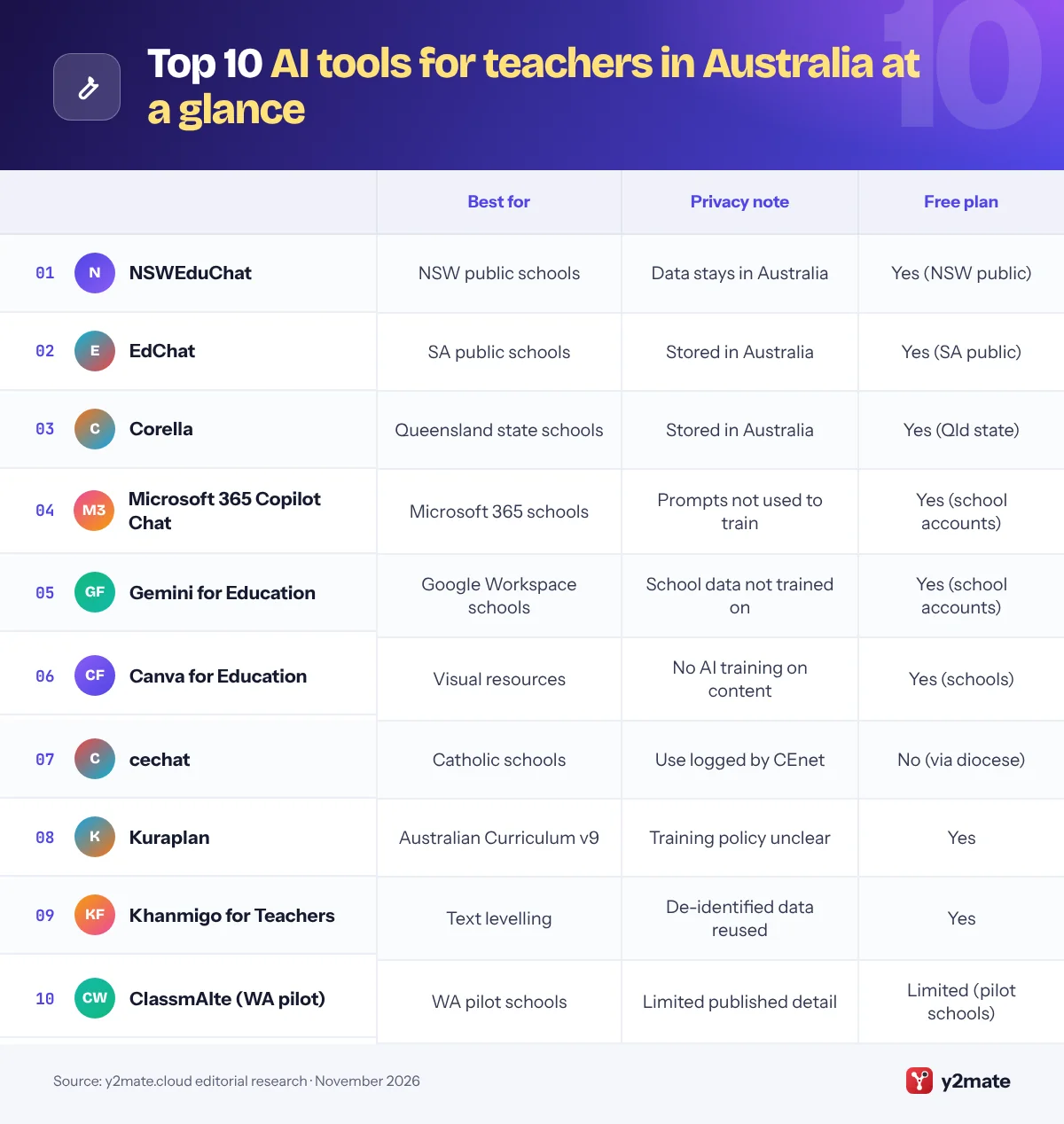
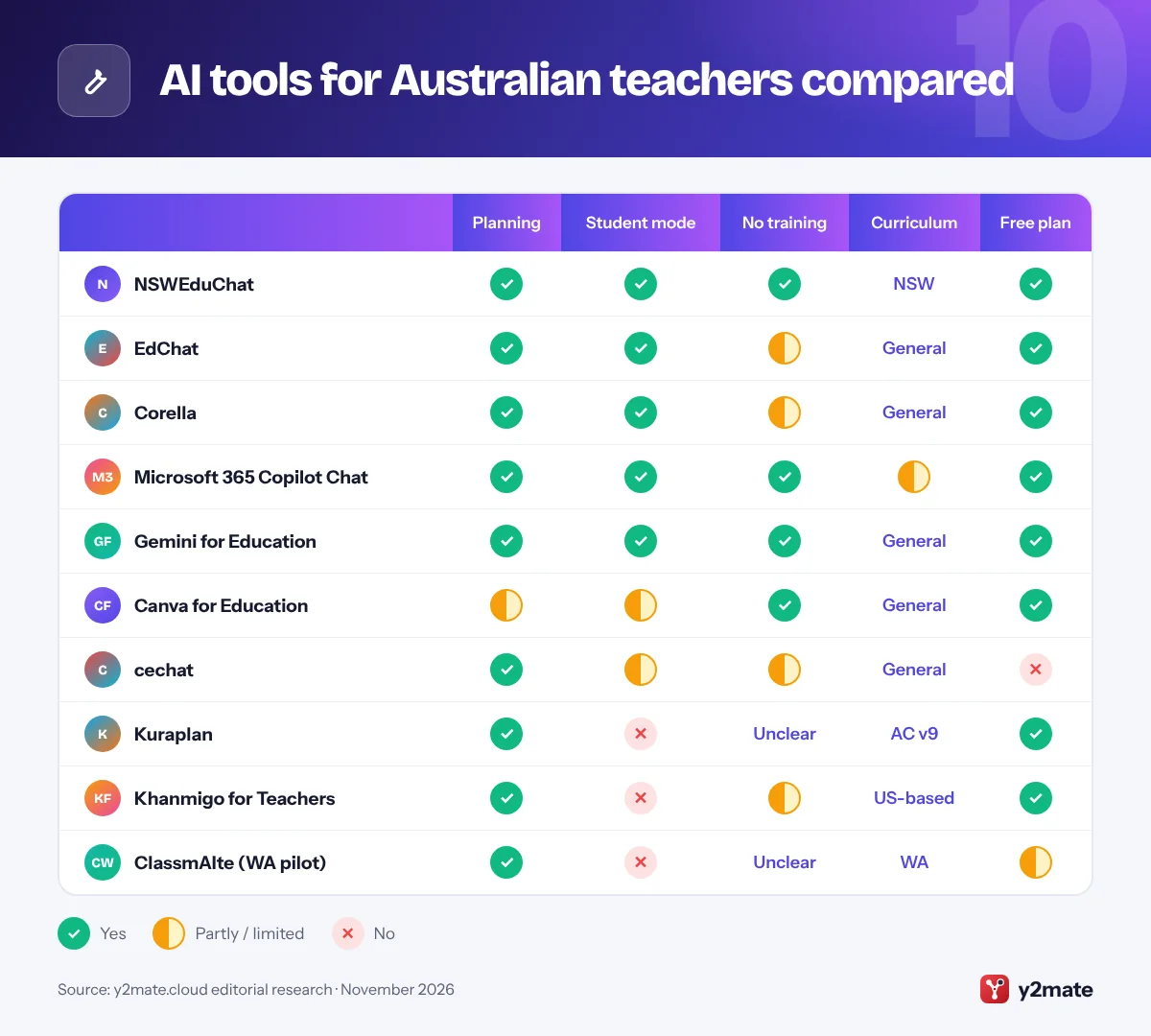
The best AI tools for teachers in Australia in 2026 depend on where you teach. Public school teachers in New South Wales, South Australia and Queensland have free, department-built assistants in NSWEduChat, EdChat and Corella, which keep data in Australia, and many Catholic school staff can use cechat. Every teacher can also use Microsoft 365 Copilot Chat or Gemini for Education through a school account, plus Canva for Education, Kuraplan and Khanmigo for Teachers, while WA pilot schools have ClassmAIte.
Three quick definitions. Generative AI is software that creates new text, images or other content from a typed instruction, called a prompt. Differentiation means adjusting a lesson so students with different abilities, reading levels or language backgrounds can reach the same learning goal. AI detection tools try to tell whether writing came from a chatbot, but they can wrongly flag a student’s own work and miss edited AI text, so they cannot prove misuse.
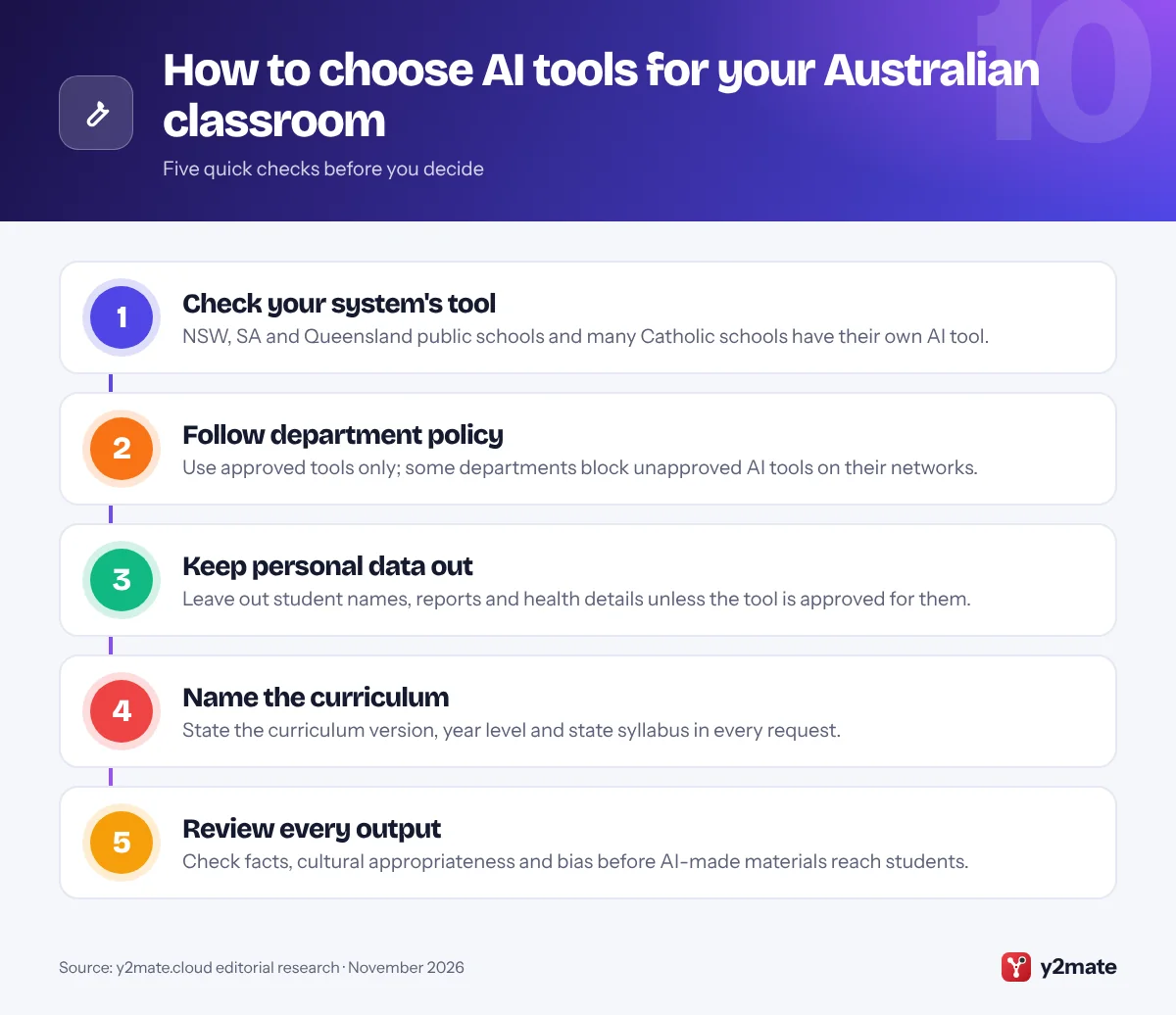
Whatever you use, follow your department, diocese or school policy, which in government schools usually means staying with approved tools, and check every output against the Australian Curriculum or your state syllabus.
How we ranked this list
We ranked tools only on publicly documented criteria: what each one does for planning, feedback, differentiation and admin; the privacy commitments its provider publishes, such as storing data in Australia or not using content to train AI models; age limits and admin controls for student use; alignment with the Australian Curriculum or state syllabuses; and whether teachers can use it free. System-built tools rank highly because they combine these, but only for staff in that system.
We did not run classroom trials or score outputs ourselves, and we leave out prices, ratings and usage figures. Access and terms change, so check them with your school before you start.
The Top 10 AI Tools for Teachers
1. NSWEduChat
Best for: NSW public school teachers and students
NSWEduChat is the NSW Department of Education’s own generative AI tool, free for staff in NSW public schools since Term 4, 2024 and for students in Years 5 to 12 since Term 4, 2025. Teachers use the staff version for lesson planning, resources, differentiated materials and admin writing, and it draws on departmental and NSW curriculum content, so outputs sit closer to NSW syllabuses than a general chatbot’s.
Staff can switch between staff and student modes. Student mode is designed to ask guiding, open-ended questions rather than hand over answers, and the department provides lessons that build students’ critical thinking about generative AI, plus a professional learning module on tailoring the support it gives students.
Privacy is the main advantage. The department says all data in NSWEduChat stays in Australia, access is limited to the department, and user input is not used to train it. Students log in with department credentials, so there are no personal accounts to manage. Use is optional, and it is available only in NSW public schools, so Catholic and independent school staff need other options on this list.
Official site: NSWEduChat
- Free for NSW public schools
- Data stays in Australia
- Guided student mode
- NSW public schools only
- Outputs still need checking
2. EdChat
Best for: South Australian public school staff
EdChat is the South Australian Department for Education’s generative AI chatbot, built with Microsoft and one of the first department-built AI tools for schools in Australia. It has been available to all staff in SA public schools and preschools since late 2024, and the department rolled it out to secondary students in government schools from October 2025, with each school deciding with its community how and when to introduce it.
Staff can use it to draft lesson ideas, resources and everyday administrative writing. Its built-in content filter blocks inappropriate material and can alert the school so staff can support a student, although the department says it does not monitor use in real time.
The department says EdChat does not send user information back to ChatGPT’s servers and that all data entered is secured by the department and stored in Australia. It has also published an independent insights report on EdChat’s first year. If you teach in an SA government school, start here before trying commercial tools, and check your site’s own guidance on student use.
Official site: EdChat
- Free for SA public school staff
- Data stored in Australia
- Content filter with alerts
- SA government schools only
- Student use varies by school
3. Corella
Best for: Queensland state school teachers
Corella is the Queensland Department of Education’s generative AI tool for state schools, custom-built for education and powered by QChat, the Queensland Government’s AI assistant. After trials in secondary, primary and special schools, the department set a target of making it available to all school leaders and teachers by June 2026, and teacher aides are included in the rollout.
Teachers can use it for lesson planning, creating resources, research, note-taking and administrative tasks. Students in Years 7 to 10 can gain access at the principal’s discretion once a parent or carer has given consent, and the department describes the student experience as guiding learners rather than simply handing over answers.
The department says Corella operates within the same secure framework as its other digital tools, with data stored in Australia after a security and privacy impact assessment. Its terms say the department keeps conversation records to improve the service and that users must not share information classified PROTECTED or above, while its privacy statement asks users not to enter personal information. Follow your school’s guidance on suitable tasks.
Official site: Corella
- Free for Queensland state schools
- Data stored in Australia
- Consent-based student access
- Queensland state schools only
- No personal details in prompts
4. Microsoft 365 Copilot Chat
Best for: schools on Microsoft 365 in any sector
Microsoft 365 is common in Australian schools, and Microsoft 365 Copilot Chat is included at no extra cost for educators, staff and students aged 13 and over with an education licence. Signed in with a school account, it has enterprise data protection, and Microsoft says prompts and responses are not used to train its foundation models. It is a practical option in states, territories and sectors without a system-built tool.
Teach in the Microsoft 365 Copilot app gives staff guided tools for lesson plans, rubrics and quizzes, and can rewrite a text at a different reading level while keeping key terms. It needs only an education licence, not a paid Copilot licence. Microsoft says Teach supports academic standards from many countries, so check how well it handles the Australian Curriculum before relying on it.
For students, Copilot Chat stays off on school-age accounts until IT switches it on with age controls, and Microsoft is rolling out a setting that limits students to Study and Learn, a mode that guides rather than answers. Your department or school may block or restrict it, so check the approved-tool list first.
Official site: Microsoft 365 Copilot Chat
- Free with education licences
- Prompts not used for training
- Admin age controls
- Student access needs IT setup
- Curriculum fit needs checking
5. Gemini for Education
Best for: Google Workspace and Chromebook schools
Schools that use Google Workspace for Education get Gemini for Education at no extra cost, including on the free Education Fundamentals edition. Teachers can use the Gemini app, Gemini Notebook, renamed from NotebookLM in July 2026, and Gemini in Classroom, which drafts lesson plans, quizzes for Google Forms, vocabulary lists and adapted versions of texts inside the platform many students already use.
Google says data from school accounts is not reviewed by humans or used to train AI models and is covered by the Workspace for Education terms. Admins choose who can use each service and can turn features off for students under 18. Younger users get a separate experience with extra safeguards and AI literacy resources, and some features remain adults-only.
Gemini Notebook is useful for building study guides from your own unit documents and syllabus extracts, with citations back to the sources. Paid add-ons unlock premium models and higher limits, but the free tier covers most planning tasks. As with Copilot, check whether your department, diocese or school has approved it before using it with students.
Official site: Gemini for Education
- Free on all Workspace editions
- No training on school data
- Works inside Google Classroom
- Premium features cost extra
- Student use needs approval
6. Canva for Education
Best for: visual resources from an Australian company
Canva, founded in Perth and based in Sydney, offers Canva for Education free to primary and secondary teachers and their students. Teachers use it for slides, worksheets, posters, learning walls and newsletters, and its AI tools can draft text, generate images and turn one resource into several formats, which is handy when you differentiate for a mixed class.
Its education terms are clear. Generative AI features are switched off by default for students and can only be unlocked by school admins. Canva says it does not use content from Canva Education accounts to train AI, does not allow those users to opt in, and lets third-party AI providers use student content only to complete each request. Students do not see advertising.
Canva is a design tool, not a planning or marking assistant, so pair it with one of the tools above for lesson content. Because many Australian schools already use it, switching on the teacher AI features is often the simplest first step, but check your department’s or school’s approval before allowing student AI use.
Official site: Canva for Education
- Free for primary and secondary
- AI off by default for students
- No AI training on content
- Not a planning or marking tool
- Student AI needs admin approval
7. cechat
Best for: staff in Catholic schools
cechat is a generative AI service for Catholic schools from CEnet, the Catholic Education Network. It began as a teacher pilot and is now offered to Catholic schools across Australia. It is built on Cogniti, the open-source AI platform from the University of Sydney, and offers defined use cases aimed at reducing administrative workload, from drafting resources to routine writing.
It is designed around Catholic educational values and aligned with the Australian Framework for Generative AI in Schools and the Rome Call for AI Ethics. Student access, which followed the teacher pilot, is managed by participating dioceses and schools, and individual use is logged within the tool and in CEnet’s Azure tenancy, giving systems oversight of how it is used.
You cannot sign up as an individual, because access comes through your diocese or school. If you work in a Catholic school, ask your diocesan education office whether cechat is available and which tasks it is approved for. It ranks below the state tools only because less detail on data storage and model training is published, so check those points with CEnet.
Official site: cechat
- Built for Catholic schools
- Aligned with national framework
- Use logged for oversight
- Access via diocese only
- Less published data detail
8. Kuraplan
Best for: planning to the Australian Curriculum v9
Kuraplan is an AI lesson planner built for Australian and New Zealand teachers, with resources aligned to version 9 of the Australian Curriculum across F to 10 learning areas. It drafts lesson plans, units, worksheets, slides and classroom visuals in one workspace, and says its resources are checked against content descriptions and achievement standards, which saves you translating US-style outputs.
The free plan includes the AI lesson, unit and worksheet planners, a lesson plan library and limited resource creation, and you can browse free curriculum resources without signing up. A paid Pro plan and a school plan add more, and the school plan includes a data processing agreement.
Privacy documentation is thinner than for the government tools. We could not find a clear statement on Kuraplan’s site about whether free-plan prompts are used to train AI models, so keep student names and personal information out of it and ask for its data terms before any whole-school use. For teachers in states without a department tool, it is one of the closest curriculum fits on this list.
Official site: Kuraplan
- Fits Australian Curriculum v9
- Free lesson and unit planners
- School plan includes a DPA
- Training policy not clear
- Little data storage detail
9. Khanmigo for Teachers
Best for: free text levelling and maths planning
Khan Academy’s Khanmigo teacher tools are free for teachers in more than 180 countries and territories, including Australia, through a partnership with Microsoft. Teachers aged 18 or over get a hub of activities for lesson plans, exit tickets, quizzes, rubrics and lesson hooks, plus tools that level, chunk or rewrite a text for students who need more support or more challenge.
The content behind it is American. Khan Academy follows US grade levels and terminology, and Khanmigo does not advertise alignment with the Australian Curriculum, so state your year level, curriculum version and Australian spelling in every request. Paid student subscriptions are sold only in the US, so here it works as a teacher planning aid.
On data, Khan Academy, a nonprofit, says it may use de-identified Khanmigo conversations and usage data to improve its products. That is less strict than the no-training commitments from NSWEduChat or from Google and Microsoft school accounts, so avoid entering anything about identifiable students and check your department’s approved-tool list first, because some departments block unapproved AI tools.
Official site: Khanmigo for Teachers
- Free for Australian teachers
- Strong text levelling tools
- Run by a nonprofit
- US curriculum and spelling
- De-identified data may be reused
10. ClassmAIte (WA pilot)
Best for: teachers in WA pilot schools
ClassmAIte is Western Australia’s AI lesson planning platform, developed in a pilot led by the WA Department of Education with Catholic Education WA, the Association of Independent Schools of WA and the School Curriculum and Standards Authority. It began in a small group of schools in 2024, and the state government expanded it in its 2026 to 2027 Budget, with the pilot extended through 2027.
Through a secure chat interface, it generates lesson sequences, lesson plans and classroom resources aligned to the WA Curriculum, which teachers then edit and tailor to individual students. Teachers in participating schools help co-design it by feeding back on what works, and its coverage is growing across more learning areas.
It is the most limited choice here: only staff in participating schools can use it, and less detail about its data handling is public than for the NSW, SA and Queensland tools. If you teach in WA, ask your school leaders whether your school is part of the pilot or plans to join, since government, Catholic and independent schools all take part.
Official site: ClassmAIte (WA pilot)
- Aligned to the WA Curriculum
- All three WA sectors involved
- Teachers help co-design it
- Pilot schools only
- Less published data detail
AI tools for Australian teachers compared
How to choose AI tools for teachers in Australia
Start with the tool your system provides. If you teach in a NSW, SA or Queensland public school, its department tool is free, keeps data in Australia and is already approved. Next, use the AI that comes with your school’s Microsoft or Google account. Add a specialist tool such as Kuraplan only when it does a job better and your school has approved it.
The national framework
The Australian Framework for Generative AI in Schools, agreed by education ministers in 2023 and reviewed regularly, sets six principles: teaching and learning; human and social wellbeing; transparency; fairness; accountability; and privacy, security and safety. State and sector policies build on it.
Privacy rules
- Non-government schools: schools covered by the Privacy Act 1988 must follow the Australian Privacy Principles, and the OAIC recommends, as best practice, not entering personal information into publicly available generative AI tools.
- Government schools: state privacy laws and department policies apply. Victoria’s policy, for example, requires opt-in parent consent before schools use tools that collect more than a school email address and password.
- Children’s privacy: the OAIC is developing a Children’s Online Privacy Code, which must be registered by 10 December 2026.
AI detection
AI detectors can wrongly flag students’ own writing. Use drafts, in-class writing and conversations about the work as evidence, and follow your school’s academic integrity policy.
Frequently asked questions
What is the best AI tool for teachers in Australia?
It depends on your school. NSW public school teachers should start with NSWEduChat, SA public school staff with EdChat and Queensland state school teachers with Corella, because they are free, approved and keep data in Australia. Elsewhere, Microsoft 365 Copilot Chat or Gemini for Education through a school account is usually the safest choice, with Kuraplan for Australian Curriculum planning.
Which Australian education departments have their own AI tools?
The NSW Department of Education runs NSWEduChat, South Australia's Department for Education runs EdChat and Queensland's Department of Education runs Corella, all for their public schools. Western Australia is piloting ClassmAIte with government, Catholic and independent schools, and CEnet offers cechat to Catholic schools. Victoria has no department-built tool but has a generative AI policy for its schools.
Is it safe to put student information into AI tools?
Only in tools your department or school has approved for it. The OAIC recommends, as best practice, not entering personal information into publicly available generative AI tools, and department policies, such as Victoria's, set extra rules on consent. Department tools such as NSWEduChat store data in Australia, but Corella's privacy statement still asks users not to enter personal information.
What is the Australian Framework for Generative AI in Schools?
It is a national framework, agreed by all education ministers in 2023, that guides the responsible use of generative AI in schools in every sector. It sets six principles: teaching and learning; human and social wellbeing; transparency; fairness; accountability; and privacy, security and safety. It is reviewed regularly, and state and sector policies build on it.
Can AI detectors prove a student used AI?
No. AI detectors estimate whether text looks machine-written, and they can wrongly flag a student's own work or miss AI text that has been edited. Treat a score as a reason to look more closely, not as proof. Drafts, in-class writing, version history and a conversation with the student about their work give far stronger evidence.
Final verdict
The best AI tools for teachers in Australia in 2026 start with the system you work in: NSWEduChat, EdChat or Corella for public school staff in NSW, SA and Queensland, and cechat for many Catholic schools. Everywhere else, Microsoft 365 Copilot Chat or Gemini for Education through a school account is the safest base, with Canva for Education, Kuraplan and Khanmigo for Teachers for specific jobs.
Follow your department or school policy, keep student information out of unapproved tools, and check every output against the curriculum you teach.
Sources and further reading
- Australian Framework for Generative AI: The federal Department of Education's page on the national framework guiding responsible use of generative AI in Australian schools.
- OAIC guidance on AI products: The privacy regulator explains how the Privacy Act applies when organisations use commercially available AI tools, including public chatbots.
- Children's Online Privacy Code: The OAIC's page on the new code to protect children's personal information online, including its development and registration timeline.
- NSW AI in education: The NSW Department of Education's hub on artificial intelligence in schools, including NSWEduChat and guidance for staff.
- Victorian generative AI policy: The Victorian Department of Education's policy on generative AI in government schools, including consent and privacy requirements.

Leave a Reply