
- The Opel Mobile FlipPhone 6, Apple iPhone 17 and Opel Mobile Touch Flip are the strongest all-round phones for seniors in Australia in 2026.
- Since 28 October 2024, ACMA rules have required telcos to identify mobiles that cannot call Triple Zero (000) over 4G and to stop supplying service to them.
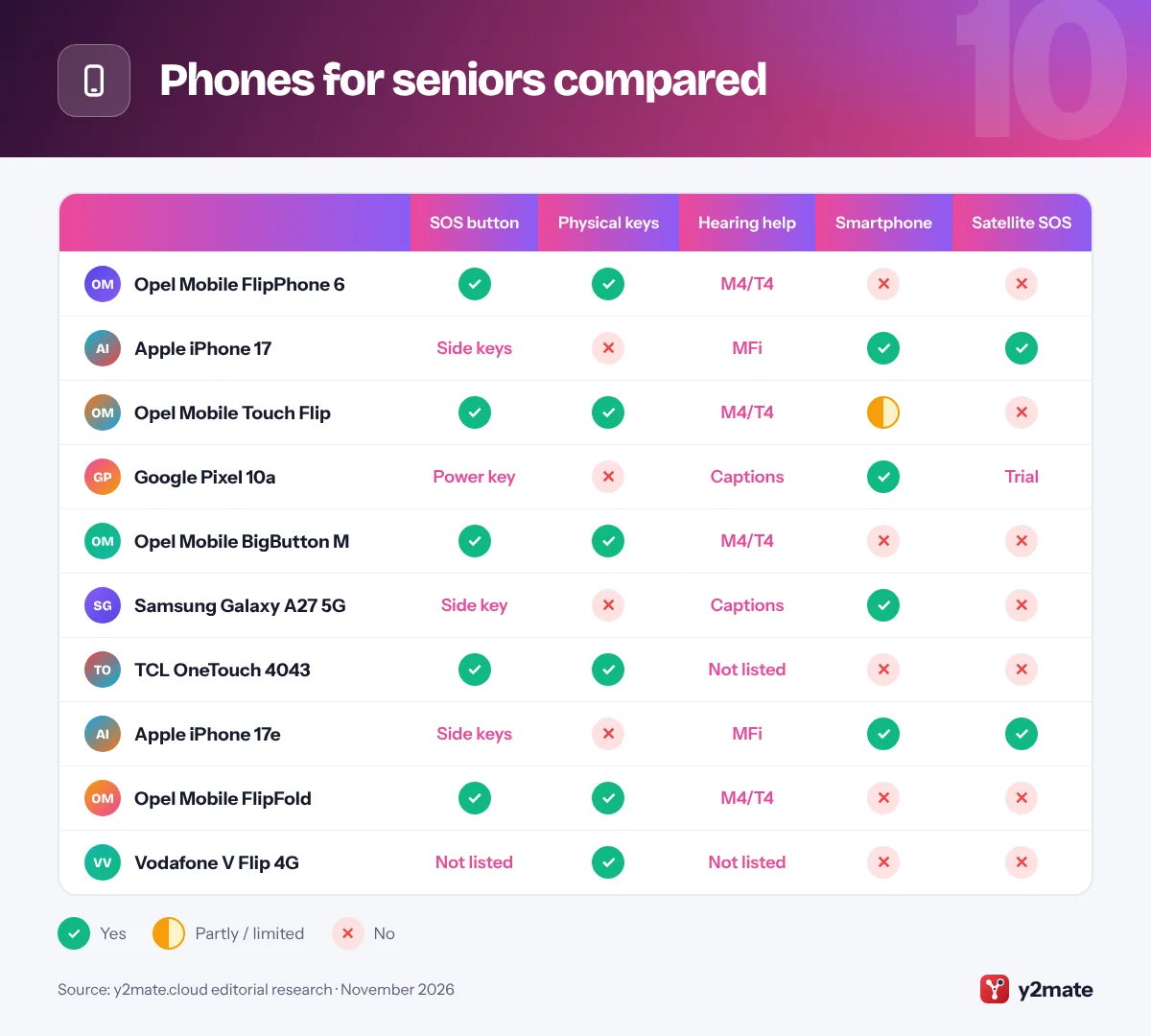
- Opel Mobile's FlipPhone 6, Touch Flip and BigButton M are sold unlocked with 4G VoLTE and come with an SOS button, a charging cradle and an M4/T4 hearing aid rating.
- 112 reaches the same emergency services as 000 from a mobile, but it does not get priority over 000 calls and does not work via satellite.
- The iPhone 17, iPhone 17e and Pixel 10a offer satellite emergency features in Australia for places with no mobile coverage.
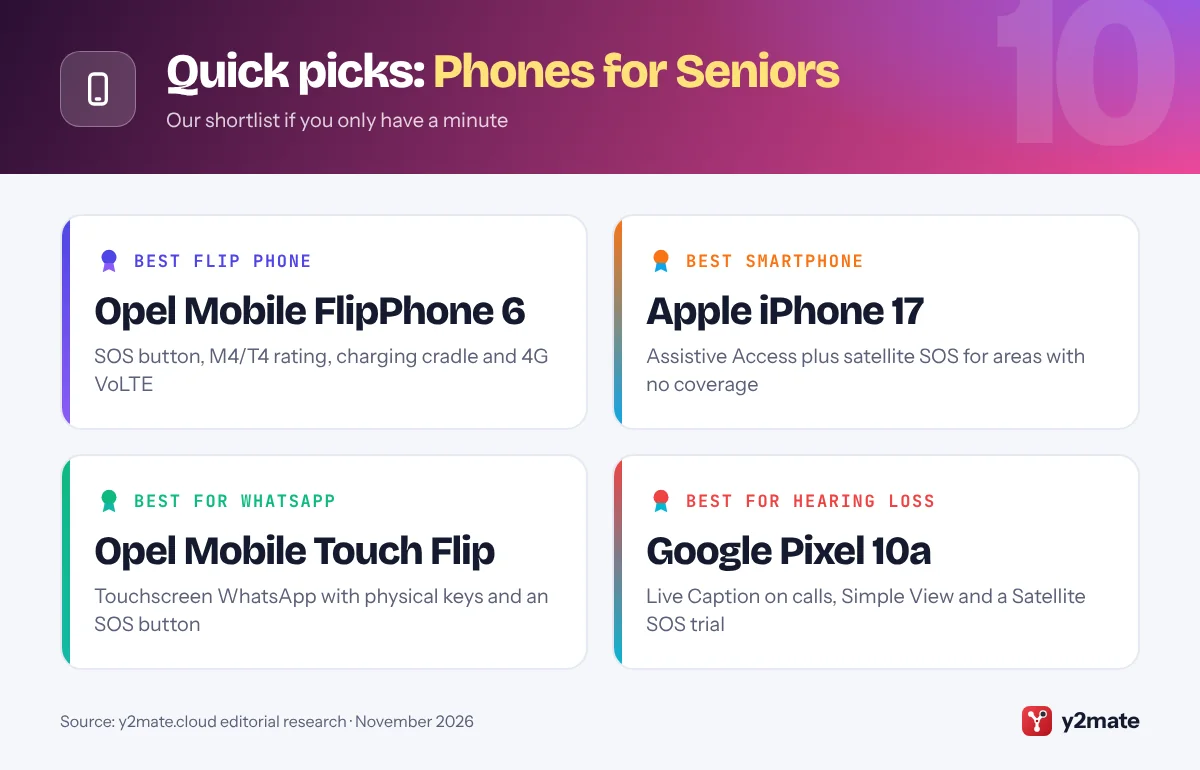
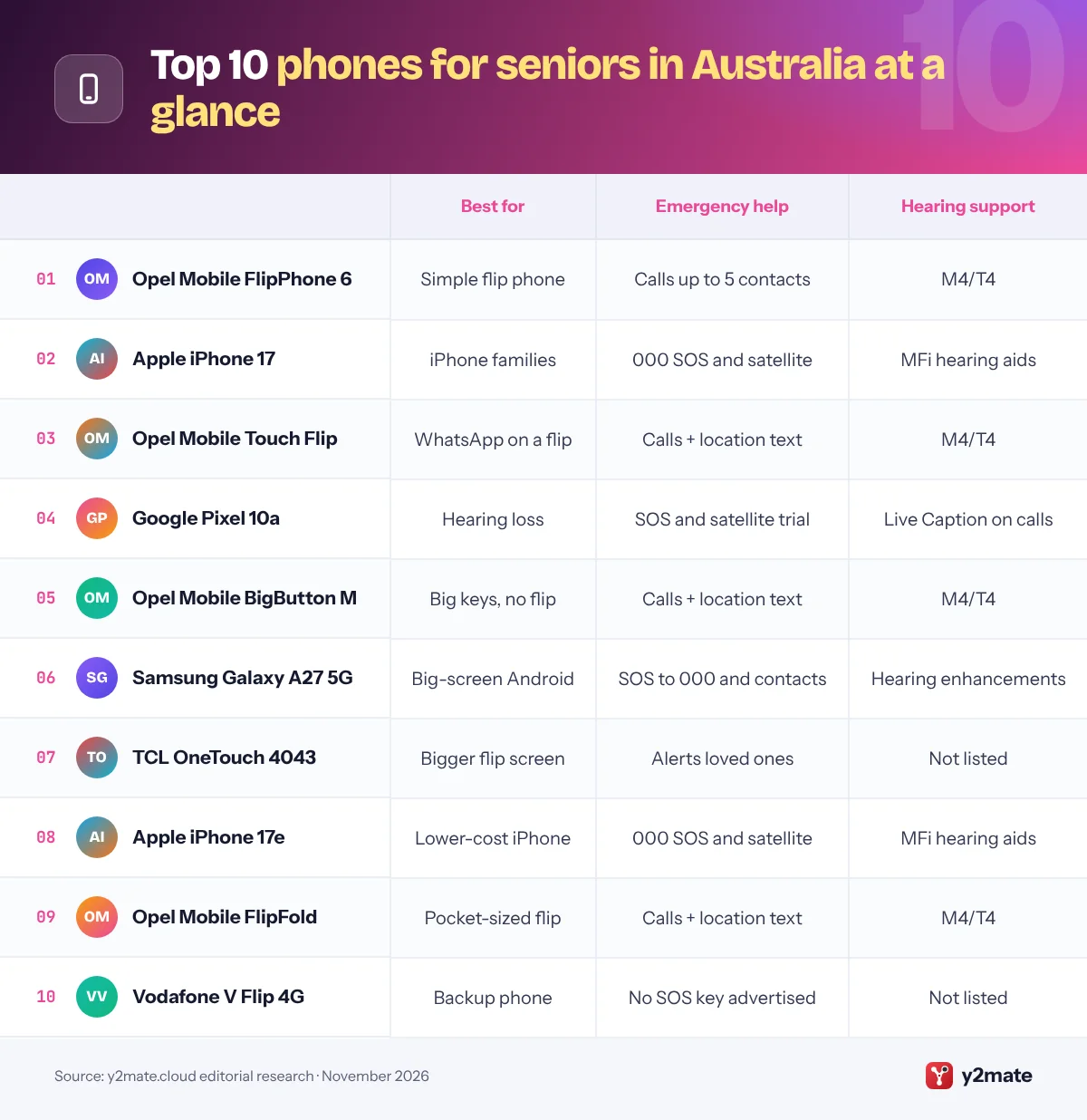
The best phones for seniors Australia-wide in 2026 are the Opel Mobile FlipPhone 6 for a simple flip phone with an SOS button, an Apple iPhone 17 with Assistive Access for iPhone families and people in remote areas, and the Opel Mobile Touch Flip for someone who wants WhatsApp on a flip. The Google Pixel 10a, Opel Mobile BigButton M, Samsung Galaxy A27 5G, TCL OneTouch 4043, iPhone 17e, Opel Mobile FlipFold and Vodafone V Flip 4G complete the list, covering hearing loss, regional living and tight budgets.
A few terms matter in Australia. VoLTE (Voice over LTE) carries calls over 4G, and since the 3G shutdown a phone needs it to make calls, including to Triple Zero (000). Camp-on is a phone’s ability to call 000 through another carrier’s network when its own has no coverage. M4/T4 is the best hearing aid rating on a scale up to 4. An SOS button on a senior phone calls family or friends you choose, not a monitoring service.
How we ranked this list
We ranked these phones for seniors Australia-wide on the makers’ published accessibility and safety features, local network compatibility (4G VoLTE and Triple Zero calling after the 3G shutdown), availability through Australian retailers and telcos, and widely reported user feedback. We did not test the phones ourselves, and we do not quote prices, ratings or battery claims.
Telstra’s own-brand Flip 4 and T-Flip 5G showed as out of stock on Telstra’s website when we checked in November 2026, and we could not confirm current Australian availability for Doro or Emporia phones, so they are not included.
The Top 10 Phones for Seniors
1. Opel Mobile FlipPhone 6
Best for: a simple flip with an SOS button
Opel Mobile is an Australian senior-phone brand, and the FlipPhone 6 is its most straightforward flip. A 1.44-inch outer screen shows who is calling, the 2.4-inch inner screen sits above big, well-spaced physical keys, and up to eight contacts can be saved to speed dial. It is rated M4/T4 for hearing aids, has a loud speaker and offers a talking keypad option.
Press the SOS button and the phone calls up to five contacts, sounds an alarm and texts them a message asking for help. It alerts family, not a monitoring service, so for a life-threatening emergency dial 000. It is sold unlocked with 4G VoLTE, so it works on any Australian 4G network, and a charging cradle is included. JB Hi-Fi stocks it as well as Opel.
Skip it if your parent wants WhatsApp; the Touch Flip suits them better. Family can program the SOS contacts and speed dials before handing it over.
Official site: Opel Mobile FlipPhone 6
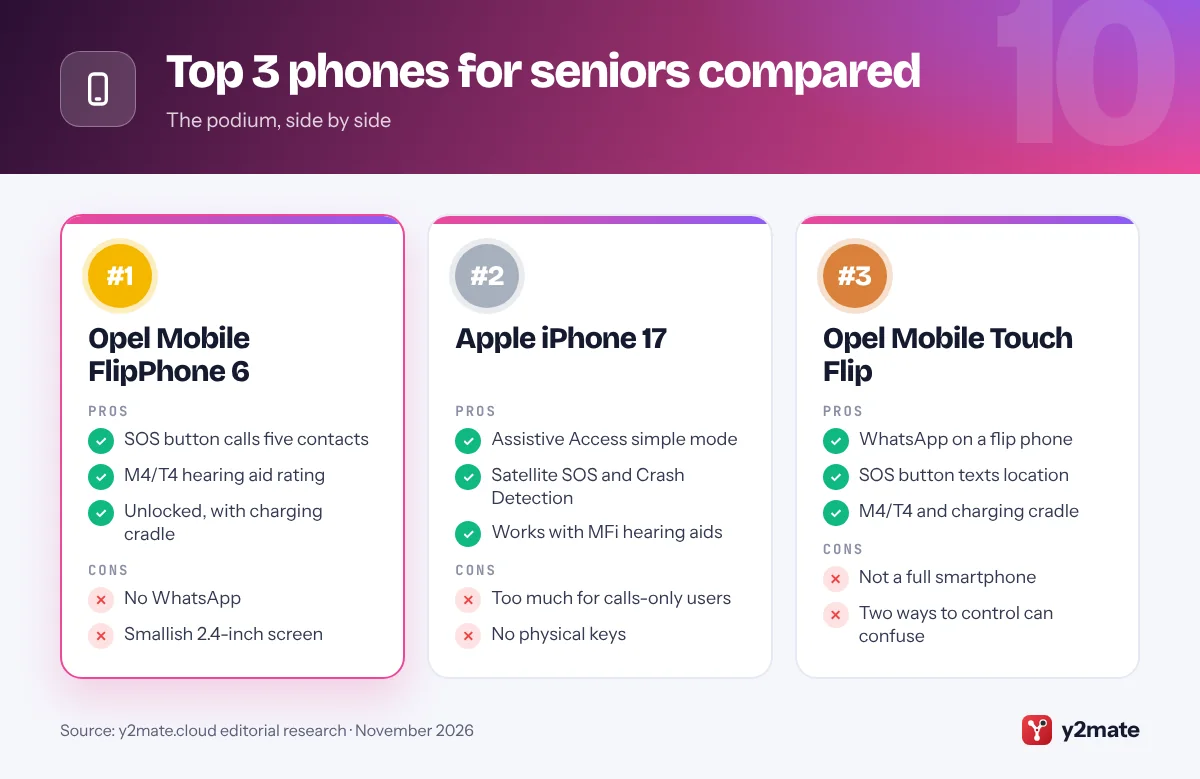
- SOS button calls five contacts
- M4/T4 hearing aid rating
- Unlocked, with charging cradle
- No WhatsApp
- Smallish 2.4-inch screen
2. Apple iPhone 17
Best for: iPhone families and remote areas
The iPhone 17 with Assistive Access is the most capable smartphone for an older Australian who already shares photos and messages with family on iPhones. Assistive Access, in Settings under Accessibility, swaps the home screen for large buttons for Calls, Messages, Camera and Photos, and a separate passcode stops it being switched off by accident. The 6.3-inch screen suits low vision, and Australian models take a nano-SIM as well as eSIM.
Its safety features matter outside the cities. If you try to call 000 without mobile reception or Wi-Fi, Emergency SOS via satellite lets you text emergency services, and Crash Detection can call for help after a severe crash. iPhones also work with Made for iPhone hearing aids.
It is more than a calls-only user needs. Family can add Medical ID and emergency contacts, and install the official Emergency+ app.
Official site: Apple iPhone 17
- Assistive Access simple mode
- Satellite SOS and Crash Detection
- Works with MFi hearing aids
- Too much for calls-only users
- No physical keys
3. Opel Mobile Touch Flip
Best for: WhatsApp on an easy flip phone
The Touch Flip is a 4G flip phone with a 2.8-inch touchscreen above a large physical keypad, so your parent can dial with real buttons but still use WhatsApp and SMS with a touchscreen and front camera. It keeps Opel’s senior features: an M4/T4 hearing aid rating, a talking keypad option, a charging cradle and a low-battery text notification.
The SOS button calls up to five contacts, sounds an alarm and texts the phone’s location to them, which helps if someone has a fall or gets lost. Like the FlipPhone 6, it is unlocked with 4G VoLTE.
It is not a full smartphone, so do not expect banking apps or maps. Family can set up WhatsApp, the SOS contacts and speed dials, and show your parent when to use the keys and when to use the touchscreen.
Official site: Opel Mobile Touch Flip
- WhatsApp on a flip phone
- SOS button texts location
- M4/T4 and charging cradle
- Not a full smartphone
- Two ways to control can confuse
4. Google Pixel 10a
Best for: hearing loss on Android
The Pixel 10a is a strong Android choice for someone with hearing loss. Live Caption adds captions to videos and phone calls, and Google’s free Live Transcribe app shows nearby speech as text. Simple View, in Settings under Accessibility, enlarges text and icons, simplifies the home screen and switches to three-button navigation.
It also brings satellite emergency help to a mid-range phone in Australia. Google includes a two-year trial of Satellite SOS, which can connect you to emergency services with no mobile or Wi-Fi coverage and share your location with contacts. Car crash detection and Emergency SOS add more protection, and Google promises seven years of updates.
It is not for someone who needs physical keys. Family can choose Simple View during setup, add emergency contacts and switch on spam call filtering in the Phone app.
Official site: Google Pixel 10a
- Live Caption on calls
- Satellite SOS trial included
- Seven years of updates
- No physical help button
- Touchscreen only
5. Opel Mobile BigButton M
Best for: big buttons without a flip
Some people find flip phones fiddly to open, and the BigButton M is Opel’s answer: a candybar phone with big, raised keys, a 2.2-inch colour screen and a very loud ringtone. Up to eight favourite contacts can be saved with photos for one-press calling, and it is rated M4/T4 for hearing aids.
Its SOS button calls up to five contacts you choose, sounds an alarm and texts them the phone’s location. Like Opel’s flips, it is unlocked with 4G VoLTE and comes with a charging cradle, and there is a talking keypad option.
The small screen makes texting harder, so it suits someone who mainly makes and takes calls. Family can add photo contacts so your parent recognises faces rather than names, and place the cradle where the phone is always left.
Official site: Opel Mobile BigButton M
- No flip to open
- Photo speed dials
- SOS button texts location
- Small 2.2-inch screen
- Awkward for long texts
6. Samsung Galaxy A27 5G
Best for: a large-screen Android with Easy mode
The Galaxy A27 5G is one of Samsung’s newer, lower-priced phones, with a 6.7-inch screen. Samsung’s Easy mode, in Settings under Display, makes it much simpler by enlarging icons and text and lengthening the touch-and-hold delay to cut accidental taps. Samsung promises six Android upgrades and six years of security updates.
Emergency SOS calls 000 and sends your location to chosen contacts when you press the side key several times quickly; it does not reach a monitoring service. Its IP64 rating covers splashes, but Samsung advises against beach or pool use.
It is a sensible step up for someone who wants photos and video calls on a big screen. Family can turn on Easy mode, check that VoLTE is switched on and add emergency contacts. Buying the Australian model rather than an overseas import avoids problems with Triple Zero calling.
Official site: Samsung Galaxy A27 5G
- Easy mode built in
- Large 6.7-inch screen
- Six years of updates
- No physical help button
- Only splash resistant
7. TCL OneTouch 4043
Best for: a bigger-screen flip with a charging dock
The TCL OneTouch 4043 is a senior-friendly flip sold by JB Hi-Fi, with a 1.77-inch outer screen for notifications and a 3.2-inch inner screen, bigger than the displays on Opel’s flips. It uses 4G VoLTE with HD Voice for clear calls and comes with a charging dock.
An emergency button lets your parent quickly contact loved ones. As with Opel phones, it alerts people you choose rather than a monitoring service. The retail listing describes the inner screen as packed with accessibility features but does not list a hearing aid rating, so check the box if hearing aids matter.
The 2MP camera is basic, and it is best for calls and texts. It suits someone who wants a larger screen on a classic flip. Family can set up the emergency contacts and speed dials before handing it over.
Official site: TCL OneTouch 4043
- Large 3.2-inch inner screen
- Emergency button
- Charging dock included
- No hearing aid rating listed
- Basic 2MP camera
8. Apple iPhone 17e
Best for: a lower-cost iPhone for everyday use
The iPhone 17e has the same Assistive Access mode, Crash Detection and Emergency SOS via satellite as the iPhone 17 in a 6.1-inch design that costs less. In Australia its satellite features also include Roadside Assistance via satellite, which helps on long country drives. It suits someone who wants FaceTime with grandchildren, photos and messages without a top camera.
MagSafe lets it snap onto a magnetic charging stand by the bed, which is easier than plugging in a cable for people with arthritis or tremors. It works with Made for iPhone hearing aids, and the Magnifier app helps with reading labels and menus.
The smaller screen is less suited to low vision, so choose the iPhone 17 if text size is the priority. Family can set up Assistive Access and Medical ID together, and keep the Assistive Access passcode somewhere safe.
Official site: Apple iPhone 17e
- Assistive Access simple mode
- Satellite SOS and roadside help
- MagSafe charging stands
- Smaller 6.1-inch screen
- No physical keys
9. Opel Mobile FlipFold
Best for: a pocket-sized flip phone
The FlipFold is Opel’s most compact flip, small enough for a shirt pocket or a small handbag when folded. A 1.77-inch outer screen shows caller ID, missed calls, the time and battery level, and inside there is a 2.4-inch screen with big physical keys. It is rated M4/T4 for hearing aids, supports 4G with VoLTE and includes a charging cradle.
The SOS button calls your chosen contacts and texts them your location, the same approach as other Opel phones, so it alerts people you know rather than a monitoring service.
Its compact size means smaller screens than the Touch Flip, so it is best for someone with reasonable eyesight who values portability, such as a keen walker or golfer. Family can set up the SOS contacts and speed dials, and show your parent the outer screen for checking missed calls.
Official site: Opel Mobile FlipFold
- Very compact when folded
- SOS button texts location
- M4/T4 and charging cradle
- Smaller screens
- No WhatsApp
10. Vodafone V Flip 4G
Best for: a low-cost backup phone on Vodafone
Vodafone’s V Flip 4G is a prepaid flip phone sold with a Vodafone SIM. It has a 2.8-inch main display, a 1.7-inch outer display, 4G calls and messaging and a charging cradle, which makes it an easy spare phone for the car or bedside drawer.
Vodafone does not advertise a dedicated SOS button or a hearing aid rating, so it is not the right choice for someone who needs emergency alerts to family. It can still dial 000 or 112 like any phone with coverage.
It only works with a Vodafone SIM unless unlocked, and unlocking fees may apply, so check Vodafone’s coverage where your parent lives, especially outside the cities. Family can save key contacts, set the ringer to maximum and keep it on the cradle so it is always charged.
Official site: Vodafone V Flip 4G
- Simple flip with outer screen
- Charging cradle included
- Easy prepaid setup
- No SOS button advertised
- Locked to Vodafone
Phones for seniors compared
Choosing phones for seniors Australia-wide after the 3G shutdown
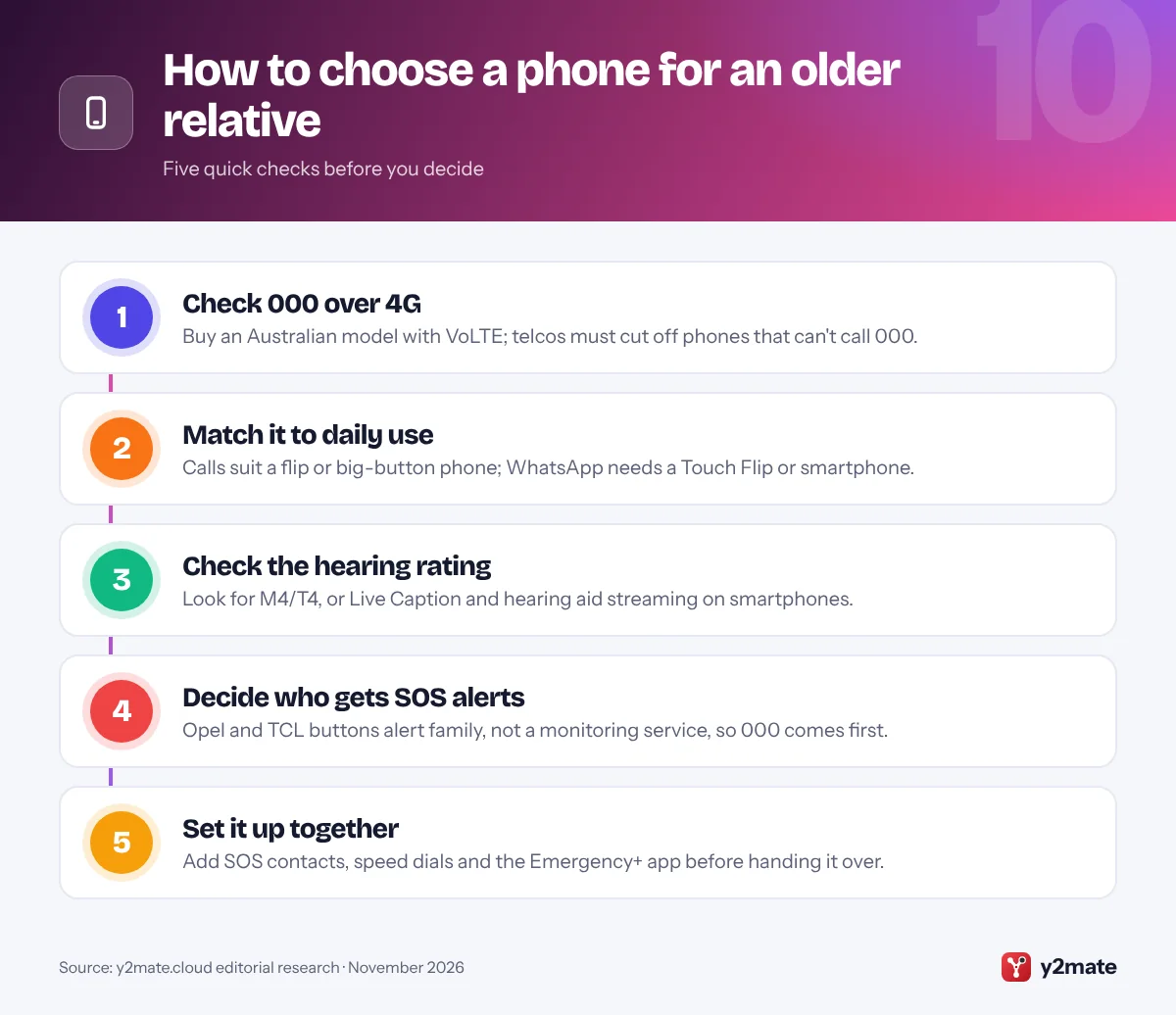
Australia’s 3G networks have closed: Vodafone switched off its 3G network around the start of 2024, and Telstra and Optus began switching theirs off from 28 October 2024. Since then, ACMA rules have required telcos to identify mobiles that cannot call Triple Zero (000) over 4G, including through another carrier’s network, warn the customer and stop supplying service to those phones. Older 4G phones and phones bought overseas are most at risk, so buy an Australian model with VoLTE.
Making emergency calls work
- 000 or 112: both reach the same services from a mobile, but 112 does not get priority and does not work via satellite.
- If a call does not connect: hang up after about five seconds and redial, then stay on the line for up to a minute so the phone can try another network.
- Location: the official Emergency+ app shows your GPS location to read out to the operator.
- Never test a phone by calling 000.
Hearing, coverage and learning
M4/T4 is the best hearing aid rating on simple phones. People who are deaf or have a hearing or speech impairment cannot text 000 and should use the National Relay Service. In regional areas, Telstra’s Blue Tick marks phones it has tested for strong voice coverage. For learning the basics, the free Be Connected program from the eSafety Commissioner offers lessons for older Australians.
Frequently asked questions
What is the best mobile phone for seniors in Australia?
For someone who mainly calls and texts, the Opel Mobile FlipPhone 6 is the best all-rounder, with an SOS button that calls up to five contacts, an M4/T4 hearing aid rating and a charging cradle. For a smartphone, an iPhone 17 with Assistive Access suits iPhone families and adds satellite SOS, while the Opel Touch Flip brings WhatsApp to a flip phone.
Why can an older 4G phone be blocked in Australia?
Since 28 October 2024, ACMA rules have required telcos to identify mobiles that cannot call Triple Zero (000) over 4G, either on their own network or through another carrier's network. Telcos must tell affected customers and stop supplying service to those phones. Older 4G models and phones bought overseas are most at risk, so check with your telco and buy an Australian model with VoLTE.
Does the SOS button on a senior phone call 000?
Usually not. On Opel Mobile phones, the SOS button calls up to five contacts you program, such as family, friends or neighbours, sounds an alarm and sends them a text, which on some models includes your location. It does not connect to a monitoring service. In a life-threatening emergency, your relative should dial 000 directly, then use the SOS button to let family know.
Should older Australians call 000 or 112 from a mobile?
Call 000 first. 112 works from mobile phones and reaches the same police, fire and ambulance services, and it does not need a SIM card or phone passcode, but mobile coverage must be available. Calling 112 does not give the call priority over 000 calls, and 112 does not work via satellite. Both numbers are free to call.
How can I check a phone will work with Triple Zero before buying?
Buy an Australian model from a local retailer or telco, confirm it supports VoLTE and that VoLTE is switched on in the settings, and ask your telco whether the handset can make emergency calls on its network. Telcos must warn customers whose phones cannot reach 000. Never test a phone by calling 000, because it can delay help for someone in a real emergency.
Final verdict
The Opel Mobile FlipPhone 6 is the best of the phones for seniors Australia-wide for simple calls with an SOS button, while an iPhone 17 with Assistive Access or the Pixel 10a suits someone ready for a smartphone, especially in areas with patchy coverage. Choose the Touch Flip for WhatsApp on a flip and the BigButton M for someone who finds flips fiddly.
Before you buy, check the phone can call 000 over 4G, decide who will answer the SOS button and set it up together.
Sources and further reading
- ACMA rules on 000 access: The ACMA fact sheet on rules requiring telcos to identify mobiles that cannot call Triple Zero and stop supplying service to them.
- How to call Triple Zero: Official advice on calling 000 from a mobile, what the operator will ask and what to do if a call does not connect.
- Using 112 and other numbers: The Department of Infrastructure explains when 112 works from a mobile and why it does not get priority over 000.
- ACMA 3G network switch: The ACMA's guide to the 3G shutdown and how to check whether a mobile can still make calls and reach 000 over 4G.
- Be Connected for older Australians: Free online lessons from the eSafety Commissioner to help older Australians learn to use phones and stay safe online.

Leave a Reply