
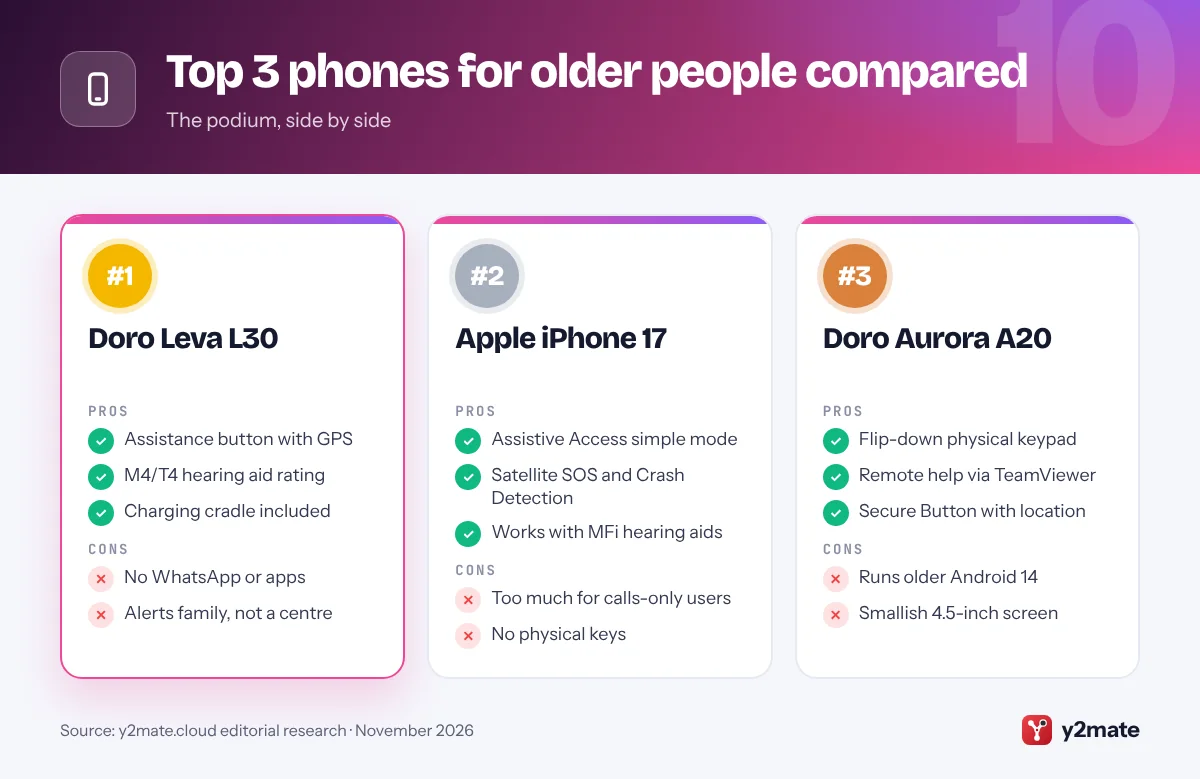
- The Doro Leva L30, Apple iPhone 17 and Doro Aurora A20 are the strongest all-round phones for older people in the UK in 2026.
- All four UK mobile networks have switched off 3G, and 2G networks will close between 2029 and 2033, so an older relative's phone needs 4G calling (VoLTE).
- Doro and Emporia assistance buttons alert family or friends you choose rather than a monitoring centre, so call 999 directly in a life-threatening emergency.
- Most UK landlines are moving to digital phone lines by the end of January 2027, which can affect telecare alarms used by older people.
- Doro is now part of Xplora Technologies, and its Connect mobile plans run on the EE network.
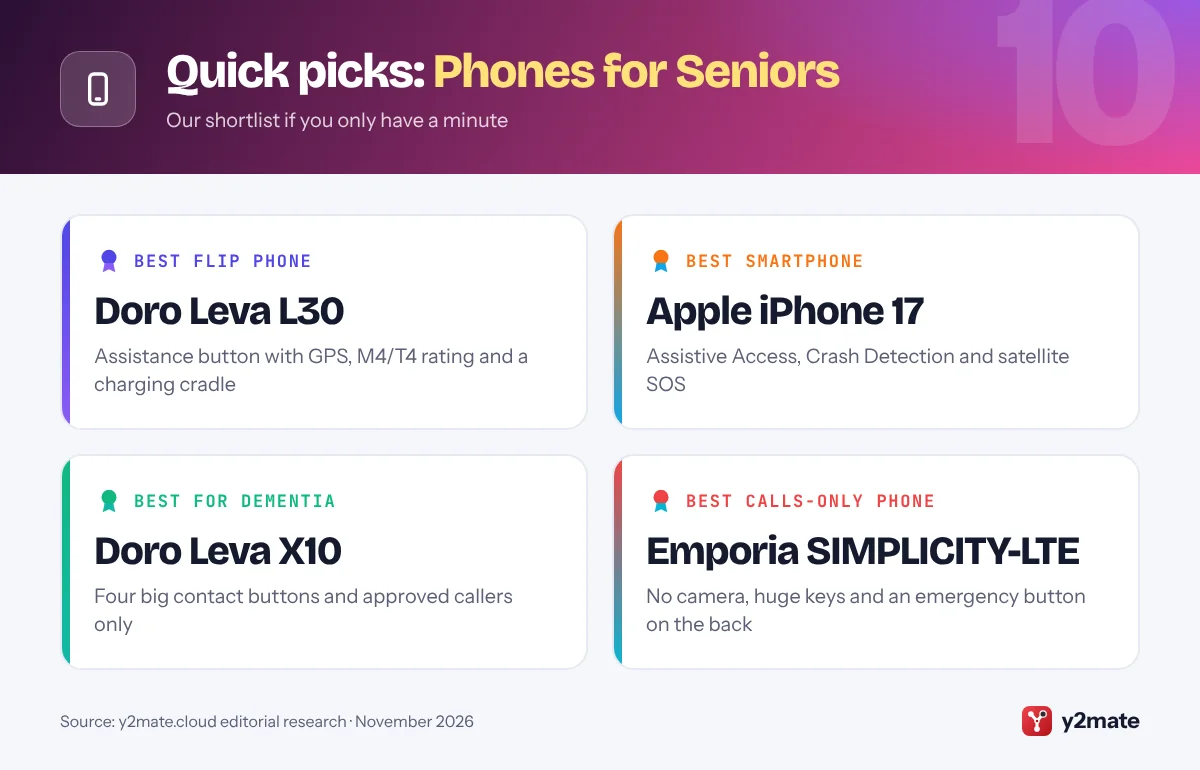
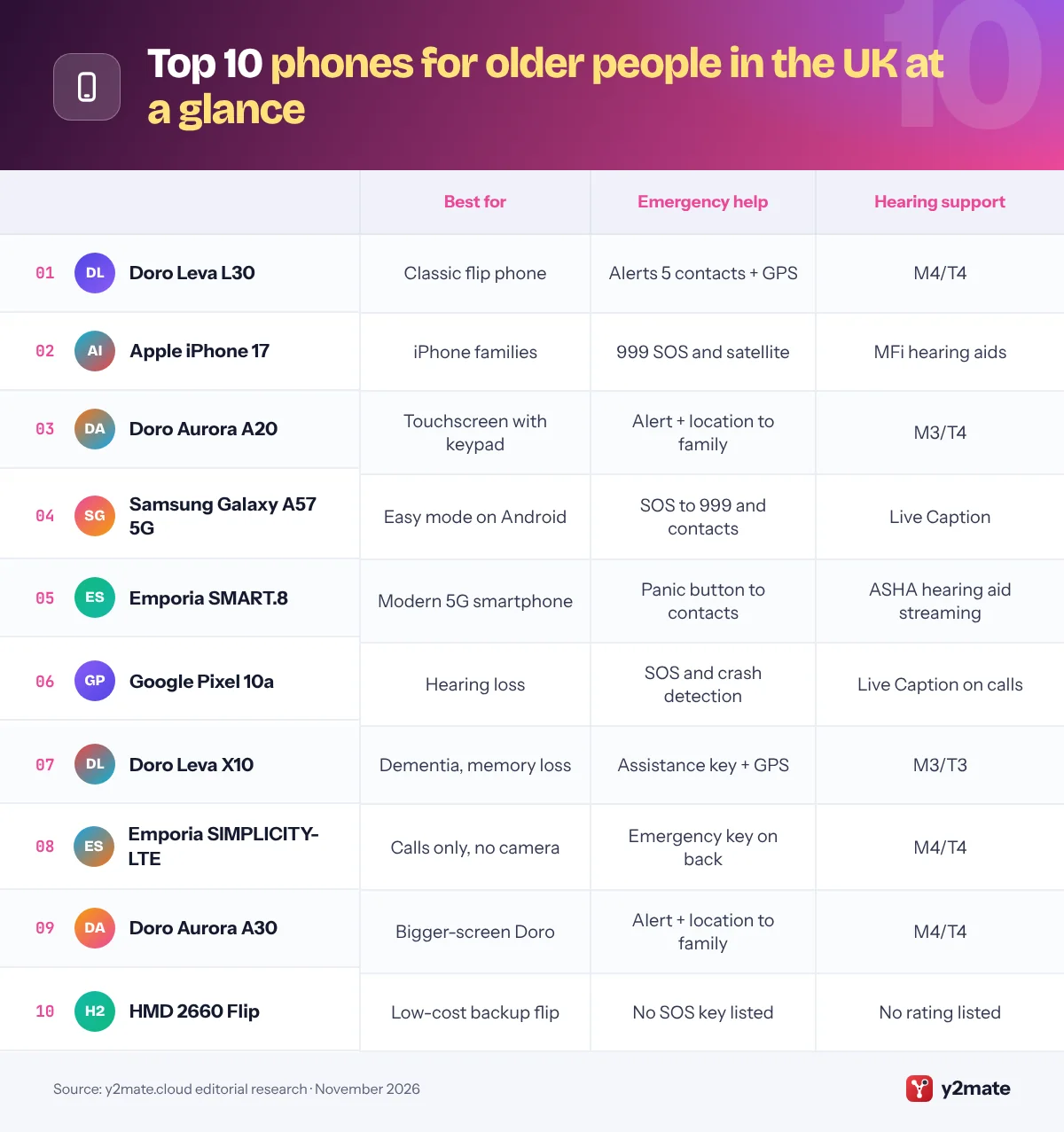
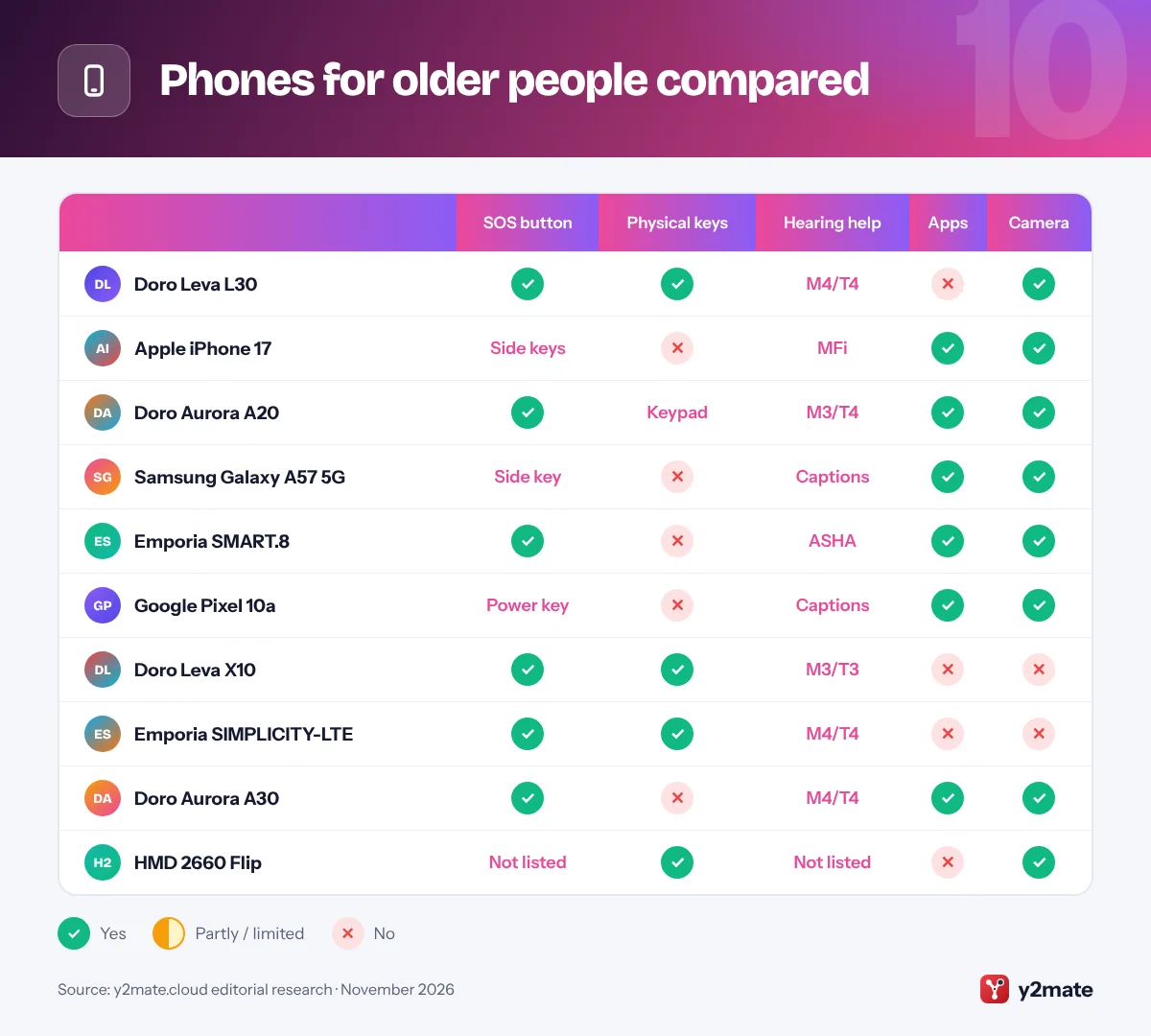
The best phones for seniors UK buyers can get in 2026 are the Doro Leva L30 for a simple flip phone with an assistance button, an Apple iPhone 17 with Assistive Access for iPhone families, and the Doro Aurora A20, a touchscreen smartphone with a flip-down keypad. The Samsung Galaxy A57 5G, Emporia SMART.8, Google Pixel 10a, Doro Leva X10, Emporia SIMPLICITY-LTE, Doro Aurora A30 and HMD 2660 Flip complete the list, covering hearing loss, memory problems and calls-only users.
Some terms are worth knowing. 4G calling (VoLTE) carries voice calls over 4G, which every phone now needs because UK networks have switched off 3G. M4/T4 is the best hearing aid rating: M covers the microphone setting and T the telecoil, on a scale up to 4. An assistance button on a senior phone usually alerts family or friends you choose, not a monitoring centre. On smartphones, simplified modes such as Apple’s Assistive Access, Samsung’s Easy mode and Google’s Simple View do a similar job to a dedicated senior phone.
How we ranked this list
We ranked these phones for seniors UK shoppers can buy on the makers’ published accessibility and safety features, local network compatibility (4G calling and 999 emergency calls now that UK networks have switched off 3G), availability through UK retailers and networks, and widely reported user feedback. We did not test the phones ourselves, and we do not quote prices, ratings or battery claims.
Earlier Doro models such as the 7100 and 8200 no longer appear in Doro’s UK online shop, which now centres on the Leva and Aurora ranges, so they are not included.
The Top 10 Phones for Seniors
1. Doro Leva L30
Best for: a classic flip with an assistance button
Doro is the best-known name in phones for older people in Britain, and the Leva L30 is its most complete flip phone. A small outer screen shows who is calling before you open it, and inside there is a 2.8-inch display above widely spaced, high-contrast keys. It has an M4/T4 hearing aid rating, HD Voice, 4G calling and a charging cradle, so it can simply sit in its stand overnight.
The assistance button can text up to five trusted contacts with your GPS location and then ring them in turn, putting the answered call on loudspeaker. It alerts family and friends, not a monitoring centre, and the standard service has no subscription. Vodafone sells it as well as Doro.
Skip it if your parent wants WhatsApp. Family should set up the assistance contacts together and agree who will respond.
Official site: Doro Leva L30
- Assistance button with GPS
- M4/T4 hearing aid rating
- Charging cradle included
- No WhatsApp or apps
- Alerts family, not a centre
2. Apple iPhone 17
Best for: iPhone families and video calls
For an older relative joining a family of iPhone users, the iPhone 17 with Assistive Access is the most capable choice. Assistive Access, in Settings under Accessibility, replaces the usual home screen with large buttons for Calls, Messages, Camera and Photos, and you choose which contacts and apps appear. A separate passcode stops it being switched off by accident. The 6.3-inch screen is a comfortable size for low vision, and UK models take a nano-SIM as well as eSIM.
Emergency SOS calls 999 when you hold the side button and a volume button, Crash Detection can call for help after a severe car crash, and Emergency SOS via satellite can reach emergency services when there is no signal. iPhones also work with Made for iPhone hearing aids.
It is more than a calls-only user needs. Family can add Medical ID and emergency contacts in the Health app.
Official site: Apple iPhone 17
- Assistive Access simple mode
- Satellite SOS and Crash Detection
- Works with MFi hearing aids
- Too much for calls-only users
- No physical keys
3. Doro Aurora A20
Best for: a first smartphone with real buttons
The Aurora A20 is Doro’s answer for someone nervous about touchscreens. It pairs a 4.5-inch touchscreen with a flip-down, backlit number keypad, so dialling feels like an old phone while WhatsApp, photos and video calls are still possible. Doro’s Easy Interface offers clear choices and guidance, ClearSound is tuned for speech, and it is rated M3/T4 for hearing aids.
The Doro Secure Button sends an alert and your location to trusted contacts with one press, and built-in TeamViewer support lets a relative see the screen and change settings remotely, with your permission. Buy it with a Doro Connect plan, which runs on EE, and you also get the Xplora Senior app, which warns about likely scam calls and lets family share locations.
It runs Android 14, an older version, so it is not for keen app users. Family can install WhatsApp and set up Secure Button contacts first.
Official site: Doro Aurora A20
- Flip-down physical keypad
- Remote help via TeamViewer
- Secure Button with location
- Runs older Android 14
- Smallish 4.5-inch screen
4. Samsung Galaxy A57 5G
Best for: Android users who want Easy mode
The Galaxy A57 5G is a well-built mid-range phone that becomes far simpler with Samsung’s Easy mode, found in Settings under Display. It enlarges icons and text, simplifies the home screen and lengthens the touch-and-hold delay to prevent accidental taps. The 6.7-inch screen suits low vision, it is rated IP68, and Samsung promises six Android upgrades and six years of security updates.
Emergency SOS calls 999 and sends your location to chosen contacts when you press the side key several times quickly. It reaches the emergency services and family, not a monitoring centre. Live Caption and Samsung’s hearing enhancements help with hearing loss.
It is a poor fit for someone who dislikes touchscreens. Family can turn on Easy mode, check that 4G calling is switched on and add emergency contacts in the Safety and emergency settings.
Official site: Samsung Galaxy A57 5G
- Easy mode built in
- Large 6.7-inch screen, IP68
- Six years of updates
- No physical help button
- Touchscreen only
5. Emporia SMART.8
Best for: a modern smartphone with a panic button
Emporia, an Austrian specialist in senior phones, sells direct to UK buyers, and the SMART.8 is its flagship. It is a 5G Android 16 phone with a 6.36-inch OLED screen and Emporia’s simplified interface, plus emporiaCOACH, which guides beginners through the basics. A physical panic button can alert emergency contacts, or be set to open the Gemini assistant instead.
Hearing aid users benefit from support for the ASHA Bluetooth standard, which streams audio directly to compatible hearing aids. The battery can be replaced without tools, it supports wireless charging, and Emporia offers a free display warranty on this model.
It is more phone than a calls-only user needs, so it suits someone who will use apps every day. Family should decide whether the button is for emergencies or the assistant, and set up the emergency contacts together.
Official site: Emporia SMART.8
- Physical panic button
- Streams to ASHA hearing aids
- Replaceable battery
- More than calls-only users need
- Button alerts contacts, not a centre
6. Google Pixel 10a
Best for: hearing loss and Google users
The Pixel 10a is a strong choice for someone with hearing loss. Live Caption adds captions to videos and phone calls, and Google’s free Live Transcribe app shows nearby speech as text, which helps in busy rooms. Simple View, in Settings under Accessibility, enlarges text and icons, simplifies the home screen and switches to three-button navigation.
Emergency SOS and car crash detection can call 999 and share your location with emergency contacts. Google promises seven years of updates, and the 6.3-inch screen is a manageable size. Note that Google advertises its Satellite SOS service for the US, not the UK.
It is not right for someone who wants physical keys. Family can choose Simple View during setup, add emergency contacts and turn on spam call filtering in the Phone app.
Official site: Google Pixel 10a
- Live Caption on calls
- Simple View layout
- Seven years of updates
- No physical help button
- No Satellite SOS in the UK
7. Doro Leva X10
Best for: dementia or short-term memory problems
Doro designed the Leva X10 for people with dementia, short-term memory problems or poor dexterity. Instead of menus, it has four large, clearly labelled buttons that call the people who matter most. Incoming calls can be limited to approved contacts, and automatic spam blocking helps keep scam callers out.
Carers can choose between user modes, set daily medication reminders and use a safety timer. The assistance button alerts trusted contacts, and relatives can request the phone’s GPS location by text, which can help if someone gets lost. It has a charging cradle, 4G calling and an M3/T3 hearing aid rating, and there is no camera to cause confusion.
It is far too limited for anyone who still texts or browses. Set it up with the four most reliable contacts and keep their order the same so it becomes a habit.
Official site: Doro Leva X10
- Four big contact buttons
- Approved callers only
- GPS location on request
- Calls only, no texting focus
- Lower M3/T3 hearing rating
8. Emporia SIMPLICITY-LTE
Best for: calls only, with no camera or extras
The SIMPLICITY-LTE is for someone who just wants to make and receive calls. There is no camera, and the extra-large keys are raised and illuminated with a clear pressure point, plus three speed-dial keys for favourite people. You can choose the font size, it is rated M4/T4 for hearing aids, and it comes with a charging cradle and a replaceable battery.
Emporia’s patented emergency button sits on the back, so it can be pressed quickly to call for help from contacts you choose. It alerts people you know rather than a monitoring centre, and the phone is IP44 rated against splashes.
Emporia also sells a 2G version of this phone, so make sure you buy the LTE model, because UK 2G networks are closing between 2029 and 2033. It is not for anyone who wants photos or apps.
Official site: Emporia SIMPLICITY-LTE
- Huge illuminated keys
- Emergency button on the back
- M4/T4 and charging cradle
- No camera or apps
- Avoid the 2G-only version
9. Doro Aurora A30
Best for: a bigger-screen Doro smartphone
The Aurora A30 brings Doro’s Easy Interface to a larger 6.1-inch touchscreen, which suits someone with low vision who wants WhatsApp, photos and video calls. It has a 50MP main camera, Doro ClearSound for clearer speech and an M4/T4 hearing aid rating.
Like the A20, it has the Doro Secure Button, which sends an alert and your location to trusted contacts, and built-in TeamViewer support so family can help remotely with permission. With a Doro Connect plan on the EE network, the Xplora Senior app adds scam call warnings and location sharing.
It runs Android 14 and has no physical keypad, so choose the A20 if buttons matter more than screen size. Family can customise the home screen, install apps and practise using the Secure Button before handing it over.
Official site: Doro Aurora A30
- Larger 6.1-inch screen
- M4/T4 hearing aid rating
- Remote help via TeamViewer
- Runs older Android 14
- No physical keypad
10. HMD 2660 Flip
Best for: a low-cost backup flip phone
HMD, the company behind Nokia phones, sells the 2660 Flip as a simple 4G flip with a 2.8-inch main screen, a 1.77-inch outer screen, big buttons and an easy menu. Vodafone sells it as well as HMD, and its removable battery and long standby time make it a handy backup phone for a bag or car.
There is also a Senior Edition with a dedicated button for Mary, an AI companion from inTouch that chats with older users. It includes a free trial and then needs a subscription. Some families may find that useful for a lonely relative, but it is not a safety service.
Unlike the older Nokia 2660 Flip, HMD’s UK specifications do not list an emergency key or a hearing aid rating, so choose a Doro or Emporia if either matters. Family can set up speed dials and turn up the ringer.
Official site: HMD 2660 Flip
- Simple, familiar flip design
- Outer screen shows callers
- Removable battery
- No emergency key listed
- No hearing aid rating listed
Phones for older people compared
How to choose phones for seniors UK networks will keep supporting
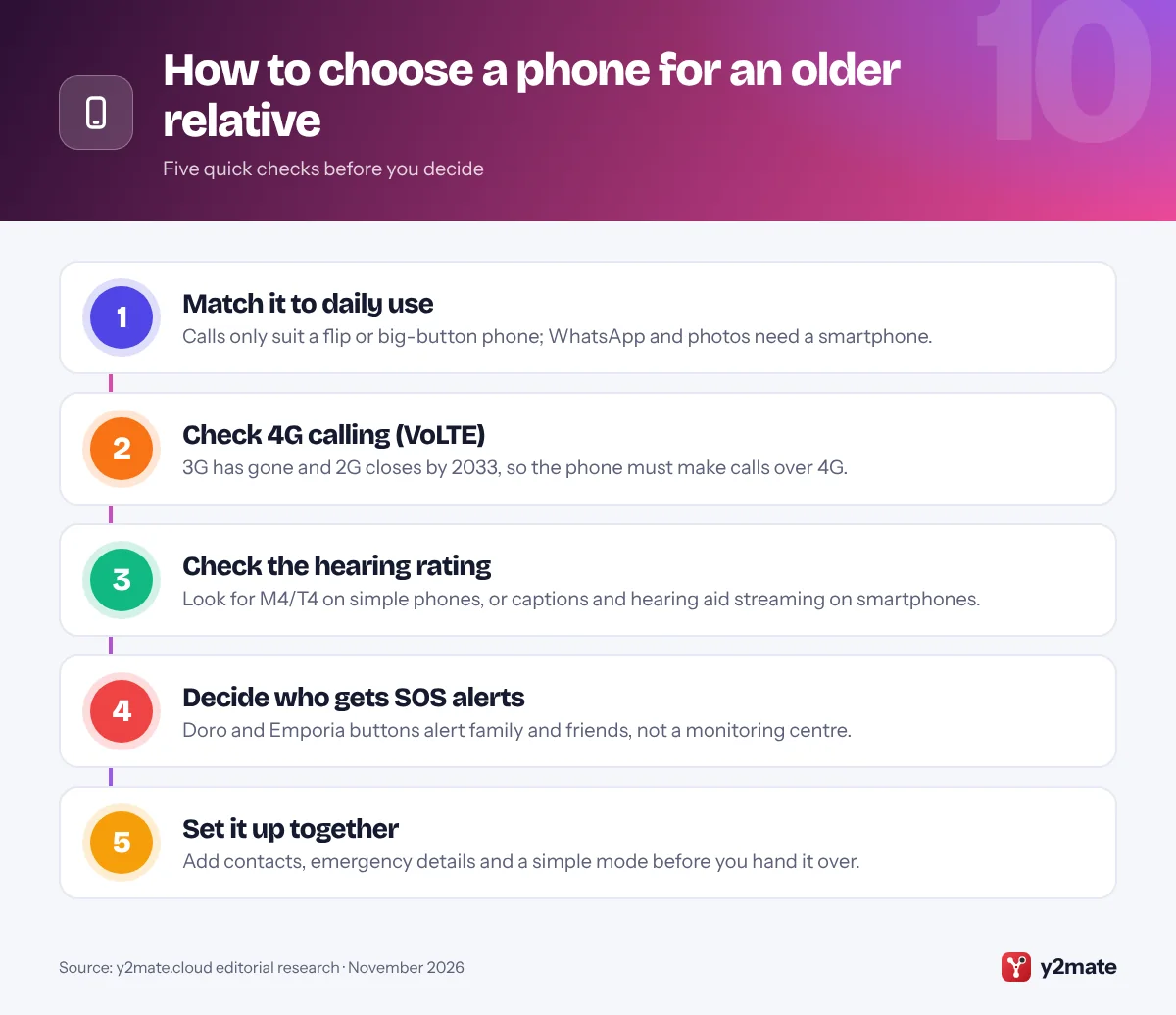
Start with the network. All four UK mobile networks have switched off 3G, and the government says 2G networks will close between 2029 and 2033, with EE planning to start in 2029. Any phone you buy should make calls over 4G (VoLTE), so check that 4G calling is switched on in the settings. Phones that cannot use 4G or 5G also miss government Emergency Alerts.
Who answers the button?
Doro and Emporia emergency buttons alert family and friends you choose; they do not call a monitoring centre, so someone must be ready to respond. For round-the-clock monitoring, a separate telecare alarm service is the usual route. In a life-threatening emergency, call 999 or 112.
The landline switchover
Most UK landlines are moving to digital phone lines by the end of January 2027. Telecare alarms and older home phones may need checking, so tell the provider if a relative relies on their landline or an alarm. Ofcom expects providers to give customers who depend on their landline a way to call 999 during a power cut, and a charged mobile is a sensible backup.
Hearing and speech support
- Simple phones: M4/T4 is the best hearing aid rating.
- Smartphones: look for Live Caption and direct streaming to compatible hearing aids.
- Text 999: deaf or speech-impaired people can register in advance for the emergencySMS service.
Frequently asked questions
What is the best mobile phone for older people in the UK?
For someone who mainly calls and texts, the Doro Leva L30 is the best all-rounder, with an assistance button that shares GPS location, an M4/T4 hearing aid rating and a charging cradle. For a smartphone, an iPhone 17 with Assistive Access suits iPhone families, while the Doro Aurora A20 adds a physical keypad for people nervous about touchscreens.
Will an old mobile phone stop working after the 3G and 2G switch-off?
All four UK networks have switched off 3G, and 2G will close between 2029 and 2033. Older phones that rely on 3G or 2G for calls will stop working, and Three has no 2G network at all. Check that the phone supports 4G calling (VoLTE) and that it is switched on in the settings, or replace it with a current 4G model.
Does a Doro assistance button call 999 or a monitoring centre?
Neither by default. The Doro Secure Button sends a text to up to five trusted contacts, on compatible models with a GPS location link, then calls them one by one until someone answers, using loudspeaker mode. The standard service has no separate subscription. It does not reach a monitoring centre, so in a life-threatening emergency your relative should dial 999 or 112.
How does the digital landline switchover affect older people?
UK phone companies are moving landlines to digital technology, and most customers are expected to switch by the end of January 2027. Telecare alarms and some older handsets may need checking or replacing. Tell the provider if a relative depends on their landline or an alarm, and keep a charged mobile as a backup, because a digital landline may not work in a power cut without battery back-up.
Can deaf or hard of hearing people contact 999 by text?
Yes. Deaf, hard of hearing or speech-impaired people can use the emergencySMS service to text 999, but they must register their mobile number in advance. Relay UK also lets people make calls through a text relay assistant, including to the emergency services. Smartphones such as the Pixel 10a and iPhone 17 also offer live captions for everyday calls.
Final verdict
The Doro Leva L30 is the best of the phones for seniors UK families can buy for straightforward calls with an assistance button, while an iPhone 17 with Assistive Access or the Doro Aurora A20 suits someone ready for a smartphone. Choose the Doro Leva X10 for dementia, the Emporia SIMPLICITY-LTE for calls only and the Pixel 10a for hearing loss.
Before you buy, make sure the phone supports 4G calling, decide who will answer the assistance button and set it up together.
Sources and further reading
- Ofcom 2G and 3G switch-off: Ofcom explains that all UK networks have switched off 3G and what the coming 2G switch-off means for older phones.
- GOV.UK 2G switch-off guidance: Government advice on checking that a phone supports 4G calling before 2G networks close between 2029 and 2033.
- Digital landline switchover: GOV.UK guidance on the move to digital landlines by January 2027 and the protections for telecare users and vulnerable customers.
- Age UK technology help: Age UK's free guides and local support to help older people get confident with phones, the internet and staying safe online.
- Relay UK text relay service: Relay UK lets people with hearing or speech difficulties make phone calls, including emergency calls, through a text relay assistant.

Leave a Reply