
- Oak National Academy's Aila is a free AI lesson assistant that builds lesson plans, slides, quizzes and worksheets from Oak's lessons for key stages 1 to 4.
- The DfE updated its generative AI product safety standards in January 2026, and schools should check AI tools against them before use.
- JCQ guidance says teachers must not use AI tools as the sole or primary means of marking candidates' work.
- The DfE advises schools to keep personal data out of generative AI tools unless it is properly protected, usually after a data protection impact assessment.
- Microsoft and Google both say school-account data in Microsoft 365 Copilot Chat and Gemini for Education is not used to train their AI models.
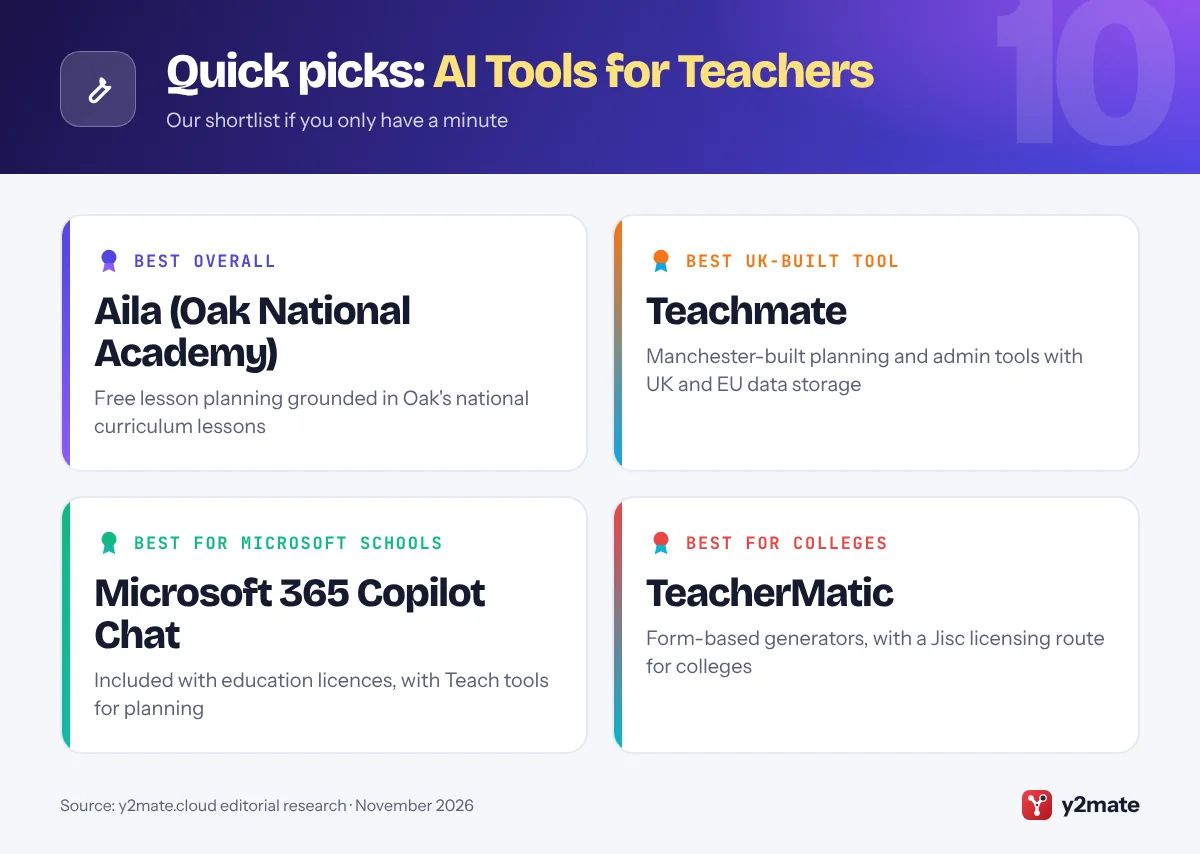
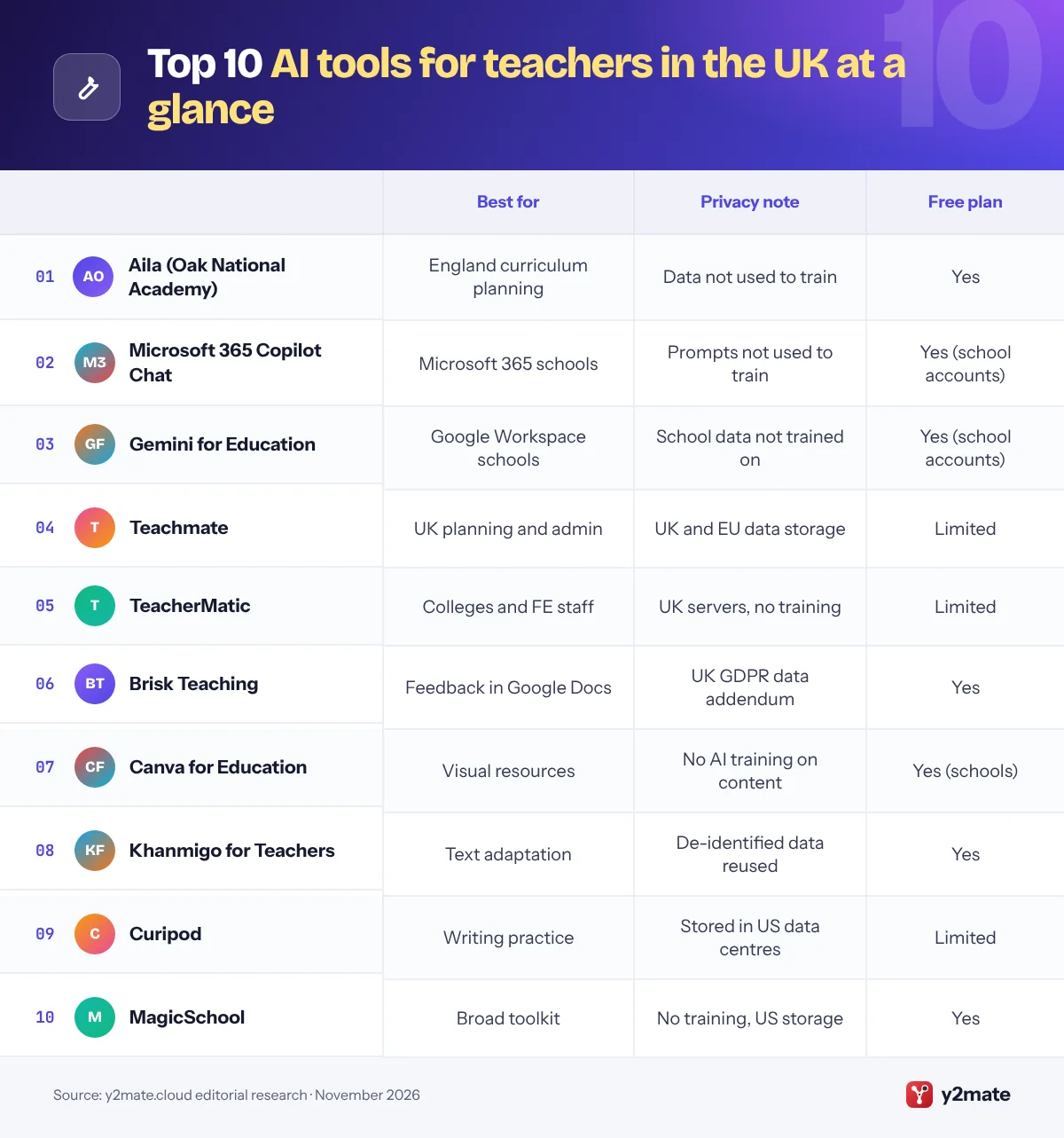
The best AI tools for teachers in the UK in 2026 are Oak National Academy’s free Aila for lesson planning built on the national curriculum for England, Microsoft 365 Copilot Chat or Gemini for Education if your school or trust already runs on Microsoft or Google, and the UK-built Teachmate and TeacherMatic for everyday planning and admin. Brisk Teaching, Canva for Education, Khanmigo for Teachers, Curipod and MagicSchool complete the list.
Some plain definitions. Generative AI is software that produces new text, images or other content when you type a request, known as a prompt. Differentiation, usually called adaptive teaching in England, means adjusting a lesson so pupils with different needs, reading ages or languages can reach the same goal. AI detection tools guess whether writing came from a chatbot, but they can wrongly accuse pupils and miss edited AI text, so their scores are never proof.
The Department for Education (DfE) supports using AI to reduce workload, but staff remain responsible for what it produces. Follow your school or trust policy, keep pupils’ personal data out of unapproved tools, and check every output before it reaches a class.
How we ranked this list
We ranked tools only on publicly documented criteria: what each one does for planning, feedback, adaptive teaching and admin; the data protection commitments its provider publishes, such as where data is stored and whether content is used to train AI models; age limits and admin controls for pupil-facing features; fit with the curriculum in England and UK schools; and whether teachers get a free plan.
We did not run classroom trials or score outputs ourselves, and we leave out prices, ratings and usage figures. Terms change, so check them with your data protection officer before you start.
The Top 10 AI Tools for Teachers
1. Aila (Oak National Academy)
Best for: free lesson planning for England’s curriculum
Aila is the free AI lesson assistant from Oak National Academy, the curriculum body that works at arm’s length from the DfE. You describe the lesson you need and Aila builds it with you step by step, drawing on Oak’s own bank of lessons across national curriculum subjects for key stages 1 to 4. It produces an editable lesson plan, slides, starter and exit quizzes and a worksheet with practice tasks.
Grounding is the difference. Rather than relying only on what a general chatbot knows, Aila retrieves similar Oak lessons and shows them to you, which keeps content and sequencing closer to the national curriculum for England. Oak says personal information is not sent to the language model and is not used to train it, and it publishes a guide to help schools complete a data protection impact assessment.
In 2026 Oak also made its curriculum available inside ChatGPT and Claude through a plugin. Aila is designed for UK teachers, works on a laptop or computer rather than a phone, and has fair use limits. Teachers in Scotland, Wales and Northern Ireland will need to adapt outputs to their own curricula.
Official site: Aila (Oak National Academy)
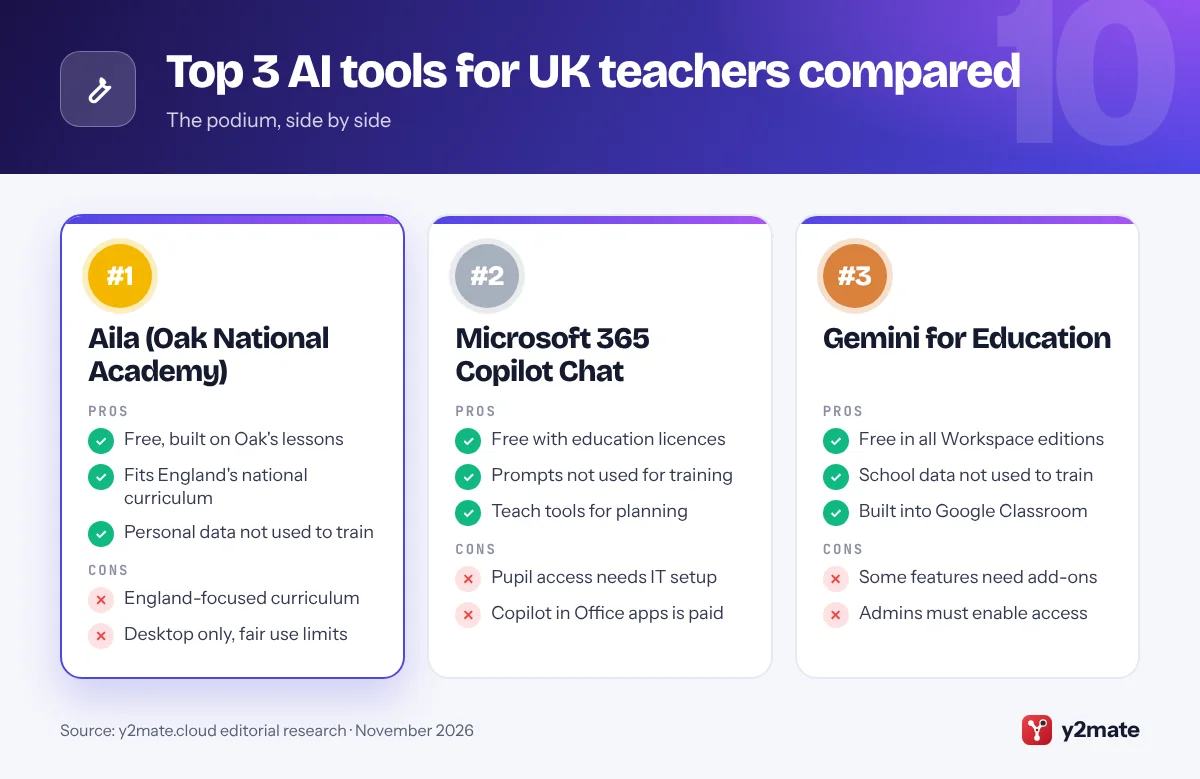
- Free, built on Oak's lessons
- Fits England's national curriculum
- Personal data not used to train
- England-focused curriculum
- Desktop only, fair use limits
2. Microsoft 365 Copilot Chat
Best for: schools and trusts on Microsoft 365
Many UK schools and multi-academy trusts already run on Microsoft 365, and Microsoft 365 Copilot Chat is included at no extra cost for staff, and for students aged 13 and over, with an education licence. Signed in with a school account, it has enterprise data protection: Microsoft says prompts and responses are not used to train its foundation models.
For planning, Teach in the Microsoft 365 Copilot app gives staff guided tools to draft lesson plans, rubrics and quizzes, and to rewrite a text at a different reading level while keeping key terms, which supports adaptive teaching. It needs only an education licence, not a paid Copilot licence. The fuller Microsoft 365 Copilot inside Word, PowerPoint and Outlook is a paid add-on.
For pupils, Copilot Chat stays off on school-age student accounts until IT switches it on with age controls, and Microsoft is rolling out a setting that limits students to Study and Learn, a mode that guides rather than gives answers. Before enabling it for pupils, complete a DPIA and check it against the DfE’s product safety standards.
Official site: Microsoft 365 Copilot Chat
- Free with education licences
- Prompts not used for training
- Teach tools for planning
- Pupil access needs IT setup
- Copilot in Office apps is paid
3. Gemini for Education
Best for: Google Workspace and Chromebook schools
Gemini for Education is included at no extra cost in every Google Workspace for Education edition, including the free Education Fundamentals, so schools that use Google Classroom or Chromebooks can switch it on without a new contract. Teachers get the Gemini app, Gemini Notebook, the research tool formerly called NotebookLM, and Gemini in Classroom, which drafts lesson plans, quizzes that export to Google Forms, vocabulary lists and other adapted materials.
Google says chats and uploads from school accounts are not reviewed by humans or used to train AI models, and are covered by the Workspace for Education terms. Admins control access by organisational unit and age: under-18 users get a separate experience with extra safeguards, some features are for adults only, and the Classroom app inside Gemini is limited to users over 18.
Gemini Notebook is useful for building revision guides or knowledge organisers from your own department documents, with citations back to the sources. As with any tool, keep pupils’ personal data out unless your DPIA covers it, and check outputs against your exam board’s specification.
Official site: Gemini for Education
- Free in all Workspace editions
- School data not used to train
- Built into Google Classroom
- Some features need add-ons
- Admins must enable access
4. Teachmate
Best for: UK-built planning and admin tools
Teachmate, which dropped the AI from its former name TeachMateAI, is a UK edtech company based in Manchester. Its platform offers a large set of tools shaped around UK schools, covering lesson and unit planning, classroom resources and school admin writing. A free starter plan gives individual teachers a small selection of tools without a payment card, and school plans open up the rest.
Data handling is central to its pitch. Teachmate says account and AI-tool data are stored and processed in the UK and EU, that it does not collect, store or share user data for commercial purposes including model training, and that outputs in its My Content history are kept only for a limited period.
When the DfE updated its generative AI product safety standards in January 2026, Teachmate published how it meets them, arguing that most learner-facing standards do not apply because it is a teacher tool. That is the company’s own assessment, so your school should still complete its own approval and DPIA, as Teachmate itself advises.
Official site: Teachmate
- UK-built for UK schools
- UK and EU data storage
- No training on user data
- Free plan is limited
- Safety claims are self-assessed
5. TeacherMatic
Best for: colleges and further education staff
TeacherMatic is an AI toolkit made up of ready-made generators for tasks such as lesson plans, quizzes, rubrics, feedback, flash cards, plenary activities, revision timetables and policy updates. You fill in a short form rather than writing a prompt, which suits staff who are new to AI. It has been part of the Avallain Group since 2024 and is widely used in further education, where Jisc’s National Centre for AI piloted it with colleges.
In July 2025 Jisc announced a partnership that lets member colleges and universities licence TeacherMatic through its CHEST agreements, which simplifies procurement. TeacherMatic says it runs on UK-based servers, is GDPR compliant and never uses customer data to train AI models. Its terms also say the service is not intended for processing personal data, so keep learners’ names and details out of every request.
A free account gives access to selected generators with a small daily limit, enough to see whether it suits you, while the full set comes with the Professional plan or an institutional licence. In 2026 it also published a framework for using AI safely in assessment.
Official site: TeacherMatic
- Form-based, no prompt writing
- UK servers, no training on data
- Jisc licensing route for colleges
- Small free daily allowance
- Not built for personal data
6. Brisk Teaching
Best for: feedback drafts inside Google Docs and Word
Brisk Teaching is a browser extension for Chrome and Edge that adds AI to Google Docs, Slides, YouTube and learning platforms. Its free teacher plan covers drafting feedback on pupils’ writing, changing the reading level of a text, and turning an article or video into a quiz, presentation or lesson plan, all without leaving the page you are on.
For UK schools, Brisk publishes a European and UK privacy notice and a data processing addendum that covers UK GDPR, and it says student and teacher inputs are never used to train, fine-tune or improve AI models. Its student data addendum still allows de-identified data to be used for its own product development, so read it before rollout.
Feedback tools need care under exam rules. JCQ guidance updated in September 2026 says teachers must not use AI as the sole or primary means of marking candidates’ work, so treat Brisk’s comments as drafts you edit. Its Inspect Writing feature, which replays how a Google Doc or OneDrive Word file was written, offers better evidence than an AI detection score when you have doubts about coursework.
Official site: Brisk Teaching
- Works inside Docs and Slides
- UK GDPR data addendum
- Writing replay for coursework
- Needs Chrome or Edge
- Feedback must stay teacher-led
7. Canva for Education
Best for: visual resources for primary and secondary
Canva for Education is free for primary and secondary teachers and their pupils, and schools can set it up for all staff and students. Teachers use it for slides, worksheets, displays, knowledge organisers and newsletters, and its AI tools can draft text, generate images and reformat a resource for a different audience, which helps when you adapt materials for pupils with different needs.
Its education terms are unusually clear. Generative AI features are off by default for students and can only be unlocked by school admins. Canva says it does not use content from Canva Education accounts to train its AI and does not let those users opt in, and third-party AI providers may process student content only to complete the request. There is no advertising to students.
Canva will not plan a scheme of work or mark essays, so it is a companion to the planning tools above rather than a replacement. If your school already uses it for display work, switching on the teacher AI features is a low-risk next step.
Official site: Canva for Education
- Free for primary and secondary
- AI off for pupils by default
- No AI training on content
- Not a planning or marking tool
- Pupil AI needs admin approval
8. Khanmigo for Teachers
Best for: free text adaptation and maths planning
Khanmigo for Teachers is Khan Academy’s AI teaching assistant, and its teacher tools are free in more than 180 countries, the UK included, thanks to support from Microsoft. Teachers aged 18 or over get activities for lesson plans, exit tickets, quizzes, rubrics and lesson hooks, plus adaptation tools that rewrite, level or chunk a text and make a topic relevant to pupils’ interests.
Khan Academy is a US nonprofit, and its materials lean towards US grade levels, spelling and terminology, so you will need to state the key stage, UK spelling and your exam board’s wording in each request. It suits teachers whose pupils already use Khan Academy for maths practice.
Check the data terms before using it with anything personal. Khan Academy says it may use de-identified Khanmigo conversations and usage data to improve its products, which falls short of the no-training commitments made by Teachmate, TeacherMatic and Aila. Paid Khanmigo subscriptions for learners are sold only in the US, so in UK schools this is a teacher-only planning aid rather than a pupil tutor.
Official site: Khanmigo for Teachers
- Free for UK teachers
- Strong text adaptation tools
- Backed by a nonprofit
- US terms and grade levels
- De-identified data may be reused
9. Curipod
Best for: whole-class writing practice with feedback
Curipod, from Norway, runs short teacher-led writing sessions: you set a prompt, pupils join without accounts and write, and AI drafts Glow and Grow feedback that names a strength and a next step. Curipod says teachers can review all AI output before pupils see it and that pupils never get an open chatbot, which suits schools that want teachers to stay in control of AI.
The free plan includes a weekly allowance of live sessions that renews automatically, with unlimited pupils but shorter maximum responses than school plans. Curipod says neither teacher nor pupil data is used to train AI models, and describes itself as GDPR compliant, with a signed data processing agreement available to schools.
Check one detail for UK GDPR: Curipod’s privacy policy says data is stored in US data centres, so your data protection officer will want to confirm the international transfer safeguards in its agreement. For low-stakes writing practice in English, history or science, the reviewed feedback is useful; for coursework, follow JCQ rules and keep marking decisions with you.
Official site: Curipod
- Teacher reviews AI feedback
- No pupil accounts needed
- No AI training on data
- Data stored in US centres
- Free sessions are limited
10. MagicSchool
Best for: a broad toolkit if you can adapt US defaults
MagicSchool is a US platform with a free teacher plan that includes a large set of tools for planning, assessment, differentiation and communication, plus a chatbot called Raina. A pupil side lets teachers choose which AI tools pupils can use and review their activity, and pupils cannot message one another.
It is built for American schools, and that shows. Its tools are designed around US grade levels and standards, so state the key stage, curriculum and UK spelling in each request and expect to edit terminology. Its privacy policy includes a notice for UK and European users and the company describes itself as GDPR aligned, but schools should ask for its UK data processing terms before any pupil use.
MagicSchool says it does not allow AI model providers to store or train on educator or student data and that student data is never sold, which are strong commitments, although data is stored in the United States. Compared with Aila or Teachmate, it offers more breadth but less UK fit, which is why it ranks tenth here.
Official site: MagicSchool
- Very broad free toolkit
- Teacher-controlled pupil mode
- No training on user data
- US grade levels by default
- Data stored in the US
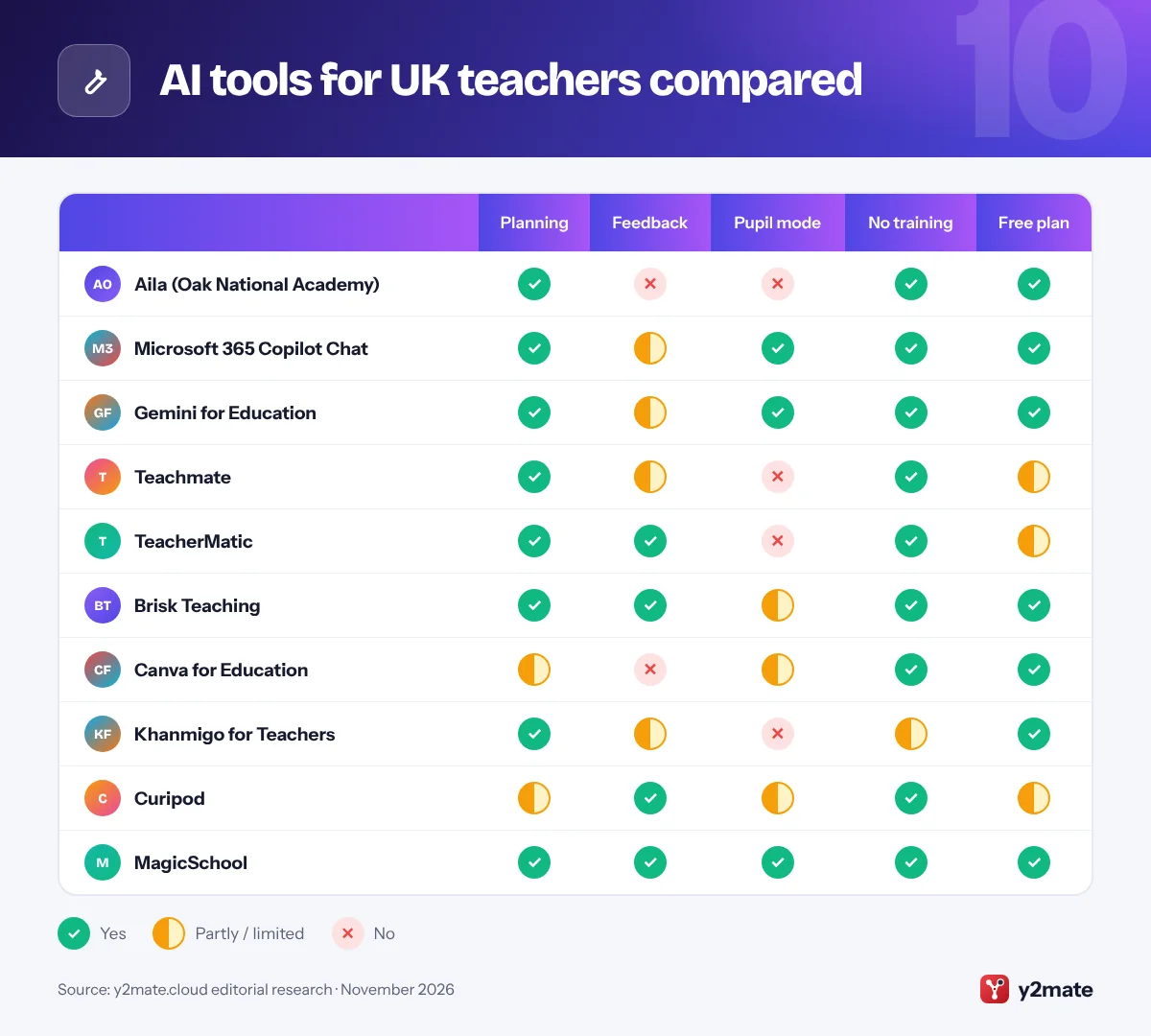
AI tools for UK teachers compared
How to choose AI tools for teachers in the UK
Start with Aila if you plan lessons for the national curriculum in England, then use the AI built into your school’s Microsoft or Google platform for everyday writing and admin. Add a specialist tool such as Teachmate, TeacherMatic or Brisk only when it does a job better and your school has approved it.
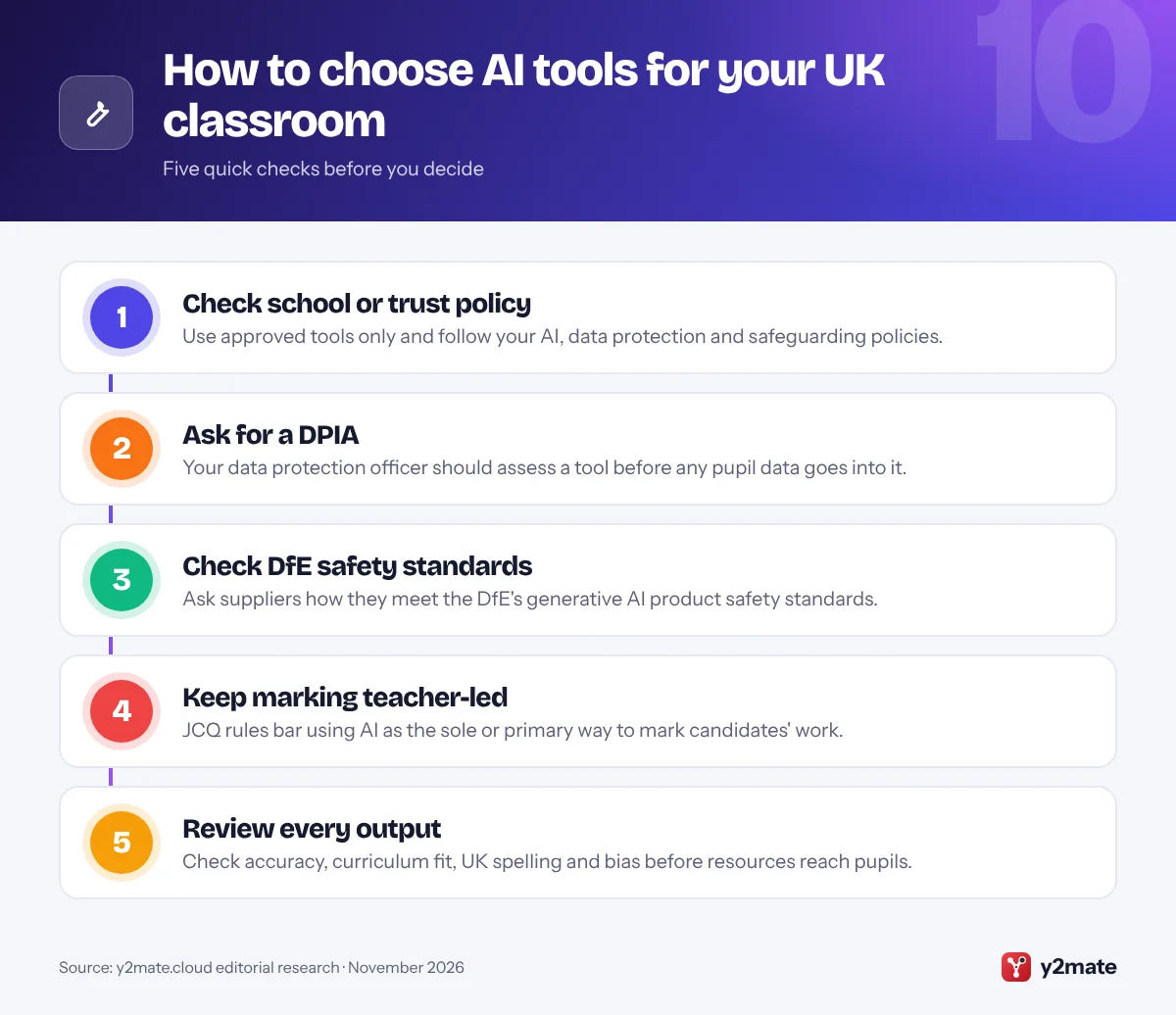
The rules that apply
- DfE guidance: the DfE’s policy paper on generative AI in education and its free support materials explain safe use, and its product safety standards, updated in January 2026, set expectations on filtering, monitoring, security, governance and pupils’ wellbeing.
- UK GDPR: the DfE advises keeping personal data out of generative AI tools unless your setting has protected it, normally through a data protection impact assessment (DPIA). The ICO’s children’s code adds standards for online services likely to be used by children.
- JCQ rules: for GCSEs, A levels and other JCQ qualifications, candidates must acknowledge any AI use, misuse is malpractice, and teachers must not use AI as the sole or primary means of marking.
Scotland, Wales and Northern Ireland
Aila follows England’s curriculum, so adapt its outputs. Northern Ireland’s Department of Education issued guidance on generative AI for education professionals in May 2026, so check what your own education department or local authority says.
AI detection
AI detectors can wrongly accuse pupils. For coursework, rely on supervised drafting, version history and conversations about the work.
Frequently asked questions
What is the best free AI tool for teachers in the UK?
For teachers in England, the best free AI tool is Aila from Oak National Academy. It builds lesson plans, slides, quizzes and worksheets from Oak's curriculum-aligned lessons for key stages 1 to 4, and Oak says personal information is not used to train the model. Microsoft 365 Copilot Chat and Gemini for Education are also free with school accounts.
Can teachers use AI to mark work in the UK?
AI can help draft feedback, but teachers must stay in charge. JCQ guidance says teachers must not use AI tools as the sole or primary means of marking candidates' work for its qualifications, such as GCSEs and A levels. For everyday classwork, follow your school's policy, check every AI comment and keep the final judgement yourself.
Is it safe to put pupils' work into AI tools?
Only in tools your school has approved. The DfE advises keeping personal data out of generative AI tools unless your setting has protected it, normally after a data protection impact assessment. Remove names and identifying details where you can, prefer tools with UK GDPR terms and no AI training on your data, and ask your data protection officer if unsure.
What are the DfE's generative AI product safety standards?
They are the Department for Education's expectations for AI products used in schools and colleges, updated in January 2026. They cover filtering, monitoring and reporting, security, privacy and data protection, design and testing, governance, and pupils' cognitive, emotional and social development and mental health. Schools are encouraged to check tools against them before use.
Can AI detectors prove a pupil used AI?
No. AI detectors estimate whether text looks machine-written, and they can wrongly flag a pupil's own writing or miss edited AI text. Use a score only as a reason to look more closely. For coursework, supervised drafting, version history, earlier samples of the pupil's writing and a conversation about the work give far stronger evidence under JCQ rules.
Final verdict
The best AI tools for teachers in the UK in 2026 start with Oak’s free Aila for curriculum-aligned lesson planning, and with Microsoft 365 Copilot Chat or Gemini for Education when your school already uses Microsoft or Google. Teachmate and TeacherMatic add UK-built planning and admin help, while Brisk Teaching, Canva for Education, Khanmigo for Teachers, Curipod and MagicSchool each do one job well.
Check your school’s policy and DPIA, keep pupils’ personal data out of unapproved tools, and keep marking decisions in human hands.
Sources and further reading
- DfE generative AI in education: The Department for Education's policy paper on how schools and colleges in England can use generative AI safely and effectively.
- Generative AI product safety standards: The DfE's standards that AI products used in education should meet, covering filtering, monitoring, security, data protection and pupils' wellbeing.
- Data protection in schools: DfE guidance on data protection in schools, including a section on generative AI and the data protection risks it raises.
- JCQ AI use in assessments: The exam boards' guidance on acceptable AI use, malpractice and teachers' responsibilities when marking work for JCQ qualifications.
- ICO children's code: The Information Commissioner's Office explains the children's code standards for online services likely to be used by children.

Leave a Reply