
- Khanmigo for Teachers is free for US teachers through a partnership between Khan Academy and Microsoft.
- Google and Microsoft both say school-account data in Gemini for Education and Microsoft 365 Copilot Chat is not used to train their AI models.
- Under FERPA, districts must keep direct control over student records shared with AI vendors, usually through a contract, so teachers should use approved tools.
- AI detectors can wrongly flag a student's own writing, so drafts, version history and conversations are better evidence than a detector score.
- Most online services had to comply with the FTC's updated COPPA Rule, which protects children under 13, by April 22, 2026.
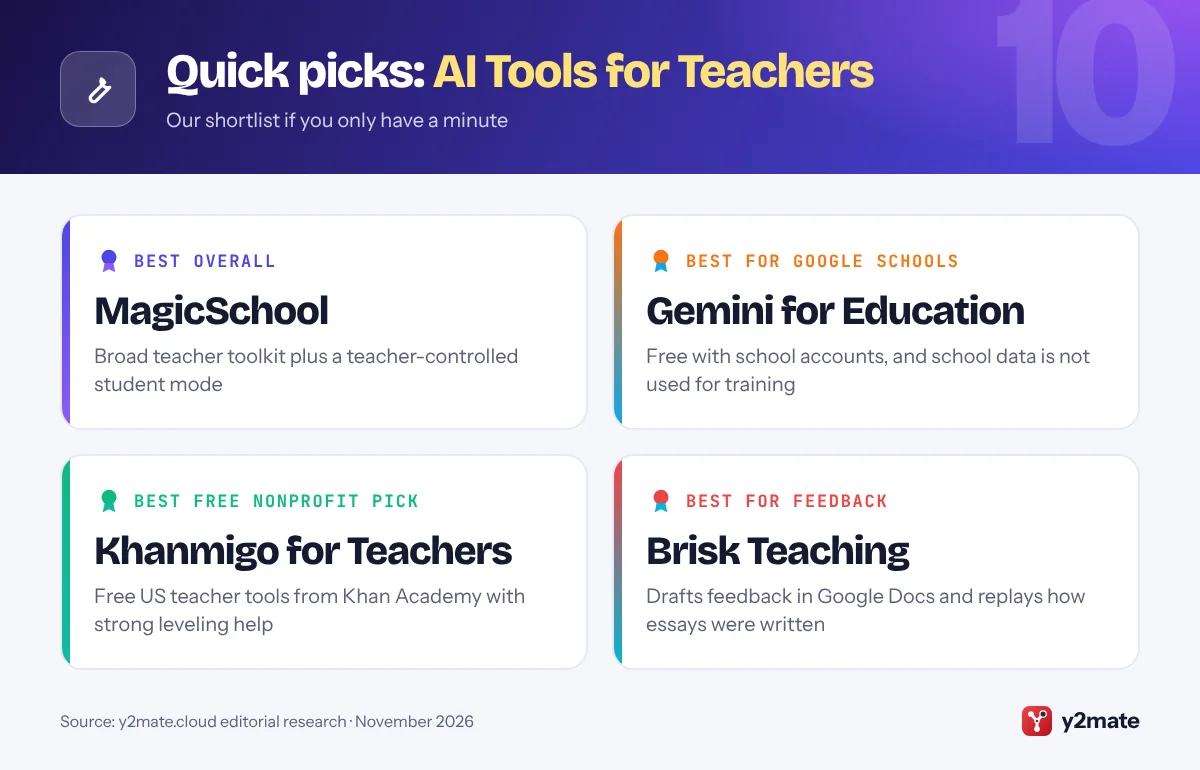
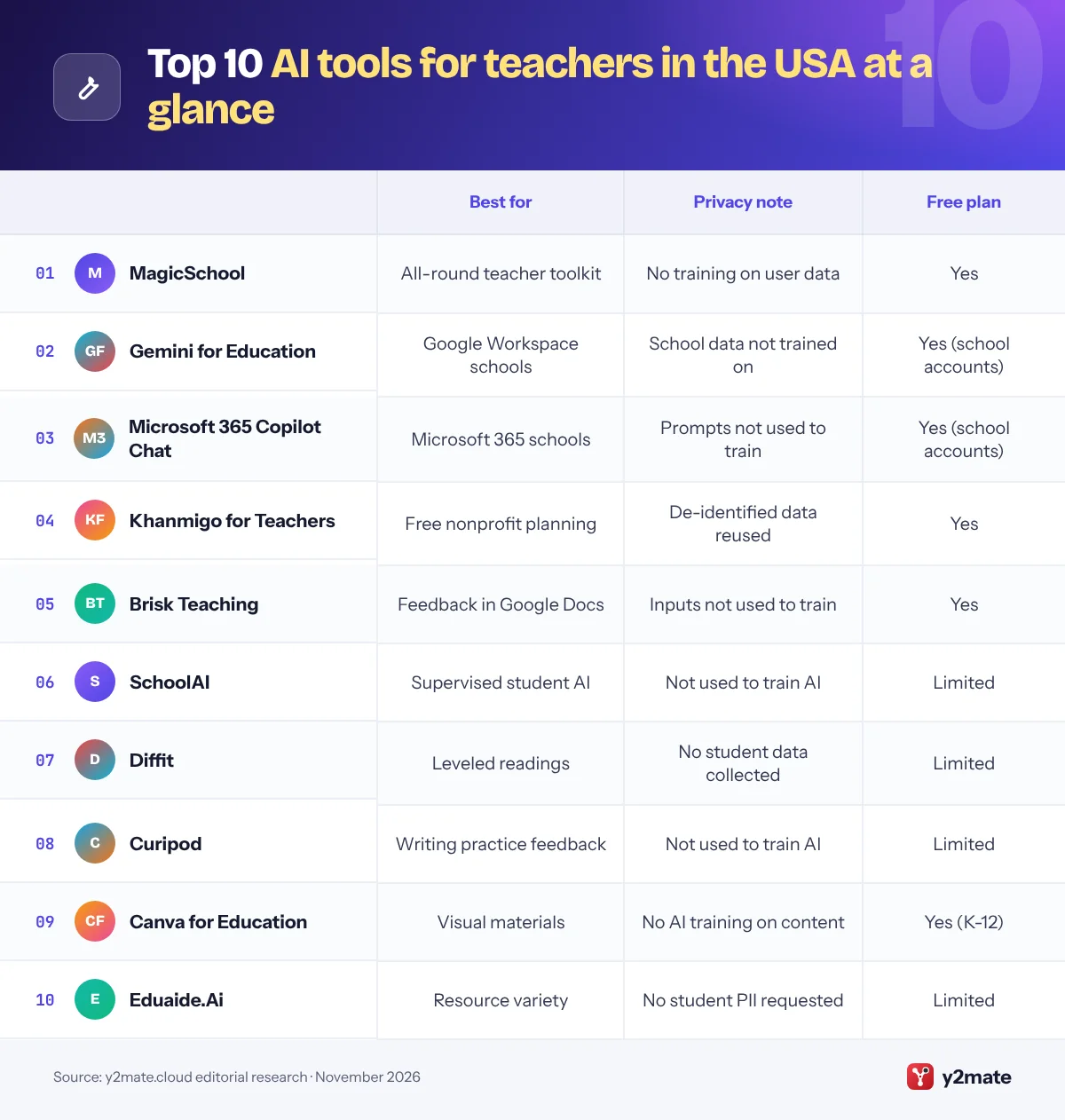
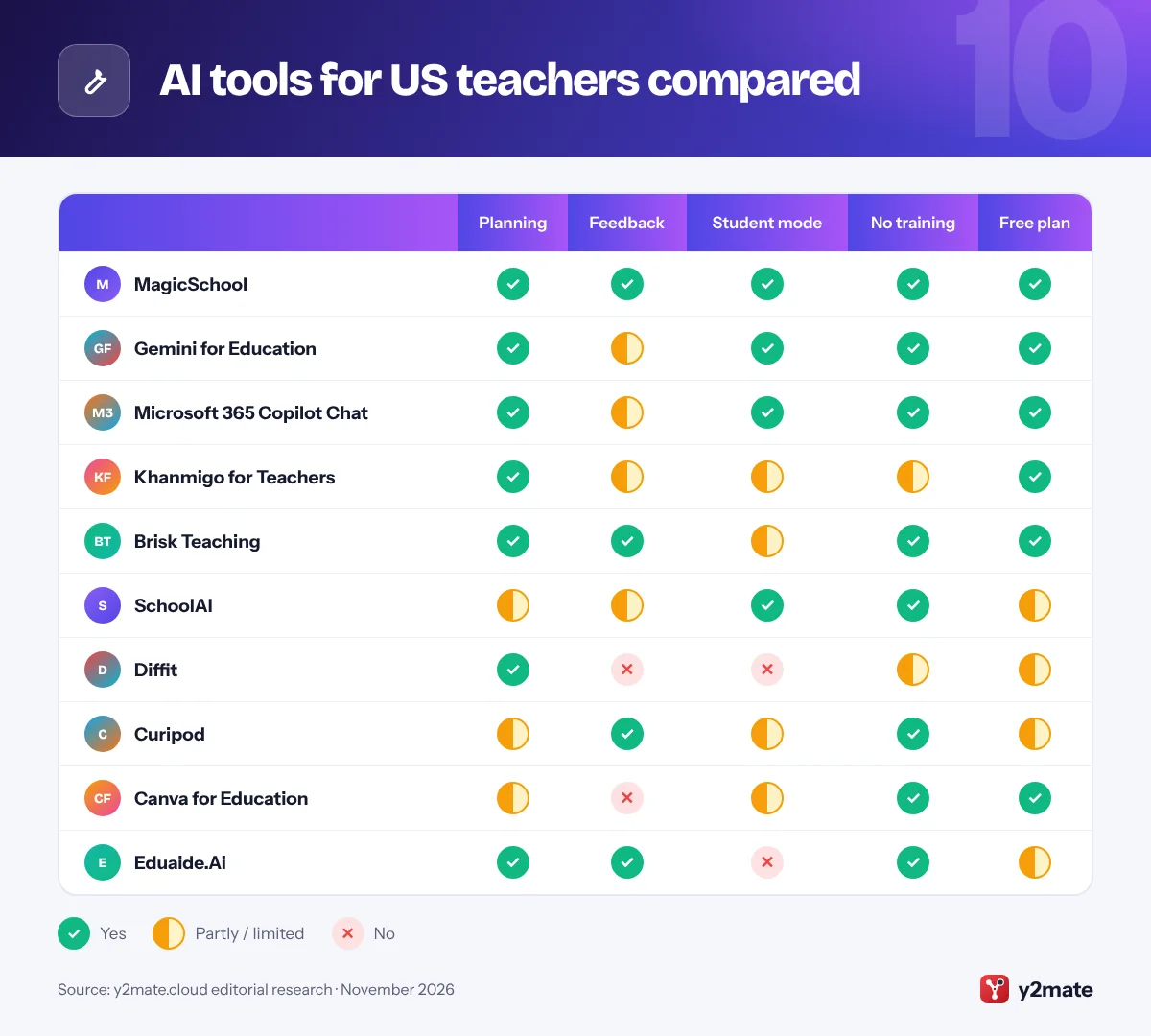
The best AI tools for teachers in the USA in 2026 are MagicSchool for an all-round planning and feedback toolkit, Gemini for Education or Microsoft 365 Copilot Chat if your district already runs on Google or Microsoft, and Khanmigo for Teachers, which Khan Academy offers free to US teachers. Brisk Teaching, SchoolAI, Diffit, Curipod, Canva for Education and Eduaide.Ai complete the list, each with a narrower job.
A few terms first. Generative AI means software that writes new text, images or other content in response to a typed request, called a prompt. Differentiation means adapting one lesson so students with different reading levels, languages or needs can reach the same goal. AI detection tools estimate whether writing came from a chatbot, but they can wrongly flag a student’s own work and miss edited AI text, so a detector score is never proof on its own.
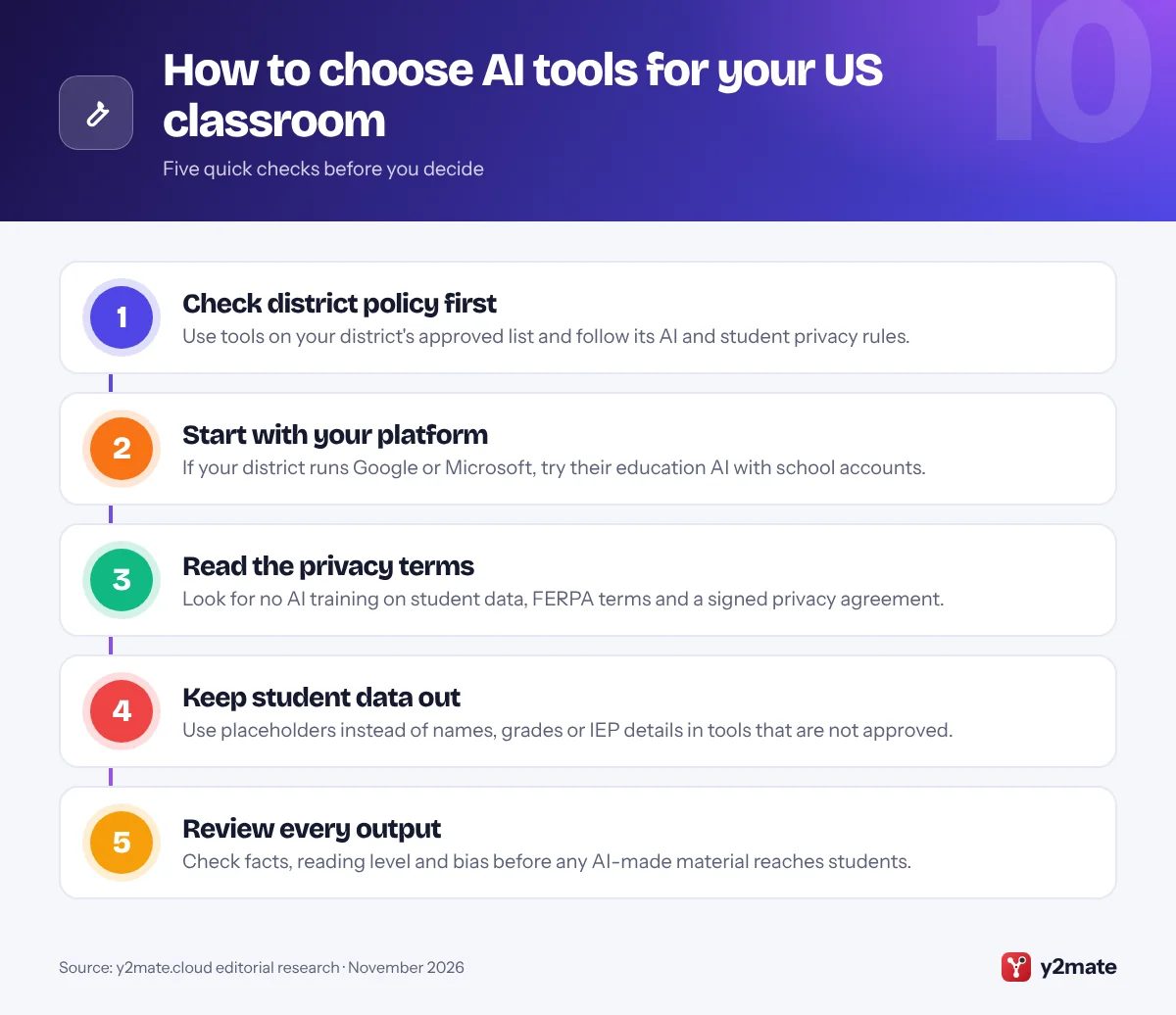
Whatever you choose, follow your district’s AI policy and approved-app list, keep student names and records out of tools your district has not approved, and check every output before it reaches a student.
How we ranked this list
We ranked tools only on publicly documented criteria: what each one does for lesson planning, feedback, differentiation and admin; the data protection commitments its provider publishes, such as not using teacher or student content to train AI models; age limits and admin controls for any student-facing features; how well it fits US schools and their systems; and whether individual teachers get a free plan.
We did not run classroom trials or score outputs ourselves, and we leave out prices, ratings and usage figures. Free plans and privacy terms change, so check the provider’s current terms and your district’s data privacy agreement before you start.
The Top 10 AI Tools for Teachers
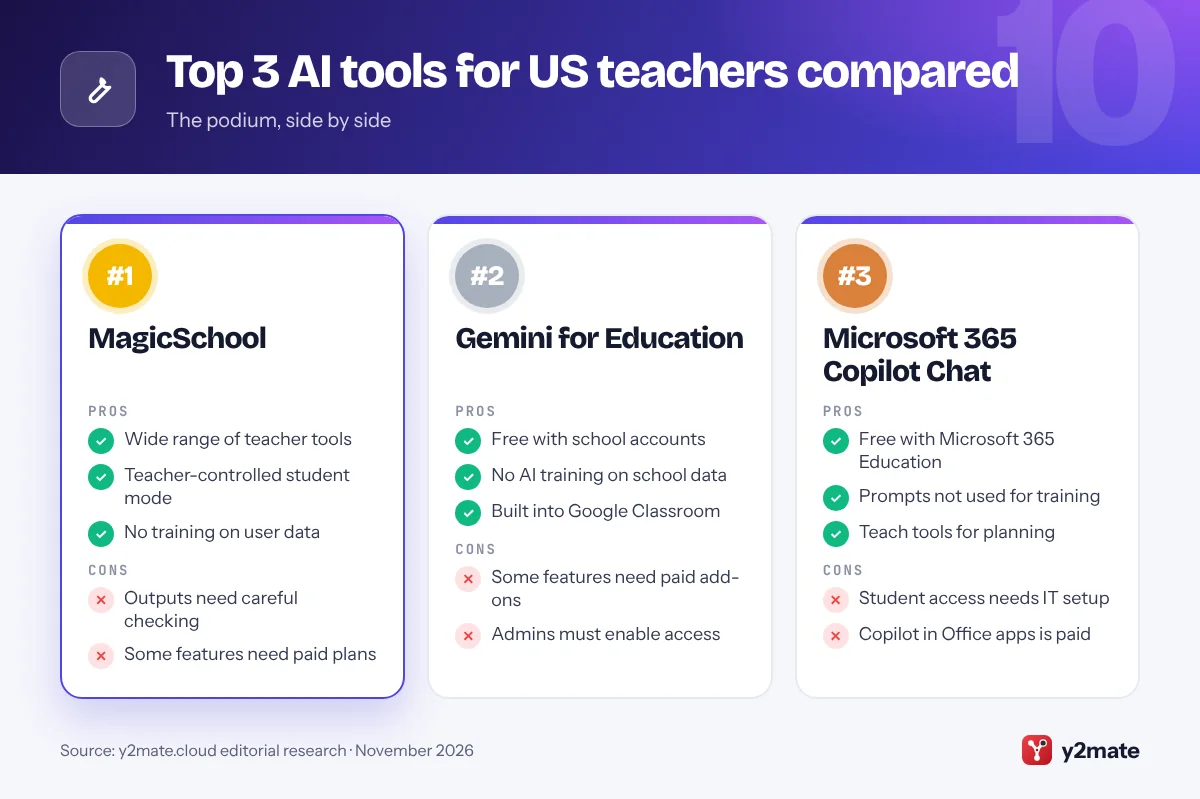
1. MagicSchool
Best for: an all-in-one toolkit with student controls
MagicSchool is an AI platform built for K-12 schools, with a large set of teacher tools for lesson plans, assessments, rubrics, differentiation, family emails and other routine writing. Teachers can use the core tools free, along with a chatbot called Raina, while paid Plus and district plans add features and contract terms such as customizable data privacy agreements.
It also has a student side. Teachers choose which AI tools students can open, student activity is saved so teachers and authorized school staff can review it, and students cannot message one another on the platform. MagicSchool says it does not allow any AI model provider to store or train on educator or student data, that student data is never sold, and that data is stored in the United States. It says it complies with FERPA and COPPA; those are the company’s own statements rather than independent audits.
Every output is a draft, and tools that help with IEP progress notes still need your professional judgment and your district’s approval before any student information goes in.
Official site: MagicSchool
- Wide range of teacher tools
- Teacher-controlled student mode
- No training on user data
- Outputs need careful checking
- Some features need paid plans
2. Gemini for Education
Best for: districts that run on Google Workspace
Gemini for Education is Google’s AI for schools, available at no extra cost in Google Workspace for Education editions, including the free Education Fundamentals. Teachers signed in with a school account can use the Gemini app, Gemini Notebook, which Google renamed from NotebookLM in July 2026, and Gemini in Classroom, a set of no-cost tools for drafting lesson plans, quizzes that export to Google Forms, vocabulary lists and other differentiated materials.
Use it through a school account, not a personal one. Google says chats and uploads made with school accounts are not reviewed by humans or used to train AI models, and are covered by the Workspace for Education terms. Admins decide which users can open the Gemini app and Gemini Notebook and can switch features off for students under 18, who get a separate experience with extra safeguards and fewer advanced features.
Gemini Notebook suits teachers who want answers grounded in their own sources, such as a curriculum guide or reading packet, with citations back to the text. Some newer Classroom features need paid add-ons.
Official site: Gemini for Education
- Free with school accounts
- No AI training on school data
- Built into Google Classroom
- Some features need paid add-ons
- Admins must enable access
3. Microsoft 365 Copilot Chat
Best for: schools that run on Microsoft 365 and Teams
Microsoft 365 Copilot Chat is included at no extra cost for educators, staff and students aged 13 and over with Microsoft 365 Education, and it has enterprise data protection when people sign in with a school account. Microsoft says prompts and responses are not used to train its foundation models. For teachers, the most useful part is Teach in the Microsoft 365 Copilot app, which needs only an education license, not a paid Copilot license.
Teach helps you draft lesson plans, rubrics and quizzes, align materials to academic standards, and rewrite a text at a different reading level while keeping key vocabulary. Learning Zone turns lessons into interactive activities that students join from their own devices.
Student access is controlled centrally. Copilot Chat is off by default for K-12 student accounts until an IT admin turns it on with age controls for 13 to 17-year-olds, and Microsoft is rolling out a setting that limits students to Study and Learn, a mode built to guide learning rather than hand over answers. The fuller Microsoft 365 Copilot inside Word, PowerPoint and Excel is a paid add-on.
Official site: Microsoft 365 Copilot Chat
- Free with Microsoft 365 Education
- Prompts not used for training
- Teach tools for planning
- Student access needs IT setup
- Copilot in Office apps is paid
4. Khanmigo for Teachers
Best for: free planning and leveling help from a nonprofit
Khanmigo for Teachers is the teacher side of Khan Academy’s AI assistant, offered free to US teachers through a partnership with Microsoft. Teachers aged 18 or over sign up with a Khan Academy account and get a hub of activities, including a lesson plan creator, exit tickets, multiple-choice quizzes, rubrics, an IEP assistant and differentiation tools such as a text leveler, a text rewriter, text chunking and Make it Relevant, which links a topic to students’ interests.
It works especially well if your students already practice on Khan Academy. Class Snapshot summarizes the past week of student work, such as learning time and assignment completion, so you can plan the next lesson around real progress.
Read the data terms before adding anything personal. Khan Academy is a nonprofit, but its deletion-practices page says it may use de-identified, pseudonymized or anonymized Khanmigo conversations and usage data to improve its products, which is looser than the no-training promises of some rivals. Giving students their own Khanmigo tutor is a separate step: paid district plans add student access along with rostering and single sign-on.
Official site: Khanmigo for Teachers
- Free for US teachers
- Strong differentiation tools
- Links to Khan Academy progress
- De-identified data may be reused
- Student tutor needs district plan
5. Brisk Teaching
Best for: feedback and leveling inside Google Docs
Brisk Teaching is a Chrome and Edge extension that brings AI into the tools teachers already use, such as Google Docs, Slides and YouTube. Its free plan for teachers includes tools to draft feedback on student writing, change the reading level of a text, and turn an article or video into a quiz, presentation or lesson plan.
Its Inspect Writing feature is a practical answer to the limits of AI detection. Rather than producing an AI score, it replays how a Google Doc or OneDrive Word file was written, marking typed text, large pastes and deletions, so you can start a conversation with a student based on evidence. Brisk itself presents the replay as a conversation starter, not a verdict.
Brisk says student and teacher inputs are never used to train, fine-tune or improve AI models, and that it reads a piece of student work only when a teacher runs a tool on it. Its student data privacy addendum still lets it use de-identified data for its own research and development, so districts should review the agreement. As a browser extension it needs Chrome or Edge, and some advanced tools sit in paid plans.
Official site: Brisk Teaching
- Works inside Google Docs
- Writing replay, not AI scores
- No training on inputs
- Needs Chrome or Edge
- Advanced tools on paid plans
6. SchoolAI
Best for: supervised AI chats for students
SchoolAI focuses on giving students AI help that teachers can see and steer. Teachers build Spaces, guided AI activities with their own instructions and guardrails, such as a tutoring chat or a writing coach, then launch them to a class. Mission Control shows each student’s conversation as it happens, so you can spot who is stuck and step in.
Safety features are not locked behind payment. SchoolAI says critical safety and wellness alerts, which flag concerning messages, stay active on every plan, and teachers keep its planning tools and an assistant called Dot on the free plan. The catch is a cap: the free plan allows only a small number of Space sessions with students each year, and fuller usage reports and audit trails come with school or district plans.
SchoolAI says student information is never sold, shared with advertisers or used to train AI models, and that it complies with FERPA and COPPA; those are the company’s own claims. Because students talk to AI directly, check your district’s age rules and parent notification policy first, and use school-issued accounts rather than personal ones.
Official site: SchoolAI
- Real-time view of student chats
- Safety alerts on every plan
- Teacher-set guardrails
- Free plan caps Space sessions
- Reports need a paid plan
7. Diffit
Best for: leveled readings and differentiated resources
Diffit does one job well: it turns a topic, article, video or document into reading material at the level your students need, with ready-made activities. You enter a topic or paste a source, choose a grade or reading level, and Diffit produces a leveled passage with a summary, key vocabulary and comprehension questions that you can export to Google Docs or Slides.
After it generates a resource, you can use its chat to adjust the reading level, swap activities, add a teacher guide or translate the content, which makes it useful for multilingual learners and mixed-ability classes. It is built for teachers, and Diffit says it does not collect any student data at all, only teacher names, email addresses and IP addresses, and that it is FERPA and COPPA compliant.
The free Basic plan has limits, including access only to resources made in the last 90 days, while paid individual and school plans unlock more. As with any simplified text, check facts, names and dates, because leveling a source can drop nuance or introduce errors that students will not spot.
Official site: Diffit
- Fast leveled readings
- No student data collected
- Easy chat-based edits
- Free plan keeps limited history
- Simplified texts need checks
8. Curipod
Best for: daily writing practice with reviewed feedback
Curipod, a company from Norway, is now a teacher-led writing practice tool. You run a short live session in which the whole class responds to a prompt, students join without accounts, and AI drafts instant Glow and Grow feedback on each response, naming a strength and a next step. Curipod says teachers can review all AI output before students see it, and students never get an open chatbot.
That teacher-in-the-loop design suits schools that want AI feedback without handing students a general-purpose assistant. Curipod also publishes practice sessions aimed at state writing tests and English language proficiency writing.
The free plan gives a set number of live sessions each week, renewing automatically, with unlimited student writers but shorter maximum responses than school and district plans. Curipod says neither student nor teacher data is used to train AI models, describes itself as FERPA, COPPA and GDPR compliant, offers schools a signed data processing agreement and stores data in US data centers. Its privacy policy has allowed teacher email addresses to be used for marketing, so review the current version and opt out if you prefer.
Official site: Curipod
- Teacher reviews AI feedback first
- No student accounts needed
- No AI training on data
- Free sessions are limited
- Narrower than all-round tools
9. Canva for Education
Best for: visual classroom materials with AI built in
Canva for Education is free for K-12 teachers, librarians and their students. Teachers use it for slides, worksheets, posters, videos and newsletters, and its AI design tools can draft text, generate images and resize or restyle a resource, which helps when you need the same content in several formats for different learners.
Its student protections are clearly documented. Generative AI features are switched off by default for students and can only be unlocked by school admins. Canva says it does not use content from Canva Education accounts, whether teachers’ or students’, to train its AI, does not let those users opt in, and does not allow third-party AI providers to use student content for their own purposes. It does not show ads to students, and it says Canva for Education is FERPA and COPPA certified by iKeepSafe.
Canva is a design tool rather than a teaching assistant, so it will not grade work or plan a sequence of lessons. It earns a place because many teachers already use it and its education terms are among the clearest on this list.
Official site: Canva for Education
- Free for K-12 schools
- AI off by default for students
- No AI training on content
- Not a planning or grading tool
- Student AI needs admin setup
10. Eduaide.Ai
Best for: varied resources from a single lesson idea
Eduaide.Ai is a planning assistant that turns a topic or learning objective into lesson plans, unit plans and a wide range of classroom resources, such as discussion prompts, graphic organizers, games and assessment questions. It also includes a feedback assistant that drafts comments on student writing against a rubric, which you review and edit before sharing.
Its privacy approach is simple. Eduaide.Ai says it does not require, request or encourage users to enter personally identifiable student information, and deletes any that is submitted by accident. It says your inputs and outputs are never used for model training, that it does not train its own models, and that its agreements with OpenAI and Anthropic do not let them train on what you enter. It states that it is FERPA and COPPA compliant and that the platform is not directed at people under 18.
The free plan gives a monthly allowance of generation credits, enough to try lesson and unit planning, while differentiation tools, AI images and a document chat sit in the Pro plan. As a teacher-only tool, it keeps AI away from students.
Official site: Eduaide.Ai
- Wide range of resource types
- No student data by design
- No training on inputs
- Small monthly free allowance
- Differentiation needs Pro
AI tools for US teachers compared
How to choose AI tools for teachers in the USA
Start with what your district already licenses. Gemini for Education and Microsoft 365 Copilot Chat come with Google and Microsoft school accounts and carry contract protections, so use them for anything involving student work. Add a specialist tool only for a job they do poorly, such as leveled readings or supervised student chats.
Federal rules and guidance
- FERPA: the Family Educational Rights and Privacy Act protects student education records. A district can share records with a vendor only under conditions such as direct control, usually set by a contract, so check that an app is approved before you upload student work.
- COPPA: the Children’s Online Privacy Protection Act covers online services that collect data from children under 13. FTC guidance lets schools consent on parents’ behalf only for educational use, not commercial purposes.
- Department of Education: its July 2025 guidance says federal grant funds can support AI tools, under principles that they be educator-led, ethical, accessible, transparent and data-protective.
State guidance
Many state education departments now publish AI guidance for schools, including California, Illinois, Michigan and Oklahoma, and several have updated theirs in 2026, so read your state’s latest version alongside your district policy.
AI detection and academic integrity
AI detectors can flag students who wrote their own work. Rely on process evidence instead, such as drafts, version history and short conversations about the writing, and tell students clearly when they may and may not use AI.
Frequently asked questions
What is the best AI tool for teachers in the USA?
For most teachers, MagicSchool is the best all-round AI tool, with free planning, feedback and differentiation tools and a teacher-controlled student mode. If your district uses Google Workspace or Microsoft 365, Gemini for Education or Microsoft 365 Copilot Chat is often the safer first choice, because school accounts come with contract protections.
Are AI tools for teachers free?
Many are. Khanmigo for Teachers is free for US teachers, MagicSchool and Brisk Teaching have free teacher plans, Canva for Education is free for K-12 schools, and Gemini for Education and Microsoft 365 Copilot Chat come at no extra cost with school accounts. SchoolAI, Diffit, Curipod and Eduaide.Ai offer limited free plans, with more features on paid individual or district plans.
Can I put student work into AI tools under FERPA?
Only in tools your school or district has approved. FERPA lets districts share education records with vendors under conditions such as direct control, usually through a contract that limits how the data is used. A free tool you signed up for yourself is unlikely to meet that test, so remove names and identifying details or use your school's approved platform instead.
Can AI detectors prove a student cheated?
No. AI detectors estimate the chance that text was machine-written, and they can wrongly flag students' own writing or miss AI text that has been edited. Treat a detector score as a reason to look more closely, not as proof. Version history, drafts, writing done in class and a conversation with the student give much stronger evidence.
Can students under 13 use AI tools at school?
It depends on the tool and your district. Microsoft 365 Copilot Chat is for students aged 13 and over, while Google offers Gemini for Education to younger students with extra safeguards if admins allow it. Under COPPA, schools can consent for children under 13 only for educational purposes, so follow your district's approved list and parent notification rules.
Final verdict
The best AI tools for teachers in the USA in 2026 start with MagicSchool for broad planning and feedback help, and with Gemini for Education or Microsoft 365 Copilot Chat when your district already runs on Google or Microsoft. Khanmigo for Teachers adds free, nonprofit-backed planning, while Brisk Teaching, SchoolAI, Diffit, Curipod, Canva for Education and Eduaide.Ai each solve one job well.
Whichever you choose, follow your district’s policy, keep identifiable student data out of unapproved tools, and review every output.
Sources and further reading
- Department of Education AI guidance: The US Department of Education explains its July 2025 guidance on using federal grant funds for AI in schools and its five principles.
- Student Privacy Policy Office FAQs: Official answers on how FERPA applies when schools and teachers use online educational services and apps that handle student records.
- FTC COPPA FAQs: The FTC explains how COPPA protects children under 13 online, including when schools can consent on behalf of parents.
- Advancing AI Education executive order: The April 2025 executive order that set up the White House Task Force on AI Education and teacher training priorities.
- Responsible edtech use guidance: The Department of Education's guidance on responsible classroom technology, which extends its AI principles to edtech more broadly.

Leave a Reply