
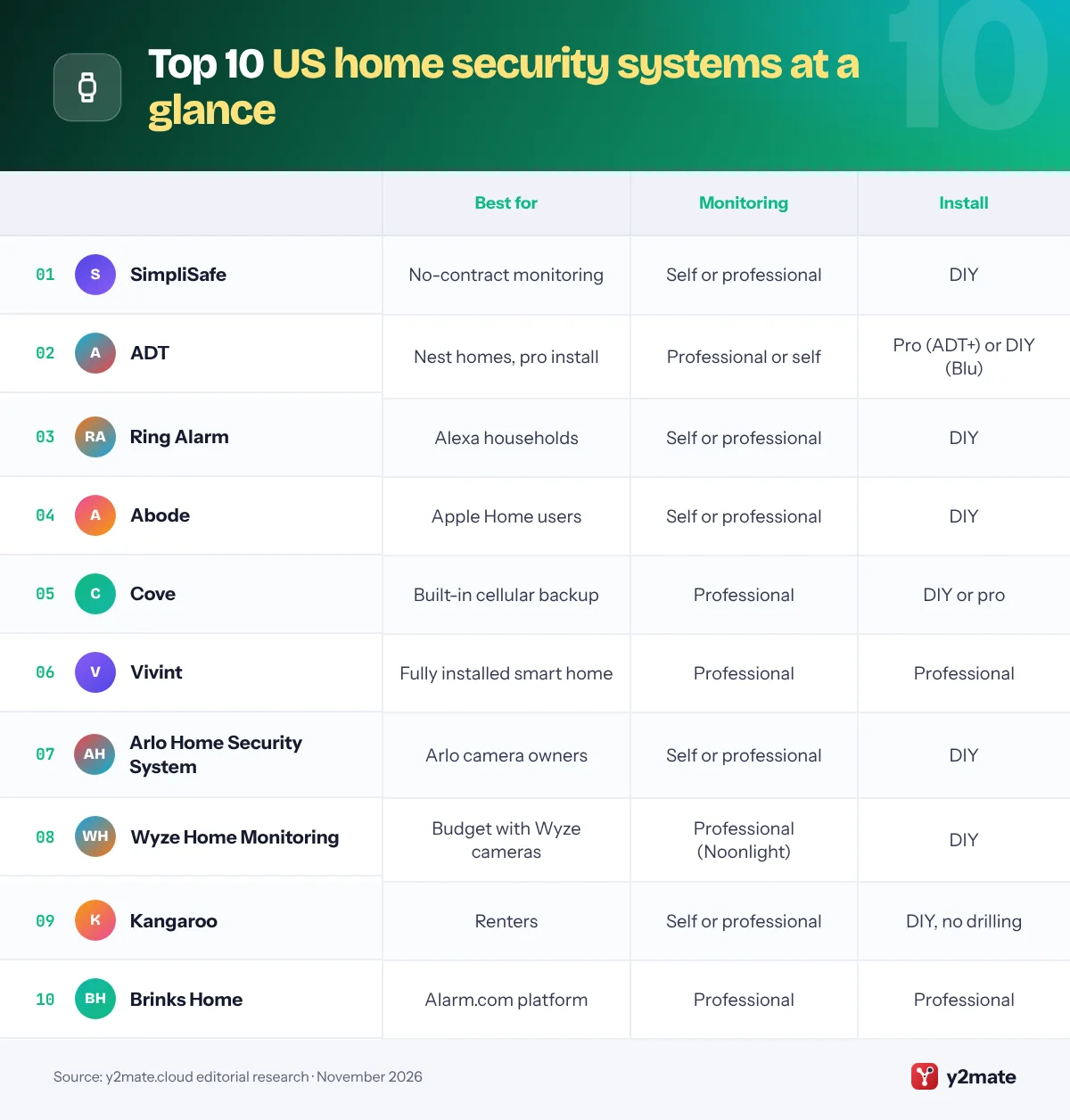
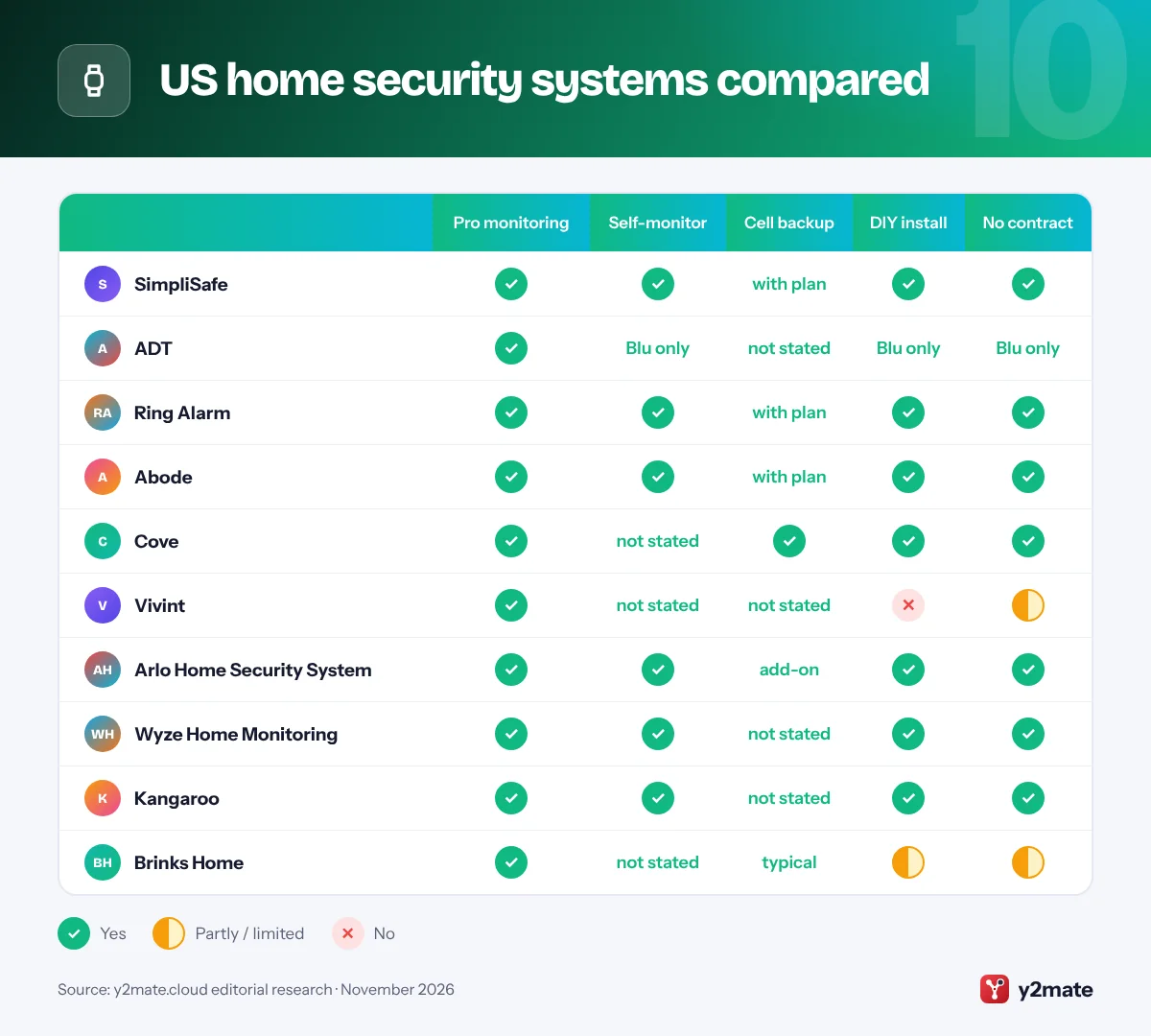
- Most systems on this list are DIY, while Vivint and Brinks Home are professionally installed and ADT offers both through ADT+ and ADT Blu.
- Professional monitoring sends alarms to staffed monitoring centers that can request emergency dispatch, while self-monitoring only sends alerts to your phone.
- SimpliSafe, Ring Alarm, Abode and Arlo all tie cellular backup to a paid plan, so check before relying on it during an internet outage.
- Google's Nest Secure alarm was deactivated in April 2024, and Google Nest cameras now join a professionally monitored alarm mainly through ADT+.
- Many US cities require an alarm permit and fine repeated false alarms, so register a monitored system with your city or police department.
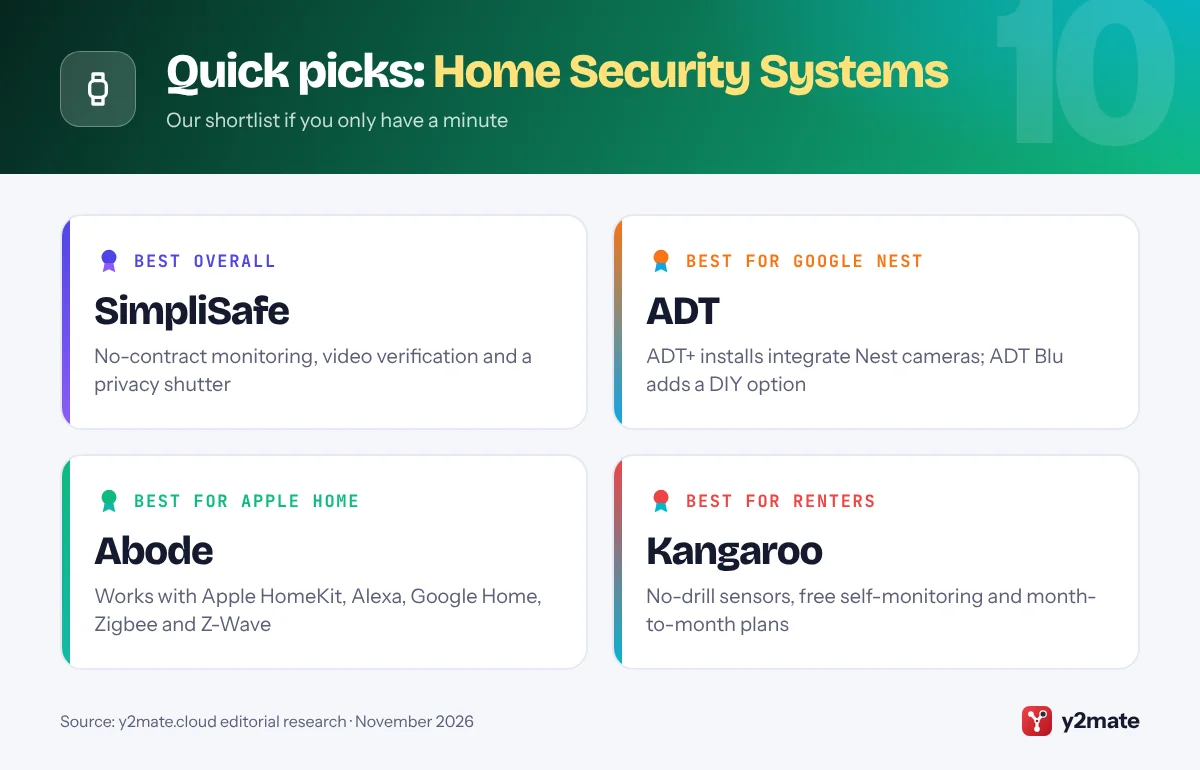
The best home security systems in the USA in 2026 are SimpliSafe for no-contract professional monitoring, ADT for professionally installed alarms built around Google Nest cameras, and Ring Alarm for Amazon Alexa homes. Abode, Cove, Vivint, Arlo, Wyze, Kangaroo and Brinks Home complete the list, each suiting a different mix of budget, installation style and smart-home platform.
Professional monitoring means trained agents at a central monitoring station watch for alarm signals around the clock and can request police, fire or medical dispatch. Self-monitoring means alerts go only to your phone and you decide whether to call 911. Cellular backup is a built-in cellular connection that keeps the alarm talking to the monitoring center if your internet goes down, while battery backup keeps it running through a power outage. Matter is an open smart-home standard from the Connectivity Standards Alliance that lets devices work across Apple Home, Google Home, Amazon Alexa and SmartThings, though few alarm systems use it yet.
This list ranks ten systems sold and supported across the US and explains the American rules that shape your choice: city alarm permits and false-alarm fines, UL-listed monitoring centers, state laws on recording audio, and the FTC’s 2023 order against Ring. It is written for homeowners, renters and anyone replacing a discontinued system such as Google’s Nest Secure.
How we ranked this list
We compared publicly documented features only: whether each system offers professional monitoring, self-monitoring or both; whether cellular and battery backup are built in or tied to a paid plan; which smart-home platforms it supports, including Alexa, Google Home, Apple Home and Matter; whether you install it yourself or need a technician; how flexible the contract is; and privacy controls such as end-to-end encryption, local storage and camera privacy shutters. We also weighed widely reported customer feedback and each company’s public record on privacy.
We did not test any equipment ourselves and do not quote prices or fees, which change often. Features often depend on the plan tier, so confirm details on the official site before you buy.
The Top 10 Home Security Systems
1. SimpliSafe
Best for: no-contract professional monitoring
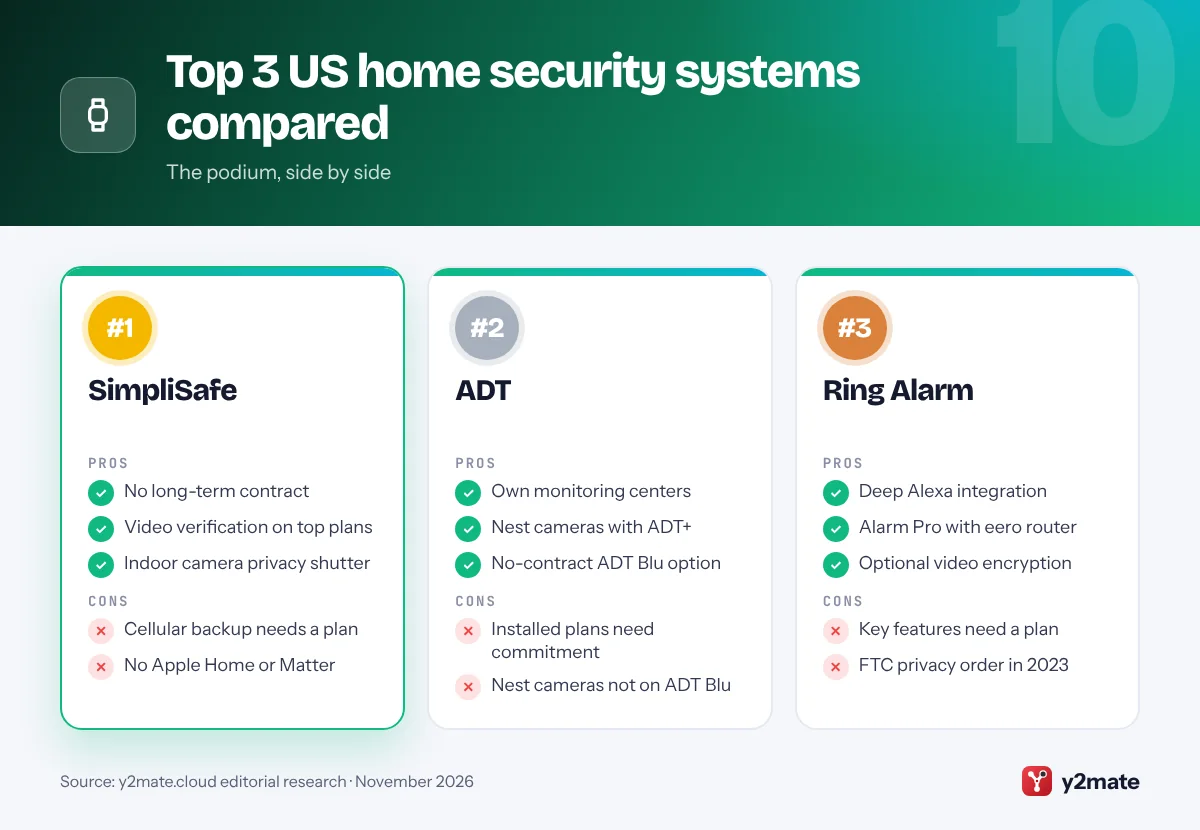
SimpliSafe is a Boston-based DIY alarm system built around a base station, keypad and wireless sensors that you stick in place yourself. You can self-monitor in the SimpliSafe app or add 24/7 professional monitoring, and its monitoring plans have no long-term contract. On the top plans, agents can check footage from SimpliSafe cameras to verify a break-in before requesting police, and its Active Guard Outdoor Protection service pairs outdoor cameras with live agents who can speak to people on your property in real time.
The base station has a backup battery for power outages, but SimpliSafe says its cellular backup connection to the monitoring center is only available with a professional monitoring plan, so self-monitoring relies on your Wi-Fi. Voice control works with Amazon Alexa and Google Assistant, although SimpliSafe does not support Apple Home or Matter. The indoor camera has a mechanical privacy shutter, a useful extra when you are home.
The best features sit on the higher plans, so if you want a polished DIY system with flexible professional monitoring, SimpliSafe is the strongest all-rounder in the US.
Official site: SimpliSafe
- No long-term monitoring contract
- Video-verified alarms on top plans
- Indoor camera privacy shutter
- Cellular backup needs a paid plan
- No Apple Home or Matter support
2. ADT
Best for: Google Nest homes that want pro installation
ADT is the best-known alarm company in the US and runs its own professional monitoring centers. In 2026 it offers two routes. ADT+ systems are fitted by ADT technicians and are the main way to get Google Nest cameras and doorbells inside a professionally monitored alarm, the result of a partnership Google and ADT announced in 2020. On higher plans, the Trusted Neighbor feature can combine Nest familiar-face detection with a compatible smart lock to let chosen people in.
ADT Blu, launched in May 2026, is ADT’s self-install line. It uses the same ADT+ app, has no long-term contract and lets you self-monitor or add 24/7 professional monitoring later. Google Nest cameras and video doorbells do not work with ADT Blu, which uses its own cameras and doorbells, although some Google and Yale smart home devices can be added.
Professionally installed ADT systems can involve a longer commitment, and reviewers note that the hardware is designed around ADT’s own service, so read the agreement closely. Choose ADT+ if you want Nest cameras with installation, or ADT Blu if you want the ADT name without a contract.
Official site: ADT
- Runs its own monitoring centers
- Nest cameras on ADT+ installs
- No-contract ADT Blu option
- Installed plans can mean commitment
- Nest cameras not supported on Blu
3. Ring Alarm
Best for: Amazon Alexa households
Ring Alarm is Amazon’s DIY security system: a base station, keypad and Z-Wave sensors that you install yourself and manage in the Ring app alongside Ring doorbells and cameras. Voice arming with Alexa, cellular backup and professional monitoring all need a Ring Protect plan. With an eligible plan, Ring’s Alarm Professional Monitoring will request emergency responders when the alarm is triggered, using a monitoring partner rather than a Ring-run center.
The Alarm Pro base station adds a built-in eero Wi-Fi 6 router and, on the right plan, Backup Internet over cellular so the system stays online during an outage. The base station also has up to 24 hours of battery backup. Ring offers optional video end-to-end encryption on supported cameras that even Ring cannot unlock, although some features stop working when it is on.
Privacy is the area to weigh. In 2023 the FTC charged Ring over employee access to customer videos and weak account security, and the resulting order requires a privacy and security program. Ring’s Community Requests feature lets local police ask for footage, but sharing is optional. For Alexa households, Ring Alarm is the most natural all-in-one choice.
Official site: Ring Alarm
- Works closely with Alexa and Ring
- Alarm Pro has a built-in eero router
- Optional video encryption
- Key features need a Ring plan
- FTC privacy order in 2023
4. Abode
Best for: Apple Home users and smart-home tinkerers
Abode is a no-contract DIY system aimed at people who want their alarm at the heart of a wider smart home. Abode says its systems work with Apple HomeKit, Amazon Alexa, Google Home, Zigbee, Z-Wave and IFTTT, which makes it one of the few alarm brands that fits naturally into an Apple Home setup. Self-monitoring is free, and optional paid plans add 24/7 professional monitoring, cellular backup, video recording and AI smart detection.
Abode highlights built-in 4G connectivity and battery backup, but the cellular path for remote alerts is tied to its paid Pro plan, so check which hub and plan you choose. HomeKit support also depends on the hub: Abode’s own listing says its basic Security Hub is not HomeKit compatible, while reviewers confirm the iota and Smart Security Kit hubs are.
Matter support is not available yet, and Abode’s camera range is smaller than Ring’s or Arlo’s. If you want an alarm that talks to Apple Home, Zigbee and Z-Wave devices without locking you into a contract, Abode is the most flexible pick on this list.
Official site: Abode
- Works with Apple Home, Alexa, Google
- Zigbee and Z-Wave support
- Free self-monitoring
- Cellular backup needs Pro plan
- HomeKit depends on the hub
5. Cove
Best for: built-in cellular backup without a contract
Cove is a DIY alarm company that sells its own sensors and cameras with 24/7 professional monitoring, no long-term contract and the option of having a technician install the system. Its current hub connects to Cove’s monitoring team over a wired Ethernet link to your router and includes 4G cellular backup, so the alarm can still reach agents if your internet fails. Cove also says the hub has a 24-hour backup battery for power outages.
Cove is designed around professional monitoring rather than app-only self-monitoring. Monitoring runs month to month, and Cove says the system can move with you. Camera support and extras sit on the higher Cove Plus tier, and reviewers report Alexa and Google Assistant voice control under that plan.
The downsides are a smaller smart-home ecosystem than Abode or Ring and a hub that needs a spare Ethernet port on your router. If built-in cellular backup and a no-contract monitoring plan are your top priorities, Cove is one of the simplest ways to get both.
Official site: Cove
- Ethernet with 4G cellular backup
- No long-term contract
- Optional professional install
- Built around paid monitoring
- Voice control on higher tier
6. Vivint
Best for: a fully installed smart home
Vivint, owned by energy company NRG since 2023, is a full-service smart home security provider. A Vivint technician designs and installs the system, and Vivint says every security system purchase includes professional installation. Its Smart Hub touchscreen panel arms the alarm, shows camera feeds and controls smart locks and other devices, and the whole system is also managed in the Vivint app with 24/7 professional monitoring.
It suits people who want one company to handle equipment, installation and monitoring. Vivint offers financing for equipment, and reviewers report that Vivint works with Amazon Alexa and Google Home for voice control.
The trade-off is flexibility. Equipment financing and monitoring agreements can tie you in for several years, early cancellation is a common complaint in reviews, and the system is designed to run with Vivint’s own service. Ask what happens to the equipment if you move or cancel. If you want a professionally designed smart home and are comfortable with a longer commitment, Vivint is the most complete installed option here.
Official site: Vivint
- Professional design and install
- Smart Hub runs the whole home
- Integrated cameras and locks
- Long financing commitments
- Tied to Vivint's own service
7. Arlo Home Security System
Best for: households that already use Arlo cameras
Arlo is best known for wireless cameras and video doorbells, and its Home Security System adds an intruder alarm for US customers. The Keypad Sensor Hub acts as the control panel, and Arlo’s All-in-One Sensor packs up to eight detection functions, such as motion, door opening and water leaks, into one small device. The alarm runs in the same Arlo Secure app as your cameras.
Professional monitoring comes through Arlo’s subscription plans, and Arlo sells a separate Cellular and Battery Backup unit that stacks with the hub. Its built-in SIM activates when you subscribe to a plan that includes professional monitoring, so cellular backup is not available if you only self-monitor. Without a plan you can still self-monitor, and many Arlo cameras can record locally to a compatible SmartHub or base station.
The main limitations are that backup costs extra and that the alarm side has a smaller accessory range than SimpliSafe or Ring. Arlo cameras work with Amazon Alexa and Google Assistant. If you already own Arlo cameras and want an alarm in the same app, this is the most seamless upgrade.
Official site: Arlo Home Security System
- Multi-function All-in-One Sensor
- Same app as Arlo cameras
- Optional cellular and battery unit
- Backup unit is an extra purchase
- Cellular needs a monitoring plan
8. Wyze Home Monitoring
Best for: Wyze camera owners on a tight budget
Wyze Home Monitoring is the budget pick for people who already use Wyze cameras. You install the Wyze Sense Hub, keypad, entry sensors and motion sensors yourself, then subscribe to Wyze’s monitoring service, which has no contract. Wyze does not run its own monitoring center: 24/7 professional monitoring is provided by Noonlight, whose agents can send police, fire or medical help when an alarm is confirmed.
The service is tightly integrated with Wyze cameras, so alarm events and video live in the same app, and Wyze leak sensors can trigger a text and call from Noonlight too. Professional monitoring is only available in the 50 US states and Canada. If you choose to self-monitor instead, Wyze says neither it nor Noonlight will dispatch emergency services, so you become the responder.
The compromises are fewer hardware options and little detail on cellular backup for the Sense Hub, and it is worth turning on two-factor authentication in the Wyze app. For renters or first-time buyers who want real professional monitoring with a light commitment, Wyze is a sensible starting point.
Official site: Wyze Home Monitoring
- No contract
- 24/7 Noonlight monitoring
- Ties in with Wyze cameras
- Smaller hardware range
- Little detail on cellular backup
9. Kangaroo
Best for: renters and small apartments
Kangaroo is a New York-based company that keeps home security deliberately simple. Its small, battery-powered sensors and doorbell camera stick in place without drilling, connect over Wi-Fi and are managed in the Kangaroo app, so the whole system is easy to take with you when you move. That suits renters, students and people in small apartments who cannot make permanent changes to their home.
Self-monitoring is free, and the paid Kangaroo Complete plan adds 24/7 professional monitoring, in which the monitoring center can contact emergency services for you. Plans run month to month, so you can start with app alerts and upgrade later. Kangaroo’s own help pages say its devices need a Wi-Fi connection to work, so think about what happens during an internet outage.
The limits are real. Kangaroo has a smaller range of devices than the larger brands, fewer smart-home integrations than Abode or Ring, and less detail on backup options. If you need simple, renter-friendly security that you can pack up in minutes, Kangaroo is the best fit on this list.
Official site: Kangaroo
- No-drill, portable sensors
- Free self-monitoring
- Month-to-month monitoring
- Devices rely on Wi-Fi
- Smaller device range
10. Brinks Home
Best for: professional monitoring on Alarm.com
Brinks Home is a long-established monitored security brand that runs its systems on the Alarm.com platform, the same back end used by many independent US alarm dealers. That gives you a mature app for arming, alerts, cameras, smart locks, thermostats and automation rules, plus access to the wide range of devices Alarm.com supports. Brinks Home provides 24/7 professional monitoring and advertises professional installation.
The Alarm.com connection is the main reason to consider Brinks. Alarm.com systems are designed to communicate over cellular, which reduces reliance on your home Wi-Fi, and the app will feel familiar if you later move to another Alarm.com provider. Brinks also sells video doorbells, cameras and smart garage controls.
The downside is commitment. Reviewers report that Brinks packages often require a multi-year monitoring agreement, particularly when installation is included, although terms vary by package. Read the agreement carefully before signing. If you want a professionally monitored system on a proven platform and are comfortable with a contract, Brinks Home is a solid alternative to ADT and Vivint.
Official site: Brinks Home
- Runs on the Alarm.com platform
- 24/7 professional monitoring
- Wide smart-home device support
- Multi-year agreements common
- Full terms need a sales call
US home security systems compared
How to choose home security systems in the USA
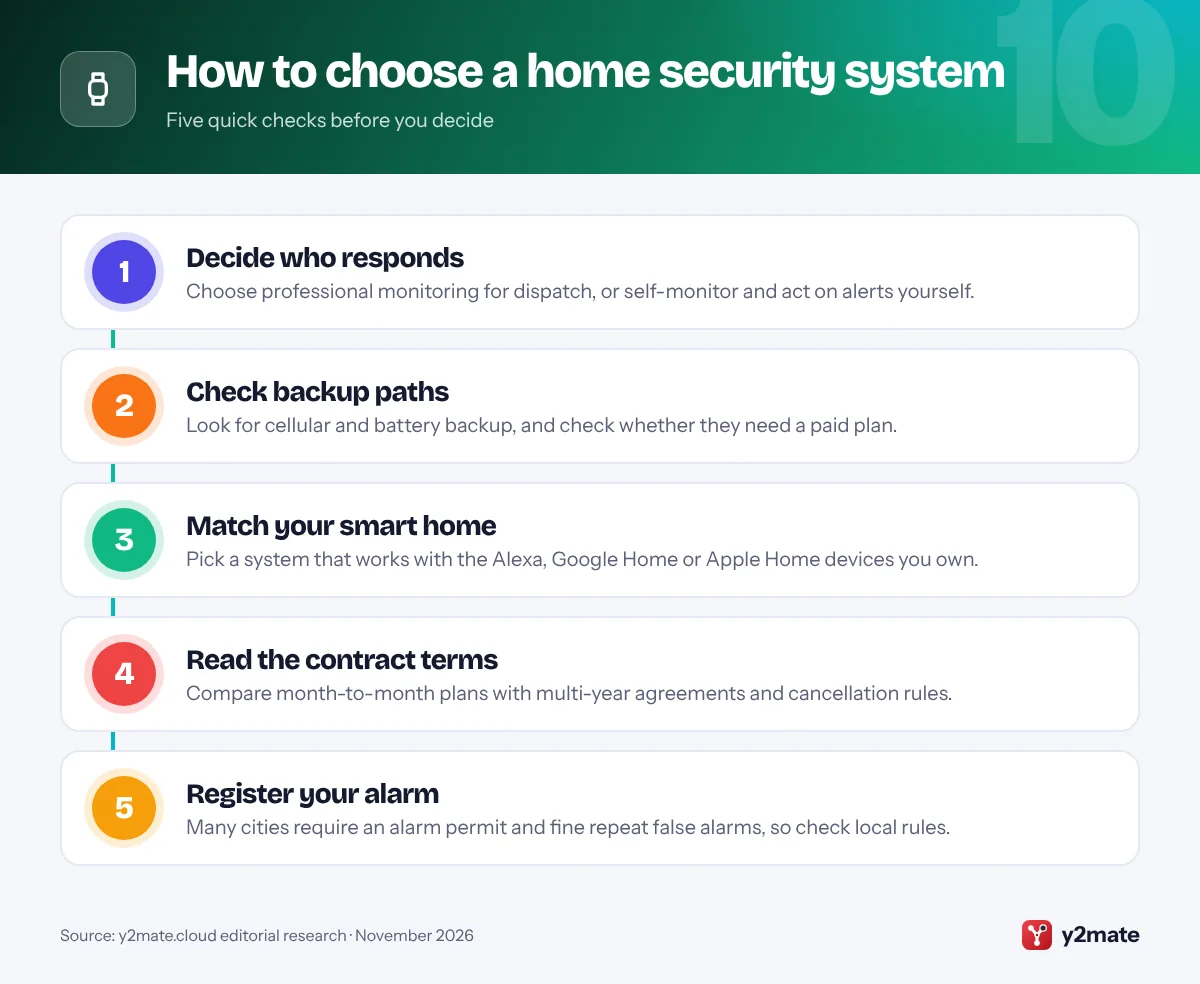
Start with who will respond when the alarm goes off. Professional monitoring sends alarms to a central station that can request police, fire or medical help, while self-monitoring sends alerts only to you. If you pay for monitoring, ask whether the central station is UL-listed, which means it is certified against Underwriters Laboratories standards for monitoring centers.
Local rules and permits
- Alarm permits: many US cities and counties require you to register a monitored alarm and charge escalating fines for repeated false alarms, and some police departments may not respond without a valid permit number.
- Recording audio: video of your own property is generally lawful, but state wiretapping laws differ on recording conversations and some require every party’s consent, so consider turning off audio on outdoor cameras.
- Camera makers: the FCC has barred new equipment authorizations for video surveillance gear from companies on its Covered List, including Hikvision and Dahua.
Privacy, renting and outages
Turn on two-factor authentication, and favor systems with optional end-to-end encryption, local storage and camera privacy shutters. The FCC’s voluntary U.S. Cyber Trust Mark for connected devices is still being rolled out, so do not expect it on every box yet. Renters should choose peel-and-stick sensors and battery cameras that leave no damage. Finally, check whether cellular and battery backup are included in the plan you pick, because several systems reserve cellular backup for paid monitoring.
Frequently asked questions
What is the best home security system in the USA in 2026?
For most people, SimpliSafe is the best all-round choice because it combines DIY installation with optional professional monitoring and no long-term contract. ADT is better if you want professional installation and Google Nest cameras, Ring Alarm suits Alexa homes, and Abode is the strongest option for Apple Home users.
What is the difference between professional monitoring and self-monitoring?
With professional monitoring, alarm signals go to a staffed central station that can contact you and request police, fire or medical dispatch, usually for a monthly fee. With self-monitoring, alerts go only to your phone and you decide what to do, including calling 911. Self-monitoring costs less but leaves you responsible when you are asleep, busy or out of signal.
Do I need a permit for a home alarm in the US?
It depends on where you live. Many US cities and counties require you to register a monitored burglar alarm with the police department or city, and most charge escalating fines once you pass a set number of false alarms in a year. Some police departments may not respond without a permit number, so check your local rules before you activate monitoring.
Do home security systems work without Wi-Fi or during a power outage?
Most base stations include a backup battery, so the siren and sensors keep working during a power outage. Contacting a monitoring center without internet requires cellular backup, which Cove builds in and SimpliSafe, Ring Alarm, Abode and Arlo tie to paid plans. Self-monitored systems that rely only on Wi-Fi cannot send alerts to your phone while the internet is down.
What happened to Google Nest Secure?
Google stopped selling the Nest Secure alarm in 2020 and deactivated the systems on April 8, 2024. It offered owners a replacement ADT system or Google Store credit. Google no longer sells its own alarm system; instead, Google Nest cameras and doorbells can be integrated into professionally installed, professionally monitored ADT+ alarms.
Final verdict
For most households, the best home security systems in the USA are SimpliSafe for a no-contract monitored DIY alarm, ADT for professional installation with Google Nest cameras or a DIY system through ADT Blu, and Ring Alarm for Alexa homes. Abode is the pick for Apple Home and smart-home enthusiasts, Cove for built-in cellular backup, and Vivint or Brinks Home if you want a fully installed system and accept a longer agreement.
Whichever you choose, check what the monitoring plan includes, register your alarm if your city requires it, and switch on two-factor authentication.
Sources and further reading
- FTC action against Ring: The FTC's 2023 announcement of its case against Ring over employee access to customer videos and weak account security.
- FTC tips on securing home cameras: FTC consumer advice on choosing encrypted cameras, avoiding default passwords and controlling who can view your camera feeds.
- FCC Covered List: The FCC's list of communications and video surveillance equipment deemed a national security risk, including gear from Hikvision and Dahua.
- Matter smart home standard: The Connectivity Standards Alliance's official overview of Matter, the open standard that lets smart devices work across major platforms.

Leave a Reply