
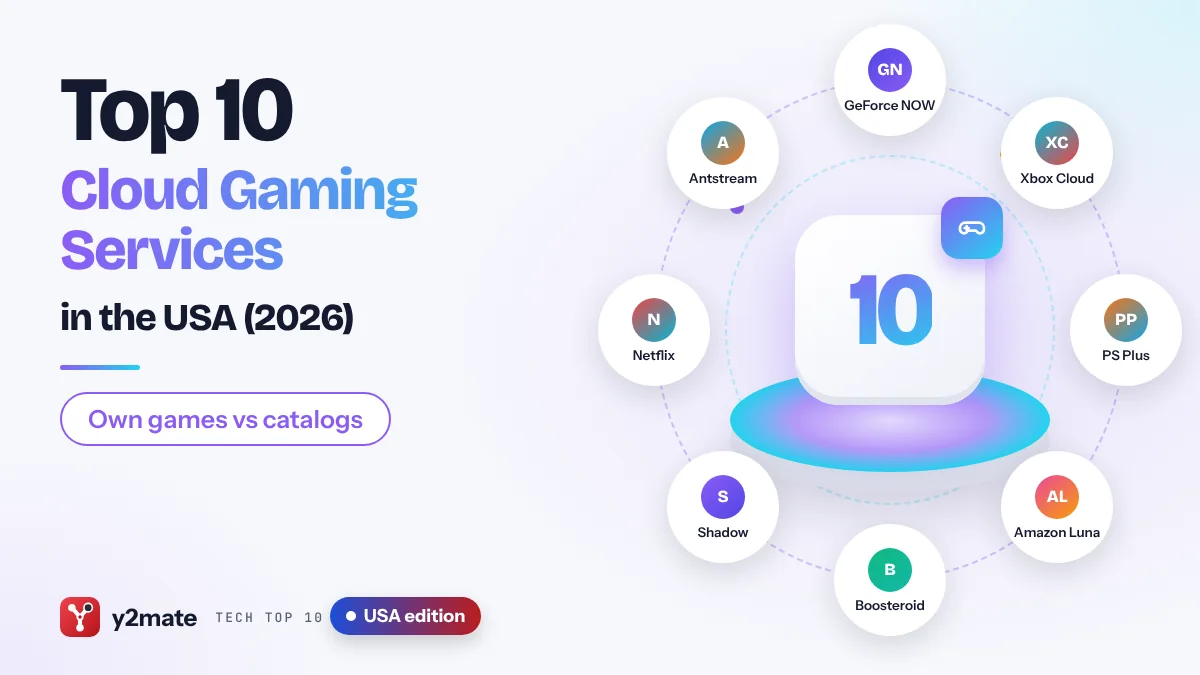
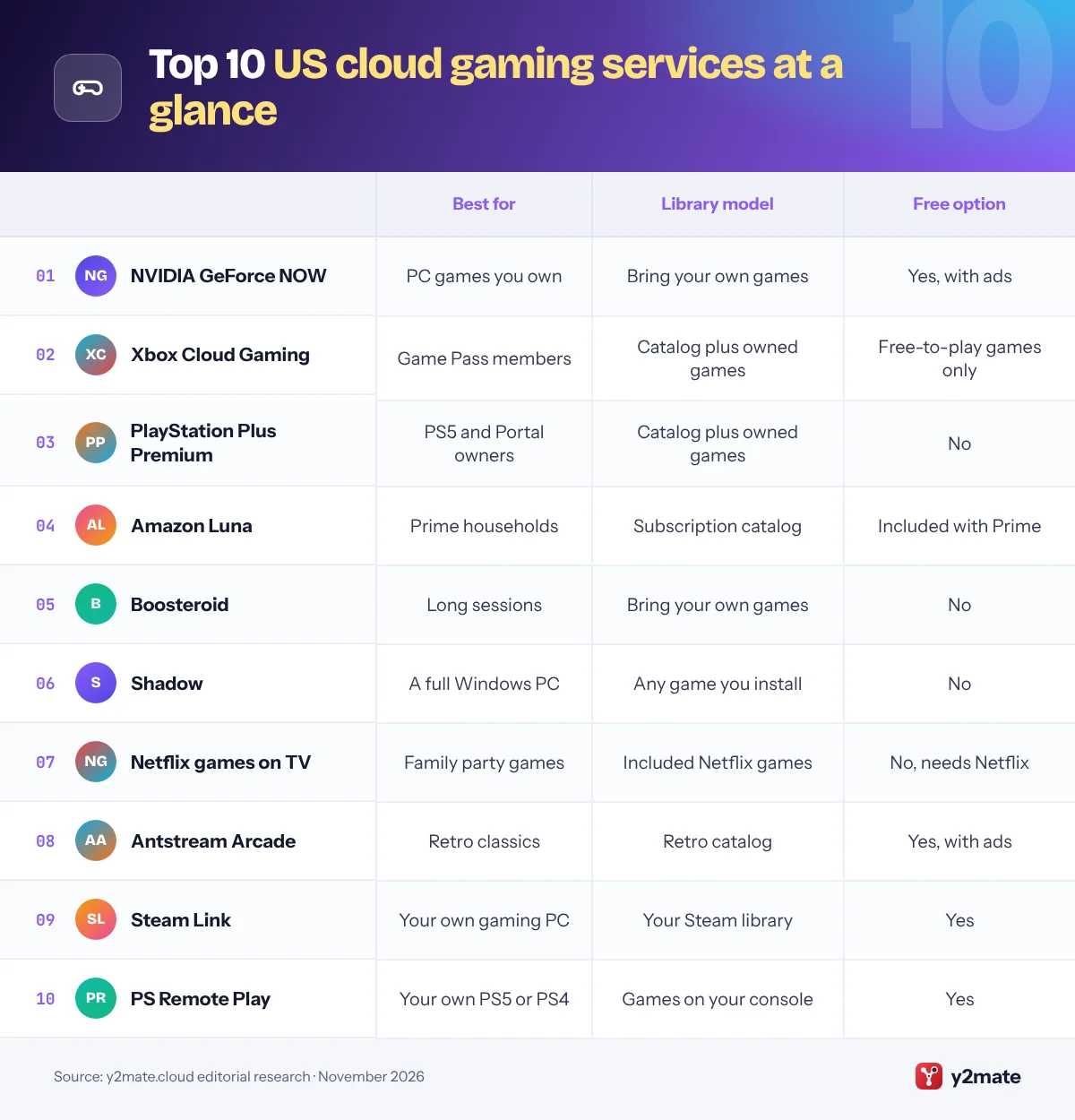
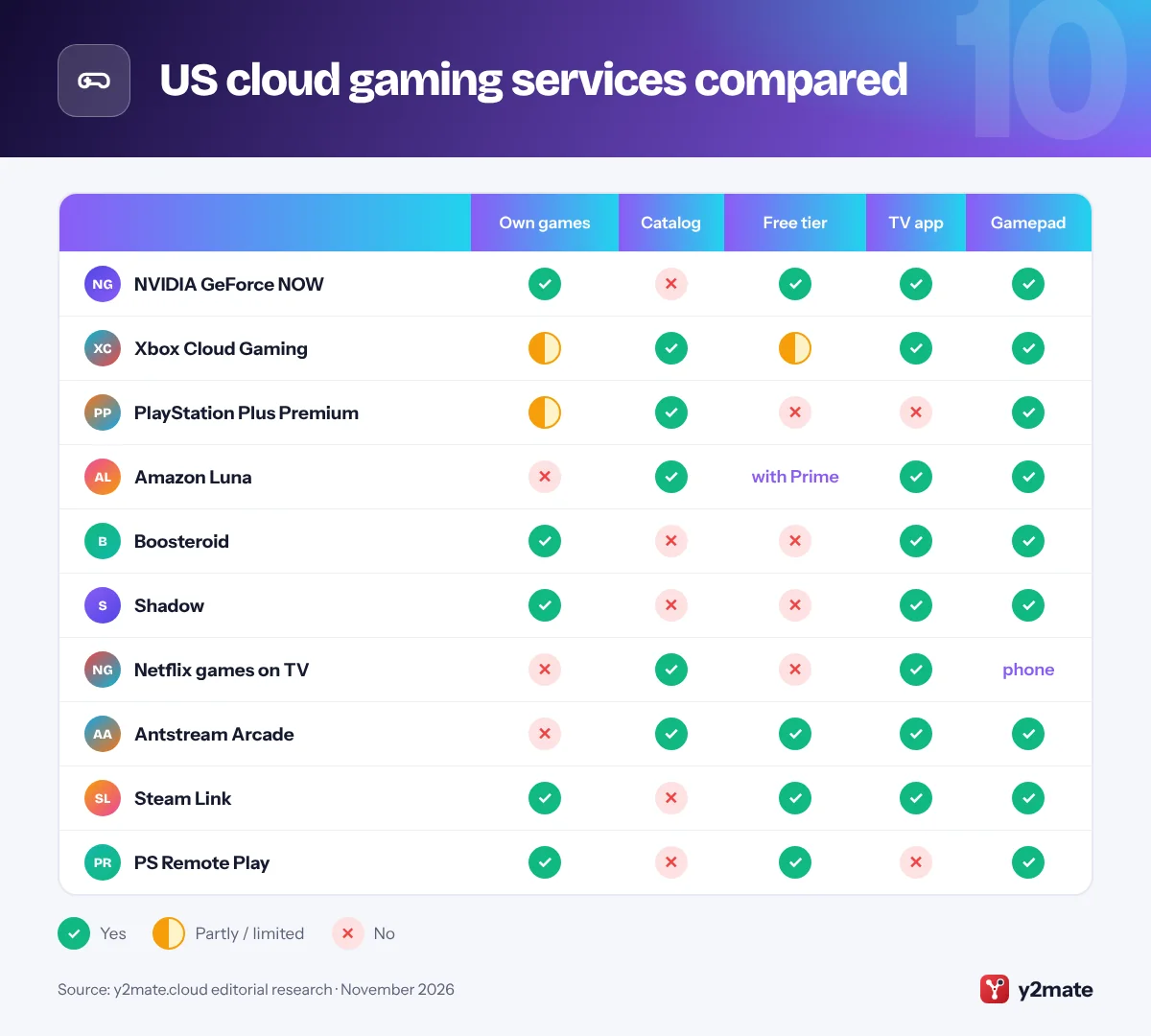
- NVIDIA GeForce NOW and Boosteroid stream PC games you already own, while Xbox Cloud Gaming, PlayStation Plus Premium and Amazon Luna mainly stream games from a subscription catalog.
- From November 2026, every Xbox Game Pass plan includes a set number of cloud gaming hours each month, and GeForce NOW paid plans include 100 hours of playtime a month.
- Cloud gaming runs the game in a remote data center, whereas remote play apps such as Steam Link and PS Remote Play stream from a PC or console you own.
- Latency, the delay between pressing a button and seeing the result, depends heavily on your distance from the nearest data center and on a wired or strong Wi-Fi connection.
- A federal appeals court vacated the FTC's Click-to-Cancel rule in July 2025, so US cancellation rights now rest on the Restore Online Shoppers' Confidence Act and state auto-renewal laws.
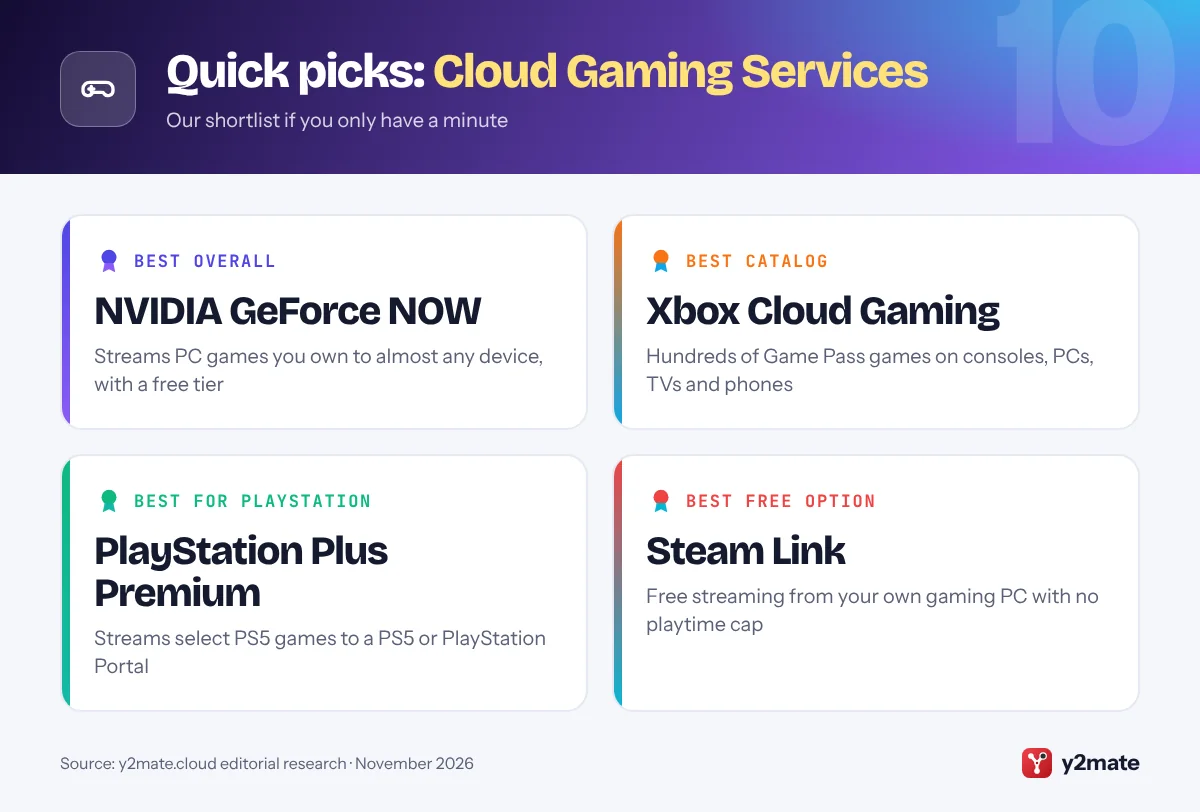
The best cloud gaming services in the USA in 2026 are NVIDIA GeForce NOW if you already own PC games, Xbox Cloud Gaming if you want a large catalog through Game Pass, and PlayStation Plus Premium if you play on a PS5 or PlayStation Portal. Amazon Luna, Boosteroid, Shadow, Netflix games on TV and Antstream Arcade cover more specific needs, while Steam Link and PS Remote Play show how streaming from your own hardware compares.
A few terms first. Cloud gaming means the game runs on a powerful computer in a data center and only video is streamed to your screen, while your button presses travel back the other way. Remote play does the same thing from a PC or console you own at home. BYOG, short for bring your own games, describes services that stream games you have bought on stores such as Steam instead of supplying a catalog. Latency is the delay between pressing a button and seeing the result; it grows with distance to the data center and with a busy or weak home network.
This guide ranks ten options available to US players and covers the American details that matter: data caps, FCC broadband labels and auto-renewal rules after the FTC’s Click-to-Cancel rule was struck down.
How we ranked this list
We ranked each service on publicly documented criteria only: the game library model (bring your own games, a subscription catalog or both), the range of supported devices, the maximum stream quality each provider officially states for its plans, whether a free tier exists, and how well physical controllers are supported. We also confirmed that each service is offered to customers in the USA as of November 2026 and took account of recent changes such as monthly playtime limits.
We did not run our own tests, and we do not quote prices, which change often and vary by plan length. Game lists change every week, so check for your favorites before you subscribe.
The Top 10 Cloud Gaming Services
1. NVIDIA GeForce NOW
Best for: playing PC games you already own on any screen
GeForce NOW streams PC games you already own from stores and services such as Steam, Epic Games Store, GOG, Ubisoft Connect and PC Game Pass, running them on NVIDIA’s GeForce RTX servers. NVIDIA operates the service directly in the USA from its own North American data centers.
There are three memberships. Free uses basic rigs and shows short video ads before each session. Performance streams at up to 1440p and 60 fps, and Ultimate runs on RTX 5080-class servers at up to 5K and 120 fps, or up to 360 fps at 1080p, according to NVIDIA. Paid plans include 100 hours of playtime a month, with some unused time rolling over, and a Day Pass gives 24 hours of premium access without a monthly commitment.
Apps and browser access cover Windows, Mac, Chromebook, Linux, iPhone, iPad, Android, select Samsung and LG TVs, Amazon Fire TV, Steam Deck and VR headsets. The catch is that not every PC game is supported, and you must own most of what you play.
Official site: NVIDIA GeForce NOW
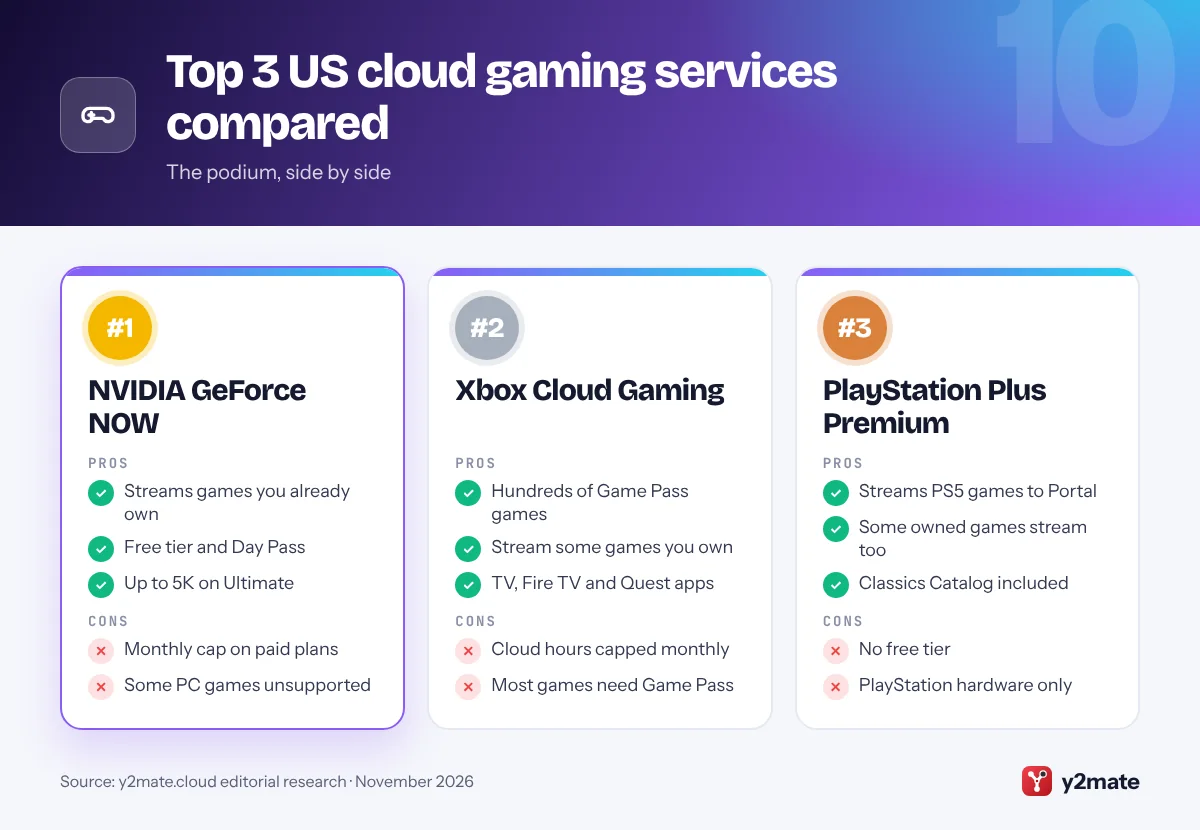
- Streams games you already own
- Free tier plus a Day Pass
- Widest device support
- 100-hour monthly cap on paid plans
- Not every PC game is supported
2. Xbox Cloud Gaming
Best for: Game Pass members who want a big catalog
Xbox Cloud Gaming streams hundreds of console games from Microsoft’s data centers and is included with all three Game Pass plans: Essential, Premium and Ultimate. Ultimate has the largest catalog, including new Xbox titles on launch day, and Microsoft gives it the best stream quality, up to 1440p, plus the shortest waits. You can also stream select games you already own, including most Xbox Play Anywhere titles, and play free-to-play games such as Fortnite with just a free Microsoft account.
The big change this month is time limits. Starting in November 2026, Microsoft includes a set number of cloud hours with each plan: 15 hours a month on Ultimate, 10 on Premium and 5 on Essential. Extra hours can be bought in the Xbox Store, and players without Game Pass will be able to buy cloud playtime to stream eligible games they own.
Device support is excellent: Xbox consoles, Windows PCs, Apple and Android phones and tablets, web browsers, select LG, Samsung and VIDAA smart TVs, Amazon Fire TV and select Meta Quest headsets. Xbox Wireless and DualShock 4 controllers work, and some games offer touch controls.
Official site: Xbox Cloud Gaming
- Hundreds of games with Game Pass
- Stream some games you own
- Smart TV, Fire TV and Quest apps
- Monthly cloud hours now capped
- Most games need Game Pass
3. PlayStation Plus Premium
Best for: PS5 and PlayStation Portal owners
PlayStation Plus Premium is the top tier of Sony’s subscription and the only one with cloud streaming. It lets you stream select PS5 games from the Game Catalog, game trials and some digital games you own to a PS5 console or PlayStation Portal, with no download and no storage used. Sony lists PS5 cloud streaming resolutions up to 4K, and Premium also includes the Classics Catalog of older PlayStation games.
Cloud streaming on PlayStation Portal left beta in November 2025. That turned the handheld from a remote player that needed your PS5 switched on into a device that can stream supported games on its own, which makes Premium the closest thing to a portable PlayStation that does not depend on your console at home.
The limits are clear. There is no free tier, PS5 cloud streaming works on PS5 and PlayStation Portal rather than on phones or smart TVs, and only selected games support it, so check Sony’s cloud streaming game finder first. If you already own a PS5, Premium is mainly a way to try games before downloading them or to play on Portal anywhere with good Wi-Fi.
Official site: PlayStation Plus Premium
- Streams PS5 games to PS5 and Portal
- Some owned games stream too
- Classics Catalog included
- No free tier
- PlayStation hardware only
4. Amazon Luna
Best for: Prime households and casual party games
Amazon Luna is Amazon’s cloud gaming service, and in the USA a selection of more than 50 games is now included with a Prime membership. That includes GameNight, a collection of more than 25 approachable local multiplayer games where friends and family use their phones as controllers. Luna Premium, which replaced Luna+, adds a larger rotating catalog for a monthly fee.
Luna has narrowed its focus in 2026. Amazon removed third-party stores and individual game purchases in April, ended the bring-your-own-library option for Ubisoft, EA and GOG games in June, and in July added a Games tab to Prime Video on Fire TV so Prime members can start Luna games there.
You can play on Fire TV and Fire tablets, select Samsung and LG smart TVs, iPhone, iPad and Android devices, and PCs, Macs and Chromebooks, using Bluetooth controllers or Amazon’s Luna Controller. Luna is no longer a place to stream PC games you already own, and its catalog leans towards family and casual titles. For a Prime household that wants occasional games on the TV, it is the easiest service here to try.
Official site: Amazon Luna
- Included with Prime
- Phone-controlled party games
- Inside Prime Video on Fire TV
- No bring-your-own-games option
- Casual-leaning catalog
5. Boosteroid
Best for: long sessions with games you already own
Boosteroid is an independent cloud gaming platform that, like GeForce NOW, streams PC games you already own. You sign in to your accounts on stores such as Steam and Epic Games Store inside a Boosteroid session and play supported titles on its remote gaming rigs. It also has a long-term agreement with Microsoft, so many Xbox PC games, including PC Game Pass titles, can be streamed through it.
The company began expanding into the USA in 2021 and runs servers in several US locations. Its headline promise is no session time limits, which suits players who game in long stretches. Apps are available for Windows, Mac, Linux and Chromebook, Android phones and Android TV, and LG webOS and Samsung Tizen TVs, and it also works in a web browser, including on iPhone through a home-screen web app.
There is no free tier, and the supported game list is smaller than GeForce NOW’s, so search for your favorite titles before subscribing. If you want a bring-your-own-games service without a monthly playtime cap, it is the most direct alternative to GeForce NOW.
Official site: Boosteroid
- No session time limits
- Streams games you already own
- Apps for TVs and Linux
- No free tier
- Smaller game list than GeForce NOW
6. Shadow
Best for: a full Windows PC in the cloud
Shadow works differently from the services above. Instead of a game library, it rents you a complete Windows PC in a data center. You can install almost any game or launcher, including Steam, Epic Games Store and Battle.net, plus mods and other Windows apps, and they stay installed between sessions just like on a home computer. Shadow notes that a small number of games and apps may not run.
Shadow serves customers in the USA and Canada as well as much of Western Europe. You connect through apps for Windows, Mac and Linux computers, phones and tablets, Android TV and Apple TV, or through a web browser. Because it is a full PC, it also handles creative software and PC VR games that game-only cloud services cannot run.
The trade-offs are complexity and commitment. You look after Windows, storage and settings yourself, there is no free tier, and a fast, stable connection is essential. For players who want total control, especially Mac users who want Windows-only games, Shadow is the most flexible option on this list.
Official site: Shadow
- Install almost any PC game
- Supports mods and Windows apps
- Strong option for Mac users
- No free tier
- You maintain Windows yourself
7. Netflix games on TV
Best for: family party games for Netflix subscribers
Netflix now streams some of its games from the cloud to TVs, which makes it a simple way to try cloud gaming without buying anything new. Open the Netflix app on a supported TV or streaming device, choose Games at the top of the screen and pick a title. Each player then scans a QR code to use their own phone or tablet as the controller.
Netflix describes the feature as a beta that is available in the USA and a growing list of other countries. The lineup focuses on party and family games such as Pictionary: Game Night and Boggle Party, and some games can also be played in Chrome or Edge on a computer. Netflix says all of its games are included with a membership, with no ads, extra fees or in-app purchases.
It is not a replacement for a console. Gamepads are not supported on TV, the catalog is small, and the games you download to your phone are separate from the ones streamed to your TV. Still, for families who already subscribe and want a group game after dinner, it is the lowest-effort cloud gaming option here.
Official site: Netflix games on TV
- Included with any Netflix plan
- Phones become controllers
- Nothing extra to install
- Gamepads not supported on TV
- Small, party-focused catalog
8. Antstream Arcade
Best for: retro and arcade classics
Antstream Arcade is a cloud service dedicated to retro games, with a licensed library of well over a thousand classic arcade, console and home computer titles. Because the games are streamed, you do not need emulators, ROM files or old hardware, and the service adds modern extras such as challenges, tournaments and leaderboards.
It runs on Windows PCs, including through the Epic Games Store, on Android phones and tablets, on iPhone and iPad, on Xbox consoles and on Samsung smart TVs through Samsung Gaming Hub. A free, ad-supported tier is available, and a paid membership removes the ads and unlocks the full experience. Physical controllers are supported, which makes a big difference for arcade games designed around joysticks and buttons.
The obvious limit is age: these are older games, so do not expect modern blockbusters or the graphical showcase that GeForce NOW or Xbox Cloud Gaming offer. If you grew up with arcades or 8-bit and 16-bit consoles, Antstream is one of the easiest legal ways to revisit them on current devices.
Official site: Antstream Arcade
- Large licensed retro library
- Free ad-supported tier
- Challenges and tournaments
- Older games only
- Paid plan for the full experience
9. Steam Link
Best for: streaming from your own gaming PC for free
Steam Link is not a cloud service, and that is the point of including it. Valve’s free app streams games from a Windows, Mac or Linux PC running Steam to another screen using Steam Remote Play. Your own PC does the work, so you need a capable gaming computer, but there is no subscription, no playtime cap and no limit on which of your Steam games you can try.
The Steam Link app is available for iPhone, iPad, Apple TV and Apple Vision Pro, Android phones, tablets and TVs, Amazon Fire TV and Raspberry Pi, and you can also stream to another computer or a Steam Deck running Steam. Remote Play Together lets friends join local co-op games online.
Performance depends on your home network. A wired connection for the host PC and a strong Wi-Fi signal for the screen you play on make the biggest difference, and streaming from home over the internet is possible but more sensitive to your upload speed. If you already own a gaming PC, compare Steam Link with any subscription before paying for cloud hardware you may not need.
Official site: Steam Link
- Free, no subscription
- Plays your whole Steam library
- Works on phones and TVs
- Needs your own gaming PC
- Quality depends on home network
10. PS Remote Play
Best for: PS5 owners who want to play away from the TV
PS Remote Play is Sony’s free app for streaming games from your own PS5 or PS4 to another device. It is available for Windows PCs, Macs, Android phones and tablets, and iPhone and iPad, and the same remote play technology powers PlayStation Portal when it connects to your console. Because your console runs the game, you can play almost anything installed on it, and no subscription is needed for remote play itself.
This is the key difference from PlayStation Plus Premium. Remote play needs your console switched on or in rest mode at home, and stream quality depends on your home upload speed and Wi-Fi. Premium cloud streaming runs selected games in Sony’s data centers instead, so a PlayStation Portal can play them even when your PS5 is off or someone else is using it.
A DualSense controller can be paired with phones, tablets and computers. Remote play works best inside the home, where the console and the device share a fast local network. If you mostly want to play in another room while someone else uses the TV, PS Remote Play may be all you need.
Official site: PS Remote Play
- Free with your own PS5 or PS4
- Plays your installed games
- Powers PlayStation Portal
- Needs your console at home
- Depends on home upload speed
US cloud gaming services compared
How to choose cloud gaming services in the USA
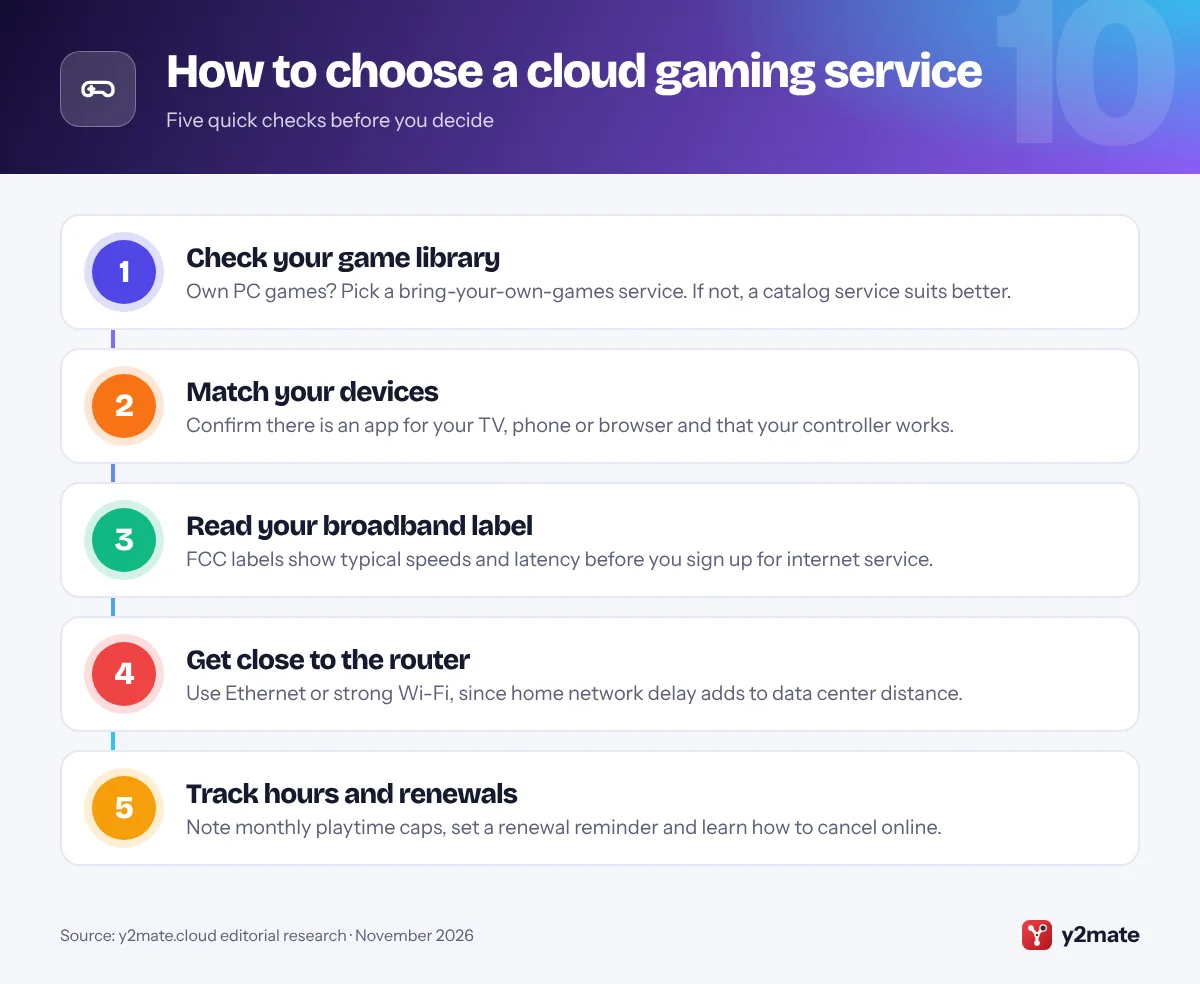
Start with the games you want to play. If you already own a PC library, GeForce NOW or Boosteroid will stream much of it; if you would rather pick from a catalog, compare the lineups of Game Pass, PlayStation Plus Premium and Luna. Then check that the service has an app for the screen you will actually use.
Your connection matters as much as the plan
- Latency: every button press travels to a data center and back, so the closer the nearest server, the more responsive games feel. A wired Ethernet connection or a strong Wi-Fi signal near the router helps.
- Broadband labels: FCC rules require internet providers to show a broadband label at the point of sale, listing typical download and upload speeds and typical latency. The FCC simplified some label rules in September 2026, but the label itself remains.
- Data caps: some home internet and fixed wireless plans still cap monthly data or slow you down after a threshold, and cloud gaming streams a lot of video. Check your plan before long sessions, especially on a mobile hotspot.
Subscriptions and cancellation
The FTC’s Click-to-Cancel rule, which would have required simple online cancellation, was vacated by the Eighth Circuit Court of Appeals in July 2025 before it took effect, and the FTC has since restarted the rulemaking process. The FTC still enforces the Restore Online Shoppers’ Confidence Act, which requires clear disclosure of terms, express consent and a simple way to stop recurring online charges. Many states add their own auto-renewal laws: California’s, updated in July 2025, requires consent to renewal terms, annual reminders and online cancellation for online sign-ups. Set a reminder before any trial or annual plan renews.
Frequently asked questions
What is the best cloud gaming service in the USA?
For most people it is NVIDIA GeForce NOW, if they already own PC games, because it streams titles from Steam, Epic and other stores to almost any device and has a free tier. If you would rather choose from a catalog, Xbox Cloud Gaming through Game Pass is the strongest alternative, and PlayStation Plus Premium is the pick for PS5 and PlayStation Portal owners.
What is the difference between cloud gaming and remote play?
Cloud gaming runs the game on a computer in a provider's data center and streams the picture to you, so you do not need gaming hardware of your own. Remote play streams from a PC or console you already own, as Steam Link and PS Remote Play do, so it is usually free but needs your hardware switched on and a good home network.
Do I need to own games to use cloud gaming?
It depends on the service. GeForce NOW, Boosteroid and Shadow are bring-your-own-games services, so you play titles you have bought on PC stores, plus supported free-to-play games. Xbox Cloud Gaming, PlayStation Plus Premium, Amazon Luna and Netflix provide a catalog with the subscription, and Xbox and PlayStation also let you stream some games you already own.
Does cloud gaming use a lot of data?
Yes. Cloud gaming streams high-quality video continuously, so a long session can use as much data as streaming several hours of high-definition video, and more at higher resolutions. If your internet plan has a monthly data cap, keep an eye on usage and lower the stream resolution when you can. Your provider's FCC broadband label and plan terms show whether data limits apply.
Can I still cancel gaming subscriptions easily after Click-to-Cancel was struck down?
Usually, yes. The FTC's rule was vacated in July 2025, but the Restore Online Shoppers' Confidence Act still requires online sellers to disclose terms clearly, get your express consent and provide a simple way to stop recurring charges. State laws, such as California's auto-renewal law, add requirements like online cancellation. Cancel through the account page of the store where you subscribed.
Final verdict
For most players, the best cloud gaming services in the USA are NVIDIA GeForce NOW for PC games you already own, Xbox Cloud Gaming for a large Game Pass catalog, and PlayStation Plus Premium for PS5 and PlayStation Portal owners. Amazon Luna suits Prime households, Boosteroid and Shadow suit players who want fewer limits, and Netflix and Antstream Arcade are easy extras.
Before you subscribe, read your broadband label, play on a wired connection or close to your router, and note any monthly playtime cap and renewal date. If you already own a gaming PC or a PS5, try Steam Link or PS Remote Play first.
Sources and further reading
- FCC broadband consumer labels: The FCC explains the broadband labels internet providers must show at the point of sale, including typical speeds and latency.
- FCC broadband speed guide: FCC consumer guidance on how much connection speed common online activities, including gaming and video streaming, need at home.
- Restore Online Shoppers' Confidence Act: The FTC's page on the federal law that requires clear terms, express consent and a simple way to stop recurring online charges.
- California AB 2863 auto-renewal law: The official text of the 2024 amendments to California's Automatic Renewal Law, covering consent, annual reminders and online cancellation.

Leave a Reply