
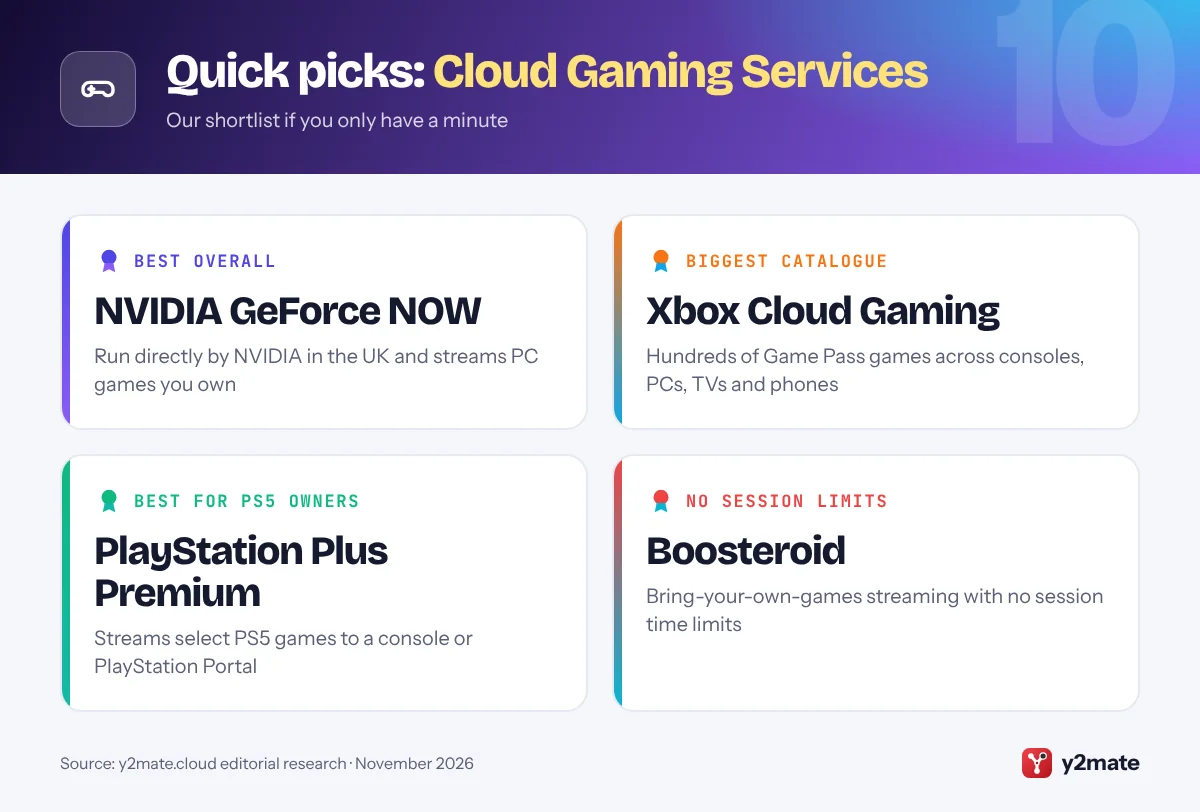
- NVIDIA runs GeForce NOW directly in the UK, streaming PC games you already own from stores such as Steam, Epic Games Store and Ubisoft Connect.
- Xbox Cloud Gaming is included with every Game Pass plan, but from November 2026 each plan comes with a monthly allowance of cloud gaming hours.
- PlayStation Plus Premium streams select PS5 games to a PS5 or PlayStation Portal in the UK, while Amazon Luna is now included with Prime and playable inside Prime Video on Fire TV.
- Ofcom's voluntary broadband speeds codes give customers of signed-up providers a minimum guaranteed speed and a penalty-free exit if it is not met and not fixed.
- New subscription rules under the Digital Markets, Competition and Consumers Act 2024 are due to start on 1 January 2027, subject to Parliament approving the regulations.
The best cloud gaming services in the UK in 2026 are NVIDIA GeForce NOW for streaming PC games you already own, Xbox Cloud Gaming for the biggest subscription catalogue, and PlayStation Plus Premium for PS5 and PlayStation Portal owners. Boosteroid, Amazon Luna and Shadow offer different trade-offs, Antstream Arcade and Netflix cover retro and party games, and Steam Link and Parsec show what is possible with a gaming PC you already have.
Some quick definitions. Cloud gaming runs a game on a server in a data centre and streams the picture to your screen, sending your controller inputs back. Remote play streams from your own PC or console instead. BYOG (bring your own games) services stream titles you have bought elsewhere, while catalogue services include games with the subscription. Latency is the lag between pressing a button and seeing the result, and it depends on how far away the server is and how good your home connection is.
Below we rank ten options available in the UK and explain the British details that affect them: full-fibre availability, Ofcom’s broadband rules and the subscription protections coming under the Digital Markets, Competition and Consumers Act.
How we ranked this list
Our ranking uses publicly documented information only: whether a service streams games you own, a catalogue or both; which devices it supports; the top stream quality each provider officially lists; whether there is a free tier; and how well it works with a controller. Every service here was confirmed as available to UK customers in November 2026.
We did not run any tests of our own and do not quote prices, which change often and differ by plan length. Check each provider’s game list before subscribing, as libraries change weekly.
The Top 10 Cloud Gaming Services
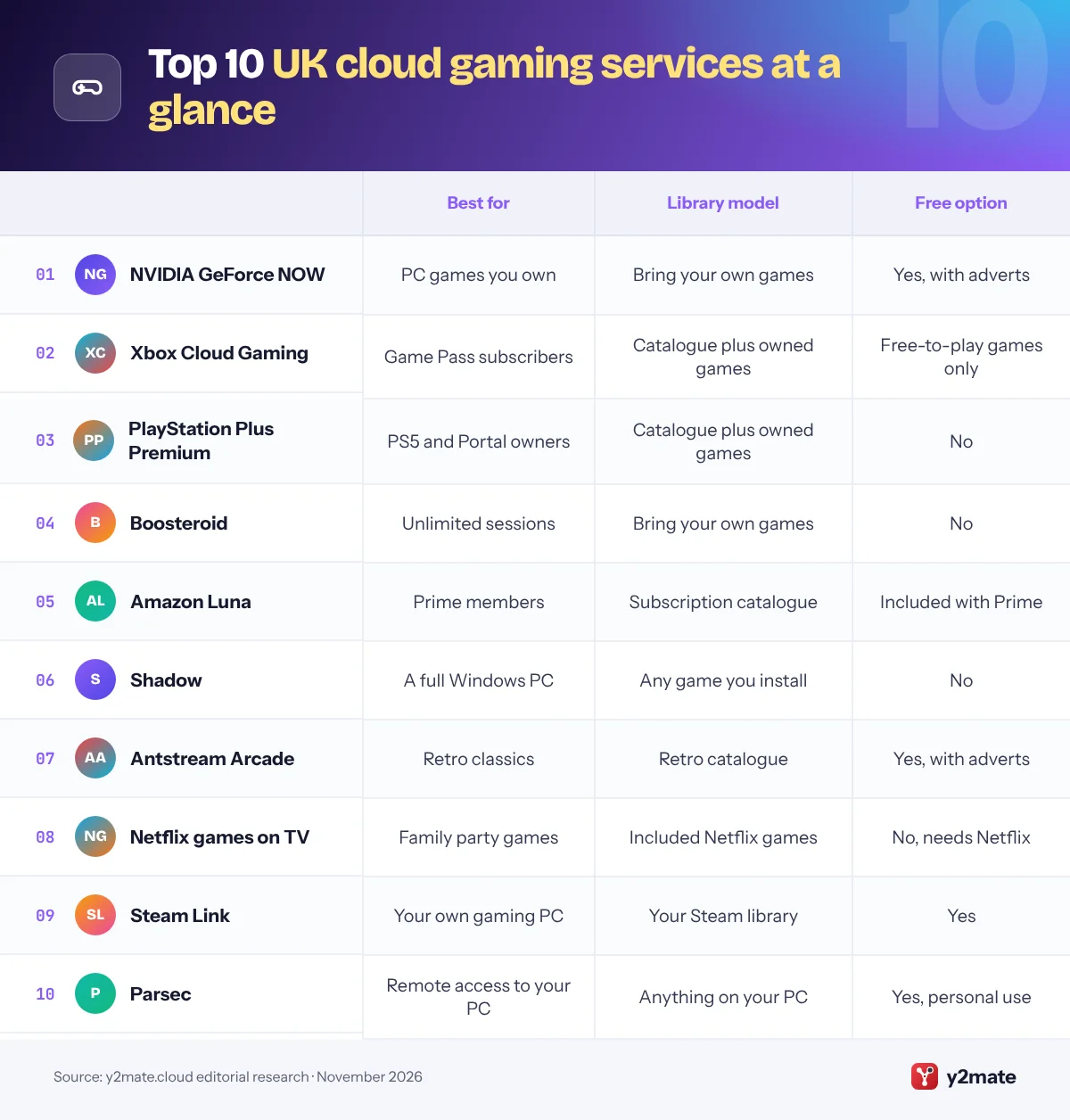
1. NVIDIA GeForce NOW
Best for: streaming the PC games you already own
GeForce NOW is NVIDIA’s own cloud gaming service, and in the UK it is run directly by NVIDIA rather than through a local partner. It streams games you already own on Steam, Epic Games Store, GOG, Ubisoft Connect and PC Game Pass, plus many free-to-play titles, from GeForce RTX servers in NVIDIA’s European data centres.
NVIDIA offers a free membership with basic rigs and short adverts before each session, plus Performance and Ultimate plans. Performance streams at up to 1440p and 60 fps, while Ultimate uses RTX 5080-class servers for up to 5K at 120 fps, or 360 fps at 1080p, according to NVIDIA. Both paid plans include 100 hours of playtime a month with limited rollover, and a Day Pass gives 24 hours of premium access with no monthly commitment.
Apps and browser play cover Windows, macOS, Linux, Chromebook, iPhone, iPad, Android, select Samsung and LG TVs, Fire TV, Steam Deck and VR headsets, and Bluetooth controllers are widely supported. You still need to buy most of your games, and not every PC title is available, so search NVIDIA’s games list before you commit.
Official site: NVIDIA GeForce NOW
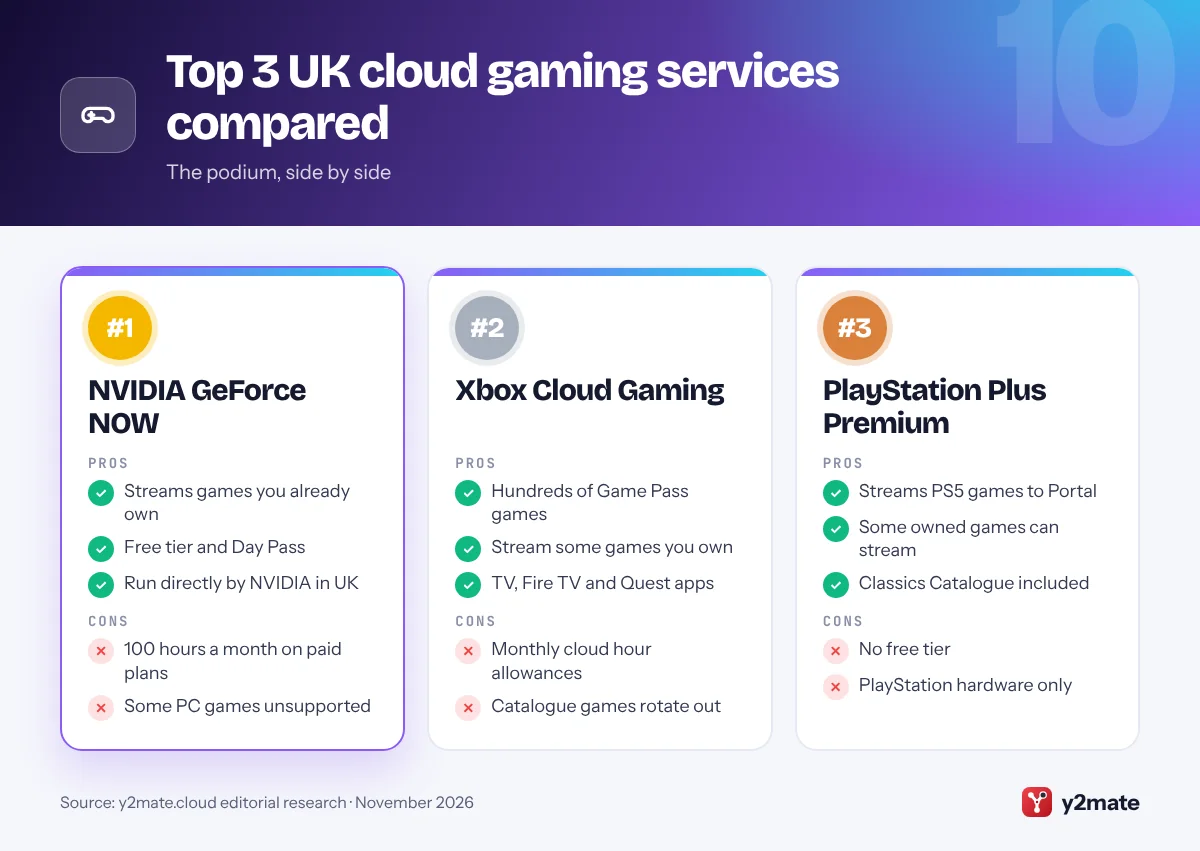
- Streams games you already own
- Free tier and Day Pass
- Very wide device support
- 100 hours a month on paid plans
- Not every PC game is supported
2. Xbox Cloud Gaming
Best for: Game Pass subscribers who want hundreds of games
Xbox Cloud Gaming is Microsoft’s streaming service for console games, included with all three Game Pass plans in the UK: Essential, Premium and Ultimate. Ultimate offers the largest catalogue, with new Xbox releases on day one, and Microsoft reserves its best stream quality, up to 1440p, and shortest queues for it. You can also stream select games you own, and free-to-play games such as Fortnite need only a free Microsoft account.
From November 2026, every plan comes with a monthly allowance of cloud hours: 15 on Ultimate, 10 on Premium and 5 on Essential. Microsoft says extra hours can be bought through the Xbox Store, and that people without Game Pass will be able to buy cloud playtime to stream eligible games they own. That is a significant change for anyone who games mainly through the cloud.
It runs on Xbox consoles, Windows PCs, phones and tablets, web browsers, select Samsung, LG and VIDAA TVs, Fire TV and Meta Quest headsets. Xbox Wireless and DualShock 4 controllers work, and some games offer touch controls on phones.
Official site: Xbox Cloud Gaming
- Hundreds of games with Game Pass
- Stream some games you own
- TV, Fire TV and Quest apps
- Monthly cloud hour allowances
- Catalogue games rotate out
3. PlayStation Plus Premium
Best for: PS5 owners and PlayStation Portal players
PlayStation Plus Premium is the highest of Sony’s three UK tiers and the one that adds cloud streaming. Members can stream select PS5 games from the Game Catalogue, game trials and some digital games they own straight to a PS5 or PlayStation Portal, without downloading anything or using console storage. Sony lists streaming resolutions of up to 4K for PS5 cloud streaming, and Premium also includes the Classics Catalogue.
The PlayStation Portal benefits most. Cloud streaming on the handheld came out of beta in November 2025, so it can now play supported games without your PS5 being switched on, which is handy when someone else is using the console or the living room TV.
There is no free tier, and PS5 cloud streaming is limited to the PS5 and Portal rather than phones, PCs or smart TVs. Not every game supports it either, so use Sony’s cloud streaming game finder before relying on it. For PS5 owners, Premium works best as a way to try games instantly and to keep playing away from the main screen.
Official site: PlayStation Plus Premium
- Streams PS5 games to PS5 and Portal
- Some owned games can stream
- Classics Catalogue included
- No free tier
- PlayStation hardware only
4. Boosteroid
Best for: unlimited session length with your own games
Boosteroid is an independent cloud gaming platform that streams PC games you already own, in the same bring-your-own-games style as GeForce NOW. You sign in to stores such as Steam and Epic Games Store inside a session and play supported titles on its remote rigs. A long-term agreement with Microsoft means many Xbox PC games, including PC Game Pass titles, can be streamed too.
Boosteroid has been expanding its European data centre network, which includes UK capacity, and it promises no session time limits, so you can play for as long as you like in one sitting. Apps cover Windows, macOS, Linux and Chromebook, Android phones and Android TV, and Samsung and LG smart TVs, and it runs in a web browser, including on iPhone and iPad as a home-screen web app.
There is no free tier, and its supported game list is shorter than NVIDIA’s, so check your favourites are included first. If you want to stream your own library without a monthly playtime allowance, Boosteroid is the closest rival to GeForce NOW in the UK.
Official site: Boosteroid
- No session time limits
- Streams games you already own
- Apps for TVs and Linux
- No free tier
- Smaller game list than NVIDIA
5. Amazon Luna
Best for: Prime members who want casual games on the TV
Amazon Luna is available in the UK, and a library of more than 50 games is now included with Prime. That includes GameNight, a set of more than 25 easy-going local multiplayer games that everyone in the room plays using their phone as a controller. Luna Premium, the successor to Luna+, adds a larger rotating catalogue as a separate subscription.
The service changed a lot in 2026. Amazon stopped selling individual games and third-party subscriptions through Luna in April, and in June it ended the option to stream Ubisoft, EA and GOG games you owned elsewhere. In July, Luna arrived inside the Prime Video app on Fire TV in the UK and US, through a new Games tab.
Luna works on Fire TV devices and Fire tablets, select Samsung and LG TVs, iOS and Android devices, and PCs, Macs and Chromebooks, with Bluetooth controllers or Amazon’s own Luna Controller. It is now a catalogue service only, leaning towards family and casual titles, but for Prime households it is an easy way to try cloud gaming without signing up for anything new.
Official site: Amazon Luna
- Included with Prime
- Phone-controlled party games
- Games tab in Prime Video
- Cannot stream games you own
- Casual-leaning catalogue
6. Shadow
Best for: a complete Windows gaming PC in the cloud
Shadow gives you a full Windows computer running in a data centre rather than a curated game service. You can install almost any game or launcher, including Steam, Epic Games Store and Battle.net, add mods and tools, and keep everything installed between sessions. Shadow notes that a small number of games and apps may not run on its machines.
The service is offered in the UK alongside much of Western Europe and North America. You can connect from Windows, macOS and Linux computers, phones and tablets, Android TV and Apple TV, or a web browser. That makes it particularly appealing to Mac owners who want Windows-only games, and to players interested in PC VR or creative software that game-only services cannot run.
The flexibility comes with responsibility. You manage Windows, storage and settings yourself, there is no free tier, and streaming a whole desktop rewards a fast, stable line, ideally full fibre with a wired connection. If you want total control over what you install, Shadow is the most flexible choice on this list.
Official site: Shadow
- Install almost any PC game
- Mods and Windows apps work
- Strong option for Mac owners
- No free tier
- You maintain Windows yourself
7. Antstream Arcade
Best for: retro games without emulators
Antstream Arcade streams classic games from the cloud, with a licensed library of more than a thousand arcade, console and home computer titles. There is nothing to emulate or download, and it adds modern features such as challenges, tournaments and leaderboards, which give old favourites a new competitive edge.
You can play on Windows PCs, including via the Epic Games Store, on Android and iOS devices, on Xbox consoles and on Samsung smart TVs through Samsung Gaming Hub. A free, ad-supported tier lets you get started, and a paid membership removes the adverts and unlocks the full service. Controllers are supported, which suits games originally designed for joysticks and arcade buttons.
The library is, by definition, made up of older games, and what is available depends on licensing, so a particular classic may not be there. Even so, for anyone who grew up with arcades or 8-bit and 16-bit machines, Antstream is one of the simplest legal ways to play them again on a modern screen, and the free tier makes it easy to try.
Official site: Antstream Arcade
- Large licensed retro library
- Free ad-supported tier
- Challenges and tournaments
- Older games only
- Full service needs a paid plan
8. Netflix games on TV
Best for: party games for households with Netflix
Netflix streams a selection of its games to TVs from the cloud, so any household with a membership can try cloud gaming without buying hardware or another subscription. Open the Netflix app on a supported TV or streaming stick, select Games at the top of the screen, then have each player scan the on-screen QR code to turn their phone or tablet into a controller.
Netflix calls TV games a beta, available in the UK and a list of other countries. The focus is on group games such as Pictionary: Game Night and Boggle Party, and some titles can also be played in Chrome or Edge on a computer. According to Netflix, every game is included with membership, with no adverts, fees or in-app purchases.
Gamepads are not supported on TV, the catalogue is small, and not every television can run it, so look for the Games option in your Netflix app. Mobile games you download are a separate collection. For a quick family game night it works well; for anything more serious, choose one of the services ranked above it.
Official site: Netflix games on TV
- Included with Netflix membership
- Phones act as controllers
- No extra hardware needed
- Gamepads not supported on TV
- Small, party-focused catalogue
9. Steam Link
Best for: free streaming from your own gaming PC
Steam Link is a remote play app rather than a cloud service. Valve’s free software streams games from your own Windows, macOS or Linux PC running Steam to another screen in your home or, with a good connection, further afield. Because your PC does the processing, there is no subscription, no monthly hour allowance and no restriction on which of your Steam games you play.
The app is available on iPhone, iPad, Apple TV and Apple Vision Pro, Android phones, tablets and TVs, Amazon Fire TV and Raspberry Pi, and Steam can also stream to another computer or a Steam Deck. Remote Play Together lets online friends join local co-op games as if they were sitting on your sofa.
The quality you get depends on your PC and your home network, so connect the gaming PC by Ethernet where possible and keep the receiving device on strong Wi-Fi. If you already own a capable PC, Steam Link is the obvious first thing to try before paying for cloud hardware you may not need.
Official site: Steam Link
- Free with no subscription
- Plays your whole Steam library
- Apps for TVs and phones
- Needs your own gaming PC
- Home network sets the quality
10. Parsec
Best for: low-lag remote access to your own PC
Parsec is a remote desktop app built for gaming and creative work. Like Steam Link, it streams from a computer you own, but it shares the whole desktop rather than just Steam, so you can play games from any launcher, use mods or run other software. It is free for personal use, with paid Warp and Teams plans aimed at professionals and businesses.
You install Parsec on a Windows or Mac host, then connect from apps on Windows, macOS, Linux, Android and other devices. Parsec says its streams reach up to 4K at 60 fps, or higher frame rates at lower resolutions, and controllers connected to your device are passed through to the host. A popular use is online couch co-op: you can invite friends to connect to your PC and play local multiplayer games together.
As with any remote play tool, the experience depends on your PC’s power and your upload speed, and setting it up takes a little more effort than a cloud service. For PC owners who want flexible access to their own machine, it is a strong free alternative.
Official site: Parsec
- Free for personal use
- Streams your whole desktop
- Easy online co-op with friends
- Needs your own gaming PC
- More set-up than cloud services
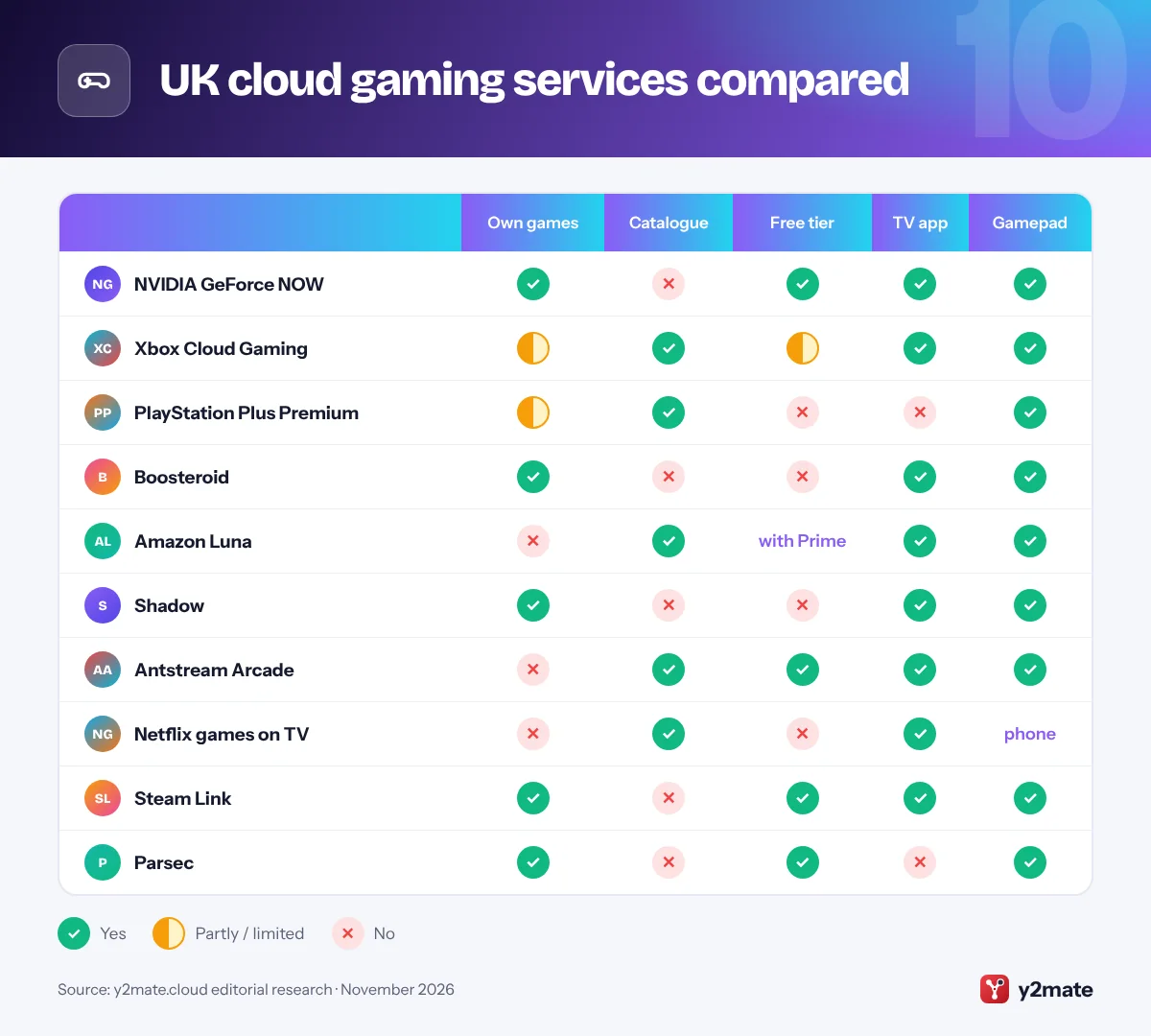
UK cloud gaming services compared
How to pick cloud gaming services in the UK
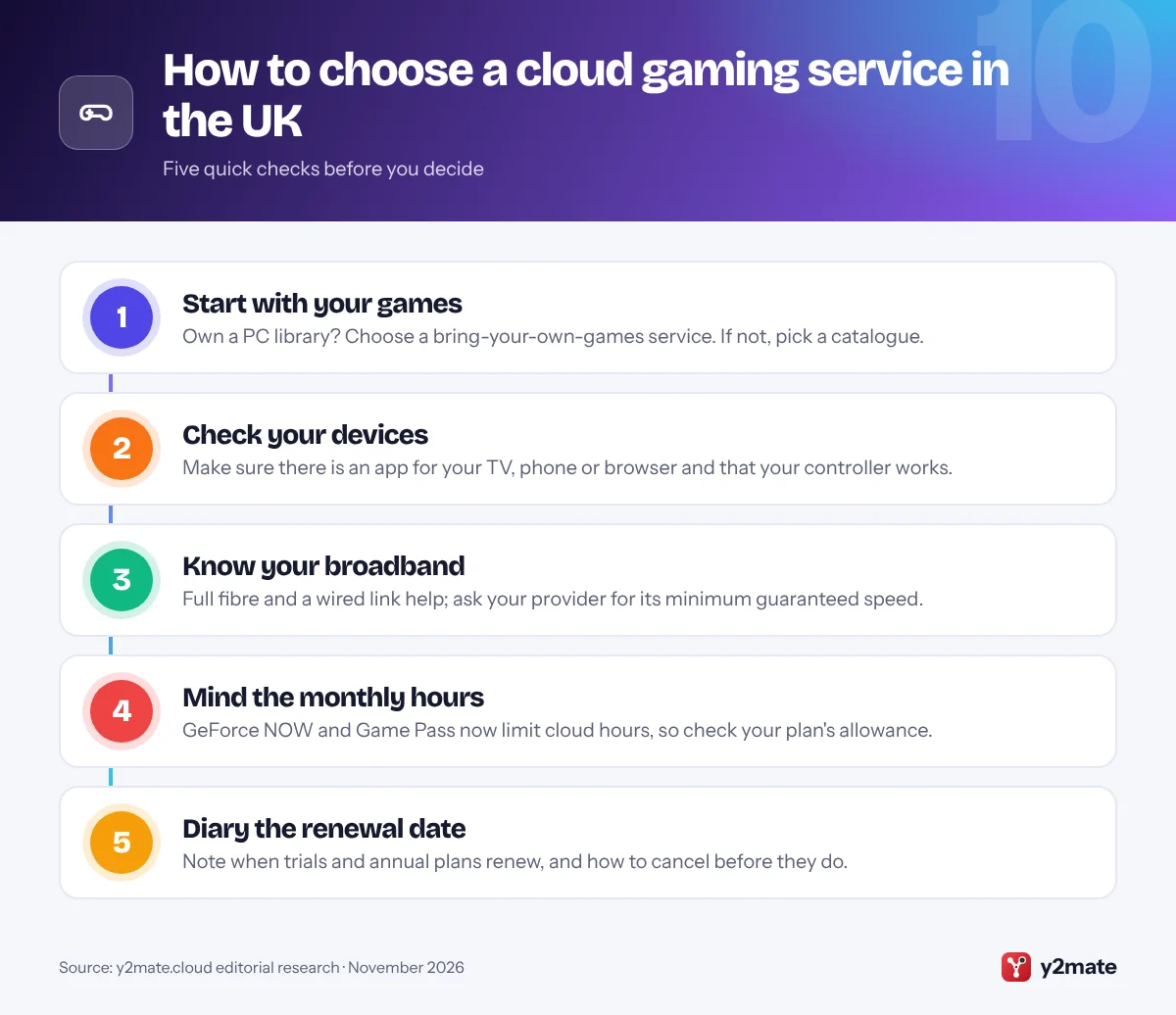
Decide first whether you want to stream games you already own or choose from a catalogue, then check that the service supports the screens and controllers you use. After that, your broadband and your contract terms matter most.
Broadband and latency
- Full fibre helps: full-fibre and other gigabit-capable connections are being rolled out by Openreach, Virgin Media O2 and alternative networks, with the government’s Project Gigabit funding harder-to-reach areas. Fibre generally gives a steadier line than older copper connections.
- Distance and Wi-Fi: the nearer the service’s data centre and the better your home network, the more responsive games feel, so use Ethernet or keep your device close to the router.
- Speed guarantees: under Ofcom’s voluntary broadband speeds codes, signed-up providers must give you a minimum guaranteed download speed when you buy, and let you leave without penalty if speeds fall below it and are not fixed.
- Price rises: since 17 January 2025, Ofcom has required phone, broadband and pay TV providers to set out any mid-contract price rises in pounds and pence before you sign up.
Subscriptions and your rights
The Digital Markets, Competition and Consumers Act 2024 gave the Competition and Markets Authority direct consumer enforcement powers from April 2025. Its subscription contract rules, including reminder notices before renewals and an easy way to cancel, are due to start on 1 January 2027, subject to Parliament approving the regulations laid in October 2026. Until then, the Consumer Contracts Regulations usually give you 14 days to cancel a new online subscription, although you may lose or reduce that right once you start using a digital service.
Frequently asked questions
Which cloud gaming service is best in the UK?
For most players, NVIDIA GeForce NOW is the best all-rounder because it streams PC games you already own to almost any device, has a free tier and is run directly by NVIDIA in the UK. Xbox Cloud Gaming is the best catalogue option for Game Pass subscribers, and PlayStation Plus Premium suits PS5 and PlayStation Portal owners.
Is cloud gaming the same as remote play?
No. Cloud gaming runs games on servers in a provider's data centre, so you need no gaming hardware of your own beyond a screen and a controller. Remote play, as with Steam Link, Parsec or PS Remote Play, streams from a PC or console you own, which is usually free but relies on that machine and on your home network.
What broadband do I need for cloud gaming in the UK?
A stable connection matters more than headline speed. Full fibre or a good cable connection, a wired Ethernet link or strong Wi-Fi close to the router, and a quiet network while you play all reduce lag. Each provider publishes its own minimum requirements, and Ofcom's speed codes let customers of signed-up providers leave if speeds fall below the guaranteed minimum.
Does Xbox Cloud Gaming have a time limit now?
Yes. From November 2026, Microsoft includes a monthly allowance of cloud gaming hours with each Game Pass plan: 15 hours on Ultimate, 10 on Premium and 5 on Essential. Extra hours can be bought through the Xbox Store, and players without Game Pass will be able to buy cloud playtime to stream eligible games they own.
What are the new UK rules for gaming subscriptions?
The Digital Markets, Competition and Consumers Act 2024 introduces subscription rules due to start on 1 January 2027, subject to Parliament approving the regulations. They include clearer information before you sign up, reminders before renewals and before free trials end, and straightforward cancellation. Until then, existing consumer law, including the 14-day cancellation rules for online purchases, still applies.
Final verdict
The best cloud gaming services in the UK for most people are NVIDIA GeForce NOW for PC games you already own, Xbox Cloud Gaming for a large Game Pass catalogue and PlayStation Plus Premium for PS5 and Portal owners. Boosteroid suits long sessions, Amazon Luna and Netflix are easy extras for existing subscribers, and Shadow offers a full Windows PC.
Before signing up, check your broadband’s guaranteed speed, play on a wired connection where you can, and note any monthly hour allowance and renewal date. If you already have a gaming PC, try Steam Link or Parsec first.
Sources and further reading
- Ofcom's broadband right to exit: Ofcom's statement on the broadband speeds codes, including minimum guaranteed speeds and when customers can leave a contract without penalty.
- Ofcom ban on inflation-linked rises: Ofcom explains why phone, broadband and pay TV providers must now set out mid-contract price rises in pounds and pence.
- The DMCC Act 2024: The full text of the Act that strengthens consumer enforcement and sets out new rules for subscription contracts.
- Consumer Contracts Regulations 2013: The regulations behind the 14-day right to cancel most online purchases, including the rules for digital content and services.
- Project Gigabit on GOV.UK: Government guidance on the programme funding gigabit-capable broadband in areas that commercial rollouts are unlikely to reach.

Leave a Reply