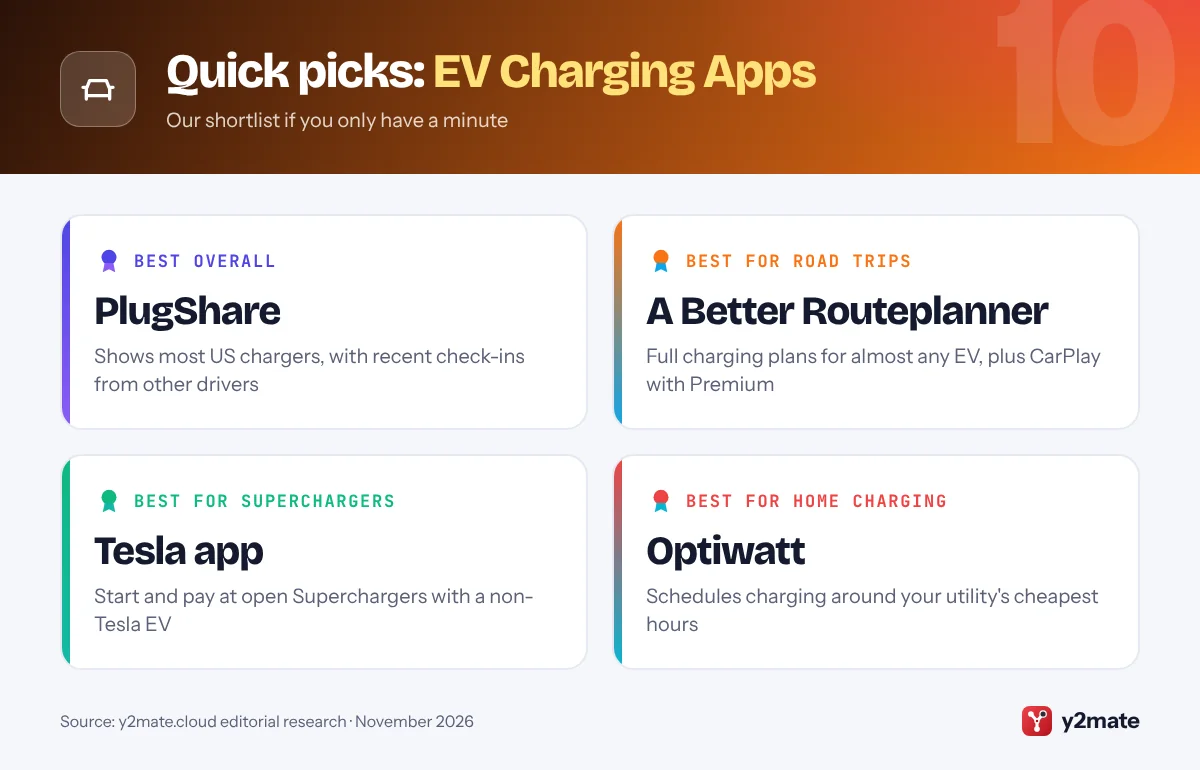
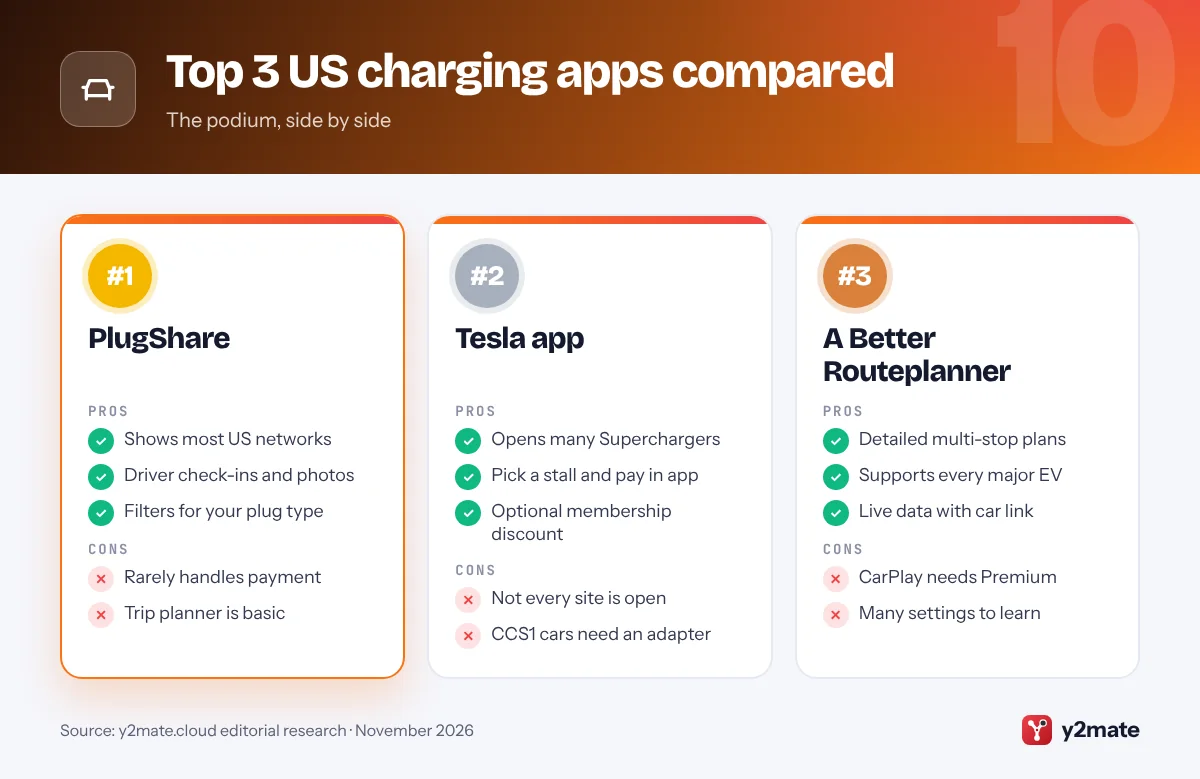
- PlugShare, the Tesla app and A Better Routeplanner cover most US drivers' needs for finding chargers, using Superchargers and planning road trips.
- Non-Tesla drivers start and pay at open Tesla Superchargers through the Tesla app, using a NACS port or an automaker-approved adapter.
- Federal rules for NEVI-funded chargers require a contactless card option, no mandatory membership and Plug and Charge-capable software.
- Network apps such as Electrify America and EVgo are most useful for memberships, Plug&Charge or Autocharge+, and reservations.
- Smart-charging apps like Optiwatt schedule home charging around your utility's time-of-use rates and can find utility reward programs.
The best EV charging apps in the USA in 2026 are PlugShare for finding almost any public charger, the Tesla app for using Superchargers with a non-Tesla EV, A Better Routeplanner (ABRP) for road-trip planning and Google Maps for simple routing. Add one or two network apps, such as Electrify America or EVgo, if you use those networks often, and a smart-charging app like Optiwatt if you pay time-of-use rates at home.
Apps matter more in the US than in many countries because payment is still fragmented. Some stations take a credit card, some need a network account, and many newer stalls support Plug and Charge, where the car identifies itself and pays automatically. The move to the NACS plug, standardized by SAE as J3400, has also opened Tesla’s Supercharger network to many other brands, but only through the right app and, for older cars, an approved adapter.
This list ranks ten apps by how much they help real drivers: what each does, which networks it covers, how payment works and who can skip it.
How we ranked this list
We ranked these EV charging apps on network coverage in the USA, payment and roaming options, route-planning and live-availability features, and how well each fits common situations such as road trips, apartment living and home charging. We based the ranking on official documentation from the app makers, app store listings, federal guidance on public chargers and widely reported driver feedback.
We did not carry out hands-on testing, and we do not list prices or fees because they change often and vary by station and plan. Check each app for current pricing before you charge.
The Top 10 EV Charging Apps
1. PlugShare
Best for: finding any public charger, any network
PlugShare is the closest thing US drivers have to a universal charger map. It lists stations from Tesla, Electrify America, EVgo, ChargePoint and most smaller networks, with filters for plug type, speed and network so the map only shows stations your car can use. Its biggest strength is the community: drivers check in, leave comments and post photos, so you can see whether a station worked for someone recently.
It also has a trip planner, and Pay with PlugShare lets registered users pay at a limited set of stations; elsewhere you start sessions in the network’s app or with a card. EVgo bought PlugShare’s parent company in 2021, and PlugShare said at the time that EVgo would get no special treatment in the app.
Who should not bother: almost nobody, although Tesla drivers who only Supercharge may find the car’s navigation enough. Check-ins are public, so pick a display name you are comfortable with.
Official site: PlugShare
- Shows most US networks
- Recent driver check-ins
- Free with useful filters
- In-app payment is limited
- Planner simpler than ABRP
2. Tesla app
Best for: Supercharger access for non-Tesla EVs
The Tesla app is now essential for many drivers who have never owned a Tesla. Because most automakers have adopted the NACS plug, owners of many Ford, GM, Hyundai, Kia, Mercedes-Benz, Rivian, Toyota and other EVs can use a large share of Tesla’s Supercharger network. You create a Tesla account, add a payment card, find a site open to other EVs, choose your stall number and start charging.
Cars with a native NACS port plug straight in. CCS1 cars need the adapter approved or supplied by their automaker; Tesla prohibits third-party adapters for safety reasons. Some automakers also let you start Supercharger sessions from their own app. An optional Supercharging membership lowers per-kWh rates for frequent users.
Who should not bother: drivers whose car is not yet approved for access, or who rarely leave town. Not every site is open to other brands, and older stalls with short cables can mean awkward parking.
Official site: Tesla app
- Opens many Superchargers
- Pick a stall and pay in app
- Optional membership discount
- Not every site is open
- CCS1 cars need an adapter
3. A Better Routeplanner
Best for: planning long road trips with charging stops
A Better Routeplanner, usually called ABRP, is the most detailed trip planner most EV drivers will find. Pick your exact model and destination and it builds a full plan with charging stops, your battery level on arrival at each one and total trip time. It supports every major EV on sale and lets you favor or avoid particular networks.
The free version handles route planning and charger search. ABRP Premium adds live traffic and weather, real-time charger availability inside plans, and navigation through Apple CarPlay and Android Auto. Connecting your car adds live battery data for more accurate predictions. Rivian bought ABRP’s Swedish developer, Iternio, in 2023, but the app remains open to every brand.
Who should not bother: commuters who rarely drive beyond their car’s range. Linking your car shares its location and battery data with the app, so read the privacy settings first.
Official site: A Better Routeplanner
- Detailed multi-stop plans
- Works for almost any EV
- Free tier is genuinely useful
- Best features need Premium
- Many settings for beginners
4. Google Maps
Best for: simple EV routing on your phone or dashboard
Google Maps has quietly become a capable EV tool. On phones it shows charging stations with plug types, speeds and, at many stations, real-time port availability, and it can filter for your car’s plugs. In cars with Android Auto and models with Google built-in, Maps can estimate your battery level on arrival and suggest charging stops on longer trips.
The appeal is simplicity: there is nothing new to learn. Apple Maps offers similar EV routing on iPhone and CarPlay for selected vehicles, sometimes set up through the automaker’s app, with real-time availability from some charging providers.
Who should not bother: drivers who already trust their car’s built-in planner, or anyone wanting fine control over networks and arrival charge, where ABRP is stronger. Maps does not start or pay for sessions, so you still need a network app or card at the station. Trip and location data follow your Google account settings.
Official site: Google Maps
- Free and already familiar
- Live port availability
- Charging stops in many cars
- Cannot start or pay sessions
- Less control than ABRP
5. ChargePoint
Best for: workplace, apartment and Level 2 charging
ChargePoint runs one of the largest charging platforms in the US, mostly Level 2 stations owned by employers, apartment buildings, hotels and stores using its hardware and software. If your office or building has chargers, you probably need this app. A free account also reaches roaming partner networks such as EVgo and FLO.
Useful extras include a virtual waitlist at busy stations, alerts when a spot opens up, and Tap to Charge, which starts a session with Apple Pay or Google Pay when you hold your phone to the station. A ChargePoint RFID card is another option. The same app manages ChargePoint home chargers and their schedules, and route planning is rolling out to selected users.
Who should not bother: drivers who charge only at home and on other networks’ fast chargers. Each station owner sets its own prices and access rules, so check details before you plug in. Some partner stations may still need a ChargePoint card.
Official site: ChargePoint
- Huge Level 2 footprint
- Waitlist at busy stations
- Roaming to EVgo and FLO
- Prices vary by site owner
- Mostly slower Level 2
6. Electrify America
Best for: Plug&Charge on a nationwide fast network
Electrify America, owned by the Volkswagen Group, runs a nationwide network of high-power DC fast chargers along interstates and at large retail parking lots. You can pay at the charger with a credit or debit card, but the app adds real value. It sets up Plug&Charge on compatible vehicles, so the car identifies itself and pays automatically, and it is how you join Pass+, an optional monthly membership with lower per-kWh rates.
The app also shows station status, sends session updates and is where many automakers’ complimentary charging plans are activated, so check whether your new EV came with included charging. Apple Wallet works too. Electrify America does not offer RFID cards, and other networks’ cards and apps do not work at its stations.
Who should not bother: occasional users, since a card at the charger works fine. Watch for idle fees if you stay plugged in after charging finishes; promotional plans often exclude them.
Official site: Electrify America
- Plug&Charge support
- Pass+ member rates
- Automaker plans activate here
- Idle fees if you linger
- No RFID card option
7. EVgo
Best for: city fast charging with Autocharge+
EVgo operates DC fast chargers in many US cities and suburbs, often at grocery stores and shopping centers, plus a growing number of Pilot and Flying J travel centers. Its app is worth installing if those stations are near you, mainly for Autocharge+: once you enroll a compatible car, plugging in is enough to start and pay, with no tapping or scanning.
The app also lets you reserve a charger at participating locations, filter by connector and power, and scan your VIN so only compatible stations appear. Sessions started through the app, EVgo card or Autocharge+ earn EVgo Rewards points redeemable for charging credit, and optional plans lower rates for frequent users. EVgo also owns PlugShare, though the apps remain separate.
Who should not bother: drivers far from EVgo stations, or who charge almost entirely at home. Reservation fees may apply, so check the terms before you book.
Official site: EVgo
- Autocharge+ plug-in start
- Reservations at some sites
- Rewards on app sessions
- Coverage varies by region
- Reservations may cost extra
8. Chargeway
Best for: new EV owners who want a simple map
Chargeway was built to make public charging understandable for people new to EVs. Instead of technical plug names, it uses colors for connector types and numbers from 1 to 7 for power levels, with 1 and 2 for AC charging and 3 to 7 for DC fast charging. Pick your car and the map shows matching stations, with an estimate of how long a charge will take.
The map covers networks across North America, including Tesla, Electrify America, EVgo, ChargePoint, Shell Recharge, Blink and Rivian, with real-time availability, reviews and photos. Its trip planner plots charging stops and lets you set outside temperature and driving speed for more realistic estimates, and you can report problems directly to network customer service teams.
Who should not bother: experienced drivers already using PlugShare and ABRP will find little new. Chargeway is a planning tool rather than a payment app, so you still need the operator’s app or a card.
Official site: Chargeway
- Color and number system
- Real-time availability
- Weather-aware trip planner
- Little new for experts
- Not a payment app
9. Optiwatt
Best for: cutting home charging costs on time-of-use rates
Most US EV charging happens at home, and the cheapest hours depend on your utility’s rate plan. Optiwatt connects to your car through the automaker’s connected services, with no extra hardware, imports your local electricity rates and schedules charging for the cheapest hours. It supports Tesla and many other brands, including Ford, Hyundai, BMW, Volkswagen and Nissan, plus ChargePoint home chargers.
It also looks for local utility programs that pay drivers for off-peak charging, and lets you schedule a one-time full charge before a road trip. Some utilities run their own managed-charging programs through platforms such as WeaveGrid, usually joined from the utility’s website, so check your utility’s EV page too.
Who should not bother: drivers on a flat electricity rate with no reward program, or whose car app already schedules charging well. Optiwatt needs access to your car’s connected account and your utility plan details, so review what you share.
Official site: Optiwatt
- Uses your real utility rates
- No extra hardware needed
- Finds utility rewards
- Needs car account access
- Little benefit on flat rates
10. Ford app
Best for: Ford EV owners who want one account
Automaker apps have become far more useful for public charging, and Ford’s shows what to look for. Activating the BlueOval Charge Network in the Ford app gives Ford EV owners one account for many providers, including Electrify America, Tesla Superchargers, EVgo, ChargePoint and Shell Recharge. You can find chargers, check availability and costs, and pay in one place, with sessions billed to your Ford account and no annual fee for network access itself.
Once activated, Plug & Charge works at supported stations, starting with Electrify America and Tesla Superchargers, so you can plug in and walk away. Charging-stop planning happens mainly in the car’s connected navigation.
Other automakers, including GM and Rivian, also handle public charging or Supercharger access through their own apps, so check yours first. Who should not bother: anyone not driving a Ford. Even Ford owners should keep a backup app, because Plug & Charge support varies by network.
Official site: Ford app
- One account, many networks
- Plug & Charge at key networks
- No annual network fee
- Only for Ford EV owners
- Plug & Charge not everywhere
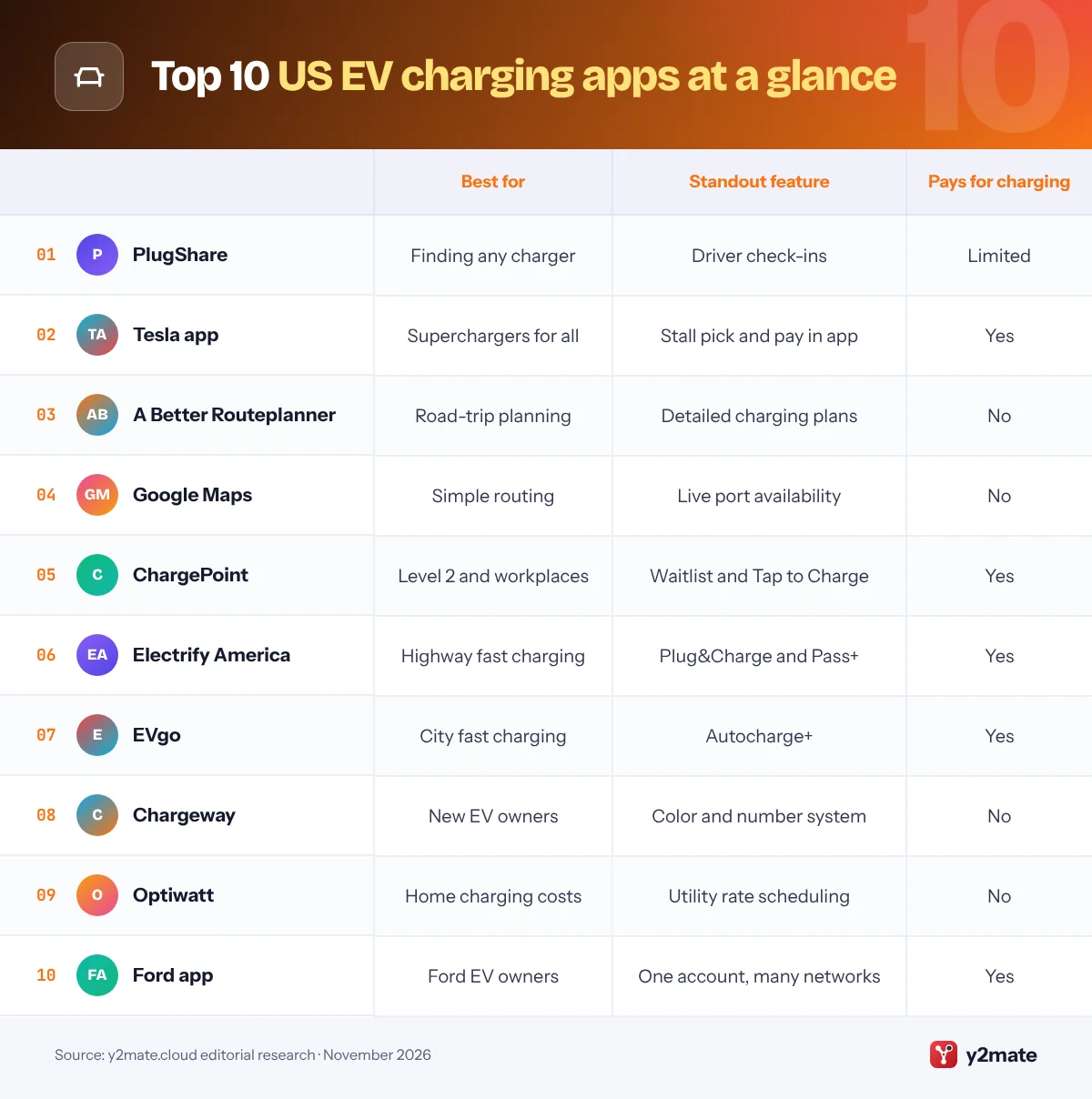
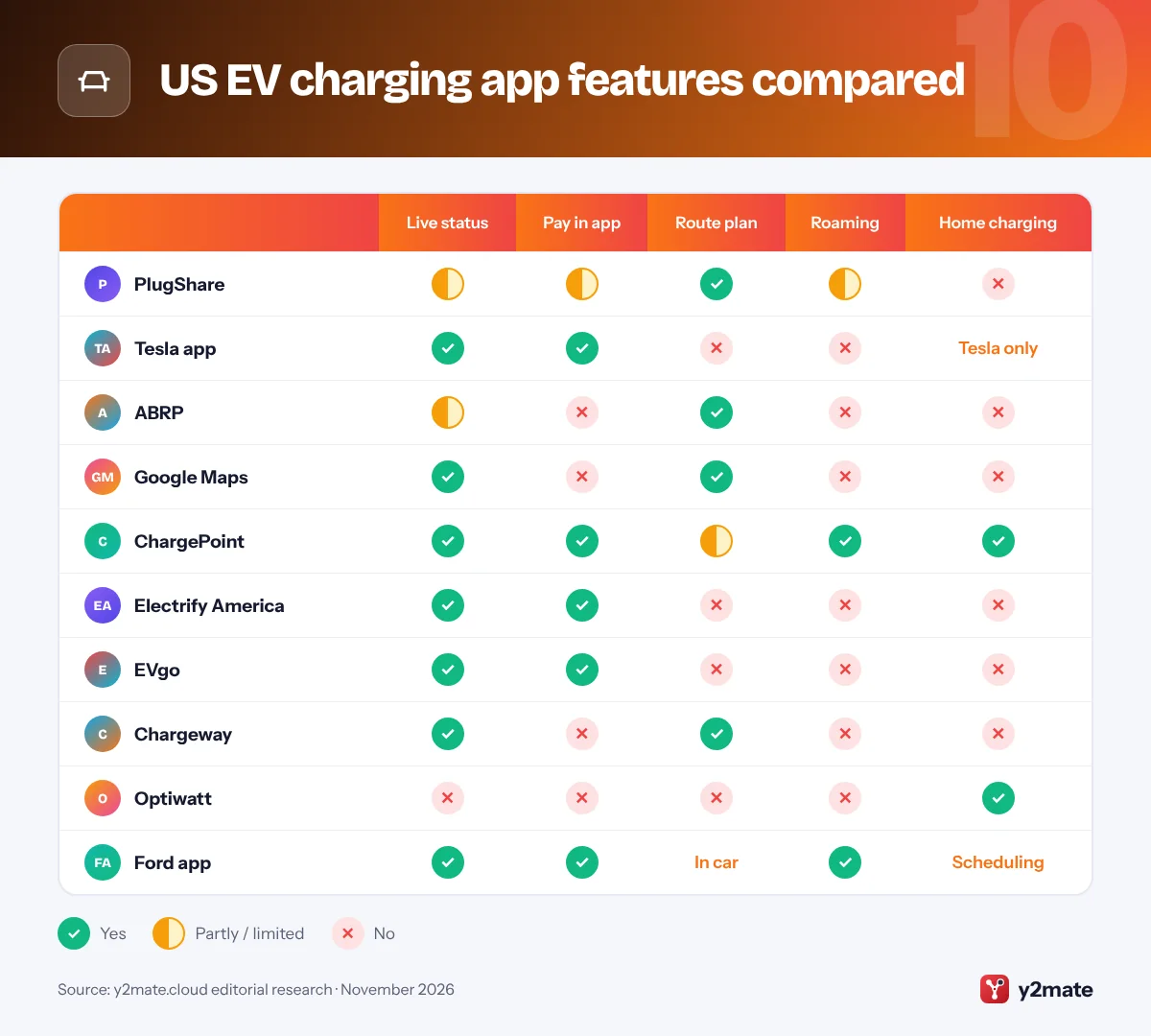
US EV charging app features compared
How to choose EV charging apps in the USA
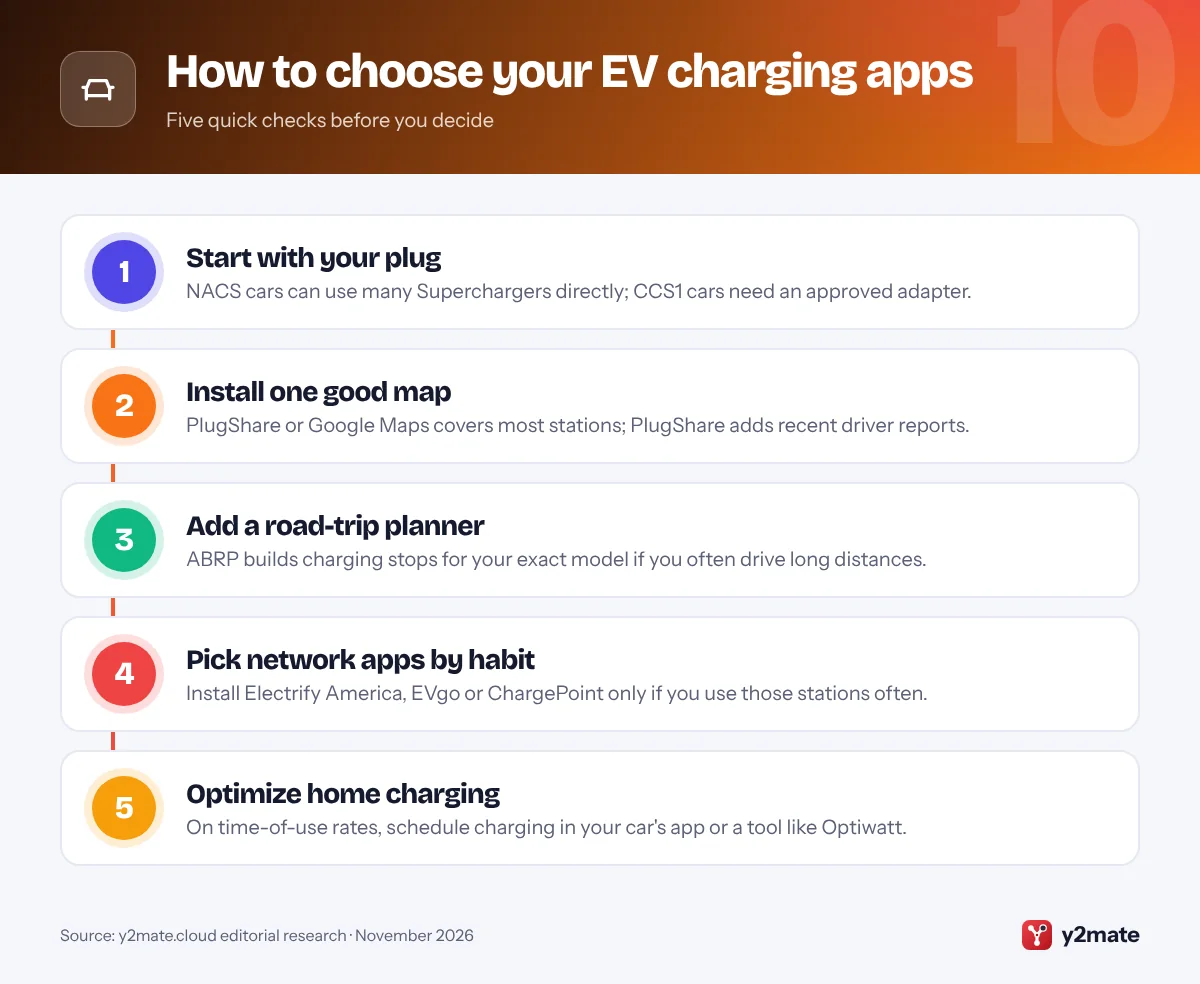
Start with how you charge most. If you charge at home and rarely travel far, one map app plus your car’s or utility’s scheduling tools may be enough. If you live in an apartment or take regular road trips, you will rely on public charging and want a slightly bigger kit.
A simple app kit for most drivers
- One map: PlugShare, Chargeway or Google Maps to find compatible stations and check recent reports.
- One planner: ABRP for long trips, or your car’s built-in planner if it handles charging stops well.
- Access apps: the Tesla app if your car can use Superchargers, plus your automaker’s app for Plug and Charge or included charging plans.
- Network apps you actually use: Electrify America, EVgo or ChargePoint, mainly for memberships, Autocharge+, reservations or workplace access.
- Home charging: a scheduler such as Optiwatt, or your utility’s managed-charging program, if you are on time-of-use rates.
What federal rules mean for payment
Chargers built with National Electric Vehicle Infrastructure (NEVI) formula funds must meet federal minimum standards in 23 CFR Part 680. These require a contactless option for major credit and debit cards plus a toll-free phone or text payment option, forbid requiring a membership, require charger software capable of Plug and Charge, and require station information such as location, pricing and real-time status to be shared free of charge with third-party apps. Older and privately funded stations do not all follow these rules, so an app is often still the most reliable way to pay.
Protect your account and data
Charging apps store payment cards and may place temporary holds on them. Apps linked to your car’s connected services can see its location and battery data, so connect only what you need and remove access from apps you stop using.
Frequently asked questions
What is the best EV charging app in the USA?
There is no single best app for everyone. PlugShare is the most useful all-round map because it covers most networks and shows recent driver check-ins. The Tesla app is essential if your car can use Superchargers, and A Better Routeplanner is the strongest road-trip planner. Most drivers add one or two network apps they use often.
Do I need a different app for every charging network?
Not always. Many fast chargers accept credit cards, ChargePoint's app roams onto partner networks such as EVgo and FLO, and automaker apps like Ford's cover several networks with one account. Federally funded NEVI stations must offer contactless card payment and cannot require a membership. Network apps still help with member rates, Plug and Charge and reservations.
Can I use Tesla Superchargers with a non-Tesla EV?
Yes, at many sites, if your automaker has been approved for access. You start and pay through the Tesla app, or in some cases your automaker's app. Cars with a NACS port plug in directly, while CCS1 cars need the adapter approved by their automaker. Tesla prohibits third-party adapters, and not every Supercharger site is open to other brands.
What is Plug and Charge?
Plug and Charge is a feature based on the ISO 15118 standard that lets the car identify itself to the charger and pay automatically when you plug in, with no app, card or tap. Electrify America supports it as Plug&Charge, and Ford offers it through the BlueOval Charge Network. You usually set it up once in the network's or automaker's app.
Which app is best for planning an EV road trip?
A Better Routeplanner is the most detailed option, planning each charging stop and arrival battery level for your exact model. Google Maps and Apple Maps offer simpler EV routing for supported cars, and Chargeway suits beginners. Whichever you use, check recent PlugShare check-ins for remote stations and keep a backup charger in mind.
Final verdict
For most US drivers, the right set of EV charging apps is PlugShare as the main map, the Tesla app if your car can use Superchargers, and A Better Routeplanner or Google Maps for trips. Add Electrify America, EVgo or ChargePoint only if those stations are part of your routine, and check what your automaker’s app already covers before downloading more.
If you charge at home on time-of-use rates, a scheduler such as Optiwatt or your utility’s managed-charging program will probably save you more than any public charging app. Keep your app kit small and always have a backup charger in mind.
Sources and further reading
- AFDC Station Locator: The U.S. Department of Energy's map of public charging stations, with filters for connector type, network and charging level.
- Charging EVs in public: The Alternative Fuels Data Center explains public charging levels, connectors and how to find and use public stations.
- Charging EVs at home: Federal guidance on home charging equipment, electricity rates and charging overnight to keep costs down.
- FHWA NEVI program: The Federal Highway Administration's page on the National Electric Vehicle Infrastructure formula program and its guidance.
- 23 CFR Part 680 standards: The federal minimum standards for NEVI-funded chargers, covering payment methods, Plug and Charge, uptime and open data.

Leave a Reply