
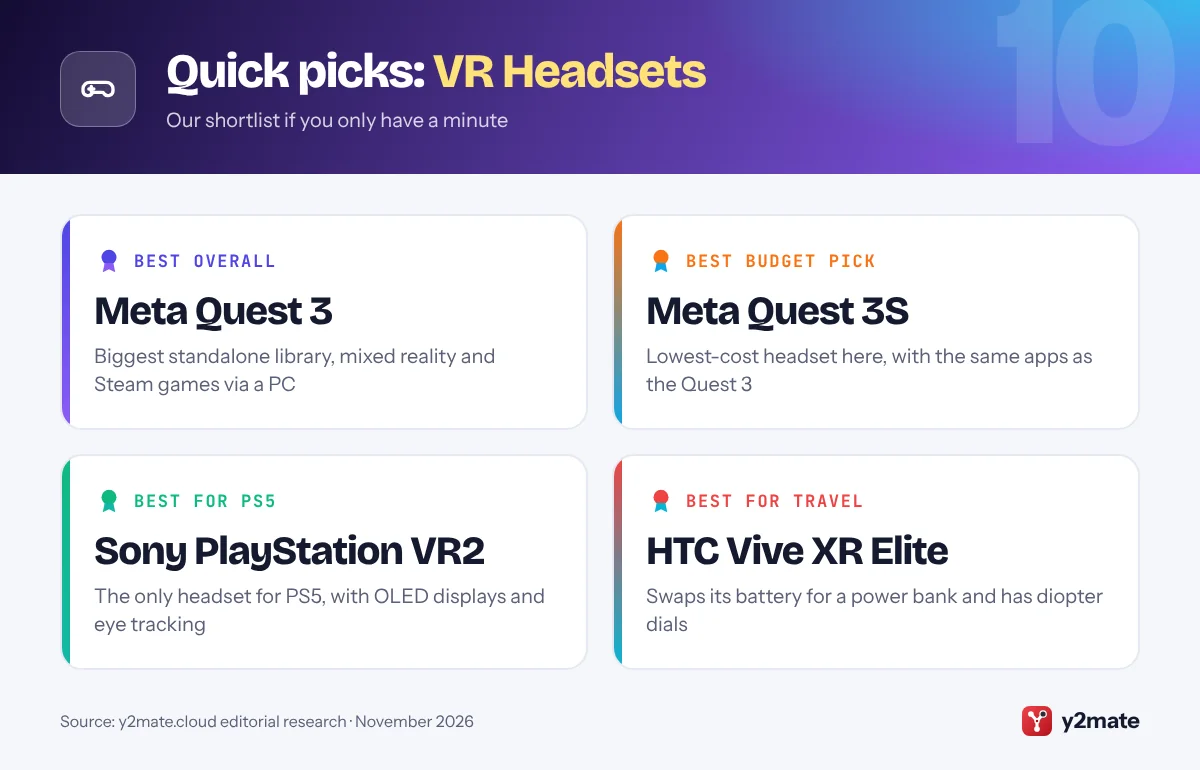
- The Meta Quest 3 is the best all-round VR headset sold in Australia, and the Quest 3S is the lowest-cost way into the same library.
- Samsung's Galaxy XR is not officially sold in Australia, and Pico has no Australian online store, so neither is on this list.
- Valve ships the Steam Frame directly to Australia through a dedicated Australian reservation list.
- PlayStation VR2 is the only headset that works with a PS5, and Sony says it is not for children under 12.
- Headsets bought from Australian businesses come with consumer guarantees under the Australian Consumer Law, on top of any manufacturer's warranty.
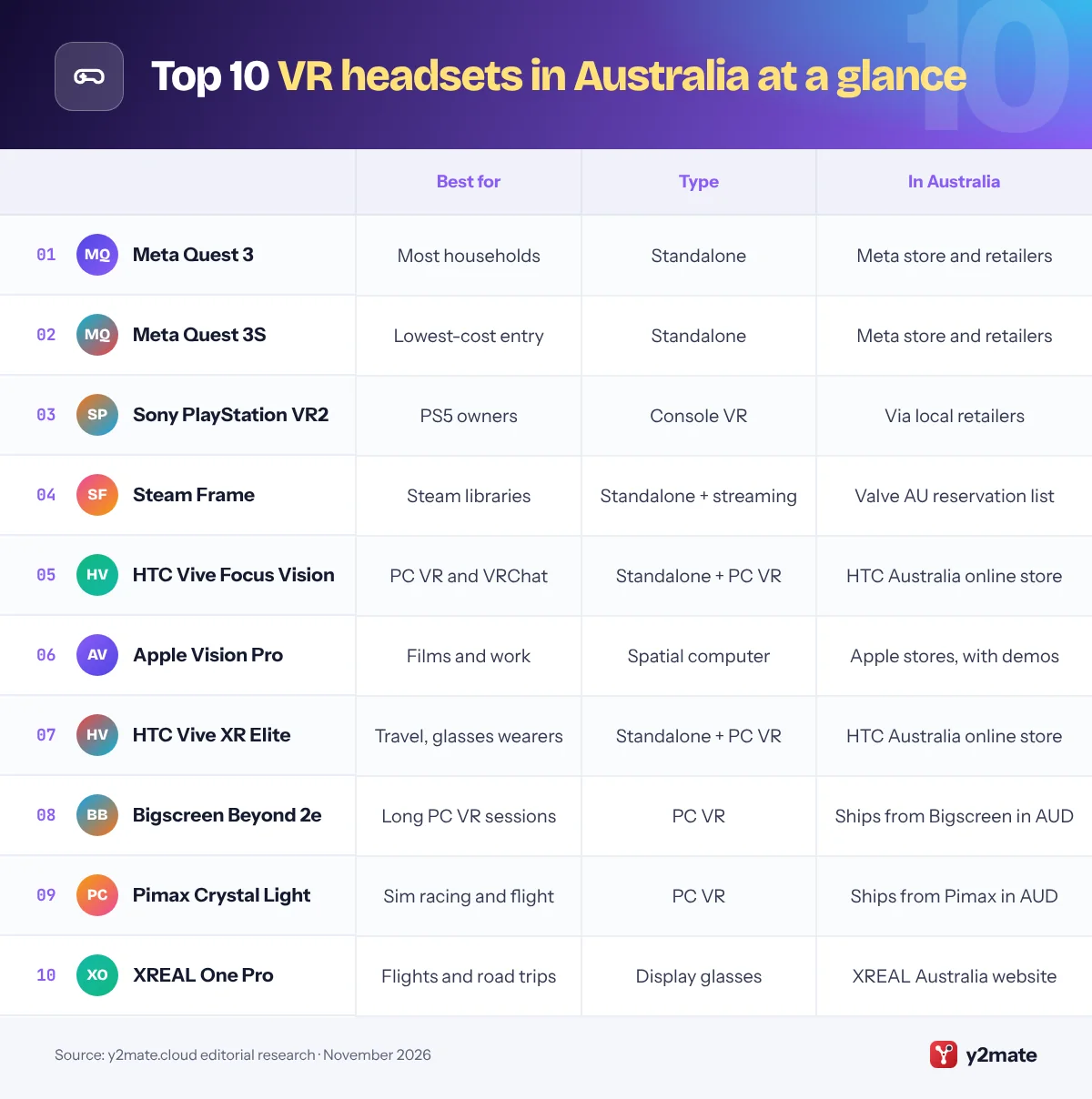
The best VR headsets Australia has on sale in late 2026 are the Meta Quest 3 for most people, the Meta Quest 3S for the lowest cost of entry, PlayStation VR2 for PS5 owners and Valve’s Steam Frame, which Valve ships directly to Australia, for Steam players. HTC’s Vive Focus Vision and Vive XR Elite cover PC VR and portability, Apple Vision Pro leads for films and work, and sim fans can look at the Bigscreen Beyond 2e and Pimax Crystal Light.
Two well-known headsets are missing because we could not confirm they are officially sold here. Samsung’s Galaxy XR launched in the US and South Korea in October 2025 and in the UK in July 2026, but Samsung Australia’s website does not list it. Pico has no Australian online store for the Pico 4 Ultra.
A quick glossary: standalone headsets have their own chip and battery, PC VR headsets lean on a gaming PC, and mixed reality uses outward cameras to blend virtual objects into your room. For each pick we cover compatibility, confirmed tracking features, who should skip it and the maker’s age advice, then explain your rights under the Australian Consumer Law.
How we ranked this list
We ranked these headsets using makers’ published specs and compatibility, the size of each platform’s app and game library, the makers’ comfort and safety guidance, availability and support in Australia, and widely reported owner feedback. Each pick is sold to Australians by its maker or local retailers as of November 2026, with the Steam Frame sold through Valve’s reservation queue.
We have not tested these headsets hands-on. Prices are left out because they move with sales and stock, and we only mention battery or display details that makers publish.
The Top 10 VR Headsets
1. Meta Quest 3
Best for: most Australian households
The Meta Quest 3 is the best all-rounder for most Australian households. It works on its own with no PC or console, tracks your head, controllers and bare hands with built-in cameras, and uses full-colour passthrough so mixed-reality games can turn your lounge room into the playing field. Pancake lenses sit in front of its LCD panels.
Meta’s Horizon Store offers the widest standalone choice of games, fitness apps, social spaces and streaming apps, and Roblox runs natively. Hook it up to a gaming PC with Meta Quest Link or Valve’s Steam Link app and it plays SteamVR titles too, while the Xbox app streams Game Pass games to a big virtual screen. Meta sells it through its Australian online store and major local retailers.
Give it a miss if eye tracking or OLED contrast matters to you, or front-heavy headsets give you a sore neck. Meta says children under 10 cannot use Quest headsets, and 10-to-12-year-olds need a parent-managed account.
Official site: Meta Quest 3
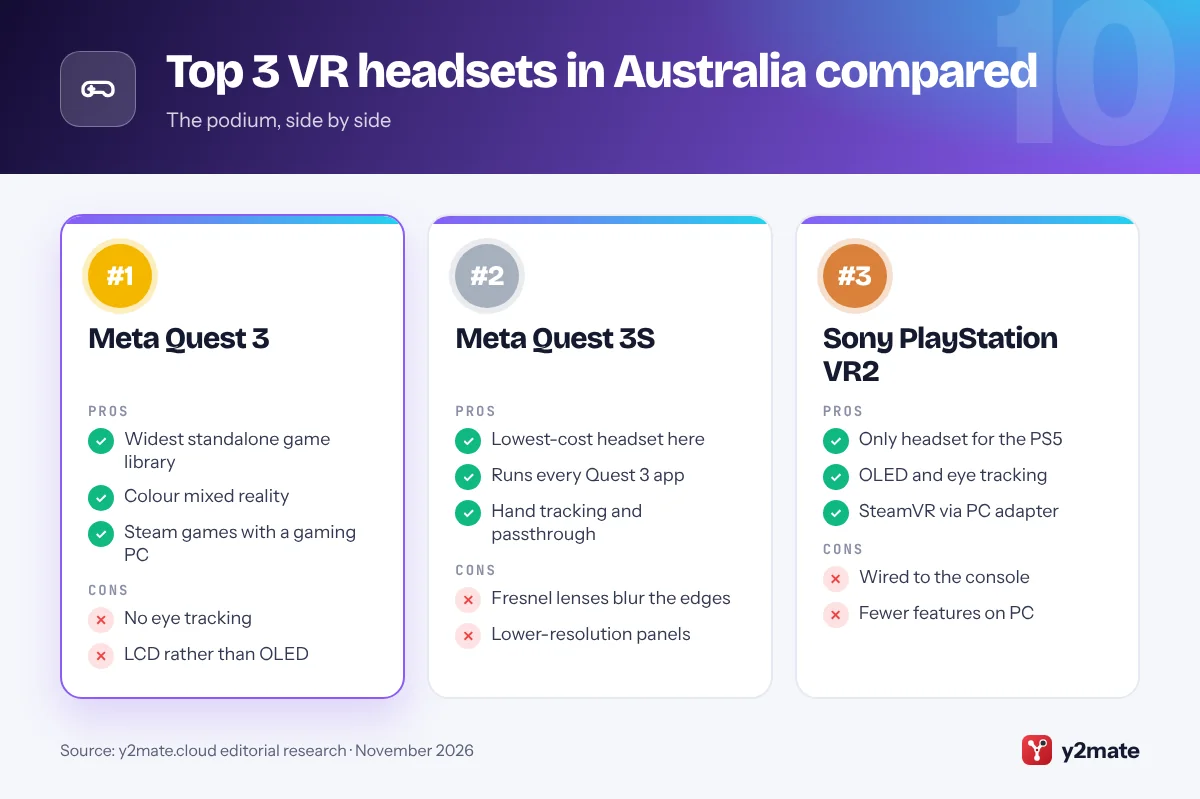
- Widest standalone game library
- Full-colour mixed reality
- Steam games with a gaming PC
- No eye tracking
- LCD rather than OLED
2. Meta Quest 3S
Best for: the lowest-cost start in VR
The Meta Quest 3S is the lowest-cost headset on this list and the one we would hand to a first-timer. It shares the Quest 3’s software, store, hand tracking and full-colour mixed reality, so a family gets the same Roblox, fitness and party games, and it can stream PC VR over Quest Link or Steam Link. Meta quotes up to 2.5 hours of average use per charge.
The compromises are in the optics. Fresnel lenses rather than pancake lenses make the front bulkier and soften the image towards the edges, and its LCD panels are lower in resolution than the Quest 3’s, which shows most when you read small text or fly detailed PC sims.
Give it a miss if you plan to watch lots of films or play detailed PC games; stepping up to the Quest 3 makes more sense. The same Meta age rules apply: no under-10s, and a parent-managed account for ages 10 to 12. Pick a storage size that suits how many games you will install.
Official site: Meta Quest 3S
- Lowest-cost headset here
- Runs every Quest 3 app
- Hand tracking and passthrough
- Fresnel lenses blur the edges
- Lower-resolution panels
3. Sony PlayStation VR2
Best for: PS5 owners
For PS5 owners, PlayStation VR2 is the clear pick, because it is the only headset that plugs into the console, and Sony’s Australian site lists it alongside a Horizon Call of the Mountain bundle. OLED displays deliver inky blacks, eye tracking lets games respond to your gaze, and the headset itself vibrates for effects. Four cameras track the headset and Sense controllers, and one USB-C cable does the rest.
Add Sony’s PC adapter and a DisplayPort 1.4 cable and it can also run SteamVR games on a Windows PC, though Sony says eye tracking, HDR, headset feedback, adaptive triggers and haptics other than rumble do not work there.
Give it a miss if you do not have a PS5, want to play without a cable or are after mixed-reality apps. It is not compatible with the PS4 or with original PlayStation VR games. Sony says it is not for children under 12, so younger kids should wait.
Official site: Sony PlayStation VR2
- Only headset for the PS5
- OLED and eye tracking
- SteamVR via PC adapter
- Wired to the console
- Fewer features on PC
4. Steam Frame
Best for: Steam players, shipped direct by Valve
Valve’s Steam Frame is the most exciting new option for Australians with a Steam library, and Valve ships it here directly, with a dedicated Australian reservation list. It is streaming-first: an included 6GHz wireless adapter streams VR and regular Steam games from your PC or Steam Deck, and eye tracking enables foveated streaming, which puts the sharpest detail where you look.
Running SteamOS on a Snapdragon chip, it can also play a growing list of Standalone Verified games without a PC. Four monochrome cameras handle tracking, the controllers include a full gamepad layout, and a copy of Half-Life: Alyx is included. It replaces the Valve Index, which Valve no longer produces.
Give it a miss if you want colour mixed reality, since its passthrough is monochrome, or you cannot wait: Valve sends purchase emails in queue order as stock allows, and new sign-ups join the waitlist. Valve’s safety manual says it is not for children under 13.
Official site: Steam Frame
- Australian reservation list
- Eye-tracked foveated streaming
- Half-Life: Alyx included
- Waitlist for new sign-ups
- Monochrome passthrough
5. HTC Vive Focus Vision
Best for: PC VR and VRChat with eye tracking
The HTC Vive Focus Vision is the most complete hybrid headset sold in Australia, and HTC sells it through its own Australian online store. On its own it runs standalone apps from HTC’s Viveport store; connected to a PC, its DisplayPort mode, using HTC’s wired streaming kit, delivers a visually lossless SteamVR picture, and it can also stream over Wi-Fi.
Eye tracking with automatic lens adjustment is built in, along with hand tracking and stereo colour passthrough on fast-switch LCD panels. HTC supports its Ultimate Trackers for full-body avatars and sells an optional Facial Tracker for lip, jaw and cheek movement, features it pitches squarely at VRChat users.
Give it a miss if you want a big library of standalone games, as Viveport is much smaller than Meta’s store, or you want a light headset. HTC’s safety guide says it was not designed for children, and that adults should closely monitor any older children who use it.
Official site: HTC Vive Focus Vision
- Built-in eye tracking
- Lossless DisplayPort mode
- Face and body tracking add-ons
- Small standalone store
- Extras add to the cost
6. Apple Vision Pro
Best for: films, apps and work with Apple gear
Apple Vision Pro, now with the M5 chip, is a spatial computer for films, apps and work rather than a games machine. Micro-OLED displays make text and video look exceptionally crisp, and you control it with your eyes, hands and voice instead of controllers. It shines with other Apple gear: Mac Virtual Display gives you a huge ultrawide screen, and iPhone spatial photos and videos play back in 3D.
Some games support Sony’s PlayStation VR2 Sense controller, bought separately, and Apple quotes up to 2.5 hours of general use from its external battery. Apple sells it in Australia online and in Apple Store locations, where you can book a demo first, and offers Afterpay monthly payments to approved customers.
Give it a miss if you want a big VR games library or SteamVR, or you live in the Android and Windows world. Apple says it should not be used by children under 13, and that teenagers should be supervised by an adult.
Official site: Apple Vision Pro
- Exceptionally crisp displays
- Eye, hand and voice control
- Demos in Apple Store locations
- Few VR games
- No SteamVR support
7. HTC Vive XR Elite
Best for: travellers and glasses wearers
The HTC Vive XR Elite is a compact, convertible headset that suits travellers and people who wear glasses. Swap its rear battery cradle for a power bank that supplies at least 30W over USB-C and it becomes a lighter pair of VR glasses, and HTC says its diopter dials can help short-sighted users. HTC sells it through its Australian online store, now with a Deluxe Pack of comfort accessories.
It runs standalone apps, streams PC VR over Wi-Fi or USB-C through VIVE Streaming, and offers full-colour passthrough with a depth sensor for mixed reality, plus hand tracking that HTC’s optional Wrist Tracker can enhance. Unlike the newer Focus Vision, it has no built-in eye tracking.
Give it a miss if you want the biggest game library or the latest hardware, since it is older than the Focus Vision. HTC’s safety guide says it was not designed for children, and that adults should closely monitor any older children who use it.
Official site: HTC Vive XR Elite
- Converts to lighter VR glasses
- Diopter dials for short sight
- Colour passthrough
- No eye tracking
- Older than the Focus Vision
8. Bigscreen Beyond 2e
Best for: long VRChat and sim sessions
The Bigscreen Beyond 2e is a featherweight PC VR headset for people who spend long sessions in VRChat or sims, and Bigscreen ships it to Australia from its own store, which can charge in Australian dollars. Micro-OLED displays and pancake optics give rich contrast, and the 2e’s eye tracking supports dynamic foveated rendering and natural-looking avatar eyes.
The catch is tracking. It uses SteamVR base stations, so you need at least one base station plus controllers, bought separately, and Valve no longer produces Index hardware, so check local supply before ordering. The face cushion is custom-made from an iPhone face scan, or you can choose a universal-fit cushion.
Give it a miss if you lack a gaming PC or want wireless play. Bigscreen offers 14-day returns alongside the consumer protections required in your region. It designs the headset around adult faces and states no minimum age on its product page.
Official site: Bigscreen Beyond 2e
- Featherweight design
- Micro-OLED displays
- Eye tracking in the 2e
- Base stations bought separately
- Gaming PC and cable needed
9. Pimax Crystal Light
Best for: sim racing and flight simulators
The Pimax Crystal Light is a PC VR headset for sim racers and flight simmers who care about reading gauges and spotting braking points. It pairs glass aspheric lenses with a QLED panel and mini-LED local dimming, plugs into your PC via DisplayPort 1.4, and tracks with inside-out cameras, with an optional upgrade to SteamVR base stations. Pimax ships it to Australia from its online store.
Pimax highlights titles such as Microsoft Flight Simulator 2024, DCS, iRacing and IL-2 Sturmovik, and the headset runs SteamVR and OpenXR games. It has no eye tracking; Pimax’s pricier Crystal Super adds that.
Give it a miss if you do not have a powerful gaming PC or want a light headset for active games, as Pimax’s own specs show it is considerably heavier than a Quest. Pimax offers a 14-day return policy and does not publish a minimum age on its product page.
Official site: Pimax Crystal Light
- Sharp view for cockpit sims
- Mini-LED local dimming
- Inside-out or base stations
- No eye tracking
- Heavy and PC-dependent
10. XREAL One Pro
Best for: a big screen on flights and road trips
The XREAL One Pro is not a VR headset, but it is a sensible alternative for Australians who mostly want a big private screen on long flights, road trips or in a small flat. These display glasses use Sony micro-OLED displays to float a large virtual screen in front of you while you still see your surroundings, and XREAL runs an Australian website.
They connect to phones, tablets and laptops whose USB-C port outputs video, as well as to a Steam Deck; a Nintendo Switch needs XREAL’s hub. The screen can stay anchored in place or follow your gaze, and XREAL says follow mode helps reduce motion sickness when travelling.
Give it a miss if you want real VR games, fitness apps or controllers, because there are none. Given how few portable options are officially sold here, they fill a gap for media fans. XREAL shows no age rating on its product page, so read the safety leaflet before children use them.
Official site: XREAL One Pro
- Big virtual screen anywhere
- Sony micro-OLED displays
- Pocketable for travel
- Not true VR
- Needs a USB-C video device
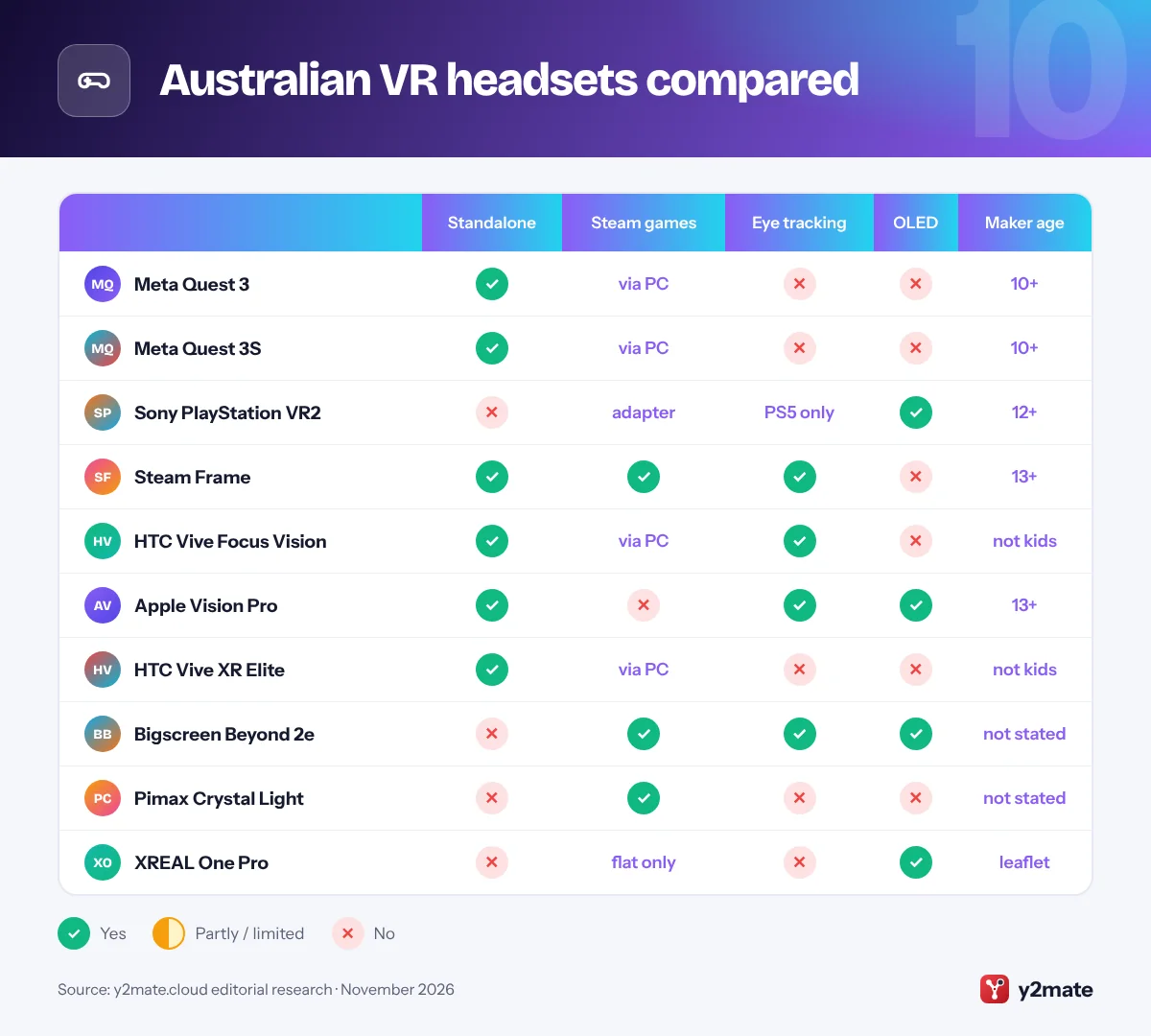
Australian VR headsets compared
VR headsets Australia buying guide: what to check
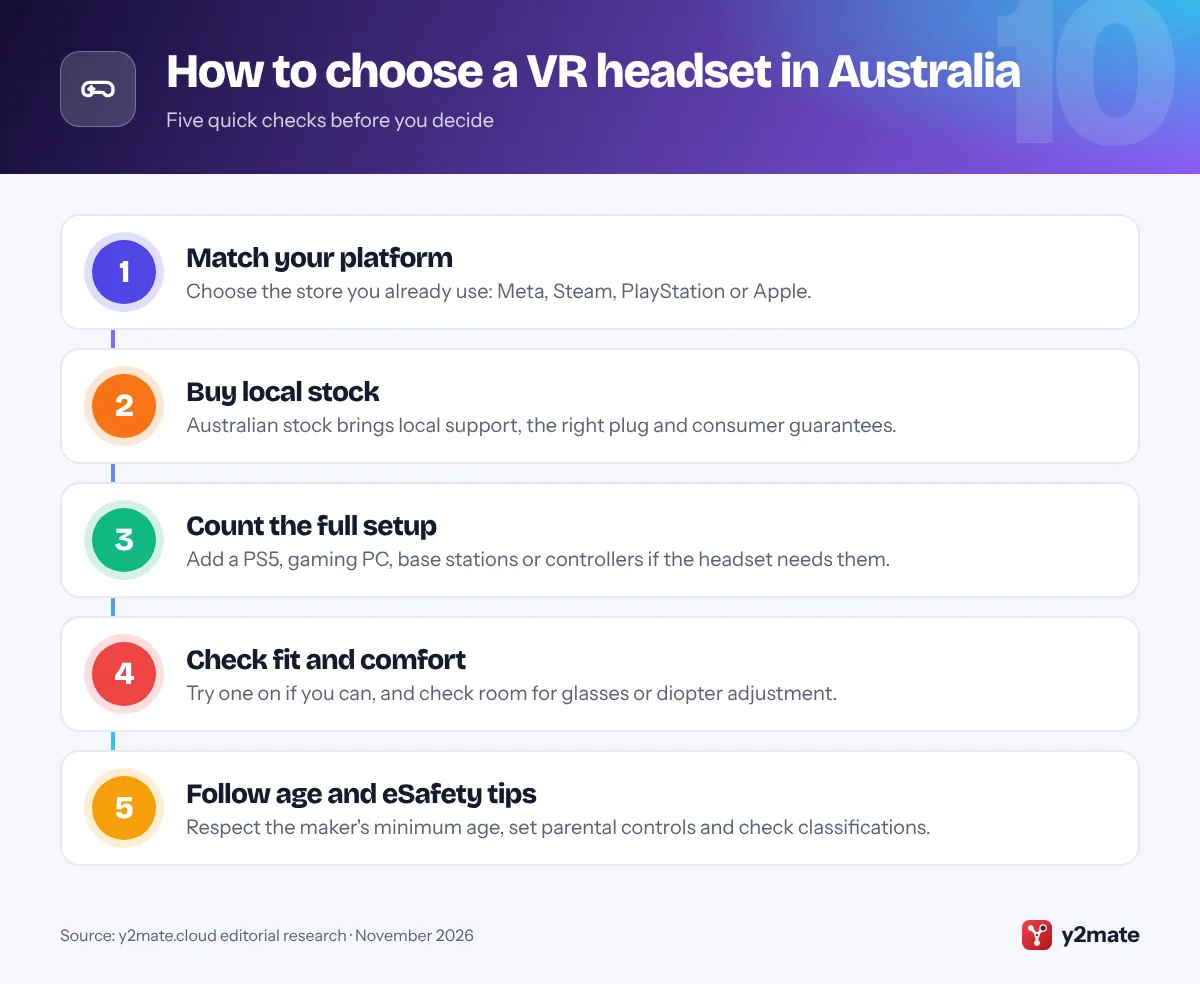
Pick your platform first, then decide whether you want a headset that works on its own or one tied to a PC or PS5. Standalone headsets such as the Quest 3 are the simplest; PC VR models like the Bigscreen Beyond 2e and Pimax Crystal Light need a capable gaming PC and cables, while hybrids such as the Steam Frame and Vive Focus Vision do both.
Your rights under the Australian Consumer Law
When you buy from an Australian business, whether JB Hi-Fi, Harvey Norman, EB Games or a maker’s local online store, consumer guarantees apply automatically: the headset must be of acceptable quality, fit for purpose and match its description. For a major failure you can choose a refund or replacement; for a minor one the business can choose how to fix it. These rights sit on top of any manufacturer’s warranty, and the ACCC explains them in detail.
Grey imports and missing models
Because Samsung’s Galaxy XR and the Pico 4 Ultra are not officially sold here, imported units may lack local warranty support, arrive with the wrong plug or tie you to an overseas account, and chasing a fault with an overseas seller is harder. Consumer guarantees also do not apply to private second-hand sales.
eSafety tips for families
The eSafety Commissioner publishes a gift guide on immersive technology for parents. Practical steps include turning on the maker’s parental controls, checking the classification of each game or app, keeping headset use in shared rooms and clearing the play space of furniture, pets and siblings.
Frequently asked questions
How much is a VR headset in Australia?
Prices change often, especially around Black Friday and end-of-financial-year sales, so we do not quote them. What you pay depends on the type of headset and its display, tracking and storage, plus anything else it needs: PS VR2 requires a PS5, PC VR needs a gaming PC, and the Bigscreen Beyond 2e needs base stations and controllers. Compare the full setup.
What are the cheapest VR headsets?
The Meta Quest 3S is the lowest-cost headset on this list and needs nothing else to work. If you already own a PS5, PlayStation VR2 can be an affordable route to high-end VR. Be wary of very cheap phone-holder viewers, and remember that private second-hand sales lack the consumer guarantees you get when buying from a business.
What is the best VR headset available in Australia?
The Meta Quest 3 is the best choice for most people, thanks to its standalone design, mixed reality and huge app library. PS5 owners should get PlayStation VR2, Steam players should join Valve's Australian queue for the Steam Frame, and Apple Vision Pro is the pick for films and work. Samsung's Galaxy XR is not officially sold here.
Can VR headsets cause headaches?
Makers including Sony, Apple and Valve list headache, along with dizziness, nausea and eye strain, among the symptoms that mean you should stop using a headset. Their guidance is to fit the headset properly, take regular breaks (Sony suggests 15 minutes for every hour of play) and avoid playing when tired. If symptoms persist, see a doctor.
Which VR headsets work with PS5 or Steam?
Only PlayStation VR2 works with a PS5. For Steam, Valve's Steam Frame is purpose-built, while the Bigscreen Beyond 2e, Pimax Crystal Light, Vive Focus Vision and Vive XR Elite run SteamVR from a Windows PC. Quest headsets reach Steam through Steam Link or Quest Link, and PS VR2 can join in with Sony's PC adapter, minus eye tracking.
What age is a VR headset for?
Each maker sets its own rule. Meta allows children aged 10 to 12 on Quest only through a parent-managed account, Sony says PS VR2 is not for under-12s, and Apple and Valve say 13 and over. HTC says its headsets were not designed for children. The eSafety Commissioner's immersive technology guide has further tips for parents.
Final verdict
For most homes, the Meta Quest 3 is the best of the VR headsets Australia has on sale, and the Quest 3S is the cheapest way into the same library. PS5 owners should choose PlayStation VR2, Steam players should get on Valve’s Australian list for the Steam Frame, and Apple Vision Pro suits buyers who care most about films and work. HTC’s Vive Focus Vision and XR Elite, the Bigscreen Beyond 2e and the Pimax Crystal Light cover PC VR, travel and simulators.
Buy from an Australian business so the consumer guarantees apply, avoid grey imports of models not sold here, and follow each maker’s age advice.
Sources and further reading
- ACCC consumer guarantees: The ACCC explains the consumer guarantees that apply to products bought from Australian businesses, including refunds and repairs.
- eSafety guide to immersive tech: The eSafety Commissioner's advice for parents on setting up VR and other immersive technology safely for children.
- Meta Quest health and safety: Meta's Australian health and safety warnings for Quest headsets, covering setup, play space, breaks and age guidance.
- PlayStation health warning: Sony's Australian health notice, including the PS VR2 safety notice, its age limit and advice on breaks.
- Apple Vision Pro safety information: Apple's safety guidance for Vision Pro in Australia, covering age limits, fit, breaks and when to stop.

Leave a Reply