
- GeForce NOW is available in Australia through NVIDIA's alliance partner Pentanet, which runs it as GeForce NOW Powered by CloudGG and lists its servers as AU East.
- Xbox Cloud Gaming has been available in Australia since 2021, and from November 2026 each Game Pass plan includes a monthly allowance of cloud gaming hours.
- PlayStation Plus cloud streaming, Amazon Luna and Shadow are not offered in Australia, so PS5 owners rely on PS Remote Play and PlayStation Portal's remote play mode instead.
- Distance matters in Australia: players far from east-coast servers, and anyone on a geostationary satellite connection, will notice more latency.
- Australia's ban on unfair trading practices and subscription traps passed Parliament on 2 July 2026 and takes effect on 1 July 2027.
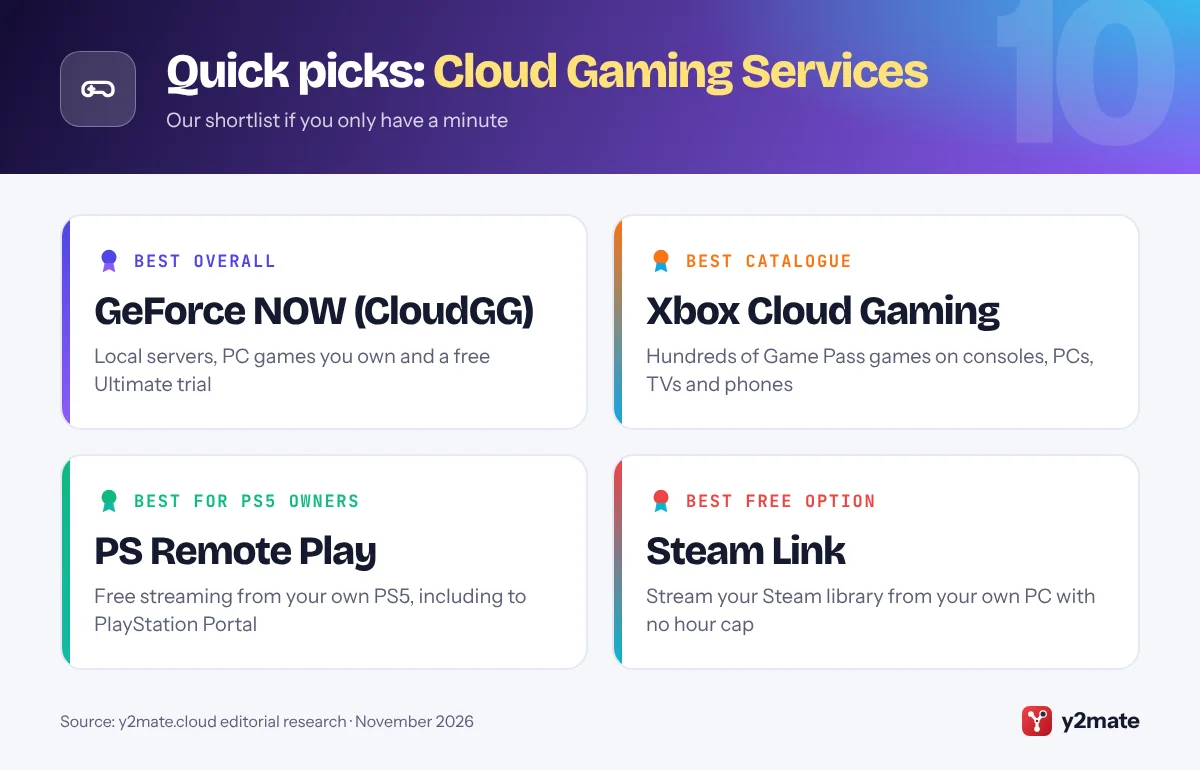
The best cloud gaming services in Australia in 2026 are GeForce NOW, run locally by NVIDIA’s partner CloudGG, for streaming PC games you already own, and Xbox Cloud Gaming for a large catalogue through Game Pass. Antstream Arcade and Netflix games on TV add retro and party games. Because PlayStation Plus cloud streaming, Amazon Luna and Shadow are not offered here, the rest of this list covers remote play tools that stream from a console or PC you own.
First, the jargon. Cloud gaming runs a game on a server in a data centre and streams video of it to your screen, while your inputs travel back. Remote play does the same from hardware you own, such as a PS5 or gaming PC. BYOG, or bring your own games, means streaming games you have bought on stores like Steam rather than using a subscription catalogue. Latency is the delay between pressing a button and seeing the result, and in a country as large as Australia, the distance between you and the server is a big part of it.
This guide ranks ten options for Australian players and covers the local details: where the servers are, what your NBN connection type means, and how the Australian Consumer Law and the coming ban on subscription traps protect you.
How we ranked this list
We ranked each option on publicly documented criteria only: the game library model, supported devices, the maximum stream quality each provider officially lists, whether there is a free tier or trial, and controller support. True cloud services rank above remote play tools, and every option was confirmed as available in Australia in November 2026. We could not confirm an Australian launch for Boosteroid or Blacknut, so neither is included.
We did not run any tests of our own and do not quote prices, which change often. Check each provider’s current game list before you subscribe.
The Top 10 Cloud Gaming Services
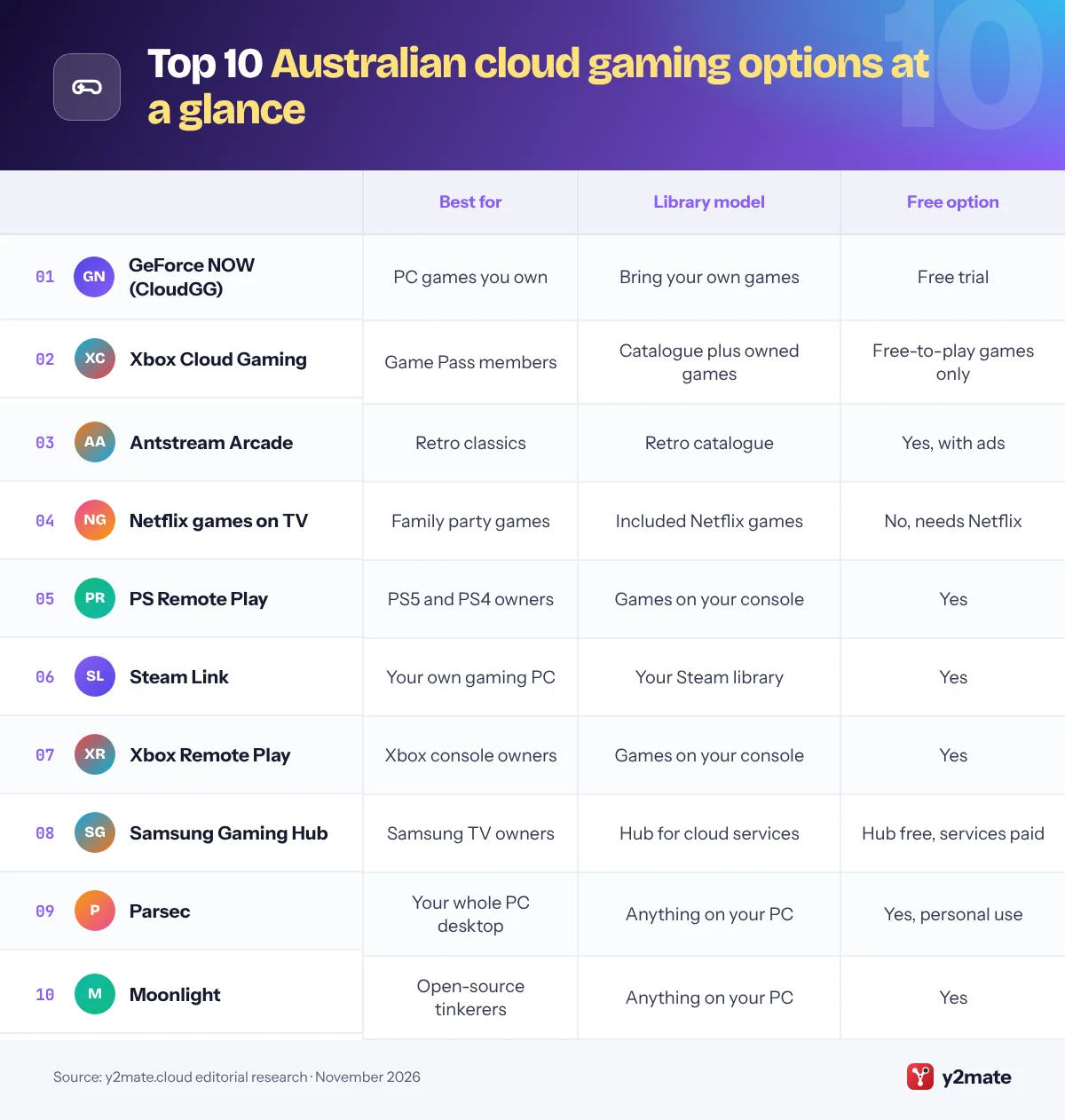
1. GeForce NOW (CloudGG)
Best for: streaming PC games you own from local servers
GeForce NOW reaches Australia through an alliance between NVIDIA and Perth-based internet provider Pentanet, which runs the service as GeForce NOW Powered by CloudGG for Australia and New Zealand. It streams games you already own on stores such as Steam, Epic Games Store and Ubisoft Connect, more than 100 popular free-to-play titles, and select Xbox PC Game Pass games.
CloudGG sells Performance and Ultimate memberships and lists their server location as AU East. Performance streams at up to 1440p and 60 fps, while Ultimate offers up to 4K at 120 fps or 1080p at 240 fps, plus priority queue access and HDR. Both include 100 hours of monthly playtime with up to 10 hours rolling over, and a free Ultimate trial gives three hours of play every 90 days. Paid plans are non-refundable except as required under the Australian Consumer Law, so use the trial to test your connection first.
Apps cover Windows, macOS, Linux, Chromebook, Android, iPhone and iPad, Samsung and LG TVs, Android TV, Steam Deck and other handhelds, with Xbox and PlayStation controllers supported. Players far from the east coast should expect more latency.
Official site: GeForce NOW (CloudGG)
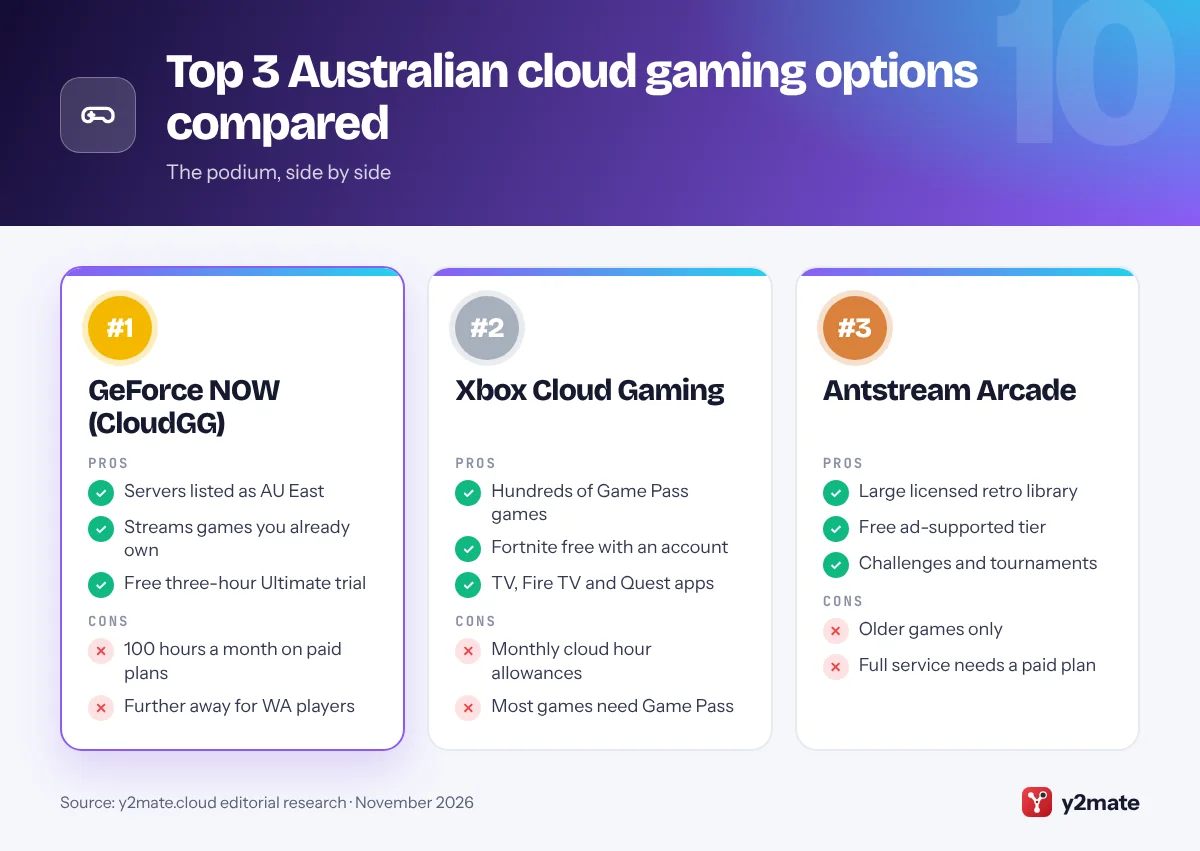
- Local servers listed as AU East
- Streams games you already own
- Free Ultimate trial
- 100 hours a month on paid plans
- Further away for WA players
2. Xbox Cloud Gaming
Best for: Game Pass members who want a large catalogue
Xbox Cloud Gaming has been available in Australia since 2021 and streams hundreds of console games from Microsoft’s Azure data centres in Australia. It is included with all three Game Pass plans, Essential, Premium and Ultimate, with Ultimate offering the biggest catalogue, day-one Xbox releases and the best stream quality, up to 1440p. Free-to-play games such as Fortnite can be streamed with just a free Microsoft account, and you can also stream select games you own.
The rules changed this month. From November 2026, each plan includes a monthly allowance of cloud gaming hours: 15 on Ultimate, 10 on Premium and 5 on Essential, and Microsoft says extra hours can be bought through the Xbox Store. Players without Game Pass will also be able to buy cloud playtime to stream eligible games they own.
You can play on Xbox consoles, Windows PCs, phones and tablets, web browsers, select Samsung, LG and VIDAA smart TVs, Fire TV and Meta Quest headsets, using an Xbox Wireless or DualShock 4 controller, or touch controls in supported games. For Australians without a gaming PC, it is the strongest catalogue-based option.
Official site: Xbox Cloud Gaming
- Hundreds of Game Pass games
- Fortnite free with an account
- TV, Fire TV and Quest apps
- Monthly cloud hour allowances
- Most games need Game Pass
3. Antstream Arcade
Best for: retro classics with a free tier
Antstream Arcade is one of the few dedicated cloud gaming services that operates in Australia, and it focuses entirely on retro games. Its licensed library runs to more than a thousand classic arcade, console and home computer titles, streamed so you need no emulators, ROM files or old hardware, with added challenges, tournaments and leaderboards.
The service launched in Australia in 2021 and runs on Windows PCs, including through the Epic Games Store, on Android phones and tablets, on iPhone and iPad, and on Xbox consoles. A free, ad-supported tier makes it easy to try, and a paid membership removes the ads and unlocks the full service. Controllers are supported, which matters for games built around joysticks and arcade buttons.
The trade-off is obvious: these are older games, and the catalogue depends on licensing deals, so a particular favourite may be missing. But if you want a legal, low-fuss way to revisit arcade hits and 8-bit or 16-bit classics, Antstream is one of the easiest cloud options available locally, and the free tier lets you check how it runs on your connection.
Official site: Antstream Arcade
- Large licensed retro library
- Free ad-supported tier
- Challenges and tournaments
- Older games only
- Full service needs a paid plan
4. Netflix games on TV
Best for: party games for Netflix households
Netflix lists Australia among the countries where it streams games to TVs, so any household with a membership can try cloud gaming without new hardware. Open the Netflix app on a supported TV or streaming device, choose Games at the top of the screen and pick a game. Each player scans a QR code to use their phone or tablet as the controller.
Netflix still describes the feature as a beta. Its TV lineup is built around party and family games such as Pictionary: Game Night and Boggle Party, and some games can also be played in Chrome or Edge on a computer. Netflix says all its games are included with membership, with no ads, extra fees or in-app purchases.
Gamepads are not supported on TV, the catalogue is small, and older TVs may not show the Games option, so check your app first. Mobile games you download are a separate collection. For families who already subscribe, it is a simple, no-commitment way to see how cloud gaming feels on your own NBN connection before paying for a dedicated service.
Official site: Netflix games on TV
- Included with Netflix membership
- Phones act as controllers
- No extra hardware needed
- Gamepads not supported on TV
- Small, party-focused catalogue
5. PS Remote Play
Best for: PS5 owners, as PS Plus has no cloud tier here
Sony does not offer PlayStation Plus cloud streaming in Australia. The top local tier is PlayStation Plus Deluxe, which includes the Game Catalogue, Classics Catalogue and game trials but not PS5 cloud streaming, and Sony’s list of cloud streaming countries does not include Australia. For PlayStation players, remote play is the practical alternative.
PS Remote Play is Sony’s free app for streaming games from your own PS5 or PS4 to a Windows PC, Mac, Android device, iPhone or iPad. The same technology powers PlayStation Portal, which in Australia works as a remote player for your PS5 rather than as a cloud device. Because your console runs the game, you can play almost anything installed on it, and remote play itself needs no subscription.
Your PS5 must be switched on or in rest mode, and the experience depends on your home Wi-Fi and, away from home, on your upload speed. It works best in the same house as the console, for example when someone else wants the TV, and a DualSense controller can be paired with phones, tablets and computers.
Official site: PS Remote Play
- Free with your own PS5 or PS4
- Plays your installed games
- Powers PlayStation Portal
- Needs your console at home
- No PS Plus cloud option locally
6. Steam Link
Best for: free streaming from your own gaming PC
Steam Link is Valve’s free remote play app, which streams games from a Windows, macOS or Linux PC running Steam to another screen. It is not cloud gaming, because your own PC does the work, but that also means no subscription, no monthly hour cap and no data centre on the other side of the country between you and your game when you play at home.
The app is available on iPhone, iPad, Apple TV and Apple Vision Pro, Android phones, tablets and TVs, Amazon Fire TV and Raspberry Pi, and you can also stream to another computer or a Steam Deck. Remote Play Together lets friends join local co-op games online as if they were in the same room.
When you play in the same house, quality depends on your PC and home network rather than your NBN plan, so wire the gaming PC to the router and keep the screen you play on within strong Wi-Fi range. Playing away from home relies on your upload speed, which is lower than download speed on many NBN plans.
Official site: Steam Link
- Free with no subscription
- Plays your whole Steam library
- Apps for TVs and phones
- Needs your own gaming PC
- Remote use limited by upload
7. Xbox Remote Play
Best for: playing your own Xbox console on a phone or PC
Xbox Remote Play streams games from your own Xbox Series X|S or Xbox One console to another device using the Xbox app on Windows PCs, Android phones and tablets, and iPhone and iPad. It is free, and it lets you play games installed on your console, including titles that are not available through Xbox Cloud Gaming.
That makes it a useful partner to the cloud service. At home on the same network as your console, remote play avoids the distance to Microsoft’s data centres and does not use your monthly cloud gaming hours. Away from home, it depends on your home upload speed and on the console being set up to accept remote connections.
You need an Xbox Wireless Controller or another compatible controller paired with your device, and the console must use a power mode that lets it be woken remotely, which you can switch on in its settings. Setup through the Xbox app takes a few minutes, but expect occasional quality drops on busy home Wi-Fi, so a wired connection for the console is worth it if your router is close by.
Official site: Xbox Remote Play
- Free with your own Xbox
- Does not use cloud hours
- Plays your installed games
- Needs your console at home
- Busy Wi-Fi hurts quality
8. Samsung Gaming Hub
Best for: Samsung TV owners who want cloud games together
Samsung Gaming Hub is not a gaming service in its own right but a gateway built into select Samsung smart TVs and monitors. It launched in Australia in 2023 and brings cloud gaming apps together in one menu, including Xbox and GeForce NOW, so you can play without a console by pairing a Bluetooth controller with the TV.
In Australia, GeForce NOW on the hub is provided by Pentanet’s CloudGG service, and Xbox cloud games need a Game Pass plan or one of Xbox’s free-to-play titles. The hub itself needs only a Samsung account, but each gaming service still requires its own membership, and the cloud hour allowances and server locations described above apply as normal.
The appeal is convenience: one menu on the TV, a controller and no extra box. The limitations are that it only works on supported Samsung models and that performance depends on the TV’s network connection, so use Ethernet if your TV has a port. If you own a recent Samsung TV, check the hub before buying a streaming stick or console just for cloud gaming.
Official site: Samsung Gaming Hub
- Xbox and GeForce NOW in one menu
- No console or extra box
- Pair any Bluetooth controller
- Select Samsung models only
- Services still need memberships
9. Parsec
Best for: remote access to your whole PC desktop
Parsec is a free remote desktop app designed for low-latency gaming and creative work. Unlike Steam Link, it streams your entire desktop from a Windows or Mac host, so you can use any launcher, mods or other software. Parsec says its streams reach up to 4K at 60 fps, or higher frame rates at lower resolutions, and controllers connected to your device are passed through to the host PC.
It is free for personal use, with paid Warp and Teams plans for professionals and businesses. Clients are available for Windows, macOS, Linux, Android and other devices, and a popular feature is inviting friends to connect to your PC so you can play local multiplayer games together online, a handy way to keep couch co-op going with friends in other cities.
As with any remote play tool, everything depends on the power of your own PC and, when you are away from home, on your NBN upload speed. Setting it up takes a little more effort than signing up for a cloud service, but for PC owners it is one of the most flexible free options available.
Official site: Parsec
- Free for personal use
- Streams your whole desktop
- Easy online co-op with friends
- Needs your own gaming PC
- More set-up than cloud services
10. Moonlight
Best for: open-source streaming from your own gaming PC
Moonlight is a free, open-source game streaming client that lets you play games from your own PC on almost any screen. It was built around NVIDIA’s GameStream protocol, and since NVIDIA retired GameStream, most people pair it with Sunshine, a free open-source host app that runs on the gaming PC.
The project says Moonlight can stream at up to 4K with HDR and at up to 120 fps on capable devices. Clients are available for Windows, macOS and Linux, iPhone, iPad and Apple TV, Android, Amazon Fire OS, ChromeOS and Raspberry Pi, with homebrew versions for other platforms, and game controllers are supported.
It is the most hands-on option here. You install and configure the host yourself, and streaming over the internet usually needs extra network setup, such as port forwarding or a virtual network tool. There are no accounts or subscriptions involved. If you enjoy tinkering and want full control over your stream settings, Moonlight is a capable free choice; if you would rather avoid setup, Steam Link is simpler.
Official site: Moonlight
- Free and open source
- Clients for many devices
- No account or subscription
- Hands-on host setup
- Internet play needs networking
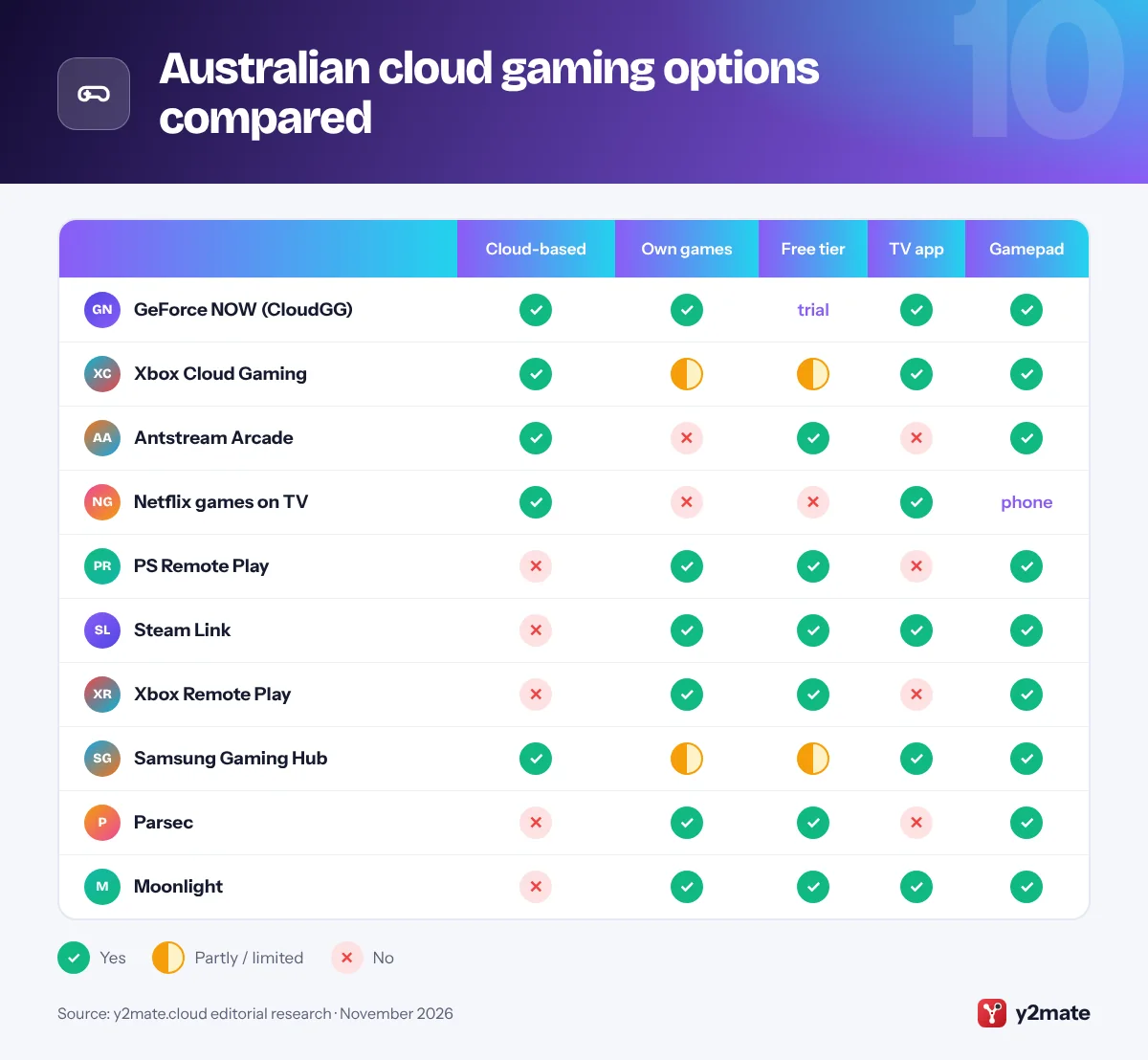
Australian cloud gaming options compared
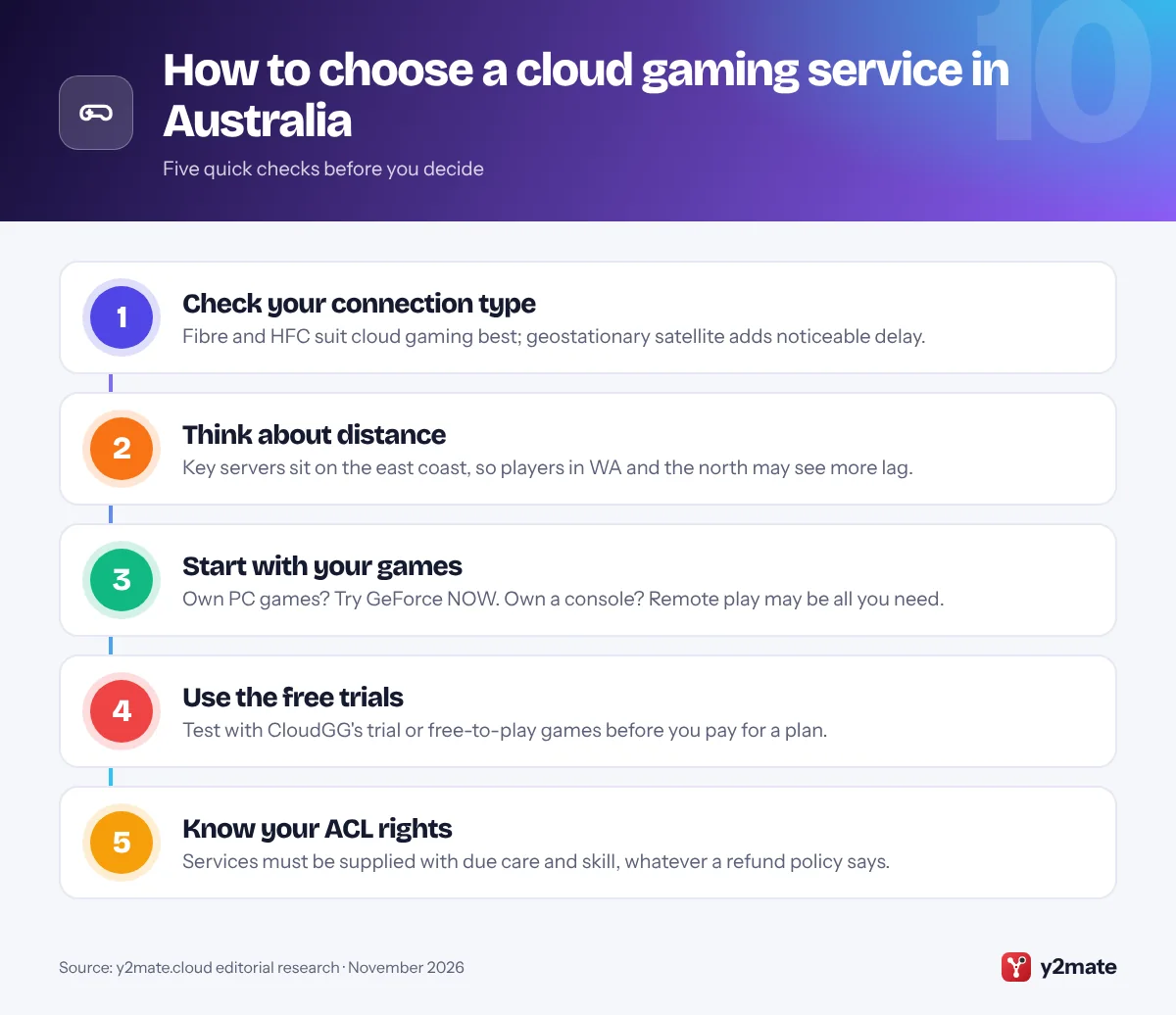
How to choose cloud gaming services in Australia
Australia’s size makes cloud gaming more sensitive to location than in most countries. Start with what you want to play, then check how far you are from the servers and what your NBN connection can deliver.
Distance, NBN and latency
- Server location: CloudGG lists its GeForce NOW servers as AU East, and Microsoft streams Xbox games from Azure data centres in Australia. Players in Perth, Darwin or regional areas far from the eastern capitals should use free trials and free-to-play games to judge the delay before paying.
- Connection type: in September 2025, nbn lifted the speeds of its Home Fast, Superfast and Ultrafast tiers for fibre-to-the-premises and HFC connections, which suits cloud gaming. Fibre-to-the-node lines can be less consistent, and geostationary satellite services add a delay that makes fast-paced games hard to play.
- Home network: a wired Ethernet connection or strong Wi-Fi close to the router often matters as much as your plan speed.
Your consumer rights
Under the Australian Consumer Law, services you buy, including gaming subscriptions, come with consumer guarantees: they must be supplied with due care and skill and be fit for any purpose you made known. A no-refund policy cannot exclude these guarantees. The ACCC has repeatedly warned about subscription traps, and the Competition and Consumer Amendment (Unfair Trading Practices) Bill 2026 passed Parliament on 2 July 2026. From 1 July 2027 the new law bans unfair trading practices and subscription traps, with requirements to disclose key terms before sign-up, notify customers before a free trial ends and remove unreasonable barriers to cancelling.
Frequently asked questions
Is GeForce NOW available in Australia?
Yes. GeForce NOW is offered in Australia and New Zealand by Pentanet under an alliance with NVIDIA, branded GeForce NOW Powered by CloudGG. It streams PC games you own from servers listed as AU East, with Performance and Ultimate plans that each include 100 hours of monthly playtime, and a free Ultimate trial of three hours every 90 days.
Can I use PlayStation Plus cloud streaming in Australia?
No. Sony does not offer PS5 cloud streaming in Australia, and the top local tier, PlayStation Plus Deluxe, includes the Game Catalogue, Classics Catalogue and game trials but not cloud streaming. PS5 owners can still use the free PS Remote Play app or a PlayStation Portal to stream games from their own console at home.
Is Amazon Luna available in Australia?
No. Amazon lists Luna's cloud-streamed games as available in the USA, the UK, Canada and a group of European countries, but not Australia. Prime members in Australia can still claim the monthly downloadable PC games offered through Prime, but they cannot stream Luna games. Xbox Cloud Gaming and GeForce NOW are the main cloud alternatives locally.
What NBN connection do I need for cloud gaming?
A stable, low-latency connection matters more than raw speed. Fibre-to-the-premises and HFC connections generally suit cloud gaming best, a wired Ethernet link or strong Wi-Fi close to the router helps, and geostationary satellite connections add too much delay for fast games. Each service publishes its own minimum requirements, and free trials are the best way to test your line.
What are my rights if a gaming subscription does not work properly?
Under the Australian Consumer Law, services must be supplied with due care and skill and be fit for any purpose you made known, and businesses cannot exclude these guarantees with a no-refund policy. If a service fails, contact the business first and keep records. From 1 July 2027, new laws will also ban unfair trading practices and subscription traps.
Final verdict
For most players, the best cloud gaming services in Australia are GeForce NOW Powered by CloudGG for PC games you already own and Xbox Cloud Gaming for a large Game Pass catalogue, with Antstream Arcade and Netflix as easy extras. With no local PlayStation Plus cloud streaming, Amazon Luna or Shadow, PS Remote Play, Steam Link and the other remote play tools fill the gaps for console and PC owners.
Before you pay, use the free trials to check latency from where you live, connect by Ethernet if you can, and keep track of monthly hour allowances and renewal dates.
Sources and further reading
- ACCC consumer rights and guarantees: The ACCC's overview of the consumer guarantees that apply to products and services, including subscriptions, bought from a business.
- ACCC warning on subscription traps: The ACCC explains how subscription traps work and what consumers should check before signing up for a free trial or recurring plan.
- Unfair trading practices ban: The Treasury minister's announcement that unfair trading practices and subscription traps will be banned from 1 July 2027.
- ACCC on faster nbn tiers: The ACCC's release on the faster high-speed nbn plans available to households with fibre-to-the-premises and HFC connections.

Leave a Reply