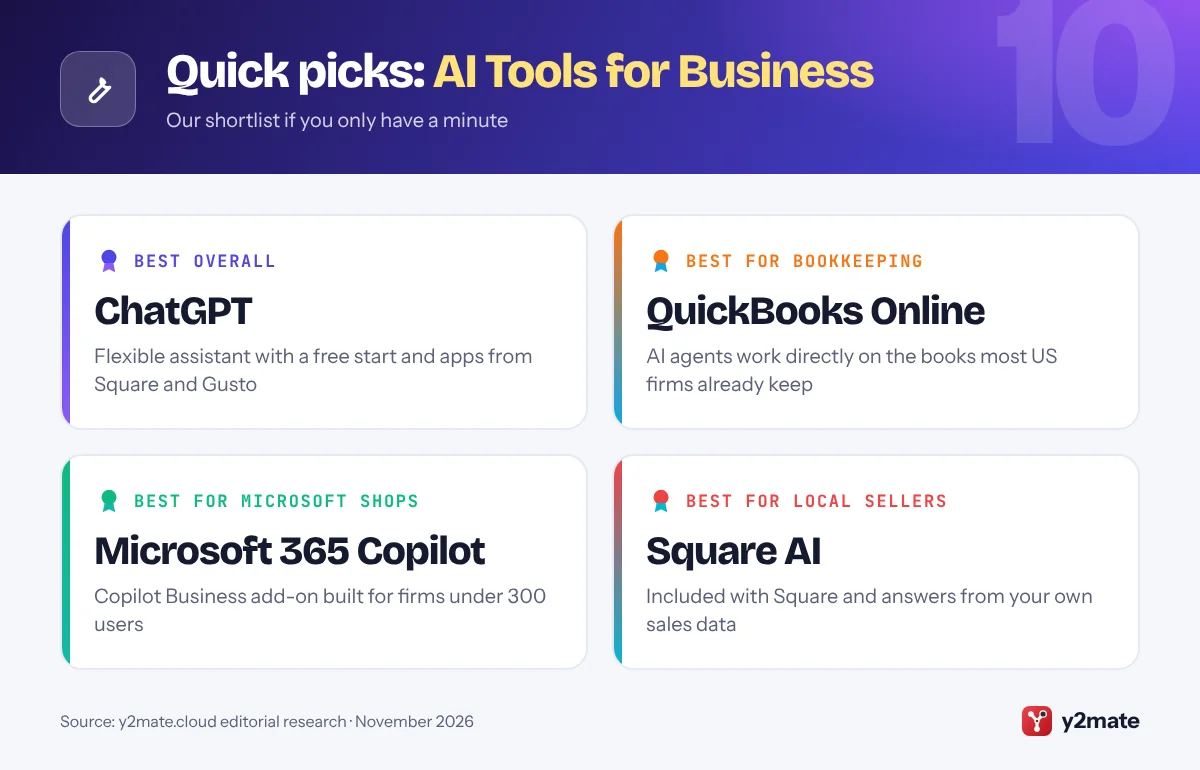
- For most US small businesses, the best first AI tool is a general assistant such as ChatGPT, Microsoft 365 Copilot, Claude or Gemini, matched to the office suite the team already uses.
- The biggest time savings often come from AI built into existing systems, such as Intuit's agents in QuickBooks Online, Square AI and Gusto's assistant Gus, because they already hold your business data.
- Microsoft 365 Copilot Business is an add-on aimed at organizations with fewer than 300 users on a Microsoft 365 Business plan.
- AI-written marketing in the US must still follow FTC rules on truthful advertising and reviews, and customer data remains subject to state privacy laws such as California's.
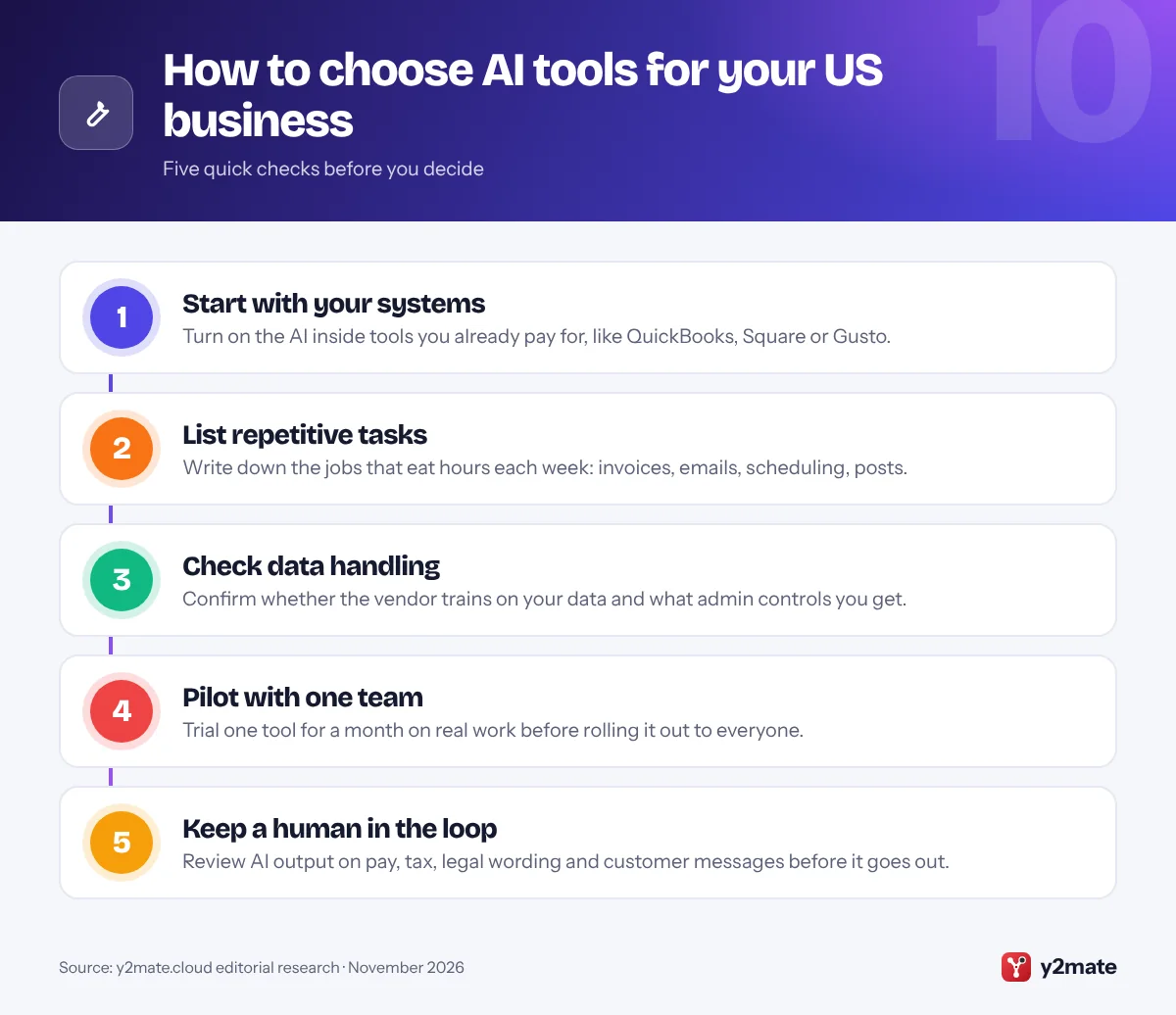
- Keep a person in charge of anything involving payroll, taxes, legal wording or messages to customers, even when an AI agent can do the task itself.
The best AI tools for small businesses in the USA in 2026 fall into two groups: general assistants such as ChatGPT, Microsoft 365 Copilot, Claude and Gemini, and AI features built into the software American owners already run on, such as QuickBooks Online, Square, Gusto, HubSpot, Canva and Zapier. Most small firms get the most value by picking one assistant that matches their office suite, then switching on the AI inside their bookkeeping, payments and payroll tools.
In this list, an AI tool means software that uses generative AI to write, summarize, answer questions or carry out multi-step tasks, often called agents, on your behalf. The market has moved quickly. Intuit now offers a team of AI agents inside QuickBooks, Square has added an AI business agent and ordering through ChatGPT and Claude, and Anthropic launched a dedicated package for small businesses in May 2026.
This guide is written for US owners and managers of businesses with roughly one to a few hundred people, from cafes and contractors to agencies and online shops. It focuses on tools widely available in the US and on integrations with US systems like QuickBooks, Square and Gusto.
How we ranked this list
We did not run lab tests. We compared publicly documented features, official product pages and announcements, and widely reported feedback from small business users. We weighed how useful each tool is for typical US small business work, how well it connects to common US systems such as QuickBooks, Square, Gusto, Google Workspace and Microsoft 365, the admin and data controls on offer, and whether there is a free or included way to start.
General assistants rank highly because almost every business can use them. Tools tied to a specific platform rank lower only because they help fewer businesses; if you already use that platform, they may be the most valuable pick for you.
The Top 10 AI Tools for Business
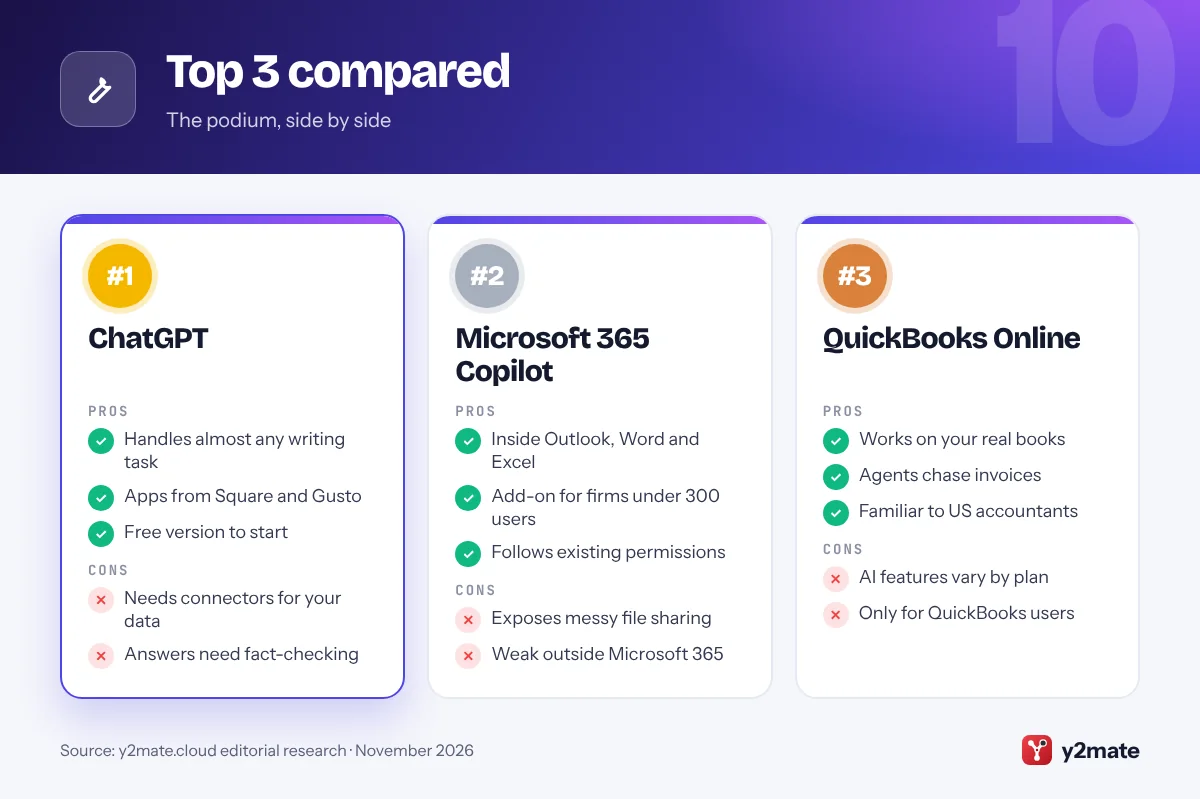
1. ChatGPT
Best for: an all-round assistant for any small team
ChatGPT from OpenAI is the general-purpose AI assistant most US owners try first, and for good reason. It drafts emails, product descriptions, job ads and policies, summarizes long documents, analyzes spreadsheets you upload and answers questions in plain English. The free version is enough to learn what it can do before you commit.
For a team, the paid ChatGPT Business plan, previously called ChatGPT Team, adds a shared workspace, admin controls and central billing. OpenAI says it does not train its models on Business workspace data by default. Connectors let ChatGPT search files in Google Drive or SharePoint, and agent features can carry out multi-step research or web tasks while you review the results. Several US small business platforms, including Square and Gusto, have launched apps that work inside ChatGPT.
The downside is that ChatGPT is a generalist. It does not know your books or your customers unless you connect them, and its answers still need checking, especially on tax, legal or HR questions where rules vary from state to state.
Official site: ChatGPT
- Handles almost any writing task
- Large ecosystem of business apps
- Free version to start
- Needs connectors to see your data
- Answers still need fact-checking
2. Microsoft 365 Copilot
Best for: businesses already on Outlook, Word and Excel
If your business runs on Microsoft 365, Copilot is the most natural AI upgrade. It works inside Outlook, Word, Excel, PowerPoint and Teams, so it can summarize a long email thread, draft a proposal from your notes, turn a Word document into a slide deck or recap a Teams meeting you missed.
Microsoft now sells Microsoft 365 Copilot Business, an add-on aimed at organizations with fewer than 300 users on a Microsoft 365 Business Basic, Standard or Premium plan. Microsoft says it offers the same core functionality as the enterprise license. People with a business account can also use Copilot Chat, a web-grounded chat assistant, at no extra cost. Because Copilot follows your existing Microsoft 365 permissions, people only get answers drawn from files they can already open.
That last point is also a warning. If your SharePoint and OneDrive sharing is messy, Copilot can surface documents people were never meant to find. Tidy up permissions before rolling it out. It is also far less useful if your team mainly lives in Google Workspace or Apple apps.
Official site: Microsoft 365 Copilot
- Works inside familiar Office apps
- Small business add-on under 300 users
- Respects existing permissions
- Exposes messy file permissions
- Limited value outside Microsoft 365
3. QuickBooks Online
Best for: bookkeeping, invoicing and getting paid
For many American small businesses, QuickBooks Online is already the financial system of record, which makes Intuit’s AI features some of the most practical on this list. Intuit Assist, its generative AI assistant, can draft invoices and payment reminders, help match expenses and point out cash flow trends and unusual spending.
Since 2025 Intuit has added a set of AI agents that work inside QuickBooks workflows rather than waiting for a prompt. Intuit describes agents for accounting, payments, customers, finance, payroll and project management, and it announced sales tax and business tax agents in late 2025. In practice that means help categorizing transactions, chasing overdue invoices and spotting problems before month end, with suggested changes presented for you to review.
Because QuickBooks already connects to US bank accounts, payroll and sales tax tools, its AI works with data that is already there, something a standalone chatbot cannot match. The catch is that features vary by plan and some agents are still rolling out, so check what your subscription includes. Your accountant or tax preparer should still review anything tax-related.
Official site: QuickBooks Online
- Works on data already in your books
- Agents for invoices, payments, tax
- Familiar to US accountants
- AI features vary by plan
- Only useful if you use QuickBooks
4. Claude
Best for: careful writing and connected workflows
Claude, made by Anthropic, is known for long, careful answers and strong writing, which suits contracts, policies, customer emails and detailed analysis of spreadsheets or PDFs. In May 2026 Anthropic launched Claude for Small Business, a package of ready-made workflows and connectors that runs in Claude Cowork, its desktop agent.
The connectors are the interesting part for US owners. Claude can link to QuickBooks, PayPal, HubSpot, Canva, DocuSign, Google Workspace and Microsoft 365, so you can ask it to pull a list of overdue invoices, draft polite follow-ups or build a campaign brief from your CRM. Anthropic said the small business package carries no extra charge beyond a Claude plan, and it partnered with PayPal on a free AI fluency course for owners. Square has also released a Claude plugin for its sellers.
On the downside, the deeper agent features need a paid plan and the desktop app, and giving any AI access to financial accounts calls for care. Start with read-only tasks and review anything it proposes to send or change.
Official site: Claude
- Strong at long documents and writing
- Connects to QuickBooks, PayPal, HubSpot
- Free plan to try
- Agent features need a paid plan
- Account access needs careful setup
5. Gemini in Google Workspace
Best for: teams that run on Gmail and Google Docs
Google has folded Gemini into its paid Workspace business plans, so if your company email is on Gmail you may already have AI tools you are not using. Depending on your plan, Gemini can draft and summarize emails in Gmail, write and rewrite in Docs, help build formulas and tables in Sheets and take meeting notes in Google Meet.
The Gemini app gives your team a chat assistant that can draw on files in Drive, and NotebookLM can turn a stack of documents, such as supplier contracts or a staff handbook, into a searchable research notebook with citations back to the source. For US businesses already paying for Workspace, Gemini is one of the simplest ways to roll out AI across a team without buying another product.
The limits depend on your tier. Entry-level plans get a narrower set of features than Business Standard and above, and Google has changed its packaging several times, so check your admin console for what you actually have. Teams that work mainly in Microsoft Office will get more from Copilot.
Official site: Gemini in Google Workspace
- Built into Gmail, Docs and Meet
- Included in paid Workspace plans
- NotebookLM for document research
- Features vary by Workspace tier
- Less useful outside Google apps
6. Square AI
Best for: restaurants, retail and service sellers
Square, owned by Block, is a common point-of-sale system for US cafes, shops, salons and food trucks, and Square AI is built into the Square Dashboard at no extra charge. Sellers can ask questions in plain English, such as which items sold best last weekend or how labor costs compared with sales, and get answers drawn from their own transaction data.
In 2026 Square went further. Managerbot, which Square describes as the next step for Square AI, opened in beta to more sellers in April and is designed to watch the business proactively and surface issues rather than wait for questions. In July Square launched a ChatGPT app and a Claude plugin so eligible sellers can be discovered and take orders through AI chat, with no added marketplace commission according to Square.
The obvious limit is that Square AI only helps if Square is your point of sale. Some features are in beta or limited to certain seller types, so check what appears in your own dashboard before planning around them, and keep an eye on how AI ordering fits your staffing.
Official site: Square AI
- Included with Square
- Answers from your own sales data
- New AI ordering channels
- Only for Square sellers
- Some features still in beta
7. Gusto
Best for: payroll, HR and benefits questions
Gusto is a popular payroll and HR platform for US small businesses, and its AI assistant, Gus, sits inside the product to answer questions about payroll, benefits, time tracking and employee management. Instead of digging through help articles, you can ask how to add a new hire, why a paycheck looks different this period or what a benefits deduction means.
Gus can also take some actions, such as approving time off or changing an employee’s salary, but it asks for the owner’s approval first. Employees can use it to find pay stubs or benefits details. In June 2026 Gusto announced Cofounder, an AI teammate for owners offered through early access, and it also has a Gusto app inside ChatGPT for running payroll from a conversation.
US payroll is tangled up in federal, state and local tax rules, so an assistant inside the system that actually runs and files payroll is more useful than asking a general chatbot. The trade-off is lock-in: Gus only helps if Gusto runs your payroll, and any change to pay or benefits still deserves a careful human check.
Official site: Gusto
- Answers payroll and HR questions fast
- Asks approval before acting
- Also works inside ChatGPT
- Only for Gusto customers
- Newest AI features in early access
8. HubSpot Breeze
Best for: sales, marketing and customer service
Breeze is the AI layer across HubSpot’s customer platform, which many US small businesses use as their CRM. Breeze Assistant can summarize contact records, draft sales emails and blog posts, and help you prepare for calls using the history stored in HubSpot. Some AI features are available with HubSpot’s free tools, which makes it easy to experiment.
Breeze agents go further. The customer agent can answer common support questions on your website or chat, and the prospecting agent can research leads and draft outreach for you to approve. HubSpot has steadily brought these agents to smaller customers, and it uses a credit system for agent actions, so heavier use costs more.
For a small business that wants leads, email marketing and support tickets in one place, the AI benefits from having all that customer history in a single database. The trade-offs are cost and complexity: advanced agents sit on higher tiers, credits need watching, and HubSpot can be more platform than a five-person firm needs. AI-written marketing must still meet FTC rules on truthful advertising and reviews.
Official site: HubSpot Breeze
- AI built on your CRM history
- Free tools include some AI
- Customer and prospecting agents
- Agent actions use credits
- Advanced agents on higher tiers
9. Canva
Best for: social posts, flyers and brand visuals
Canva is one of the easiest ways for a small business without a designer to produce marketing material. Its AI tools, grouped under Magic Studio and the Canva AI assistant, can generate a first draft of a design from a prompt, resize one design for different social platforms, remove backgrounds from product photos and write copy with Magic Write.
For US businesses the value is speed and consistency. Brand Kits keep your logo, fonts and colors in one place, so everyone on the team produces on-brand posts, menus and flyers without starting from scratch. Canva is also part of Claude for Small Business, so a campaign brief written in Claude can become editable Canva designs that use your brand settings.
Canva has a generous free plan, but many AI features and brand controls need a paid plan. AI-generated images can look generic, and you should make sure any image used in an ad does not mislead customers about what you actually sell. For complex illustration or print production, a professional designer is still the better choice.
Official site: Canva
- Very easy for non-designers
- Brand Kit keeps work consistent
- Generous free plan
- Best AI tools need a paid plan
- AI images can look generic
10. Zapier
Best for: connecting apps and automating routine work
Zapier has long been the glue between small business apps, and it now adds AI on top. You can describe an automation in plain English and Zapier’s Copilot helps build it, or set up Zapier Agents that take multi-step actions across thousands of connected apps, such as reading a new web form, drafting a reply and adding the lead to your CRM.
This matters because many US small businesses run on a patchwork of tools: QuickBooks or Square for money, Gmail or Outlook for email, a booking app, a CRM and a few spreadsheets. Zapier lets AI move information between them without custom code. A free plan covers simple automations, which is enough to test a few ideas before paying.
The risk is that automations run without anyone watching. A badly worded instruction can send the wrong email to a customer or create duplicate records. Start with low-stakes tasks, add an approval step wherever money or customer messages are involved, and keep a simple list of what each automation does so someone else can maintain it.
Official site: Zapier
- Connects thousands of apps
- Build automations in plain English
- Free plan for simple tasks
- Mistakes can run unnoticed
- Costs rise with heavy use
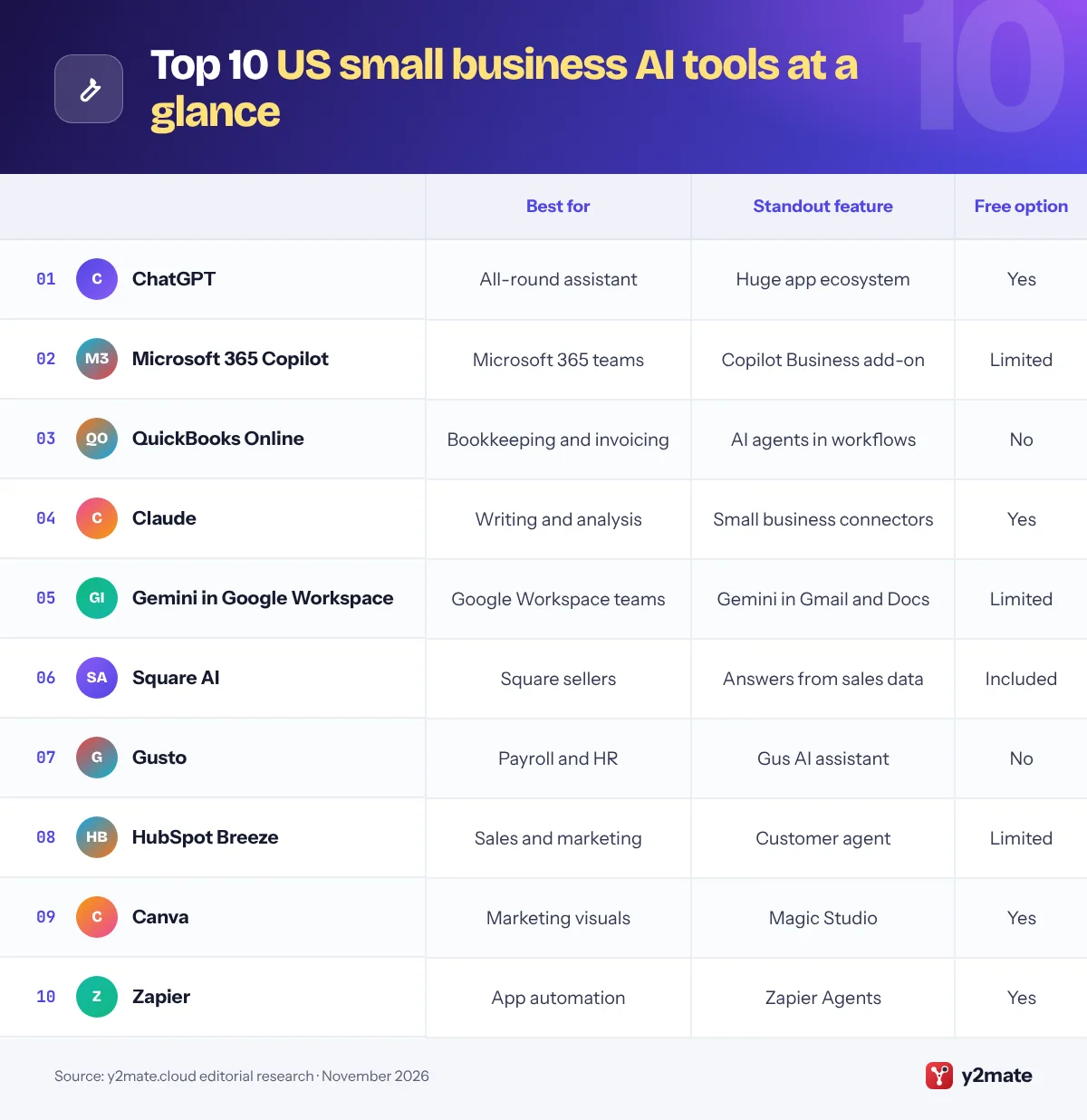
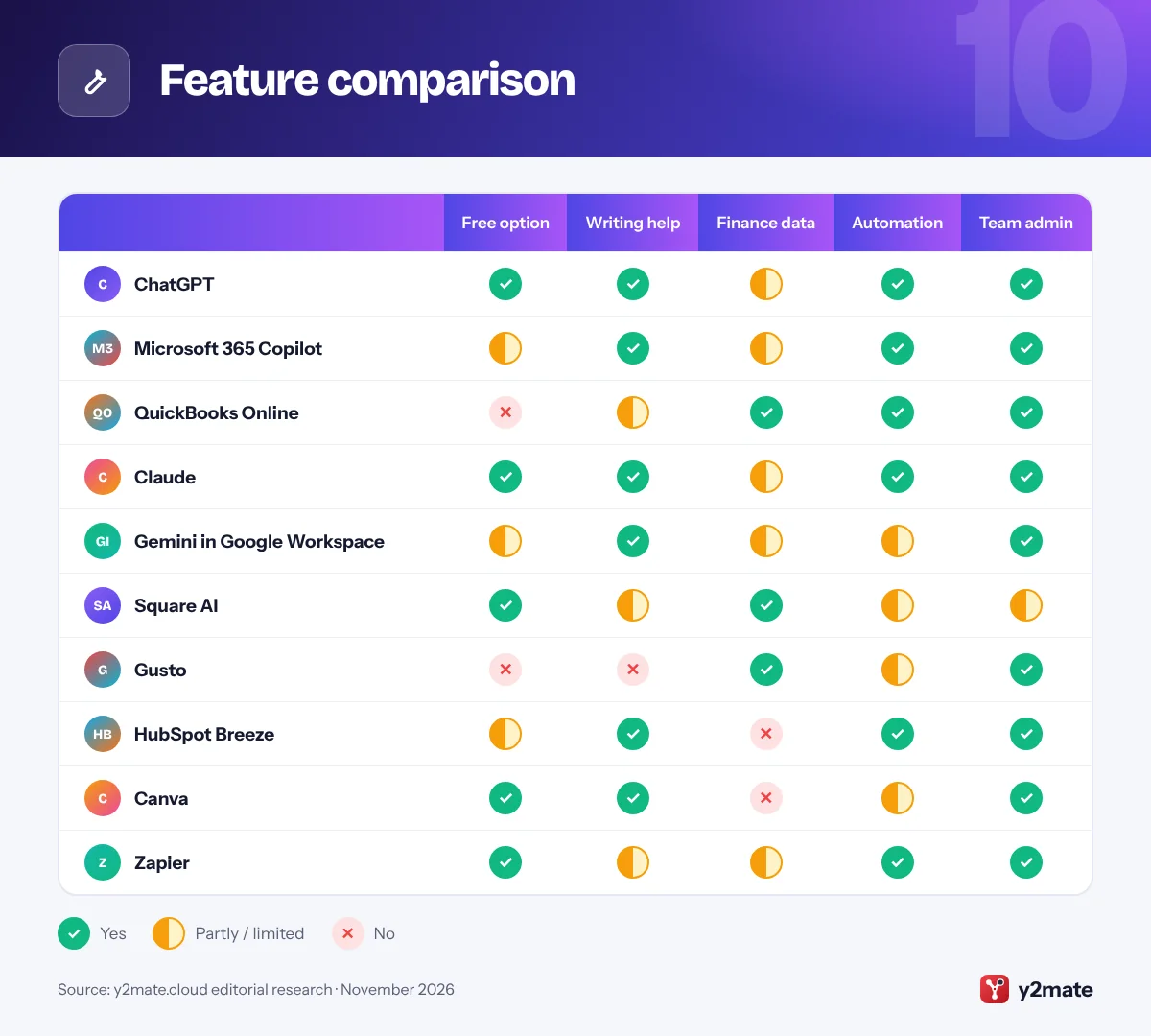
Feature comparison
How to choose AI tools for small businesses in the USA
Start with the software you already pay for. If you use QuickBooks, Square, Gusto or HubSpot, switch on their AI features first, because they already hold your data and need no new integrations. Then add one general assistant that matches your office suite: Copilot for Microsoft 365, Gemini for Google Workspace, or ChatGPT or Claude if you want something independent of both.
Understand the US rules that apply
There is no single federal AI law for small businesses, but existing rules still apply. The FTC treats false or unsupported claims as deceptive whether a person or an AI wrote them, and it has rules against fake reviews. If you handle customer data, state privacy laws such as California’s may apply depending on your size and activity, and a few states, Colorado among them, have passed AI-specific laws. When in doubt, ask a lawyer.
Protect customer and employee data
- Use business plans with admin controls rather than personal accounts.
- Check whether the vendor uses your data to train its models and how to opt out.
- Do not paste Social Security numbers, health details or card data into a chatbot.
- Turn on multi-factor authentication for every AI account.
Watch the costs that creep
Many AI features are priced per user, per credit or per action. Start with a few seats, review usage after a month and cancel tools nobody opens. Finally, write a one-page AI policy covering what staff may use, what data is off-limits and who reviews AI output.
Frequently asked questions
What is the best AI tool for a small business in the USA?
For most US small businesses the best first AI tool is a general assistant that matches your existing software. Choose Microsoft 365 Copilot if you run on Outlook and Excel, Gemini if you use Gmail and Google Docs, or ChatGPT or Claude if you want a flexible assistant. Then switch on AI inside your bookkeeping, payments or payroll system.
Does QuickBooks have AI?
Yes. QuickBooks Online includes Intuit Assist, a generative AI assistant, and a set of Intuit AI agents for accounting, payments, customers, finance, payroll and project management. They can help categorize transactions, draft invoices and reminders, and surface cash flow issues. Features vary by plan and region, so check what your subscription includes and review changes before they are posted.
Is it legal for US businesses to use AI with customer data?
Generally yes, but existing laws still apply. The FTC Act prohibits deceptive or unfair practices, including misleading AI claims, and state privacy laws such as California's govern how some businesses collect and share personal data. Use business plans with data controls, avoid entering sensitive information like Social Security numbers, and get legal advice for higher-risk uses such as hiring decisions.
Can AI run payroll for a small business?
AI can help with payroll but should not run it unsupervised. Payroll platforms like Gusto offer AI assistants that answer questions and can take actions such as approving time off after the owner approves. QuickBooks also offers a payroll agent. Because US payroll involves federal, state and local tax rules, a person should always review pay changes and filings.
Are free AI tools safe for business use?
Free AI tools are fine for low-risk tasks like brainstorming or drafting social posts, but they usually lack admin controls and may use your inputs to improve their models unless you opt out. For anything involving customer, employee or financial data, use a business plan that offers clear data protections, central account management and multi-factor authentication.
Final verdict
For most American small businesses, the smartest path is to start with ChatGPT or the AI that comes with your office suite, Microsoft 365 Copilot or Gemini, and then switch on the AI inside the systems that run your money and people: QuickBooks Online, Square and Gusto. Those built-in tools often save the most time because they already know your numbers.
Add Claude, HubSpot Breeze, Canva or Zapier when you have a clear job for them, such as connected workflows, marketing or automation. Whatever you choose, keep a person responsible for pay, taxes, legal wording and anything that goes out to customers.
Sources and further reading
- FTC guidance on AI: The Federal Trade Commission's hub on artificial intelligence, with business guidance on truthful AI claims and consumer protection.
- FTC privacy and security guidance: Plain-language FTC guidance for businesses on protecting customer data and meeting privacy and security obligations.
- SBA cybersecurity guide: The US Small Business Administration's guide to common cyber threats and practical steps to protect a small business.
- NIST AI Risk Management Framework: NIST's voluntary framework to help organizations identify and manage the risks of using AI systems.

Leave a Reply