
- PlugShare, Chargefox and the Tesla app give Australian EV drivers the widest view of and access to public chargers in 2026.
- Chargefox, owned by the state motoring clubs, roams onto partner networks including bp pulse, NRMA, AGL, EVX and Shell Recharge.
- Some Australian networks, including Ampol's AmpCharge, start sessions only through their own app, so set up accounts before a long trip.
- Queensland's Electric Super Highway is accessed through a Chargefox account, while NSW and Victoria publish official charger maps.
- Amber for EVs times home charging to rooftop solar and low wholesale prices for Amber electricity customers with compatible cars.
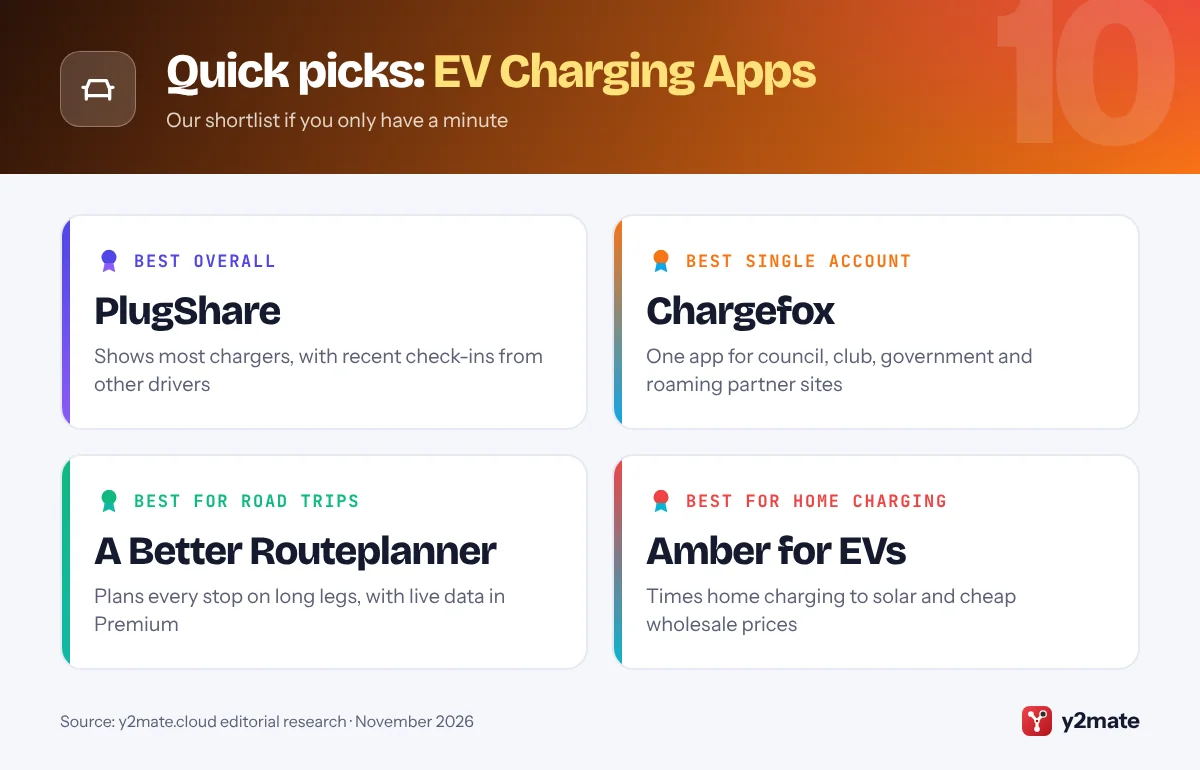
The best EV charging apps Australia-wide in 2026 are PlugShare for seeing almost every charger, Chargefox for one account across many networks, the Tesla app for Supercharger access in other brands, and A Better Routeplanner for planning long country drives. Add network apps such as Evie, My NRMA or Ampol’s app for the chargers you use most, and a solar-aware home charging app if you can charge at home.
Apps matter a lot in Australia. Payment is far from standard: some chargers accept a tap of a bank card, some use RFID cards, and several networks start sessions only through their own app. Distances also raise the stakes, because a single faulty charger in a country town can leave you with a long wait or a detour, so checking recent driver reports before you commit is worth the effort.
This list ranks ten apps by how much they help real drivers, explains which networks each covers and how payment works, and says who can skip it.
How we ranked this list
We ranked these EV charging apps on network coverage in Australia, including regional and highway reach, payment and roaming options, route-planning and live-availability features, and usefulness for common situations such as road trips, apartment living and solar home charging. We based the ranking on official documentation from the app makers, app store listings, federal and state government guidance and widely reported driver feedback.
We did not carry out hands-on testing, and we do not quote prices because they change often and vary by site and membership. Check each app for current pricing before you charge.
The Top 10 EV Charging Apps
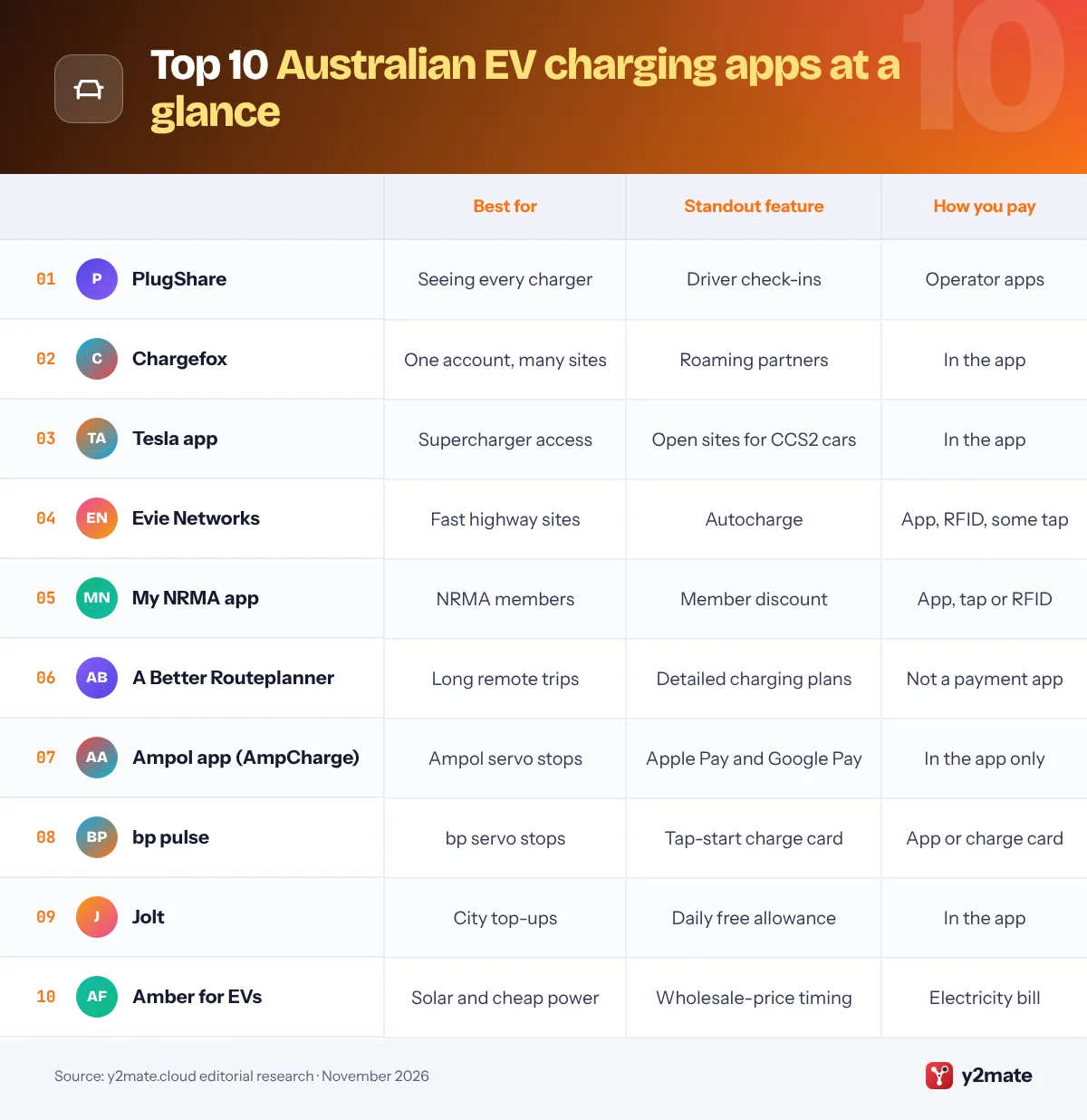
1. PlugShare
Best for: seeing every charger on long country drives
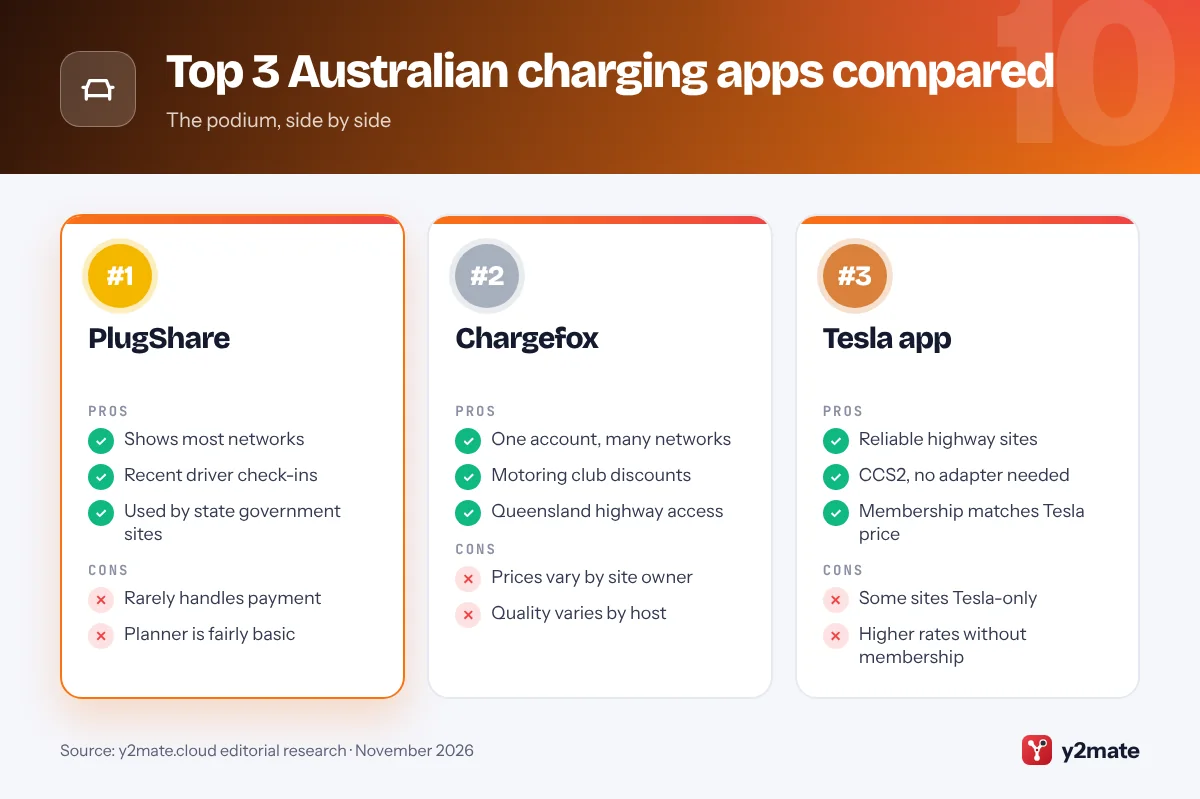
PlugShare is one of the most widely used charger maps among Australian EV drivers, and government sites point people to it too: Victoria’s official charging pages suggest PlugShare for a full view of public chargers. It lists sites from Tesla, Evie, Chargefox, NRMA, Ampol, bp pulse, councils and small destination hosts such as motels and wineries, with plug and power filters.
Its real value on country drives is the community. Drivers check in, report faults, post photos and leave comments, so before relying on a single charger in a small town you can see whether it worked for someone recently. The trip planner finds chargers along a route, though it is simpler than ABRP.
In Australia it is mainly a map and research tool; you usually pay in the operator’s app or at the charger. Who should not bother: city drivers loyal to one network, who may rarely open it. Check-ins are public, so choose a display name you are comfortable with.
Official site: PlugShare
- Shows most networks
- Recent driver check-ins
- Free and easy to use
- Rarely handles payment
- Planner is fairly basic
2. Chargefox
Best for: one account across many networks
Chargefox is the closest thing Australia has to a roaming app. It is owned by the motoring clubs NRMA, RACV, RACQ, RAA, RAC and RACT, and its app combines chargers owned by councils, businesses and government programs with partner networks that joined through roaming deals, including bp pulse, EVX, AGL, NRMA and, since 2026, Shell Recharge. One account can start and pay at a very wide range of sites, from regional fast chargers to hotel destination chargers.
You also need a Chargefox account to use Queensland’s Electric Super Highway, and members of participating motoring clubs can get charging discounts through the app.
Who should not bother: city drivers who stick to one network with its own app. Because sites belong to many owners, prices and reliability vary, and roaming partners can set different prices from their own apps, so check the price shown before plugging in. NRMA members, for example, may only get their discount in the My NRMA app.
Official site: Chargefox
- Very wide single-app access
- Motoring club discounts
- Needed for Queensland highway
- Prices vary by site owner
- Quality varies by host
3. Tesla app
Best for: Supercharger access for non-Tesla EVs
Tesla has opened many of its Australian Supercharger sites to other brands, and the Tesla app is how non-Tesla drivers use them. Create a Tesla account, add a payment method, select Charge Your EV, find an open site, plug in, choose the post number and start charging. Australian EVs use the CCS2 plug, which Tesla’s local Superchargers support, so most cars connect without an adapter.
Superchargers sit on major intercity routes such as the Hume and Pacific highways and in capital cities, and are known for reliability, making the app a valuable backup on long drives. A Supercharging membership lets other EVs charge at the same price as Tesla owners.
Who should not bother: drivers whose regular routes have no open Superchargers. If a site does not appear in the app it may still be Tesla-only, as some busy highway sites are. Sessions time out if you do not plug in soon after selecting a post, so plug in first.
Official site: Tesla app
- Reliable highway sites
- CCS2, so no adapter
- Membership matches Tesla price
- Some sites Tesla-only
- Higher rates without membership
4. Evie Networks
Best for: fast highway and shopping centre sites
Evie Networks runs one of Australia’s largest dedicated fast-charging networks, with sites on highways linking cities and regional towns and at shopping centres and supermarkets. The Evie app shows available locations and charging progress in real time, and it unlocks Evie’s handiest features.
Autocharge lets you save your vehicle in the app so DC sessions start when you plug in, provided a debit or credit card is your default payment method. An Evie Pass RFID card linked to your account starts a charge with a tap, the app accepts Apple Pay and PayPal, and Evie has trialled Tap & Go bank-card payment at selected sites.
Ampol agreed in October 2026 to buy Evie, with completion targeted for the first half of 2027, subject to ACCC clearance, and Evie has said its app, accounts and Autocharge carry on as normal meanwhile. Who should not bother: drivers who never pass Evie sites. Autocharge does not work at AC chargers or with every vehicle.
Official site: Evie Networks
- Autocharge plug-in start
- RFID card backup
- Strong regional coverage
- Tap & Go only at some sites
- Ownership change pending
5. My NRMA app
Best for: NRMA members charging in regional NSW
The NRMA has built an important regional fast-charging network, NRMA Electric, centred on New South Wales and the ACT. Charging features sit inside the My NRMA app: you add a payment card in its EV charging section, plug in and swipe to start.
The app matters most for members, who get a discount when they start and pay through My NRMA, or can link a card for cashback when they tap to pay. Anyone can tap a credit card or phone on the charger’s reader or use an RFID card, and NRMA chargers also appear in the Chargefox app, though member pricing may not apply there.
Who should not bother: non-members who rarely visit regional NSW, since tap-and-go or Chargefox will do. The network charges idle fees after a short grace period once charging stops, so move your car promptly. Payment methods already stored in My NRMA cannot yet be used for charging, so you need to add a card separately.
Official site: My NRMA app
- Member discount in the app
- Tap-and-go also accepted
- Strong regional NSW sites
- Best value for members only
- Idle fees after grace period
6. A Better Routeplanner
Best for: planning big trips with long gaps
Australian road trips can involve long stretches between fast chargers, which is where A Better Routeplanner (ABRP) earns its place. Choose your exact model and destination and it plans each charging stop, how long to stay and the battery level you will arrive with, so you can see in advance whether a leg is too long.
The free version plans routes and finds chargers. ABRP Premium adds live traffic and weather, real-time charger availability in your plan and navigation through Apple CarPlay and Android Auto. Connecting your car provides live battery data for more accurate predictions, and you can set preferred networks.
Who should not bother: city drivers who rarely leave the metro area. ABRP is owned by Rivian but supports every major EV model. On remote routes, treat any plan as a guide and keep a buffer, because one charger out of action can change everything. Connecting your car shares its location and battery data with the app.
Official site: A Better Routeplanner
- Plans every stop for you
- Weather and traffic in Premium
- Supports most EV models
- Live data needs Premium
- Plans still need a buffer
7. Ampol app (AmpCharge)
Best for: charging at Ampol service stations
AmpCharge is Ampol’s public charging network, located at Ampol service stations in cities and on highways, with food and toilets on hand while you charge. To use it you need the main Ampol app: register, enable location, add a payment method, then pick the charger in the app, plug in and tap start. Payment is taken automatically when the session ends, with an emailed invoice.
The app shows nearby AmpCharge sites with charger availability and pricing, and accepts Visa and Mastercard as well as Apple Pay and Google Pay, but not American Express. Ampol’s agreement to buy Evie Networks, announced in October 2026 and subject to ACCC clearance, could make this app more important, though Ampol has not said how the two apps will work together.
Who should not bother: drivers who rarely stop at Ampol sites. Because AmpCharge sessions are started in the app, you need a compatible smartphone with you, so keep your phone charged and a backup network in mind.
Official site: Ampol app (AmpCharge)
- Servo amenities on site
- Apple Pay and Google Pay
- Live availability and pricing
- Phone app required
- No Amex accepted
8. bp pulse
Best for: bp service station stops and fleets
bp pulse is rolling out fast and ultra-fast chargers at bp service stations in cities and on major highways. In Australia, payments run through the bp pulse app, which shows real-time charger availability, live pricing and accepted payment methods, including Visa, Mastercard, Amex, PayPal, Apple Pay and Google Wallet. You start a session by scanning the charger’s QR code or entering the station ID.
If you prefer not to use your phone, a bp pulse charge card linked to your app account starts sessions with a tap; it is not a payment card itself and draws on a saved debit or credit card. bp pulse chargers are also available to Chargefox users through roaming, and bp offers EV charging on BP Plus fuel cards for fleets.
Who should not bother: drivers whose routes rarely pass bp sites, or who already reach them through Chargefox. Coverage is still uneven between states, so check the map first.
Official site: bp pulse
- Servo convenience
- Charge card for tap starts
- Also reachable via Chargefox
- App needed to pay
- Coverage uneven by state
9. Jolt
Best for: city drivers without home charging
Jolt builds DC chargers at kerbside and car park locations in Australia’s major cities, often near shops and cafés. That makes it useful for apartment dwellers and anyone without a driveway who needs a quick top-up during an errand.
Everything runs through the Jolt app, where you register, find a charger, see pricing upfront, start and stop sessions and keep receipts. Jolt offers a daily free energy allowance, with a service fee applying, and charges a per-kWh rate beyond it that varies by location. The optional Jolt Plus subscription lowers rates and, for compatible vehicles, adds AutoCharge, which recognises your car so charging starts as soon as you plug in.
Who should not bother: drivers who charge at home or need highway charging, since Jolt is city-focused and slower than ultra-fast highway hubs. Kerbside bays can have parking time limits, and idle fees apply if you stay plugged in after charging finishes.
Official site: Jolt
- Daily free allowance
- Handy city locations
- AutoCharge with Jolt Plus
- City-focused network
- Parking limits at kerbside
10. Amber for EVs
Best for: charging on solar and cheap wholesale power
Amber is an electricity retailer that passes through real-time wholesale prices, and its Amber for EVs feature automates home charging around them. Tell the Amber app when you need the car ready and how much charge you want, and it charges when your rooftop solar is producing or wholesale prices are low, steering around price spikes and alerting you when they happen.
It talks directly to the Tesla Model 3 and Model Y, post-2021 Model S and Model X, and MG, Audi and XPeng models with built-in connectivity, so many drivers need no smart charger, while some other cars can connect through a supported wall charger. Amber moved these features into its main app after closing its standalone Charge HQ app in September 2026.
Who should not bother: anyone unwilling to switch retailer, since Amber for EVs is for Amber customers, and households outside Amber’s supply areas, which cover parts of NSW, Victoria, South Australia, the ACT and south-east Queensland but not Western Australia. Wholesale pricing suits flexible households best.
Official site: Amber for EVs
- Solar and price-aware charging
- No smart charger for many
- Price spike alerts
- Must be an Amber customer
- Not available in every state
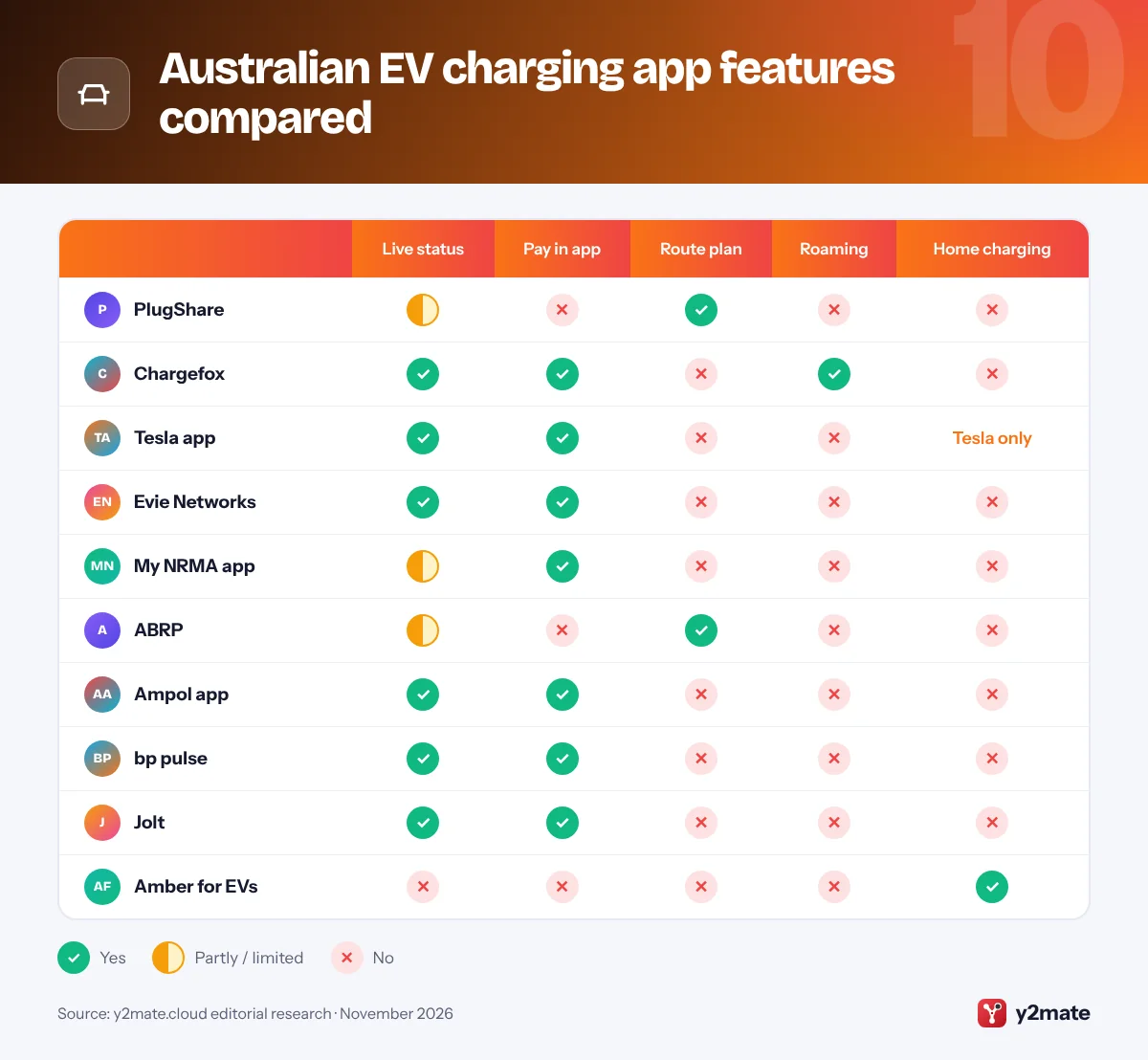
Australian EV charging app features compared
How to choose EV charging apps in Australia
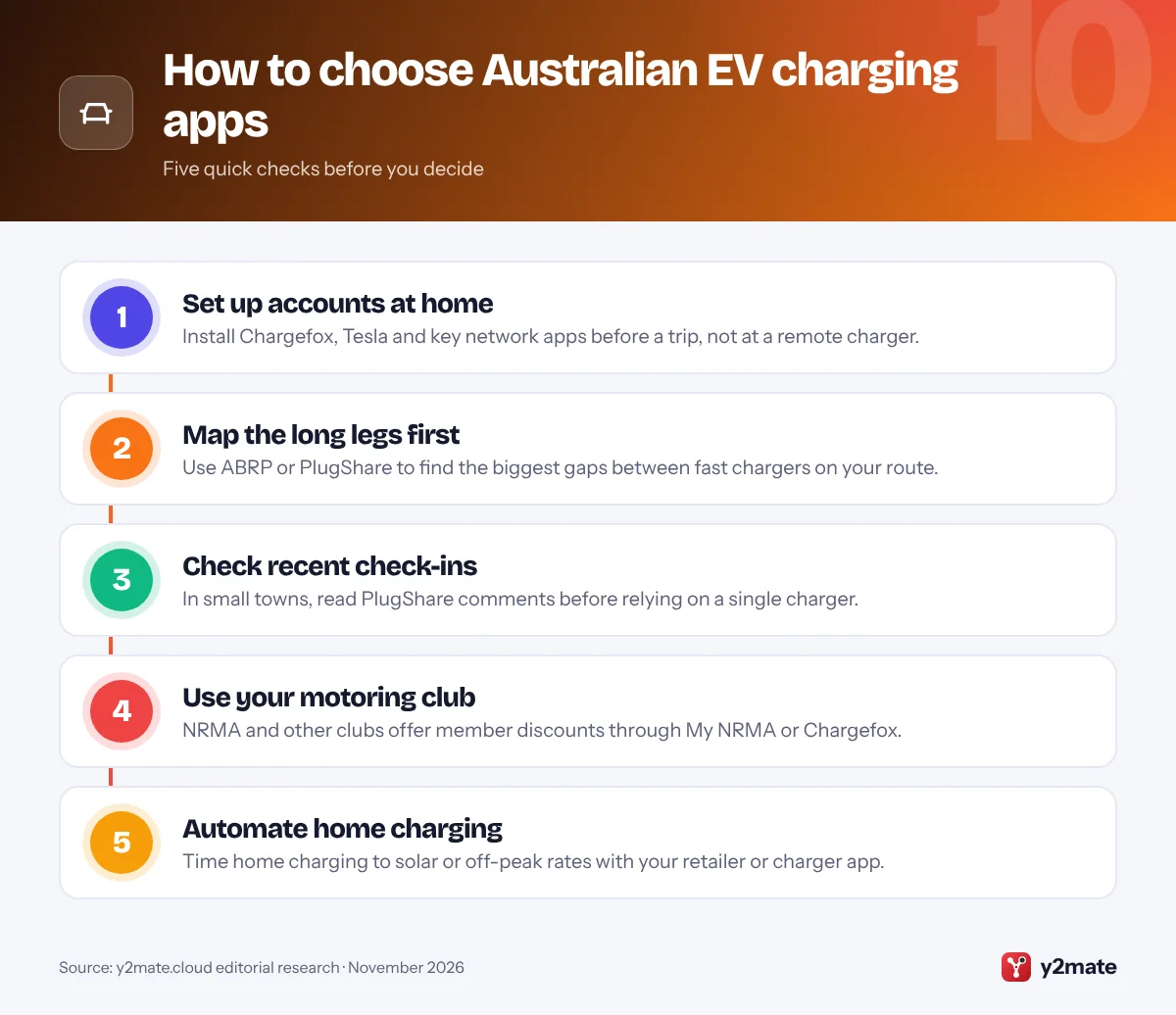
Start with where you charge. If you can charge at home, public apps are mainly for trips, and a solar-aware or off-peak home charging app will do the most for your running costs. If you live in an apartment, focus on the city networks near you, such as Jolt, Evie and shopping centre chargers, and keep Chargefox as a catch-all.
Plan for distance
- Set up before you leave: several networks, including AmpCharge and bp pulse, are app-based, so create accounts and add cards at home.
- Know the gaps: plan long legs in ABRP or PlugShare and note a backup charger for each.
- Arrive with a buffer: do not count on the last charger before a long stretch being free or working.
- Carry a card or two: an RFID card from Evie or bp pulse, or a tap-to-pay option at NRMA sites, helps if your phone has no signal.
Official maps and programs
Transport for NSW publishes an EV charging map, and Victoria maps government-funded chargers while pointing drivers to PlugShare for the full picture. Queensland’s Electric Super Highway is used through a Chargefox account. The federal energy.gov.au site explains public charging and trip planning, and notes that the Australian Government does not endorse specific apps.
Frequently asked questions
What is the best EV charging app in Australia?
There is no single best app. PlugShare is the most useful all-round map because it shows most networks and recent driver check-ins. Chargefox gives the widest access with one account through its roaming partners, and the Tesla app opens many Superchargers to other brands. Most drivers add network apps such as Evie or My NRMA for chargers they use often.
Do I need a different app for every charging network in Australia?
Often, yes, although it is getting easier. Chargefox roams onto partner networks such as bp pulse, NRMA, AGL, EVX and Shell Recharge. Some networks, including AmpCharge, start sessions only through their own app, while NRMA chargers also accept tap-and-go cards. Setting up the main apps before a trip saves stress at remote chargers.
Can non-Tesla EVs use Tesla Superchargers in Australia?
Yes, at many sites. Tesla has opened a large number of its Australian Superchargers to other brands. You use the Tesla app to find open sites, select a post, and start and pay for charging. Australian EVs use the CCS2 plug, so most connect without an adapter. A membership gives Tesla-owner pricing for frequent users.
How do I pay for the Queensland Electric Super Highway?
You need a Chargefox account. The Queensland Government says drivers access the Electric Super Highway's charging stations through the Chargefox app, which shows the current price for each site. Create your account and add a payment method before you set off, because many of the network's regional sites are a long way from alternatives.
Which app is best for charging an EV with rooftop solar?
If you are willing to switch retailer, Amber for EVs times charging to your solar and to low wholesale prices for compatible Tesla, MG, Audi and XPeng models. Other options include the scheduling features in some smart chargers and car apps, combined with an off-peak or solar-friendly electricity plan. Amber does not supply every state, including Western Australia.
Final verdict
For most Australian drivers, the best set of EV charging apps is PlugShare as the main map, Chargefox for broad single-account access, the Tesla app where Superchargers are open to you, and ABRP for long country drives. Add Evie, My NRMA, Ampol or bp pulse depending on the networks along your regular routes, and Jolt if you live in a city without home charging.
Set everything up before you travel, carry a backup card, and check recent check-ins before relying on a single regional charger. At home, a solar-aware app such as Amber for EVs can make the biggest difference to what you spend.
Sources and further reading
- How to charge your EV: The Australian Government's guide to home and public charging, charger types and plugs such as Type 2 and CCS2.
- Planning an EV trip: Federal advice on planning longer electric vehicle trips, including charging stops and using charging apps.
- NSW EV charging map: Transport for NSW's map of public electric vehicle chargers across New South Wales.
- Victorian charging locations: The Victorian Government's map of government-funded EV chargers across the state.
- Queensland's Electric Super Highway: The Queensland Government's page on its fast-charging network, which drivers access through a Chargefox account.

Leave a Reply