
- Australia's Privacy Act 1988 has no general right to object to AI training, so platform settings and objection forms are the main tools.
- Meta now lets Australians object to their public Facebook and Instagram content being used to train its AI; ABC News reported in November 2026 that the form has been available since July 2025.
- The OAIC's guidance says personal information being publicly available does not mean it can lawfully be used to train AI models.
- From 10 December 2026, organisations covered by the Privacy Act must explain in their privacy policies when computer programs make or inform decisions that significantly affect people.
- Opt-outs generally stop future training only; data already used remains in models that have been built.
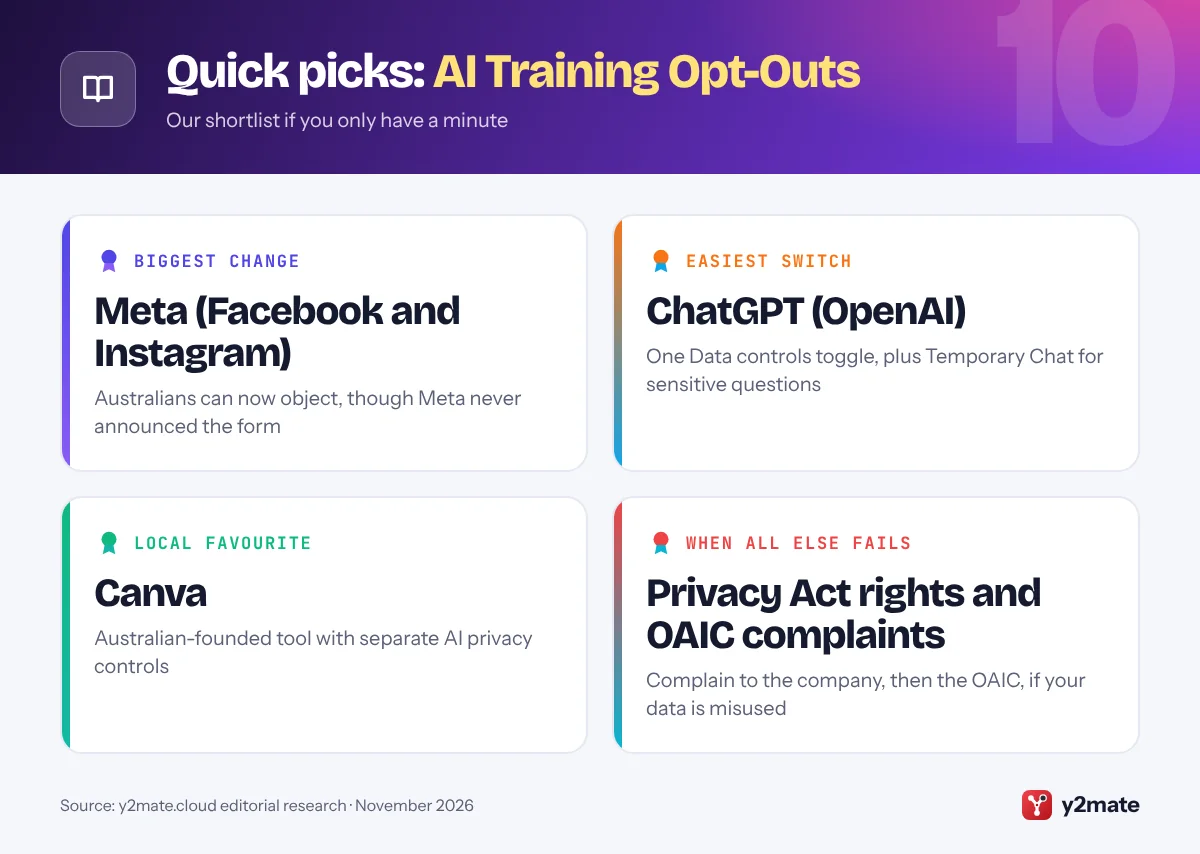
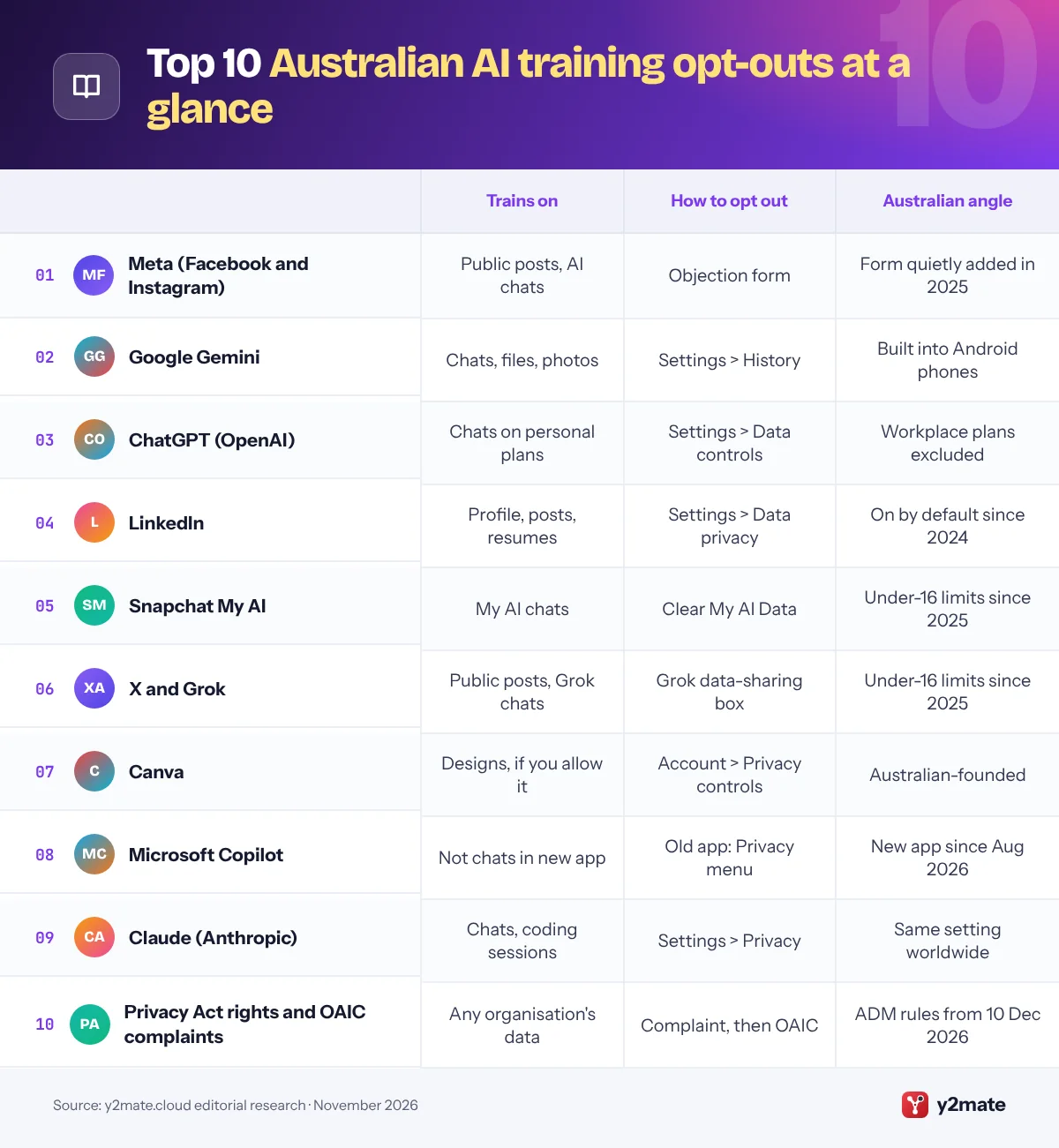
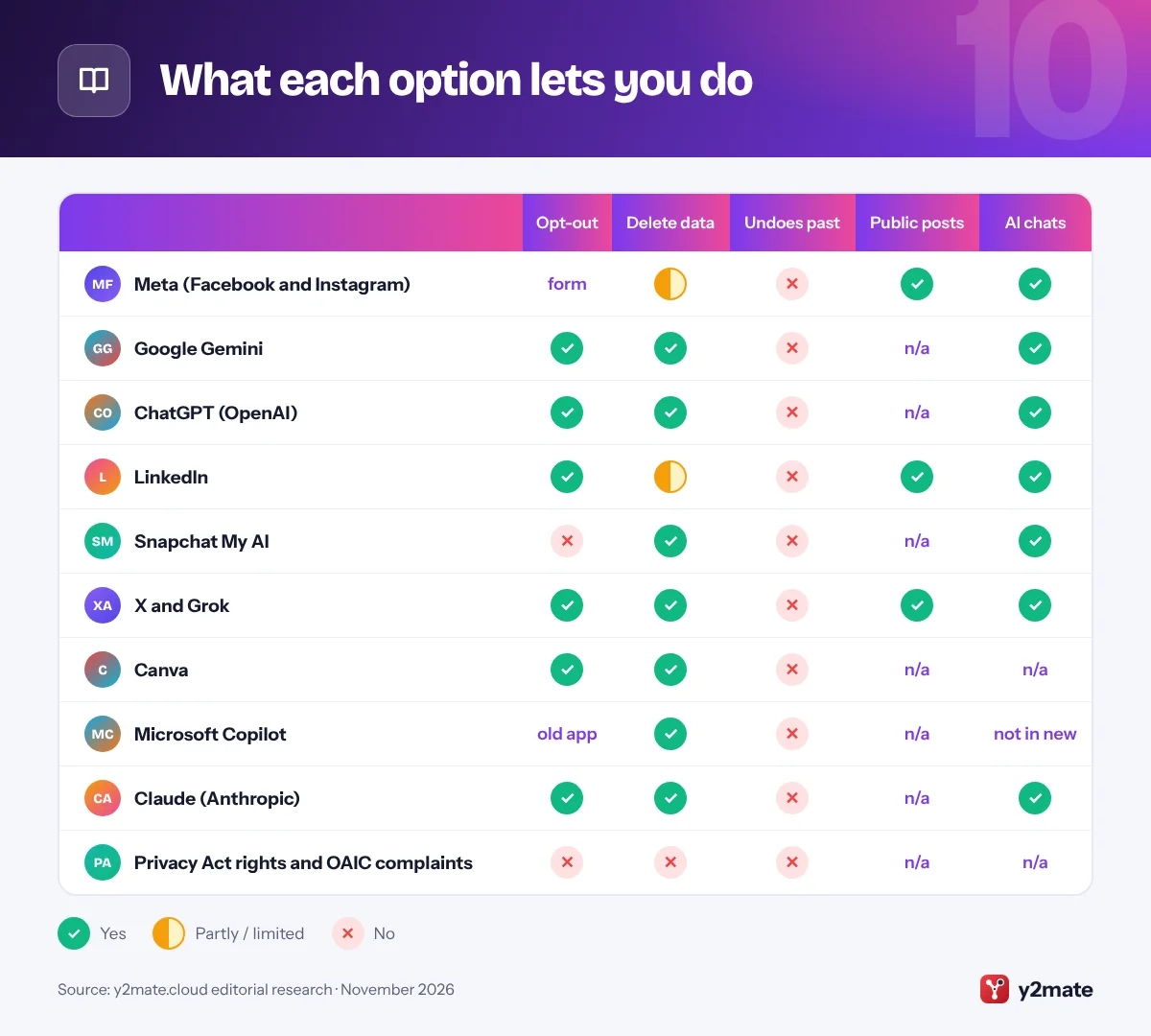
The quickest way to opt out of AI training Australia-wide is to change each platform’s own setting, because the Privacy Act 1988 gives no general right to object. The biggest change is Meta: Australians can now object to their public Facebook and Instagram content being used, through a form ABC News reported in November 2026 has been quietly available since July 2025. ChatGPT, Gemini, Claude, LinkedIn, X and Canva have their own settings, and Snapchat lets you delete My AI data. In most cases, opting out applies only from now on.
A few plain definitions. AI training means using data, such as posts, photos and chatbot conversations, to teach or fine-tune an AI model. An opt-out means the use is switched on unless you turn it off. The OAIC is the Office of the Australian Information Commissioner, the regulator that enforces the Privacy Act.
Below are the ten platforms and routes that matter most for Australians in November 2026. If a menu label looks different, check the app’s privacy or data settings. This is general information, not legal advice.
How we ranked this list
We ranked each item by how many people in Australia use the service, how much personal content it can train on, and how clear its opt-out is. We judged these from official help pages, privacy policies and regulator statements, including the OAIC’s guidance and the Attorney-General’s Department’s reform papers, as of November 2026.
We did no hands-on testing. Where a platform offers only deletion rather than a true opt-out, we say so.
The Top 10 AI Training Opt-Outs
1. Meta (Facebook and Instagram)
Best for: anyone with a public Facebook or Instagram account
Meta trains its AI on information shared on its apps, including public posts, photos and captions, plus your interactions with Meta AI. At a Senate inquiry in September 2024, Meta confirmed it had used Australian adults’ public posts, and Australians were told they could not opt out as EU users could. That has changed: ABC News reported in November 2026 that an objection form has been available to Australians since July 2025, with no public announcement.
To use it, open Meta’s Privacy Centre while logged in and follow the link to object to your information being used for AI at Meta. According to the ABC, Meta then emails you to confirm your public content will be excluded from future training. Private accounts, private messages and accounts of users under 18 are already excluded.
The objection works only from now on, so earlier public posts may already be in Meta’s models. The OAIC told the ABC it has been assessing whether social media platforms may train AI on user data and intends to publish the results of its investigations in the coming months.
Official site: Meta (Facebook and Instagram)
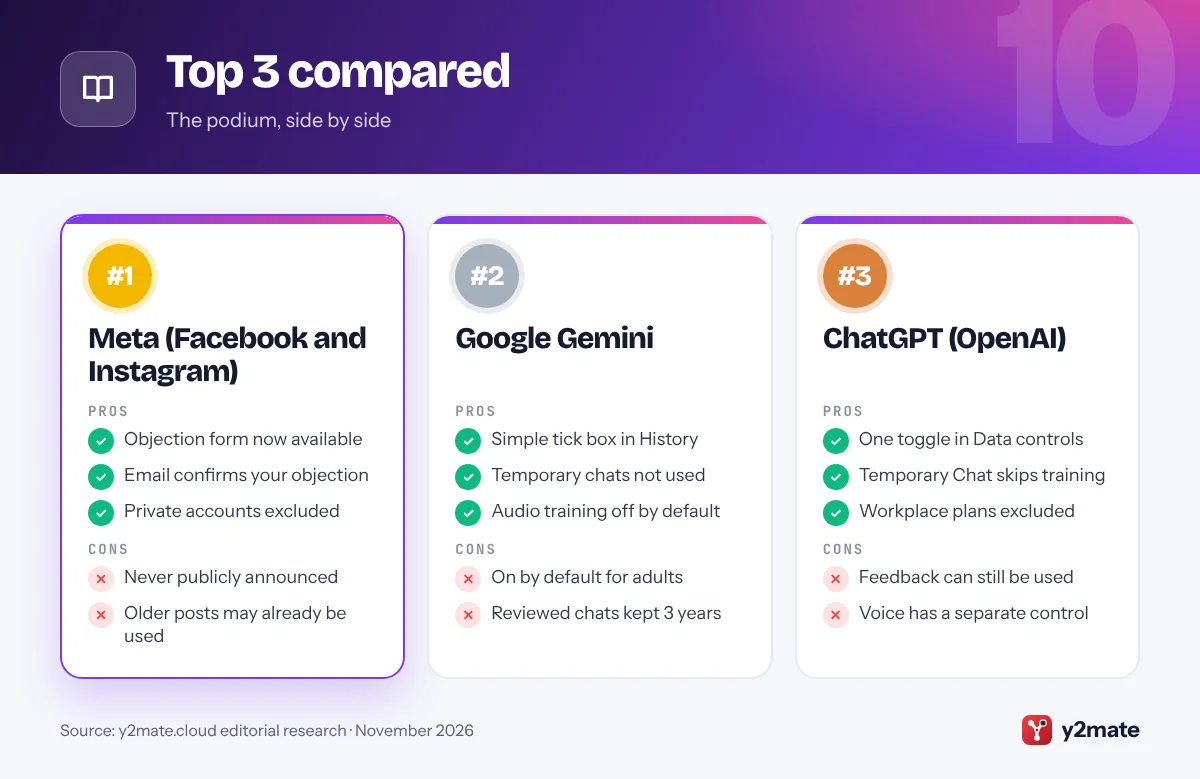
- Objection form now available
- Email confirms your objection
- Private accounts excluded
- Never publicly announced
- Older posts may already be used
2. Google Gemini
Best for: Android users and anyone with a Google account
Gemini sits inside Android phones and Google’s apps, so it is easy to use without noticing the training setting. When the chat content setting is on, Google uses your future Gemini chats, including uploaded files and photos, Gemini’s replies and location information, to train its generative AI models. Google’s privacy hub says it is on by default for users over 18.
To switch it off on the web, open Gemini, go to Settings, then History, untick the chat content (text and uploads) box and select Turn off. Audio and Gemini Live recordings have a separate box that is off by default. Temporary chats are not used for training.
Google keeps chats already chosen for human review for up to three years, even after you delete them or change the setting, and feedback you send can still be used. If you run a business, note that the OAIC’s guidance on commercially available AI products recommends not entering personal information, especially sensitive information, into publicly available AI tools.
Official site: Google Gemini
- Simple tick box in History
- Temporary chats not used
- Audio training off by default
- On by default for adults
- Reviewed chats kept 3 years
3. ChatGPT (OpenAI)
Best for: students and workers on personal ChatGPT plans
On personal ChatGPT Free, Plus and Pro accounts, OpenAI uses your conversations to improve its models unless you turn that off. Open Settings, choose Data controls and switch off Improve the model for everyone. Signed in, the choice applies to your account on the web and in the apps; if you use ChatGPT without signing in, it is saved only in that browser.
For sensitive one-off questions, start a Temporary Chat. OpenAI says these chats are not used to improve its models, do not appear in your history and do not create memories, though they may be kept for up to 30 days for safety purposes.
Two exceptions matter. A thumbs up or thumbs down rating can make the whole conversation available for training, and voice mode has its own data-sharing control. If your employer or university provides ChatGPT Business, Enterprise or Edu, OpenAI says that content is not used for training by default, and your administrator controls the settings.
Official site: ChatGPT (OpenAI)
- One toggle in Data controls
- Temporary Chat skips training
- Workplace plans excluded
- Feedback can still be used
- Voice has a separate control
4. LinkedIn
Best for: job seekers and professionals with full profiles
LinkedIn’s Data for Generative AI Improvement setting decides whether your data trains AI models that create content, including those of affiliates such as Microsoft. Australian members have had this setting switched on by default since 2024, when LinkedIn excluded Europe and the UK but not Australia. LinkedIn’s help pages say training can draw on profile details, posts, articles, comments, group activity, resumes and screening answers saved to your account, and your use of its AI tools.
To turn it off, go to Settings & Privacy, then Data privacy, then Data for Generative AI Improvement. Private messages, including InMail, are not used, and LinkedIn says it excludes members it believes are under 18.
Opting out does not affect training that has already happened. For AI models that do not generate content, such as those used for personalisation or security, LinkedIn has a separate Data Processing Objection Form. Because Australian law has no general right to object, that form is LinkedIn’s own offer rather than a legal requirement here.
Official site: LinkedIn
- Single clear setting
- Private messages excluded
- Extra objection form
- On by default since 2024
- Past training not undone
5. Snapchat My AI
Best for: Snapchat users aged 16 and over
My AI is the chatbot built into Snapchat’s Chat screen. Snap’s help pages say everything you share with My AI is stored until you delete it, and may be used to improve Snap’s products and personalise your experience, including ads. There is no setting to stop that use while you keep using My AI.
The control is deletion: tap your profile, then the gear icon, scroll to Privacy Controls, tap Clear Data and then Clear My AI Data. You can also delete content sent to My AI in a chat within 24 hours. Snap’s help pages do not say that deleting removes anything from models already improved with your data.
Snapchat is one of the platforms that, since 10 December 2025, must take reasonable steps to stop Australians under 16 having accounts under the social media minimum age rules enforced by eSafety. For older teens and adults, the safest habit is not to share personal details, photos of others or your location with My AI.
Official site: Snapchat My AI
- Clear My AI Data in Settings
- Chat deletion within 24 hours
- Under-16 account limits apply
- No training opt-out toggle
- Chats can shape ads
6. X and Grok
Best for: anyone who posts publicly on X
X uses your public posts and your conversations with Grok, the AI assistant made by xAI, to train and fine-tune AI models unless you switch it off. Go to Settings and privacy, then Privacy and safety, then Data sharing and personalization, then Grok & Third-party Collaborators, and untick the box. X’s help pages say that protecting your posts, which makes your account private, also keeps them out of training.
The setting does not delete your past Grok conversations, so clear those separately, and the standalone Grok app and grok.com have their own model-improvement setting. X does not promise to remove posts already used for training, so if your account has been public for years, assume older posts may have been included.
X is also on eSafety’s list of age-restricted platforms, so it must take reasonable steps to keep Australians under 16 off the service. Without a legal right to object in Australia, the setting and a private account are your main tools on X.
Official site: X and Grok
- One box covers posts and Grok
- Private accounts excluded
- Grok history can be deleted
- Setting buried in menus
- Grok app has its own toggle
7. Canva
Best for: students, teachers and small businesses on Canva
Canva, the Australian-founded design platform, has its own AI features and a clear set of privacy controls. Its Trust Centre says Canva won’t use your content, such as the text in your designs and media you upload, to improve AI-powered features unless that is consistent with your privacy settings. A separate control covers general usage and activity data, which Canva says never includes your content.
To check, select your profile icon, choose Your account, then Privacy controls, read each permission and switch off any you are not comfortable with. Canva says content from Business, Teams and Enterprise accounts is not used to improve AI features, and students on Canva Education cannot opt in at all.
Members of the Canva Creators program, who publish templates and other content, are paid if they let Canva use their content to improve AI features, and can opt out in their creator preferences. Canva’s Trust Centre also says it stores user data in the United States, which is worth knowing if you upload client or student material.
Official site: Canva
- Content use tied to your settings
- Business content excluded
- Students cannot opt in
- Two toggles to check
- Data stored in the US
8. Microsoft Copilot
Best for: Windows users who chat with Copilot
Microsoft released an updated Copilot app on 18 August 2026, and its support pages say that in the new app, on the web, desktop and mobile, prompts, responses and file contents are not used to train foundation models. Optional feedback may be used to improve Copilot, but not to train those models.
The older Copilot app follows older rules and has its own training switches under your profile, then Privacy: Training on conversation activity and Training on voice conversations. If you used the older app, Microsoft says you should sign in to the new one by 31 December 2026 to keep eligible chats, because content that has not been moved will be deleted after that date.
In the new app, Settings then Personalization holds separate switches for saved memories, sharing with Bing, Edge and MSN, and ads personalisation. Work and school accounts signed in with Microsoft Entra are covered by separate commercial terms, so check with your employer or school about how they are configured.
Official site: Microsoft Copilot
- New app chats not trained on
- Memory and ads switches
- Work accounts excluded
- Old app follows older rules
- Move old chats by 31 December
9. Claude (Anthropic)
Best for: Claude Free, Pro and Max subscribers
Since Anthropic’s 2025 consumer terms update, people on Claude Free, Pro and Max plans, including when they use Claude Code, choose whether their chats and coding sessions can be used to train its models. You can change your choice at any time in Settings, then Privacy, using the toggle under Help improve our AI models.
The decision also sets how long data is kept: up to five years for new or resumed chats if you allow training, compared with 30 days if you do not. Incognito chats are excluded from training whatever your setting, and chats you delete are not used in future training.
Switching off does not remove data from training runs that have already started or from models already released, and conversations flagged by safety systems may still be used for safety work. Claude for Work and API customers are covered by commercial terms instead. Like the other chatbots here, Claude applies the same consumer setting in Australia as elsewhere.
Official site: Claude (Anthropic)
- Explicit choice, not buried
- Incognito chats excluded
- Deleted chats not reused
- Five-year retention if allowed
- Safety-flagged chats still used
10. Privacy Act rights and OAIC complaints
Best for: when a company ignores your privacy concerns
The Privacy Act 1988 does not give Australians a general right to object to AI training, or a general right to have data erased. It does give you the right to access personal information an organisation holds about you and to ask for it to be corrected, and the Australian Privacy Principles limit how covered organisations collect, use and disclose personal information. Many small businesses are exempt.
The OAIC’s October 2024 guidance for AI developers says that information being publicly available does not mean it can lawfully be used to train AI, and notes that Australian law has no legitimate interests basis. If you think a company has misused your data, complain to it first and allow 30 days, then lodge a written complaint with the OAIC.
More change is coming. From 10 December 2026, privacy policies must explain when computer programs make or inform decisions that significantly affect people. A draft bill released in August 2026 proposes a fair and reasonable test and a right to erasure for large online platforms, but it is not yet law.
Official site: Privacy Act rights and OAIC complaints
- Access and correction rights
- Free OAIC complaints
- New ADM rules from December
- No general right to object
- Complaints can be slow
What each option lets you do
How to opt out of AI training in Australia when the law is still catching up
Australian privacy law is changing, but for now your protection depends mostly on what each company chooses to offer. That makes it worth checking settings yourself rather than waiting for a rule to do it for you.
Why Australia is different
- No right to object: unlike UK and EU law, the Privacy Act has no general right to object, so companies are not obliged to offer an opt-out.
- Public is not a free-for-all: the OAIC says developers should not assume that collecting information posted publicly online complies with the Privacy Act.
- A new route to court: since 10 June 2025, a statutory tort lets people sue over serious invasions of privacy that are intentional or reckless.
- More reform pending: the August 2026 exposure draft would replace parts of the Australian Privacy Principles with a fair and reasonable test.
Practical habits
Set accounts you do not need to be public to private, keep children’s photos and personal details out of public posts and chatbots, and save any confirmation emails from objection forms. Recheck your settings whenever a platform emails you about privacy policy changes, because new AI features are often switched on by default.
Frequently asked questions
Can Australians opt out of Meta using their posts for AI?
Yes. Meta's objection form, reached through the Privacy Centre, is now available to Australians. ABC News reported in November 2026 that it has been available since July 2025, though Meta never announced it. After you submit it, Meta says it emails confirmation that your public content will be left out of future AI training. Earlier posts may already have been used.
Does the Privacy Act let me stop AI training on my data?
Not directly. The Privacy Act 1988 has no general right to object to processing or to have data erased. You can ask an organisation for access to and correction of your personal information, and complain if you think it has broken the Australian Privacy Principles. Most AI training opt-outs in Australia come from company settings, not the law.
What does the OAIC say about training AI on public data?
In its October 2024 guidance for developers, the OAIC said that personal information being publicly available does not mean it can lawfully be used to train generative AI models. It also noted that sensitive information generally needs consent. The OAIC told the ABC in November 2026 that it intends to publish results of its investigations into platforms in the coming months.
Is LinkedIn using Australian members' data to train AI?
It can, unless you switch it off. LinkedIn's Data for Generative AI Improvement setting has been on by default for Australian members since 2024. Turn it off under Settings and Privacy, then Data privacy. Private messages are excluded, and opting out does not affect training that has already taken place.
What changes for privacy and AI on 10 December 2026?
From 10 December 2026, organisations covered by the Privacy Act must explain in their privacy policies when they use computer programs to make or inform decisions that significantly affect people. The obligation came from the Privacy and Other Legislation Amendment Act 2024. It is a transparency rule about automated decisions, not a right to opt out of AI training.
Final verdict
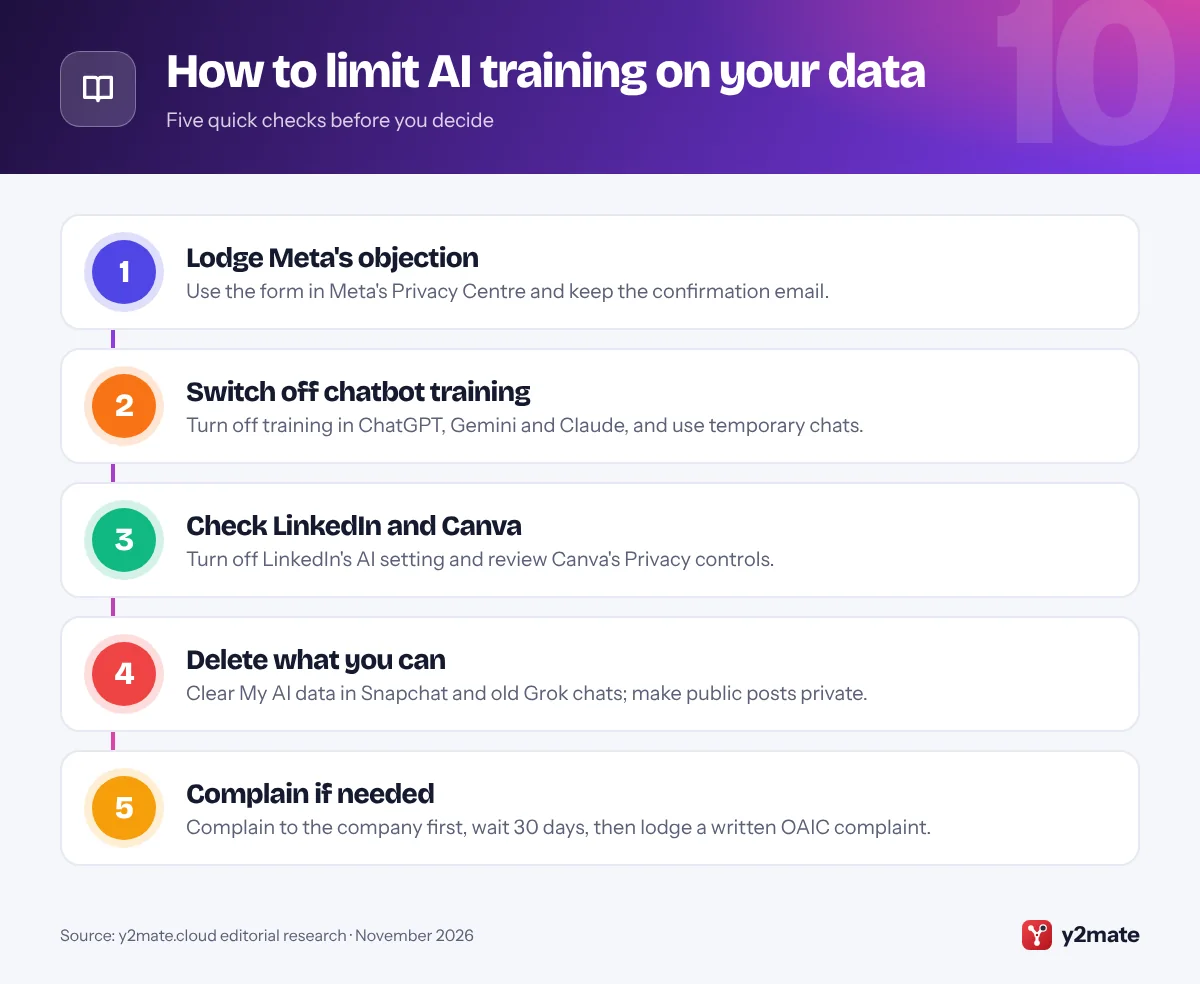
The most effective way to opt out of AI training Australia-wide right now is to start with Meta’s objection form, then switch off training in ChatGPT, Gemini, Claude and LinkedIn, check Canva’s privacy controls and the Grok setting on X, and clear your Snapchat My AI data. Where no setting exists, making content private or deleting it is the only reliable fix.
Opt-outs work from now on, so do them early and keep your confirmation emails. If a company mishandles your data, complain to it first and then to the OAIC.
Sources and further reading
- OAIC guidance on training AI: The OAIC's guidance for developers, which says publicly available personal information cannot automatically be used to train generative AI models.
- OAIC on automated decision transparency: The OAIC's resources on the privacy policy disclosures about automated decisions that apply from 10 December 2026.
- Privacy Act 1988: The current text of the Privacy Act 1988, including the Australian Privacy Principles, on the official Federal Register of Legislation.
- Privacy reform exposure draft: The Attorney-General's Department consultation on the 2026 exposure draft of further Privacy Act reforms, including the proposed fair and reasonable test.
- eSafety social media age rules: eSafety explains the social media minimum age rules in force since 10 December 2025 and which platforms must keep under-16s off.

Leave a Reply