
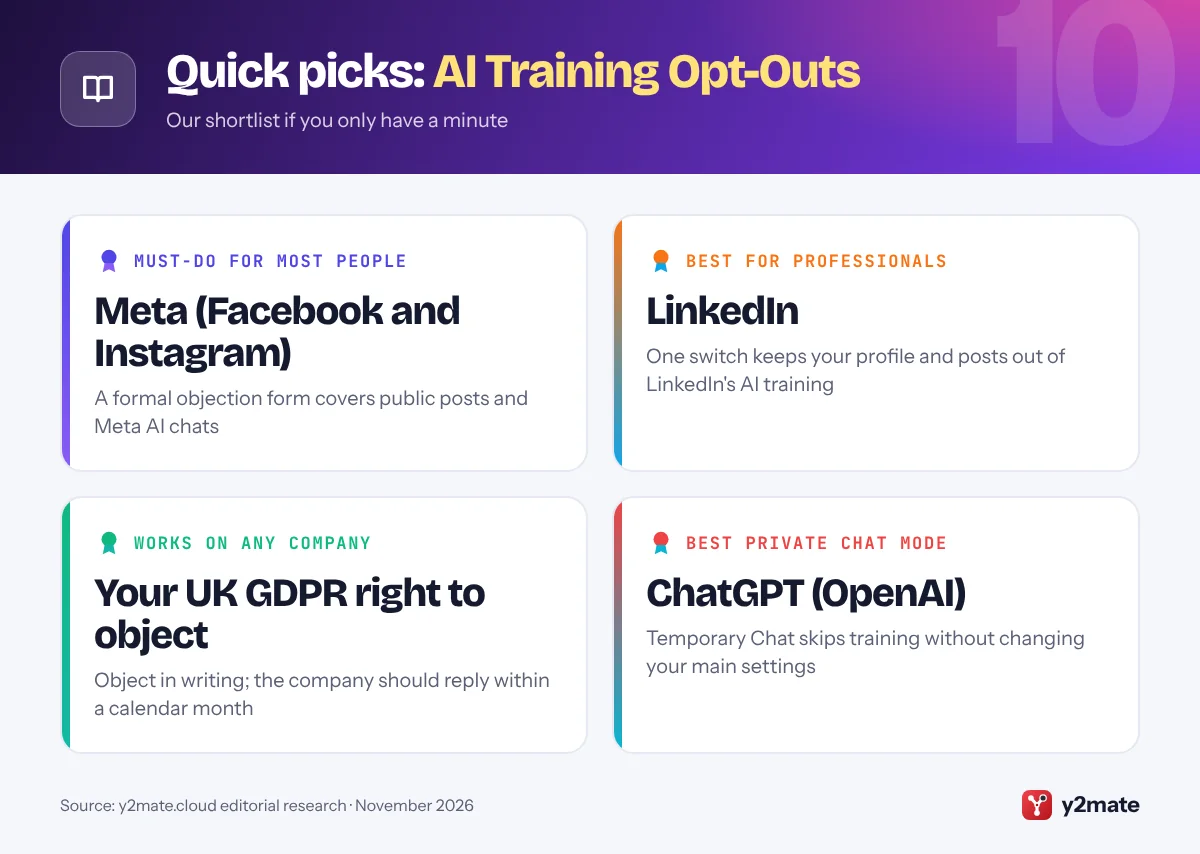
- UK GDPR gives people a right to object when a company uses their personal data on the basis of legitimate interests, including for AI training, and the company must respond within one calendar month.
- Meta lets UK adults object to their public Facebook and Instagram content being used to train its AI through an objection form in its Privacy Centre.
- LinkedIn updated its UK privacy notice on 3 November 2025 to cover generative AI training on members' data; the Data for Generative AI Improvement setting switches it off.
- Since 19 June 2026, every UK organisation must have a way to handle data protection complaints and must acknowledge a complaint within 30 days.
- Opt-outs and objections generally apply to future training only and do not remove data from models already built.
The simplest way to opt out of AI training UK users have is each platform’s own setting, backed by a legal right: under UK GDPR you can object when a company uses your personal data for AI training on the basis of its ‘legitimate interests’. Meta gives UK adults an objection form for Facebook and Instagram, LinkedIn has a switch it introduced before training on UK members’ data, and ChatGPT, Gemini, Claude, X and Pinterest have their own controls. Objections and opt-outs generally apply from now on and do not remove data from models already trained.
A few plain definitions. AI training means using data, such as posts, photos and chatbot conversations, to teach or fine-tune an AI model. Legitimate interests is one of the lawful bases a company can use to process your data without asking for consent, provided it balances its interests against yours. The right to object lets you ask it to stop.
Below are the ten platforms and routes that matter most for people in the UK in November 2026, with the setting or form to use and its limits. If a menu label looks different, check the app’s privacy or data settings. This is general information, not legal advice.
How we ranked this list
We ranked each item by how many people in the UK use the service, how much personal content it can train on, and how clear the route to opt out or object is. We judged these from official help pages, privacy policies and regulator statements, especially those of the Information Commissioner’s Office (ICO), as of November 2026.
We did no hands-on testing. Your UK GDPR right to object has its own entry because it works with any organisation, including those without a setting.
The Top 10 AI Training Opt-Outs
1. Meta (Facebook and Instagram)
Best for: anyone with a public Instagram or Facebook account
Meta uses public content shared by adults on Facebook and Instagram in the UK, such as public posts, comments, photos and captions, to train the generative AI behind its AI at Meta features. It paused the plan in June 2024 at the ICO’s request, made objecting simpler, and began notifying UK users in September 2024. Meta says it does not use private messages with friends and family, or information from the accounts of people in the UK under 18.
UK adults can object using Meta’s objection form, reached from the Privacy Centre: look for the AI at Meta section and the link to object. Meta’s help pages say an objection can cover your interactions with Meta AI as well as your public content, and applies to the accounts in your Accounts Centre. Meta said it would honour objections already received.
Know the limits. The ICO said it had not given regulatory approval and that Meta must demonstrate ongoing compliance. Objections apply to future training, and information about you that other people share may still be used.
Official site: Meta (Facebook and Instagram)
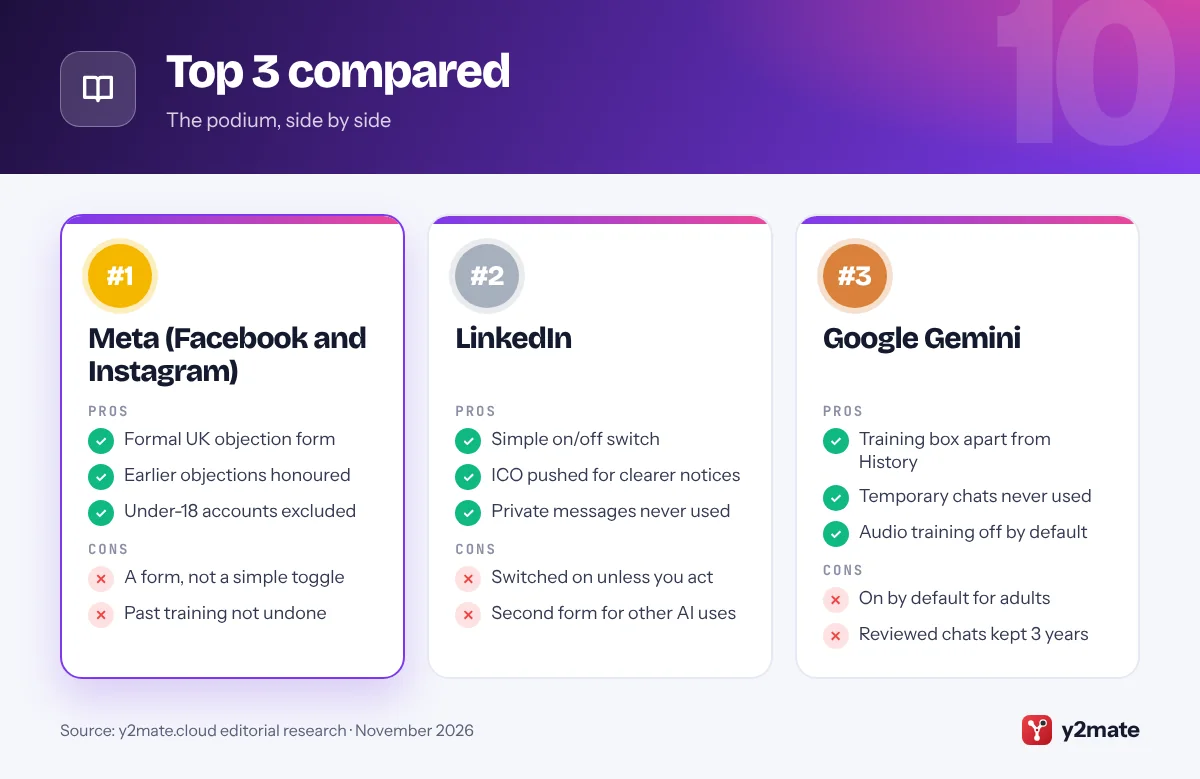
- Formal UK objection form
- Earlier objections honoured
- Under-18 accounts excluded
- A form, not a simple toggle
- Past training not undone
2. LinkedIn
Best for: professionals with a detailed public profile
LinkedIn suspended AI training on UK members’ data in September 2024 after the ICO raised concerns. In September 2025 the ICO said LinkedIn had improved its transparency material, made it simpler to object through opt-out settings and given a longer window to do so, and was resuming its plans. LinkedIn’s help pages say it updated its privacy notice for the UK on 3 November 2025 to cover generative AI training.
The switch is called Data for Generative AI Improvement. Go to Settings & Privacy, then Data privacy, and turn it off. It covers profile details, posts, articles, comments, group activity, CVs and screening answers saved to your account, and your use of LinkedIn’s AI tools. Private messages are excluded, as are members LinkedIn believes are under 18.
Opting out does not affect training already carried out. For AI models that do not generate content, such as those used for personalisation or security, use LinkedIn’s separate Data Processing Objection Form, which is also the route to object to your feedback being used.
Official site: LinkedIn
- Simple on/off switch
- ICO pushed for clearer notices
- Private messages never used
- Switched on unless you act
- Second form for other AI uses
3. Google Gemini
Best for: Android and Gmail users who chat with Gemini
Google uses your Gemini app conversations to train its generative AI models when the chat content setting is on, and Google’s privacy hub says that is the default for users over 18. It covers what you type and say, files and photos you share, Gemini’s replies, location information and data from apps you connect.
On the web, open Gemini, choose Settings, then History, untick the box for chat content (text and uploads) and select Turn off. Audio and Gemini Live recordings have a separate box, which is off by default. Temporary chats are never used for training, and Google says that with History switched off, your future chats are not used to train its models unless you send feedback.
Google was one of ten foundation model developers that the ICO said in October 2026 had made, or committed to make, data protection changes after its scrutiny, including stronger ways for people to exercise their rights. One catch remains: chats already selected for human review are kept for up to three years, even after you delete them.
Official site: Google Gemini
- Training box apart from History
- Temporary chats never used
- Audio training off by default
- On by default for adults
- Reviewed chats kept 3 years
4. Your UK GDPR right to object
Best for: companies with no opt-out setting
Companies that train AI on UK users’ data commonly rely on legitimate interests as their lawful basis. Article 21 of UK GDPR gives you the right to object to that processing, whether or not the company offers a button. The ICO’s public guidance, updated in July 2026 for the Data (Use and Access) Act 2025, says to contact the organisation, state exactly which use you object to and explain why. There are no special words, and the ICO provides a template letter.
The organisation should respond within one calendar month. It can keep processing only if it shows compelling legitimate grounds that override your interests, or needs the data for legal claims, so give specific reasons. If you want data deleted rather than just not used, make an erasure request instead.
If you are unhappy with the answer, complain to the organisation first. Since 19 June 2026, every organisation must offer a way to make data protection complaints and acknowledge yours within 30 days. After that, you can complain to the ICO.
Official site: Your UK GDPR right to object
- Works with any company
- Free, with no special wording
- One-month response deadline
- Company can refuse with reasons
- Does not undo past training
5. ChatGPT (OpenAI)
Best for: everyday ChatGPT users on Free, Plus or Pro
On personal ChatGPT Free, Plus and Pro accounts, OpenAI uses your conversations to improve its models unless you switch that off. The control is in Settings, then Data controls: turn off Improve the model for everyone. Signed in, the choice follows your account across the web and mobile apps; signed out, it is stored in that browser only.
Temporary Chat is the private option. OpenAI says these chats do not appear in your history, do not create memories and are not used to improve its models, though they may be kept for up to 30 days for safety. OpenAI’s Privacy Portal is another route for privacy requests, including objections.
Watch the exceptions. Rating a reply with a thumbs up or down can make that whole conversation available for training, and voice mode has its own data-sharing control. ChatGPT Business, Enterprise and Edu workspaces are not used for training by default. OpenAI is also one of the ten developers named in the ICO’s October 2026 report on foundation models.
Official site: ChatGPT (OpenAI)
- One clear Data controls toggle
- Temporary Chat for one-offs
- Privacy Portal for requests
- Feedback can still be used
- Voice needs its own setting
6. X and Grok
Best for: anyone who posts publicly on X
X uses public posts and your conversations with Grok, the assistant made by xAI, to train and fine-tune AI models unless you turn it off. Go to Settings and privacy, then Privacy and safety, then Data sharing and personalization, then Grok & Third-party Collaborators, and untick the box. X’s help pages say that protecting your posts, which makes your account private, also keeps them out of this training.
Grok has drawn close attention from UK regulators. On 3 February 2026 the ICO opened formal investigations into X and xAI over Grok’s processing of personal data and its potential to produce harmful sexualised images and video. The ICO has said it paused its wider foundation model engagement with xAI while that investigation continues.
Practical limits: the setting stops future use but does not delete your past Grok conversations, which you clear separately. The standalone Grok app and grok.com also have their own model-improvement setting. X does not promise to remove posts already used for training.
Official site: X and Grok
- One box covers posts and Grok
- Private accounts excluded
- Grok history can be deleted
- Setting buried in menus
- ICO investigation ongoing
7. Snapchat My AI
Best for: Snapchat users and parents of teenage users
My AI is the chatbot built into Snapchat’s Chat screen. Snap’s help pages say everything you share with My AI is stored until you delete it, and may be used by Snap to improve its products and personalise your experience, including ads. There is no switch to stop that use while you keep chatting with it.
Your control is deletion. Tap your profile, then the gear icon, scroll to Privacy Controls, tap Clear Data and then Clear My AI Data. Content you send to My AI in a chat can also be deleted within 24 hours. Snap’s help pages do not say that deletion removes anything from models already improved with your data.
The ICO has looked closely at My AI. It issued a preliminary enforcement notice in October 2023 over Snap’s risk assessment, then concluded in May 2024 that Snap’s revised assessment complied with UK GDPR, and said it would keep monitoring. For teenagers, the simplest advice is not to share personal details with My AI at all.
Official site: Snapchat My AI
- Clear My AI Data in Settings
- ICO reviewed its risk checks
- Chat deletion within 24 hours
- No training opt-out toggle
- Chats can shape ads
8. Microsoft Copilot
Best for: Windows users who chat with Copilot
Microsoft’s updated Copilot app, available since 18 August 2026 on the web, desktop and mobile, comes with a clear statement on its support pages: prompts, responses and file contents are not used to train foundation models. Optional feedback may be used to improve Copilot, but not to train those models.
The older Copilot app works differently and had its own training switches under your profile, then Privacy: Training on conversation activity and Training on voice conversations. Microsoft asks people who used the older app to sign in to the new one by 31 December 2026 to keep eligible chats, as content not moved will then be deleted.
In the new app, Settings then Personalization holds separate switches for saved memories, sharing with Bing, Edge and MSN, and ads personalisation. Work and school accounts signed in with Microsoft Entra fall under separate commercial terms. Microsoft is also among the ten developers in the ICO’s October 2026 report, which recorded changes such as clearer transparency information.
Official site: Microsoft Copilot
- New app chats not trained on
- Memory and ads switches
- Work accounts excluded
- Old app follows older rules
- Move old chats by 31 December
9. Claude (Anthropic)
Best for: Claude Free, Pro and Max subscribers
Anthropic asks every user of its consumer plans, Claude Free, Pro and Max, whether their chats and coding sessions can be used to train future models, a choice introduced with its 2025 consumer terms update. You can change your answer at any time in Settings, then Privacy, using the toggle under Help improve our AI models.
The decision affects retention as well as training. If you allow it, new and resumed chats can be kept for up to five years, compared with 30 days if you do not. Incognito chats are excluded from training whatever your setting, and chats you delete are not used in future training.
Switching off does not pull your data out of training runs already under way or models already released, and conversations flagged by safety systems may still be used for safety work. Claude for Work and API customers are covered by commercial terms instead. Anthropic is one of the ten developers in the ICO’s October 2026 report on foundation models.
Official site: Claude (Anthropic)
- Explicit choice, not buried
- Incognito chats excluded
- Deleted chats not reused
- Five-year retention if allowed
- Safety-flagged chats still used
10. Pinterest
Best for: photographers and artists who share on Pinterest
Pinterest uses certain publicly available content that people save or upload to train Pinterest Canvas, its own image-generation model, which powers features such as AI-generated backgrounds for product images in ads. Its UK help centre says you can opt out of this use at any time.
Go to Settings, then Privacy and data, and untick Use your data to train Pinterest Canvas. Users under 18 are opted out automatically and cannot opt in. Website owners can ask Pinterest to exclude their domain from future Canvas training through a separate request on its help site.
The tick box is quicker than a formal objection, although your UK GDPR right to object would still apply if it did not exist. Pinterest’s help page does not say whether opting out affects versions of the model already trained, so photographers and illustrators should switch it off before uploading more original work. The setting appears on the web and in the app.
Official site: Pinterest
- Simple tick box
- Under-18s opted out
- Route for website owners
- Only covers Canvas training
- Silent on past training
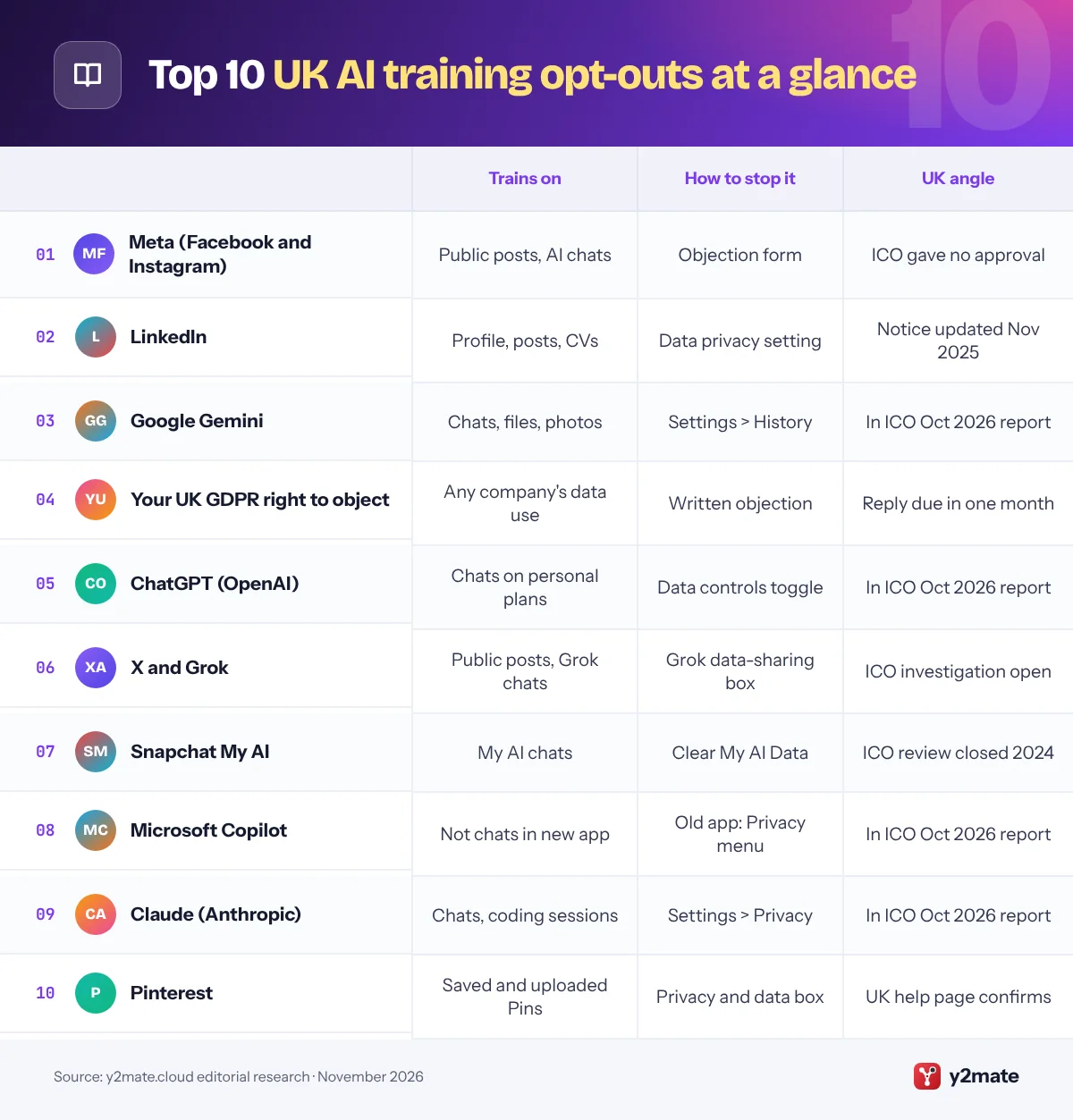
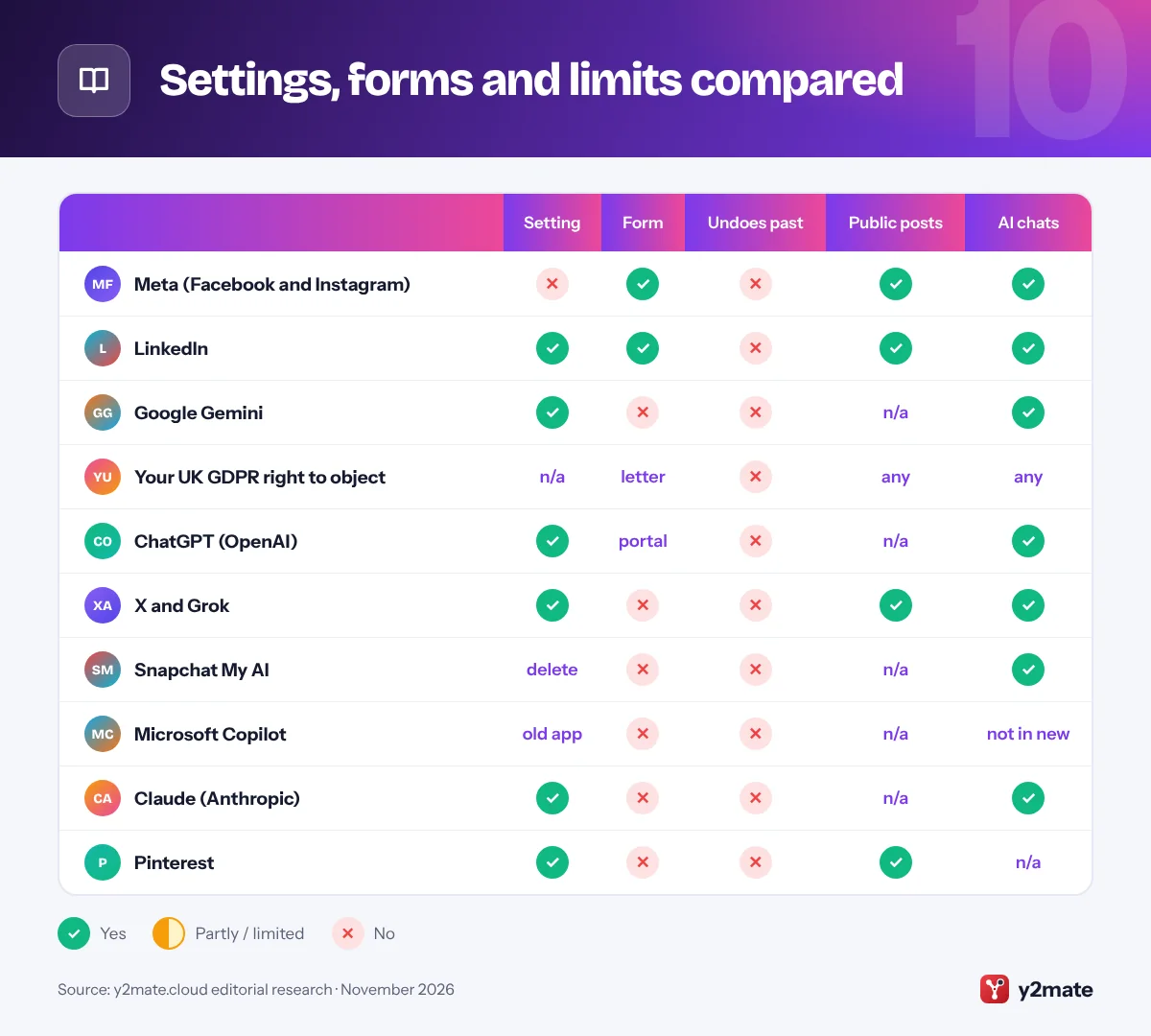
Settings, forms and limits compared
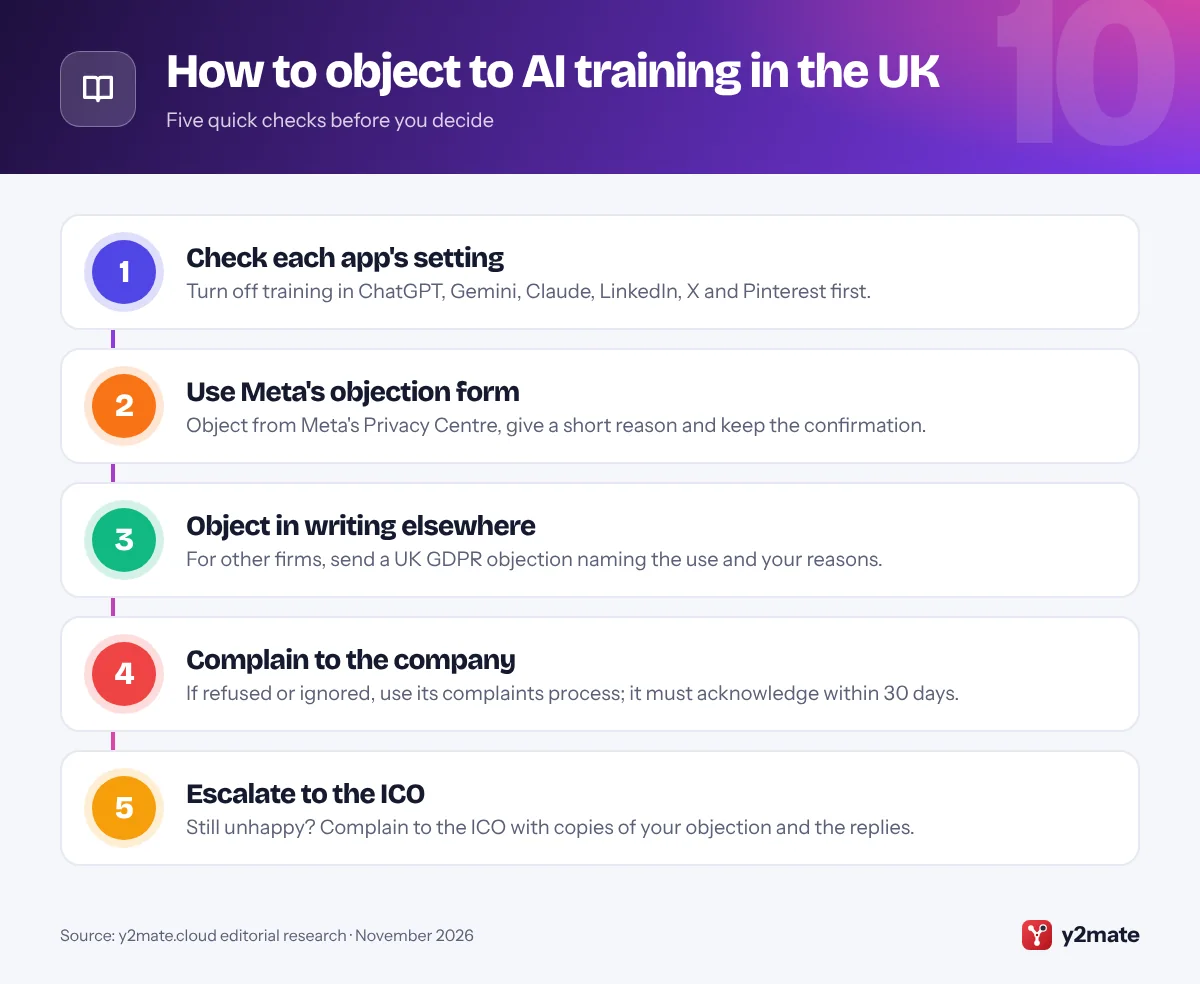
How to opt out of AI training: UK checklist
In the UK you have two tools: the settings each company provides, and your legal right to object. Use the settings first because they are instant, then use objections for anything a setting does not cover.
What a good objection includes
- Who you are: your name and the email address or username on the account.
- The exact use: for example, using my public posts and chats to train generative AI models.
- Your reasons: explain briefly why the use affects you, such as personal photos, your children appearing in posts, or professional content.
- A deadline: ask for a reply within one calendar month, as the ICO’s template does.
Keep a paper trail
Screenshot your settings after changing them and save confirmation emails. If a company refuses or does not reply, those records support a complaint to the company and then to the ICO.
Watch for new notices
The ICO has said companies should give people a clear and simple way to object before they start training on personal data. Meta and LinkedIn both sent UK users notices before starting, so read in-app messages and emails about privacy changes rather than dismissing them.
Frequently asked questions
Can I stop Meta using my Instagram posts for AI in the UK?
Yes. UK adults can object using Meta's objection form, which you reach from the Privacy Centre's AI at Meta section. Meta says it does not use private messages or accounts of people under 18 in the UK. An objection applies to future training, so posts already used may stay in existing models, and information others share about you may still be used.
Is LinkedIn using my data to train AI in the UK?
It can, unless you switch it off. LinkedIn updated its UK privacy notice on 3 November 2025 to cover generative AI training. Turn off Data for Generative AI Improvement under Settings and Privacy, then Data privacy. Private messages are excluded, and opting out does not affect training that has already taken place.
What is the right to object under UK GDPR?
It is your right under Article 21 to ask an organisation to stop using your personal data when it relies on legitimate interests or a public task. You contact the organisation, say which use you object to and why. It should reply within one calendar month and can continue only if it shows compelling grounds that override your interests.
Will objecting remove my data from AI models already trained?
Usually not. Meta, LinkedIn, Anthropic and others apply objections and opt-outs to future training. Data already used generally stays in models that have been built. That is why the ICO has said companies should give people a clear way to object before training starts, and why it is worth objecting as early as possible.
Can I complain to the ICO about AI training on my data?
Yes, but complain to the organisation first. Since 19 June 2026 every organisation must have a data protection complaints process and acknowledge complaints within 30 days. If you are still unhappy after that, you can complain to the ICO, including copies of your objection, the company's replies and screenshots of your settings.
Final verdict
For most people, the quickest way to opt out of AI training UK-wide is to object through Meta’s form, switch off LinkedIn’s Data for Generative AI Improvement setting, and turn off training in ChatGPT, Gemini and Claude. For any company without a setting, a short written objection under UK GDPR does the job.
Objections work from now on, not backwards, so act early and keep records in case you need to complain to the company or the ICO.
Sources and further reading
- ICO statement on Meta AI training: The ICO's September 2024 statement on Meta resuming AI training on UK users' data, noting it had not given regulatory approval.
- ICO statement on LinkedIn: The ICO's statements on LinkedIn pausing and then, in September 2025, resuming generative AI training on UK members' data.
- ICO report on AI developers: The ICO's October 2026 announcement that ten leading AI developers made or committed to data protection changes after its scrutiny.
- New complaints law now in force: The ICO explains the duty, in force since 19 June 2026, for organisations to handle data protection complaints and acknowledge them within 30 days.
- GOV.UK guide to the Data Act: The government's summary of the data protection changes made by the Data (Use and Access) Act 2025, including complaints handling.

Leave a Reply