
- No federal US law gives people a general right to opt out of AI training, so each company's own setting is the main route.
- ChatGPT, Gemini, Claude, LinkedIn, X and Pinterest let you switch off training on your data, but Meta and Reddit offer US users no opt-out for public posts.
- Opting out generally stops future use only; data already used to train a model is not removed from it.
- Microsoft says prompts, responses and files in its updated Copilot app, released on August 18, 2026, are not used to train foundation models.
- California's privacy law gives rights to delete, correct and limit data, but no specific right to stop AI training.
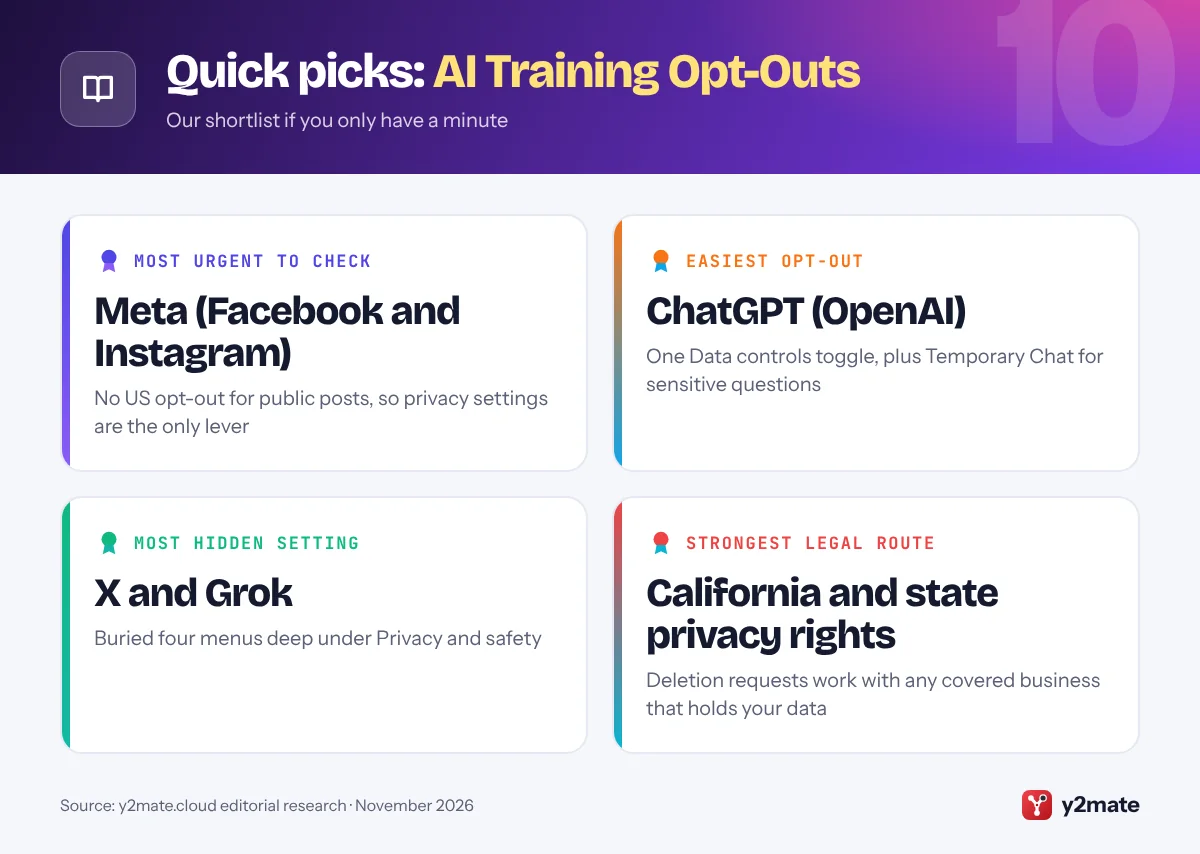
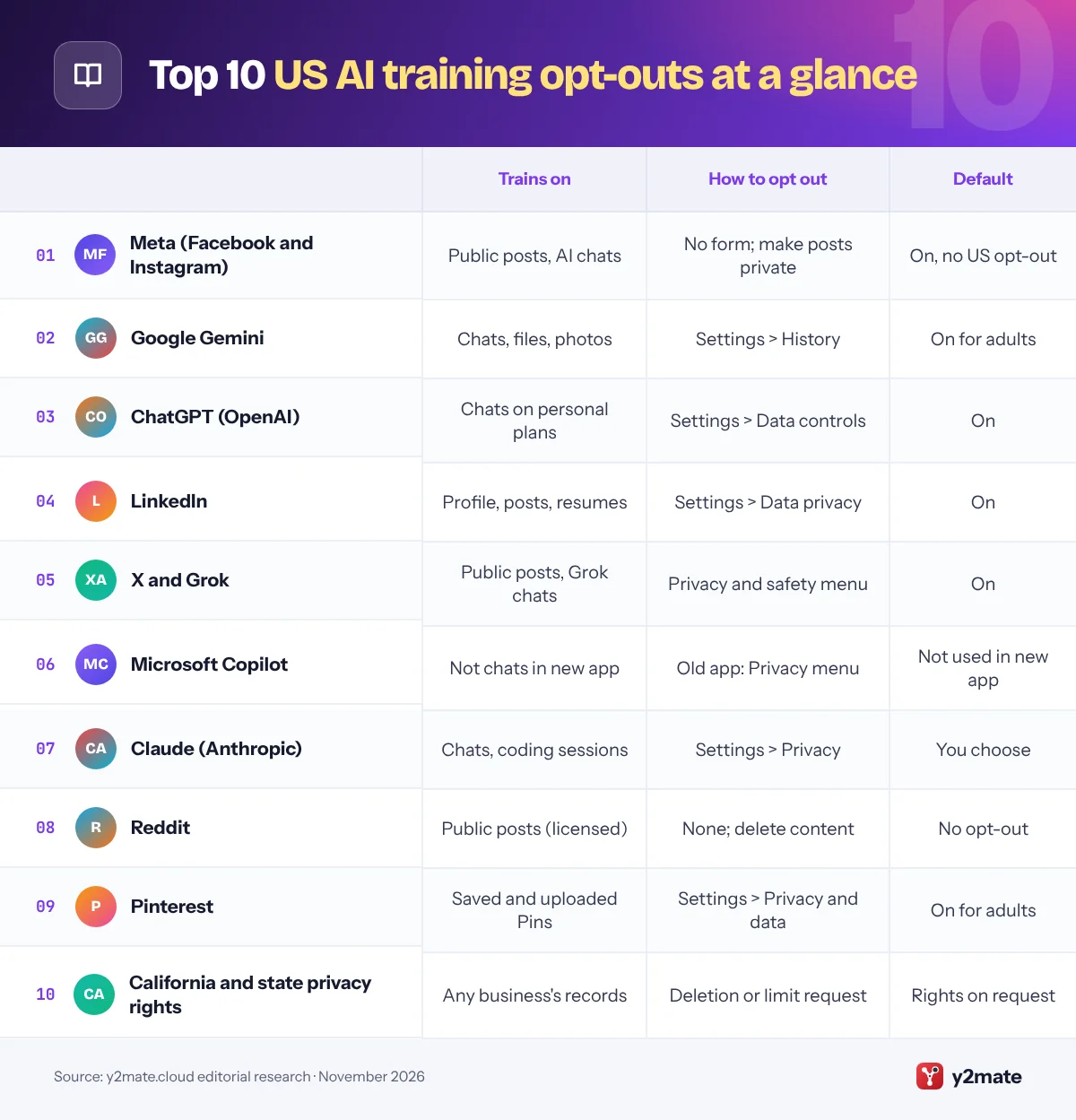
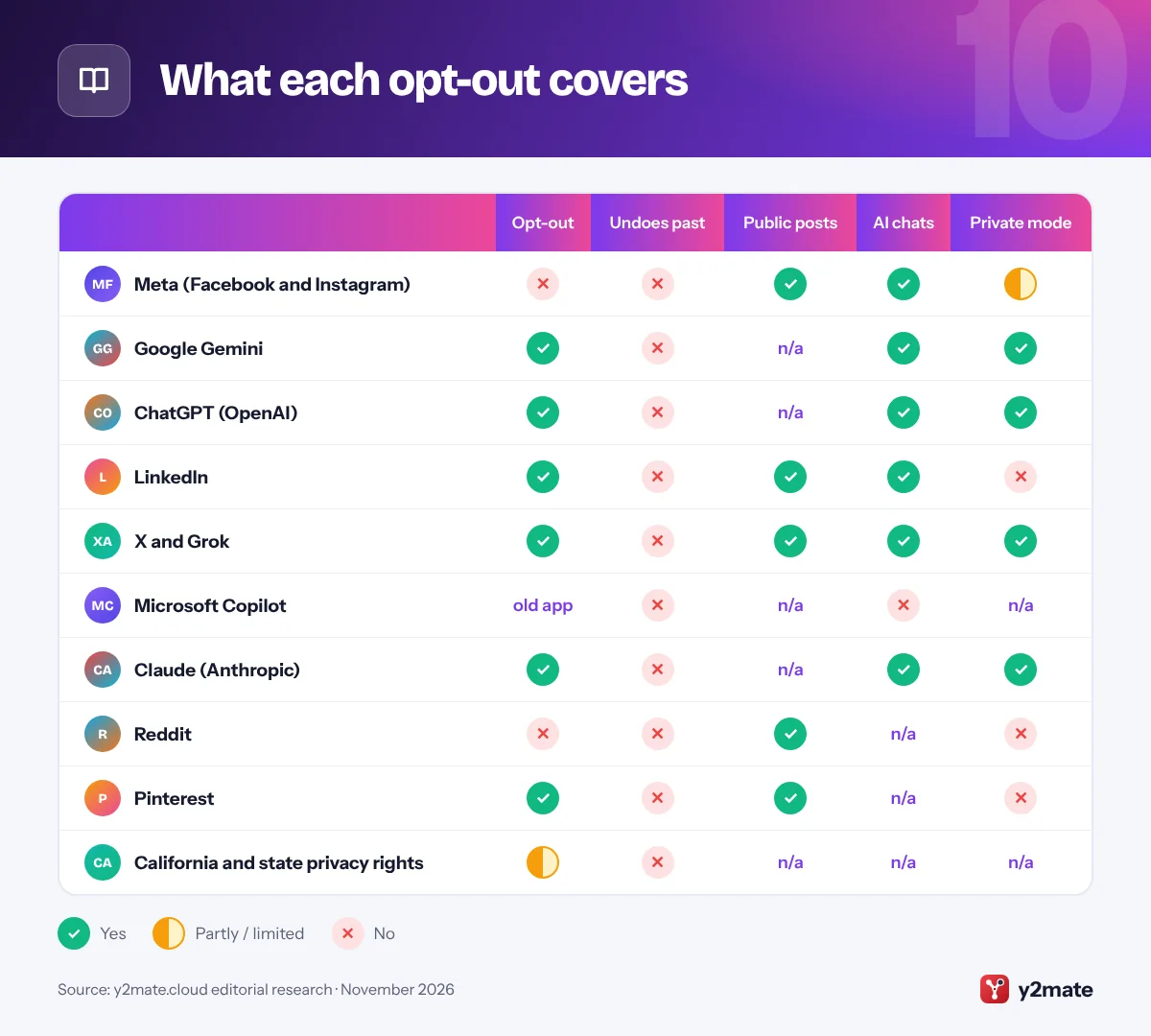
To opt out of AI training in the USA, you have to switch off each company’s own setting, because no federal law gives Americans a general right to stop their posts and chats being used to train AI. ChatGPT, Google Gemini, Claude, LinkedIn, X and Pinterest each offer a toggle. Meta (Facebook and Instagram) and Reddit offer US users no opt-out for public posts, so the only fix there is to make content private or delete it. In almost every case, opting out stops future use only: data already used for training stays in models that have been built.
Some plain definitions. AI training means using large amounts of data, which can include your posts, photos and chats, to teach or fine-tune an AI model. An opt-out means the use is switched on unless you turn it off. A temporary chat (called Incognito in Claude) is a chatbot mode that is not saved to your history and, under the provider’s own rules, is not used for training.
Below are the ten platforms and routes that matter most in the US in November 2026. If a menu label looks different, check the app’s privacy or data settings. This is general information, not legal advice.
How we ranked this list
We ranked each item by how many people in the US use the service, how much personal content it can train on, and how clear its opt-out is. We judged these from official help pages, privacy policies and regulator statements, including material from the FTC and California’s privacy regulators, as of November 2026.
We did not do any hands-on testing. Where a company offers no opt-out, we say so plainly, because knowing that is useful too.
The Top 10 AI Training Opt-Outs
1. Meta (Facebook and Instagram)
Best for: anyone with public Facebook or Instagram posts
Meta trains its AI models on information shared on its apps, including public posts, photos and captions, and your interactions with Meta AI, according to its Privacy Center. Meta says it does not use the content of private messages with friends and family for training unless you or someone in the chat shares them with Meta AI.
Meta offers people in the UK, the EU and Australia a form to object to their public content being used. US users have not been offered that form, so there is no switch to flip. The practical options are to make your Instagram account private, set Facebook posts to Friends, use Facebook’s option to limit who can see past posts, and keep personal details out of Meta AI chats. Meta may still use information about you that other people post.
Separately, since December 16, 2025, Meta has used your Meta AI chats to personalize the content and ads you see in most regions. For that, Meta points to Ads Preferences rather than an off switch.
Official site: Meta (Facebook and Instagram)
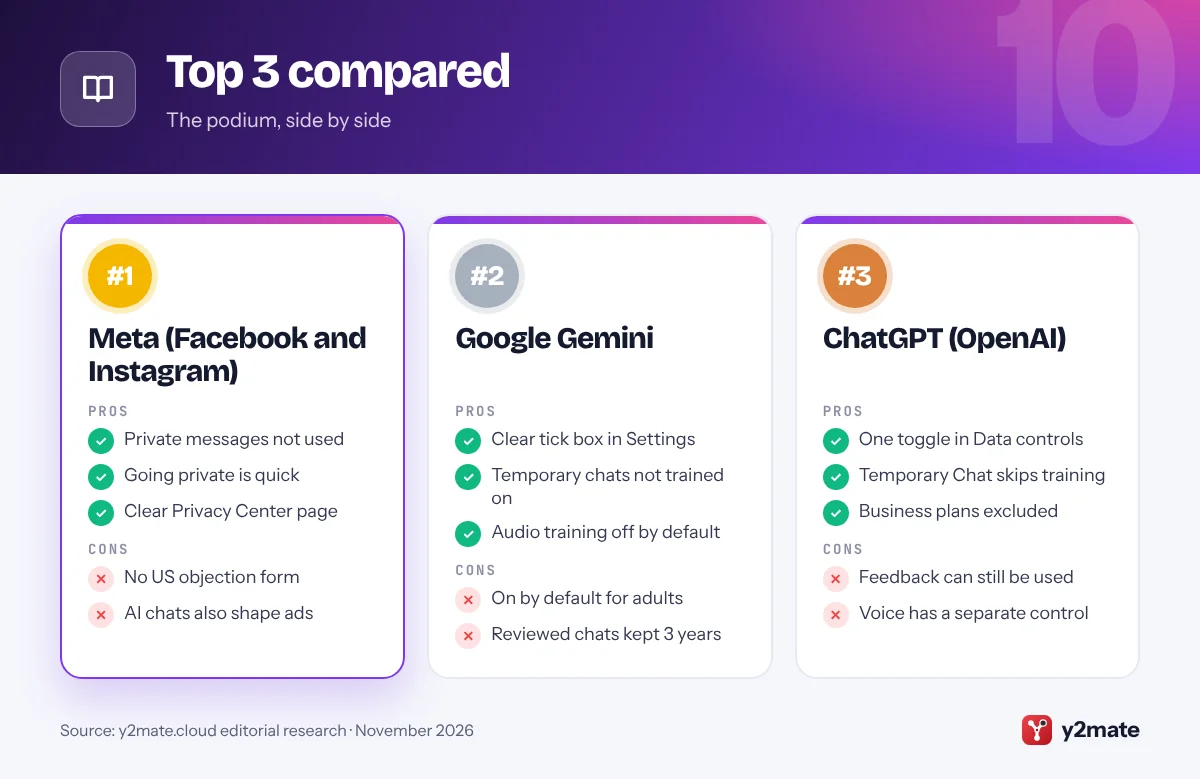
- Private messages not used
- Going private is quick
- Clear Privacy Center page
- No US objection form
- AI chats also shape ads
2. Google Gemini
Best for: Android and Gmail users who chat with Gemini
If you use the Gemini app with a personal Google Account, a chat content setting decides whether Google uses your future conversations to train generative AI models. Google’s Gemini privacy hub says it is on by default for users over 18 and covers what you type and say, files, photos and screens you share, Gemini’s answers, location information and data from connected apps.
To turn it off on the web, open Gemini, click Settings, then History, untick the box for chat content (text and uploads) and click Turn off. A separate box for audio and Gemini Live videos and screenshares is off by default. Temporary chats are not used to train Google’s AI models.
The limits matter. Chats already picked for human review are kept for up to three years, even if you delete them or change the setting later, and feedback you send can still be used. Work or school accounts are managed by an administrator.
Official site: Google Gemini
- Clear tick box in Settings
- Temporary chats not trained on
- Audio training off by default
- On by default for adults
- Reviewed chats kept 3 years
3. ChatGPT (OpenAI)
Best for: everyday ChatGPT users on Free, Plus or Pro
On personal ChatGPT Free, Plus and Pro accounts, sharing your chats to improve OpenAI’s models is switched on by default. To stop it, open Settings, select Data controls and turn off Improve the model for everyone. When you are signed in, the choice applies to your account on the web and in the mobile apps; if you use ChatGPT without signing in, it is saved only in that browser.
For a one-off sensitive question, start a Temporary Chat. OpenAI says these chats do not appear in your history, do not create memories and are not used to improve its models, although they may be kept for up to 30 days for safety purposes.
There are catches. If you give a thumbs up or thumbs down, the whole conversation linked to that feedback may be used for training. Voice mode has its own data-sharing control. Turning the setting off does not delete old chats. Content from ChatGPT Business, Enterprise and Edu workspaces is not used for training by default.
Official site: ChatGPT (OpenAI)
- One toggle in Data controls
- Temporary Chat skips training
- Business plans excluded
- Feedback can still be used
- Voice has a separate control
4. LinkedIn
Best for: professionals with a detailed public profile
LinkedIn’s Data for Generative AI Improvement setting controls whether your data is used to train AI models that create content, including models of affiliates such as Microsoft. In the US it has been switched on by default since 2024. LinkedIn’s help pages say training can draw on profile details, posts, articles, comments, poll answers, group activity, resumes and screening answers saved to your account and your use of its AI features.
To turn it off, go to Settings & Privacy, then Data privacy, then Data for Generative AI Improvement, and switch it off. Private messages, including InMail, are not used, and LinkedIn says it does not use data from members it believes are under 18 for this training.
Opting out does not affect training that has already happened. The setting also does not cover AI models that do not generate content, such as those used for personalization or security; for those, LinkedIn offers a separate Data Processing Objection Form, which is also the way to object to your feedback being used.
Official site: LinkedIn
- Single clear setting
- Private messages excluded
- Objection form for other AI
- On by default in the US
- Past training not undone
5. X and Grok
Best for: anyone who posts publicly on X
X uses your public posts and your interactions with Grok, the AI assistant made by xAI, to train and fine-tune AI models unless you switch this off. The setting sits under Settings and privacy, then Privacy and safety, then Data sharing and personalization, then Grok & Third-party Collaborators, where you untick the box allowing your data to be used. X’s help pages also say that protecting your posts, which makes your account private, keeps them out of this training.
Two things are easy to miss. The setting does not delete past Grok conversations, so clear those separately in Grok. The standalone Grok app and grok.com also have their own model-improvement setting, which you need to check as well.
X does not promise that switching off removes posts already used for training. If your account has been public for years, assume older posts may already have been included in training data.
Official site: X and Grok
- One box covers posts and Grok
- Private accounts excluded
- Grok history can be deleted
- Setting is buried deep
- Grok app has its own toggle
6. Microsoft Copilot
Best for: Windows users who chat with Copilot
Microsoft changed its approach with the updated Copilot app released on August 18, 2026. For the new app, on the web, desktop and mobile, Microsoft’s support pages say prompts, responses and file contents are not used to train foundation models. Optional feedback can be used to improve Copilot, but not to train those models.
The older Copilot app follows older rules, under which Microsoft could use de-identified conversations for training unless you opted out. Its controls are under your profile, then Privacy, with separate switches for Training on conversation activity and Training on voice conversations. Microsoft says people who used the older app should sign in to the updated one by December 31, 2026, to keep eligible chats; content not moved will be deleted.
In the new app, Settings then Personalization holds separate switches for saved memories, sharing with Bing, Edge and MSN, and ads personalization. Work and school accounts signed in with Microsoft Entra fall under separate commercial protections.
Official site: Microsoft Copilot
- New app chats not trained on
- Separate memory and ad controls
- Work accounts excluded
- Older app has different rules
- Old chats need moving by Dec 31
7. Claude (Anthropic)
Best for: Claude Free, Pro and Max subscribers
Since Anthropic updated its consumer terms in 2025, people on Claude Free, Pro and Max plans, including when they use Claude Code, choose whether their chats and coding sessions can be used to train its models. To check or change your choice, open Settings, select Privacy and use the model-improvement toggle, currently headed Help improve our AI models.
The choice also changes how long data is kept. If you allow training, Anthropic keeps new or resumed chats for up to five years; if you do not, the standard period is 30 days. Incognito chats are not used for training even if the setting is on, and chats you delete are left out of future training.
Switching off does not remove data from training runs that have already started or from finished models. Conversations flagged by safety systems may still be used for safety work, and Claude for Work and API use fall under separate commercial terms.
Official site: Claude (Anthropic)
- You choose at sign-up
- Incognito chats never used
- Deleted chats not reused
- Five-year retention if on
- Flagged chats may still be used
8. Reddit
Best for: active posters and commenters on Reddit
Reddit is one of the clearest cases of public content feeding AI with no individual opt-out. Its privacy policy says third parties can access public Reddit content through its developer services and must pay licensing fees for larger quantities, and Reddit announced data partnerships with Google and OpenAI in 2024. There is no setting that keeps your public posts and comments out of these arrangements.
Your real control is deletion. Delete individual posts and comments you do not want reused. Deleting your account alone is not enough: Reddit’s privacy policy says your posts and comments stay visible unless you delete them first, although they are no longer linked to your profile. Content already copied into a dataset cannot be recalled.
If you live in a state with a privacy law, Reddit lets you request access, deletion or correction through its privacy settings. Going forward, keep personal details out of public threads.
Official site: Reddit
- Posts can be deleted any time
- State privacy requests work
- Usernames can stay anonymous
- No AI opt-out setting
- Copied data cannot be recalled
9. Pinterest
Best for: Pinners who upload their own photos or art
Pinterest trains Pinterest Canvas, its own image-generation model, on certain publicly available content that users save or upload, and uses it for features such as generating backgrounds for product images in ads. Its help center says you can opt out of this use at any time.
To do it, open Settings, select Privacy and data, and untick Use your data to train Pinterest Canvas. Pinterest says people under 18 are automatically opted out and cannot opt in. Website owners who do not want their domain used for future Canvas training can use a separate request route on Pinterest’s help site.
The setting is specific to Canvas training. Pinterest’s help page does not say that opting out removes your images from versions of the model already trained, so if you upload original photography or artwork, switch it off before you post more. The setting is the same on the web and in the app.
Official site: Pinterest
- Simple tick box
- Under-18s opted out
- Route for website owners
- Covers Canvas training only
- No word on past training
10. California and state privacy rights
Best for: residents of California and other privacy states
The US has no comprehensive federal privacy law, so your legal options depend on where you live. California’s Consumer Privacy Act, amended by the CPRA, gives residents the right to know what a business holds about them, to delete it, to correct it, to opt out of its sale or sharing, and to limit the use of sensitive personal information. Colorado, Virginia, Texas and other states have similar deletion rights.
None of these is a dedicated right to stop AI training, but a deletion request removes stored posts and chats from future training data. California’s rules on automated decisionmaking technology took effect on January 1, 2026, with compliance due by January 1, 2027, but they cover decisions such as hiring and lending, not training. Since January 1, 2026, California’s AB 2013 has required developers of generative AI to publish a high-level summary of their training data.
At the federal level, the FTC can act against unfair or deceptive practices, and in February 2024 it warned that quietly changing privacy terms to use data for AI training could break the law.
Official site: California and state privacy rights
- Works with any covered business
- Deletion clears future data
- Regulators take complaints
- No specific AI-training right
- Depends on your state
What each opt-out covers
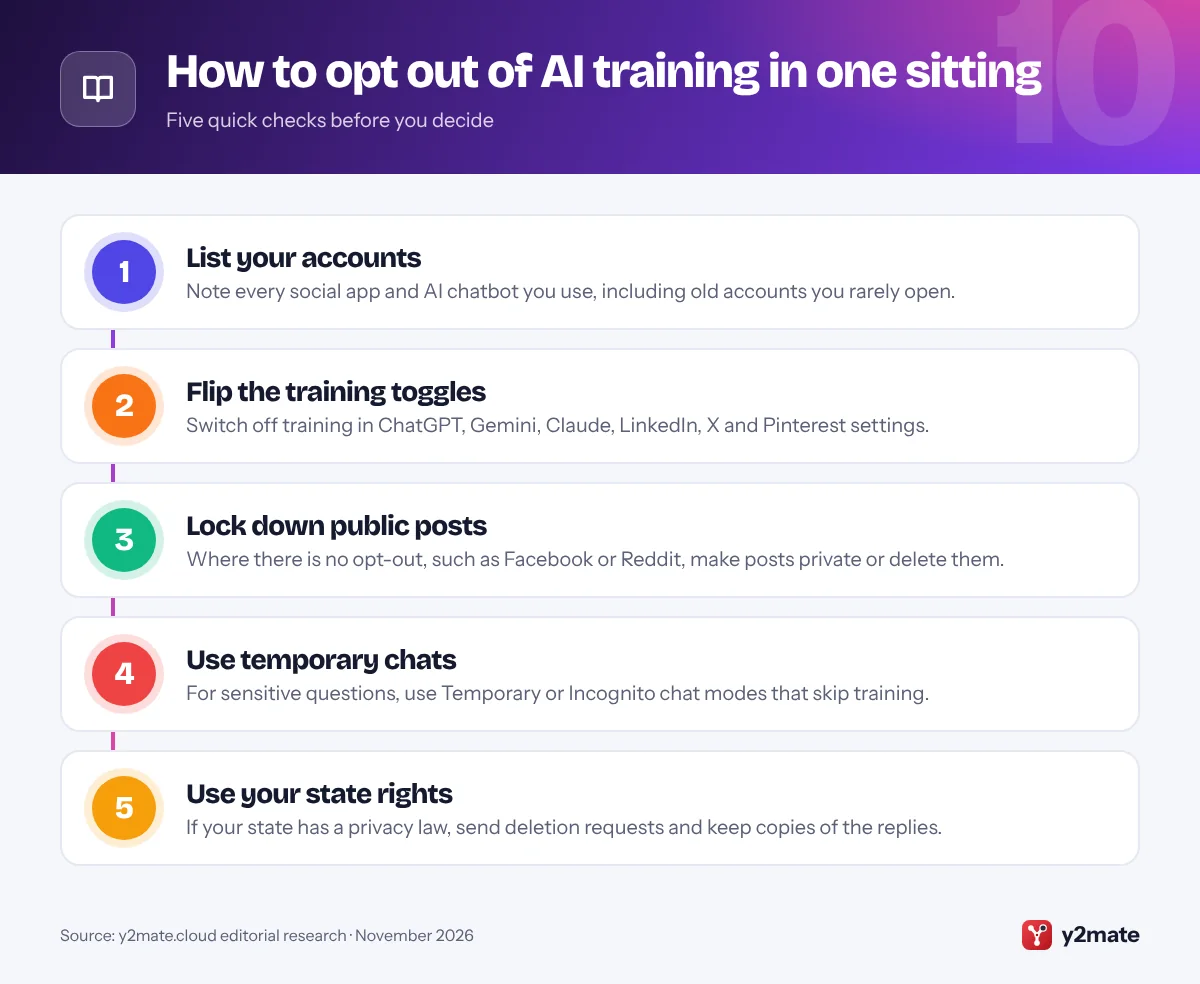
How to opt out of AI training without missing anything
Opting out works best as a short routine rather than a one-off job. Companies add AI features and update privacy terms regularly, so recheck your settings a few times a year and whenever a policy-change email arrives.
Know what opting out does and does not do
- It usually works going forward only: Anthropic and LinkedIn say plainly that training already done is not undone, and no major company promises to remove data from existing models.
- It is tied to your account: settings follow your login, so repeat them for every account, including family accounts you manage.
- Feedback is often an exception: thumbs up or down ratings in ChatGPT, Gemini and Claude can still be used for training.
- Deletion is the fallback: where there is no setting, deleting or hiding content is the only way to keep it out of future datasets.
Watch for policy-change notices
Changes to AI training terms usually arrive as an email or an in-app notice. Read them rather than tapping accept, and check whether a new default has been switched on. If you believe a company has quietly applied new terms to data it collected under old promises, you can report it to the FTC at ReportFraud.ftc.gov. California residents can also file a complaint with the California Privacy Protection Agency.
Frequently asked questions
Can I stop Meta using my Facebook and Instagram posts for AI in the US?
Not with a setting. Meta offers an objection form in places such as the UK, the EU and Australia, but US users have not been offered one for their public posts. You can limit what Meta can use by making your Instagram account private, setting Facebook posts to Friends, limiting who can see past posts and keeping personal details out of Meta AI chats.
Does opting out remove my data from AI models that were already trained?
Generally, no. Anthropic and LinkedIn say opting out does not affect training that has already happened, and other major companies do not promise to remove data from existing models. Opting out stops future chats and posts being added to new training data, so do it early.
Are ChatGPT temporary chats used to train AI?
No. OpenAI says Temporary Chats are not used to improve its models, do not appear in your history and do not create memories. They may be kept for up to 30 days for safety purposes. If you save a temporary chat, it becomes a normal chat and follows your account's model-improvement setting.
Does California's privacy law let me opt out of AI training?
Not directly. The CCPA gives California residents rights to know, delete and correct personal information, to opt out of its sale or sharing, and to limit the use of sensitive information. A deletion request can keep stored data out of future training, but there is no specific CCPA right to stop a company training AI on data it lawfully holds.
Are my work accounts used to train AI?
Usually not by default. OpenAI says it does not train on ChatGPT Business, Enterprise or Edu workspace content by default, Anthropic's training choice does not apply to Claude for Work or its API, and Microsoft excludes work and school accounts signed in with Entra ID. Your employer's administrator controls these settings.
Final verdict
The quickest way to opt out of AI training in the USA is to spend a few minutes in the settings of the services you actually use: Data controls in ChatGPT, History in Gemini, Privacy in Claude, Data privacy in LinkedIn, the Grok setting on X, and Privacy and data on Pinterest. For Facebook, Instagram and Reddit, where there is no opt-out, make posts private or delete what you do not want reused.
Opting out will not pull data out of models already built, so act early and recheck after every privacy-policy email.
Sources and further reading
- California Attorney General on the CCPA: The California Attorney General explains the rights the CCPA gives residents, including the rights to know, delete, correct and opt out of the sale of personal information.
- CPPA's final automated decision rules: California's privacy regulator announces approval of its rules on automated decisionmaking technology, risk assessments and cybersecurity audits, effective January 1, 2026.
- Report a problem to the FTC: The FTC's official reporting site, where you can report a company you believe has used your data unfairly or deceptively.
- OpenAI on using chats for training: OpenAI's own explanation of when ChatGPT conversations are used for training and how to switch it off.
- Anthropic's consumer terms update: Anthropic's announcement of the Claude model training choice, the five-year retention period and which plans it covers.

Leave a Reply