
- A self-custody crypto wallet gives you sole control of your keys, so no exchange can freeze your coins, but no one can reverse a mistake or reset a lost seed phrase.
- Crypto in a wallet you control is not covered by FDIC deposit insurance or SIPC, so a secure backup is your only safety net.
- In October 2026, FinCEN withdrew its 2020 proposal to make exchanges keep records on transfers to self-hosted wallets, but exchanges still screen withdrawals and may ask who owns a wallet.
- Since January 1, 2025, the IRS has required cost basis to be tracked wallet by wallet, so keep a record every time you move crypto between an exchange and your own wallet.
- Buy hardware wallets only from the maker or a reseller it lists, and never type your seed phrase into any app, website or message.
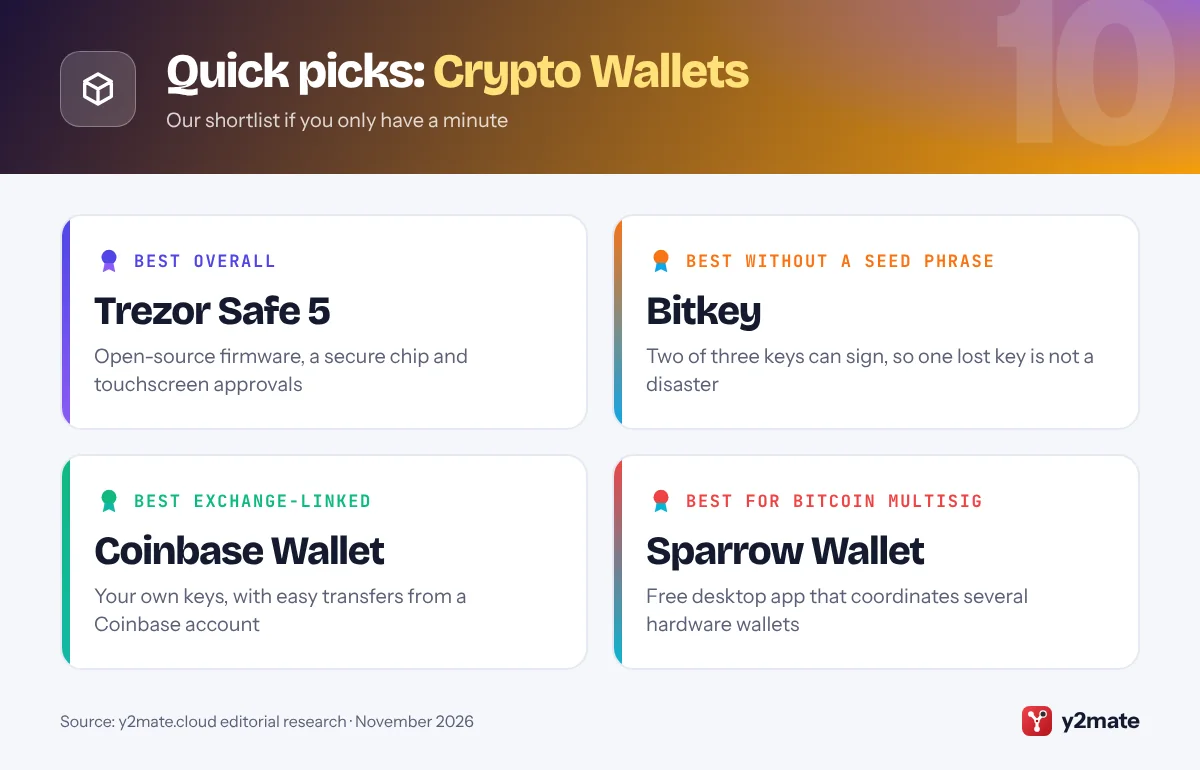
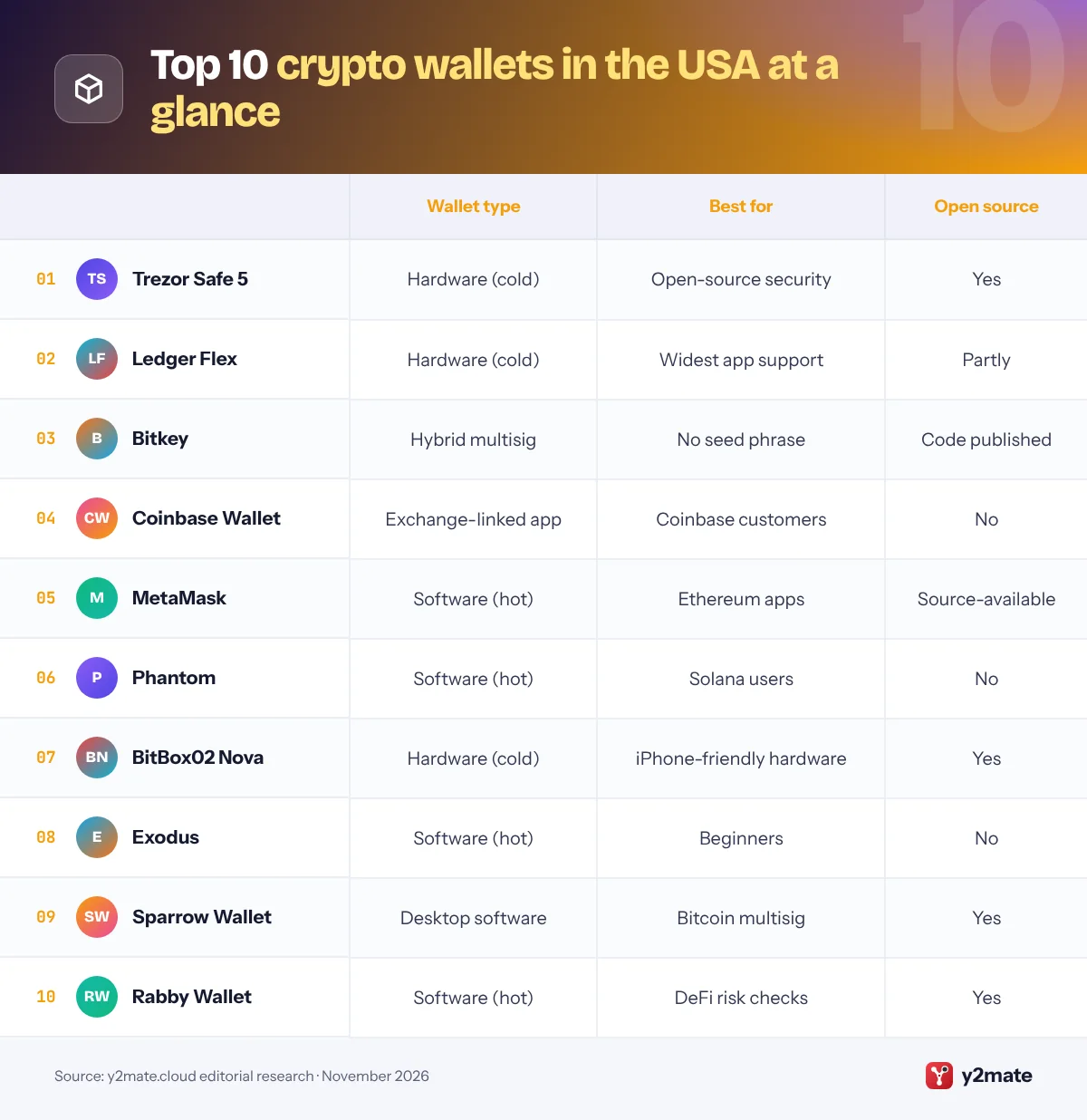
The best crypto wallets in the USA in 2026 are the Trezor Safe 5 for open-source hardware security, the Ledger Flex for the widest app support on a secure-chip device, and Bitkey, Block’s bitcoin wallet that does away with the seed phrase. Coinbase Wallet, MetaMask and Phantom are the strongest software picks for everyday use, while BitBox02 Nova, Exodus, Sparrow Wallet and Rabby Wallet each serve a narrower need. All ten are sold or offered to US customers through official channels.
Some plain definitions. A crypto wallet does not store coins; it stores the private keys that let you move them on a blockchain. Self-custody means you hold those keys yourself instead of leaving them with an exchange. Most wallets back up your keys as a seed phrase, a list of words that can restore the wallet on any device, so anyone who sees it can take your crypto. A hardware wallet keeps keys offline on a small device and asks you to approve each transaction on its own screen, making it a cold wallet; an app or browser extension on an internet-connected device is a hot wallet.
The travel rule is the anti-money-laundering requirement for financial institutions, including crypto exchanges, to pass sender and recipient details along with certain transfers. Self-custody means no FDIC or SIPC protection and no help desk that can undo a mistake. This article is general information, not financial advice.
How we ranked this list
We ranked each wallet only on publicly documented criteria: custody type (hardware, software or exchange-linked), whether its code is open source, the blockchains it supports, security features such as a secure element chip, passphrase support and multisignature (multisig) setups, how easy it is for beginners, and whether it is officially sold or offered in the United States. We also checked each maker’s recent security notices and how it handled them.
We did not test these wallets ourselves, and we leave out prices, which change often. Check the maker’s official website for current models and approved sellers before you buy.
The Top 10 Crypto Wallets
1. Trezor Safe 5
Best for: open-source security with a touchscreen
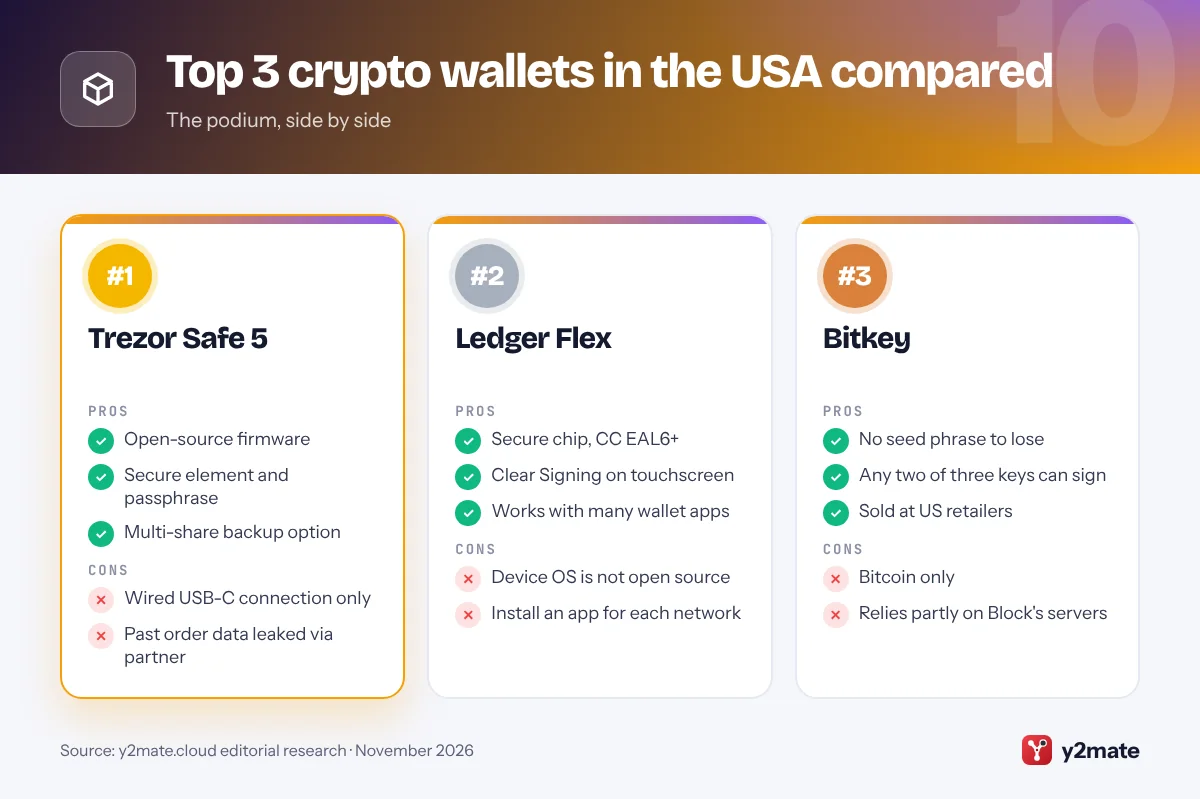
Trezor, the Czech pioneer of consumer hardware wallets, sells the Safe 5 as the middle model in its current range, between the button-operated Safe 3 and the Bluetooth-equipped Safe 7. Its firmware is open source, so anyone can inspect it, and it adds a secure element chip certified to CC EAL6+ that protects your keys and PIN if the device is lost or stolen. You approve every transaction on a color touchscreen.
By default the Safe 5 creates a 20-word backup in Trezor’s multi-share format, which can also split your recovery words into several shares so no single sheet can empty your wallet. You can pick a classic 12-word backup instead, add a passphrase and use the device as one signer in a bitcoin multisig setup. A Bitcoin-only edition runs firmware with everything else stripped out.
You manage it in the Trezor Suite app, and it also works with third-party wallets such as Exodus, MetaMask and Sparrow. Trezor ships to US customers from its own store. In 2026 it disclosed that a former US shipping partner had exposed contact details from past orders, so treat any unexpected email, text or call about your device as phishing.
Official site: Trezor Safe 5
- Open-source firmware
- Secure element and passphrase
- Multi-share backup option
- Wired USB-C connection only
- Past order data leaked via partner
2. Ledger Flex
Best for: the widest app support on a secure chip
Paris-based Ledger makes hardware wallets that work with a very wide range of apps, and the Flex sits between the smaller Nano Gen5 and the larger Stax. Your keys live inside a secure element chip certified to CC EAL6+, and the E Ink touchscreen uses a feature Ledger calls Clear Signing to show transaction details in plain language rather than raw code, so you can spot a risky approval before confirming.
The Flex connects to phones over Bluetooth and to computers over USB-C, and uses NFC for the Ledger Recovery Key, a PIN-protected backup card included in the box. You manage it in Ledger Wallet, the app formerly called Ledger Live, or connect it to MetaMask, Phantom, Rabby, Sparrow and many other wallets. It covers bitcoin, Ethereum, Solana and many other networks, and supports passphrases and bitcoin multisig.
The trade-off is transparency. Ledger publishes the code for the apps that run on its devices, but the operating system on the secure element is proprietary, so you rely on Ledger and the chip’s certification rather than code you can read yourself. Buy from Ledger’s own store or a retailer it lists.
Official site: Ledger Flex
- Secure chip, CC EAL6+
- Clear Signing on touchscreen
- Works with many wallet apps
- Device OS is not open source
- Install an app for each network
3. Bitkey
Best for: bitcoin savers who fear losing a seed phrase
Bitkey comes from Block, the US company behind Cash App, and it takes a different approach to self-custody. Instead of a single seed phrase, it spreads control across three keys: one in the Bitkey app on your phone, one on the Bitkey hardware device and one held on Block’s servers. Any two can approve a transaction, a setup known as 2-of-3 multisig, so losing your phone or the device is recoverable without a list of words to guard.
You confirm sensitive actions with the device’s fingerprint sensor, which talks to your phone over NFC. Block cannot move your bitcoin on its own, because its key is only one of the three, and Bitkey offers an Emergency Exit Kit for moving funds without Block’s app. There is also an inheritance feature for naming a beneficiary. Block has published the code for the firmware, app and server under a license that allows inspection but restricts commercial reuse.
Bitkey is bitcoin-only, and everyday recovery relies on Block keeping its service running. It is sold through its own website and US retailers such as Best Buy, so you can buy it in person.
Official site: Bitkey
- No seed phrase to lose
- Any two of three keys can sign
- Sold at US retailers
- Bitcoin only
- Relies partly on Block's servers
4. Coinbase Wallet
Best for: Coinbase users moving into self-custody
Coinbase Wallet is the self-custody app from Coinbase, the big US exchange, and it is separate from the main Coinbase app, where the company holds your crypto for you. In this app, you hold the keys. Coinbase renamed it the Base App in July 2025, then switched back to the Coinbase Wallet name in September 2026 and kept Base as the name of its blockchain, so older guides use either name.
You can set it up with a classic recovery phrase or as a smart wallet secured by a passkey, which spares you from writing down words but works only on Ethereum-compatible networks such as Base. Recovery-phrase wallets also support bitcoin and Solana. Linking your Coinbase account makes it quick to move crypto between custody and self-custody, a gentle way to learn how wallets work.
The app is not open source, and supported networks change over time, so check Coinbase’s help center before sending an unusual token. Withdrawals from the Coinbase exchange to this wallet still go through the exchange’s usual anti-money-laundering screening. Once crypto arrives, Coinbase cannot reverse or refund a transfer you sign.
Official site: Coinbase Wallet
- Easy funding from Coinbase
- Passkey option, no word list
- Supports bitcoin and Solana
- Not open source
- Passkey wallets are EVM-only
5. MetaMask
Best for: Ethereum apps, now with Solana and bitcoin
MetaMask, built by Consensys, is one of the most widely supported wallets in Ethereum apps, and runs as a browser extension and a mobile app. In late 2025 it moved to multichain accounts, so one account now holds an Ethereum-compatible address, a Solana address and, since December 2025, a bitcoin address. That makes it a sensible single hot wallet across those networks.
MetaMask connects to Ledger, Trezor, Keystone and other hardware wallets, so you can keep keys offline while using the familiar interface. Its code is public, but since 2020 it has been released under a license that limits commercial reuse, so it is better described as source-available than open source. Buying and swapping inside the app rely on third-party providers, and what they offer can vary by state.
Its popularity makes it a favorite target for scammers. Fake MetaMask support accounts, look-alike browser extensions and phishing pages that ask you to complete a security check by typing in your Secret Recovery Phrase are all common. MetaMask never needs that phrase. Install it only from metamask.io or the app store links on that site.
Official site: MetaMask
- Widely supported in Ethereum apps
- Pairs with hardware wallets
- Ethereum, Solana and bitcoin
- Hot wallet keys stay online
- Top target for copycat scams
6. Phantom
Best for: Solana users who also hold Ethereum or bitcoin
Phantom made its name on Solana and has grown into a multichain app for iPhone, Android and desktop browsers that also supports Ethereum, bitcoin, Base, Polygon and a handful of newer networks. It previews what a transaction will do before you sign and warns about known malicious sites, which matters on Solana, where fast-moving token launches attract plenty of scams.
Its network list changes more often than most. Phantom ended support for Sui and Monad in 2026, so check the current list before you send anything. In March 2026, staff at the Commodity Futures Trading Commission also gave Phantom no-action relief covering how its app connects US users to regulated derivatives markets.
Phantom pairs with Ledger hardware wallets, which lets you keep keys offline while using its interface. Its code is not open source, and on its own it is a hot wallet, so do not keep long-term savings in it without hardware protection. Download it only from phantom.com or the official app store listings.
Official site: Phantom
- Polished Solana experience
- Transaction previews and warnings
- Pairs with Ledger
- Not open source
- Network list changes often
7. BitBox02 Nova
Best for: simple open-source hardware with iPhone support
Swiss company Shift Crypto released the BitBox02 Nova in 2025 as the successor to its original BitBox02. It keeps the small, minimalist design, with touch-sensitive edges instead of buttons, and adds a new Infineon secure chip certified to EAL6+, a tougher display behind glass and, for the first time on a BitBox, support for iPhone and iPad. The firmware remains open source.
The iPhone connection uses Bluetooth through a separate chip, which you can switch off permanently in the settings if you prefer a cable. Backups go to a microSD card or a written list of recovery words. The Nova comes in a Multi edition for bitcoin, Ethereum and other coins, and a Bitcoin-only edition with a smaller codebase that cannot later be switched to the Multi firmware.
The BitBoxApp handles setup, sending and receiving, and the device also works as a signer in Sparrow and Electrum, including for multisig. It supports fewer coins than Ledger, so check your assets first. Shift Crypto sells directly from its own online shop, which ships to the US.
Official site: BitBox02 Nova
- Open-source firmware
- iPhone support over Bluetooth
- microSD backup option
- Narrower coin range than Ledger
- Small screen for long details
8. Exodus
Best for: beginners who want desktop and mobile apps
Exodus, a US company whose shares trade on NYSE American, makes one of the most approachable software wallets, with matching desktop and mobile apps, a clear portfolio view and built-in swaps between assets through third-party providers. Setup takes minutes: the app creates a recovery phrase for you, and you can lock it with a password or your phone’s biometrics.
Its most useful safety feature is hardware support. You can pair a Trezor with Exodus Desktop, and Exodus Mobile supports the Bluetooth-equipped Trezor Safe 7, so you keep Exodus’s friendly interface while the keys stay on the Trezor. It covers bitcoin, Ethereum, Solana and many other networks in one app.
The trade-offs are worth knowing. Exodus is not open source, so you rely on the company’s own security work, and swaps run through outside providers that set their own rates. Impostors posing as Exodus support are common on social media, so get help only through the help center on exodus.com and never share your recovery phrase with anyone.
Official site: Exodus
- Very beginner-friendly design
- Desktop and mobile apps
- Pairs with Trezor devices
- Not open source
- Swap rates set by providers
9. Sparrow Wallet
Best for: bitcoin holders who want full control on desktop
Sparrow Wallet is a free, open-source bitcoin wallet for Windows, macOS and Linux, built for people who want to see exactly what their wallet is doing. It offers coin control, which lets you choose which coins to spend, along with clear views of fees and transaction details, and you can connect it to your own bitcoin node for extra privacy.
Its real strength is hardware wallet support. Sparrow works with Trezor, Ledger, BitBox02, Keystone and other devices, by cable or by scanning QR codes, and it is one of the most popular ways to set up a multisig vault in which, for example, two of three devices must approve a payment. The keys stay on the hardware wallets; Sparrow only builds and broadcasts the transactions.
Sparrow has no official mobile app. In July 2026, a lawsuit filed in California alleged that a fake Sparrow app on Apple’s App Store stole bitcoin from people who entered their seed phrases into it. The real Sparrow Wallet is a desktop app for Windows, macOS and Linux with no iPhone version, so treat any Sparrow app in a phone app store as fake. Download Sparrow only from sparrowwallet.com and treat any phone app using its name as fake.
Official site: Sparrow Wallet
- Open source and free
- Excellent multisig support
- Coin control and privacy tools
- Desktop only, no mobile app
- Bitcoin only
10. Rabby Wallet
Best for: DeFi users who want to see risks before signing
Rabby Wallet, from the team behind the DeBank portfolio tracker, is an open-source wallet for Ethereum and other Ethereum-compatible networks, available as a browser extension, a desktop app and a mobile app. It is aimed at people who use decentralized finance (DeFi) apps such as lending markets and token swaps and want more warnings than a basic wallet gives.
Before you sign, Rabby simulates the transaction and shows which tokens will leave your wallet and which will arrive, and it flags risks such as a first-time interaction with a contract or an unusually large token approval. A built-in approvals page lets you revoke permissions you no longer need, and the wallet switches networks automatically to match the app you are using, which avoids a common cause of failed transactions.
Rabby works with Ledger, Trezor, Keystone and other hardware wallets and with Safe multisig accounts. It does not support bitcoin or Solana, and simulation cannot catch every scam, so still read each prompt carefully and keep long-term holdings on a hardware wallet.
Official site: Rabby Wallet
- Open-source code
- Pre-signing risk checks
- Built-in approval manager
- Ethereum-type networks only
- Simulation is not a guarantee
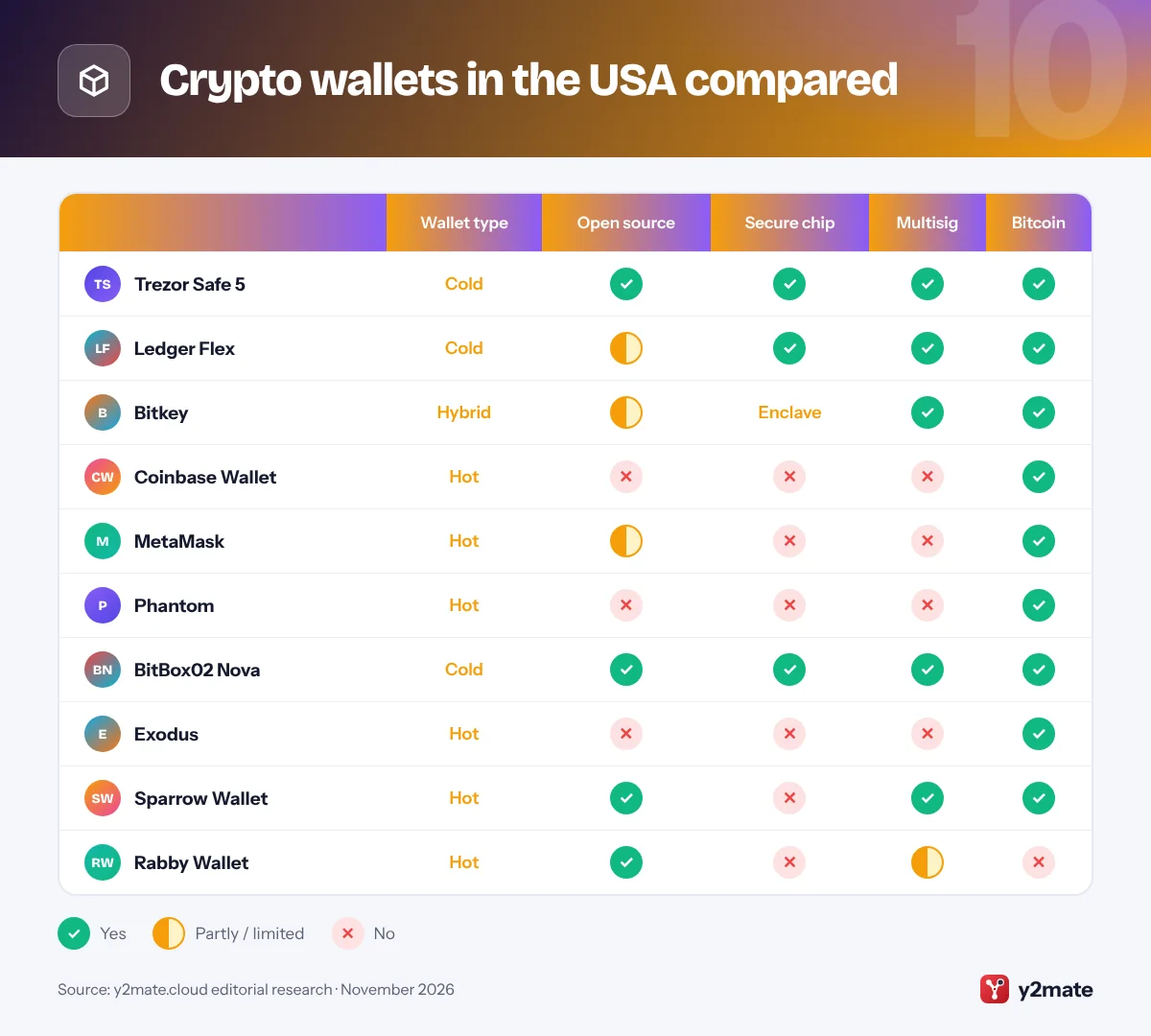
Crypto wallets in the USA compared
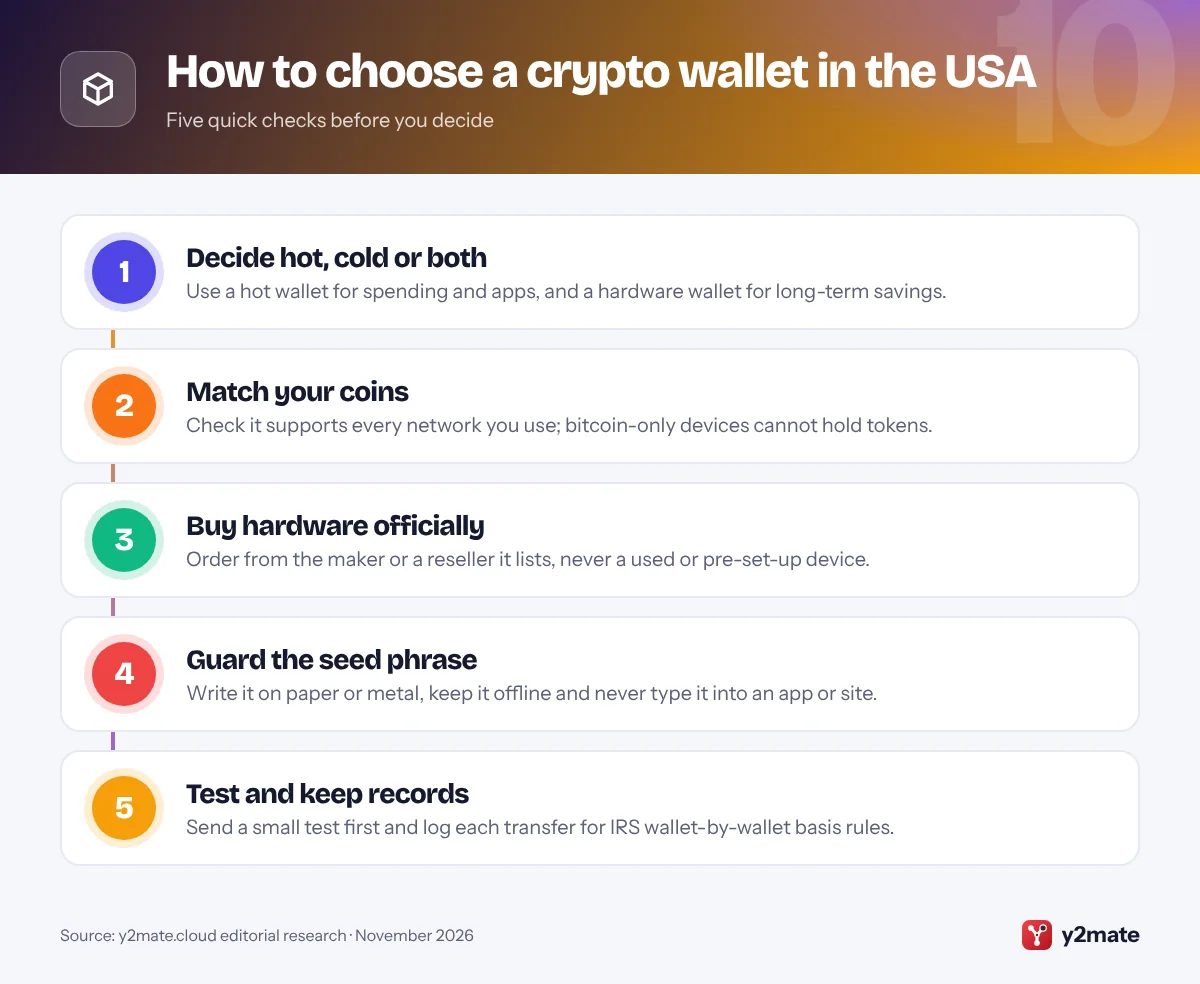
How to choose between crypto wallets in the USA
Most people need two wallets: a hot wallet such as Coinbase Wallet, MetaMask or Phantom for small amounts and apps, and a cold wallet such as a Trezor, Ledger, BitBox02 or Bitkey for savings. Start with the networks you use.
What happens when you withdraw from a US exchange
- Travel rule: under FinCEN’s Bank Secrecy Act rules, exchanges pass sender and recipient details when crypto above a set threshold moves between financial institutions. A transfer to your own wallet has no receiving institution, but exchanges still screen the address and may ask who owns it.
- No extra self-custody rule: in October 2026, FinCEN formally withdrew its 2020 proposal that would have required exchanges to keep records on, and report, certain transfers to self-hosted wallets.
- No insurance: FDIC deposit insurance and SIPC protection do not cover crypto in a wallet you control.
Avoid the common scams
The FTC warns that only scammers demand payment in crypto. Never share your seed phrase, ignore anyone who contacts you about your wallet, and download apps only through links on the maker’s own site. A hardware wallet that arrives with a seed phrase already written down is a scam. Watch for security notices too: in 2026, Coinkite told some Coldcard owners to move funds to a new seed after a firmware flaw weakened seed generation, and a firmware update could not repair seeds already created.
Keep tax records
Moving crypto between your own wallets is not a sale, but the IRS now expects cost basis to be tracked wallet by wallet, and exchanges report sales on Form 1099-DA. Log every transfer, or use crypto tax software that imports your wallet addresses.
Frequently asked questions
What is the best crypto wallet in the USA?
For most people, the best crypto wallet in the USA is a pairing: a hardware wallet such as the Trezor Safe 5 or Ledger Flex for savings, plus a hot wallet such as Coinbase Wallet, MetaMask or Phantom for everyday use. If you hold only bitcoin and worry about losing a seed phrase, Bitkey's two-of-three key design is the simplest alternative.
What is the difference between a hot wallet and a cold wallet?
A hot wallet is an app or browser extension whose keys live on an internet-connected phone or computer, which is convenient but exposed to malware and phishing. A cold wallet, usually a hardware device, keeps keys offline and asks you to approve each transaction on its own screen. Many people keep spending money in a hot wallet and long-term savings in a cold one.
Will my exchange ask questions when I withdraw to my own wallet?
It may. US exchanges follow FinCEN's anti-money-laundering rules, so they screen withdrawal addresses and can ask whether a wallet belongs to you. The travel rule itself covers transfers between financial institutions, not to your own wallet, and FinCEN withdrew its 2020 proposal for extra self-hosted wallet record-keeping in October 2026. Your exchange still reports your sales to the IRS.
Is crypto in a self-custody wallet insured?
No. FDIC deposit insurance covers bank deposits and SIPC covers securities at a failed brokerage, but neither protects crypto in a wallet you control. If you lose your seed phrase or approve a scam transaction, there is usually no one who can reverse it, so tested backups and small test transfers matter.
Do I pay tax when I move crypto to my own wallet?
Generally no. Moving crypto between wallets you own is not a sale, so the move itself is not taxable. But since January 1, 2025, the IRS has required cost basis to be tracked separately for each wallet and account, and your exchange cannot see what happens after crypto leaves it. Keep records of every transfer, or use crypto tax software.
Final verdict
The best crypto wallets in the USA start with a hardware device for anything you cannot afford to lose: the Trezor Safe 5 for open-source security, the Ledger Flex for the widest app support, or Bitkey if a seed phrase worries you. Add a hot wallet such as Coinbase Wallet, MetaMask or Phantom for everyday use.
Whatever you choose, buy hardware from official stores, keep your seed phrase offline, send a small test first and keep records for the IRS. Self-custody puts you in full control, which also means you carry full responsibility.
Sources and further reading
- FinCEN guidance on virtual currency: FinCEN's 2019 guidance explains how anti-money-laundering rules, including the travel rule, apply to crypto businesses and to unhosted wallets.
- FinCEN withdrawal notice, October 2026: The Federal Register notice withdrawing FinCEN's 2020 proposed rule on transactions involving self-hosted crypto wallets.
- SEC: crypto asset custody basics: The SEC's investor bulletin compares self-custody with third-party custody and explains the risks of hot and cold wallets.
- FTC on cryptocurrency scams: The Federal Trade Commission explains how crypto scams work, the warning signs to look for and how to report them.
- IRS guidance on digital assets: The IRS explains how digital assets are taxed and what records and forms you need when you file.

Leave a Reply