

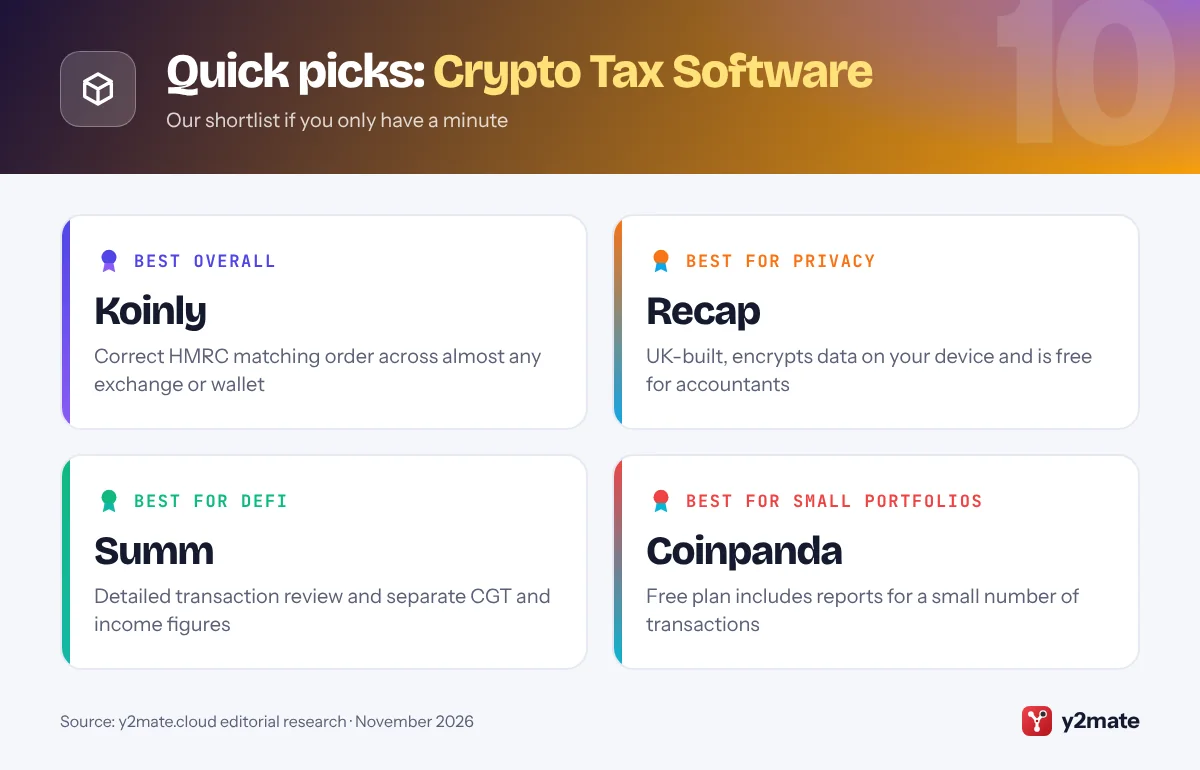
- Koinly, Recap and Summ are the strongest crypto tax software choices for UK investors in 2026, and all three apply HMRC's share pooling rules.
- HMRC treats most cryptoassets held as investments as subject to Capital Gains Tax, so selling, swapping, spending or giving them away is usually a disposal, while staking and mining rewards are usually income.
- HMRC matches a disposal with same-day purchases first, then purchases in the following 30 days, and only then with the Section 104 pool, which is why simple spreadsheets often get UK crypto gains wrong.
- Since the 2024 to 2025 tax year, the SA108 capital gains pages of the Self Assessment return have had a separate section for cryptoasset disposals.
- Since 1 January 2026, UK crypto platforms have collected users' details under the OECD Crypto-Asset Reporting Framework, with the first reports due to HMRC by 31 May 2027.
The best crypto tax software in the UK in 2026 is Koinly for a London-based all-rounder that applies HMRC’s pooling rules across almost any exchange or wallet, Recap for a UK-built, privacy-first calculator that accountants can use free, and Summ for detailed DeFi reconciliation. CoinTracker, CoinLedger, Blockpit, Divly, CoinTracking, Coinpanda and Awaken Tax complete the list. Each produces a capital gains report built around HMRC’s rules, and most let you import your history and check the results before paying.
Some plain definitions first. HMRC does not treat crypto as money. Most people hold cryptoassets as personal investments, so Capital Gains Tax applies when they make a disposal: selling for pounds, swapping one token for another, spending crypto or giving it away, although gifts to a spouse or civil partner are treated differently. Your gain is what you received minus your allowable costs, such as what you paid and certain fees. Tokens received from staking, mining or as payment are usually taxed as income instead.
What makes UK crypto tax hard is share pooling. HMRC matches each disposal first with tokens of the same type bought on the same day, then with tokens bought in the following 30 days (the bed and breakfasting rule), and only then with the Section 104 pool, which holds the rest at an average cost. Doing this by hand across several platforms is error-prone. This article is general information, not tax advice; for complex affairs, speak to a chartered tax adviser or an accountant who understands crypto.
How we ranked this list
We compared publicly documented information only: whether each tool applies HMRC’s same-day, 30-day and Section 104 matching rules, what its UK report provides for the SA108 capital gains pages and for income, how its exchange, wallet and blockchain integrations are described, its handling of DeFi and NFTs, its features for accountants, and whether a free plan exists. We gave extra weight to UK-based providers and privacy features.
We did not carry out hands-on testing and do not quote prices or plan limits, which change often. Accointing is not listed separately because Blockpit bought it in 2023 and invited its users to move across. Check each provider’s current terms before you sign up.

The Top 10 Crypto Tax Software
1. Koinly
Best for: a London-based all-rounder with HMRC pooling
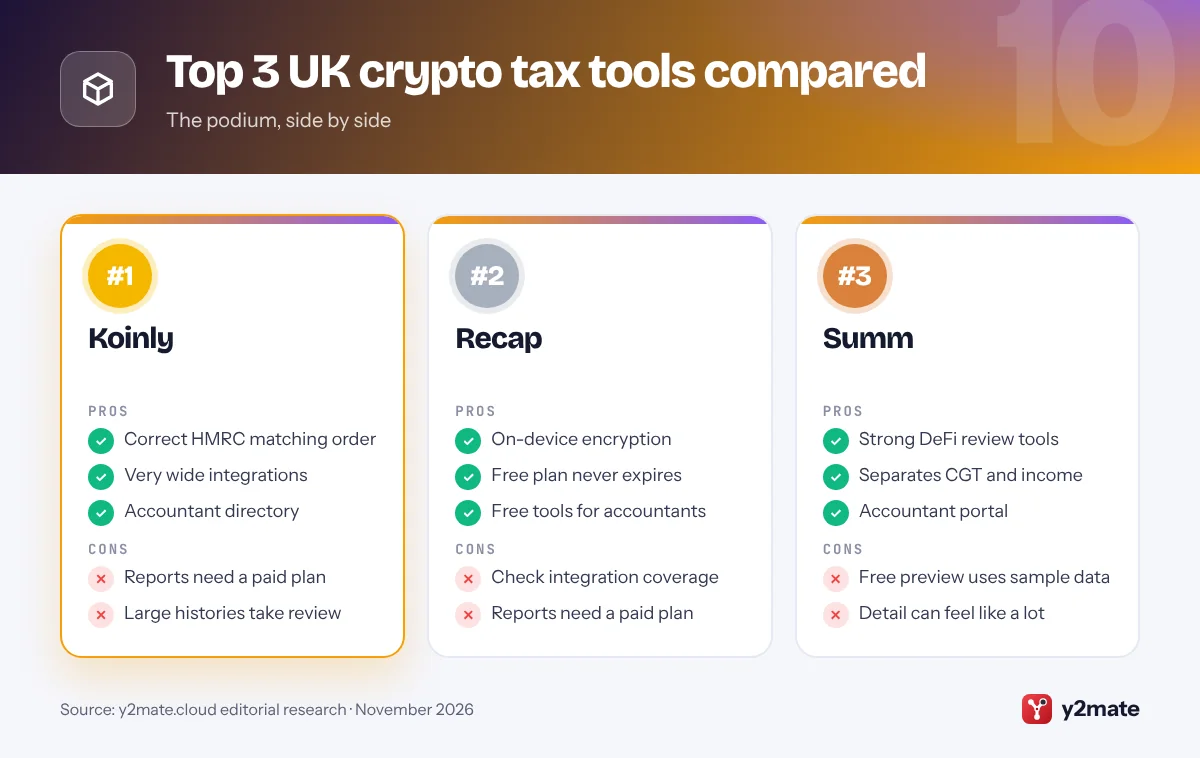
Koinly, headquartered in London, is the best all-round crypto tax software for UK investors. It applies HMRC’s matching rules in the right order, same-day first, then the 30-day bed and breakfasting rule, then the Section 104 pool, and works out your gains in pounds across every exchange, wallet and blockchain you connect. Imports run through API connections, CSV files or public wallet addresses, and Koinly matches transfers between your own accounts so they are not mistaken for disposals.
Its UK report sets out the figures for the cryptoasset section of the SA108 capital gains pages, plus income such as staking rewards for the main return. Disposals matched under the same-day or 30-day rules show their acquisition date, while the rest come from the pool’s average cost, as HMRC expects.
You can import and preview your gains free, but downloading reports needs a paid plan. Koinly also lists accountants who use the software, useful if you want a professional to check your figures. If you want one tool that handles almost any mix of UK and overseas platforms, Koinly is the safe choice.
Official site: Koinly
- Correct HMRC matching order
- Very wide integrations
- Accountant directory
- Reports need a paid plan
- Large histories take review
2. Recap
Best for: privacy-first, UK-built tax reports
Recap is a London-based crypto tax calculator built specifically for UK rules. It was set up to handle HMRC’s pooling rules with privacy in mind, and that focus still shows. Recap says your data is encrypted on your device before it leaves the browser, so the company itself cannot see your transactions, a real difference if you dislike handing a full financial history to a third party.
Its reports apply Section 104 pooling with the same-day and 30-day matching rules and include a detailed Capital Gains Tax report alongside income. The free plan never expires: you can import transactions, track your portfolio, preview gains and income, and share data with your accountant, paying only to download tax reports. Accountants can use Recap’s professional tools free, with a double opt-in to link each client.
Check that your exchanges and wallets are on Recap’s integrations list, or can be imported by CSV, before you commit. If privacy and a UK-first approach matter most to you, Recap is the standout choice, and accountancy firm Crunch uses it for clients who want their return filed for them.
Official site: Recap
- On-device encryption
- Free plan never expires
- Free tools for accountants
- Check integration coverage
- Reports need a paid plan
3. Summ
Best for: DeFi users and detailed reconciliation
Summ, called Crypto Tax Calculator until October 2025, is a Sydney-based company with full UK support. Its calculations follow HMRC’s rules, matching disposals with the same-day and 30-day rules before the Section 104 pool, with no option to cherry-pick individual lots. Its UK reports separate capital gains for the SA108 pages from income such as staking and mining rewards for the main SA100 return.
Summ is strongest when your activity is complicated. It imports from a very wide range of blockchains, wallets and exchanges, and its review tools let you check and edit each transaction, which matters when one DeFi action creates several entries. That will matter more as HMRC’s draft rules for crypto loans and liquidity pools, due from 6 April 2027, change how some DeFi transactions are treated.
Accountants get a client management portal, and a free account lets you import data and explore your transactions, though real reports need a paid plan and the free preview uses sample figures. If you are active in DeFi and want a tool your accountant can work in too, Summ is a strong pick.
Official site: Summ
- Strong DeFi review tools
- Separates CGT and income
- Accountant portal
- Free preview uses sample data
- Detail can feel like a lot
4. CoinTracker
Best for: a polished app for year-round tracking
CoinTracker, based in San Francisco, offers full UK support alongside its larger US business. Its UK calculations match each disposal with same-day acquisitions, then acquisitions in the following 30 days, and only then the Section 104 pool. It keeps one pool for each type of cryptoasset across all your wallets and exchanges, rather than one per platform, because HMRC looks at what you own, not where it sits. The result is an HMRC Capital Gains Tax summary for the SA108 pages.
CoinTracker’s web and mobile apps are designed for watching a portfolio all year, not just at tax time, and it connects to exchanges and wallets by API or public address. If you use an accountant, you can add them as a tax professional so they can view and edit your account, and remove that access later.
The free plan covers tracking and a preview, but reports need a paid plan. Some of its guides and filing integrations are US-focused, so follow the UK-specific help. For a clean app that applies UK pooling properly, CoinTracker is a solid option.
Official site: CoinTracker
- One pool per token, all wallets
- Year-round portfolio app
- Tax professional access
- Much of its help is US-focused
- Reports need a paid plan
5. CoinLedger
Best for: a simple path to Self Assessment figures
CoinLedger is a US company with a dedicated UK product that applies HMRC’s shared pool method. It tracks cost basis across transfers between your own wallets and exchanges, applies the pooling rules and produces the figures for the SA108 capital gains pages, along with an income report for staking rewards and similar receipts.
Its strength is a clear, guided workflow. You import your accounts, and CoinLedger highlights anything that looks incomplete, such as tokens sold without a purchase record, so you can fix gaps before they distort your gains. Importing transactions and viewing your net gains and losses is free; you pay when you want the full report. You can also invite your accountant to access your reports directly.
CoinLedger’s UK guides explain wider changes too, such as UK platforms collecting user details under the Crypto-Asset Reporting Framework from 2026, which means HMRC will soon see far more of your activity. It prepares reports rather than filing for you. If you want a straightforward route from exchange exports to the numbers for your return, CoinLedger is easy to recommend.
Official site: CoinLedger
- Clear guided workflow
- Free gains and losses preview
- Invite your accountant
- US company, UK is one market
- Prepares reports, does not file
6. Blockpit
Best for: UK investors with EU links and expert help
Blockpit is an Austrian crypto tax platform that bought rival Accointing in 2023 and invited Accointing users to move their data across. Its UK reports use a UK-specific shared pool method, applying the same-day rule, the 30-day rule and then the Section 104 pool, and treat transaction fees as part of your allowable costs.
Each report lists the timestamp, amount, asset, cost and fee for every transaction in the tax year, along with your balances and realised gains and losses, which makes it easy for an accountant or HMRC to follow your workings. Blockpit integrates with a wide range of exchanges, wallets and blockchains. Portfolio tracking is free, and you pay per tax year when you want a report. If you would rather not do it yourself, its paid expert service can prepare the report for you.
Because Blockpit grew up in German-speaking Europe, it is a natural fit if you have lived or invested in the EU as well as the UK. If you want one platform that understands HMRC pooling and European rules, and the option of expert help, Blockpit is worth considering.
Official site: Blockpit
- Fees added to allowable costs
- Paid expert service
- UK and EU country reports
- Reports charged per tax year
- Expert service costs extra
7. Divly
Best for: SA108-ready reports with clear instructions
Divly is a Swedish crypto tax tool whose UK report is designed around HMRC’s Cryptoassets Manual. The report covers the SA108 capital gains summary and other income, and it includes a full transaction history and an export of your Section 104 pool holdings, useful evidence if HMRC ever asks how you reached your figures. Each localised report comes with instructions on where the numbers go and a link to a filing guide.
You can import your exchanges and wallets and review your results before paying. Payment is per tax year, and once you have paid you can regenerate that year’s report as often as you like, handy if you find a missing exchange after your first draft. Divly also runs a professional tax suite for accountants.
Some of Divly’s UK guide articles have not kept pace with its software and still quote out-of-date allowances, so check current figures on GOV.UK. If you want a clear, well-documented report that maps neatly onto the Self Assessment pages, Divly is a good fit.
Official site: Divly
- Section 104 pool export
- Step-by-step filing notes
- Regenerate reports freely
- Some UK guides are dated
- Payment per tax year
8. CoinTracking
Best for: experienced traders who want deep analysis
CoinTracking is one of the longest-running crypto portfolio and tax tools, and it remains popular with active traders who want detail. For UK users, it automatically applies the same-day, 30-day and Section 104 pooling rules that HMRC requires, rather than first-in, first-out or other methods that HMRC does not allow for individuals.
Beyond the tax report, CoinTracking offers analysis of realised and unrealised gains, income, fees and closing positions, and you can adjust settings in detail. That depth suits experienced investors and accountants, and there are dedicated plans for businesses and tax professionals, but beginners may find the interface busy.
The free account lets you view a portfolio, while importing new transactions and downloading tax reports requires a paid plan. Paid plans cover every tax year without extra charges, which helps if you are catching up on earlier years; for past years you have not reported, HMRC’s cryptoasset disclosure service is the route to put things right. If you have a long trading history and want granular control, CoinTracking delivers it.
Official site: CoinTracking
- Automatic UK pooling rules
- Very detailed analysis
- All tax years on paid plans
- Busy interface for beginners
- Free plan only views portfolio
9. Coinpanda
Best for: small portfolios that need a quick report
Coinpanda, an Oslo-based company, offers a UK Share Pool calculation method that includes the same-day and 30-day rules. It keeps a separate pool for each cryptocurrency and updates the pooled cost automatically with every transaction, and when you sell only part of a holding it takes the cost as the right proportion of the pool, as HMRC’s worked examples show.
The result is an HMRC-format report covering gains and income. Coinpanda’s free plan includes tax reports for a small number of transactions, so someone with only a handful of trades may not need to pay at all, while paid plans cover larger histories. It supports DeFi, NFTs and staking, and invites accountants to use its crypto tax suite for client work.
Some of Coinpanda’s UK guide pages are older, so rely on GOV.UK for current rates and allowances rather than its articles. Check that your exchanges are on its integrations list before you start. If your crypto history is modest and you want a quick, correctly pooled report, Coinpanda is a sensible place to begin.
Official site: Coinpanda
- Free reports for tiny histories
- Automatic share pooling
- Accountant suite
- Some UK guides are dated
- Check integration coverage
10. Awaken Tax
Best for: on-chain DeFi and NFT activity
Awaken Tax, a San Francisco start-up, focuses on people whose crypto lives in self-custody wallets. It supports DeFi, NFTs and many newer blockchains, and lets you label transactions such as liquidity deposits, bridges and NFT mints quickly. For UK users, it says its calculations convert everything to pounds and apply HMRC’s pooling and matching rules, and it produces HMRC capital gains reports.
Its pricing model is easy to follow: you can upload wallets and see your tax summary free, and pay only when you download reports, with a free tier for smaller histories. A full-service option is available if you want its team to prepare your reports.
Awaken publishes less UK-specific guidance than UK specialists such as Recap, and it says some niche DeFi protocols have limited support, so check unusual transactions carefully. DeFi users should also watch HMRC’s planned changes for crypto loans and liquidity pools from April 2027 and make sure their software keeps up. If most of your activity is on-chain and your current tool struggles with it, Awaken is worth a look.
Official site: Awaken Tax
- Built for DeFi and NFTs
- Free to upload and preview
- Full-service option
- Less UK-specific guidance
- Some niche protocols limited
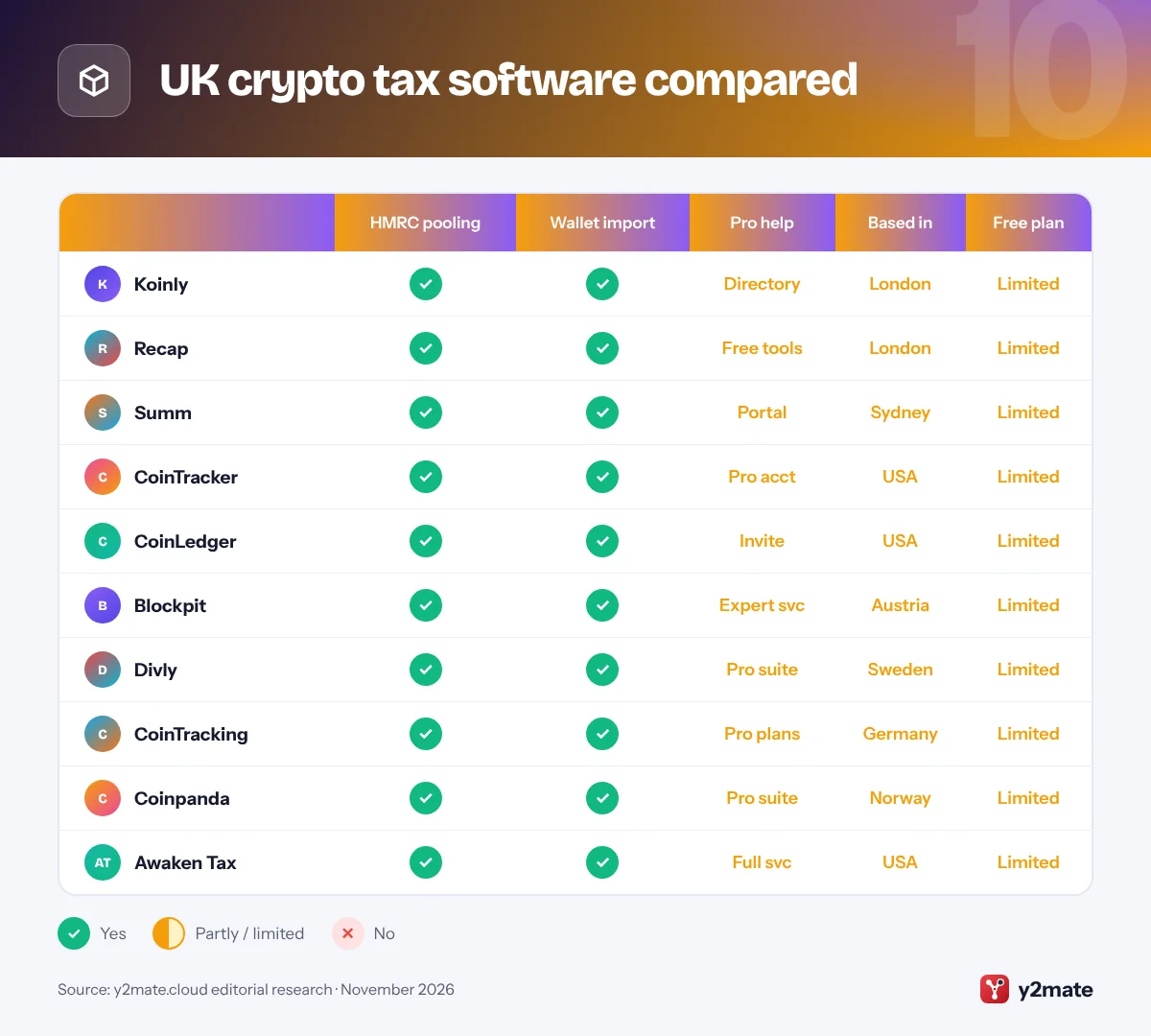
UK crypto tax software compared
How to choose crypto tax software in the UK
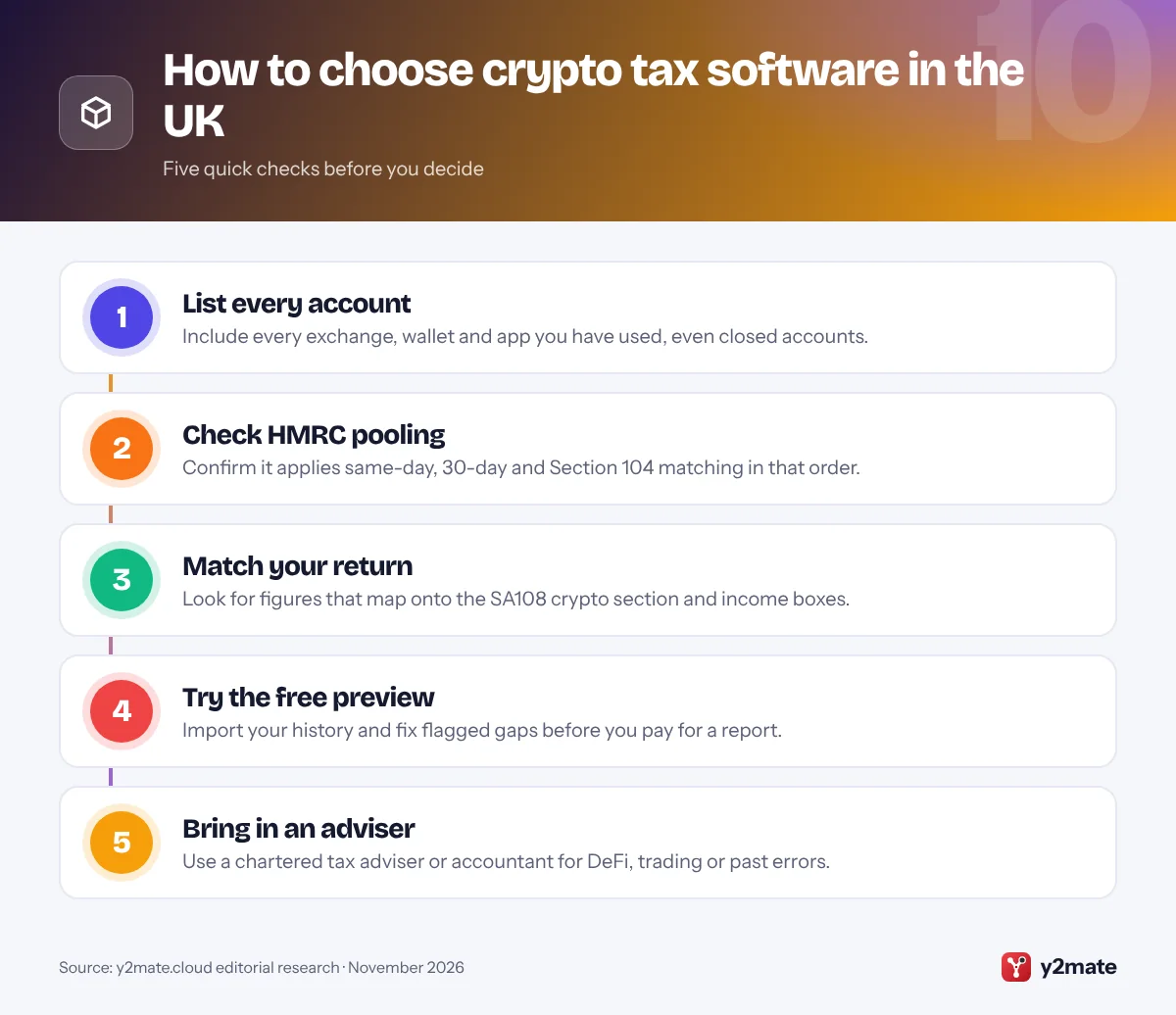
Start with the matching rules. HMRC’s Cryptoassets Manual sets out the same-day rule, the 30-day rule and the Section 104 pool, and any tool you use must apply them in that order, with one pool per token across all your wallets and exchanges. First-in, first-out and similar methods used in other countries are not allowed for UK individuals.
Know what HMRC already sees
- Self Assessment: since the 2024 to 2025 tax year, the SA108 capital gains pages have had a separate cryptoasset section, so your software should give you disposals, proceeds, costs, gains and losses ready to enter.
- Platform reporting: under the Crypto-Asset Reporting Framework, UK platforms have collected details such as your National Insurance number since 1 January 2026, and the first reports reach HMRC by 31 May 2027.
- Earlier years: if you missed tax in past years, HMRC’s cryptoasset disclosure service lets you put it right before HMRC contacts you.
Watch the DeFi changes
HMRC has published draft legislation that would treat many crypto loans and liquidity pool deposits as no gain, no loss from 6 April 2027, so gains arise only on a later economic disposal. If you use DeFi, choose software that keeps pace with these rules and lets you correct its labels. Treat this guide as general information rather than tax advice.
Frequently asked questions
What is the best crypto tax software in the UK?
Koinly is the best all-rounder for most UK investors because it applies HMRC's same-day, 30-day and Section 104 rules across almost any exchange or wallet. Recap is the best choice if privacy matters, as it is UK-built and encrypts data on your device, and Summ is strongest for DeFi. Most tools let you import and preview free before paying for a report.
How is crypto taxed in the UK?
For most individuals, crypto is an investment subject to Capital Gains Tax. Selling it, swapping it for another token, spending it or giving it away is usually a disposal, and you report gains and losses on the SA108 pages of your Self Assessment return. Crypto received from staking, mining or as payment for work is usually taxed as income instead.
What is the 30-day rule for crypto in the UK?
The 30-day rule, often called bed and breakfasting, means that if you sell a token and buy the same type of token back within the following 30 days, the sale is matched with that new purchase rather than with your Section 104 pool. It stops people selling and quickly rebuying simply to create a gain or loss, and crypto tax software applies it automatically.
Does HMRC know about my crypto?
Increasingly, yes. Since 1 January 2026, UK crypto platforms have had to collect users' details, such as National Insurance numbers, and report their transactions to HMRC, with the first reports due by 31 May 2027. If you have undeclared gains or income from earlier years, HMRC's cryptoasset disclosure service lets you correct them.
Do I need an accountant for crypto tax in the UK?
Not always. If you only bought and sold on one or two platforms, crypto tax software can produce the figures you need for Self Assessment. An accountant or chartered tax adviser is worth it if you use DeFi, trade frequently, receive crypto through a business or need to correct past years. Recap, Summ, CoinTracker and Divly all offer tools that accountants can use with you.
Final verdict
The best crypto tax software in the UK starts with Koinly for an all-rounder that gets HMRC’s matching order right, Recap for privacy and a UK-first approach, and Summ for complex DeFi activity. CoinTracker and CoinLedger offer polished, guided workflows, Blockpit suits investors with EU links, Divly gives clear SA108-ready reports, and CoinTracking, Coinpanda and Awaken Tax cover more specific needs.
Whichever you choose, import every account, check the pooled results, keep your records and file on time. With platforms now reporting to HMRC, it pays to get your crypto figures right.
Sources and further reading
- HMRC Cryptoassets Manual on pooling: HMRC's own explanation of the same-day rule, the 30-day rule and Section 104 pooling for cryptoassets, with worked examples.
- Tax when you sell cryptoassets: GOV.UK guidance on when selling, swapping, spending or giving away cryptoassets means you need to pay Capital Gains Tax.
- SA108 capital gains summary: The Self Assessment capital gains pages and notes, including the separate section for reporting cryptoasset disposals.
- Details crypto platforms will ask for: HMRC explains the personal details UK crypto platforms must now collect from users and report to HMRC.
- Tell HMRC about unpaid crypto tax: How to use HMRC's disclosure service to declare unpaid tax on cryptoasset gains or income from earlier years.

Leave a Reply