

- CoinTracker, Koinly and CoinLedger are the strongest all-round crypto tax software choices for US filers in 2026, and all three produce IRS Form 8949.
- The IRS treats crypto as property, so selling, swapping or spending it is a disposal reported on Form 8949 and Schedule D, while staking and mining rewards are ordinary income.
- Brokers sent the first Forms 1099-DA in early 2026 showing gross proceeds for 2025 sales, and cost basis reporting applies to covered assets sold from 2026 onward.
- Form 1099-DA does not show basis for crypto moved in from other wallets or exchanges, so you still need your own records or crypto tax software to fill the gaps.
- Buying crypto with dollars and simply holding it does not by itself require a yes answer to the digital asset question on Form 1040.
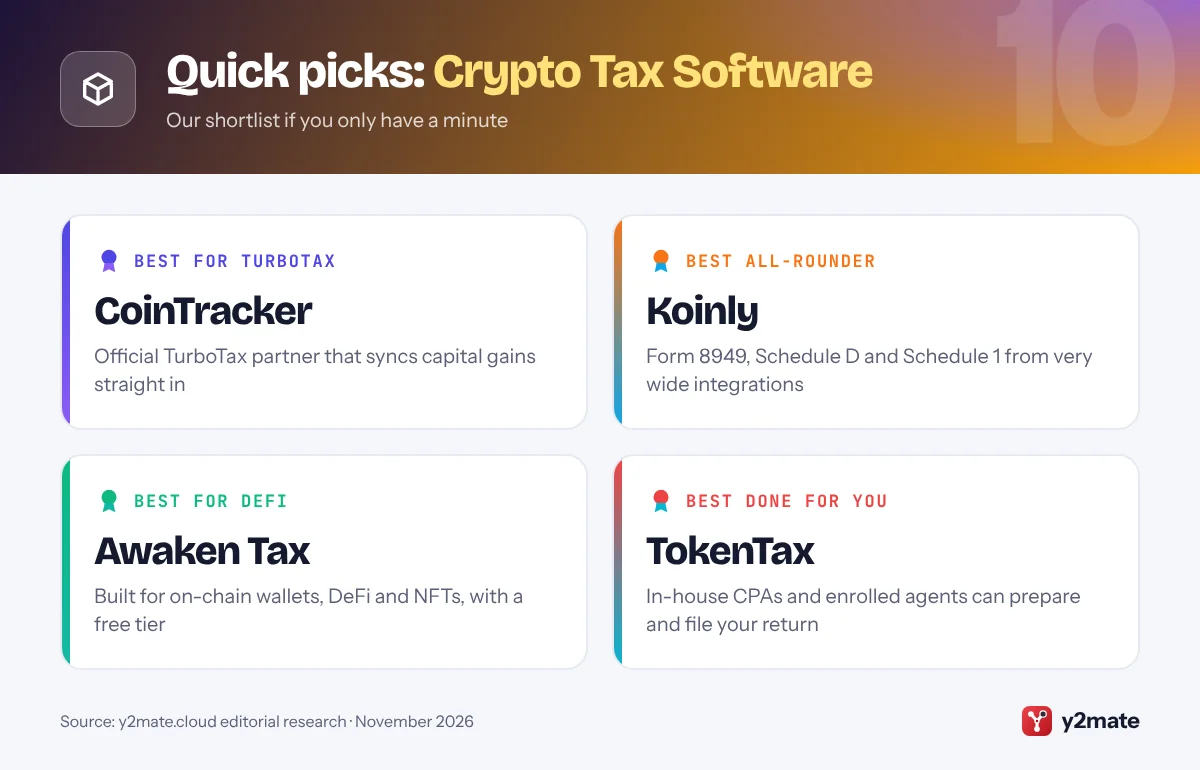
The best crypto tax software in the USA in 2026 is CoinTracker if you file with TurboTax, Koinly if your coins are spread across many exchanges and wallets, and CoinLedger if you want the simplest guided path to a finished Form 8949. Summ and Awaken Tax are strongest for DeFi, ZenLedger and TokenTax suit people who work with a CPA, and CoinTracking, Coinpanda and TurboTax Premium cover more specific needs. Most let you import your history and preview results before paying.
Some plain definitions help. The IRS treats crypto as property, not currency. Selling it, swapping one coin for another or spending it is a disposal that creates a capital gain or loss: the difference between what you received and your cost basis, which is what you paid, including fees. Disposals are listed on Form 8949 and totaled on Schedule D. Crypto you receive from staking, mining, airdrops or as payment is ordinary income, usually reported on Schedule 1, or on Schedule C if it is part of a business.
The big change is Form 1099-DA, which US brokers, including crypto exchanges, now use to report digital asset sales. Forms for 2025 sales, sent in early 2026, show gross proceeds only. For 2026 sales, brokers must also report cost basis for covered assets, generally those bought on or after January 1, 2026 and held at the same broker. Coins moved in from elsewhere and self-custody activity can still arrive with no basis, the gap crypto tax software fills. This article is general information, not tax advice; if your situation is complex, speak to a CPA or enrolled agent.
How we ranked this list
We compared publicly documented information only: which IRS forms each tool produces, such as Form 8949, Schedule D and income schedules; how it hands data to TurboTax, H&R Block, TaxAct or a CPA; how its exchange, wallet and blockchain integrations are described; its support for DeFi and NFT activity; its features for tax professionals; and whether a free plan exists. We gave extra weight to features that help you reconcile Form 1099-DA with your own records.
We did not carry out hands-on testing and do not quote prices or plan limits, which change every season. TaxBit is not included because it closed its consumer product in 2023 to focus on businesses and governments.

The Top 10 Crypto Tax Software
1. CoinTracker
Best for: TurboTax filers who want a direct import
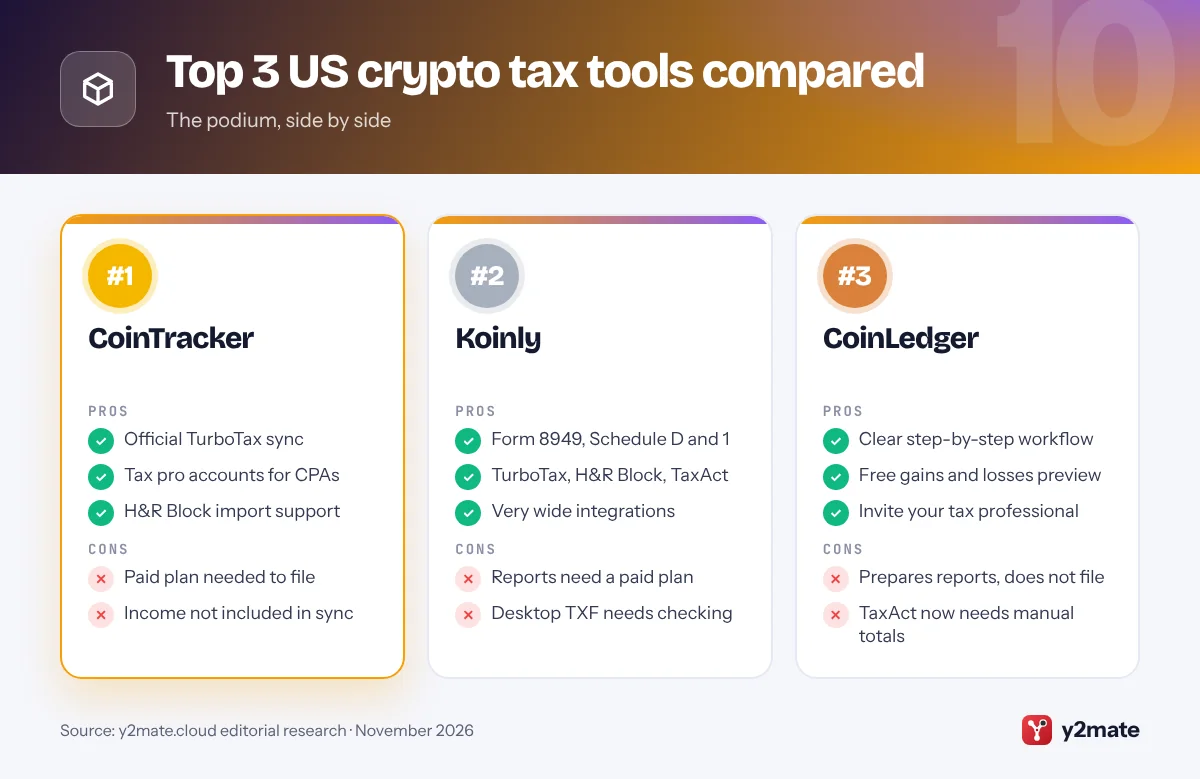
CoinTracker is the most convenient choice for Americans who file with TurboTax. As TurboTax’s official crypto tax partner, it lets paid users sync capital gains straight into TurboTax Online instead of uploading files. It also supports H&R Block imports, and you can download Form 8949 from its Tax Report Center if you file another way.
You connect exchanges and wallets through API keys or public addresses, then review anything it flags. CoinTracker advises waiting until every exchange has sent its Form 1099-DA before filing, so you can compare broker figures with your records. The TurboTax sync covers capital gains only, so staking and other income must be entered separately.
Tax professionals can use a tax pro account to view and edit a client’s transactions and reports, and clients can revoke that access at any time. The free plan covers tracking and a preview, but filing reports need a paid plan, and TurboTax caps how many transactions the sync accepts. If you file with TurboTax and want the fewest manual steps, start here.
Official site: CoinTracker
- Official TurboTax sync
- Tax pro accounts for CPAs
- H&R Block import support
- Paid plan needed to file
- Income not included in sync
2. Koinly
Best for: portfolios spread across many exchanges
Koinly is the best all-rounder for US investors whose crypto is spread across many exchanges, wallets and blockchains. Headquartered in London, it imports data through API connections, CSV files and public addresses, matches transfers between your own accounts so they are not treated as sales, and warns you about gaps such as missing purchase history, a common cause of wrong cost basis.
Its USA IRS Report bundles Form 8949, Schedule D and Schedule 1, so gains and income such as staking rewards arrive in one download. Koinly also produces a report for TurboTax Online, a TXF file for TurboTax Desktop, and PDFs for H&R Block, TaxAct or your CPA, and it runs a directory of accountants who use the software.
You can import and preview your gains free, but downloading reports needs a paid plan. Koinly notes that TurboTax Desktop users may need to edit disposals to pick the right Form 8949 box now that Form 1099-DA exists. If you want one tool that copes with almost any mix of platforms and chains, Koinly is a strong default.
Official site: Koinly
- Form 8949, Schedule D and 1
- TurboTax, H&R Block, TaxAct
- Very wide integrations
- Reports need a paid plan
- Desktop TXF needs checking
3. CoinLedger
Best for: first-time filers who want a guided workflow
CoinLedger is built to make crypto taxes approachable for everyday US investors. It walks you through importing exchanges and wallets, highlights transactions that need attention and produces Form 8949 plus files for the main consumer tax programs. Its guides cover TurboTax Online and Desktop, H&R Block and TaxSlayer, and very active traders can get a consolidated Form 8949 by asset type.
It also tracks changes to those programs closely, warning that TaxAct stopped accepting crypto gain and loss CSV imports in 2026, so TaxAct users now enter Form 8949 totals, and that TurboTax Online users should upload its TurboTax PDF rather than Form 8949 itself.
Importing transactions and viewing net gains and losses is free; you pay for the full report. The Invite My Tax Professional option shares reports with your accountant. CoinLedger supports DeFi, NFTs and staking income, but it prepares reports rather than filing for you. If you are doing crypto taxes yourself for the first time, its clear workflow makes it an easy place to start.
Official site: CoinLedger
- Clear step-by-step workflow
- Free gains and losses preview
- Invite your tax professional
- Prepares reports, does not file
- TaxAct now needs manual totals
4. Summ
Best for: DeFi users and accountant collaboration
Summ, called Crypto Tax Calculator until October 2025, is a Sydney-based company with full support for US filers. Its software fills out Form 8949 and Schedule D, separates income such as staking rewards and airdrops for Schedule 1, and exports to TurboTax or packages everything for your accountant. It also supports Form 1099-DA reporting, so you can compare broker figures with what you actually paid.
Summ is at its best when your activity is complicated. It imports from a wide range of blockchains, wallets and exchanges, and its review screens let you check and edit every transaction, which matters when one DeFi action creates several entries.
Accountants get a free client management portal for inviting clients, reviewing transactions together and connecting to Xero and QuickBooks. A free personal account lets you import data, edit transactions and see a portfolio summary, but real reports need a paid plan, and the free preview uses sample figures. If you are active in DeFi and want a tool your CPA can work in alongside you, Summ is an excellent pick.
Official site: Summ
- Strong DeFi transaction review
- Free accountant portal
- Form 1099-DA reporting
- Free preview uses sample data
- Detail can feel like a lot
5. ZenLedger
Best for: CPAs and investors who want pro-ready forms
ZenLedger is a US-focused crypto tax platform that produces Form 8949, Schedule D and Schedule 1 for each tax year, so capital gains and income such as staking or mining rewards land in the right places. It describes its output as CPA-ready, and its Tax Professional Suite lets accountants manage crypto clients from one dashboard.
For do-it-yourself filers, ZenLedger works alongside TurboTax or TaxAct rather than replacing them, and its help pages say plainly that it is not full filing software. It updates instructions as those programs change: for tax year 2025, it says TurboTax Online no longer accepts its CSV files, so you upload the PDF from its TurboTax download instead.
ZenLedger offers a free plan for people with very few transactions, plus paid tiers with tax-loss harvesting tools that show where selling at a loss could offset gains. It handles DeFi and NFT activity alongside exchange trades. If you work with a CPA, or you are a tax professional yourself, ZenLedger’s pro tools and complete form set make it a sensible choice.
Official site: ZenLedger
- Form 8949, Schedule D and 1
- Tax Professional Suite
- Free plan for tiny histories
- Not full filing software
- TurboTax route has changed
6. TokenTax
Best for: complex portfolios that need a CPA to file
TokenTax combines crypto tax software with its own accounting team. The software reconciles exchange and wallet data and produces a reconciled Form 8949 and Schedule D that you can export to TurboTax, H&R Block or TaxAct. If you would rather not file yourself, its in-house CPAs and enrolled agents can prepare and file your full return as an add-on service.
That hybrid model suits messy histories: years of trading across closed exchanges, heavy DeFi use or income from several sources. Higher tiers add a tax-loss harvesting dashboard and help with harder imports such as over-the-counter trades, and its top service includes expert consultations and support if the IRS asks questions.
TokenTax has no free plan for its tax software; its only free tool is a calculator that estimates the tax on a single sale. It also offers practical tips, such as answering no when TurboTax Online asks whether an uploaded TokenTax Form 8949 is a Form 1099-DA. If you want professionals to take responsibility for a complicated crypto return, TokenTax is the most complete option here.
Official site: TokenTax
- In-house CPAs and EAs
- Exports to TurboTax and others
- Help with IRS questions
- No free plan
- Best features cost the most
7. Awaken Tax
Best for: heavy DeFi and NFT users
Awaken Tax, a San Francisco start-up founded in 2022, is built for people whose crypto lives on-chain. It focuses on DeFi, NFTs and newer blockchains, and lets you label transactions such as liquidity deposits, bridges and NFT mints quickly. For US users it generates Form 8949 and Schedule D, plus a TurboTax-ready report.
Its pricing model is easy to follow: you can upload wallets and see your tax summary free, and pay only when you download reports, with a free tier for smaller histories that includes the TurboTax file. Plans do not auto-renew. If you want help, a full-service option has its team prepare your crypto tax reports.
Awaken says some niche DeFi protocols still have limited support, so review unusual transactions before you file. Because self-custody wallets never receive a Form 1099-DA, on-chain users depend on their own records more than anyone. If most of your activity happens in self-custody wallets rather than on exchanges, Awaken is worth a close look.
Official site: Awaken Tax
- Built for DeFi and NFTs
- Free tier includes TurboTax file
- Full-service option
- Some niche protocols limited
- Younger than most rivals
8. CoinTracking
Best for: detailed reports and long trading histories
CoinTracking is one of the longest-running crypto tax tools, popular with active traders who want detailed analysis as well as tax reports. It imports data from exchanges and blockchains by API or CSV, then offers reports covering realized and unrealized gains, income, fees and closing positions. For US users, it produces Form 8949 and exports that work with TurboTax.
Its depth is both strength and weakness. You can drill into almost any figure and adjust settings in detail, which suits experienced investors and accountants, and there are dedicated plans for businesses and tax professionals. Beginners may find the interface busier than simpler apps such as CoinLedger.
The free account lets you view a portfolio, but importing new transactions and downloading tax reports requires a paid plan. Paid plans cover every tax year without extra charges, which helps if you are catching up on several years of unreported activity, worth fixing now that brokers report to the IRS. If you have a long trading history and want granular control, CoinTracking is a capable choice.
Official site: CoinTracking
- Very detailed reports
- All tax years on paid plans
- Plans for tax professionals
- Busy interface for beginners
- Free plan only views portfolio
9. Coinpanda
Best for: getting Form 1099-DA checkboxes right
Coinpanda produces IRS Form 8949, Schedule D and Schedule 1 for US users, and it moved quickly to handle the new broker reporting. Its 2026 update added a US Compliance Hub where you mark which brokers sent you a Form 1099-DA, so the forms it generates use the correct checkboxes. That matters, because Form 8949 separates transactions reported on Form 1099-DA, with or without basis, from those that were not.
Its TurboTax integration now exports a zip of PDF files for TurboTax Online, which no longer accepts crypto CSV uploads. Coinpanda supports DeFi, NFTs and staking, and invites accountants and CPAs to use its crypto tax suite for client work.
The free plan stands out because it includes tax reports for a small number of transactions, so someone with only a handful of trades may not need to pay. Check that your exchanges and wallets are on its integrations list before you start. If your crypto history is modest and you want clean Form 1099-DA matching without fuss, Coinpanda is a sensible pick.
Official site: Coinpanda
- Form 1099-DA Compliance Hub
- Free reports for tiny histories
- Form 8949, Schedule D and 1
- Check integration coverage
- TurboTax via PDF upload only
10. TurboTax Premium
Best for: simple portfolios on one or two exchanges
TurboTax Premium is not a dedicated crypto tax tool, but for some Americans it is enough. Intuit’s online Premium tier covers investment income, including crypto sales, Form 1099-DA and Form 1099-B, and can import crypto transactions from supported platforms or sync from CoinTracker. If you only traded on a couple of US exchanges that send complete 1099-DAs, you may not need anything else.
The limits show up with self-custody wallets, DeFi, NFTs and transfers between platforms. Forms for 2025 sales show gross proceeds only, and later forms show basis only for covered assets, so coins moved in from elsewhere can appear with missing basis. TurboTax will not rebuild that history; a dedicated tool or your own records must fill the gap. Simple Form 1040 returns, the kind its free edition handles, do not cover crypto sales.
TurboTax Expert Assist Premium adds help from a tax expert and a final review before you file. Choose TurboTax Premium if your crypto activity is simple and your 1099-DAs are complete, and pair it with a tool above if not.
Official site: TurboTax Premium
- Files the whole return
- Imports Form 1099-DA
- Expert review option
- Cannot rebuild missing basis
- Weak for DeFi and wallets
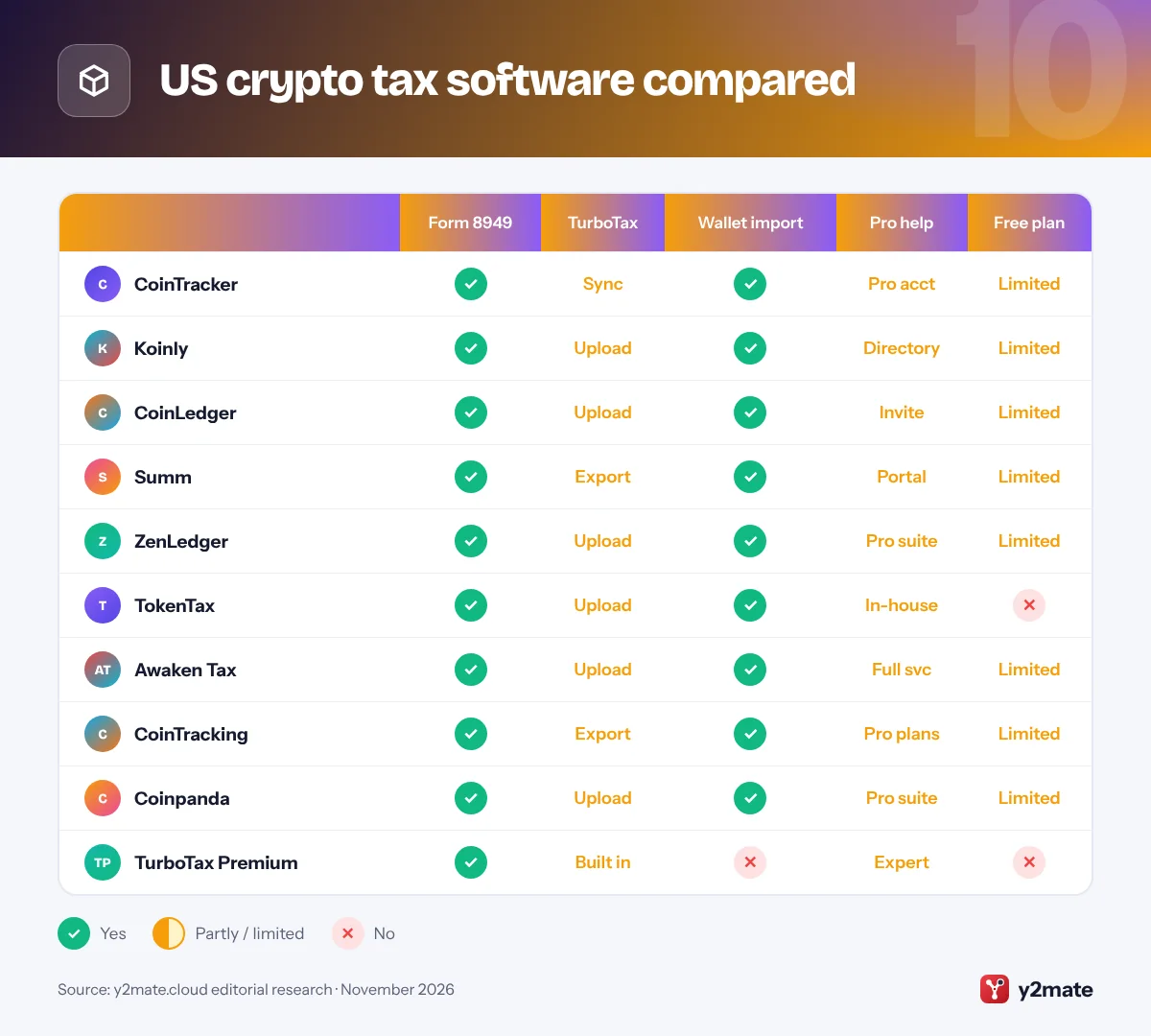
US crypto tax software compared
How to choose crypto tax software in the USA
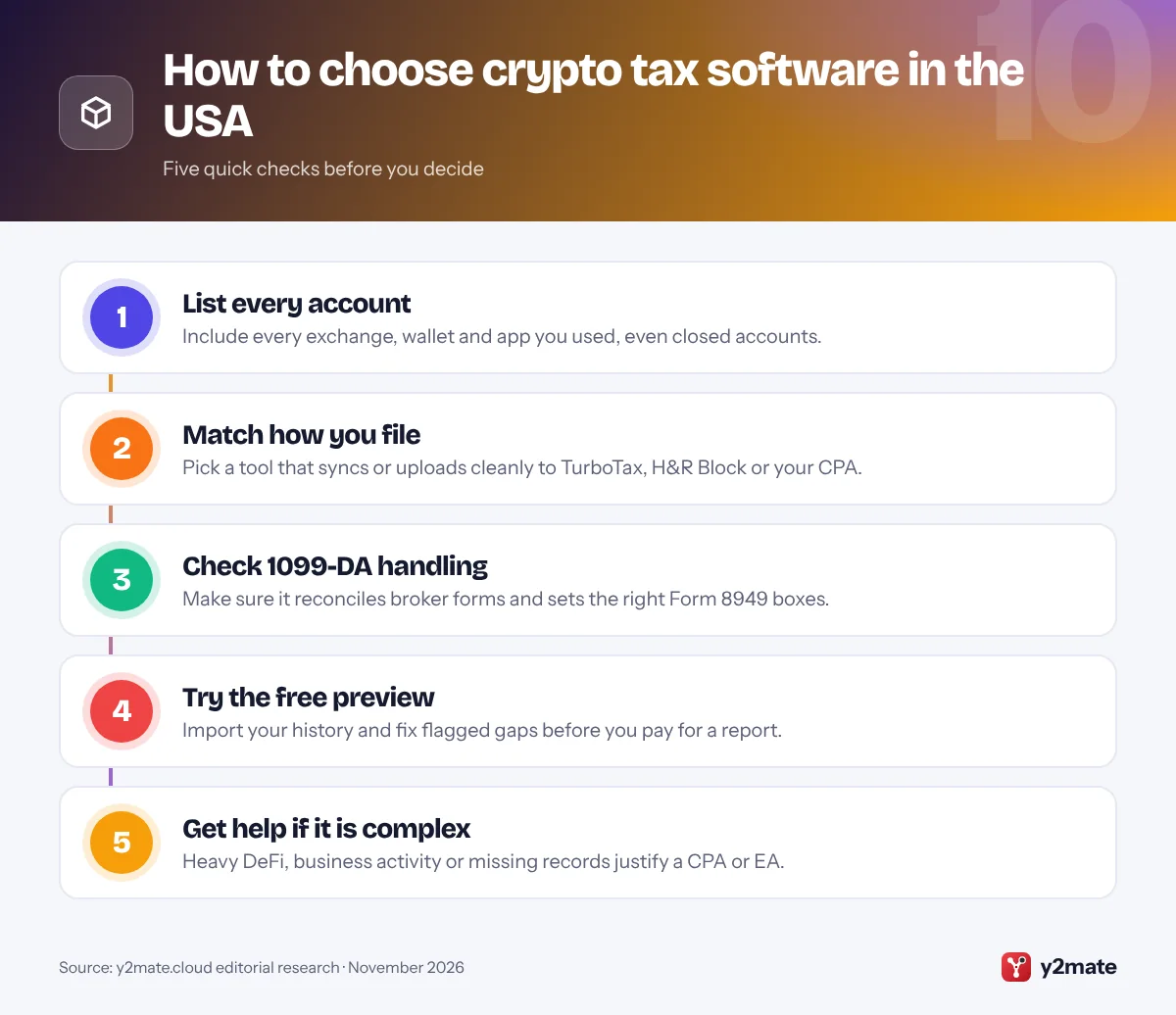
Start with how you file. If you use TurboTax, a tool with a direct sync or a well-documented upload path saves time. If a CPA or enrolled agent prepares your return, look for a professional portal or a clean Form 8949 export your preparer can work with.
Know the rules the software applies
- Short and long term: crypto held for more than a year before a disposal produces a long-term gain or loss, which is taxed differently from a short-term one.
- Wallet-by-wallet basis: since January 1, 2025, cost basis has generally had to be tracked separately for each wallet or exchange account, so set up your software the same way.
- The digital asset question: every Form 1040 asks whether you received or disposed of digital assets. Buying with dollars and holding is a no, but even paying a network fee in crypto can make it a yes.
- Wash sales: the wash sale rule is written for stocks and securities and has not been extended to crypto that is not a security, but Congress has considered bills to change that, so check the current position before planning year-end sales.
Reconcile every Form 1099-DA
Enter each Form 1099-DA you receive and compare it with your software’s figures. Where a broker shows no basis because the coins came from elsewhere, your records decide the correct number, and the right Form 8949 checkbox matters. Keep exports from every exchange you have used, including closed ones. Treat this guide as general information, not tax advice.
Frequently asked questions
What is the best crypto tax software in the USA?
For most people, CoinTracker is the best choice if you file with TurboTax, because it is TurboTax's official crypto partner and syncs capital gains directly. Koinly is the best all-rounder for many exchanges and wallets, and CoinLedger is the easiest for first-timers. If you want professionals to handle a complicated return, TokenTax pairs its software with in-house CPAs and enrolled agents.
Do I need crypto tax software if I get a Form 1099-DA?
Not always. If you only bought and sold on one or two US exchanges and every Form 1099-DA shows your cost basis, ordinary tax software may be enough. But forms for 2025 sales show gross proceeds only, and later forms leave out basis for coins transferred in from elsewhere. If you use self-custody wallets, DeFi or several platforms, crypto tax software helps you rebuild the missing basis.
How is crypto taxed in the USA?
The IRS treats crypto as property. Selling it, swapping it for another coin or spending it creates a capital gain or loss, reported on Form 8949 and Schedule D, and it is long-term if you held the crypto for more than a year. Crypto received from staking, mining, airdrops or as payment for work is ordinary income based on its value when you receive it.
Can I import my crypto taxes into TurboTax or H&R Block?
Yes. CoinTracker syncs directly with TurboTax, while Koinly, CoinLedger, ZenLedger, TokenTax, Coinpanda and others produce PDFs or files for TurboTax Online. Koinly, CoinTracker, CoinLedger and TokenTax also support H&R Block. Import methods change between tax seasons, and TurboTax Online has moved away from crypto CSV uploads, so follow your tool's current instructions and check the totals after importing.
Do I have to report crypto if I did not sell any?
If you only bought crypto with dollars and held it, there is usually no gain or loss to report, and you can generally answer no to the digital asset question on Form 1040. However, swapping one coin for another, spending crypto, or receiving staking rewards, mining income or an airdrop are all reportable, even if you never cashed out to dollars.
Final verdict
The best crypto tax software in the USA depends on how you file. CoinTracker is the smoothest route for TurboTax users, Koinly handles the widest mix of exchanges and wallets, and CoinLedger is the friendliest for first-timers. Summ and Awaken Tax lead for DeFi, ZenLedger and TokenTax suit people who work with professionals, and TurboTax Premium may be all you need for simple, exchange-only activity.
Whichever you choose, start early, import every account, compare the results with each Form 1099-DA and keep your records. For a complex return, ask a CPA or enrolled agent to review it.
Sources and further reading
- IRS digital assets guidance: The IRS overview of how digital assets are taxed, which forms to use and how to report sales, exchanges and income.
- Instructions for Form 1099-DA: Official IRS instructions explaining what brokers report on Form 1099-DA, including the phase-in of gross proceeds and cost basis.
- Answering the digital asset question: IRS examples of when to check yes or no to the digital asset question on Form 1040.
- About Form 8949: The IRS page for Form 8949, used to report sales and other disposals of capital assets, with its current instructions.
- IRS ruling on staking rewards: Revenue Ruling 2023-14, which explains when staking rewards count as taxable income and how their value is measured.

Leave a Reply