
- The Lively Jitterbug Flip3, Apple iPhone 17 and Lively Jitterbug Smart5 are the strongest all-round phones for seniors in the USA in 2026.
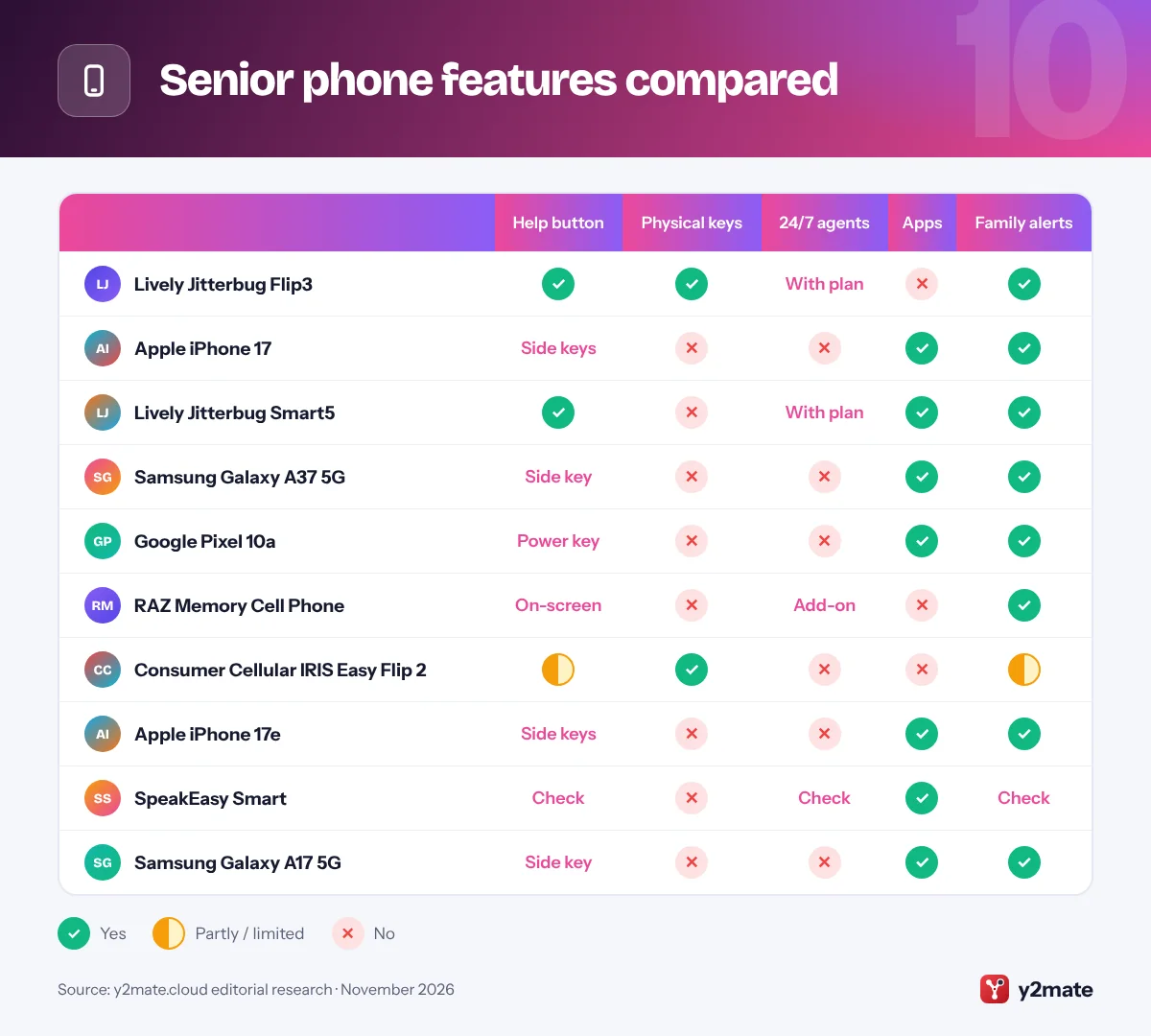
- Lively's Urgent Response button reaches trained agents around the clock with the right plan, while Emergency SOS on iPhone, Samsung and Pixel phones calls 911 and alerts chosen contacts instead of a monitoring center.
- From December 15, 2026, FCC rules mean handset makers can no longer offer phone models in the US that are not hearing aid compatible, with carriers following later.
- The big US carriers shut down their 3G networks in 2022, so an older 3G-only phone cannot make calls and should be replaced with a 4G LTE or 5G model.
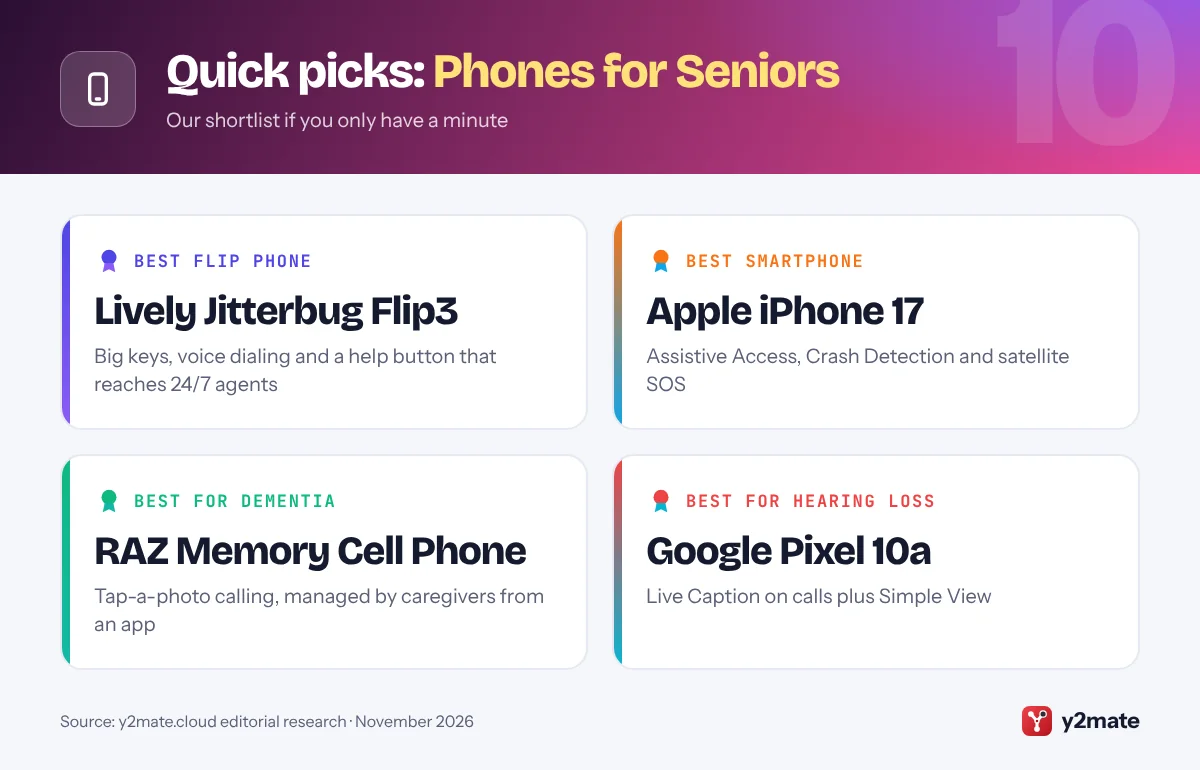
- The RAZ Memory Cell Phone, which caregivers manage from their own smartphone, is designed for people living with dementia or memory loss.
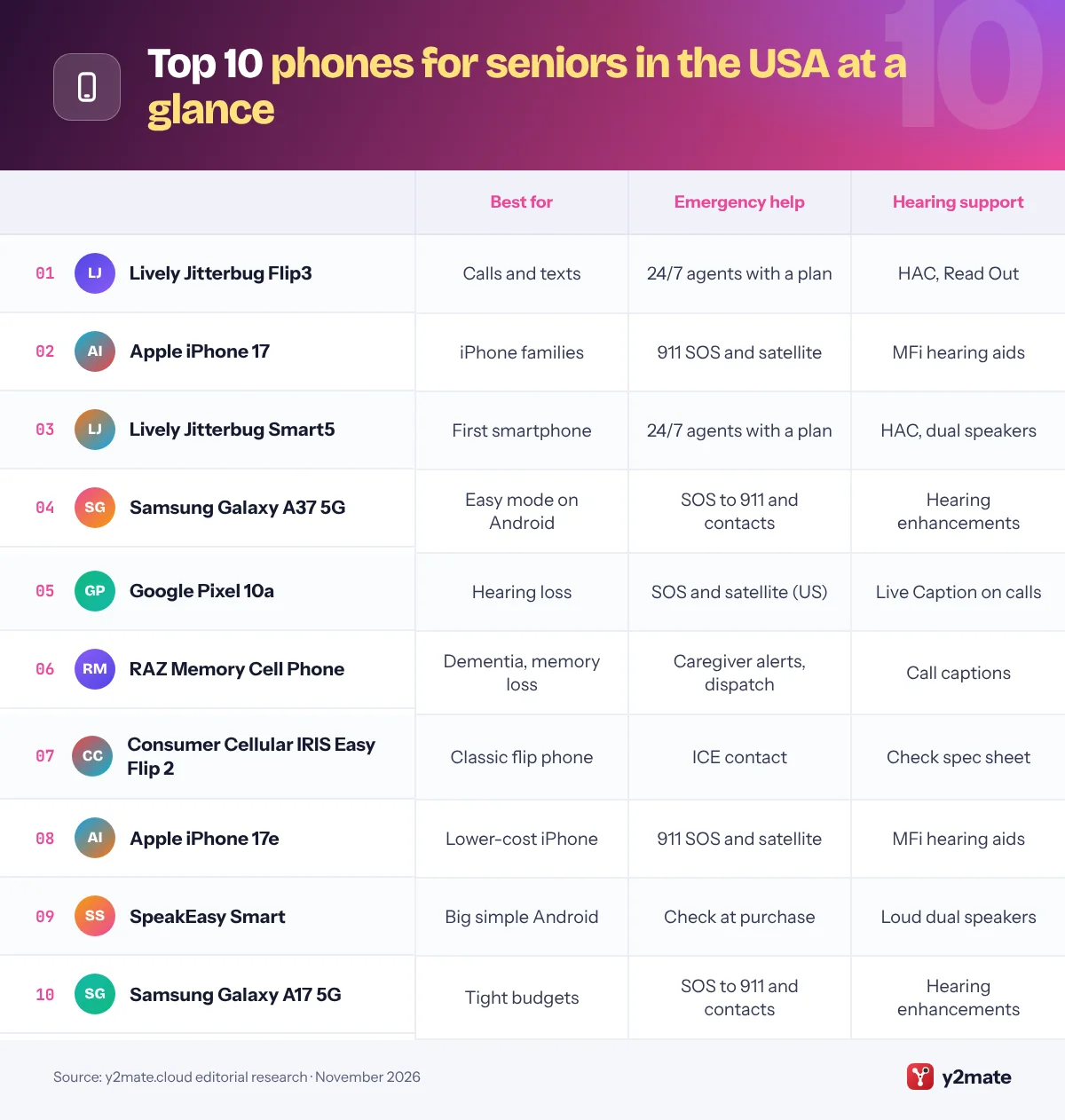
The best phones for seniors in the USA in 2026 are the Lively Jitterbug Flip3 for someone who mainly calls and texts and wants a 24/7 help button, an Apple iPhone 17 set up with Assistive Access for iPhone families, and the Jitterbug Smart5 for a first, simplified smartphone. The Samsung Galaxy A37 5G, Google Pixel 10a, RAZ Memory Cell Phone, Consumer Cellular IRIS Easy Flip 2, iPhone 17e, SpeakEasy Smart and Galaxy A17 5G complete the list, covering low vision, hearing loss, memory loss and tight budgets.
A few terms help. A senior phone is built for older users, with big buttons or icons, loud audio and often a dedicated help button. A mainstream smartphone can do the same job once you turn on a simplified layout such as Apple’s Assistive Access, Samsung’s Easy mode or Google’s Simple View. HAC means a phone is certified as hearing aid compatible under FCC rules. Finally, an SOS button either reaches a staffed response center or simply alerts family and 911, and that difference matters.
Each pick below explains who it suits, who should skip it and how family can help.
How we ranked this list
We ranked these phones on the makers’ and carriers’ published accessibility and safety features, local network compatibility (4G LTE or 5G calling now that US carriers have retired 3G, plus 911 calling), availability through US retailers and carriers, and widely reported user feedback. We did not test the phones ourselves, and we do not quote prices, ratings or battery claims.
Nokia-brand flip phones are not included because HMD, which makes them, stopped selling devices directly in the US in 2025.
The Top 10 Phones for Seniors
1. Lively Jitterbug Flip3
Best for: calls, texts and a 24/7 help button
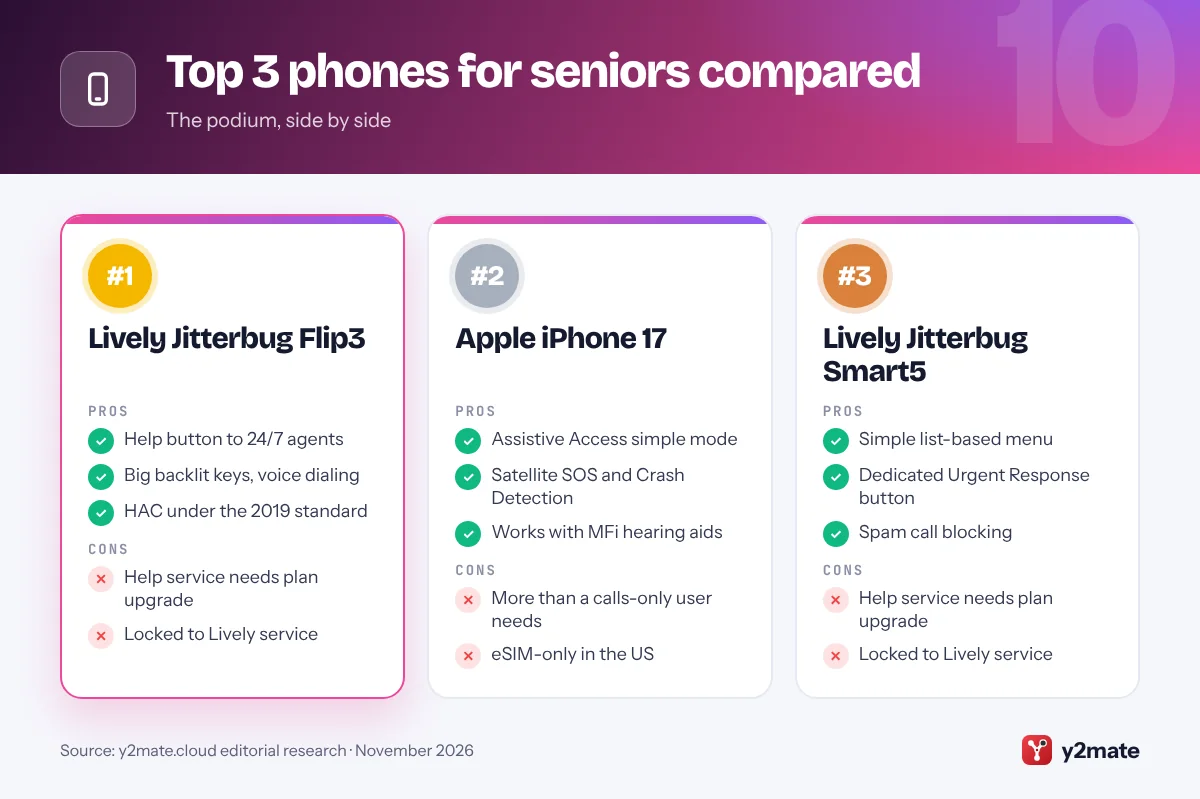
The Jitterbug Flip3 from Lively, the senior-focused carrier run by Best Buy Health, is the easiest pick for someone who mostly calls and texts. It replaces the Flip2 with a high-contrast 3.2-inch screen, big backlit tactile keys, a simple menu and voice dialing, so your parent can say Dial and a contact’s name. Lively lists Read Out for spoken menus, Real Time Texting and hearing aid compatibility under the current 2019 standard.
The dedicated Help button is the headline feature. With an Urgent Response plan it connects to trained agents around the clock rather than just ringing family, and relatives can get an alert through the Lively Link app. It runs on 5G with Wi-Fi calling, but it only works with Lively service.
Skip it if your parent wants WhatsApp or video calls. Family can set up speed dial and lock the side volume buttons, and an Essentials kit adds a charging cradle.
Official site: Lively Jitterbug Flip3
- Help button to 24/7 agents
- Big backlit keys, voice dialing
- HAC under the 2019 standard
- Help service needs plan upgrade
- Locked to Lively service
2. Apple iPhone 17
Best for: iPhone families and FaceTime
If the rest of the family uses iPhones, an iPhone 17 set up with Assistive Access is often the easiest smartphone for an older parent. Assistive Access, in Settings under Accessibility, replaces the normal home screen with large buttons for Calls, Messages, Camera and Photos, and a family member chooses which contacts and apps appear. The 6.3-inch display is bigger than the iPhone 17e’s, which helps with low vision.
Emergency SOS calls 911 when you hold the side button and a volume button, Crash Detection can call for help after a severe car crash, and Emergency SOS via satellite lets you text 911 with no cell signal or Wi-Fi. These reach 911 and your emergency contacts, not a monitoring center. iPhones work with Made for iPhone hearing aids.
It is too much phone for someone who only makes calls. US models are eSIM-only, so check that your carrier supports eSIM; Consumer Cellular sells it, for example.
Official site: Apple iPhone 17
- Assistive Access simple mode
- Satellite SOS and Crash Detection
- Works with MFi hearing aids
- More than a calls-only user needs
- eSIM-only in the US
3. Lively Jitterbug Smart5
Best for: a first smartphone with a help button
The Jitterbug Smart5 is Lively’s simplest smartphone and suits someone moving up from a flip phone who wants photos, video chat and a few apps without the usual clutter. Instead of a grid of icons, it opens to a simple list-based menu with big text on a large screen, and voice typing makes texting easier for stiff fingers. Dual speakers help with hearing loss, and Lively lists it as hearing aid compatible under the 2019 standard.
Like the Flip3, it has a dedicated Urgent Response button. Add the Urgent Response service and it reaches trained agents 24/7, who can help in an emergency, while family are alerted through Lively Link. It runs Android 16 on 5G and includes spam call blocking.
It only works on Lively, so it is not for someone keeping another carrier. Family can add favorite contacts and apps before handing it over.
Official site: Lively Jitterbug Smart5
- Simple list-based menu
- Dedicated Urgent Response button
- Spam call blocking
- Help service needs plan upgrade
- Locked to Lively service
4. Samsung Galaxy A37 5G
Best for: Android users who want Easy mode
The Galaxy A37 5G is a sensible mid-range Android phone that becomes much simpler with Samsung’s Easy mode, found in Settings under Display. Easy mode enlarges icons and text, uses a simpler home screen and lengthens the touch-and-hold delay to cut accidental taps. The 6.7-inch screen suits low vision, and the phone is rated IP68 against water and dust.
Samsung’s Emergency SOS can call 911 and send your location to chosen contacts when you press the side key several times quickly; it alerts family, not a monitoring service. Samsung promises six Android upgrades and six years of security updates. It is sold unlocked by Samsung and through Consumer Cellular.
It is less suitable for someone who finds any touchscreen stressful. Family can turn on Easy mode, raise the font size and add emergency contacts in the Safety and emergency settings.
Official site: Samsung Galaxy A37 5G
- Easy mode built in
- Large 6.7-inch screen, IP68
- Six years of updates
- No physical help button
- Touchscreen only
5. Google Pixel 10a
Best for: hearing loss and Google users
The Pixel 10a is a strong Android choice for someone with hearing loss. Live Caption puts captions on videos and phone calls, and Google’s free Live Transcribe app turns nearby speech into text, which helps at noisy family gatherings. Simple View, in Settings under Accessibility, enlarges text and icons, simplifies the home screen and switches to three-button navigation that many first-time users find easier.
Safety tools include Emergency SOS, car crash detection and Satellite SOS, which in the US can connect you to emergency services with no cell signal or Wi-Fi; Google includes it at no extra charge for the first two years. Google promises seven years of updates.
It is not the phone for someone who wants physical buttons. Family can choose Simple View during setup, add emergency contacts and switch on spam call screening.
Official site: Google Pixel 10a
- Live Caption on calls
- Simple View layout
- Seven years of updates
- No physical help button
- Touchscreen only
6. RAZ Memory Cell Phone
Best for: dementia or memory loss
The RAZ Memory Cell Phone is built for people living with dementia, memory loss or the effects of a stroke. There are no apps, menus or notifications: the always-on screen shows large photos of contacts, and your parent taps and holds a picture to call. Apps cannot be installed, which is the point.
Caregivers manage it from their own iPhone or Android phone with the RAZ Care app, adding contacts, changing settings, checking battery and location, and limiting incoming calls to approved numbers to block scammers. Call captions help with hearing loss, auto-answer can put calls straight on speaker, and caregivers can get a text when 911 is called. A RAZ Emergency Service, which needs a subscription, routes emergency calls to a private dispatcher who decides whether to involve 911.
It uses 4G VoLTE with a SIM from major carriers, and Lively sells it too. It is wrong for anyone who still manages a phone independently.
Official site: RAZ Memory Cell Phone
- Tap-a-photo calling
- Caregiver app controls everything
- Blocks unknown callers
- No apps at all
- Dispatch service costs extra
7. Consumer Cellular IRIS Easy Flip 2
Best for: a classic flip on Consumer Cellular
Consumer Cellular is a long-running carrier popular with older Americans, and the IRIS Easy Flip 2 is its own-brand flip phone, launched in 2026. It keeps the familiar clamshell design with large backlit buttons, front-facing volume keys, simple navigation and one-button calling for favorite contacts. A magnifier uses the camera to enlarge small print, there is a flashlight, and it uses 5G for calls and texts.
There is no monitored help button. Instead, you can set an In Case of Emergency (ICE) contact for quick access, so emergencies go to family or 911 rather than a staffed center. Check the hearing aid compatibility details on its spec sheet before buying.
Skip it if you want apps or video calls. Consumer Cellular has stores and phone support, and family can add favorites and the ICE contact before handing it over.
Official site: Consumer Cellular IRIS Easy Flip 2
- Large backlit keys
- Magnifier and flashlight
- In-store help available
- No monitored help button
- No apps or video calls
8. Apple iPhone 17e
Best for: a lower-cost iPhone for everyday use
The iPhone 17e has the same Assistive Access mode, Emergency SOS, Crash Detection and Emergency SOS via satellite as the iPhone 17, in a slightly smaller 6.1-inch design that costs less. That makes it a good fit for someone who wants FaceTime with grandchildren, photos and messages but not a top camera.
It supports MagSafe, so a magnetic charging stand by the bed can make nightly charging easier than plugging in a cable, which helps people with arthritis or tremors. It works with Made for iPhone hearing aids, and Apple’s accessibility settings include larger and bold text plus a Magnifier app for reading labels and menus.
The smaller screen is less ideal for low vision, so choose the iPhone 17 if text size is the main concern. US models are eSIM-only. Assistive Access asks for a passcode to exit, so it is not switched off by accident.
Official site: Apple iPhone 17e
- Assistive Access simple mode
- Satellite SOS and Crash Detection
- MagSafe charging stands
- Smaller 6.1-inch screen
- eSIM-only in the US
9. SpeakEasy Smart
Best for: a big, simple Android from a senior brand
SpeakEasy is a newer brand from Consumer Cellular, built around two senior phones and simple plans, and the SpeakEasy Smart is its large-screen Android phone. It has a 6.7-inch display with large fonts and buttons, a senior-friendly mode with a list or grid layout, quick access to favorite contacts and loud dual speakers, yet it still handles video calls, email and apps.
SpeakEasy advertises one-touch emergency response, but its small print says the Care app and medical alert may not be available at the time of purchase, so confirm what is active before relying on it. Until then, treat it as a phone that calls 911 and family, not a monitored device.
It suits someone who wants a simplified Android phone with US-based support, and it can be tried in Consumer Cellular stores. If you need a proven monitored button today, the Jitterbug Smart5 is the safer bet.
Official site: SpeakEasy Smart
- Big 6.7-inch screen
- List or grid senior mode
- Loud dual speakers
- Emergency features may come later
- New brand with a short record
10. Samsung Galaxy A17 5G
Best for: a low-cost Android with long updates
The Galaxy A17 5G is the budget way into Samsung’s Easy mode. It has a large 6.7-inch screen, and Samsung promises six Android upgrades and six years of security updates, counted from when the model was first made in 2025, which is unusual at this level. It is sold unlocked by Samsung and through Consumer Cellular.
Easy mode, Emergency SOS and Samsung’s accessibility tools, including high-contrast fonts, magnification and hearing enhancements, match those on pricier Galaxy phones. Emergency SOS alerts 911 and chosen contacts, not a monitoring center. Its IP54 rating covers splashes, not dunking, and performance is modest, so it is best for calls, messages, photos and video chat.
Choose it for a careful user on a tight budget. Family can switch on Easy mode, add emergency contacts and remove unused apps from the home screen.
Official site: Samsung Galaxy A17 5G
- Easy mode built in
- Six years of updates
- Large 6.7-inch screen
- Modest performance
- Only splash resistant
Senior phone features compared
How to choose phones for seniors in the USA
Start with how your parent actually uses a phone. If it is mostly calls and texts, a flip phone with physical keys is less confusing and easier to answer. If they want photos of the grandchildren, video calls or a banking app, a smartphone with a simplified layout is the better long-term choice.
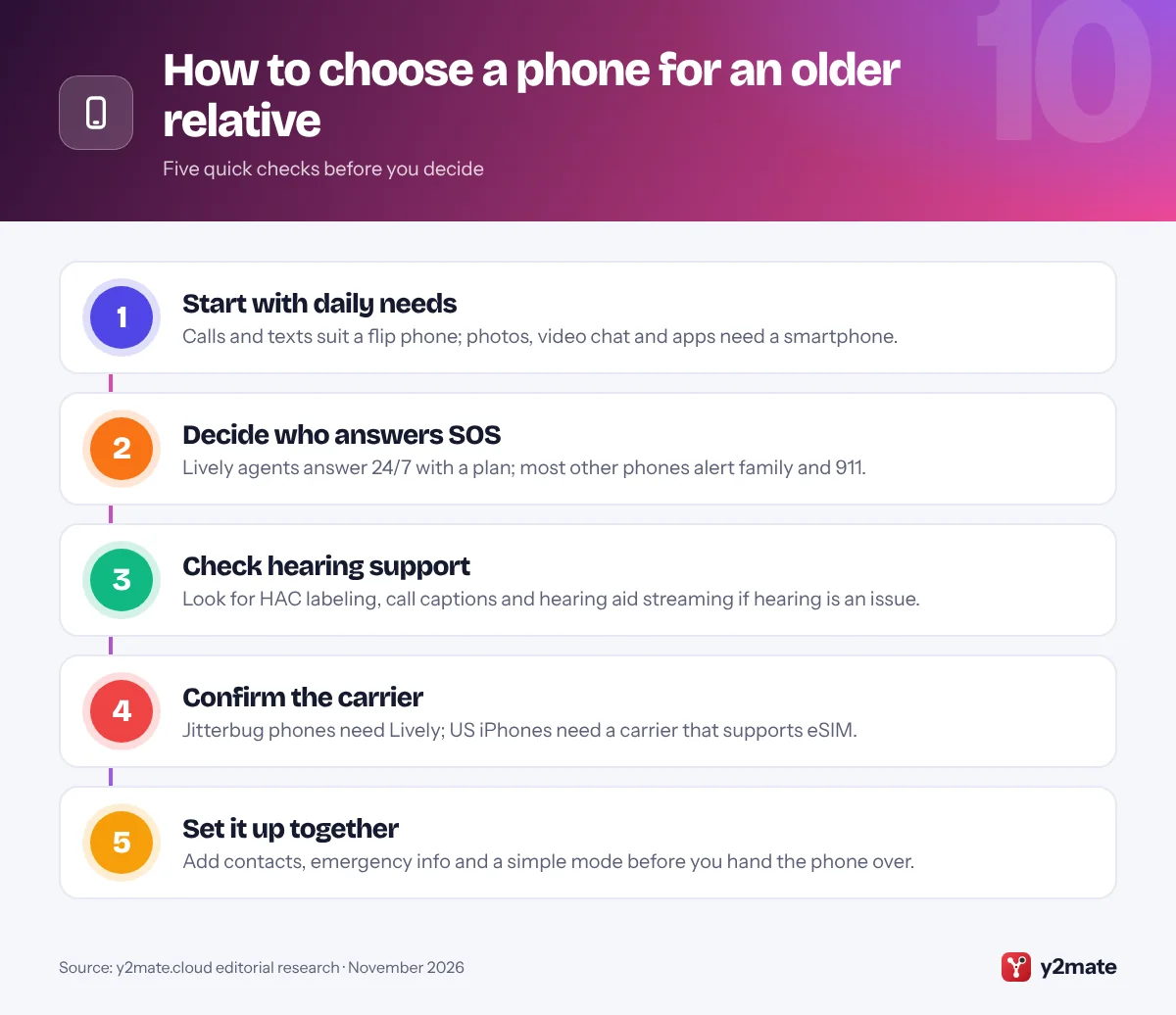
Who answers the help button?
This is the biggest difference between phones. Lively’s Urgent Response connects to trained agents 24/7, but only with the right plan. Emergency SOS on iPhone, Samsung and Pixel phones calls 911 and texts your emergency contacts, which is free but relies on someone being able to speak or on family responding. For a life-threatening emergency, calling 911 directly is always fastest.
Hearing aids and FCC rules
From December 15, 2026, FCC rules mean manufacturers can no longer offer handset models in the US that are not hearing aid compatible, with carriers following later. Still check the HAC details on the box, and look for features such as call captions or Bluetooth streaming to hearing aids.
Carriers, networks and plans
- Network: the big carriers retired 3G in 2022, so choose a 4G LTE or 5G phone; an old 3G-only phone will not work.
- Senior carriers: Lively and Consumer Cellular focus on older customers, and T-Mobile offers 55+ versions of its plans.
- Help with costs: eligible low-income households can apply for the federal Lifeline phone discount; the Affordable Connectivity Program ended in 2024.
All the phones for seniors in this list can call 911, and calling or texting 988 reaches the Suicide and Crisis Lifeline.
Frequently asked questions
What is the best cell phone for seniors in 2026?
For someone who mainly calls and texts, the Lively Jitterbug Flip3 is the easiest choice, with big keys and a help button that reaches 24/7 agents on the right plan. For a smartphone, an iPhone 17 with Assistive Access suits iPhone families, while the Jitterbug Smart5 is the simplest Android option with a dedicated help button.
Do Jitterbug phones call 911 or a monitoring center?
Both. Any Jitterbug phone can dial 911 directly. The separate Help or Urgent Response button connects to Lively's trained agents around the clock, but only if your plan includes the Urgent Response service, and family can be alerted through the Lively Link app. Without that service, the button does not reach a monitoring center.
Are all cell phones hearing aid compatible in the US?
From December 15, 2026, FCC rules mean handset manufacturers can no longer offer phone models in the US that are not hearing aid compatible, and carriers have later deadlines. Older or imported phones may lack HAC certification, so check the box or spec sheet, and look for call captions or hearing aid streaming.
What phone is best for someone with dementia?
The RAZ Memory Cell Phone is designed for dementia and memory loss. It has no apps or menus, shows large photos of contacts on an always-on screen, and is managed by caregivers through the RAZ Care app. Caregivers can block unknown callers, check location and get a text alert if 911 is called.
Will an old flip phone still work in the US?
Only if it supports 4G LTE calling or 5G. AT&T, Verizon and T-Mobile shut down their 3G networks in 2022, so 3G-only phones can no longer connect for calls or texts on those networks. If a relative has an older flip phone, check that it shows 4G or LTE service, or replace it with a current model.
Final verdict
For most families, the Lively Jitterbug Flip3 is the best of the phones for seniors in the USA when calls and a 24/7 help button matter most, while an iPhone 17 with Assistive Access or the Jitterbug Smart5 suits someone ready for a smartphone. Choose the RAZ Memory Cell Phone for dementia, the Pixel 10a for hearing loss and the Galaxy A17 5G for a tight budget.
Before you buy, decide who should answer the help button, check the carrier the phone works with, and spend an hour setting it up together.
Sources and further reading
- FCC hearing aid compatibility guide: The FCC's consumer guide explains what hearing aid compatible (HAC) means for mobile phones and how to check a handset before you buy.
- FCC notice on the HAC deadline: The FCC's June 2026 public notice confirming that handset makers must stop offering phone models that are not hearing aid compatible from December 15, 2026.
- FCC guide to the 988 Lifeline: The FCC explains how to call or text 988 to reach the Suicide and Crisis Lifeline from any phone.
- FCC health and emergency guides: The FCC's hub of consumer guides on wireless 911 calls, text-to-911 and Wireless Emergency Alerts.
- Set up Assistive Access: Apple's step-by-step guide to turning on Assistive Access, choosing apps and setting the passcode that keeps it in place.

Leave a Reply