
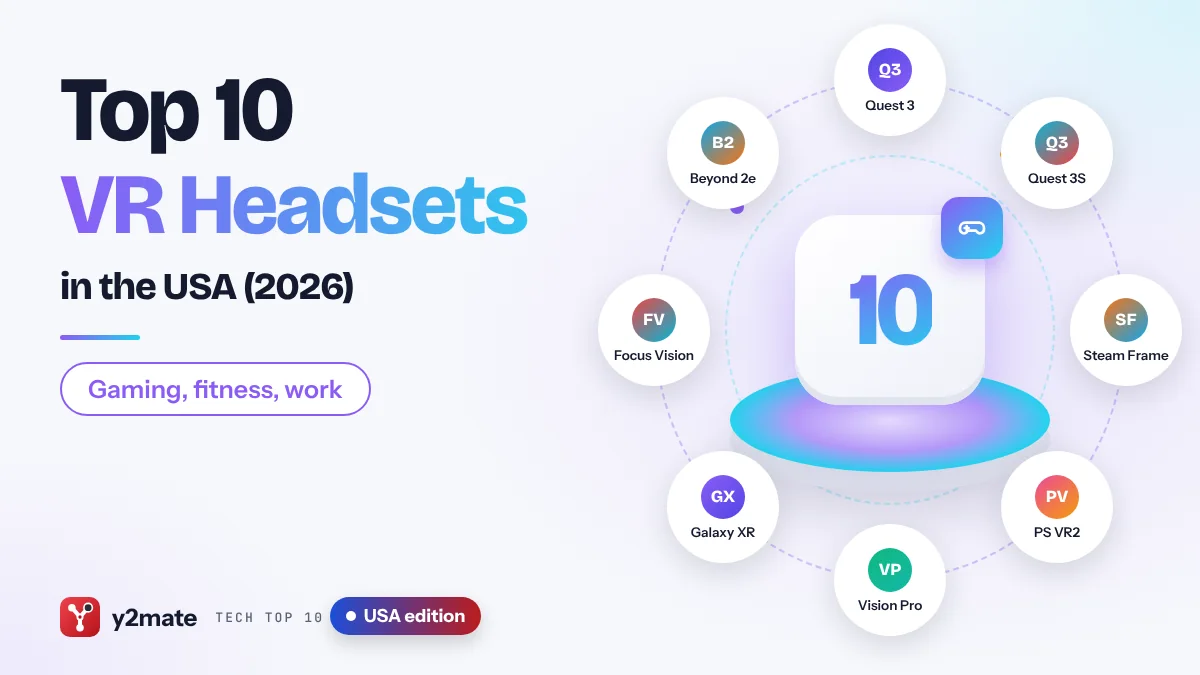
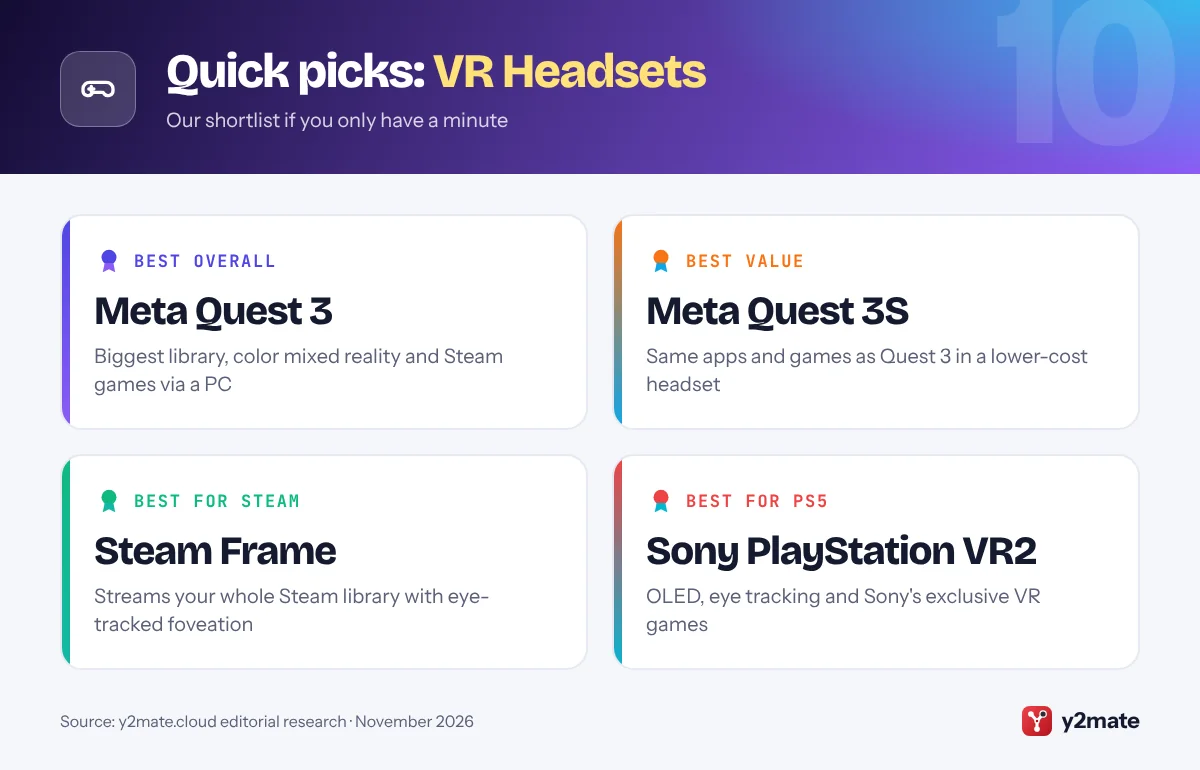
- The Meta Quest 3 is the best all-round VR headset in the US for most people, and the cheaper Quest 3S runs the same apps and games.
- Valve's Steam Frame streams a whole Steam library and has eye tracking, but US buyers get it through Valve's reservation queue.
- PlayStation VR2 is the only headset made for the PS5, and Sony's PC adapter adds SteamVR games with fewer features.
- No VR headset works with Xbox Series X or S consoles; Meta Quest headsets can stream Xbox cloud games to a virtual screen instead.
- Makers set different age limits: Meta allows ages 10 and up with parent-managed accounts, Sony says 12, and Apple, Samsung and Valve say 13.
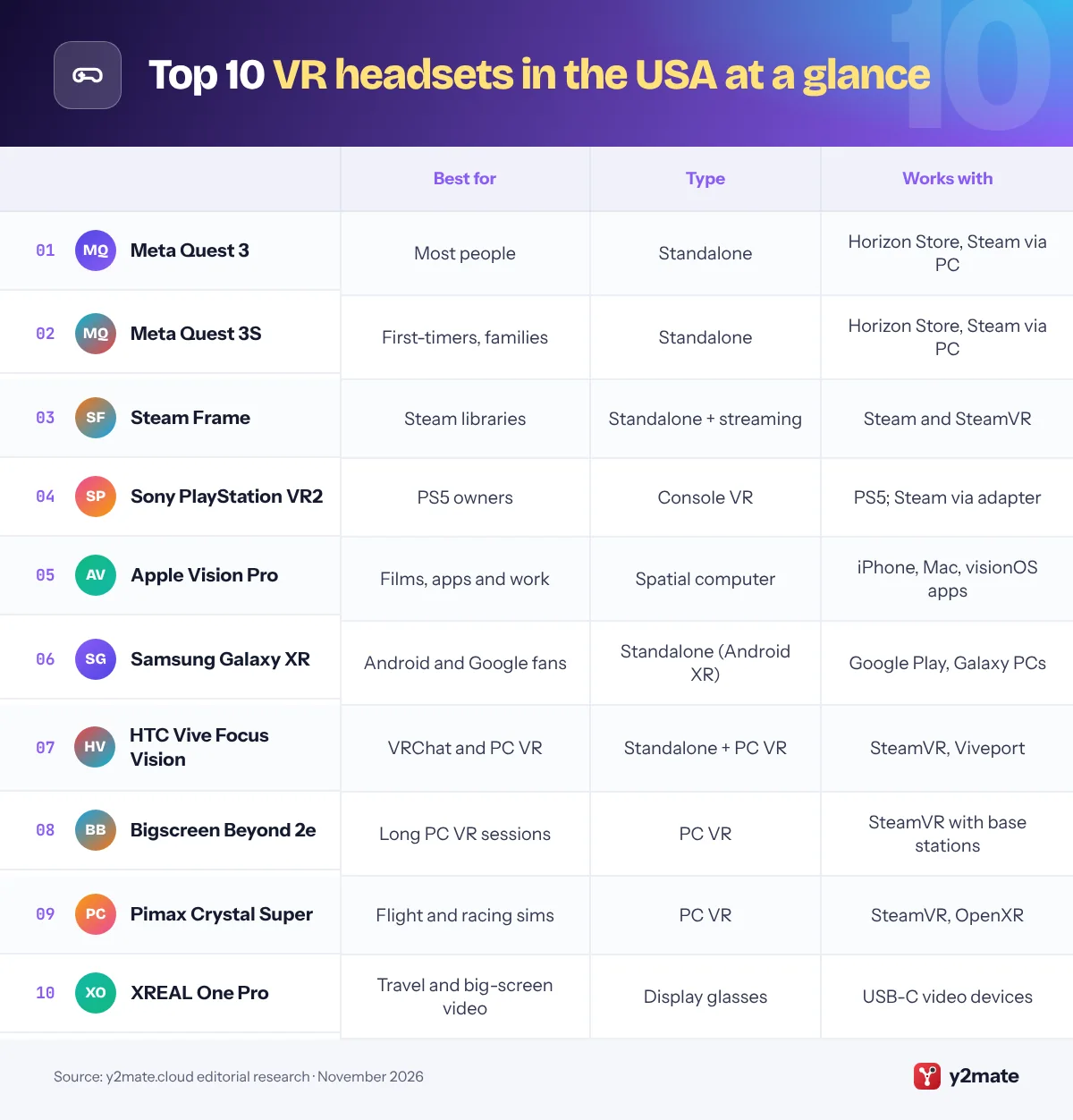
The best VR headsets in the USA in late 2026 are the Meta Quest 3 for most people, the Meta Quest 3S for first-timers on a tighter budget, Valve’s new Steam Frame for Steam players and Sony’s PlayStation VR2 for PS5 owners. If films, apps and work matter more than games, Apple Vision Pro and Samsung Galaxy XR are the premium picks, while PC enthusiasts should look at the HTC Vive Focus Vision, Bigscreen Beyond 2e and Pimax Crystal Super.
Quick definitions: a standalone headset has its own chip and battery; a PC VR headset borrows a gaming PC’s graphics power; mixed reality uses outward cameras (passthrough) to show your room with virtual objects in it; and inside-out tracking means those cameras follow your head and controllers, with nothing mounted on the wall.
For each pick we cover compatibility, confirmed tracking features, who should skip it, the maker’s age advice and how it is sold in the US. Pico does not sell its consumer headsets here, and Valve no longer produces the Valve Index, so neither is listed.
How we ranked this list
We ranked these headsets on the makers’ published specs and compatibility information, the size of each platform’s app and game library, the makers’ comfort and safety guidance, US availability and support, and widely reported owner feedback. Every pick is sold in the US by its maker or authorized retailers as of November 2026; the Steam Frame is sold through Valve’s reservation queue.
We have not tested these headsets hands-on. We leave out prices because they change often, and we only mention display or battery figures that makers publish.
The Top 10 VR Headsets
1. Meta Quest 3
Best for: most people, from games to mixed reality
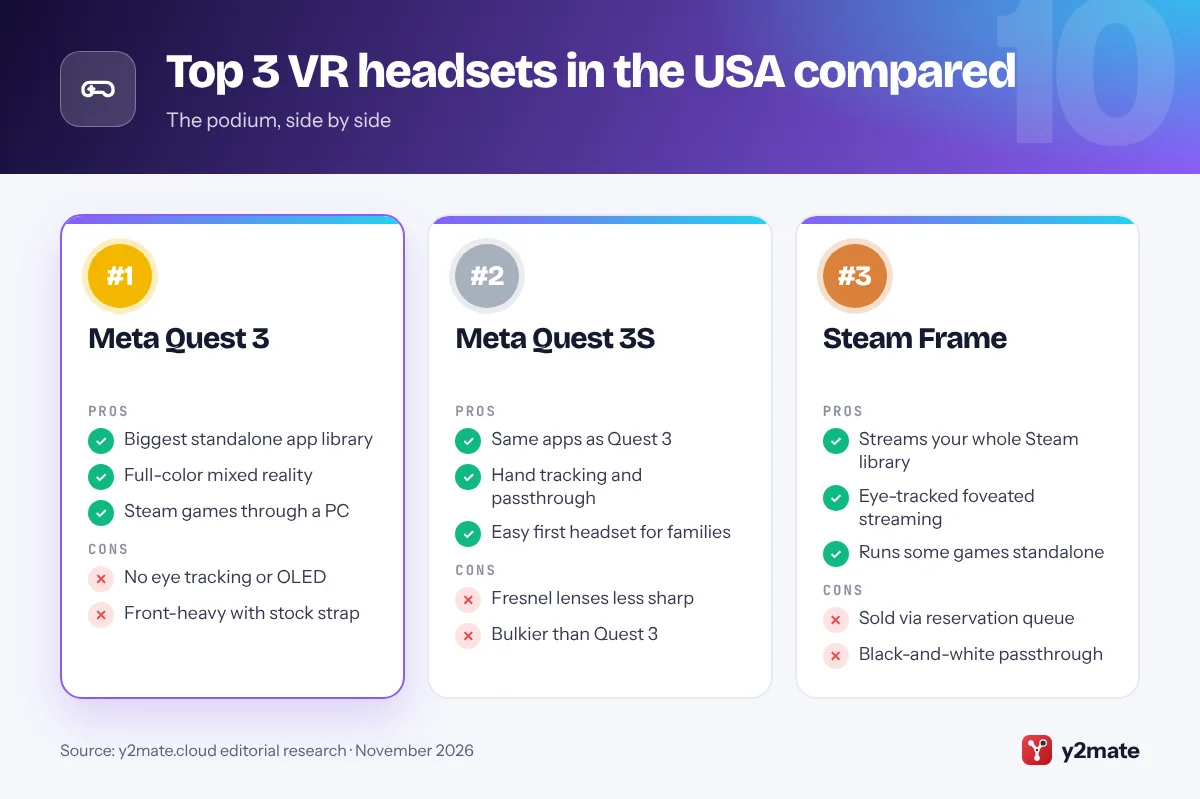
The Meta Quest 3 is the best VR headset for most Americans because it does nearly everything well without a computer. It is a standalone headset with inside-out tracking, hand tracking and full-color passthrough for mixed reality, so a virtual board game can sit on your real coffee table. Pancake lenses sit in front of LCD panels.
Its Meta Horizon Store has the biggest standalone library of games, fitness apps, social worlds and video apps, and Roblox has a native Quest app. With a capable Windows PC you can also play SteamVR games through Meta Quest Link or Valve’s Steam Link app, and the Xbox app streams Game Pass titles to a giant virtual screen.
Skip it if you want eye tracking, OLED contrast or long battery life, or if front-heavy headsets bother you. Meta says children under 10 cannot use Quest headsets, and 10-to-12-year-olds need a parent-managed account.
Official site: Meta Quest 3
- Biggest standalone app library
- Full-color mixed reality
- Plays Steam games with a PC
- No eye tracking or OLED
- Front-heavy with the stock strap
2. Meta Quest 3S
Best for: first-timers and families
The Meta Quest 3S runs the same software and the same Meta Horizon Store as the Quest 3, which makes it the easiest way into VR for families and first-timers. You get the same standalone design, inside-out tracking, hand tracking and full-color passthrough, plus Roblox, fitness apps, Xbox cloud gaming and PC streaming. Meta quotes up to 2.5 hours of average use per charge.
The savings come from the optics. The Quest 3S uses older Fresnel lenses rather than pancake lenses, so the front is bulkier and text looks less crisp toward the edges. Its LCD panels are also lower in resolution than the Quest 3’s.
Skip it if you mainly want films or detailed PC simulators; the Quest 3 is the better long-term buy for that. Meta’s age rules are the same: no children under 10, and a parent-managed account for ages 10 to 12.
Official site: Meta Quest 3S
- Same apps and games as Quest 3
- Full-color mixed reality
- Easiest first headset
- Fresnel lenses are less sharp
- Bulkier front than Quest 3
3. Steam Frame
Best for: Steam players who want wireless PC VR
Steam Frame is Valve’s new headset for people whose games live on Steam, and it takes over from the Valve Index, which Valve no longer produces. Valve calls it streaming-first: an included 6GHz wireless adapter streams VR and regular flat-screen Steam games from your PC or Steam Deck, and eye tracking powers foveated streaming, which sends the sharpest detail to wherever you look.
It also runs SteamOS on a Snapdragon chip, and Valve’s Standalone Verified label shows which games work without a PC. Four monochrome cameras handle inside-out tracking, LCD panels sit behind pancake lenses, the controllers add a full gamepad layout, and Valve includes Half-Life: Alyx.
Skip it if you want color mixed reality, because passthrough is black and white, or if you need a headset now: US orders go through Valve’s reservation queue, and new sign-ups join the back of the waitlist. Valve’s safety manual says it is not for children under 13.
Official site: Steam Frame
- Streams your whole Steam library
- Eye-tracked foveated streaming
- Half-Life: Alyx included
- Reservation queue in the US
- Black-and-white passthrough
4. Sony PlayStation VR2
Best for: PS5 owners
PlayStation VR2 is the only VR headset made for the PS5, and the best way to play Sony’s own VR games. It pairs OLED displays, which give deep blacks, with eye tracking, headset vibration and Sense controllers with adaptive triggers. Four cameras on the headset handle inside-out tracking, and one USB-C cable connects it to the console, so there is no battery to charge.
Sony’s PC adapter, sold separately, lets it play SteamVR games on a Windows PC with a DisplayPort 1.4 output and Bluetooth. On PC, Sony says eye tracking, HDR, headset feedback, adaptive triggers and haptics other than rumble are unavailable, so treat PC play as a bonus.
Skip it if you do not own a PS5, dislike cables, or want standalone or mixed-reality apps. It does not work with the PS4 or original PlayStation VR games. Sony says it is not for children under 12.
Official site: Sony PlayStation VR2
- OLED displays with deep blacks
- Eye tracking and headset haptics
- Steam games via PC adapter
- Needs a PS5 and a cable
- Fewer features on PC
5. Apple Vision Pro
Best for: iPhone and Mac users, films and work
Apple Vision Pro, now powered by the M5 chip, is a spatial computer first and a VR headset second. Its micro-OLED displays are the sharpest here for films and text, and you control it with your eyes, hands and voice: look at a button, then tap your fingers together. Mac Virtual Display turns your Mac into a huge curved screen, and iPhone spatial photos play back in 3D.
The App Store offers visionOS apps plus many iPhone and iPad apps, and select games support Sony’s PlayStation VR2 Sense controller, sold separately. Apple quotes up to 2.5 hours of general use from the external battery, and FaceTime calls can use your Persona, a realistic digital version of you.
Skip it if you mainly want VR games, since it does not run SteamVR, or if your devices are Android and Windows. Apple says children under 13 should not use it and teens should be supervised. You can book a demo at Apple Stores.
Official site: Apple Vision Pro
- Sharpest displays for films and text
- Eye and hand control
- Deep iPhone and Mac integration
- Small library of VR games
- Heavier than standalone rivals
6. Samsung Galaxy XR
Best for: Android and Google app fans
Samsung Galaxy XR, the first headset built on Google’s Android XR platform, went on sale in the US in October 2025 and is the natural pick for Android and Google fans. It runs Google Play Store apps, including immersive versions of YouTube and Google Maps, with Google’s Gemini assistant built in.
Samsung confirms micro-OLED displays, four eye-tracking cameras, hand tracking and passthrough mixed reality, powered by an external battery pack. PC Link brings the screen of a compatible Windows PC, such as a Samsung Galaxy Book, into the headset for work, but Samsung offers no official SteamVR support, and its optional gaming controllers are sold separately.
Skip it if gaming is your priority, because its library of VR games is far smaller than Meta’s and PC VR is not its focus. Samsung says it is designed for users 13 and older, and minors aged 13 and over must use it under adult supervision. Samsung’s US site lets you book a demo before you buy.
Official site: Samsung Galaxy XR
- Micro-OLED displays
- Google Play apps and Gemini
- Eye and hand tracking
- Controllers cost extra
- No official SteamVR support
7. HTC Vive Focus Vision
Best for: VRChat and eye-tracked PC VR
The HTC Vive Focus Vision is a hybrid: a standalone headset that really shines as a PC VR headset for SteamVR games, VRChat and full-body tracking. Its DisplayPort mode, using HTC’s wired streaming kit, sends a visually lossless image from your PC, and it can also stream wirelessly.
HTC builds in eye tracking with automatic lens spacing, hand tracking and stereo color passthrough, and its displays are fast-switch LCD panels. It works with HTC’s Ultimate Trackers for full-body avatars without base stations, and HTC sells an add-on Facial Tracker that captures lip, jaw and cheek movement, making it one of the few headsets with face tracking.
Skip it if you want a big standalone library, because HTC’s Viveport store is much smaller than Meta’s, or the lightest possible headset. HTC’s safety guide says it was not designed for children, and that adults should closely monitor older children who use it.
Official site: HTC Vive Focus Vision
- Built-in eye tracking
- DisplayPort mode for PC VR
- Optional face and body tracking
- Small standalone library
- Best extras cost more
8. Bigscreen Beyond 2e
Best for: long PC VR sessions in a tiny headset
The Bigscreen Beyond 2e is an ultra-light PC VR headset for people who spend hours in VRChat, simulators or Steam games; Bigscreen calls the Beyond 2 the world’s smallest VR headset. The 2e adds eye tracking, which supports dynamic foveated rendering in compatible games and expressive avatar eyes, while micro-OLED displays and pancake optics deliver deep blacks.
It is SteamVR-native but tracks with SteamVR base stations, so you need at least one base station plus controllers, all sold separately. Valve no longer produces Index base stations or controllers, so check what you can still buy first. The cushion is made from an iPhone face scan, or you can choose a universal-fit cushion.
Skip it if you have no gaming PC, no room for base stations or want wireless play. Bigscreen sells direct with 14-day returns, designs the headset around adult faces and states no minimum age on its product page.
Official site: Bigscreen Beyond 2e
- Tiny and very light
- Micro-OLED displays
- Eye tracking in the 2e
- Base stations and controllers extra
- Needs a gaming PC and cable
9. Pimax Crystal Super
Best for: flight and racing simulators
The Pimax Crystal Super is built for flight and racing simulators, where reading tiny cockpit instruments matters most. Its unusual trick is a replaceable optical engine: choose a QLED panel with mini-LED local dimming or a micro-OLED engine, and swap later instead of buying a new headset. Tobii eye tracking is built in for foveated rendering.
Tracking is inside-out by default, with an optional upgrade to SteamVR base stations for extra precision. It connects to your PC by DisplayPort and runs SteamVR and OpenXR games, and Pimax highlights sims such as Microsoft Flight Simulator 2024, DCS and iRacing.
Skip it if you do not have a high-end gaming PC, which Pimax recommends for the best results. It is also large and heavy next to a Quest, so it suits seated sim rigs better than active games. Pimax sells direct in the US with a 14-day return policy and lists no minimum age on its product page.
Official site: Pimax Crystal Super
- Swappable QLED or micro-OLED
- Tobii eye tracking built in
- Inside-out or base stations
- Needs a high-end PC
- Large and heavy
10. XREAL One Pro
Best for: a giant private screen when traveling
The XREAL One Pro is not a VR headset, but it earns a place as an alternative for people who mostly want a giant private screen for films, work or flat-screen games. These display glasses use Sony micro-OLED displays to show a large virtual screen while you still see the room around you.
They plug into phones, tablets and laptops whose USB-C port outputs video, and into the Steam Deck; a Nintendo Switch needs XREAL’s hub. XREAL’s own chip can pin the screen in place as you turn your head, or a follow mode keeps it in front of you on planes and trains. There are no controllers and no VR game library.
Skip it if you want true VR, fitness or mixed-reality games, because every headset above does more. The glasses suit travel and small apartments. XREAL shows no age rating on its product page, so read the safety leaflet before letting children use them.
Official site: XREAL One Pro
- Huge virtual screen anywhere
- Sony micro-OLED displays
- Very portable
- Not true VR
- Needs a USB-C video device
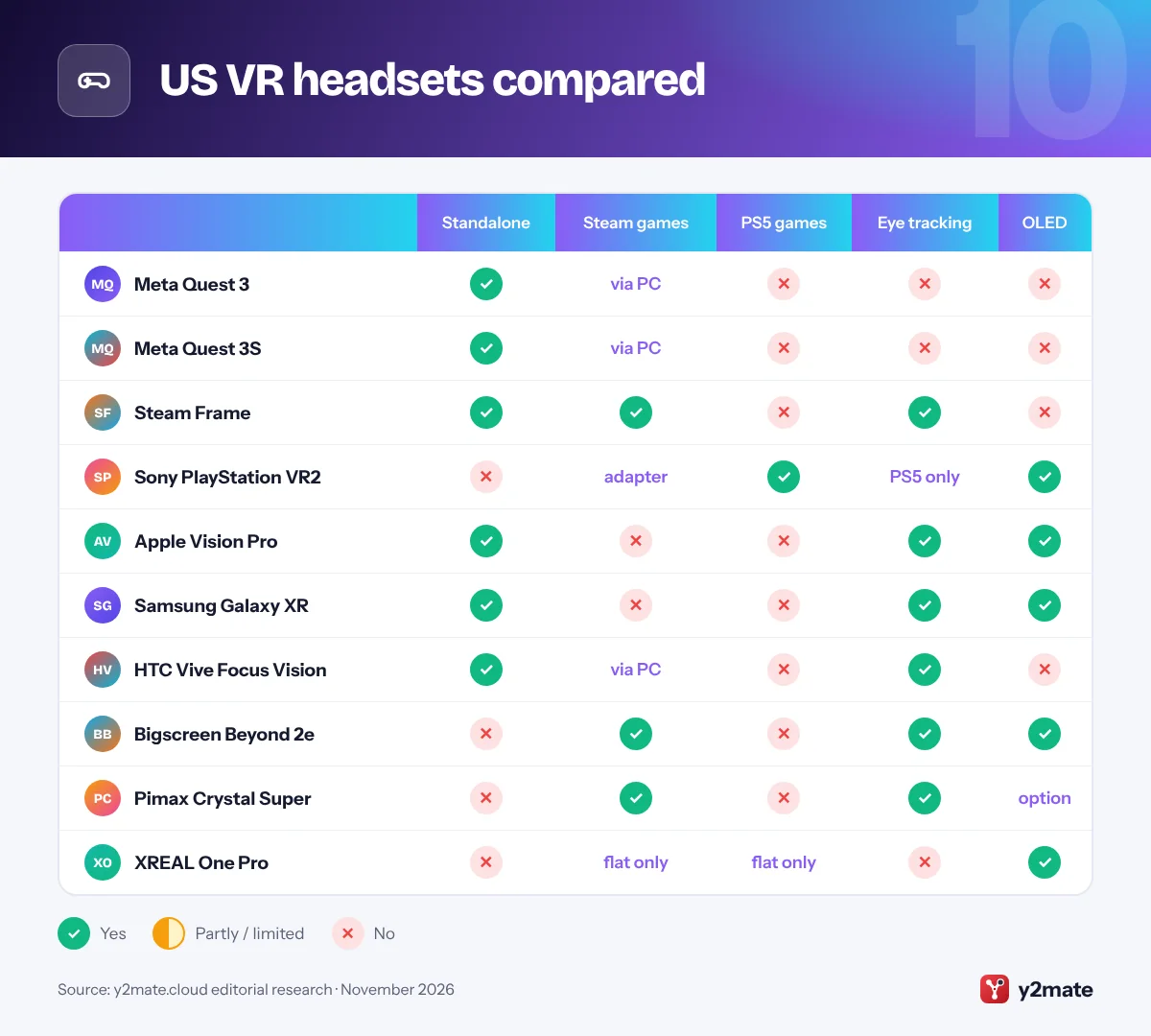
US VR headsets compared
How to choose VR headsets in the USA
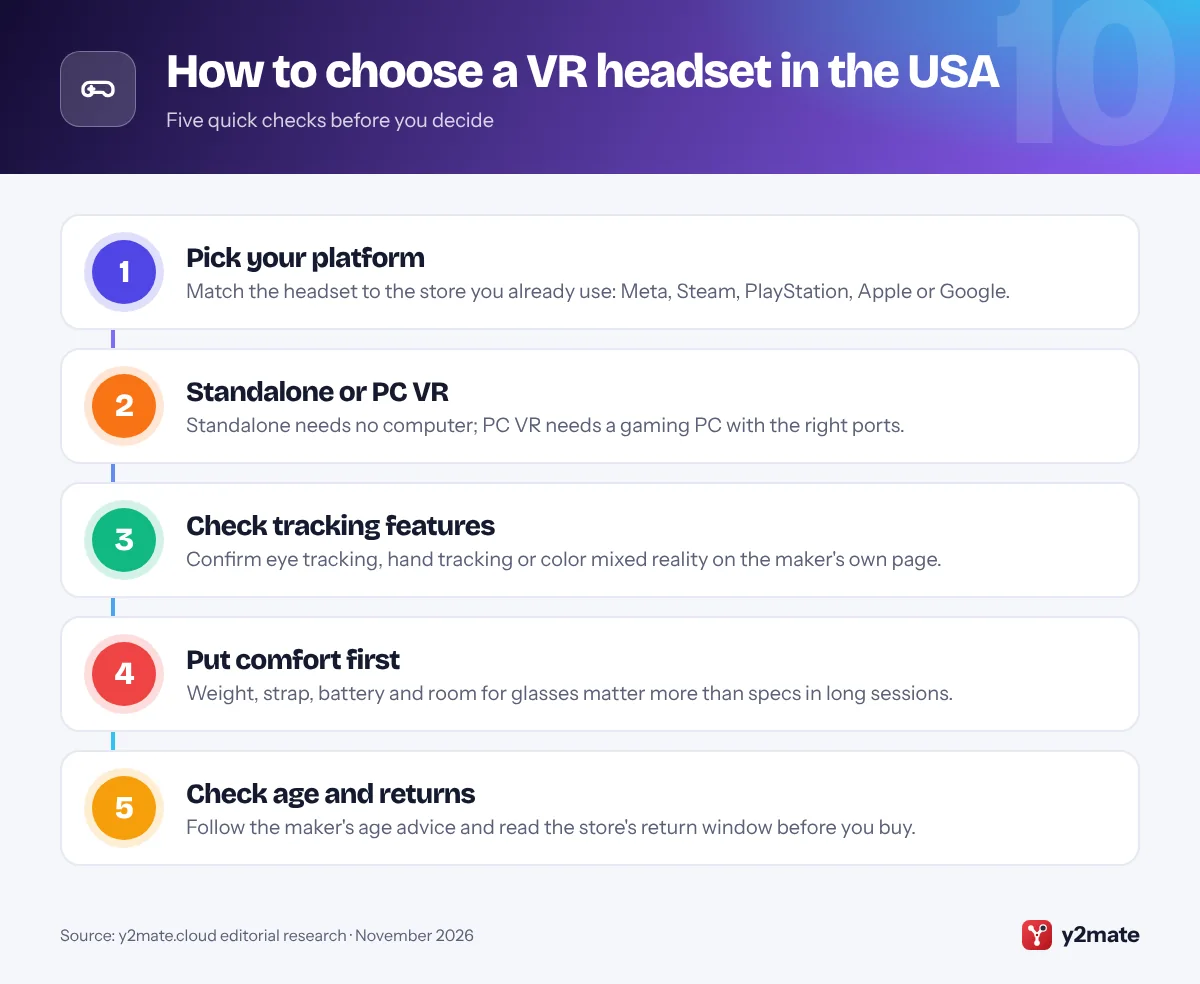
Start with the games and apps you already use: Meta’s store, Steam, PlayStation, Apple’s App Store and Google Play are separate ecosystems, and only some headsets reach more than one.
How does a VR headset work?
A headset places a small display in front of each eye, behind lenses that let your eyes focus on it. Each eye sees a slightly different image, which your brain combines into depth. Cameras and motion sensors track your head and redraw the scene constantly, so the virtual world stays put as you look around.
Standalone vs PC VR
Standalone headsets such as the Quest 3 have a mobile chip and battery inside, so you can play anywhere without wires. PC VR models such as the Bigscreen Beyond 2e and Pimax Crystal Super rely on a gaming PC’s graphics card, which allows more detailed games but adds cost and cables. Hybrids such as the Steam Frame and Vive Focus Vision do both.
Which headsets have OLED or face tracking?
OLED and micro-OLED panels, which show true blacks, are used in PlayStation VR2, Vision Pro, Galaxy XR, Bigscreen Beyond 2e and Pimax’s micro-OLED engine; the Quest headsets, Steam Frame and Vive Focus Vision use LCD. Face tracking is rare: HTC sells an add-on Facial Tracker for the Vive Focus Vision, and Vision Pro animates your Persona in calls.
How to clean headset foam
For the Quest 3’s foam facial interface, Meta advises removing debris with a dry microfiber cloth, then hand washing in cool water with mild detergent without soaking it, and avoiding alcohol and chemical cleaners. Clean lenses only with a dry microfiber cloth.
Your rights when you buy
The FTC says a written warranty must be available to read before you buy, and implied warranties can apply even without one. Return windows are set by each store, so check the policy at Best Buy, another retailer or the maker, and keep your receipt.
Frequently asked questions
What are VR headsets used for?
Mostly gaming, but also fitness, social apps, films on a giant virtual screen, travel experiences and work. Mixed-reality headsets such as the Quest 3 place apps in your real room, spatial computers like Apple Vision Pro and Samsung Galaxy XR focus on productivity and media, and PC VR adds detailed flight and racing simulators.
Which headsets work with Steam?
Valve's Steam Frame is built for Steam and streams your whole library, including flat-screen games. The Bigscreen Beyond 2e, Pimax Crystal Super and HTC Vive Focus Vision run SteamVR from a Windows PC. Quest 3 and 3S use Steam Link or Quest Link, PlayStation VR2 needs Sony's PC adapter, and Vision Pro and Galaxy XR lack official SteamVR support.
Which VR headset works with the PS5?
Only Sony's PlayStation VR2 is made for the PS5. It connects with a single USB-C cable and supports eye tracking, headset vibration and adaptive triggers in PS5 games. It does not work with the PS4, original PlayStation VR games are not compatible, and no other headset on this list can play PS5 VR games.
Do any headsets work with Xbox?
Not the way PS VR2 works with a PS5, because Xbox Series X and Series S consoles do not support VR headsets. Instead, you can install the Xbox app on a Meta Quest headset and stream Game Pass or supported free-to-play cloud games onto a giant virtual screen. These are regular flat games rather than VR, and they need fast internet.
Which headsets can play Roblox?
Roblox has a native app for Meta Quest headsets, so the Quest 3 and Quest 3S can play it without a PC. Roblox also supports VR on Windows PCs with compatible PC VR headsets. On Quest, Meta's account rules apply, so a parent must set up and manage the account for a child aged 10 to 12.
Which headsets have eye tracking?
On this list, the Steam Frame, PlayStation VR2, Apple Vision Pro, Samsung Galaxy XR, HTC Vive Focus Vision, Bigscreen Beyond 2e and Pimax Crystal Super have eye tracking. It can sharpen detail where you look, let you select menus with your gaze and animate avatar eyes. The Quest 3 and 3S lack it, and PS VR2 loses it on PC.
What are the cheapest headsets worth buying?
The Meta Quest 3S is the lowest-cost headset on this list, and it needs no PC or console. PlayStation VR2 can be good value if you already own a PS5. Costs climb with OLED displays, eye tracking and PC VR, which may also need a gaming PC, base stations or controllers. Prices change often, so compare the whole setup.
Final verdict
For most people in the US, the Meta Quest 3 is the VR headset to buy, with the Quest 3S as the lower-cost way into the same library. Steam players should join Valve’s queue for the Steam Frame, PS5 owners should get PlayStation VR2, and Apple Vision Pro or Samsung Galaxy XR suit buyers who value films, apps and work over games. PC enthusiasts are well served by the Vive Focus Vision, Bigscreen Beyond 2e and Pimax Crystal Super.
Before you buy, check the maker’s age advice, clear a safe play space and read the store’s return policy.
Sources and further reading
- FTC guide to warranties: The Federal Trade Commission explains written and implied warranties and what to do if a product you bought develops a problem.
- FTC on kids and video games: The FTC's advice for parents on game ratings, parental controls, chat settings and limits on in-game spending.
- Meta Quest health and safety: Meta's official health and safety warnings for Quest headsets, including setup, play space and age guidance.
- PlayStation health warning: Sony's health and safety notice for PlayStation hardware, including the PS VR2 headset safety notice and age limit.
- Apple Vision Pro safety information: Apple's safety guidance for Vision Pro, covering age limits, breaks, fit and symptoms that mean you should stop.

Leave a Reply