
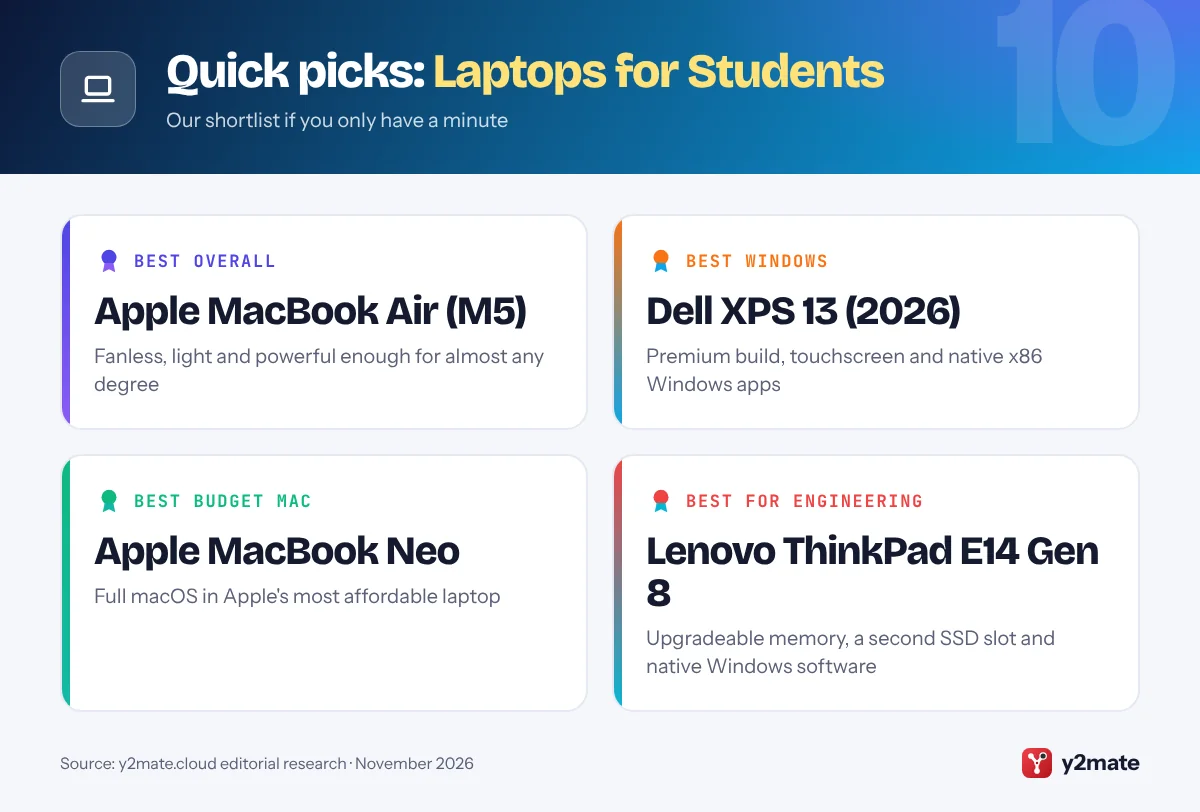
- The Apple MacBook Air with M5, the Dell XPS 13 (2026) and the Apple MacBook Neo are the strongest all-round laptops for uni students in Australia in 2026.
- Engineering, architecture and some science units rely on Windows-only software, so check your unit outlines before choosing a Mac, Chromebook, iPad or Arm-based Windows laptop.
- Under the Australian Consumer Law, a laptop bought from a business must be of acceptable quality, match its description and be fit for purpose, regardless of any warranty.
- The ATO only allows a self-education deduction for a laptop when your course has a sufficient connection to your current job, and only for the work-related share.
- Apple and Dell offer education pricing in Australia, while Microsoft's Australian store listed student pricing as temporarily unavailable in November 2026.
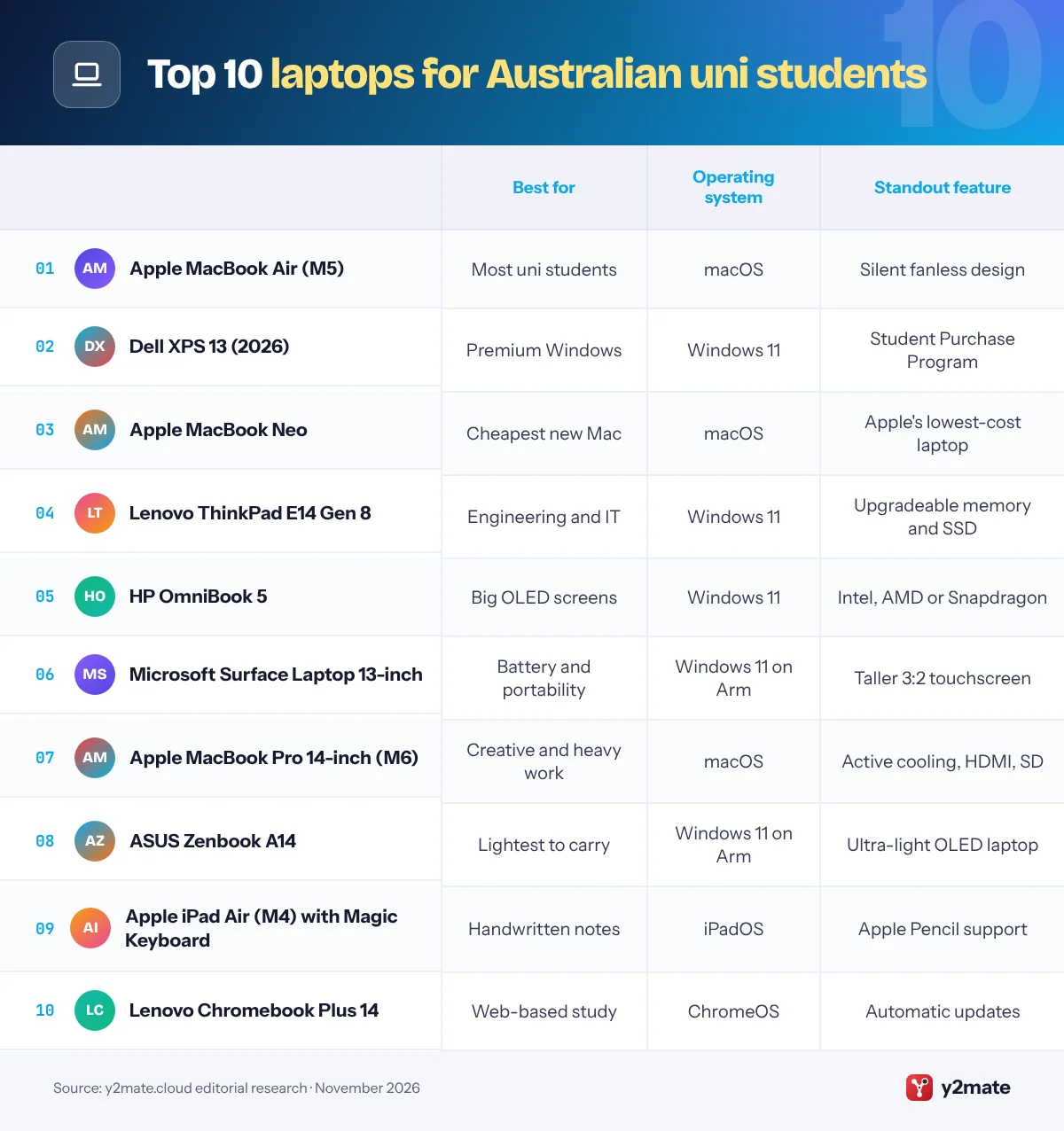
The best laptops for students in Australia in 2026 are the Apple MacBook Air with M5 for most uni students, the Dell XPS 13 (2026) for a premium Windows laptop and the Apple MacBook Neo for the most affordable Mac. The Lenovo ThinkPad E14 Gen 8, HP OmniBook 5, Microsoft Surface Laptop 13-inch, MacBook Pro 14-inch with M6, ASUS Zenbook A14, iPad Air with Magic Keyboard and Lenovo Chromebook Plus 14 complete the list, covering engineering and science units, creative courses, handwritten notes and tight budgets.
A few terms first. Education pricing is a lower price that makers such as Apple and Dell offer to eligible students and educators. A Copilot+ PC is a Windows 11 laptop with a dedicated AI processor, called an NPU, that runs Microsoft’s on-device AI features. A Chromebook Plus is a Chromebook that meets Google’s higher minimum hardware standard and adds extra Google AI tools. Consumer guarantees are rights under the Australian Consumer Law that require a laptop bought from a business to be of acceptable quality, match its description and be fit for purpose, whatever the warranty says.
This guide ranks ten laptops sold officially in Australia and explains uni IT requirements, education pricing, your consumer rights and when a laptop may be tax-deductible.
How we ranked this list
We compared publicly documented information only: each maker’s Australian product pages and specs, how well the operating system suits common uni courses, portability and battery life as the makers describe them, keyboard and screen, repair and upgrade options, student programs and warranty as stated on official Australian sites, and software update policy. Every laptop here is sold officially in Australia through the maker or its authorised retailers in November 2026.
We did not test these laptops ourselves, and we leave out prices, discount amounts, battery-hour claims and weights, because they vary by configuration and change often.
The Top 10 Laptops for Students
1. Apple MacBook Air (M5)
Best for: most uni students who want a Mac
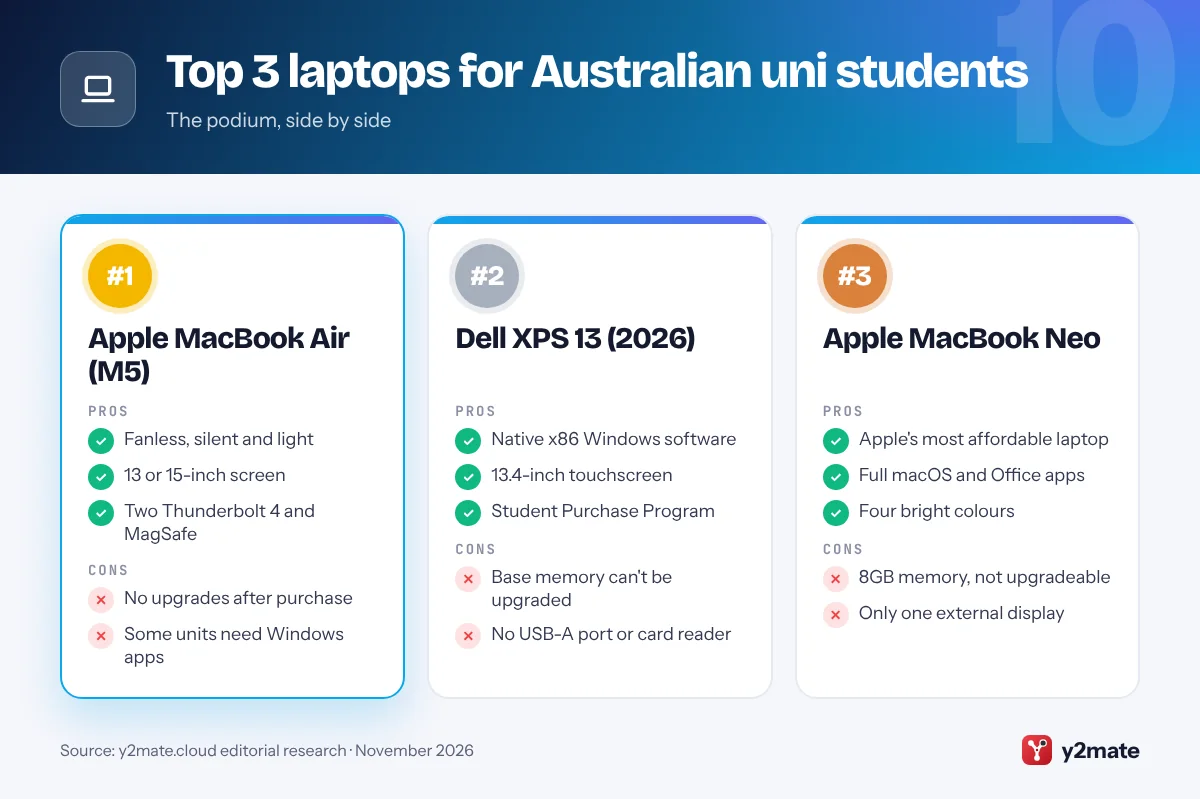
The MacBook Air with M5 is the best laptop for most uni students in Australia. Released in March 2026 in 13-inch and 15-inch sizes, it is thin, light and fanless, so it stays silent in tutorials and libraries, and Apple rates the battery for a full day on campus.
The M5 chip has more than enough power for assignments, research, presentations, coding units and photo or video projects. Two Thunderbolt 4 ports, MagSafe charging and support for up to two external displays make it easy to plug into a monitor at home, and the 15-inch model gives more space for reading and writing side by side.
Like every Mac, its memory and storage are set when you buy it, so choose a configuration that will last the length of your degree. Check your faculty’s guidance if your engineering, architecture or design units rely on Windows-only software. Apple’s Australian Education Store offers education pricing to current and newly accepted uni students and to parents buying for them, and Apple’s one-year limited warranty sits alongside your rights under the Australian Consumer Law.
Official site: Apple MacBook Air (M5)
- Fanless, silent and light
- 13 or 15-inch screen
- Two Thunderbolt 4 and MagSafe
- No upgrades after purchase
- Some units need Windows apps
2. Dell XPS 13 (2026)
Best for: a premium Windows laptop for uni
Dell’s XPS 13 came back in mid-2026 and is the best premium Windows laptop for uni students in Australia. It is the thinnest and lightest XPS Dell has made, with a machined aluminium body, a 13.4-inch touchscreen, a backlit keyboard and four speakers, so it feels every bit as premium as a MacBook Air.
Its Intel Core Series 3 and Core Ultra Series 3 processors are x86 chips, so Windows-only software for engineering, accounting, statistics or architecture units runs natively without emulation. Its two USB-C ports handle charging and external monitors, and dual fans keep it cool under longer workloads.
Dell Australia lists the XPS 13 with its Student Purchase Program, which offers special savings for students and educators. The base model’s memory is modest and cannot be upgraded later, so choose more if you multitask heavily, and keep a USB-C hub handy because Dell lists no USB-A port or card reader. If you want a compact Windows laptop that runs mainstream course software without compromise, this is the one to get.
Official site: Dell XPS 13 (2026)
- Native x86 Windows software
- 13.4-inch touchscreen
- Student Purchase Program
- Base memory can't be upgraded
- No USB-A port or card reader
3. Apple MacBook Neo
Best for: the cheapest way to buy a new Mac
The MacBook Neo is Apple’s entry-level laptop and the most affordable way for an Australian uni student to buy a new Mac. Launched in March 2026, it pairs the A18 Pro chip from the iPhone 16 Pro with a 13-inch Liquid Retina display in a recycled aluminium body, finished in silver, blush, citrus or indigo.
It runs the full version of macOS, so Microsoft Office, Pages, Zoom and Apple Intelligence work as they do on dearer Macs, and it handles essays, readings, presentations and streaming smoothly. Apple’s Education Store includes it, so education pricing applies.
There are limits. All models have 8GB of memory that cannot be upgraded, one USB-C port is a slower USB 2 connection, only one external display is supported and Touch ID comes on only one of the two models. That suits arts, education, nursing and business students well, but data-heavy science units, big coding projects and serious video editing will push it hard. Choose the MacBook Air if you need more headroom for later years of your degree.
Official site: Apple MacBook Neo
- Apple's most affordable laptop
- Full macOS and Office apps
- Four bright colours
- 8GB memory, not upgradeable
- Only one external display
4. Lenovo ThinkPad E14 Gen 8
Best for: engineering, IT and science students
The ThinkPad E14 Gen 8 is the best laptop for engineering, IT and science students in Australia who need Windows and want a machine that can be upgraded during their degree. Most thin laptops have soldered memory, but the E14 Gen 8 takes standard DDR5 memory modules and has room for a second SSD, and Lenovo lists the battery, memory, SSD and speaker as customer-replaceable parts.
Lenovo sells it with Intel Core Series 3 or AMD Ryzen AI processors, both x86 chips, so CAD, statistics, simulation and lab software built for Windows runs natively. The 14-inch 16:10 screen, an HDMI port for tutorial-room projectors and the spill-resistant, backlit ThinkPad keyboard with its red TrackPoint make it a practical study tool, and Lenovo says it is tested to the MIL-STD 810H durability standard.
It is not the slimmest or lightest laptop here, and the standard screens are less vivid than the OLED panels on some rivals. Configurations vary between Lenovo’s Australian and overseas stores, so check what is listed locally. If you expect your software needs to grow from first year to final-year projects, its upgradeability makes it a sensible long-term buy.
Official site: Lenovo ThinkPad E14 Gen 8
- Upgradeable memory and storage
- Native x86 Windows software
- ThinkPad keyboard and TrackPoint
- Heavier than ultraportables
- Screen less vivid than OLED
5. HP OmniBook 5
Best for: OLED screens and a choice of chips
HP’s OmniBook 5 is the balanced middle of HP’s current laptop range, which replaced the Pavilion and Envy names, and HP lists students among the buyers it is designed for. It is a good pick for uni students who want a bigger, sharper screen without paying flagship prices.
HP sells 14-inch and 16-inch versions and a 14-inch Flip 2-in-1 with optional stylus support, and OLED screens are offered on selected models. Processor choice is the standout: AMD Ryzen AI and Intel Core Ultra versions run standard Windows software natively, while Snapdragon X2 versions trade some compatibility for longer battery life. HP’s Australian store lists a range of OmniBook 5 14-inch models, so you can compare configurations directly.
That variety is also the catch, because memory, storage, ports and screens differ a lot between models. Read each listing in full and avoid the most basic configurations if you want it to last a full degree. The 16-inch version is worth a look if you study at a desk, work with big spreadsheets or like two documents open at once. For a familiar brand with flexible options, the OmniBook 5 is a solid all-rounder.
Official site: HP OmniBook 5
- OLED screen options
- AMD, Intel or Snapdragon
- 16-inch and Flip versions
- Specs vary widely by model
- Easy to pick a weak config
6. Microsoft Surface Laptop 13-inch
Best for: long battery life and a touchscreen
The Surface Laptop 13-inch is Microsoft’s most portable and affordable Surface Laptop and a strong pick for uni students who prioritise battery life. It uses a Qualcomm Snapdragon X2 Plus processor, making it a Copilot+ PC, and Microsoft calls it the longest-lasting Surface Laptop it sells.
Its 13-inch touchscreen has a taller 3:2 shape that fits more of a reading or assignment on screen, and it has a full-size backlit keyboard, a fingerprint reader, two USB-C ports, a USB-A port and a headphone jack, so most older accessories still plug straight in.
There are two things to weigh up in Australia. First, Snapdragon is an Arm chip: Office, Teams, browsers and most mainstream apps run natively or through Microsoft’s Prism emulation, but some specialist engineering software, older drivers and exam tools may not, so check your unit outlines. Second, Microsoft’s Australian store said in November 2026 that student pricing was temporarily unavailable while it updates prices, so compare authorised retailers. For arts, law, commerce and health students who want Windows and stamina, it is an excellent choice.
Official site: Microsoft Surface Laptop 13-inch
- Longest-lasting Surface Laptop
- Taller 3:2 touchscreen
- USB-A port and fingerprint reader
- Arm chip limits some software
- No AU student pricing right now
7. Apple MacBook Pro 14-inch (M6)
Best for: design, film, music and big code projects
The 14-inch MacBook Pro now comes with Apple’s M6 chip, which arrived in Australia in November 2026. It is the laptop to choose if you study film, animation, music production, design or computer science and regularly push your machine hard.
Unlike the fanless MacBook Air, it has active cooling, so long video exports and big code builds can run at full speed for longer. Apple fits 16GB of unified memory as standard with an option for 32GB, and the port selection is generous: three Thunderbolt 4 ports, HDMI, an SDXC card slot for camera cards, MagSafe 3 and a headphone jack. Apple says the M6 model has the longest battery life of any Mac to date.
For most students it is more power than needed, and memory and storage cannot be upgraded later. Apple also sells new MacBook Pro models with a touch-enabled PROLED XDR display and M5 Pro or M5 Max chips, but they are aimed at professionals. Apple’s Education Store offers education pricing on the M6 model. If your course is creative or compute-heavy and does not depend on Windows software, it is the most capable laptop here.
Official site: Apple MacBook Pro 14-inch (M6)
- Active cooling for heavy work
- HDMI and SD card slot
- Apple's longest Mac battery life
- More than most students need
- No upgrades after purchase
8. ASUS Zenbook A14
Best for: the lightest Windows laptop to carry
If your uni day involves trains, buses and long walks between buildings, the ASUS Zenbook A14 is one of the lightest ways to carry Windows. ASUS calls it an ultra-lightweight Copilot+ PC, and its 14-inch OLED display, 16:10 shape and large battery make it well suited to long days of reading and writing away from a power point.
It runs on Qualcomm Snapdragon X-series processors, which are efficient Arm chips, and ASUS Australia lists it on its local website. The OLED screen is non-touch, which helps keep it slim, and the deep blacks of OLED make late-night reading and streaming easy on the eyes.
The trade-off is software compatibility. Microsoft 365, Teams, web browsers and most popular apps work well on Windows on Arm, either natively or through emulation, but some engineering, statistics and exam software may not, and some older printers or devices may lack Arm drivers. Check your unit requirements and your uni’s IT advice before you buy. For arts, communications, law and business students who value portability above all, it is a great fit and easy to carry every day.
Official site: ASUS Zenbook A14
- Ultra-lightweight 14-inch body
- Large battery
- OLED screen for reading
- Check Arm compatibility first
- Non-touch display
9. Apple iPad Air (M4) with Magic Keyboard
Best for: handwritten notes and annotated readings
For students who learn best with a pen, the iPad Air with M4 and the Magic Keyboard for iPad Air is a light, flexible alternative to a traditional laptop. Apple released it in March 2026 in 11-inch and 13-inch sizes, with the M4 chip and 12GB of memory for smooth multitasking.
With Apple Pencil Pro or Apple Pencil (USB-C) you can annotate lecture slides, highlight readings and draw diagrams for anatomy, chemistry or maths, then attach the Magic Keyboard to type assignments. The keyboard connects magnetically through the Smart Connector, so there is no Bluetooth pairing or separate charging, and it adds a trackpad and a 14-key function row.
iPadOS now offers resizable windows, yet it still cannot install Mac or Windows software, and some uni exam platforms, specialist programs and coding tools will not run. It works best as a note-taking and reading device for health, education, arts and science students who do their heavier work on campus computers. Apple’s Australian Education Store offers education pricing on iPad Air, the Magic Keyboard and Apple Pencil, so you can bundle the full set.
Official site: Apple iPad Air (M4) with Magic Keyboard
- Write on slides with Apple Pencil
- Very light and portable
- Magic Keyboard with trackpad
- Cannot run Mac or Windows apps
- Keyboard and Pencil cost extra
10. Lenovo Chromebook Plus 14
Best for: web-based study on a budget
The Lenovo Chromebook Plus 14 is the best Chromebook for Australian uni students whose study happens online. It pairs an efficient MediaTek Kompanio Ultra Arm processor with a 14-inch OLED display, and as a Chromebook Plus it meets Google’s higher hardware bar and includes extra Google AI features.
ChromeOS boots quickly, updates automatically and needs very little maintenance, which helps when assignments pile up. Web versions of Microsoft 365, Google Docs, Canvas and Moodle run well, and you can install Android apps or switch on a Linux environment for introductory programming. Google supports Chromebooks with 10 years of automatic updates from the release date of the hardware platform, so check a model’s update end date before you buy.
The catch is that a Chromebook cannot install full Windows or Mac software, which rules it out for many engineering, design and research units. Google’s newer Googlebook laptops, on sale in Australia since October 2026, run an Android-based system but are premium-priced and still very new. If your degree is essay-based and your budget is tight, the Chromebook Plus 14 is a low-fuss choice that will stay secure for years.
Official site: Lenovo Chromebook Plus 14
- Sharp 14-inch OLED display
- Automatic updates
- Very little maintenance
- No full Windows or Mac apps
- Check the update end date
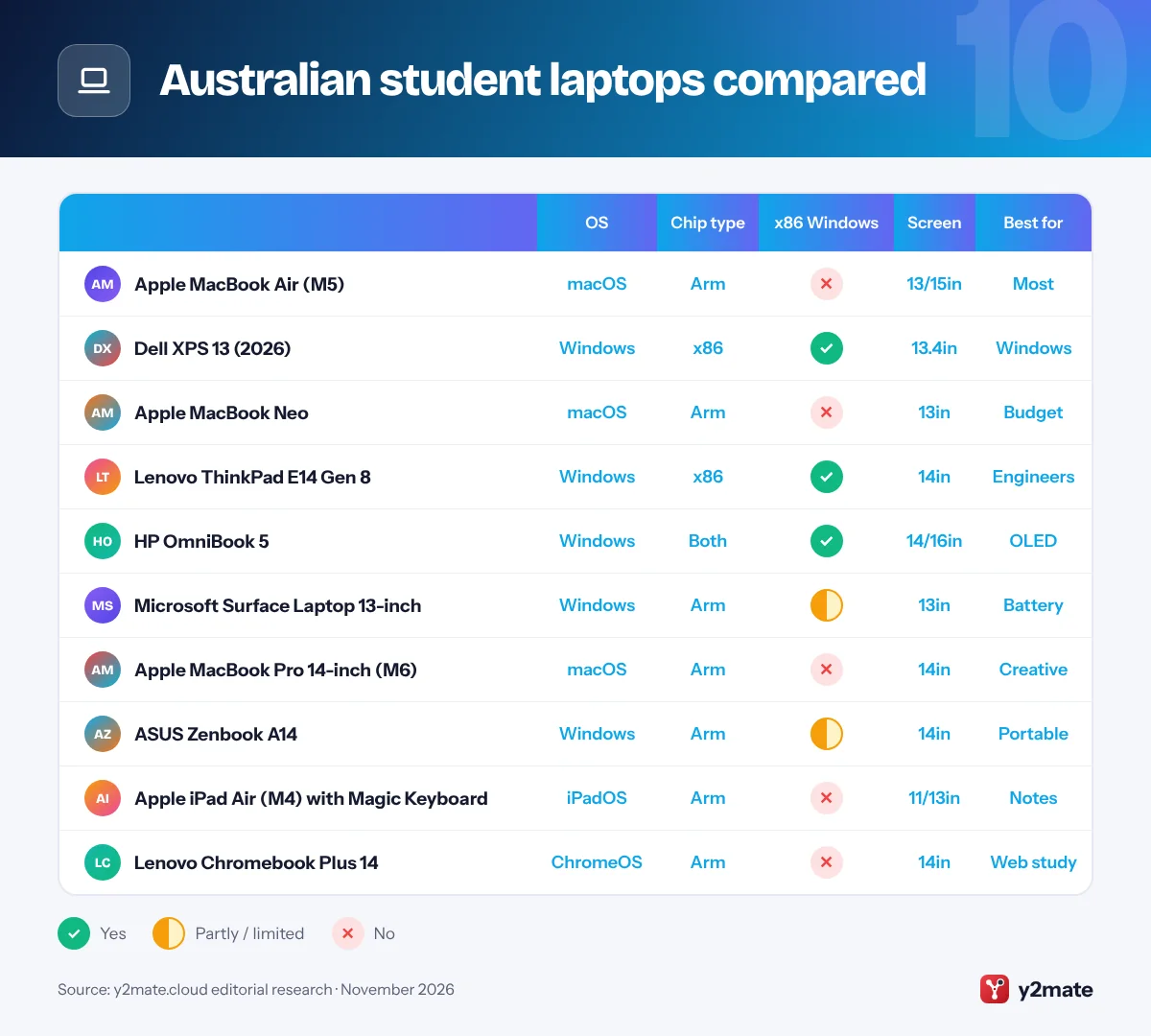
Australian student laptops compared
How to choose laptops for students in Australia
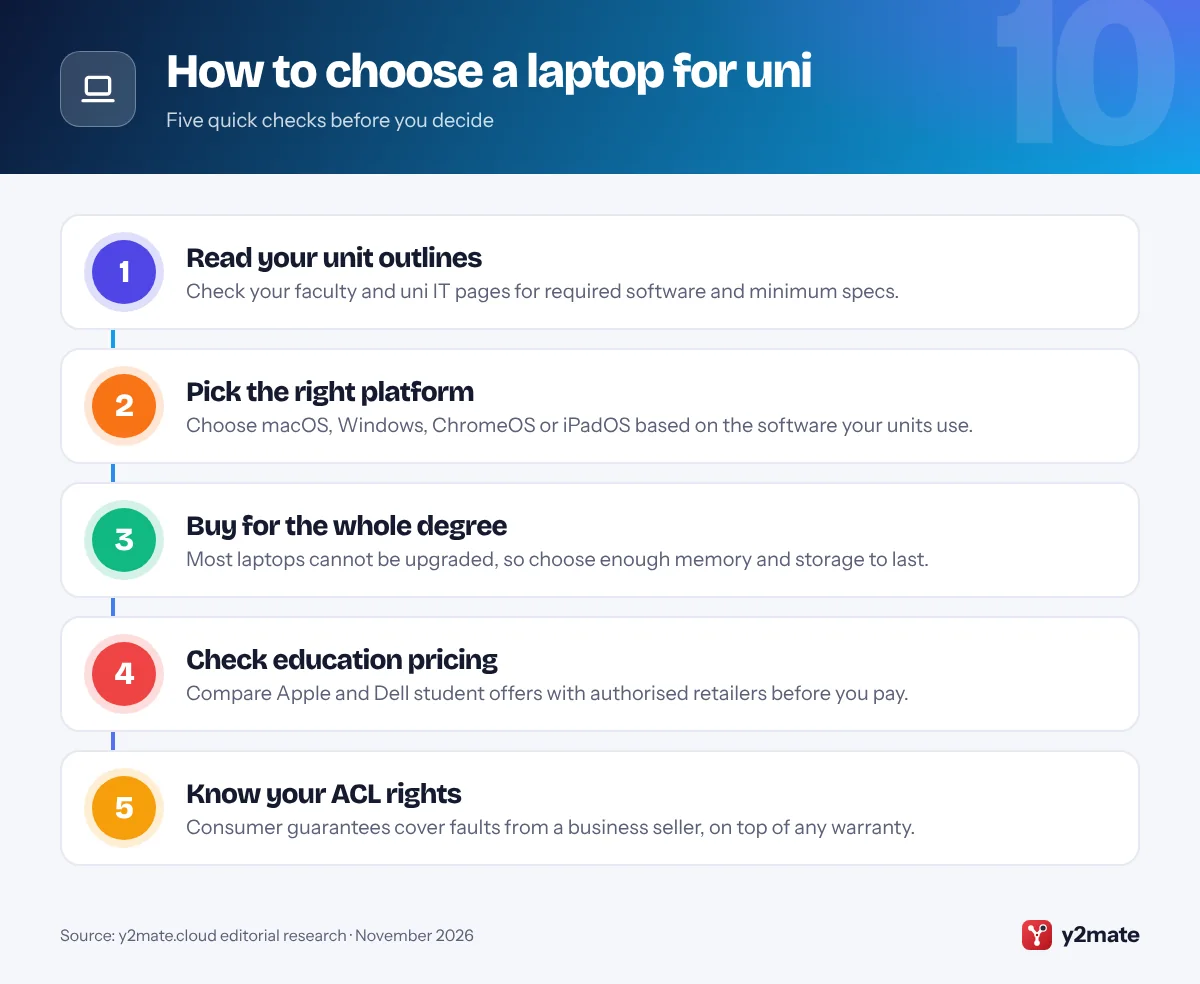
Start with your uni’s IT advice and your unit outlines. Many faculties publish minimum laptop specs, and engineering, architecture and some business units rely on Windows-only software, though some unis provide it on campus computers or through virtual desktops. Buying before O-Week gives you time to set up your laptop before classes start.
Education pricing
- Apple: the Australian Education Store is open to current and newly accepted uni students and parents buying for them.
- Dell: the Student Purchase Program offers savings for students and educators.
- Microsoft: in November 2026 its Australian store listed student pricing as temporarily unavailable.
Your rights under the Australian Consumer Law
Consumer guarantees apply automatically when you buy from a business: a laptop must be of acceptable quality, match its description and be fit for any purpose you made known. For a major failure you can choose a refund or replacement, and the guarantees can continue after the maker’s warranty ends. A warranty is an extra promise on top of these rights, not a replacement for them.
Tax deductions
If you work while studying and your course has a sufficient connection to your current job, the ATO may let you claim the work-related share of a laptop’s decline in value as a self-education expense. A course that only relates to a future career generally does not qualify, so check the ATO’s guidance or ask a registered tax agent.
Frequently asked questions
What is the best laptop for uni students in Australia?
For most uni students in Australia, the Apple MacBook Air with M5 is the best laptop in 2026: it is light, silent, long-lasting and capable across almost every course. The Dell XPS 13 (2026) is the best premium Windows laptop, the MacBook Neo is the most affordable Mac, and the Lenovo ThinkPad E14 Gen 8 suits engineering and science students who need upgradeable Windows hardware.
Can I claim a laptop on tax as a uni student?
Only in some cases. The ATO allows a self-education deduction when your course has a sufficient connection to your current paid work, for example by maintaining or improving skills you use in that job. You can then claim the work-related share of the laptop's decline in value, not the private-use share. Study aimed at a future career generally does not qualify. Keep receipts and records of how you use it.
Is a Chromebook or an iPad good enough for uni?
For essay-based degrees, often yes. A Chromebook handles web apps such as Microsoft 365, Google Docs, Canvas and Moodle, and an iPad Air with a keyboard is excellent for handwritten notes and annotating readings. Neither can install full Windows or Mac programs, so they suit arts, education and health courses better than engineering, design or data-heavy science units. Always check your unit outlines first.
What does the Australian Consumer Law cover if my laptop breaks?
If a laptop you bought from a business has a fault, the consumer guarantees under the Australian Consumer Law apply. It must be of acceptable quality, match its description and be fit for purpose. For a major failure you can choose a refund or replacement; for a minor failure the business can choose to repair it. These rights can continue after the warranty ends, but damage you cause is not covered.
Where can uni students get education pricing on a laptop in Australia?
Apple's Australian Education Store offers education pricing to current and newly accepted uni students and parents buying for them, and Dell runs a Student Purchase Program for students and educators. Microsoft's Australian store said in November 2026 that student pricing was temporarily unavailable. Check each maker's student page before buying, and compare education pricing with seasonal sales from authorised retailers.
Final verdict
The best laptops for students in Australia in 2026 are the MacBook Air with M5 for most uni students, the Dell XPS 13 (2026) for premium Windows and the MacBook Neo for the most affordable Mac. The ThinkPad E14 Gen 8 is the smart choice for engineering and IT, the MacBook Pro 14-inch suits creative and compute-heavy courses, and the iPad Air with Magic Keyboard and Chromebook Plus 14 cover note-takers and tight budgets.
Before you buy, check your unit outlines, compare education pricing with authorised retailers, keep your receipt for Australian Consumer Law claims, and only claim a tax deduction if your course is linked to your current job.
Sources and further reading
- ACCC consumer rights and guarantees: The ACCC's overview of the consumer guarantees that apply automatically to goods bought from a business, including laptops.
- ACCC guide to warranties: How a maker's warranty against defects and extended warranties work alongside the consumer guarantees, which a business cannot exclude.
- ATO work-related self-education expenses: The ATO's 2026 tax return instructions on when study costs, including equipment, have a sufficient connection to your current job.
- ChromeOS Auto Update policy: Google's official policy on how long Chromebooks receive automatic updates, counted from each hardware platform's release date.

Leave a Reply