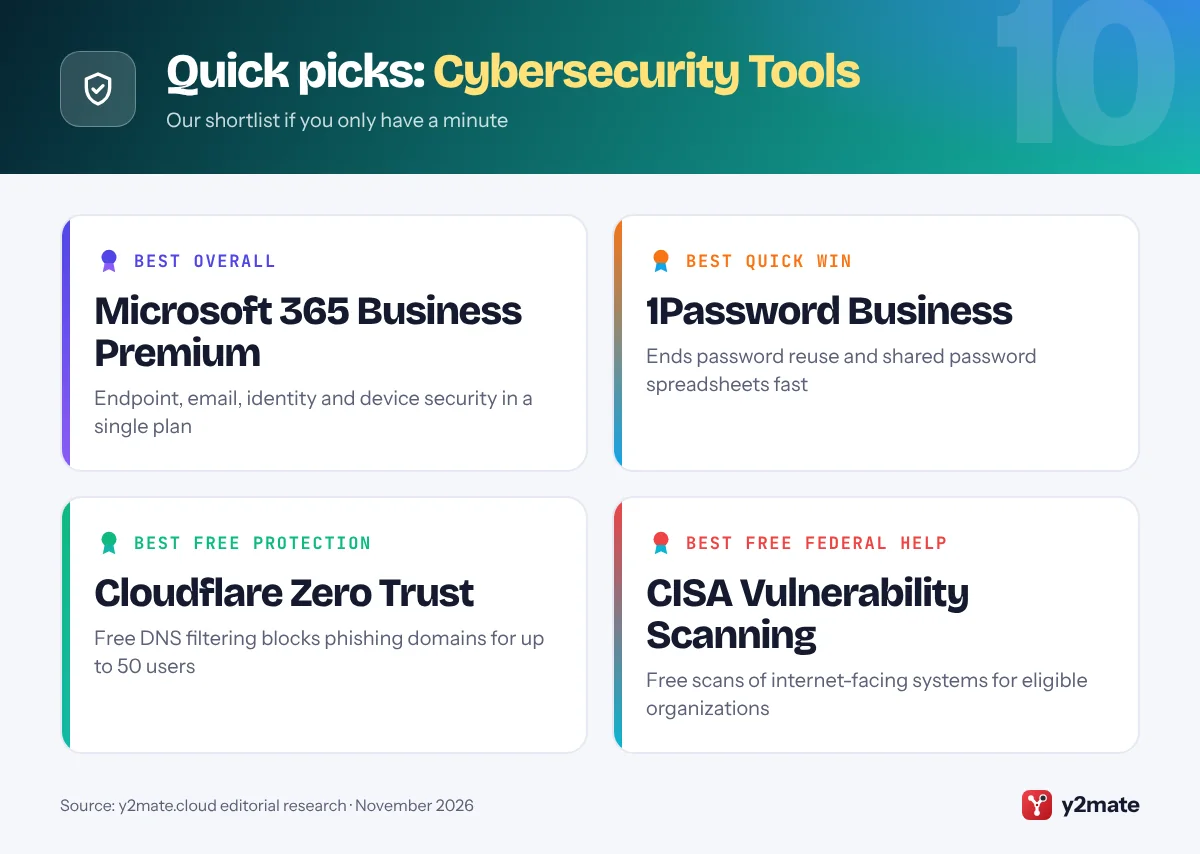
- For most US small businesses, the best cybersecurity starting point is the protection already included in Microsoft 365 Business Premium or Google Workspace, switched on and enforced.
- Multi-factor authentication, a password manager, endpoint protection and backups that ransomware cannot delete cover the attacks that most often hit small firms.
- CISA offers free Vulnerability Scanning to government bodies and critical infrastructure organizations, a group that includes many small businesses in sectors such as healthcare and manufacturing.
- NIST's free CSF 2.0 Small Business Quick-Start Guide and the FTC's Cybersecurity for Small Business materials give owners a no-cost security plan and staff training.
- Every US state has a data breach notification law, and financial businesses covered by the FTC Safeguards Rule must also report breaches affecting 500 or more consumers to the FTC.
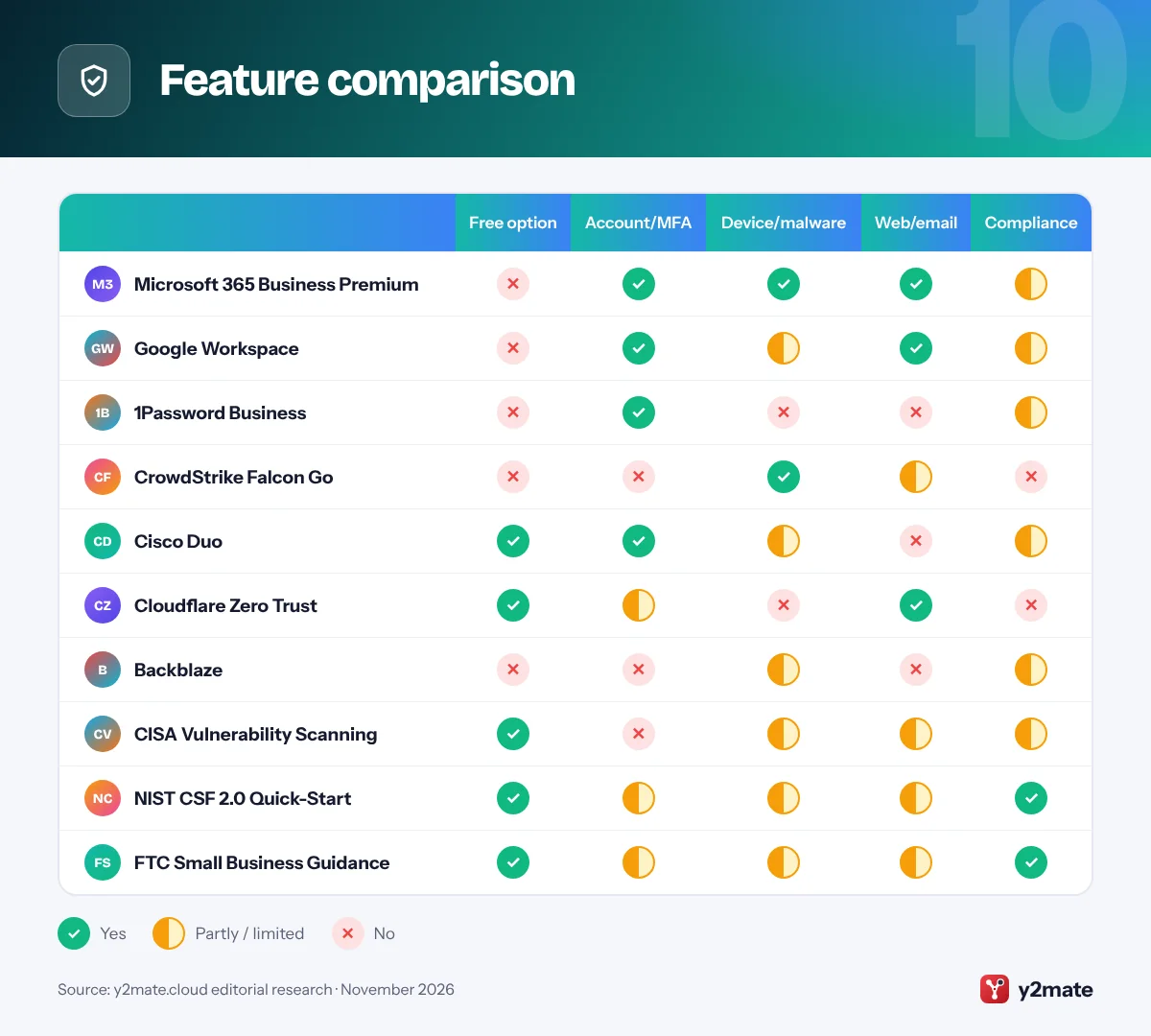
The best cybersecurity tools for small businesses in the USA in 2026 combine paid platforms with free federal help: a secure office suite such as Microsoft 365 Business Premium or Google Workspace, a password manager, endpoint protection, multi-factor authentication, DNS filtering and backup, supported by free resources from CISA, NIST and the FTC. For most US firms, the biggest wins come from switching on the security already included in the tools they pay for, then filling the gaps in a sensible order.
In this list, a cybersecurity tool means software or a service that helps you prevent, detect or recover from attacks such as phishing, ransomware and account takeover. Some picks are commercial products. Others are free government services many owners never hear about, including CISA’s Vulnerability Scanning and NIST’s Small Business Quick-Start Guide.
This guide is for owners and managers of US businesses with roughly one to a few hundred staff, from dental offices and accountants to contractors and online stores. It also flags the US rules that shape your choices, such as state breach notification laws and, for financial-type businesses like tax preparers and auto dealers that arrange financing, the FTC Safeguards Rule.
How we ranked this list
We did not run lab tests. We compared publicly documented features, official product pages and government guidance, and widely reported feedback from small business owners and IT providers. We weighed how well each of these cybersecurity tools for small businesses in the USA covers the attacks that most often hit small firms, namely phishing, stolen passwords, ransomware and unpatched systems; how easy it is to run without a dedicated security team; whether there is a free or included way to start; and how well it fits US requirements such as the FTC Safeguards Rule and state breach laws.
Platforms that cover several layers at once rank highest. Free government resources rank lower only because they guide or check your security rather than enforce it. For many small firms, they are still the best place to start.
The Top 10 Cybersecurity Tools
1. Microsoft 365 Business Premium
Best for: Microsoft-based firms with up to 300 users
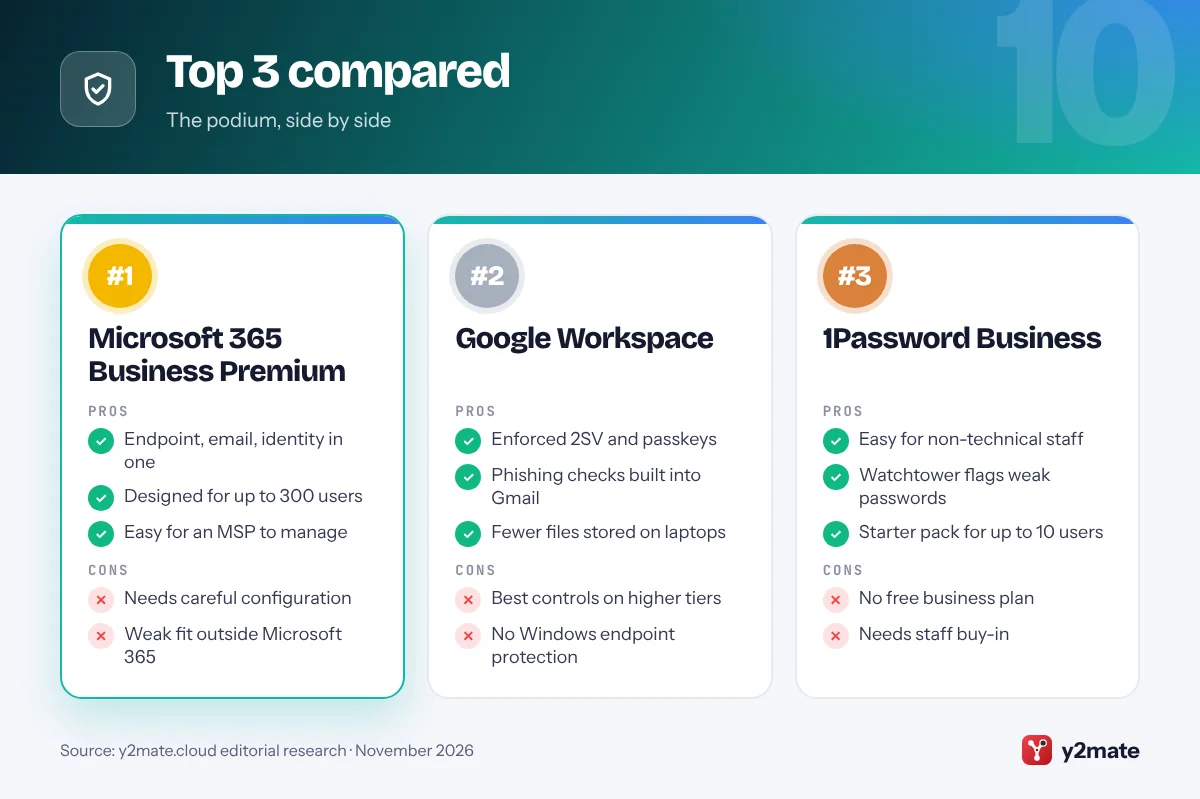
Microsoft 365 Business Premium is the plan many US IT providers recommend for small businesses that already use Outlook, Word and Teams, because it bundles a full security stack with the apps. It is designed for organizations with up to 300 users and includes Microsoft Defender for Business for endpoint protection, Defender for Office 365 Plan 1 for checking email links and attachments, Microsoft Intune for managing laptops and phones, and Microsoft Entra ID P1 for conditional access and multi-factor authentication.
In practice, one admin center can enforce MFA, block sign-ins from unmanaged devices, push Windows updates, encrypt laptops and isolate an infected PC. Defender for Business is also sold on its own for firms that do not need the whole bundle. Because licensing is per user, it is easy to budget for and easy to hand to a managed service provider (MSP) to run.
The catch is that many protections need to be configured before they do anything, and the settings are extensive. Plenty of small firms pay for Business Premium and only use the email. If you are not on Microsoft 365, or you have more than 300 users, look elsewhere.
Official site: Microsoft 365 Business Premium
- Endpoint, email and identity in one plan
- Designed for firms up to 300 users
- Easy for an MSP to manage
- Needs careful configuration
- Little value outside Microsoft 365
2. Google Workspace
Best for: teams that run on Gmail and Google Drive
If your business email is on Gmail, Google Workspace already includes security controls that many owners never switch on. Admins can enforce 2-Step Verification for every account, let staff sign in with passkeys or hardware security keys, set password rules and decide which phones and laptops can reach company data. Gmail scans incoming mail for spam, malware and phishing and warns users about suspicious links and attachments.
The admin console can also alert you to suspicious sign-ins and other risky account activity. Because most work happens in the browser, there are fewer company files sitting on local laptops to lose or have encrypted. Business Plus and Enterprise editions add more, including Google Vault for retaining and searching email and files, and advanced endpoint management for tighter control of devices.
The limits are that Workspace does not protect Windows PCs the way a dedicated endpoint tool does, and the strongest controls sit in the higher tiers. Pair it with endpoint protection on any Windows machines, and make sure at least two trusted people hold admin access with recovery options set up.
Official site: Google Workspace
- Enforced 2-Step Verification
- Passkeys and security keys
- Phishing checks built into Gmail
- Best controls on higher tiers
- Does not replace endpoint protection
3. 1Password Business
Best for: replacing shared passwords and spreadsheets
Stolen and reused passwords remain one of the easiest ways into a small business, and a password manager is one of the cheapest fixes with the biggest payoff. 1Password, from the Toronto-based company of the same name, stores logins, passkeys, card details and secure notes in encrypted vaults that staff can share by team, so nobody needs a password spreadsheet or a sticky note on the monitor.
1Password Business adds admin controls, activity reports and Watchtower, which flags weak, reused or exposed passwords across the company. It can also unlock with single sign-on from identity providers such as Microsoft Entra ID and Okta. For very small teams, the company sells a Teams Starter Pack for up to 10 people. Accounts created on 1Password.com are hosted in the United States, which keeps things simple for US firms answering customer questionnaires.
There is no free business plan, only a trial, and the value depends entirely on staff using it. Roll it out with a short training session, start with shared accounts such as social media, suppliers and banking portals, and set up account recovery so a forgotten password does not lock anyone out.
Official site: 1Password Business
- Easy for non-technical staff
- Watchtower flags weak passwords
- Supports passkeys and SSO
- No free business plan
- Only works if staff adopt it
4. CrowdStrike Falcon Go
Best for: endpoint protection without an IT team
CrowdStrike, headquartered in Austin, Texas, is best known for protecting large enterprises, but Falcon Go is its package for small businesses. The US version bundles Falcon Prevent next-generation antivirus, which looks at behavior and uses machine learning rather than relying only on signature updates, with USB device control, mobile device protection and Express Support.
Everything is managed from a web console, and a lightweight agent protects each laptop and desktop, so a small office does not need to run a server. CrowdStrike limits Falcon Go purchases to 100 devices, which makes its target clear: small teams that want a recognized security brand without enterprise complexity. Growing firms can move up to Falcon bundles that add endpoint detection and response (EDR) or to Falcon Complete, CrowdStrike’s fully managed service.
Falcon Go is focused on prevention, so nobody is watching your alerts around the clock unless you upgrade or use a provider who does. It also adds a separate console and bill if you already own Microsoft Defender for Business through Business Premium, so decide which tool will be your main endpoint protection rather than paying twice for the same layer.
Official site: CrowdStrike Falcon Go
- Enterprise-grade antivirus engine
- Simple web console
- Built for teams under 100 devices
- No 24/7 monitoring in this tier
- Overlaps with Defender for Business
5. Cisco Duo
Best for: adding MFA to VPNs and older systems
Multi-factor authentication (MFA) means proving who you are with a second factor, such as a phone prompt or security key, on top of a password. Microsoft 365 and Google Workspace include MFA for their own apps, but small firms often have other doors: a VPN, remote desktop, a Windows server or a line-of-business app. Duo, founded in Ann Arbor, Michigan, and now owned by Cisco, is one of the most widely used ways to put MFA in front of those systems.
Staff approve sign-ins with a push notification in the Duo Mobile app, a hardware token or a security key, and admins manage everything from one dashboard. Duo Free covers up to 10 users, which is enough for many very small offices to protect remote access at no cost. Paid editions add features such as single sign-on, device health checks and more detailed access policies.
Text message and phone call codes are still available, but they are weaker than app prompts or security keys, so steer staff toward the stronger options. Duo is also one more vendor to manage, so skip it if all your systems already sit behind Microsoft Entra ID or Google sign-in.
Official site: Cisco Duo
- Free for up to 10 users
- Protects VPN and remote desktop
- Easy push approvals for staff
- Another vendor to manage
- Overlaps with Entra ID or Google
6. Cloudflare Zero Trust
Best for: free DNS filtering for up to 50 users
DNS filtering stops a device from reaching known malicious websites by checking each web address against threat intelligence before the connection is made. It is a cheap, quiet way to blunt phishing links and malware downloads, even when someone clicks the wrong thing. Cloudflare, headquartered in San Francisco, offers this through Cloudflare Zero Trust, whose free plan covers up to 50 users.
You can protect an office by pointing the router’s DNS settings at Cloudflare Gateway, or install Cloudflare’s device client on laptops so the protection follows staff home and on the road. Policies can block whole categories such as malware, phishing and other security threats. The same platform also offers Zero Trust access, which lets staff reach internal apps without opening up an old-style VPN to the internet.
The free plan comes with limited logs and support, and the dashboard uses networking terms that may be unfamiliar to owners. If nobody in the business wants to touch DNS settings, ask your IT provider to set it up once. If you only need basic blocking, a free resolver such as Quad9 needs no account at all.
Official site: Cloudflare Zero Trust
- Free for up to 50 users
- Blocks phishing and malware domains
- Works in the office and remotely
- Setup needs some networking know-how
- Limited logs and support when free
7. Backblaze
Best for: ransomware-resistant cloud backup
Backups are what let a small business recover from ransomware, a stolen laptop or an accidental deletion without paying anyone. Backblaze, based in San Mateo, California, offers two routes. Computer Backup for businesses continuously backs up staff laptops and desktops to the cloud, with central administration and billing. B2 Cloud Storage is a destination that many backup apps and network storage devices can send copies to.
The feature to look for is Object Lock on B2, which makes backup copies immutable for a period you choose, so they cannot be deleted or encrypted during that time, even by an attacker who has stolen an admin password. It works with popular backup software such as Veeam and with network storage devices from brands like Synology and QNAP, so you can keep a local copy for fast restores and a locked cloud copy for disasters.
Backblaze’s computer backup does not cover mailboxes and files that live in Microsoft 365 or Google Workspace, so you need a separate tool for those. And no backup is real until you have tested a restore. Schedule a test every few months.
Official site: Backblaze
- Immutable backups with Object Lock
- Simple laptop backup for staff
- Works with Veeam and NAS devices
- Microsoft 365 data needs another tool
- Restores need regular testing
8. CISA Vulnerability Scanning
Best for: free external scans for eligible organizations
The Cybersecurity and Infrastructure Security Agency (CISA), the federal agency that leads civilian cyber defense, offers free Vulnerability Scanning, the service long known as Cyber Hygiene. Once you enroll, CISA continuously scans your internet-facing systems, such as public IP addresses, firewalls and remote access services, for known vulnerabilities and risky configurations, then sends regular reports and faster alerts when it finds something urgent.
Eligibility is the key detail. The service is offered to federal, state, local, tribal and territorial governments and to public and private critical infrastructure organizations. Plenty of small businesses fall into critical infrastructure sectors, including healthcare, water, food and agriculture, manufacturing and financial services, so it is worth asking. CISA also offers Web Application Scanning for public websites and keeps a catalog of free cybersecurity services and tools that any organization can browse.
Scanning only looks from the outside, so it will not spot a phishing-compromised mailbox or an unpatched laptop at someone’s home. Enrollment involves some paperwork, and you must act on the findings yourself or with your IT provider.
Official site: CISA Vulnerability Scanning
- Free continuous external scanning
- Reports from a federal agency
- Fast alerts on urgent problems
- Limited to eligible organizations
- You must fix findings yourself
9. NIST CSF 2.0 Quick-Start
Best for: turning good intentions into a written plan
The NIST Cybersecurity Framework (CSF) 2.0 is the US government’s voluntary, widely used framework for managing cyber risk, and NIST published a Small Business Quick-Start Guide, Special Publication 1300, alongside it in February 2024. It is free, short and written for businesses that have modest or no cybersecurity plans in place.
The guide walks through the framework’s six functions, Govern, Identify, Protect, Detect, Respond and Recover, with one page of practical actions for each. Examples include listing your hardware, software and data, deciding who is responsible for security, and writing down who to call during an incident. NIST’s Small Business Cybersecurity Corner adds plain-language guides and templates. Using the CSF also makes conversations with insurers, larger customers and your IT provider easier, because many of them already use its language.
It is a planning tool, not software, so it will not stop an attack on its own, and working through it takes a few hours of an owner’s time. Treat it as the checklist that tells you which of the other tools on this list you still need, and revisit it once a year.
Official site: NIST CSF 2.0 Quick-Start
- Free and written for small firms
- Shared language with insurers
- Covers response and recovery
- Guidance only, not a product
- Takes time to work through
10. FTC Small Business Guidance
Best for: free staff training and Safeguards Rule help
The Federal Trade Commission is the main federal regulator of how most US businesses protect customer data, and it publishes free Cybersecurity for Small Business materials developed with NIST, the Small Business Administration and the Department of Homeland Security. They include short fact sheets, videos and quizzes on topics such as phishing, ransomware, physical security and vendor security, plus a guide for employers on using them to train staff.
For some businesses the FTC is also a direct rule-maker. The FTC Safeguards Rule requires non-bank financial businesses, such as tax preparers, mortgage brokers and auto dealers that arrange financing, to run a written information security program with elements including multi-factor authentication and encryption. Since May 2024, covered businesses must also notify the FTC within 30 days of discovering a breach of unencrypted customer information that affects 500 or more people. The FTC’s plain-language compliance guide explains what applies.
These are guidance materials, so they will not protect a device by themselves, and there is no phishing simulation or progress tracking. But they are free and in the public domain, which makes them an easy basis for a monthly lunch-and-learn without buying a training platform.
Official site: FTC Small Business Guidance
- Free, public-domain training material
- Explains the Safeguards Rule
- Short enough for busy staff
- No tracking or phishing tests
- Guidance only, not a product
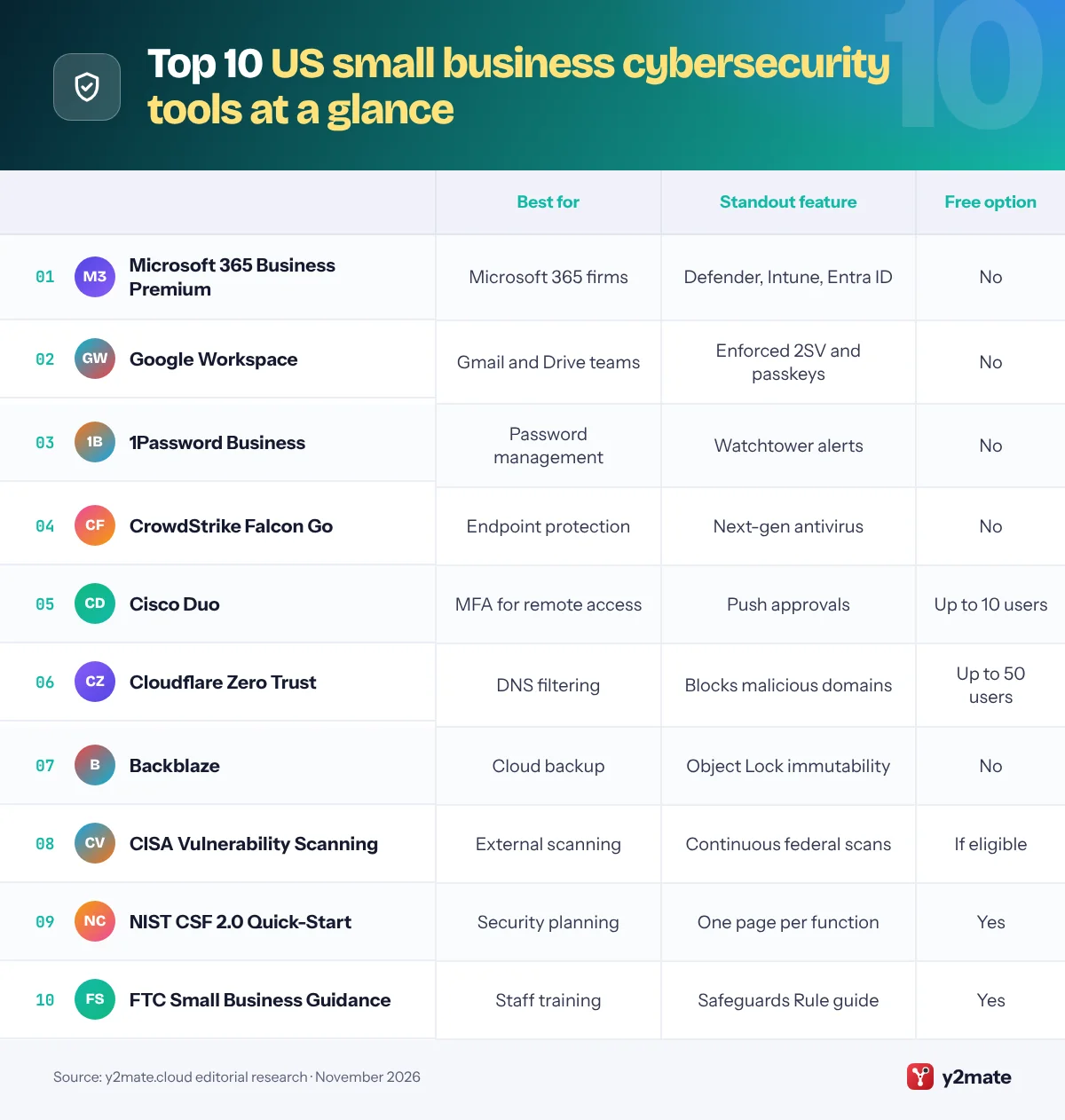
Feature comparison
How to choose cybersecurity tools for small businesses in the USA
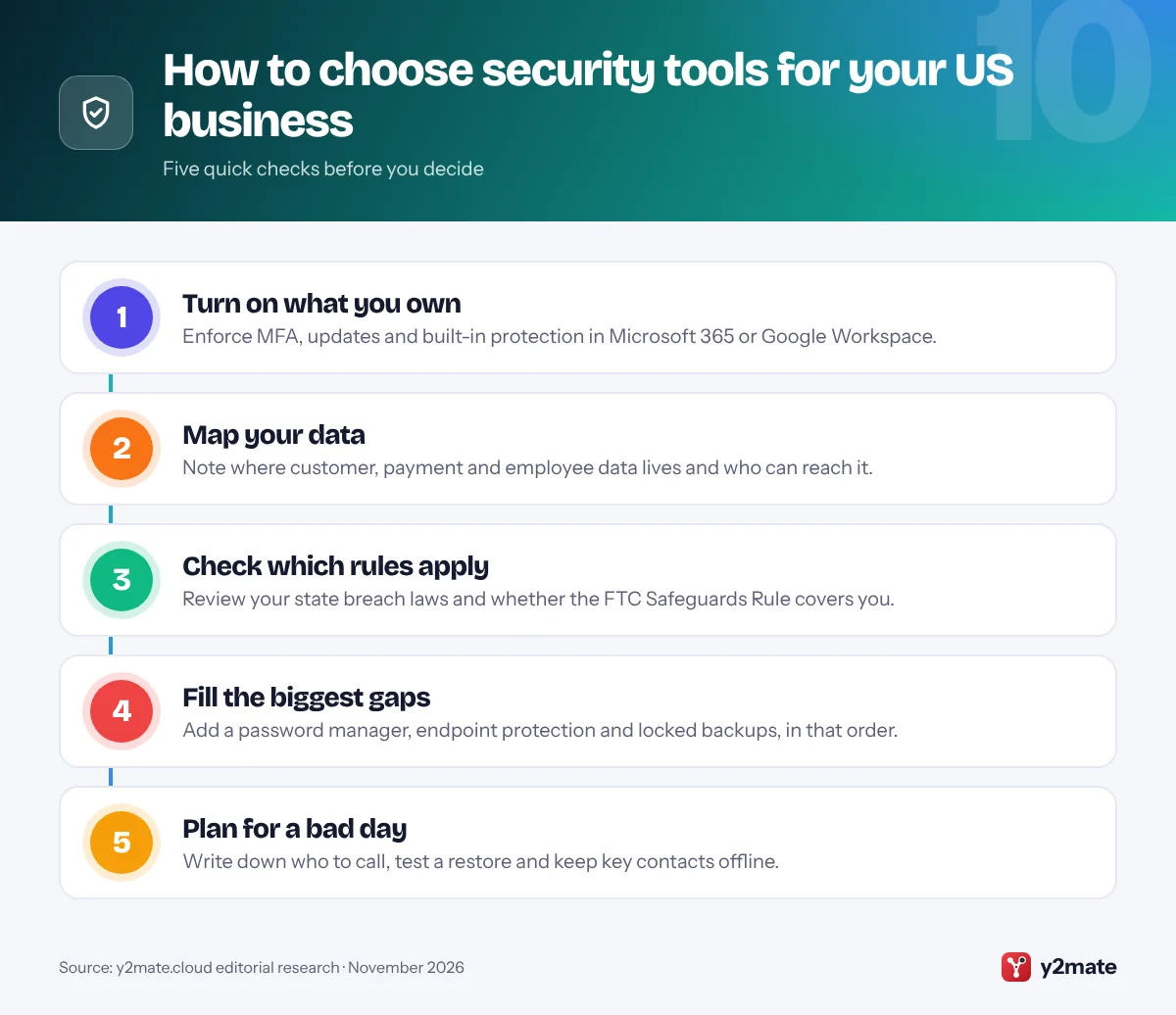
Start with the attacks that actually hit small US firms: phishing emails, stolen or reused passwords, ransomware and unpatched systems. The cheapest defenses are often already in your subscriptions, so enforce multi-factor authentication and automatic updates in Microsoft 365 or Google Workspace before buying anything new. Then add, in order, a password manager, endpoint protection, DNS filtering and backups that cannot be deleted.
Know the US rules that apply to you
Every state, plus the District of Columbia, has a data breach notification law, and most apply to businesses of any size that hold residents’ personal information. Deadlines and attorney general notice thresholds vary, so check the states where your customers live. If you are a tax preparer, mortgage broker, auto dealer that arranges financing or similar financial business, the FTC Safeguards Rule probably applies, with its own written security program and FTC reporting duty. Healthcare providers also have HIPAA obligations.
Questions to ask any vendor
- Can it enforce MFA and log admin activity?
- Where is our data stored, and can we export it if we leave?
- What support is included, and is it available when we work?
- Does it fit our IT provider’s tools, or is it another console to watch?
Think about insurance and outside help
Cyber insurers commonly ask about MFA, endpoint protection and backups before they quote, so the tools on this list can also smooth your application. If nobody on staff owns IT, a reputable managed service provider can run these tools for you. Ask how they secure their own remote access to your systems, because attackers target providers too.
Frequently asked questions
What cybersecurity tools does a small business need?
Most small businesses need five basics: multi-factor authentication on email and remote access, a password manager, endpoint protection on every computer, automatic software updates, and backups that ransomware cannot delete. Add DNS filtering and staff phishing training next. Many of these come with Microsoft 365 Business Premium or Google Workspace, so check what you already pay for before buying separate tools.
Does CISA offer free cybersecurity services to small businesses?
Yes, with conditions. CISA's free Vulnerability Scanning service, formerly called Cyber Hygiene, is available to government bodies and to public and private critical infrastructure organizations, which includes many small firms in sectors such as healthcare, water, food and agriculture, and manufacturing. CISA also publishes free guidance, its Secure Our World tips for staff and a catalog of no-cost tools that any business can use.
Does the FTC Safeguards Rule apply to my small business?
It applies to non-bank financial institutions under the FTC's jurisdiction, which can include tax preparers, mortgage brokers, payday lenders and auto dealers that arrange financing or leasing. Covered businesses need a written information security program with safeguards such as MFA and encryption, and must report breaches affecting 500 or more consumers to the FTC. Some smaller firms are exempt from certain requirements, so read the FTC's guide.
Is Microsoft Defender enough for a small business?
For many small businesses, yes. Microsoft Defender for Business, included in Microsoft 365 Business Premium and sold separately, provides next-generation antivirus plus endpoint detection and response, and it is designed for organizations with up to 300 users. It works best when devices are enrolled in Intune and settings are configured properly. Firms without in-house IT may still want a managed service provider to watch alerts and respond.
Do I have to report a data breach in the US?
Usually, yes. Every state has a breach notification law requiring businesses to notify affected residents, and often the state attorney general, when certain personal information is exposed. Deadlines and triggers differ by state. Industry rules can add duties, such as the FTC Safeguards Rule for financial businesses or HIPAA for healthcare. Contact your insurer and a lawyer quickly, and report cybercrime to the FBI's Internet Crime Complaint Center.
Final verdict
When choosing cybersecurity tools for small businesses in the USA, the strongest foundation is the security built into your office suite: Microsoft 365 Business Premium if you run on Microsoft, or Google Workspace with enforced 2-Step Verification if you live in Gmail. Add 1Password for passwords, CrowdStrike Falcon Go or Defender for Business on every computer, Cloudflare for DNS filtering and Backblaze for backups that ransomware cannot touch.
Then use the free federal help: NIST’s quick-start guide to write a simple plan, the FTC’s materials to train staff, and CISA’s scanning if you qualify. Revisit the plan once a year, and whenever you add staff, systems or new types of customer data.
Sources and further reading
- FTC Safeguards Rule guide: The FTC's plain-language guide to who the Safeguards Rule covers and what a written information security program must include.
- NIST Small Business Cybersecurity Corner: NIST's hub of free guides, templates and videos that help small businesses plan and manage cybersecurity risk.
- CISA Secure Our World: CISA's campaign with simple steps and tip sheets on passwords, MFA, phishing and software updates for staff.
- SBA cybersecurity guide: The US Small Business Administration's overview of common cyber threats and practical steps to protect a small business.
- FBI Internet Crime Complaint Center: The FBI's official site for reporting cybercrime, including business email compromise and ransomware incidents.

Leave a Reply