- The Essential Eight, ASD's set of eight mitigation strategies, remains the most widely recognised cybersecurity baseline for Australian small businesses.
- ASD's ACSC introduced ASD Essentials in October 2026 as an evolution of the Essential Eight, and both frameworks are available during a transition period.
- Small businesses with 19 or fewer full-time equivalent employees can get free cyber advice and incident support from the government-funded Small Business Cyber Resilience Service run by IDCARE.
- ASD's Australian Cyber Security Hotline, 1300 CYBER1, offers advice 24 hours a day, and cybercrime can be reported through ReportCyber at cyber.gov.au.
- Businesses with annual turnover above 3 million dollars must report ransomware payments to ASD within 72 hours, and businesses covered by the Privacy Act must notify eligible data breaches to the OAIC.
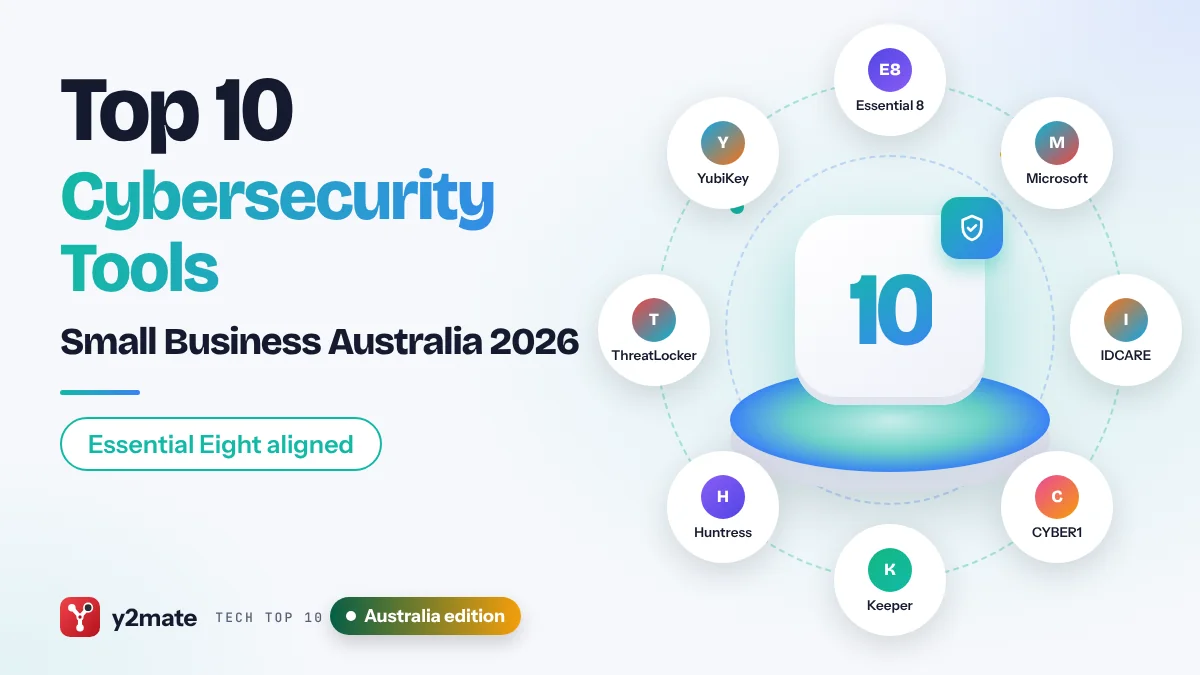
The best cybersecurity tools for small businesses in Australia in 2026 are built around the Essential Eight, ASD’s baseline of eight mitigation strategies, and free government support such as the 1300 CYBER1 hotline and the IDCARE-run Small Business Cyber Resilience Service. On the commercial side, Microsoft 365 Business Premium, Keeper, Huntress, ThreatLocker, YubiKey, MailGuard and Cloudflare cover most of the controls a small firm needs, several of them with Australian hosting or local teams.
In this list, a cybersecurity tool means software, hardware or a service that helps you prevent, detect or recover from attacks such as phishing, ransomware and business email compromise. ASD’s ACSC is the Australian Signals Directorate’s Australian Cyber Security Centre, the federal government’s lead cyber security agency. In October 2026 it introduced ASD Essentials, which it describes as an evolution of the Essential Eight; both are available during a transition period, and insurers, tenders and supplier questionnaires still commonly ask about Essential Eight maturity.
This guide is for owners and managers of Australian businesses with roughly one to 200 staff. It also covers local obligations that shape your choices, including the Notifiable Data Breaches scheme run by the OAIC and mandatory ransomware payment reporting for businesses with annual turnover above 3 million dollars.
How we ranked this list
We did not carry out lab testing. We compared publicly documented features, official guidance from ASD’s ACSC, the OAIC and the Department of Home Affairs, product documentation and widely reported feedback from Australian businesses and managed service providers. We weighed how directly each of these cybersecurity tools for small businesses in Australia supports the Essential Eight strategies, whether it is free or included in something you already pay for, Australian hosting or local support, and how realistic it is for a small team without security staff.
Free government frameworks and services rank highly because every Australian business can use them. Commercial tools are ranked by how many small firms they suit; specialised tools such as application control rank lower only because they usually need an IT provider to run them.
The Top 10 Cybersecurity Tools
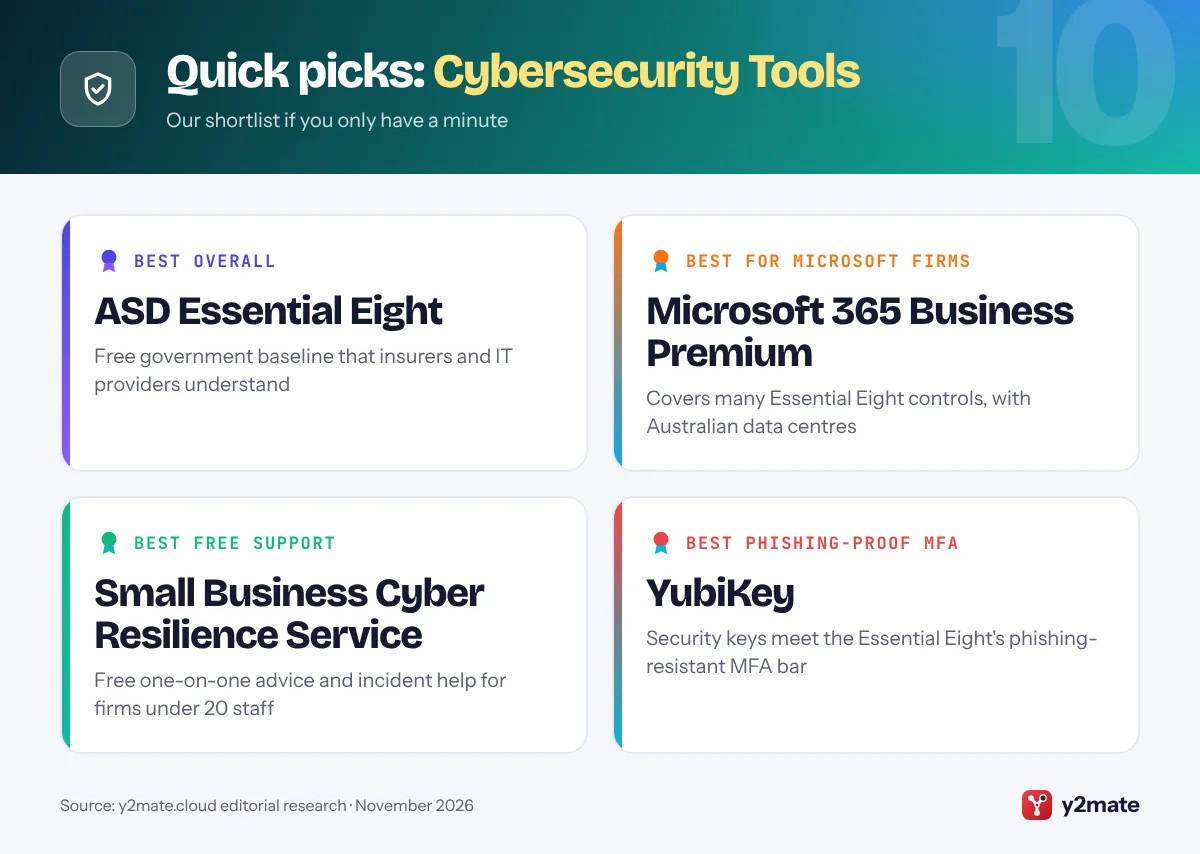
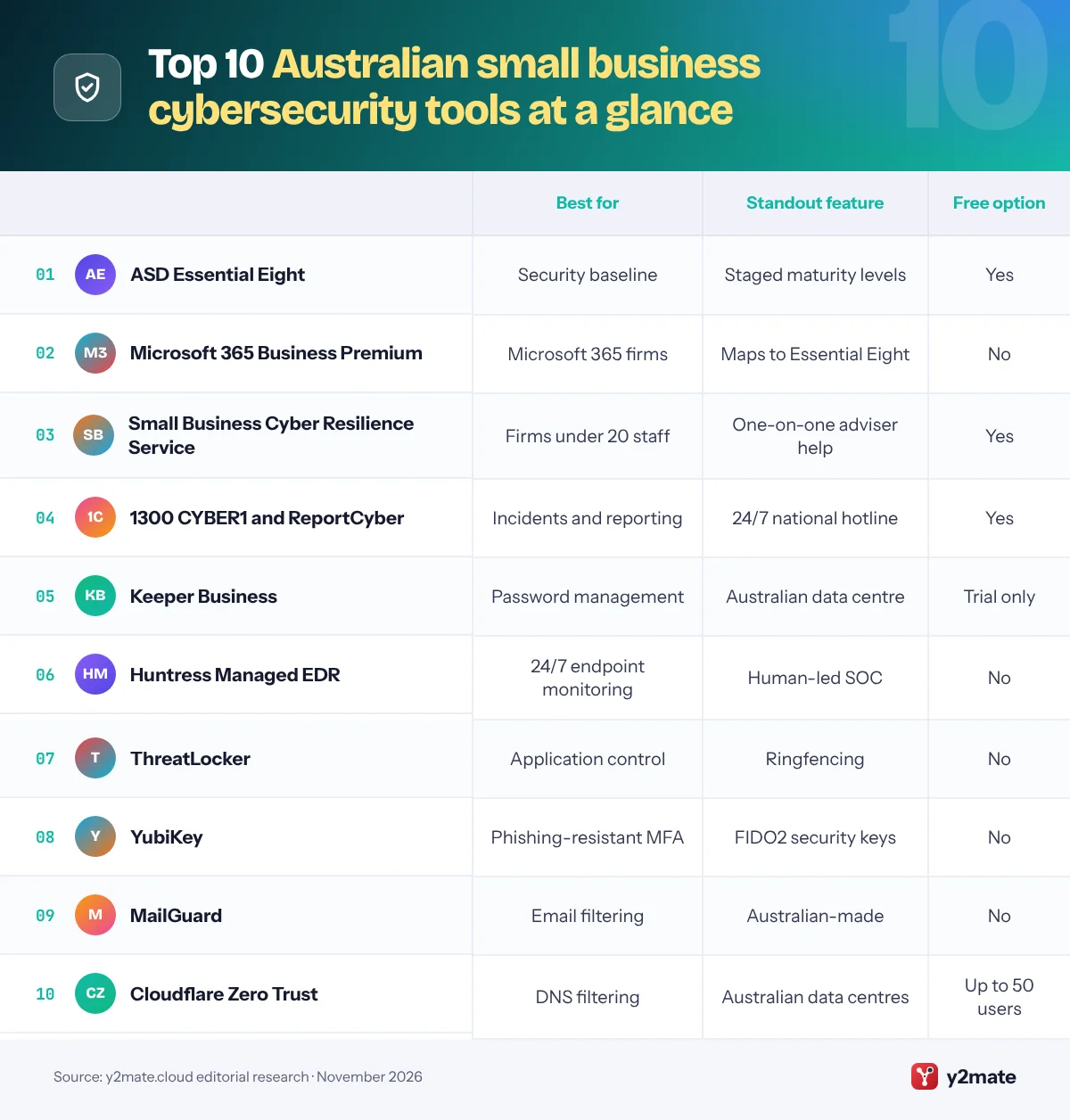
1. ASD Essential Eight
Best for: a clear, government-backed security baseline
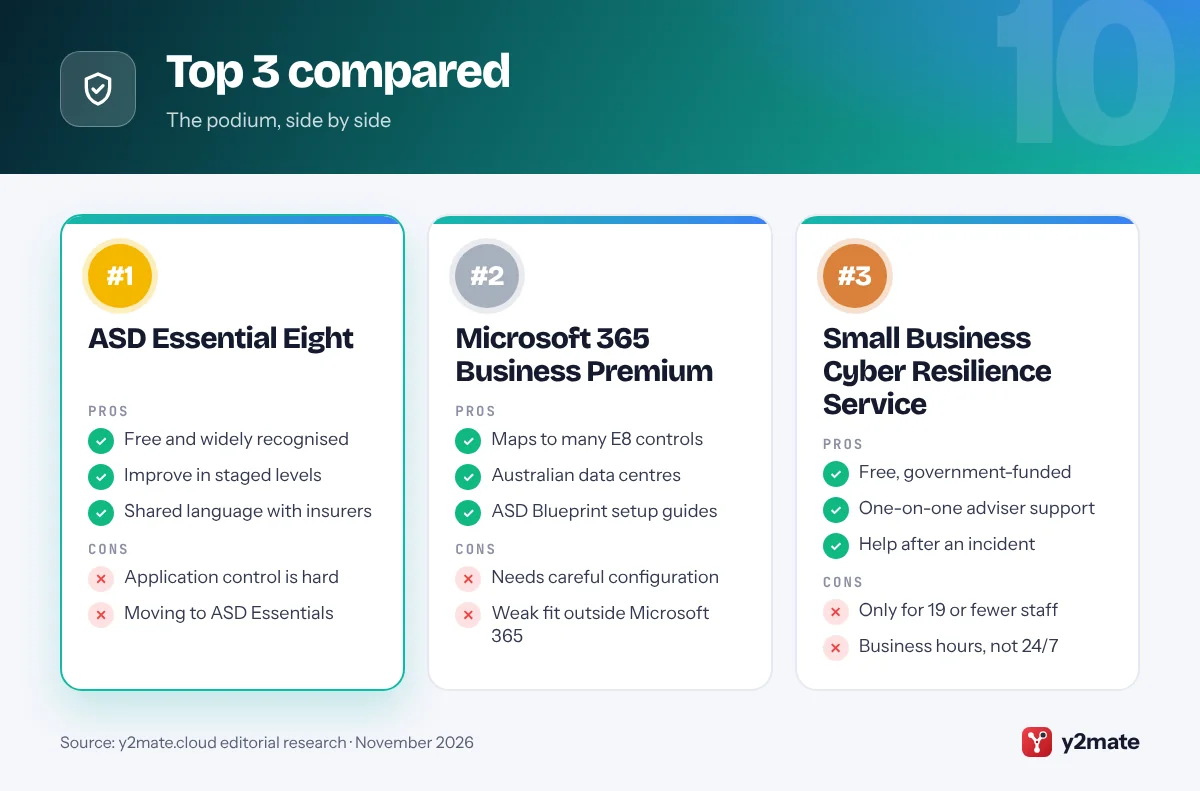
The Essential Eight is ASD’s set of eight mitigation strategies that together make it much harder for attackers to compromise your systems: patch applications, patch operating systems, multi-factor authentication, restrict administrative privileges, application control, restrict Microsoft Office macros, user application hardening and regular backups. It is free to read on cyber.gov.au, and its maturity model sets out levels one to three so you can improve in stages.
For most small businesses, Maturity Level One is a realistic first target, and it gives you a shared language with your IT provider, insurer and larger customers. Higher levels raise the bar; since the November 2023 update, for example, Maturity Level Two requires phishing-resistant MFA, such as security keys, smart cards or passkeys, for users of online services and systems. In October 2026 ASD’s ACSC introduced ASD Essentials, which replaces maturity levels with effectiveness ratings. Both frameworks remain available, with no mandatory changeover date announced at the time of writing.
The Essential Eight tells you what to do, not how, and some strategies, especially application control, are hard for a small team without help. Use it as the checklist that decides which other tools on this list you buy.
Official site: ASD Essential Eight
- Free, clear and widely recognised
- Staged maturity levels
- Understood by insurers and MSPs
- Application control is hard
- Transition to ASD Essentials
2. Microsoft 365 Business Premium
Best for: covering Essential Eight controls in one plan
Most Australian small businesses already use Microsoft 365, and Business Premium is the plan that turns it into a security platform. Designed for organisations with up to 300 users, it adds Microsoft Defender for Business, Defender for Office 365 Plan 1, Intune device management and Microsoft Entra ID P1 to the familiar Office apps.
Together they can address much of the Essential Eight. Intune can push application and Windows updates, block Office macros from the internet, harden browsers and deploy application control policies, while Entra ID enforces MFA and Defender for Business provides endpoint detection and response. Microsoft publishes Essential Eight implementation guidance for its cloud, and ASD’s own Blueprint for Secure Cloud gives step-by-step Microsoft 365 configurations. Microsoft runs data centre regions in Australia, and core data for Australian customers is generally stored onshore; your admin centre shows where your tenant’s data lives.
None of this happens by default. Business Premium is only as good as its configuration, and many small firms pay for it without enforcing MFA or removing local admin rights. Ask your IT provider which Essential Eight maturity level your current settings actually meet, and get the answer in writing.
Official site: Microsoft 365 Business Premium
- Maps to many Essential Eight controls
- Australian data centres
- ASD Blueprint configuration guides
- Needs careful configuration
- Little value outside Microsoft 365
3. Small Business Cyber Resilience Service
Best for: free one-on-one advice and incident help
The Small Business Cyber Resilience Service is a free, Australian Government-funded service delivered by IDCARE, the not-for-profit national identity and cyber support service. It is open to small businesses with 19 or fewer full-time equivalent employees, including sole traders, that are registered in Australia, actively trading and hold an ABN.
Before anything goes wrong, you can get a free Cyber Health Check to measure your cyber resilience and identify risks, plus one-on-one consultations with cyber advisers who give practical guidance tailored to your business. After an incident, such as a hacked email account, ransomware or a remote access scam, advisers help with cyber first aid and recovery steps. You can reach the service through IDCARE’s online form or its helpline during business hours on weekdays, and business.gov.au has the current contact details.
It provides advice and support rather than a product, so it will not install or monitor anything for you, and it is not a 24/7 emergency line. For urgent incidents outside business hours, call ASD’s 1300 CYBER1 hotline, and report cybercrime through ReportCyber. Larger firms with 20 or more staff will need a commercial provider for the same kind of help.
Official site: Small Business Cyber Resilience Service
- Free and government-funded
- One-on-one expert advice
- Help after an incident
- Only for 19 or fewer staff
- Business hours, not 24/7
4. 1300 CYBER1 and ReportCyber
Best for: 24/7 help and official incident reporting
ASD’s ACSC runs the Australian Cyber Security Hotline, 1300 CYBER1 (1300 292 371), which offers cyber security advice and assistance 24 hours a day, seven days a week. ReportCyber, at cyber.gov.au/report, is the national online system for reporting cybercrime; reports are passed to the relevant police agency and help ASD build a picture of current threats against Australian businesses.
ASD’s ACSC also offers a free Alert Service that emails you about new threats and how to manage them, a Small Business Cyber Security Guide, and a partnership program that businesses with an ABN can join for advisories and a regular newsletter. A useful tip: if someone contacts you claiming to be from ASD’s ACSC, they will give you an incident or reference number, and you can call the hotline to confirm the contact is genuine before acting.
These services advise and coordinate rather than fix your systems, and police may not be able to recover money already sent to criminals. Save the hotline number in every staff member’s phone now, because during an incident your email and computers may be unavailable, and contact your bank straight away if a payment has gone to a scammer.
Official site: 1300 CYBER1 and ReportCyber
- 24/7 national hotline
- Official cybercrime reporting
- Free alerts and guides
- Advice, not hands-on repair
- Lost money is rarely recovered
5. Keeper Business
Best for: password management with Australian hosting
Keeper Security, based in Chicago, makes a zero-knowledge password manager, meaning vaults are encrypted on your device and the company cannot read them. Importantly for local buyers, Keeper opened an Australian data centre, hosted on Amazon Web Services in Sydney, in 2021, so Australian organisations can keep their encrypted vaults onshore. That can help when customers or tenders ask where your data is stored.
Keeper Business gives each employee a private vault plus shared folders for team logins, with admin controls, role-based permissions and security reports that flag weak or reused passwords. It supports passkeys, and Keeper’s enterprise options integrate with single sign-on providers such as Microsoft Entra ID. Add-ons cover dark web monitoring and secure file storage, and the company also sells privileged access tools if your IT provider wants to lock down admin accounts, which supports the Essential Eight strategy of restricting administrative privileges.
Some features small firms want, such as breach monitoring, cost extra, and the admin console has a lot of options for a first-time user. If onshore hosting matters to you, confirm with Keeper that your account is created in the Australian region before you migrate any passwords.
Official site: Keeper Business
- Australian data centre option
- Shared folders and role controls
- Passkey support
- Useful extras are add-ons
- Busy admin console
6. Huntress Managed EDR
Best for: 24/7 monitored endpoints through your MSP
Endpoint detection and response (EDR) watches laptops and servers for suspicious behaviour, not just known malware, but someone has to read and act on the alerts. Huntress, a US company focused on small and mid-sized businesses, sells Managed EDR that pairs its agent with a 24/7 security operations centre whose analysts investigate threats and tell you, or your IT provider, what to fix.
Huntress launched in Australia and New Zealand in 2023, with local staff and a regional lead based in Sydney, and its threat analysts work across the US, UK and Australia. It is sold mainly through managed service providers, which is how most Australian small businesses buy IT support anyway, and it can sit alongside Microsoft Defender, adding human-led monitoring on top. Huntress also offers managed identity threat detection and response for Microsoft 365 accounts, which helps catch business email compromise, a common and costly attack on small firms.
Huntress is designed for the MSP channel, so buying it directly as a very small business may not be straightforward, and pricing depends on your provider. If you have no IT provider at all, start with Defender for Business and the free government services before adding a managed service like this.
Official site: Huntress Managed EDR
- 24/7 human-led monitoring
- Local ANZ team
- Spots Microsoft 365 account takeover
- Mainly sold through MSPs
- Overkill for one-person firms
7. ThreatLocker
Best for: Essential Eight application control
Application control means only approved software can run on your computers, so ransomware and other unknown programs are blocked by default. It is one of the Essential Eight strategies, but it is the one small businesses most often skip, because it is fiddly to set up and maintain with built-in Windows tools alone.
ThreatLocker, a Florida-based company, focuses on making this practical. Its agent first learns which applications your business uses, then lets your IT provider approve what is allowed, ringfence trusted apps so they cannot reach files or the internet unnecessarily, and control USB storage and requests for admin rights. The company opened an Australian data centre in Sydney in 2024 and publishes guidance mapping its tools to the Essential Eight, which helps when you need to show an insurer or customer what you have in place.
Default-deny security changes how staff work: new software and some updates may need approval, and someone has to handle those requests quickly or people will get frustrated. ThreatLocker is usually deployed and managed by an MSP, so it suits businesses that already have one and are aiming beyond Maturity Level One.
Official site: ThreatLocker
- Blocks unapproved software
- Ringfences trusted apps
- Australian data centre
- Approval requests need managing
- Usually needs an MSP
8. YubiKey
Best for: phishing-resistant MFA for staff and admins
Text message codes and authenticator app prompts can be phished or approved by mistake. A security key such as Yubico’s YubiKey is a small USB or NFC device that proves who you are using the FIDO2 and passkey standards. It only responds to the genuine website, so a fake login page cannot capture a usable code.
That matters in Australia because, from Maturity Level Two, the Essential Eight requires phishing-resistant MFA for users of online services and systems, and security keys are one of the methods ASD names. YubiKeys work with Microsoft 365, Google Workspace, Keeper and most major cloud services that support security keys or passkeys, and they are a practical way to protect the accounts criminals target first, such as administrators, finance staff and anyone who can change bank details.
Every person needs at least two keys, one as a spare, and you must enrol them carefully so a lost key does not lock someone out. Passkeys stored on phones or laptops are another phishing-resistant option and may suit many staff; keep hardware keys for admin and finance roles, where the stakes are highest.
Official site: YubiKey
- Phishing-resistant sign-ins
- Supports Essential Eight ML2
- Works with Microsoft and Google
- Spares needed for every user
- Enrolment takes planning
9. MailGuard
Best for: Australian-made email filtering
Email remains the main way phishing, invoice fraud and malware reach small businesses. MailGuard, based in Melbourne, is an Australian email security company that filters messages for phishing, malware, spam and business email compromise before they reach your staff, and it regularly publishes alerts about email scams targeting Australians.
MailGuard 365 works inside a Microsoft 365 tenancy, moving threats out of the way using Microsoft’s own mail folders, while MailGuard’s filtering service can also be added in front of Google Workspace and other mail platforms, usually with a simple change to your domain’s MX records. It is sold directly and through Australian IT providers, so local support is easy to find, and it gives small firms a second opinion on email from a company focused on the local threat picture.
If you already pay for Microsoft 365 Business Premium, you have Defender for Office 365 Plan 1, so MailGuard is an extra layer rather than a replacement; weigh whether a second filter is worth it for your risk. No filter is perfect, so pair it with staff training and a firm rule that any change to bank details is confirmed by phone using a number you already hold.
Official site: MailGuard
- Australian company and support
- Works with Microsoft 365 and Google
- Simple MX record setup
- Overlaps with Defender for Office
- Extra cost on top of email
10. Cloudflare Zero Trust
Best for: free DNS filtering for up to 50 users
DNS filtering blocks devices from reaching known malicious websites before a connection is made, which stops many phishing links and malware downloads even when someone clicks the wrong thing. Cloudflare Zero Trust provides this through its Gateway service, and its free plan covers up to 50 users, which is enough for most Australian small businesses.
Cloudflare runs data centres in Australia, so lookups are typically answered locally rather than overseas. You can protect an office by changing the router’s DNS settings, or install Cloudflare’s device client so laptops stay protected at home, on client sites and on public Wi-Fi. The same platform can also replace a traditional VPN for staff who need remote access to internal systems, without exposing those systems directly to the internet.
The free plan has limited logging and support, and its policies use networking terms that may be unfamiliar to owners. Ask your IT provider to set it up once and check the activity logs when something looks wrong. If you only need simple blocking with no account at all, a free resolver such as Quad9 is an alternative, though it offers no controls or reports.
Official site: Cloudflare Zero Trust
- Free for up to 50 users
- Australian data centres
- Protects staff off-site
- Limited logs on free plan
- Setup needs networking know-how
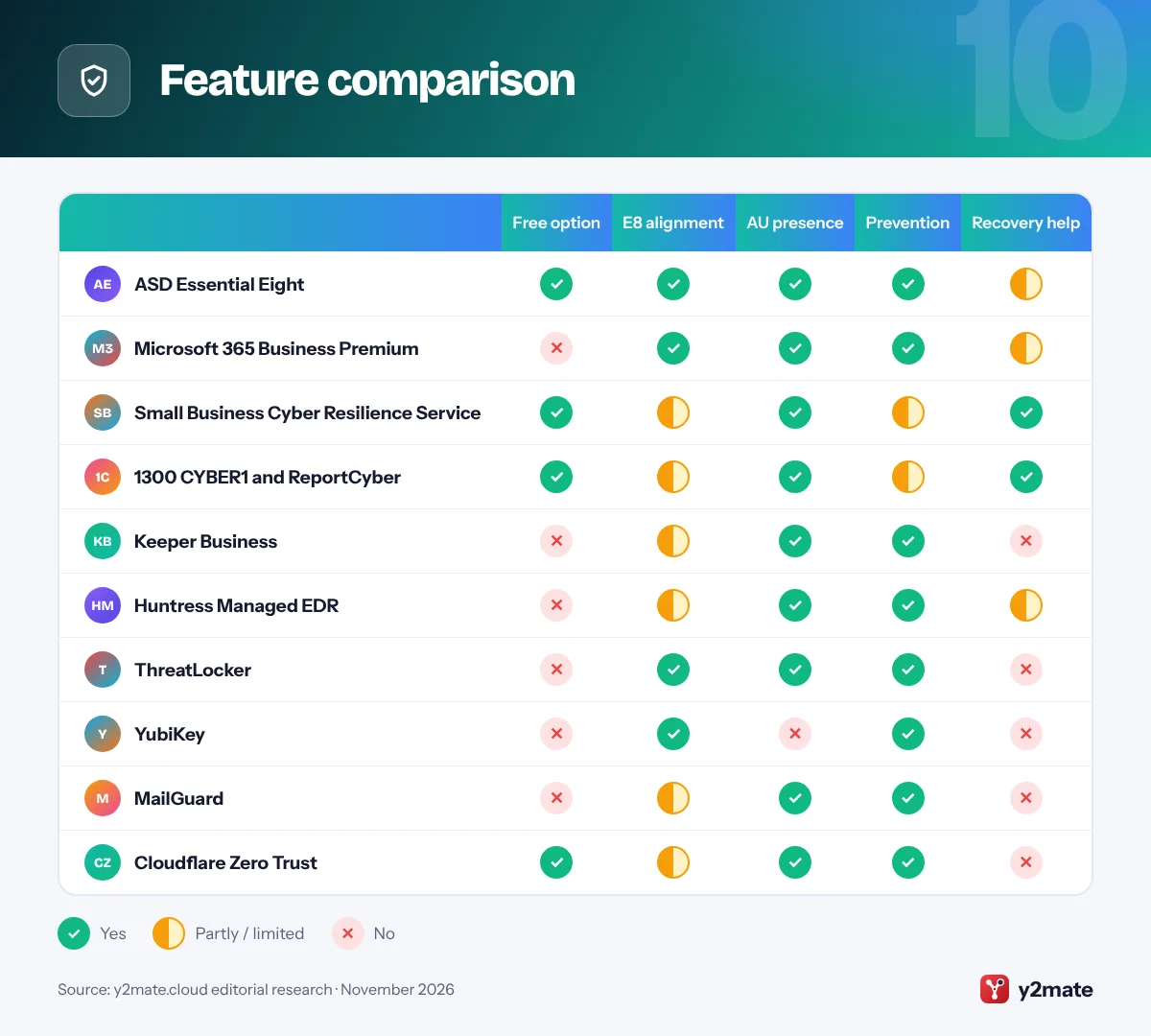
Feature comparison
How to choose cybersecurity tools for small businesses in Australia
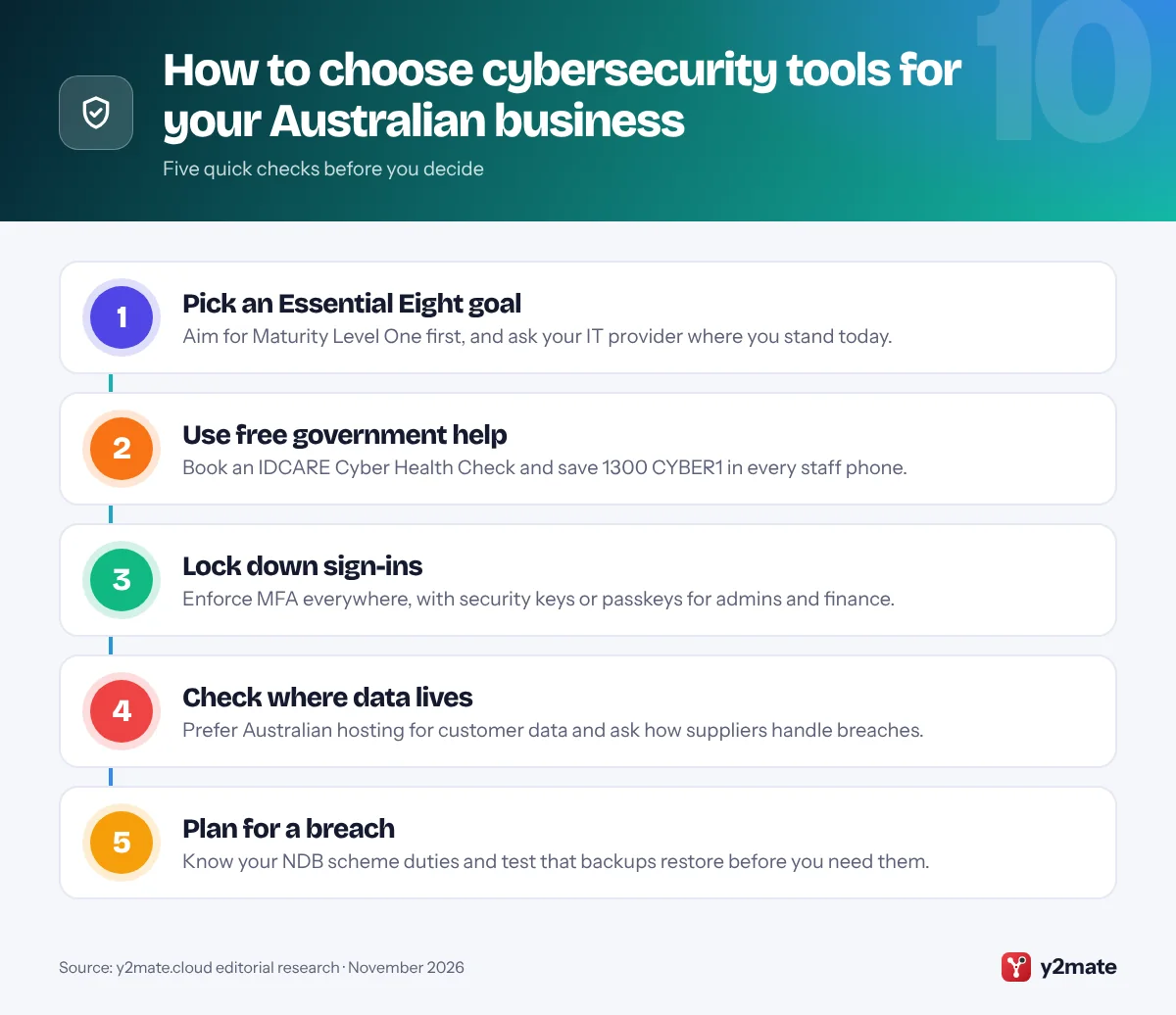
Start by deciding what you are aiming for. For most small firms that means Essential Eight Maturity Level One, with phishing-resistant MFA for administrators and finance staff as an early upgrade. Then check what you already own: if you use Microsoft 365, Business Premium configured using ASD’s Blueprint for Secure Cloud can cover a large share of the strategies. Add other tools only where gaps remain, such as password management, monitoring and email filtering.
Know your legal obligations
If your business is covered by the Privacy Act 1988, the Notifiable Data Breaches scheme requires you to notify the OAIC and affected individuals when a data breach is likely to cause serious harm, and to assess a suspected breach within 30 days. Many small businesses with annual turnover of 3 million dollars or less are currently exempt, but there are important exceptions, such as health service providers, and further Privacy Act reforms were released as an exposure draft in 2026, so check the OAIC’s guidance regularly. Separately, under the Cyber Security Act 2024, businesses with annual turnover above 3 million dollars must report any ransomware or cyber extortion payment to ASD within 72 hours.
Questions to ask suppliers and IT providers
- Where is our data hosted, and can we keep it in Australia?
- Which Essential Eight strategies does this tool support, and to what maturity level?
- Who responds to alerts after hours?
- How will you help us meet NDB scheme duties if something goes wrong?
Finally, store 1300 CYBER1 and your IT provider’s emergency number somewhere that does not depend on your email or computers.
Frequently asked questions
What is the Essential Eight and does my small business need it?
The Essential Eight is ASD's set of eight mitigation strategies covering application and operating system patching, MFA, admin privileges, application control, Office macros, user application hardening and backups. It is not a legal requirement for most private businesses, but it is the most widely recognised security baseline in Australia, and insurers, larger customers and IT providers often ask about it. Maturity Level One is a sensible first target.
Is ASD Essentials replacing the Essential Eight?
ASD's ACSC introduced ASD Essentials in October 2026 and describes it as an evolution of the Essential Eight. It replaces maturity levels with effectiveness ratings and priority phases. Both frameworks remain available during a transition period, and existing contracts, insurance forms and regulations may still refer to the Essential Eight, so small businesses do not need to abandon work they have already done.
Who can I call if my business is hacked in Australia?
Call ASD's Australian Cyber Security Hotline on 1300 CYBER1 (1300 292 371), which operates 24 hours a day, and report cybercrime through ReportCyber at cyber.gov.au. Small businesses with 19 or fewer employees can also get free recovery support from the Small Business Cyber Resilience Service run by IDCARE. If money has been sent to a scammer, contact your bank immediately.
Do small businesses have to report data breaches to the OAIC?
Only if the Privacy Act covers them. Many small businesses with annual turnover of 3 million dollars or less are exempt, but exceptions include health service providers and businesses that trade in personal information, among others. Covered businesses must notify the OAIC and affected people about eligible data breaches likely to cause serious harm, and assess suspected breaches within 30 days.
Do I need to report a ransomware payment in Australia?
Yes, if your business has annual turnover above 3 million dollars or is otherwise covered by the Cyber Security Act 2024. Since 30 May 2025, covered businesses that make a ransomware or cyber extortion payment must report it to ASD within 72 hours. Government agencies advise against paying ransoms, and paying does not guarantee your data will be recovered or deleted.
Final verdict
For anyone choosing cybersecurity tools for small businesses in Australia, the smartest plan is to treat the Essential Eight as your checklist, keep an eye on ASD Essentials, and lean on free help: the IDCARE-run Small Business Cyber Resilience Service for advice and 1300 CYBER1 when things go wrong. If you run on Microsoft 365, Business Premium configured with ASD’s Blueprint covers a large share of the strategies.
Then fill the gaps: Keeper for passwords with Australian hosting, YubiKeys for admins and finance staff, Huntress and ThreatLocker through your IT provider for monitoring and application control, and MailGuard or Cloudflare for extra email and web filtering. Write down your Notifiable Data Breaches process now, before you need it.
Sources and further reading
- OAIC Notifiable Data Breaches scheme: The Australian privacy regulator explains which data breaches must be notified, who is covered and how to report to the OAIC.
- OAIC small business privacy guidance: OAIC guidance on when the Privacy Act applies to small businesses, including the exceptions that apply regardless of turnover.
- Ransomware payment reporting factsheet: The Department of Home Affairs factsheet on who must report ransomware and cyber extortion payments to ASD, and when.
- ASD Blueprint for Secure Cloud: ASD's official configuration guidance for securing Microsoft 365 and related cloud services in line with the Essential Eight.
- Small Business Cyber Resilience Service: IDCARE's page for the free, government-funded cyber advice and recovery service for Australian small businesses and sole traders.

Leave a Reply