
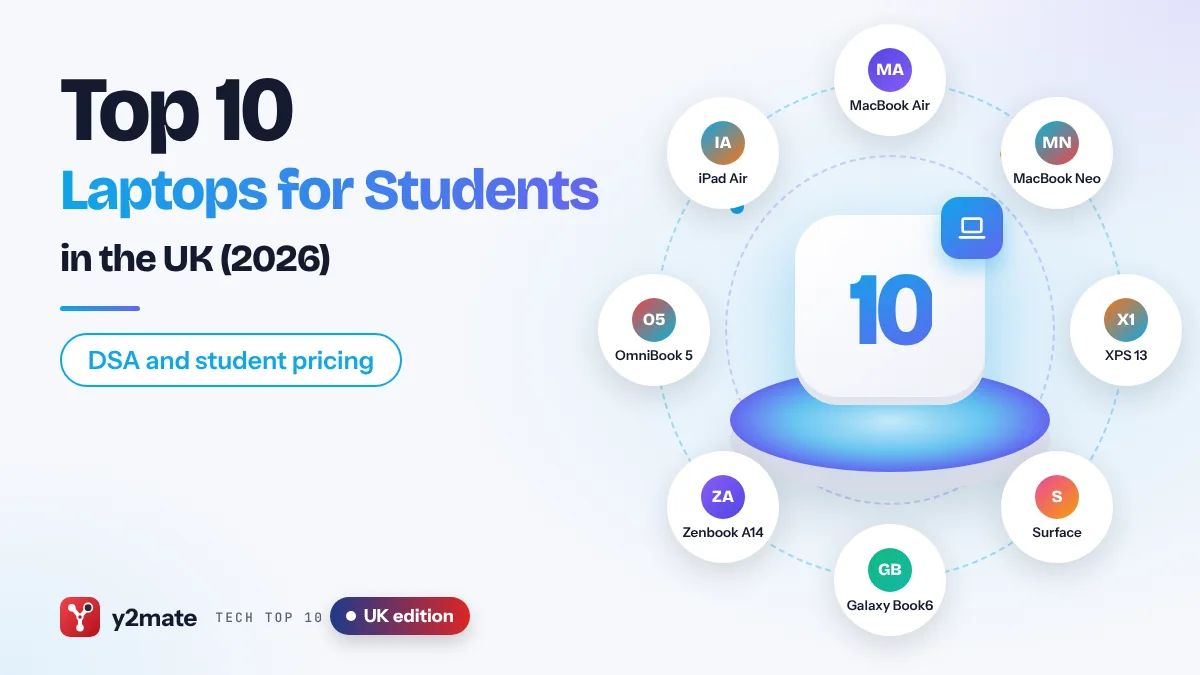
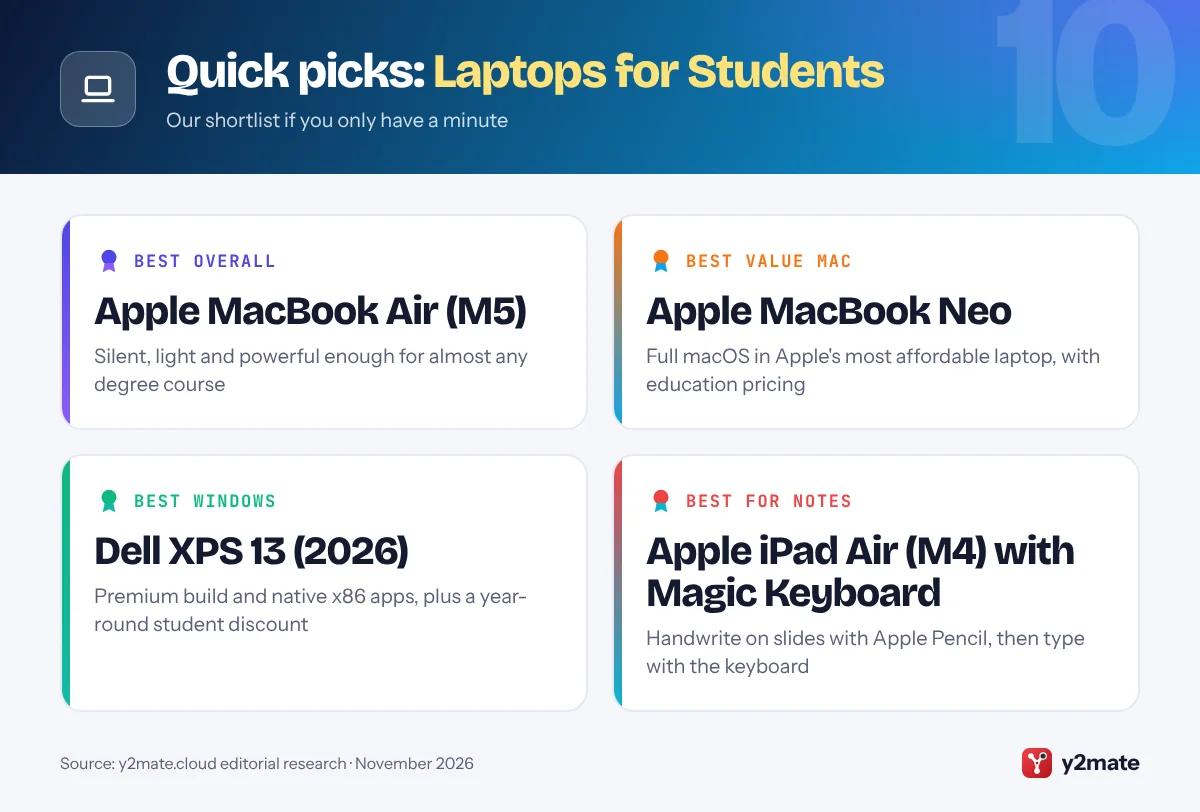
- The Apple MacBook Air with M5, the Apple MacBook Neo and the Dell XPS 13 (2026) are the strongest all-round laptops for university students in the UK in 2026.
- Disabled Students' Allowance can pay for specialist equipment, including a computer if you need one because of a disability, and it does not have to be repaid.
- Apple, Microsoft and Dell all run student pricing schemes in the UK, and Dell's covers students and apprentices over 16 at college and university level.
- Under the Consumer Rights Act 2015, you have 30 days to reject a faulty laptop bought from a business for a full refund.
- Chromebooks and iPads suit essay-based courses but cannot install full Windows or Mac software, so check your course's IT guidance first.
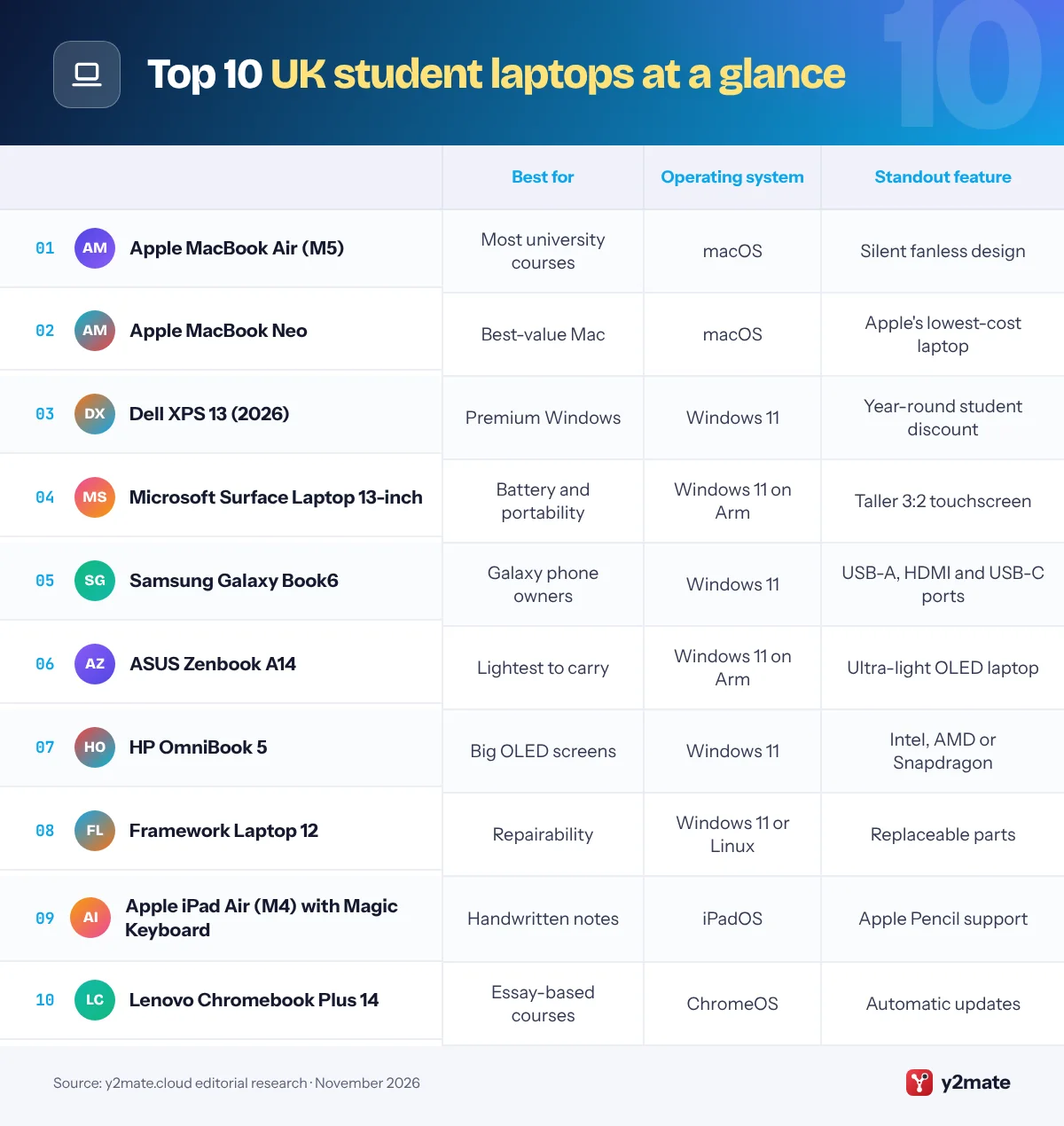
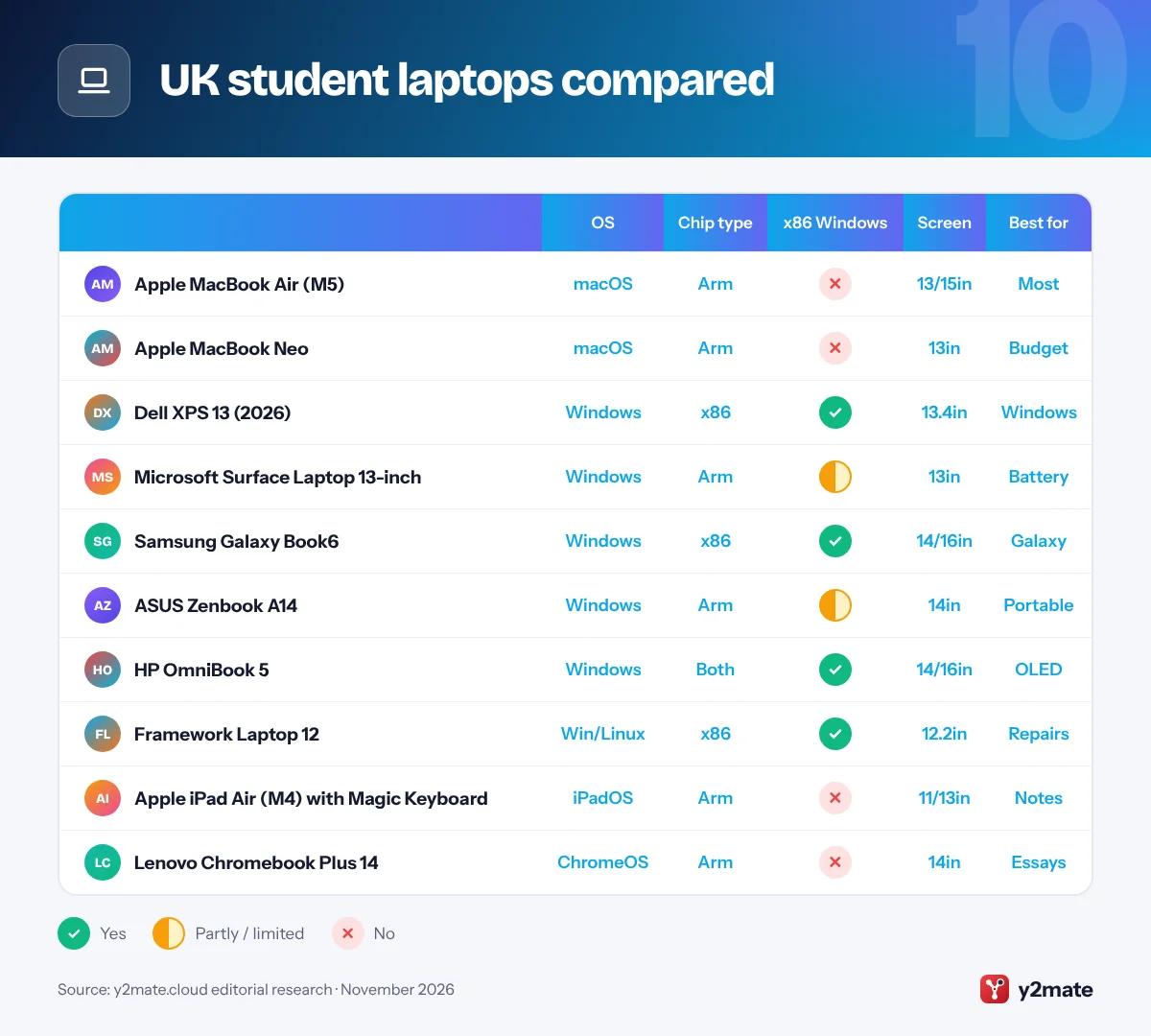
The best laptops for students in the UK in 2026 are the Apple MacBook Air with M5 for most university courses, the Apple MacBook Neo for the most affordable Mac and the Dell XPS 13 (2026) for a premium Windows laptop. The Microsoft Surface Laptop 13-inch, Samsung Galaxy Book6, ASUS Zenbook A14, HP OmniBook 5, Framework Laptop 12, iPad Air with Magic Keyboard and Lenovo Chromebook Plus 14 complete the list, covering long battery life, Galaxy phone owners, repairability, handwritten notes and tight budgets.
Some terms explained. Education pricing is a reduced price that Apple, Microsoft and Dell offer to eligible students, usually after you verify your status with a service such as UNiDAYS. A Copilot+ PC is a Windows 11 laptop with a dedicated AI processor, called an NPU, powerful enough for Microsoft’s on-device AI features. A Chromebook Plus is a Chromebook that meets Google’s higher minimum hardware standard and adds extra Google AI tools. Disabled Students’ Allowance (DSA) is non-repayable government support that can fund specialist equipment, including a computer, for eligible students.
This guide ranks ten laptops sold officially in the UK and explains university IT guidance, education pricing, DSA and your rights under the Consumer Rights Act.
How we ranked this list
We compared publicly documented information only: each maker’s UK product pages and specs, how well the operating system suits common university courses, portability and battery life as the makers describe them, keyboard and screen, repair and upgrade options, warranty and student schemes as stated on official UK sites, and software update policy. Every laptop here is sold officially in the UK through the maker or its authorised retailers in November 2026.
We did not run our own tests, and we leave out prices, discount amounts, battery-hour claims and weights, because they vary by configuration and change often.
The Top 10 Laptops for Students
1. Apple MacBook Air (M5)
Best for: most university students who want a Mac
The MacBook Air with M5 is the best laptop for most university students in the UK. Apple launched it in March 2026 in 13-inch and 15-inch sizes, and both are thin, light and completely silent because there is no fan, so it will not hum through a quiet library session. Apple rates the battery for a full day, which helps in older lecture theatres with few sockets.
The M5 chip copes comfortably with essays, dissertations, spreadsheets, coding modules and photo or video projects, and the 15-inch model gives more room for two documents side by side. You get two Thunderbolt 4 ports, MagSafe charging and support for up to two external displays for a desk in halls.
Memory and storage are fixed at purchase, so buy enough to last a three- or four-year degree. If your engineering or architecture course relies on Windows-only software, check your department’s guidance first. Apple’s UK Education Store offers education pricing to current and newly accepted higher education students, and anyone who needs more power can step up to the 14-inch MacBook Pro with M6, which arrived in November 2026.
Official site: Apple MacBook Air (M5)
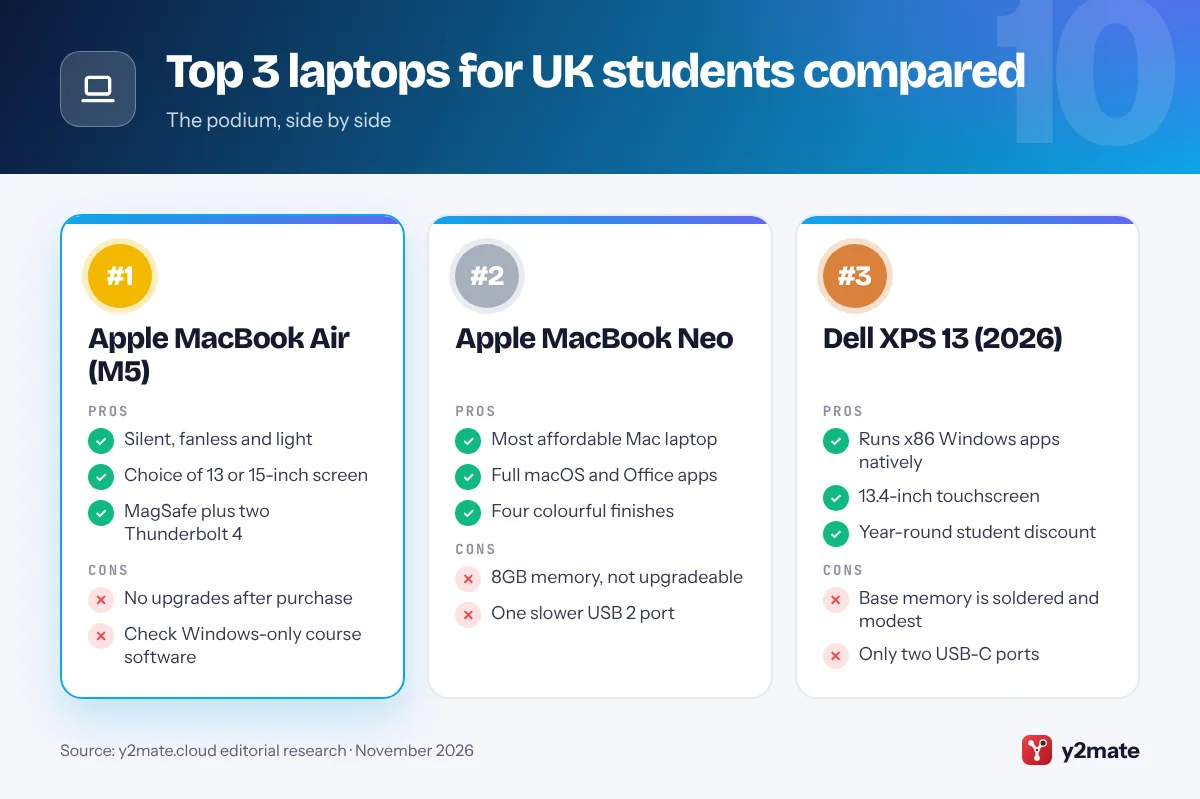
- Silent, fanless and light
- Choice of 13 or 15-inch screen
- MagSafe plus two Thunderbolt 4
- No upgrades after purchase
- Check Windows-only course software
2. Apple MacBook Neo
Best for: the most affordable way to get a Mac
The MacBook Neo is Apple’s entry-level laptop, launched in March 2026, and the best-value way for a UK university student to get a Mac. Inside a recycled aluminium body it uses the A18 Pro chip from the iPhone 16 Pro, with a 13-inch Liquid Retina display and a Magic Keyboard with colour-matched keys in silver, blush, citrus or indigo.
It runs full macOS, including Pages, Keynote, Microsoft Office and Apple Intelligence, so essays, presentations, reading lists and video calls feel smooth. It is also covered by Apple’s education pricing, which makes it the most affordable route into Apple’s laptop range for students.
Know the limits before you choose it. Every Neo has 8GB of memory that cannot be increased, one of the two USB-C ports runs at slower USB 2 speeds, it drives only one external monitor, and Touch ID is available on only one of the two models. That is fine for humanities, social sciences, law and business modules, but not ideal for large datasets, heavy video editing or demanding coding projects. If your course is mostly reading and writing, the Neo is a superb budget pick.
Official site: Apple MacBook Neo
- Most affordable Mac laptop
- Full macOS and Office apps
- Four colourful finishes
- 8GB memory, not upgradeable
- One slower USB 2 port
3. Dell XPS 13 (2026)
Best for: a premium Windows laptop for any course
The XPS 13 returned in June 2026 as Dell’s thinnest and lightest XPS yet, and it is the best premium Windows laptop for UK students. Its CNC-machined aluminium chassis feels as solid as a MacBook, and it pairs a 13.4-inch touchscreen with a backlit keyboard and four speakers.
Dell fits Intel Core Series 3 or Core Ultra Series 3 processors, which are x86 chips, so Windows-only software for engineering, accountancy, statistics or architecture modules runs natively without emulation. Its two USB-C ports handle charging, monitors and docks, and higher configurations offer more memory for heavier work.
Dell Advantage for Students gives a year-round student discount to students and apprentices over 16 at college and university level, so further education students qualify as well as undergraduates. The base model’s memory is modest and soldered, so choose a higher configuration if you multitask heavily, and keep a USB-C adapter handy for SD cards or older USB-A drives, as Dell lists no card reader or USB-A port. If you want a Windows laptop that is easy to carry between halls, the library and lectures, the XPS 13 is the one to beat.
Official site: Dell XPS 13 (2026)
- Runs x86 Windows apps natively
- 13.4-inch touchscreen
- Year-round student discount
- Base memory is soldered and modest
- Only two USB-C ports
4. Microsoft Surface Laptop 13-inch
Best for: long battery life and a touchscreen
Microsoft’s Surface Laptop 13-inch is the smallest and most affordable Surface Laptop, and Microsoft recommends it for students and commuters. The latest model runs on a Qualcomm Snapdragon X2 Plus chip, making it a Copilot+ PC with on-device AI features such as improved Windows search, and Microsoft calls it its longest-lasting Surface Laptop.
The 13-inch touchscreen uses a taller 3:2 shape, which shows more of an essay or journal article without scrolling, and the backlit keyboard is comfortable for long writing sessions. A fingerprint reader, two USB-C ports, a USB-A port and a headphone jack make it practical day to day.
Snapdragon is an Arm chip, so check your course software. Office, web browsers, Teams and most popular apps run natively or through Microsoft’s Prism emulation, but some specialist engineering tools, older drivers, VPN clients and exam software may not. Microsoft’s UK store gives students, parents and educators a year-round discount on a selection of Surface devices. For humanities, law, business and social science students who want Windows and stamina in a small package, it is an excellent choice.
Official site: Microsoft Surface Laptop 13-inch
- Longest-lasting Surface Laptop
- Taller 3:2 touchscreen
- USB-A port and fingerprint reader
- Arm chip limits some software
- Plain 60Hz display
5. Samsung Galaxy Book6
Best for: students who already use a Galaxy phone
Samsung’s Galaxy Book6 range went on sale in the UK in March 2026, and in September Samsung added a more affordable 14-inch Galaxy Book6 aimed at everyday computing. It is the best Windows choice for students who already own a Galaxy phone, because Samsung designs it to work with Galaxy phones and tablets, so moving files, photos and notes between devices is quick.
The 14-inch model uses Intel Core Series 3 processors, which run x86 Windows software natively, and has a 16:10 display with an anti-reflective finish that cuts glare under bright lecture-theatre lighting. It is slim and easy to carry, and the ports are generous: two identical USB-C ports, USB-A, HDMI and a headphone jack, so you rarely need a dongle for projectors or older accessories. Galaxy AI tools such as AI Select help you search what is on screen.
The 14-inch model has no touchscreen, as touch is reserved for the 16-inch version, and Samsung’s laptop line-up is smaller than Dell’s or HP’s, so there are fewer configurations to choose from. If your phone is a Galaxy and your course needs Windows, it is the most joined-up option here.
Official site: Samsung Galaxy Book6
- Works smoothly with Galaxy phones
- USB-A, HDMI and two USB-C
- Anti-reflective 16:10 screen
- No touch on the 14-inch model
- Fewer configurations to pick
6. ASUS Zenbook A14
Best for: carrying all day around a big campus
The ASUS Zenbook A14 is built for students who spend all day on their feet. ASUS describes it as an ultra-lightweight Copilot+ PC, and it is one of the lightest 14-inch Windows laptops on sale in the UK, which makes it easy to carry between a campus spread across a city, a part-time job and the train home.
It runs on Qualcomm Snapdragon X-series processors and pairs them with a large battery for long days away from a plug. The 14-inch OLED screen has deep blacks and a 16:10 shape suited to reading and writing, although ASUS lists it as non-touch, which helps keep it slim.
As with the Surface Laptop, the Arm chip is the thing to check. Microsoft 365, Teams, browsers and most mainstream apps are fine, but some specialist engineering, statistics or exam software may not run on Windows on Arm, and some older printers may lack Arm drivers. Look at your course handbook or ask your university’s IT service before you buy. If you mostly read, write and research, the Zenbook A14 is one of the easiest Windows laptops to live with.
Official site: ASUS Zenbook A14
- Ultra-lightweight 14-inch body
- Large battery
- OLED screen for reading
- Check Arm compatibility first
- Non-touch display
7. HP OmniBook 5
Best for: OLED screens and a choice of chips
HP’s OmniBook 5 sits in the middle of HP’s renamed laptop range, which replaced the old Pavilion and Envy names, and HP’s UK site describes it as a great choice for university students as well as families and professionals. It balances a sensible size, OLED screen options and a choice of processors, so it is easy to match to your course.
You can choose 14-inch or 16-inch laptops or a 14-inch Flip 2-in-1 with optional stylus support. HP offers AMD Ryzen AI and Intel Core Ultra versions, which run standard Windows programs natively, and Snapdragon X2 versions for longer battery life on Arm. The 16-inch model is handy for spreadsheets, coding and side-by-side reading in a shared house where there is no room for a monitor.
Because there are so many versions, read each listing carefully for memory, storage, screen type and processor, and skip the most basic configurations if you want it to last until graduation. HP’s UK site also points students towards the OmniBook 3 as a more budget-focused option. If you want an OLED screen and flexibility from a familiar brand, the OmniBook 5 is a strong all-rounder.
Official site: HP OmniBook 5
- OLED screen options
- Intel, AMD or Snapdragon chips
- 16-inch and Flip versions
- Specs vary widely by model
- Easy to pick a weak config
8. Framework Laptop 12
Best for: a repairable 2-in-1 you can keep upgrading
The Framework Laptop 12 is the most repairable laptop on this list and a smart choice for students who want one machine to last a whole degree. It is a 12.2-inch touchscreen convertible with a 360-degree hinge and stylus support, and Framework says its shock-resistant chassis meets MIL-STD-810 durability standards.
Nearly every component can be replaced, from the battery and display to the keyboard and mainboard, and memory and storage are upgradeable. Framework ships directly to the UK, and in August 2026 it announced Intel Core Series 3 mainboards with Thunderbolt 4, Wi-Fi 7 and an optional backlit keyboard, which owners of the earlier model can fit themselves. Ports use swappable Expansion Cards, so you can choose USB-C, USB-A or HDMI to suit your desk and seminar rooms.
You can order it with Windows 11, as a DIY Edition you finish with your own memory and storage, or pre-built with Fedora Linux, a useful option for computer science students. The trade-offs are a small screen and entry-level processors, so it is not the laptop for heavy video or 3D work. If repairability matters to you, it is in a class of its own.
Official site: Framework Laptop 12
- Most repairable laptop here
- Touchscreen 2-in-1, stylus support
- Upgradeable memory and storage
- Small 12.2-inch screen
- Entry-level processors
9. Apple iPad Air (M4) with Magic Keyboard
Best for: handwritten notes and reading on the go
For students who take handwritten notes, annotate PDFs and read a lot, the iPad Air with M4 plus Apple’s Magic Keyboard for iPad Air is a lighter, more flexible alternative to a laptop. Launched in March 2026 in 11-inch and 13-inch sizes, it uses the M4 chip with 12GB of memory, so it handles lecture recordings, note apps and photo editing with ease.
The Magic Keyboard for iPad Air attaches magnetically through the Smart Connector, needs no Bluetooth pairing or charging, and adds a trackpad and a 14-key function row. With Apple Pencil Pro or Apple Pencil (USB-C), you can write directly on lecture slides, sketch diagrams and mark up set texts, which many students find easier than typing maths or chemistry notes.
iPadOS now supports resizable windows, but it still cannot install Mac or Windows software, and some university exam tools, specialist programs and coding environments will not run. Treat it as a note-taking and reading device that can also handle essays, rather than a full laptop replacement for technical courses. Apple’s UK Education Store offers education pricing on iPad Air, the Magic Keyboard and Apple Pencil.
Official site: Apple iPad Air (M4) with Magic Keyboard
- Write on slides with Apple Pencil
- Light and very portable
- Magic Keyboard with trackpad
- Cannot run Mac or Windows apps
- Keyboard and Pencil cost extra
10. Lenovo Chromebook Plus 14
Best for: essay-based courses on a tight budget
The Lenovo Chromebook Plus 14 is the best Chromebook for UK students whose coursework happens in a browser. It uses a MediaTek Kompanio Ultra processor, an efficient Arm chip, with a 14-inch OLED display, and as a Chromebook Plus it meets Google’s higher hardware standard and includes extra Google AI tools.
ChromeOS starts quickly, updates itself and needs very little looking after, which helps during a busy term. If your university provides Microsoft 365 through your student account, the web versions of Word, Excel, PowerPoint and Teams run well, alongside Google Docs and learning platforms such as Moodle or Blackboard. Google provides 10 years of automatic updates, measured from the release of the hardware platform rather than your purchase date, so check a model’s update end date.
The limitation is software. A Chromebook cannot install full Windows or Mac programs, such as NVivo or specialist design tools, so it is a poor fit for many science, engineering and research-methods modules. Google’s new Googlebook laptops, on sale in the UK since October 2026, add Android-based features but are pricier and very new. For essay-based degrees on a tight budget, the Chromebook Plus 14 is a dependable choice.
Official site: Lenovo Chromebook Plus 14
- Sharp 14-inch OLED display
- Updates itself automatically
- Simple, low-maintenance software
- No full Windows or Mac apps
- Check the update end date
UK student laptops compared
How to choose laptops for students in the UK
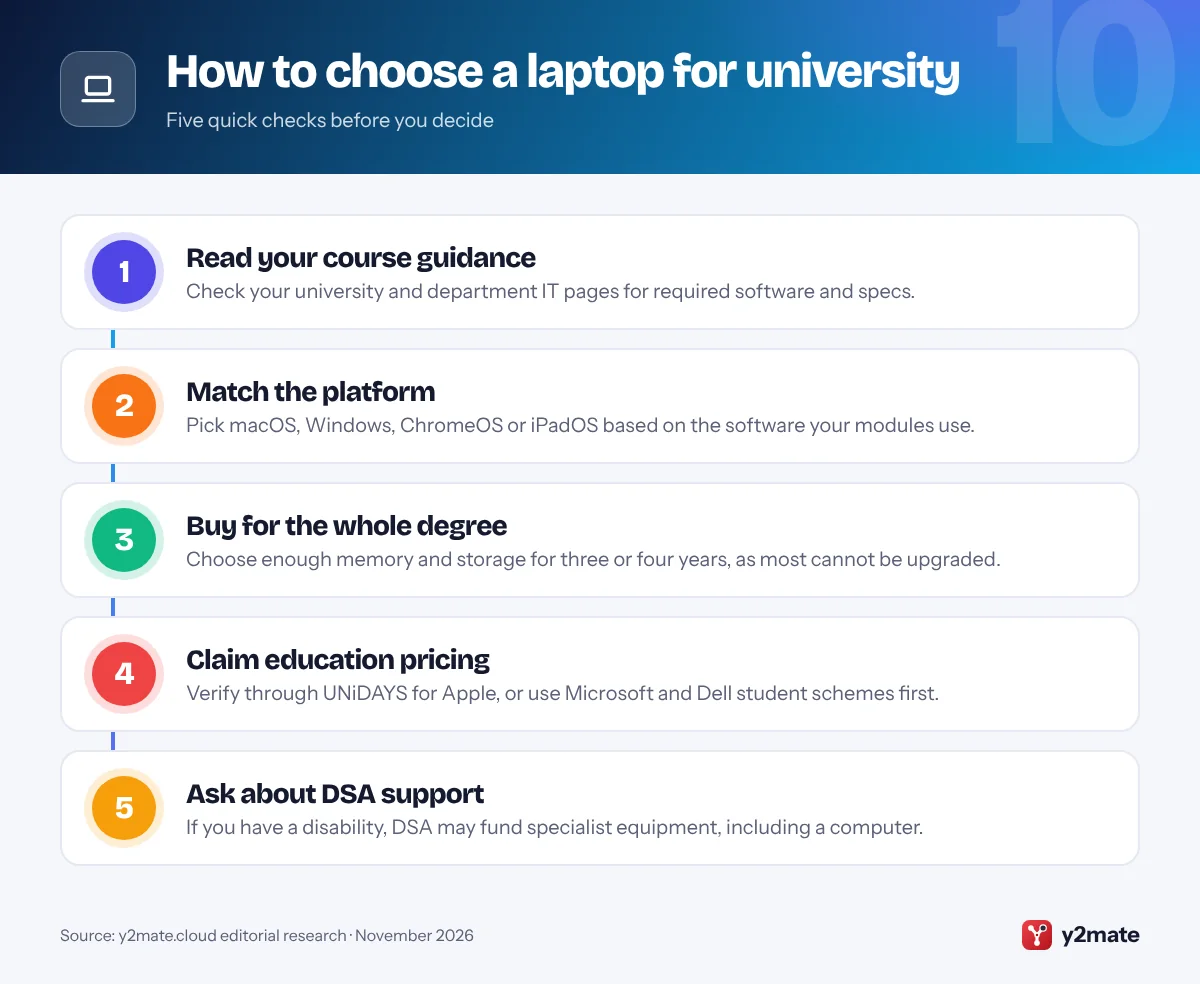
Start with your university’s IT guidance and your course handbook. Many departments list recommended specs, and engineering, architecture and some finance modules rely on Windows-only software, although some universities offer it through campus PCs or remote desktops. If in doubt, an x86 Windows laptop is the safest all-round choice. Buy UK stock from the maker or an authorised retailer so you get a UK keyboard layout and UK warranty support.
Education pricing
- Apple: the UK Education Store is open to current and newly accepted higher education students and parents buying for them, with eligibility checked through UNiDAYS.
- Microsoft: students, parents and educators get a year-round discount on a selection of Surface devices.
- Dell: Dell Advantage for Students covers students and apprentices over 16 at college and university level.
Disabled Students’ Allowance
DSA can pay for specialist equipment, including a computer if you need one because of a disability, long-term health condition, mental health condition or specific learning difficulty. A needs assessment decides what you receive, and if you are assessed as needing a new computer you pay a fixed contribution towards it. Apply through Student Finance England, or your own student finance body in Wales, Scotland or Northern Ireland.
Your rights
Under the Consumer Rights Act 2015, a laptop bought from a business must be of satisfactory quality, fit for purpose and as described. You have 30 days to reject a faulty laptop for a refund, and a fault that appears within six months is presumed to have been there at delivery.
Frequently asked questions
What is the best laptop for university students in the UK?
The MacBook Air with M5 is the best laptop for most UK university students, thanks to its silent fanless design, long battery life and enough power for almost any course. The MacBook Neo is the best-value Mac, the Dell XPS 13 (2026) is the best premium Windows laptop, and the iPad Air with Magic Keyboard suits students who prefer handwritten notes.
Can Disabled Students' Allowance pay for a laptop?
Yes, in some cases. DSA can pay for specialist equipment, including a computer, if you need it because of a disability, long-term health condition, mental health condition or specific learning difficulty such as dyslexia. You have a needs assessment first, and if a new computer is recommended you pay a fixed contribution towards it. You do not have to pay DSA back.
Is a MacBook or a Windows laptop better for university?
It depends on your course. A MacBook suits most humanities, social science, business and creative courses and is required for building Apple apps. Windows is safer for engineering, architecture and other courses that use Windows-only software. If you choose Windows, Intel and AMD models run older programs natively, while Snapdragon-based laptops rely on emulation for some apps, so check your department's guidance.
Is a Chromebook or an iPad good enough for university?
For essay-based courses, often yes. A Chromebook handles Google Docs, Microsoft 365 on the web and university learning platforms, and an iPad Air with a keyboard is excellent for handwritten notes and reading. Neither can install full Windows or Mac software, so they are a poor fit for courses that need specialist programs or certain exam tools. Check your course requirements first.
What are my rights if my new laptop is faulty?
Under the Consumer Rights Act 2015, you can reject a faulty laptop for a full refund within 30 days of buying it from a business. After that, the retailer gets one chance to repair or replace it, and a fault that appears within six months is presumed to have been there when you received it. Your claim is against the retailer, not the manufacturer.
Final verdict
The best laptops for students in the UK in 2026 are the MacBook Air with M5 for most courses, the MacBook Neo for the best-value Mac and the Dell XPS 13 (2026) for premium Windows. The Surface Laptop 13-inch, Galaxy Book6, Zenbook A14 and OmniBook 5 cover different Windows needs, while the Framework Laptop 12, iPad Air with Magic Keyboard and Chromebook Plus 14 suit repair-minded, note-taking and budget-conscious students.
Before you buy, read your course’s IT guidance, verify your status for education pricing, ask about DSA if it applies to you, and keep your receipt so you can use your Consumer Rights Act protections.
Sources and further reading
- Disabled Students' Allowance: GOV.UK guidance on who can get DSA, what it pays for, including computers, and how the needs assessment works.
- Consumer Rights Act 2015: The full text of the law requiring goods sold by traders to be of satisfactory quality, fit for purpose and as described.
- Citizens Advice on faulty goods: Citizens Advice explains when you can ask for a refund, repair or replacement if something you bought is faulty.
- ChromeOS Auto Update policy: Google's official policy on how long Chromebooks receive automatic updates, counted from each hardware platform's release date.

Leave a Reply