- UK small businesses can cover many security basics for free with NCSC services such as the Cyber Action Toolkit, Check Your Cyber Security, Early Warning and Exercise in a Box.
- Cyber Essentials assessments moved to the Danzell question set on 27 April 2026, and missing multi-factor authentication on cloud services now leads to an automatic fail.
- UK organisations with turnover under £20m that certify their whole organisation to Cyber Essentials can opt in to free cyber liability insurance arranged by IASME.
- Microsoft 365 Business Premium, designed for up to 300 users, bundles endpoint, email, device and identity protection that maps closely to the Cyber Essentials controls.
- Under UK GDPR, a personal data breach that is likely to put people at risk must be reported to the ICO without undue delay and, where feasible, within 72 hours.
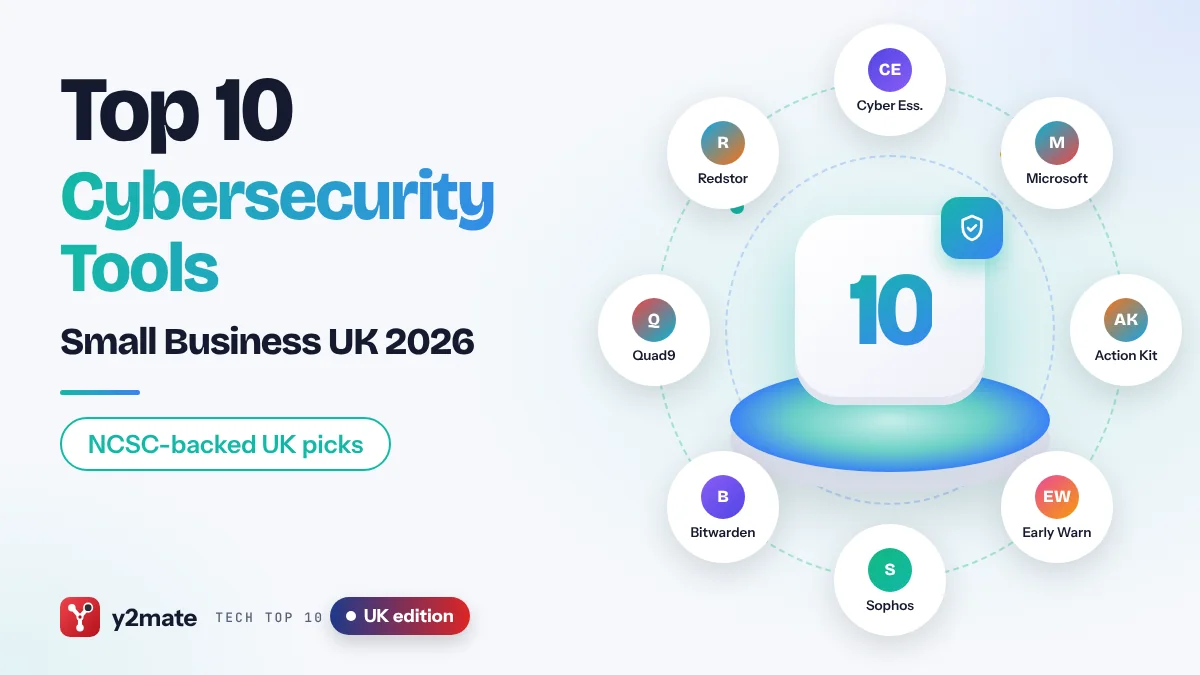
The best cybersecurity tools for small businesses in the UK in 2026 start with free help from the National Cyber Security Centre (NCSC): the Cyber Essentials scheme, the Cyber Action Toolkit, Early Warning, Check Your Cyber Security and Exercise in a Box. Add a handful of well-chosen commercial tools, such as Microsoft 365 Business Premium, Sophos Endpoint, Bitwarden, Quad9 and Redstor backup, and most small firms can cover the attacks that matter without employing a security team.
Here, a cybersecurity tool means any software, service or scheme that helps you prevent, spot or recover from attacks such as phishing, ransomware and account takeover. The UK is unusual in how much the government provides for free: the NCSC, which is part of GCHQ, runs several services designed specifically for sole traders, micro-businesses and charities.
This guide is for owners and managers of UK organisations with roughly one to 250 staff. It pays particular attention to Cyber Essentials, which changed in April 2026 so that multi-factor authentication on cloud services is now a firm requirement, and to your duties under UK GDPR if personal data is breached.
How we ranked this list
We did not carry out lab testing. We compared publicly documented features, official NCSC and IASME guidance, product documentation and widely reported feedback from UK businesses and IT providers. We weighed how well each of these cybersecurity tools for small businesses in the UK tackles common attacks, how much it helps you meet Cyber Essentials, whether it is free or included in something you already pay for, whether data can be hosted in the UK or EU, and whether it can be bought and supported through UK partners.
Government schemes and services rank highly because they are free and built for UK small organisations. Commercial tools are ranked by how widely useful they are; one tied to a platform you do not use simply matters less to you.
The Top 10 Cybersecurity Tools
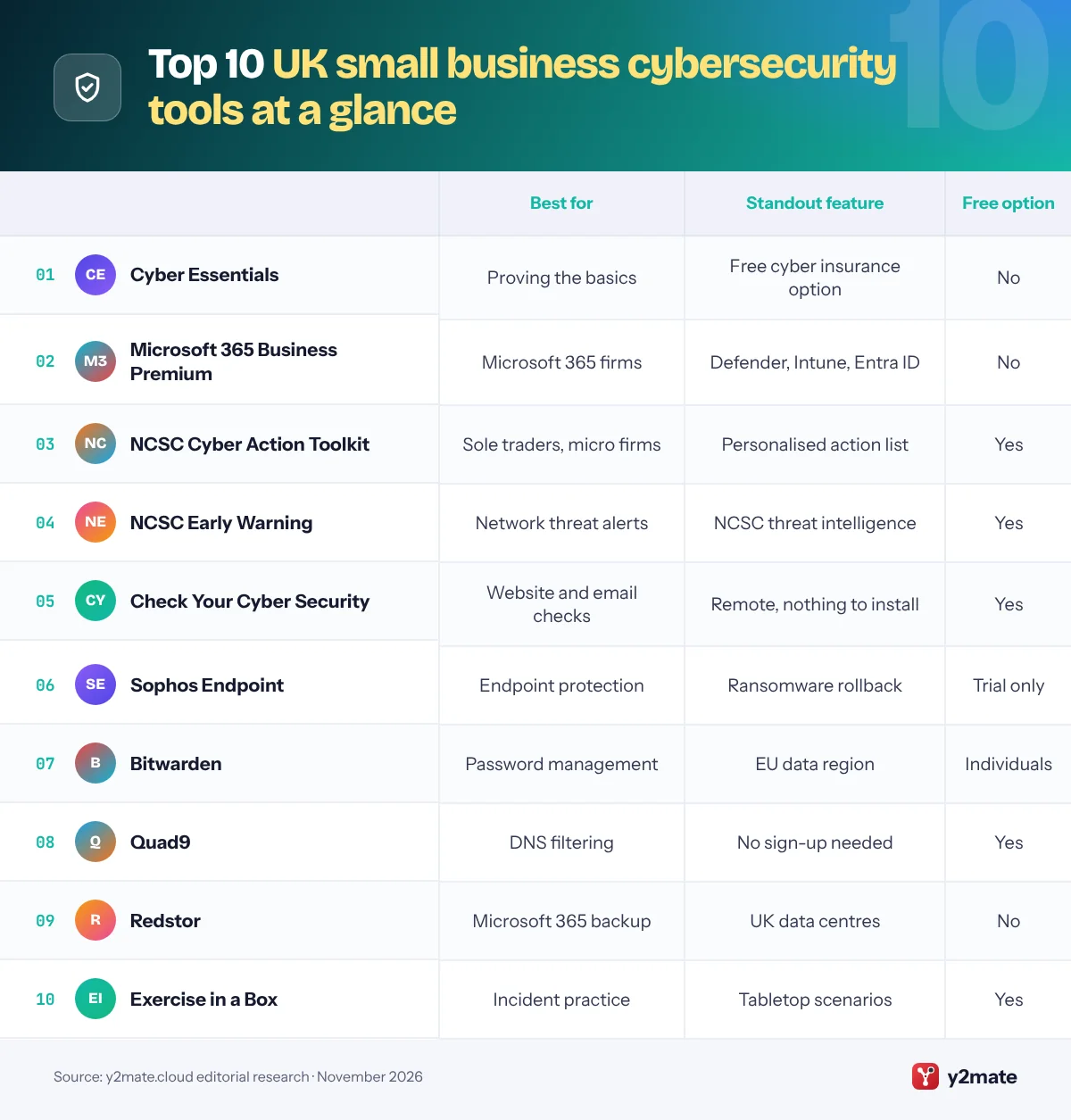
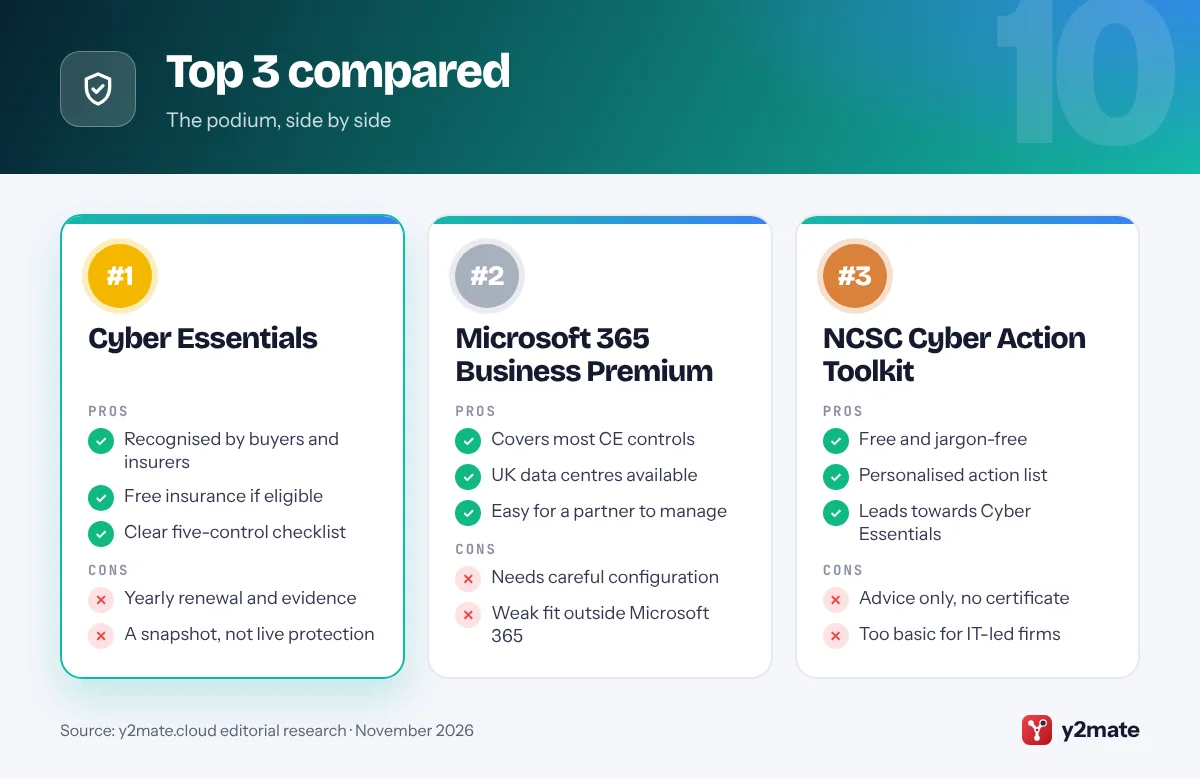
1. Cyber Essentials
Best for: proving the basics to customers and insurers
Cyber Essentials is the government-backed certification scheme, overseen by the NCSC and delivered by IASME, that checks five technical controls: firewalls, secure configuration, security update management, user access control and malware protection. Basic Cyber Essentials is a verified self-assessment questionnaire, while Cyber Essentials Plus adds a hands-on technical audit by an assessor. Certification is required for some central government contracts and is increasingly requested by larger customers and insurers.
From 27 April 2026, new assessments use version 3.3 of the requirements and the Danzell question set. The headline change is that missing multi-factor authentication on cloud services now leads to an automatic fail, and cloud services that store or process business data cannot be left out of scope. UK organisations with a turnover under £20m that certify their whole organisation can also opt in to free cyber liability insurance arranged by IASME.
Certification is a snapshot rather than ongoing protection, and gathering evidence about every device and account takes time. If you are starting from scratch, work through the NCSC’s free Cyber Action Toolkit first, then choose a certification body licensed by IASME.
Official site: Cyber Essentials
- Recognised by customers and insurers
- Free insurance for eligible firms
- Clear five-control checklist
- Yearly renewal and evidence work
- A snapshot, not live protection
2. Microsoft 365 Business Premium
Best for: Microsoft-based firms that want one console
For UK firms that already use Outlook, Teams and Excel, Microsoft 365 Business Premium is the most practical way to meet most Cyber Essentials controls from one place. It is designed for organisations with up to 300 users and adds Microsoft Defender for Business, Defender for Office 365 Plan 1, Intune device management and Microsoft Entra ID P1 to the familiar apps.
With those, an administrator can enforce multi-factor authentication through conditional access, push Windows and app updates, keep laptops encrypted, block unmanaged devices and isolate a compromised PC. That maps neatly onto the scheme’s secure configuration, update management, access control and malware protection requirements. Microsoft operates UK data centre regions, and core Microsoft 365 data for UK customers is generally stored in the UK; the admin centre shows where your tenant’s data lives, which is useful when completing UK GDPR records.
Business Premium only helps if it is configured properly, which is why many small firms hand it to a Microsoft partner. Plenty of businesses pay for it and never switch on the protections. If you run on Google Workspace, or you have more than 300 users, it is the wrong fit.
Official site: Microsoft 365 Business Premium
- Covers most Cyber Essentials controls
- UK data centres
- Easy for a partner to manage
- Needs careful configuration
- Little value outside Microsoft 365
3. NCSC Cyber Action Toolkit
Best for: sole traders and micro-businesses starting out
The Cyber Action Toolkit is a free NCSC service launched in October 2025 for sole traders, micro-businesses and small organisations. You answer a few questions about how your business works, and it turns NCSC advice into a personalised set of small, achievable actions, such as turning on two-step verification, setting up backups and keeping devices updated, with a way to track your progress as you complete them.
It is designed as a stepping stone to Cyber Essentials, so the actions line up with the scheme’s controls without the jargon. Because it was built for people with no technical background, it is an ideal first job for an owner or office manager, and the only cost is time. It also helps you see which of the paid tools in this list you genuinely need, rather than buying on a salesperson’s say-so.
The toolkit gives advice rather than doing the work for you, and it does not certify anything, so you cannot show it to a customer as proof. Firms with an established IT provider may find it too basic and should go straight to preparing for Cyber Essentials.
Official site: NCSC Cyber Action Toolkit
- Free and jargon-free
- Personalised action list
- Leads towards Cyber Essentials
- Advice only, no certificate
- Too basic for IT-led firms
4. NCSC Early Warning
Best for: free alerts about threats on your network
Early Warning is a free NCSC service that notifies UK organisations about potential cyber attacks on their networks. Once you register the static IP addresses or domain names your organisation owns, the NCSC checks them against a range of threat intelligence feeds and emails you when it sees signs of trouble, such as malware infections, vulnerable services exposed to the internet or other suspicious activity linked to your assets.
The NCSC says signing up takes about five minutes, and it runs in the background with no software to install. That makes it valuable for small firms that cannot justify a commercial security monitoring service, and it pairs well with Check Your Cyber Security, which gives you a one-off picture, while Early Warning keeps watching.
You need a static IP address or your own domain name to register, so a sole trader using only home broadband and a free email address will get little from it. The NCSC also stresses that it should not be your only source of security alerts; keep antivirus, updates and sensible monitoring in place alongside it.
Official site: NCSC Early Warning
- Free and quick to set up
- No software to install
- Alerts from NCSC threat data
- Needs a static IP or own domain
- Not a full monitoring service
5. Check Your Cyber Security
Best for: a quick free check of your website and email
Check Your Cyber Security is a free NCSC online service that runs remote checks on your public-facing IT, with nothing to install. It looks at your website and IP addresses for common vulnerabilities, checks whether your email domain is protected against spoofing, so criminals cannot easily send emails that appear to come from you, and tells you whether your web browser is out of date and open to exploitation.
Each issue it finds comes with step-by-step guidance written for non-specialists, so an owner can pass the results straight to whoever looks after the website or email. Any small organisation can use it, including charities and schools. Email spoofing is often used in invoice fraud, where a criminal pretends to be you or a supplier and asks for payment to a new bank account, so fixing those settings is a quick win.
It is a point-in-time scan of what is visible from the internet, so it will not find weak passwords, unpatched laptops or a mailbox that has already been compromised. Run it again after any change to your website, domain or email provider, and register for Early Warning for ongoing alerts.
Official site: Check Your Cyber Security
- Free, remote and quick
- Plain-English fix guidance
- Spots email spoofing risks
- One-off checks only
- Cannot see inside your network
6. Sophos Endpoint
Best for: UK-headquartered endpoint protection via partners
Sophos, headquartered in Oxfordshire, is one of the few major security vendors based in the UK, and its endpoint protection is widely used by small and mid-sized British firms. Sophos Endpoint, the product long sold as Intercept X, combines anti-malware with anti-ransomware technology that can detect malicious encryption and roll affected files back, plus exploit prevention and web protection, all managed from the cloud-based Sophos Central console.
Sophos sells mainly through UK resellers and managed service providers, which suits small firms that want a local company to install and support it. If you want people watching alerts around the clock, Sophos MDR adds a 24/7 managed detection and response service, and it can work alongside Microsoft security tools you already own. Sophos expanded its services business by acquiring Secureworks in 2025.
Buying through a partner means support quality varies, and the range of Sophos products and tiers can be confusing for a first-time buyer. If you already pay for Microsoft Defender for Business through Business Premium, decide which one will be your main endpoint protection rather than running two, and make sure whichever you choose is covered in your Cyber Essentials evidence.
Official site: Sophos Endpoint
- UK-headquartered vendor
- Ransomware rollback
- 24/7 MDR option
- Sold mainly through partners
- Product range can confuse
7. Bitwarden
Best for: an open-source password manager with EU hosting
A password manager is the simplest way to stop staff reusing passwords, and Bitwarden is a strong-value choice for UK small businesses. It is open source, has its code and security independently audited, and stores logins, passkeys, payment cards and secure notes in end-to-end encrypted vaults that teams can share through collections.
For UK firms that care where data lives, Bitwarden lets you choose between its US and EU cloud regions when you create an account, and it can also be self-hosted. The business plans add admin controls, event logs and reports on weak or reused passwords, and the Enterprise plan adds options such as single sign-on and enforced policies. A free plan for individuals lets owners and staff try it before you roll it out across the company.
The interface is more functional than polished, so less technical staff may need a short walkthrough. Accounts are tied to the region you pick at sign-up and cannot simply be moved later, so choose the EU region from day one if that matters for your UK GDPR records or customer contracts.
Official site: Bitwarden
- Open source and audited
- EU data region option
- Free plan for individuals
- Less polished interface
- Region cannot be changed later
8. Quad9
Best for: free, privacy-focused DNS filtering
Quad9 is a free DNS resolver run by a not-for-profit foundation in Zurich, Switzerland. When a device looks up a web address, Quad9 checks it against threat intelligence from a large group of security partners and refuses to resolve domains known to host malware, phishing or botnet infrastructure. There is no account to create and no software to install; you simply set your router or devices to use 9.9.9.9.
That makes it one of the quickest wins on this list for a small office, a shop or a member of staff working from home. Quad9 operates under Swiss data protection law, which it describes as equivalent to GDPR, and says it does not store users’ IP addresses, a reassuring stance for UK firms handling personal data under UK GDPR.
Quad9 offers no dashboard, reports or custom block lists, so you cannot see what was blocked or add your own rules. If you need those, ask your IT provider about a paid DNS filtering service. The NCSC’s own Protective DNS service is aimed at the public sector rather than private businesses, so Quad9 is the closest free equivalent for most small firms.
Official site: Quad9
- Free with no sign-up
- Blocks known malicious domains
- Strong privacy stance
- No dashboard or reports
- No custom block lists
9. Redstor
Best for: backing up Microsoft 365 to UK data centres
Microsoft keeps its services running, but that is not the same as a full backup of your emails and files if an account is hijacked, a mailbox is deleted or ransomware-encrypted files sync into OneDrive. Redstor, a backup company based in Reading and founded in 1998, protects Microsoft 365 data, including Exchange Online, OneDrive, SharePoint and Teams, alongside other workloads such as servers.
Its UK cloud backups are held in UK data centres, according to its listings on the government’s G-Cloud framework, which helps if your contracts, insurer or internal policies call for UK data residency. Redstor is built for managed service providers and resellers, so most small businesses buy it through their IT partner, who handles set-up, monitoring and restores. That arrangement suits firms that would rather not manage backups themselves.
You cannot easily buy Redstor directly as a very small business, and it is one more supplier to manage. If your IT provider already uses a different backup platform, there is no need to switch; simply ask them to show you a successful test restore of a mailbox and a SharePoint folder, and confirm where the copies are stored.
Official site: Redstor
- Backs up Microsoft 365 data
- UK data centres
- Managed by your IT partner
- Mainly sold through partners
- Another supplier to manage
10. Exercise in a Box
Best for: rehearsing your response to an attack
Exercise in a Box is a free NCSC tool that lets you practise how your organisation would respond to a cyber incident, in a safe environment and in your own time. It offers discussion-based tabletop exercises and technical simulations, with specific pathways for small and medium-sized enterprises, and scenarios built around common cyber threats as well as home and remote working.
Running one with the owner, office manager and IT provider quickly exposes the gaps that tools cannot fill: who decides whether to shut systems down, where the backups are, how you reach staff if email is down, and when you need to tell the ICO, your insurer or customers. You need to register, but no expert knowledge is required, and the exercises can be repeated as your business changes or new staff join.
It will not fix anything on its own, and it needs an hour or two of senior people’s time, which small firms often find hard to schedule. For more realistic practice, the NCSC assures commercial providers under its Cyber Incident Exercising scheme, though most small businesses will get plenty from the free version.
Official site: Exercise in a Box
- Free tabletop and technical exercises
- Pathways for small businesses
- Reveals gaps in your plan
- Needs senior staff time
- Practice only, no protection
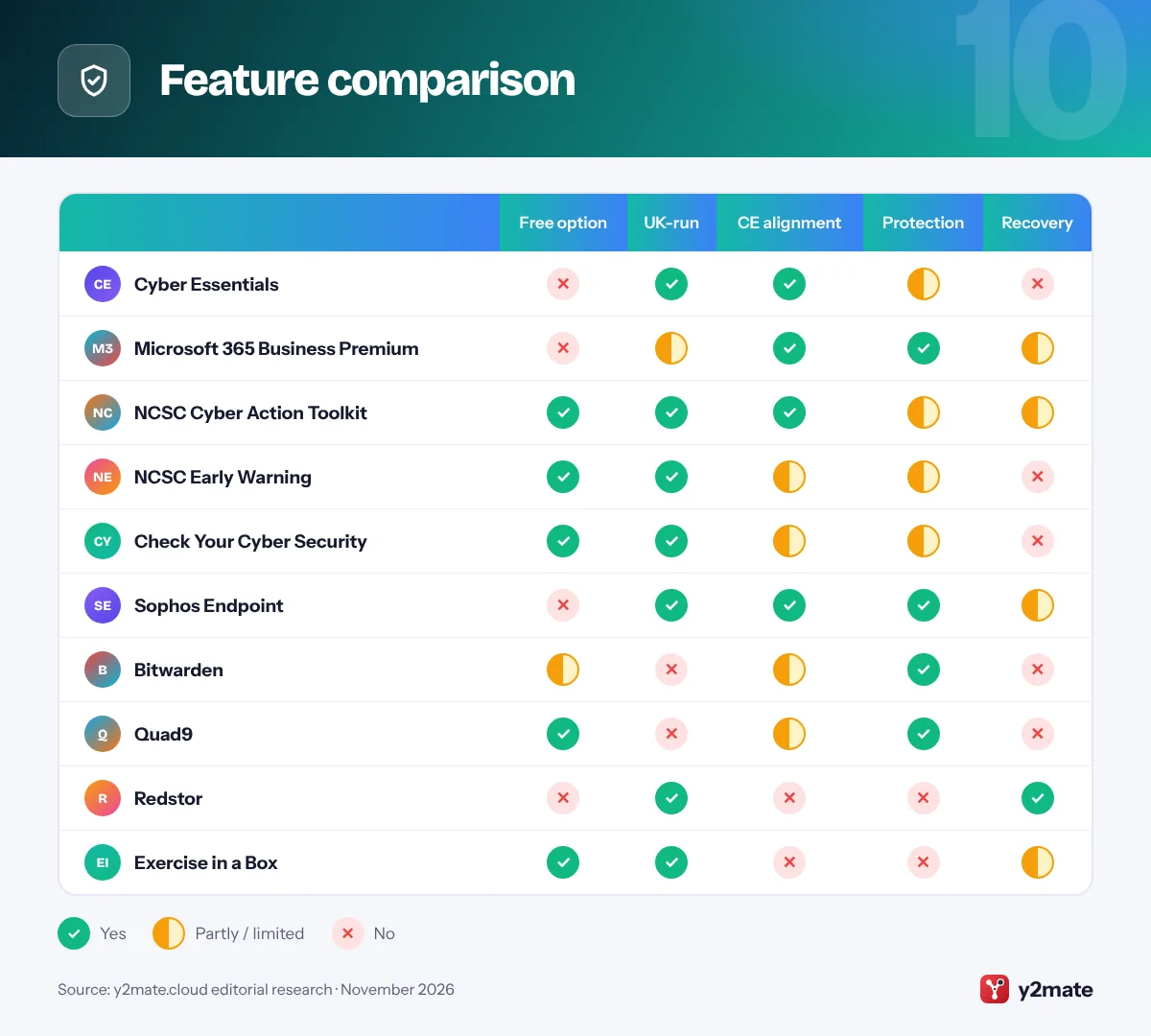
Feature comparison
How to choose cybersecurity tools for small businesses in the UK
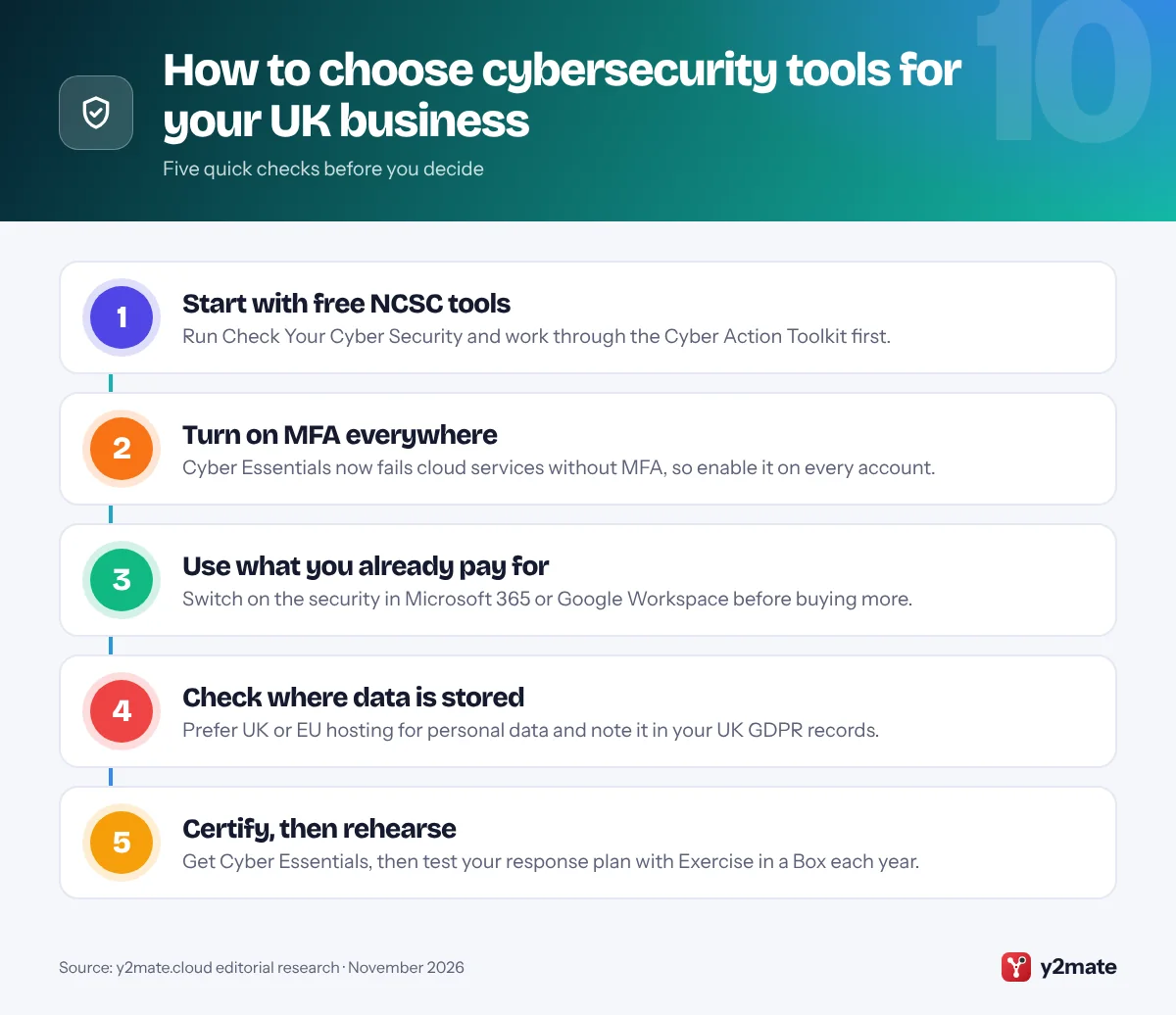
Begin with the free NCSC services, because they cost nothing and show you where you stand. Run Check Your Cyber Security on your website and email domain, register for Early Warning if you have your own domain or a static IP address, and work through the Cyber Action Toolkit. Then close the gaps using the security already included in Microsoft 365 or Google Workspace before buying extra products.
Plan for Cyber Essentials
Even if no customer has asked yet, Cyber Essentials is a sensible target. Since April 2026, missing multi-factor authentication on cloud services means an automatic fail, and cloud services holding business data must be in scope. Choose tools that make the five controls easy to evidence: managed updates, MFA, separate admin accounts and malware protection on every device.
Know your UK GDPR duties
If a personal data breach is likely to put people’s rights and freedoms at risk, you must report it to the Information Commissioner’s Office (ICO) without undue delay and, where feasible, within 72 hours of becoming aware of it. Keep a simple breach log, decide in advance who makes the call on reporting, and check where each supplier stores personal data. The ICO says its breach guidance is under review following the Data (Use and Access) Act 2025, so check it periodically.
Buying tips
- Ask suppliers whether they hold Cyber Essentials themselves.
- Prefer tools your IT partner already supports and monitors.
- Keep admin accounts separate from everyday accounts, with MFA on both.
- Check whether your insurer requires particular controls before you buy.
Frequently asked questions
What is the best free cybersecurity tool for a UK small business?
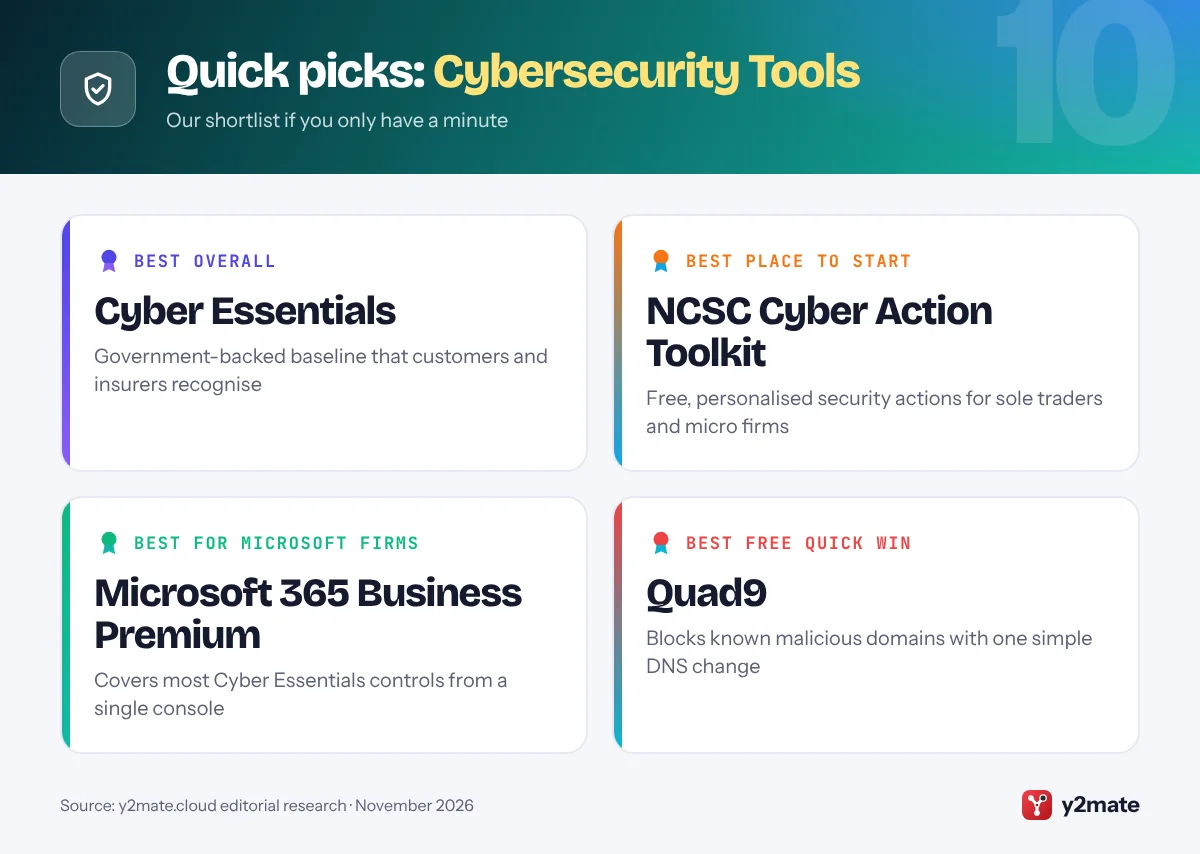
The best free starting points come from the NCSC. The Cyber Action Toolkit gives sole traders and small firms a personalised, jargon-free list of security actions, Check Your Cyber Security scans your website and email domain for common weaknesses, and Early Warning alerts you to threats linked to your network. For free protection on devices, Quad9 blocks known malicious domains with no sign-up.
Is Cyber Essentials mandatory for UK businesses?
Not for every business. Cyber Essentials is required for some central government contracts, particularly those involving personal data or certain ICT services, and many private customers and insurers also ask for it. Since 27 April 2026, assessments use the Danzell question set, and missing multi-factor authentication on cloud services is an automatic fail. Most organisations renew their certification every 12 months to keep it current.
Do I need to report a cyber attack to the ICO?
Only if personal data is involved and the breach is likely to put people's rights and freedoms at risk. In that case UK GDPR requires you to tell the ICO without undue delay and, where feasible, within 72 hours of becoming aware of it, and to tell affected people directly if the risk to them is high. Keep a record of every breach, even ones you decide not to report.
What is NCSC Early Warning and who can use it?
Early Warning is a free National Cyber Security Centre service that emails UK organisations when its threat intelligence shows signs of malware, vulnerabilities or attacks linked to their networks. You register the static IP addresses and domain names your organisation holds, so you need at least one of those to benefit. It does not replace antivirus or a monitoring service, but it is a useful extra layer.
Can I get free cyber insurance with Cyber Essentials?
Yes, if you qualify. Organisations domiciled in the UK or Crown Dependencies with an annual turnover under £20m that certify their whole organisation to Cyber Essentials can opt in to free cyber liability insurance arranged through IASME, the scheme's delivery partner. The cover has limits and conditions, so read the policy details and consider whether you also need a fuller policy from a commercial insurer.
Final verdict
For anyone choosing cybersecurity tools for small businesses in the UK, the smartest route is to use the NCSC’s free services first, Check Your Cyber Security, Early Warning and the Cyber Action Toolkit, and then work towards Cyber Essentials, which now insists on multi-factor authentication for cloud services. If you are already a Microsoft business, Microsoft 365 Business Premium covers most of the technical controls from one console.
Fill the remaining gaps with Sophos Endpoint or Defender on every device, Bitwarden for passwords, Quad9 for free DNS filtering and Redstor or a similar service for backups of Microsoft 365 data. Finally, run Exercise in a Box once a year so everyone knows what to do, and when to call the ICO, if something goes wrong.
Sources and further reading
- NCSC Small Business Guide: The National Cyber Security Centre's low-cost steps to protect a small business from the most common cyber attacks.
- Cyber Essentials help and resources: Official NCSC resources explaining the Cyber Essentials requirements, the latest question set and how to prepare for certification.
- IASME cyber liability insurance: IASME's page setting out who qualifies for the free cyber liability insurance offered with whole-organisation Cyber Essentials certification.
- ICO personal data breach guidance: The Information Commissioner's Office explains when and how to report a personal data breach under UK GDPR.
- ICO advice for small organisations: Practical data protection help from the ICO aimed at small businesses, sole traders and charities.

Leave a Reply