
- The Lenovo ThinkPad T14 Gen 7, Dell Pro 5 Series 14 and Apple MacBook Air with M5 are the strongest all-round laptops for small business in Australia in 2026.
- The instant asset write-off for small businesses became permanent from 1 July 2026, and its threshold applies to each eligible asset separately.
- GST-registered businesses that can claim the full GST credit use a laptop's GST-exclusive cost when working out the instant asset write-off.
- The Australian Consumer Law's consumer guarantees cover most laptops bought by a business, alongside any manufacturer's warranty.
- Windows 10 support ended on 14 October 2025, and ASD's ACSC recommends moving to Windows 11 rather than relying on paid Extended Security Updates.
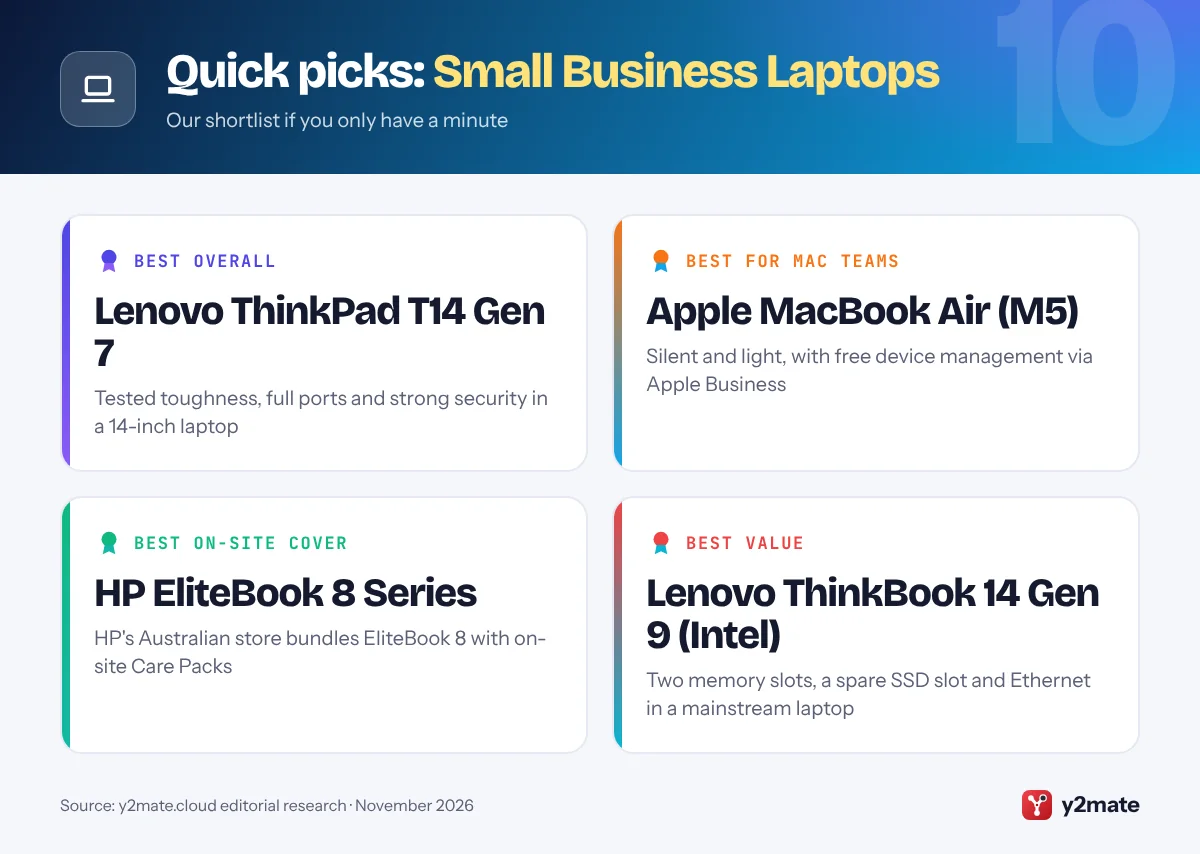
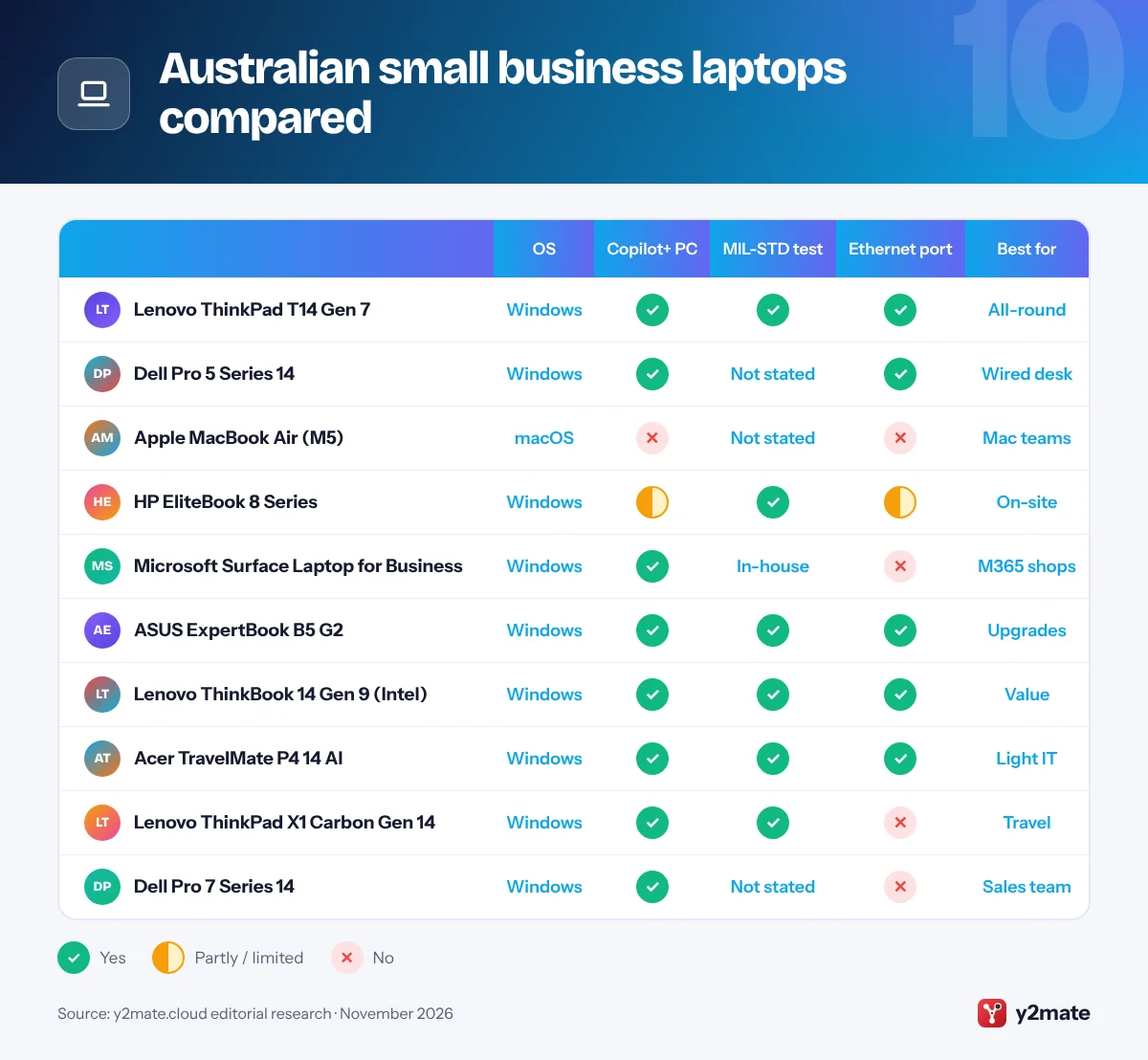
The best laptops for small business in Australia in 2026 are the Lenovo ThinkPad T14 Gen 7 for most businesses, the Dell Pro 5 Series 14 for teams standardising on Dell, and the Apple MacBook Air with M5 for Mac-based firms. The HP EliteBook 8 Series, Microsoft Surface Laptop for Business, ASUS ExpertBook B5 G2, Lenovo ThinkBook 14 Gen 9, Acer TravelMate P4 14 AI, ThinkPad X1 Carbon Gen 14 and Dell Pro 7 Series 14 round out the list for security-focused teams, Microsoft 365 users, tighter budgets and people who travel interstate.
Four terms come up throughout. Business-class laptops are built for work: makers keep the same parts for the life of a model, add security chips and self-repairing firmware, test for durability and stock spare parts for years. Intel vPro is a business version of Intel’s platform, and on vPro Enterprise laptops an IT provider can reach the machine remotely to fix or reinstall it, even if Windows will not boot. With an on-site warranty, a technician visits your premises after the fault has been diagnosed remotely, rather than you sending the laptop to a repair depot. Device management covers tools such as Microsoft Intune and Apple Business that set up, update, lock or wipe company laptops over the internet.
This guide ranks ten laptops sold through the makers’ Australian stores, sites or business resellers in November 2026, and explains the instant asset write-off, GST credits, the Australian Consumer Law and what the end of Windows 10 means for your business.
How we ranked this list
Our ranking uses only information the makers publish: stated durability testing such as MIL-STD-810H, security hardware and firmware protection, the warranty and on-site options shown on Australian sites, how easily each laptop can be managed with Windows 11 Pro, vPro, Intune or Apple Business, how repairable and upgradeable it is, and battery life and portability as each maker describes them. We gave extra weight to on-site and repair options, because laptops for small business in Australia are often used a long way from a service centre.
We have not tested these laptops in a lab, and there are no prices, discounts, benchmark scores or battery and weight figures here, because they change with configuration and sales. Confirm the specification and warranty of the exact model before buying.
The Top 10 Small Business Laptops
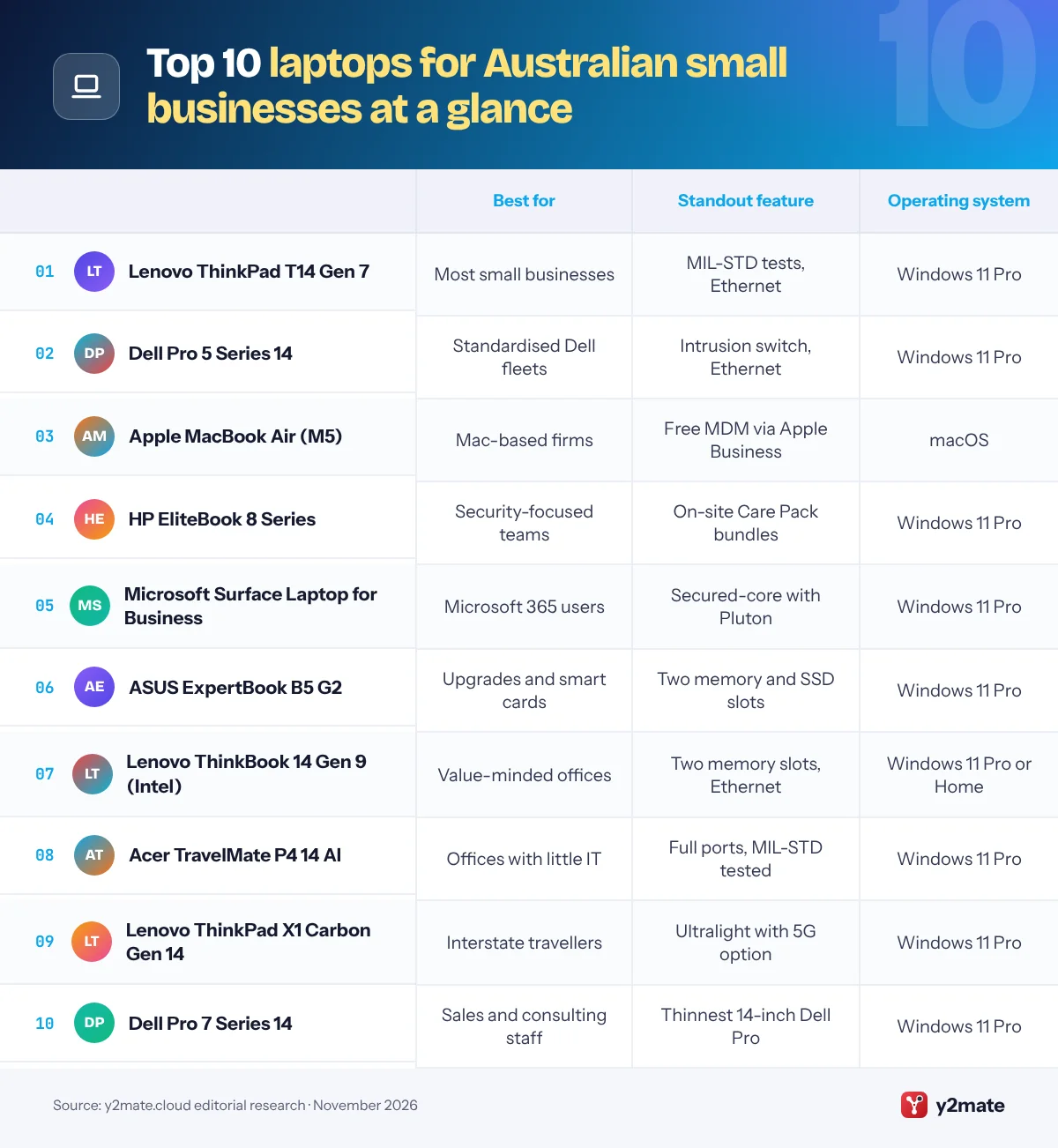
1. Lenovo ThinkPad T14 Gen 7
Best for: most small firms wanting one tough all-rounder
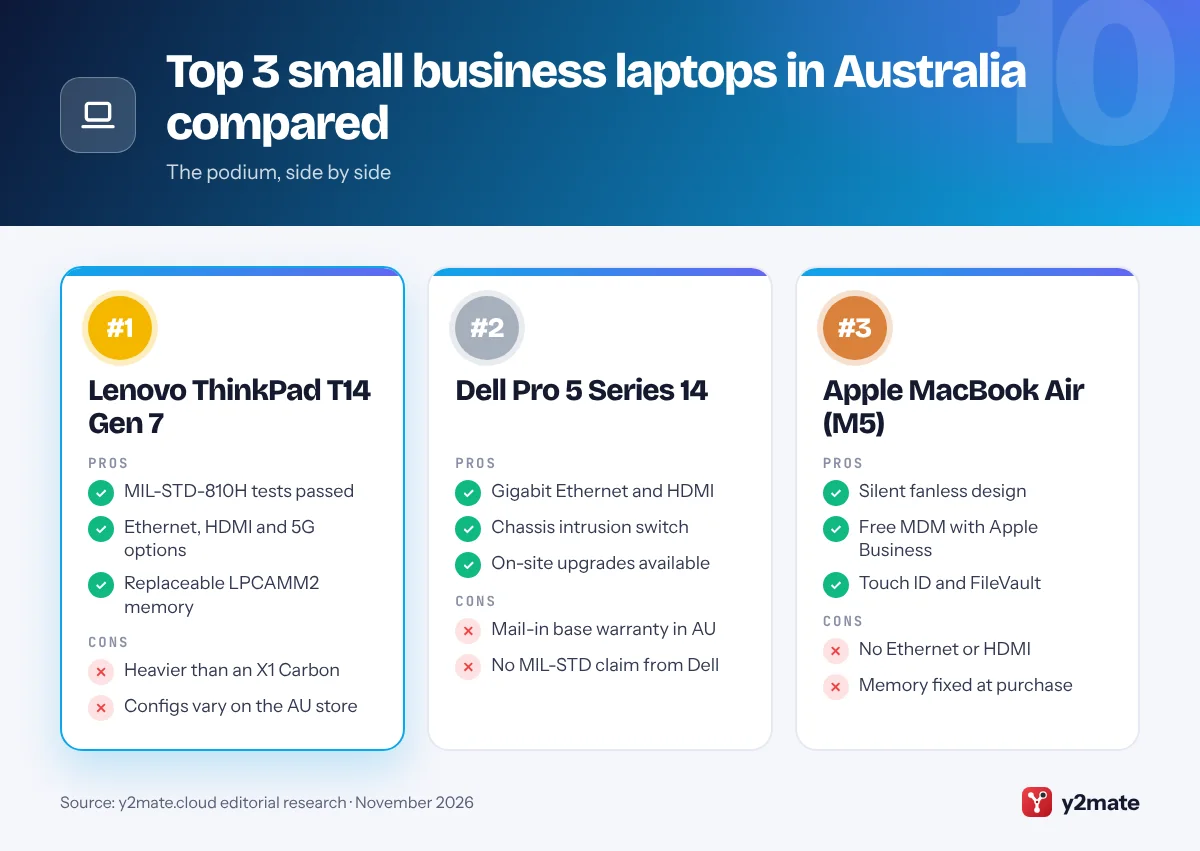
The ThinkPad T14 Gen 7 is the best all-round business laptop in Australia because it pairs tested toughness with the ports and security a small office actually uses. Lenovo says it passed MIL-STD-810H military tests, which counts for laptops that travel between job sites, cars and client offices, and it has a spill-resistant keyboard and a webcam privacy shutter. It runs Intel Core Ultra Series 3 processors as a Copilot+ PC.
There is a full Ethernet jack alongside HDMI, USB-A and Thunderbolt 4, plus optional smart card, 4G and 5G modules, which helps staff who work where there is no Wi-Fi. Memory is on a replaceable LPCAMM2 module, vPro Enterprise models allow remote management by your IT provider, and ThinkShield security adds a discrete TPM 2.0 chip and a self-healing BIOS.
Lenovo’s Australian store lists configurations with different warranties, and many ThinkPads offer on-site service or Premier Support upgrades. Lenovo Pro, the free business membership, adds business pricing and small business specialists. The Australian Consumer Law guarantees also apply alongside any warranty Lenovo provides.
Official site: Lenovo ThinkPad T14 Gen 7
- MIL-STD-810H tests passed
- Ethernet, HDMI and 5G options
- Replaceable LPCAMM2 memory
- Heavier than an X1 Carbon
- Configs vary on the AU store
2. Dell Pro 5 Series 14
Best for: teams standardising on a Dell with wired ports
Dell’s 2026 business range replaces the Latitude name with four families: Dell Pro 3, Pro 5, Pro 7 and Pro Premium. The Dell Pro 5 Series 14 is the middle option for wide deployment, and it is a dependable default for an Australian small business that is adding staff. Intel Core Ultra Series 3 processors bring Copilot+ PC features, with vPro choices for managed fleets.
The port selection includes Thunderbolt 4, USB-A, HDMI and Gigabit Ethernet, and Dell offers smart card, NFC, fingerprint and 5G options. For security, Dell lists a FIPS-certified TPM 2.0 chip, quantum-resistant BIOS verification and a chassis intrusion switch that alerts IT if someone opens the case. Dell says its 2026 business laptops also gain modular USB-C ports and customer-replaceable batteries, which should make repairs quicker.
On Dell’s Australian site, the base warranty for this model is mail-in service with pre-paid freight. Upgrades include ProSupport Flex or ProSupport Plus with on-site service after remote diagnosis, and Dell sells Accidental Damage Protection Insurance in Australia. If a dead laptop would stop jobs or invoices going out, the upgrade is worth pricing in.
Official site: Dell Pro 5 Series 14
- Gigabit Ethernet and HDMI
- Chassis intrusion switch
- On-site upgrades available
- Mail-in base warranty in AU
- No MIL-STD claim from Dell
3. Apple MacBook Air (M5)
Best for: Mac-based teams and creative small businesses
For Australian businesses that already use iPhones and Macs, the MacBook Air with M5 is the easiest laptop to roll out. Released in March 2026 in 13-inch and 15-inch sizes, it is fanless and silent, with Touch ID, two Thunderbolt 4 ports, MagSafe charging and support for two external displays. Apple rates the battery for a full working day, and macOS includes FileVault disk encryption.
Apple Business, launched in April 2026 and available in Australia, now includes device management at no extra cost. You can enrol company Macs automatically, push settings and apps with Blueprints, and give staff Managed Apple Accounts that keep business data separate from personal data. It brings Apple Business Manager and Apple Business Connect together in one place, and Apple’s Australian Small Business team can help with setup and financing options.
The trade-offs are no Ethernet or HDMI port, memory that cannot be upgraded later, and software compatibility, because some accounting, practice and industry tools still need Windows. Apple’s one-year warranty sits alongside the Australian Consumer Law guarantees, and AppleCare options add more cover.
Official site: Apple MacBook Air (M5)
- Silent fanless design
- Free MDM with Apple Business
- Touch ID and FileVault
- No Ethernet or HDMI
- Memory fixed at purchase
4. HP EliteBook 8 Series
Best for: security-focused teams wanting on-site cover
HP’s EliteBook 8 range is its premium mainstream business line, in 13-inch Flip, 14-inch and 16-inch sizes. In November 2026, HP’s Australian online store was still listing EliteBook 8 G1i models, often bundled with five-year on-site Care Packs, while the newer EliteBook 8 G2i with Intel Core Ultra Series 3 processors was available through Australian IT resellers. Either generation gives you HP’s full business feature set.
Security is the headline. HP Wolf Security for Business includes Sure Start, HP’s self-healing BIOS, plus Sure Recover, Tamper Lock and Secured-core PC protections, and Wolf Pro Security Edition models add more. HP says the EliteBook 8 G2i passed MIL-STD-810H tests that HP carried out, covering drops, vibration, dust, humidity and temperature extremes. Thunderbolt 4 and HDMI are standard, with Ethernet on some models.
The on-site Care Pack bundles on HP’s store are the main local attraction, because a technician comes to you instead of you sending the laptop away. Compare G1i and G2i specifications carefully before ordering, since the G2i uses Intel’s newer processors.
Official site: HP EliteBook 8 Series
- Wolf Security and Sure Start
- On-site Care Pack bundles
- 13, 14 and 16-inch sizes
- HP store still lists G1i
- Ethernet on some models only
5. Microsoft Surface Laptop for Business
Best for: Microsoft 365 businesses using Intune
The Surface Laptop for Business (8th Edition) launched in May 2026 with Intel Core Ultra Series 3 processors in 13.8-inch and 15-inch sizes, and Microsoft’s Australian Surface for Business site also lists Snapdragon X2 models and a compact 13-inch version. Each one is a Secured-core PC running Windows 11 Pro, with Microsoft’s Pluton security processor built in.
Surface makes the most sense if you already pay for Microsoft 365. Intune, Windows Autopilot and the Surface Management Portal let you ship a laptop straight to a new starter, have it set itself up when they sign in, and manage settings down to the firmware, which suits businesses with staff spread across several states. Microsoft says nearly every major component is replaceable through Surface commercial-authorised resellers, and select 13.8-inch models include an optional built-in privacy screen.
There is no Ethernet port, and Microsoft cites its own reliability testing rather than MIL-STD results. Buy through Surface for Business or an authorised reseller for business protection plans, including the option to keep a failed drive so your data never leaves the business.
Official site: Microsoft Surface Laptop for Business
- Secured-core PC with Pluton
- Autopilot zero-touch setup
- Replaceable major parts
- No Ethernet port
- Repairs via authorised resellers
6. ASUS ExpertBook B5 G2
Best for: growing firms that want upgrades and smart cards
The ASUS ExpertBook B5 G2 is one of the best-equipped mid-range business laptops sold in Australia. It uses Intel Core Ultra Series 3 processors with vPro, qualifies as a Copilot+ PC, and ASUS says it meets MIL-STD-810H military standards, while noting that the tests run in a laboratory on selected products.
It is easy to keep current. Two DDR5 SO-DIMM memory slots and two M.2 SSD slots mean more memory or storage can be added later, and a self-encrypting SSD is available. Ports include Thunderbolt 4, USB-A, HDMI, Gigabit Ethernet and microSD, with an optional smart card reader. ASUS ExpertGuardian security includes a NIST SP 800-193 compliant BIOS that can restore itself after an attack, a discrete TPM 2.0 chip, chassis intrusion detection and FIDO2 sign-in, and ASUS promises five years of BIOS and driver security updates.
ASUS offers company logo branding on the lid and sells ASUS Premium Care for extra cover. Check which on-site service options apply in your area before you buy several, particularly outside the capital cities.
Official site: ASUS ExpertBook B5 G2
- Two memory and two SSD slots
- Ethernet, HDMI and microSD
- Five years of security updates
- Check regional on-site options
- Heavier than ultralights
7. Lenovo ThinkBook 14 Gen 9 (Intel)
Best for: value buyers who want Ethernet and upgrades
Lenovo designs its ThinkBook range for small and medium-sized businesses, and the ThinkBook 14 Gen 9 with Intel Core Ultra Series 3 processors gives you most business essentials without ThinkPad pricing. It is a Copilot+ PC, Lenovo says it passed MIL-STD-810H military tests, and it is sold with Windows 11 Pro or Home, so pick Pro if you plan to manage it with Intune.
Its upgrade options are rare at this level. Two DDR5 SO-DIMM slots and a second, empty M.2 slot let you add memory or another SSD later, which can stretch the laptop’s working life. The ports include Ethernet, HDMI, an SD card reader, two Thunderbolt 4 and two USB-A, and security covers a FIPS-certified discrete TPM 2.0, a self-healing BIOS, a webcam privacy shutter and optional infrared face sign-in.
There is no vPro, and the base warranty is courier or carry-in service, which can mean a longer wait for repairs in regional areas, so consider an on-site upgrade. Lenovo Pro members also get business pricing, which helps when you are equipping several staff at once.
Official site: Lenovo ThinkBook 14 Gen 9 (Intel)
- Two memory slots, spare SSD slot
- Ethernet, HDMI and SD reader
- MIL-STD-810H tests passed
- No vPro remote management
- Carry-in base warranty
8. Acer TravelMate P4 14 AI
Best for: small offices with little or no in-house IT
The TravelMate P4 14 AI is Acer’s answer for businesses without an IT department. Acer says it built the new TravelMate range for small and medium-sized businesses that must manage remote devices with limited IT support, and it scheduled the P4 14 AI for Australia from May 2026, a month before North America. It runs Intel Core Ultra Series 3 processors with vPro options, qualifies as a Copilot+ PC, and Acer says the new TravelMates are certified to MIL-STD-810H.
Plugging in is easy: there are two Thunderbolt 4 ports, two USB-A, HDMI, a microSD slot and an Ethernet port, so nobody needs a dongle in a shared office. A power-key fingerprint reader, a discrete TPM, a camera shutter and Acer ProShield Plus software cover security, and a chassis intrusion alarm is optional. A convertible TravelMate P4 Spin 14 AI with a garaged stylus suits staff who mark up plans or forms.
Before ordering several, confirm Acer’s Australian warranty terms and what on-site help is available where you are. If you expect to add memory later, compare it with the ThinkBook 14 Gen 9, which has two memory slots.
Official site: Acer TravelMate P4 14 AI
- Made for firms with little IT
- Ethernet, HDMI and two USB-A
- MIL-STD-810H certified by Acer
- Check on-site options locally
- Compare specs model by model
9. Lenovo ThinkPad X1 Carbon Gen 14
Best for: owners who fly interstate to see clients
If you regularly fly interstate or drive between client sites, the ThinkPad X1 Carbon Gen 14 Aura Edition is the business ultralight to look at. Lenovo announced it at CES in January 2026, and Lenovo Australia sells it as a Copilot+ PC for premium, ultra-light productivity. It is one of the lightest 14-inch business laptops available, yet Lenovo says it passed MIL-STD-810H military tests.
Lenovo kept useful ports, including HDMI, USB-A and a Thunderbolt 4 port on each side, and options include a 2.8K OLED screen, a 10MP camera with infrared sign-in, a haptic touchpad and a 5G modem for airport lounges and long drives. The Space Frame chassis gives IT easier access to the keyboard, battery and smaller boards for repairs. vPro Enterprise configurations add remote management, and ThinkShield includes a discrete TPM 2.0 chip and a self-healing BIOS.
It is a premium-priced model with no Ethernet port, and its memory is soldered, so choose enough at purchase. For staff who mostly work at a desk, the ThinkPad T14 Gen 7 is the better-value ThinkPad.
Official site: Lenovo ThinkPad X1 Carbon Gen 14
- Very light 14-inch design
- MIL-STD-810H tests passed
- 5G and OLED options
- No Ethernet port
- Soldered memory
10. Dell Pro 7 Series 14
Best for: sales staff and consultants who need a slim Dell
The Dell Pro 7 Series 14 is the slimmer step up from the Pro 5, and Dell positions the Pro 7 family for consultants and sales staff. Dell describes it as the thinnest 14-inch Dell Pro model, and the family includes 13-inch and 14-inch laptops and 2-in-1s, with aluminium chassis options, touchscreen variants and cameras of up to 8MP.
Inside are Intel Core Ultra Series 3 processors with vPro, or AMD Ryzen AI PRO 400 Series chips, so it can join a managed fleet alongside Pro 5 models. Dell’s 2026 security features, including quantum-resistant BIOS protection and root-of-trust firmware checks, carry across the range, and Dell is building Halcyon anti-ransomware technology into its business line-up.
It has no Ethernet jack, so plan on a USB-C dock for wired networking, and Dell does not quote MIL-STD results for it. On Dell’s Australian site the base warranty is mail-in service with pre-paid freight, so most businesses should add ProSupport with on-site service after remote diagnosis, and consider Dell’s Accidental Damage Protection Insurance for staff who travel.
Official site: Dell Pro 7 Series 14
- Thinnest 14-inch Dell Pro model
- vPro or AMD PRO choices
- Laptop or 2-in-1 versions
- No Ethernet port
- Mail-in base warranty in AU
Australian small business laptops compared
How to choose laptops for small business in Australia
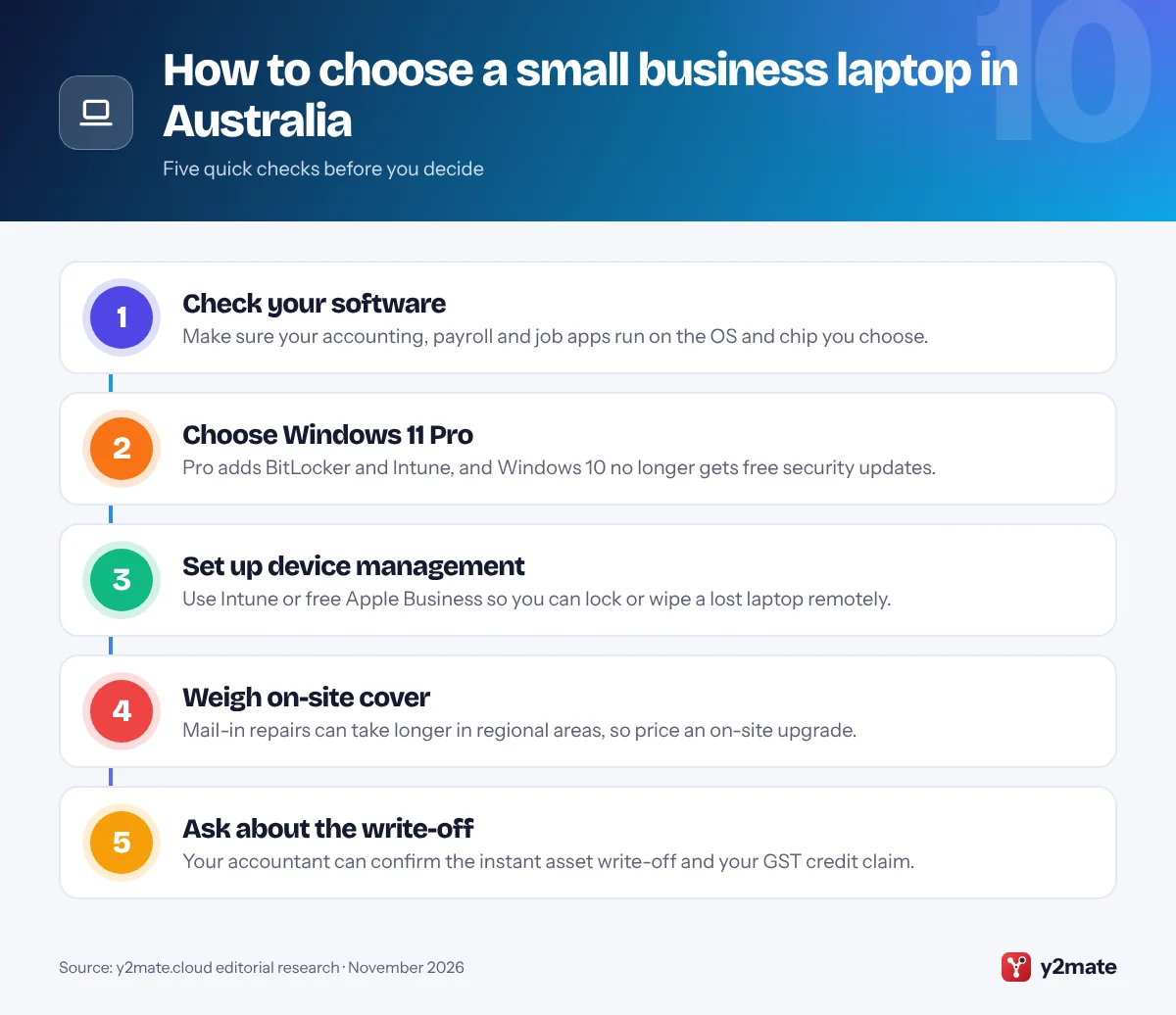
Begin with the software you rely on, from accounting and payroll to job management and industry tools, and check it runs on the operating system and chip you plan to buy. Then think about repairs: mail-in and carry-in warranties can take longer outside the major cities, so on-site cover is worth considering for staff in regional areas.
Instant asset write-off and GST
The instant asset write-off became permanent from 1 July 2026 after the 2026–27 Budget measure was legislated. Small businesses under the aggregated turnover limit can immediately deduct the business-use share of each eligible asset that costs less than the threshold, and the threshold applies per asset, so several laptops can each qualify. If you are registered for GST and can claim the full GST credit, you claim the credit on your activity statement and use the GST-exclusive cost for the write-off. Tax rules change, so confirm your position with your accountant or registered tax agent.
Windows 10 and device management
Windows 10 support ended on 14 October 2025. The Australian Signals Directorate’s ACSC recommends moving to Windows 11 and buying paid Extended Security Updates only where critical operational needs force you to stay. Patching operating systems is one of the Essential Eight, so choose Windows 11 Pro for BitLocker and Intune, or Apple Business for Macs.
Your rights under the Australian Consumer Law
Consumer guarantees also protect businesses that buy goods under a set value or goods normally bought for personal use, which covers most laptops. They apply alongside any manufacturer’s warranty, so a faulty laptop must be repaired, replaced or refunded even after a short warranty ends, depending on the fault.
Frequently asked questions
What is the best laptop for a small business in Australia?
For most Australian small businesses, the Lenovo ThinkPad T14 Gen 7 is the best all-round laptop thanks to MIL-STD-810H testing, Ethernet and HDMI ports, vPro options and strong security. The Dell Pro 5 Series 14 suits teams standardising on Dell, the MacBook Air with M5 suits Mac-based firms, and the ThinkBook 14 Gen 9 is the best value with room to upgrade.
Can I claim a laptop under the instant asset write-off?
Usually, yes, if your business is under the aggregated turnover limit and the laptop costs less than the write-off threshold. The write-off became permanent from 1 July 2026, applies per asset and covers the business-use share of an asset first used or installed ready for use in that income year. More expensive laptops go into the small business pool instead. Check the details with your accountant.
Do I claim GST on a business laptop?
If your business is registered for GST and the laptop is for business use, you can usually claim a GST credit for the GST in the price on your business activity statement, as long as you hold a valid tax invoice. You then use the GST-exclusive cost for the instant asset write-off. If you are not registered for GST, the GST stays part of the laptop's cost.
Does the Australian Consumer Law cover laptops bought by a business?
Yes, in most cases. The ACCC says consumer guarantees apply to business purchases of goods that cost less than a set value threshold or that are normally bought for personal, domestic or household use, which includes most laptops. A laptop must therefore be of acceptable quality and fit for purpose, on top of any manufacturer's warranty, unless you bought it to resell.
What should I do with Windows 10 laptops in Australia?
Windows 10 support ended on 14 October 2025, so those laptops no longer receive free security updates. ASD's ACSC recommends upgrading to Windows 11 where the hardware allows, and buying paid Extended Security Updates only if critical operational requirements force you to keep Windows 10 for a while. Replace laptops that cannot run Windows 11, and back up your data before upgrading.
Final verdict
The best laptops for small business in Australia in 2026 are the Lenovo ThinkPad T14 Gen 7 for most businesses, the Dell Pro 5 Series 14 for Dell-based teams and the MacBook Air with M5 for Mac users. The HP EliteBook 8 Series stands out for bundled on-site cover, the ThinkBook 14 Gen 9 and ASUS ExpertBook B5 G2 give the most room to upgrade, and the X1 Carbon Gen 14 suits owners who are always travelling.
Before you buy, choose Windows 11 Pro or Apple Business for management, retire your last Windows 10 machines, weigh on-site cover if you work outside the big cities, and ask your accountant how the instant asset write-off and GST credits apply to your purchase.
Sources and further reading
- ATO instant asset write-off update: The ATO confirms that the instant asset write-off for small businesses is now permanent and explains who is eligible.
- ATO instant asset write-off rules: The ATO explains how to work out an asset's cost, including GST, and how to claim the write-off.
- Changes for businesses from July 2026: Business.gov.au summarises the changes that started on 1 July 2026, including the permanent instant asset write-off.
- ACCC small business rights: The ACCC explains when consumer guarantees protect a small business that buys goods such as laptops.
- ACSC Windows end of support guidance: ASD's Australian Cyber Security Centre explains the risks of unsupported Windows versions and how organisations should respond.

Leave a Reply