
- The Lenovo ThinkPad T14 Gen 7, Dell Pro 5 Series 14 and Apple MacBook Air with M5 are the strongest all-round laptops for small business in the USA in 2026.
- Windows 10 reached end of support on October 14, 2025, so any business PC still running it needs Windows 11 or Microsoft's paid Extended Security Updates.
- The 2025 federal tax law raised the Section 179 expensing limit and permanently restored full first-year bonus depreciation for qualifying property acquired after January 19, 2025.
- Business laptops differ from consumer models mainly in security hardware, remote management, stable parts and on-site warranty upgrades, not in raw speed.
- Apple Business, launched in April 2026, gives small firms free built-in device management for Macs, while Windows fleets usually rely on Microsoft Intune.
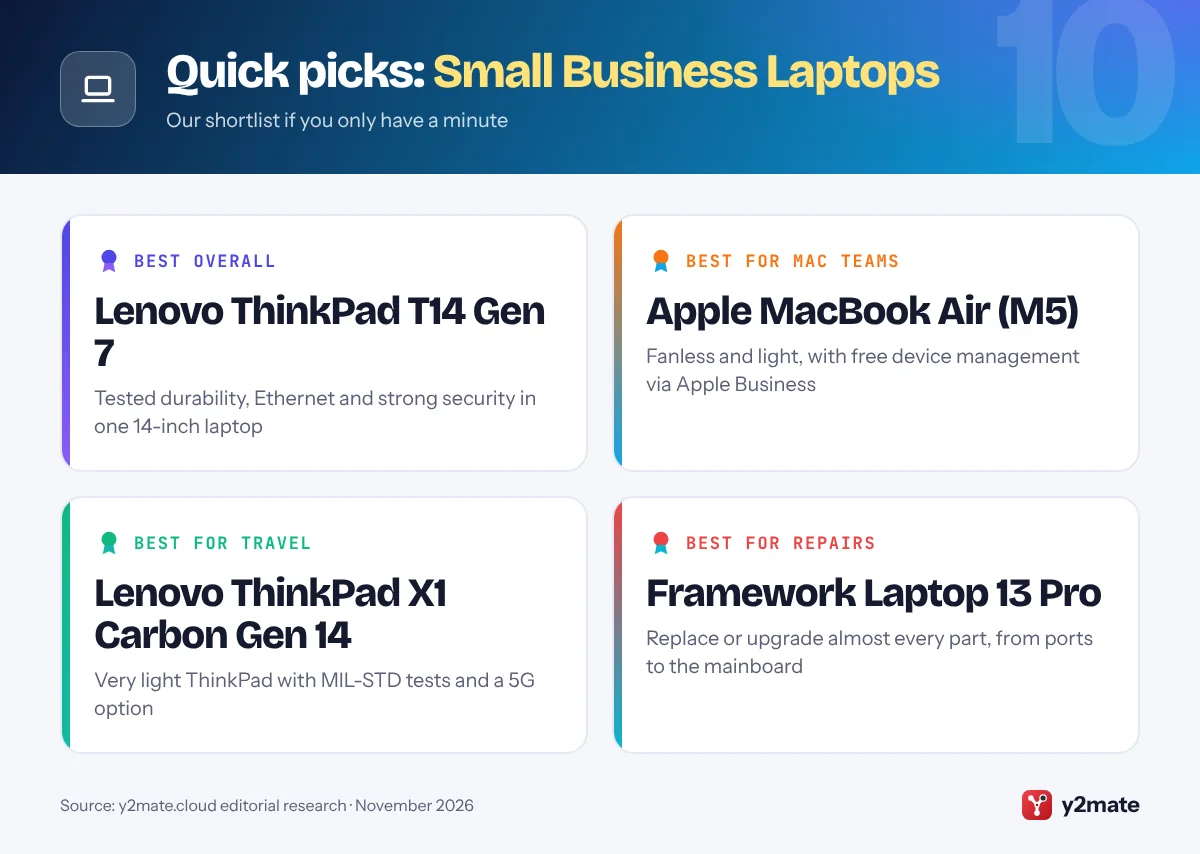
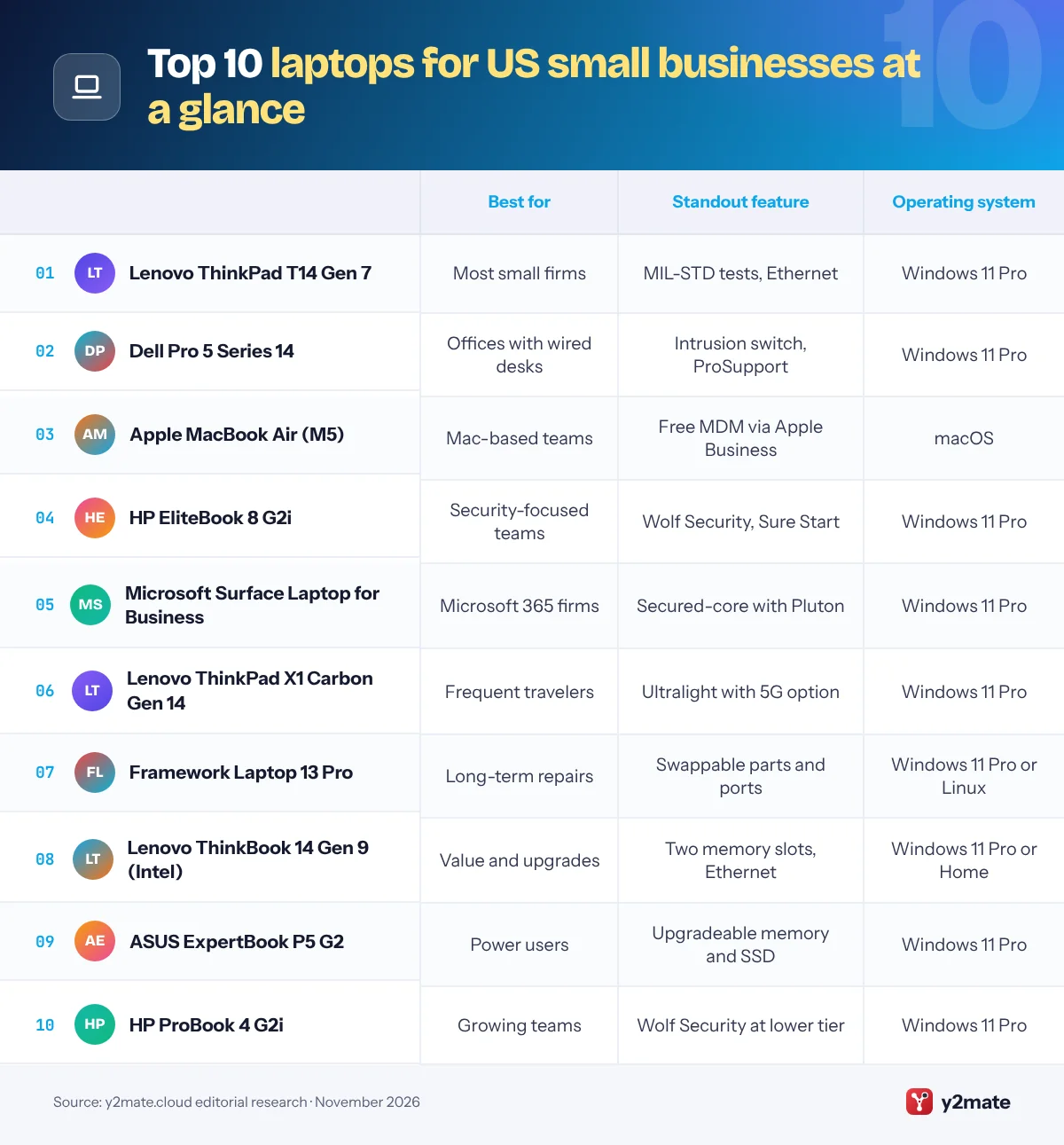
The best laptops for small business in the USA in 2026 are the Lenovo ThinkPad T14 Gen 7 for most firms, the Dell Pro 5 Series 14 for offices that want Dell ProSupport and a wired network port, and the Apple MacBook Air with M5 for Mac-based teams. The HP EliteBook 8 G2i, Microsoft Surface Laptop for Business, ThinkPad X1 Carbon Gen 14, Framework Laptop 13 Pro, Lenovo ThinkBook 14 Gen 9, ASUS ExpertBook P5 G2 and HP ProBook 4 G2i complete the list for security-focused teams, frequent travelers, repair-minded owners and tighter budgets.
A few terms are worth knowing. A business-class laptop is built for work rather than home use: the maker keeps its parts stable through a model generation, adds security hardware such as a discrete TPM chip and self-healing firmware, tests it for durability and sells spare parts and warranty upgrades for years. Intel vPro is Intel’s business platform, and on vPro Enterprise models an IT provider can manage, update and repair a PC remotely, even when Windows will not start. An on-site warranty means a technician comes to your workplace, usually after a remote diagnosis, instead of you mailing the laptop away. Device management, or MDM, is software such as Microsoft Intune or Apple Business that lets you set up, update, lock or wipe company laptops from a web console.
This guide ranks ten laptops listed on their makers’ US stores in November 2026 and explains Section 179, bonus depreciation, sales tax, warranties and the end of Windows 10 support for small firms, sole proprietors and freelancers.
How we ranked this list
We ranked these laptops for small business in the USA only on publicly documented criteria: durability testing the maker states, such as MIL-STD-810H, built-in security features, the warranty and on-site service options sold in the US, manageability through Windows 11 Pro, Intel vPro, Intune or Apple Business, repairability and upgradeable parts, and battery life and weight as the makers describe them. Every model is listed on its maker’s US store or business site in November 2026.
We did not test these laptops ourselves, and we leave out prices, discounts, benchmark scores and battery or weight figures, because they change with configuration and promotions. Check exact specifications and warranty terms for the configuration you order.
The Top 10 Small Business Laptops
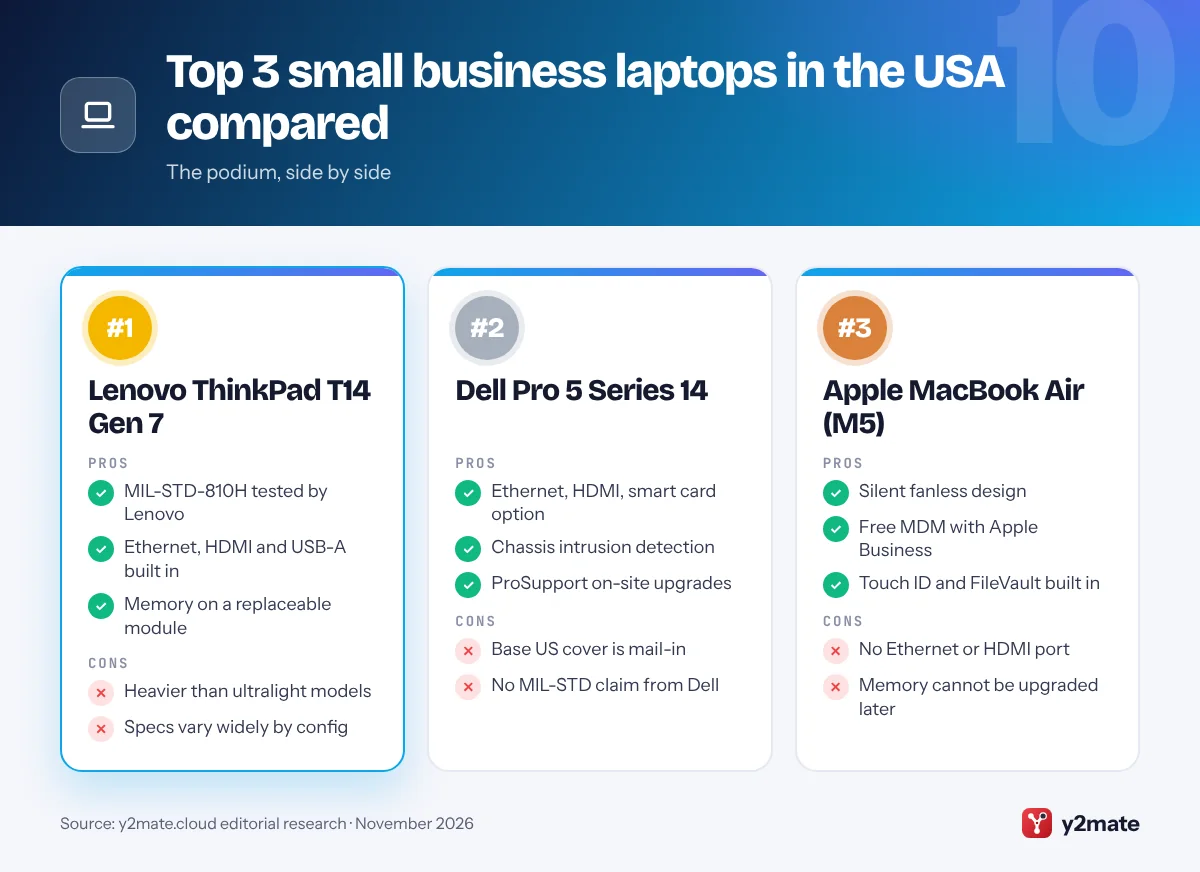
1. Lenovo ThinkPad T14 Gen 7
Best for: most small firms that want one dependable laptop
The ThinkPad T14 Gen 7 is the best all-round laptop for small business in the USA because it combines tested durability, strong security and practical ports in one mainstream 14-inch design. Lenovo says it passed MIL-STD-810H military tests, and it has a spill-resistant keyboard, a webcam privacy shutter and an optional fingerprint reader in the power button. It uses Intel Core Ultra Series 3 processors and qualifies as a Copilot+ PC.
For a small office, the ports matter: HDMI, USB-A, Thunderbolt 4 and a full-size Ethernet jack mean no dongles for projectors or wired desks, and Lenovo offers an optional smart card reader and a 4G or 5G modem. Memory sits on a single LPCAMM2 module rather than being soldered to the board, and vPro Enterprise configurations let an IT partner manage the laptop remotely. Lenovo’s ThinkShield security adds a discrete TPM 2.0 chip and a self-healing BIOS.
Configurations vary widely, so check the warranty listed for the exact model. Lenovo offers limited on-site service on many configurations and sells Premier Support upgrades, while its free Lenovo Pro program adds business pricing and financing options.
Official site: Lenovo ThinkPad T14 Gen 7
- MIL-STD-810H tested by Lenovo
- Ethernet, HDMI and USB-A built in
- Memory on a replaceable module
- Heavier than ultralight models
- Specs vary widely by config
2. Dell Pro 5 Series 14
Best for: offices that want Dell ProSupport and wired ports
The Dell Pro 5 Series 14 is the mainstream model in Dell’s 2026 business range, which replaced the old Latitude name with Dell Pro 3, Pro 5, Pro 7 and Pro Premium tiers. Dell aims the Pro 5 at broad company-wide deployments, and it makes a sensible standard laptop for a growing team: Intel Core Ultra Series 3 processors with Copilot+ PC features and many vPro options, an optional all-aluminum chassis, and a port set that includes Thunderbolt 4, USB-A, HDMI and Gigabit Ethernet.
Security is a real strength. Dell lists a FIPS-certified TPM 2.0 chip, quantum-resistant BIOS verification and a chassis intrusion switch that flags physical tampering, plus optional smart card, NFC and fingerprint readers. Dell also says its 2026 commercial laptops add modular USB-C ports and customer-replaceable batteries to make repairs simpler.
On Dell’s US store, the base cover for this model is mail-in hardware service, and you can upgrade to ProSupport with on-site service after remote diagnosis, or to ProSupport Plus, which adds accidental damage cover. Dell’s US site also lists financing for business purchases.
Official site: Dell Pro 5 Series 14
- Ethernet, HDMI, smart card option
- Chassis intrusion detection
- ProSupport on-site upgrades
- Base US cover is mail-in
- No MIL-STD claim from Dell
3. Apple MacBook Air (M5)
Best for: Mac-based teams, consultants and creatives
The MacBook Air with M5, launched in March 2026, is the best choice for small businesses that already run on Apple devices. It comes in 13-inch and 15-inch sizes, has a silent fanless design, Touch ID, two Thunderbolt 4 ports and MagSafe charging, and it can drive two external displays at a desk. Apple rates the battery for a full working day, and FileVault encryption is built into macOS.
The business case got stronger in April 2026, when Apple launched Apple Business, a free platform that replaces Apple Business Manager, Apple Business Essentials and Apple Business Connect. It includes built-in device management, so a small firm can set up Macs with preset settings and apps, use Managed Apple Accounts to keep work and personal data separate, and add AppleCare+ for Business support. Apple’s US Small Business team can also help with setup and financing options.
The limits are familiar. Memory and storage cannot be upgraded after purchase, there is no Ethernet or HDMI port, and some accounting, design and industry software is still Windows-only.
Official site: Apple MacBook Air (M5)
- Silent fanless design
- Free MDM with Apple Business
- Touch ID and FileVault built in
- No Ethernet or HDMI port
- Memory cannot be upgraded later
4. HP EliteBook 8 G2i
Best for: security-conscious teams that travel
The EliteBook 8 G2i is HP’s premium mainstream business laptop for 2026, sold in 13-inch Flip, 14-inch and 16-inch versions with Intel Core Ultra Series 3 processors. HP positions the EliteBook 8 range for people who switch between focused work and frequent meetings, and the 14-inch Copilot+ models are the natural pick for a small team.
Security is the main reason to choose it. HP Wolf Security for Business includes Sure Start, which HP calls a self-healing BIOS, along with Sure Recover, Tamper Lock and Secured-core PC features, and HP sells Wolf Pro Security Edition bundles. HP says the design passed a set of MIL-STD-810H tests it performed, covering drops, vibration, dust, humidity and temperature extremes. Thunderbolt 4 and HDMI are standard, and Ethernet is available on some configurations.
Base warranties vary by listing, from one to three years, so read the details and budget for an HP Care Pack if you want on-site repairs. The HP for Business store sells configurable models directly, and HP Financial Services offers leasing for business buyers.
Official site: HP EliteBook 8 G2i
- Wolf Security and Sure Start
- MIL-STD-810H tested by HP
- 13, 14 and 16-inch choices
- Ethernet only on some models
- On-site cover costs extra
5. Microsoft Surface Laptop for Business
Best for: Microsoft 365 firms managed with Intune
The Surface Laptop for Business (8th Edition) arrived in May 2026 in 13.8-inch and 15-inch sizes with Intel Core Ultra Series 3 processors, and Microsoft now also lists Snapdragon X2 versions and a smaller 13-inch model. Every Surface for Business device ships as a Secured-core PC running Windows 11 Pro, with Microsoft’s Pluton security processor built in.
Its biggest advantage for a small firm is how neatly it fits Microsoft’s own tools. Intune, Windows Autopilot and the Surface Management Portal can set up new laptops with zero-touch deployment and manage settings right down to the firmware. Microsoft says nearly every major component is replaceable, with parts supplied through authorized commercial resellers, and select 13.8-inch models offer an optional built-in privacy screen that IT can control.
There is no Ethernet port, so plan on a USB-C dock for wired networking, and Microsoft does not quote MIL-STD results, relying on its own reliability testing instead. Buy through Surface for Business or an authorized reseller to get business protection plans, including an option to keep a failed drive.
Official site: Microsoft Surface Laptop for Business
- Secured-core PC with Pluton
- Deep Intune and Autopilot fit
- Most parts replaceable
- No Ethernet port
- Repairs go through resellers
6. Lenovo ThinkPad X1 Carbon Gen 14
Best for: owners and consultants who travel light
The ThinkPad X1 Carbon Gen 14 Aura Edition is Lenovo’s flagship business ultralight, announced at CES in January 2026, and it is the laptop to choose if you spend more time with clients than at your own desk. It is one of the lightest 14-inch laptops Lenovo sells, yet Lenovo says it still passed MIL-STD-810H military tests, and it keeps HDMI, USB-A and two Thunderbolt 4 ports so you can present without adapters.
Lenovo rebuilt the chassis around a Space Frame design that gives IT staff easier access to the keyboard, battery and smaller boards when parts need swapping. Options include a 2.8K OLED display, a 10MP camera with infrared sign-in, a haptic touchpad and a 5G modem for working away from Wi-Fi. vPro Enterprise configurations add remote management, and ThinkShield security includes a discrete TPM 2.0 chip and a self-healing BIOS.
The trade-offs are cost and the lack of an Ethernet jack, which needs a USB-C adapter. Memory is soldered, so buy enough at the start.
Official site: Lenovo ThinkPad X1 Carbon Gen 14
- Very light for a 14-inch laptop
- MIL-STD-810H tested by Lenovo
- 5G and OLED options
- No Ethernet port
- Memory is soldered
7. Framework Laptop 13 Pro
Best for: repair-minded firms that keep laptops for years
The Framework Laptop 13 Pro, announced in April 2026, is the most repairable laptop on this list. Framework designs its laptops so owners can replace the battery, screen, keyboard, ports and mainboard themselves, and the 13 Pro keeps parts compatibility with earlier Framework Laptop 13 models, so a future mainboard upgrade can extend its life instead of replacing the whole machine.
The Pro adds a redesigned CNC aluminum chassis, a larger battery and, on Intel Core Ultra Series 3 models, LPCAMM2 memory that you can choose at order or supply yourself. Ports come from four swappable Expansion Card bays, so each laptop can carry the mix of USB-C, USB-A, HDMI or Ethernet cards a person needs. Framework calls it its first Ubuntu Certified system.
For small fleets, Framework says pre-built laptops with Windows 11 Pro support Windows Autopilot, and US customers can add an extended warranty. The DIY Edition suits technical owners rather than a busy office. Framework does not list on-site service, so this is a laptop for firms that value long life and self-repair over hands-off support.
Official site: Framework Laptop 13 Pro
- Almost every part replaceable
- Swappable port Expansion Cards
- Fits future mainboard upgrades
- No on-site service listed
- DIY Edition needs hands-on setup
8. Lenovo ThinkBook 14 Gen 9 (Intel)
Best for: value, upgrades and a wired office network
Lenovo aims its ThinkBook line at small and medium businesses, and the ThinkBook 14 Gen 9 with Intel Core Ultra Series 3 processors is the best-value pick here. It is a Copilot+ PC that Lenovo says passed MIL-STD-810H military tests, and it is sold with Windows 11 Pro or Home, so make sure you order Pro if you plan to manage it centrally.
Its practicality stands out. Two DDR5 SO-DIMM memory slots and a second empty M.2 slot mean you can add memory or storage later instead of buying a new laptop. The ports cover almost everything an office needs: Ethernet, HDMI, an SD card reader, two Thunderbolt 4 and two USB-A. Security includes a FIPS-certified discrete TPM 2.0, a self-healing BIOS, a webcam privacy shutter and an optional infrared camera for Windows Hello.
It is not a vPro laptop, so it lacks Intel’s hardware remote management, and its standard warranty is courier or carry-in service rather than on-site. Lenovo sells warranty upgrades, and Lenovo Pro membership adds business pricing.
Official site: Lenovo ThinkBook 14 Gen 9 (Intel)
- Two memory slots, spare SSD slot
- Ethernet, HDMI and SD reader
- MIL-STD-810H tested by Lenovo
- No vPro remote management
- Carry-in base warranty
9. ASUS ExpertBook P5 G2
Best for: power users who want upgradeable memory
The ASUS ExpertBook P5 G2, announced in January 2026, is a strong alternative to the big three business brands. The 14-inch Intel version uses Intel Core Ultra Series 3 processors in a new aluminum body, and ASUS says it meets the MIL-STD-810H military standard, with the usual caveat that its tests run under lab conditions on selected products.
It is one of the most upgradeable laptops here. ASUS lists two DDR5 SO-DIMM memory slots and two M.2 SSD slots, so a growing business can add memory or storage later. The port selection is generous, with two Thunderbolt 4, two USB-A, HDMI and Gigabit Ethernet, and the keyboard is spill-resistant, with a privacy shutter on the webcam.
ASUS ExpertGuardian security includes a NIST-compliant commercial BIOS, a discrete TPM 2.0 chip, Windows 11 Secured-core features and FIDO2 biometric sign-in, and ASUS promises five years of BIOS and driver security updates. ASUS sells warranty extensions on its US store, but check which on-site support options apply before you standardize on it.
Official site: ASUS ExpertBook P5 G2
- Two memory slots, two SSD slots
- Ethernet, HDMI, two USB-A
- Five years of security updates
- Check on-site repair options
- Heavier than ultralights
10. HP ProBook 4 G2i
Best for: growing teams buying several mid-range laptops
HP’s ProBook 4 G2 series is the company’s mainstream line for growing small and midsize businesses, and the Intel-based ProBook 4 G2i comes in 14-inch and 16-inch sizes on HP’s US store. It is the sensible choice when you need several matching laptops for staff and want HP’s business security without paying EliteBook prices.
Many US listings bundle three years of HP Wolf Pro Security, and the security stack includes HP Sure Start, Sure Click, Sure Run, Sure Recover and Tamper Lock, plus a TPM 2.0 chip. The 14-inch model offers Gigabit Ethernet alongside Wi-Fi 7, which suits offices with wired desks, and HP sells customizable configurations with Windows 11 Pro.
The catch is variety. HP labels some models Next Gen AI PCs, its name for Copilot+ PCs, and others simply AI PCs, while memory, storage and screen options differ widely between part numbers. Compare the full specification sheet for each model before ordering several. As with the EliteBook, budget for an HP Care Pack if you want on-site repairs or cover beyond the base warranty.
Official site: HP ProBook 4 G2i
- Built for growing small firms
- Wolf Security with Sure Start
- Ethernet on 14-inch models
- Specs vary a lot by part number
- On-site cover costs extra
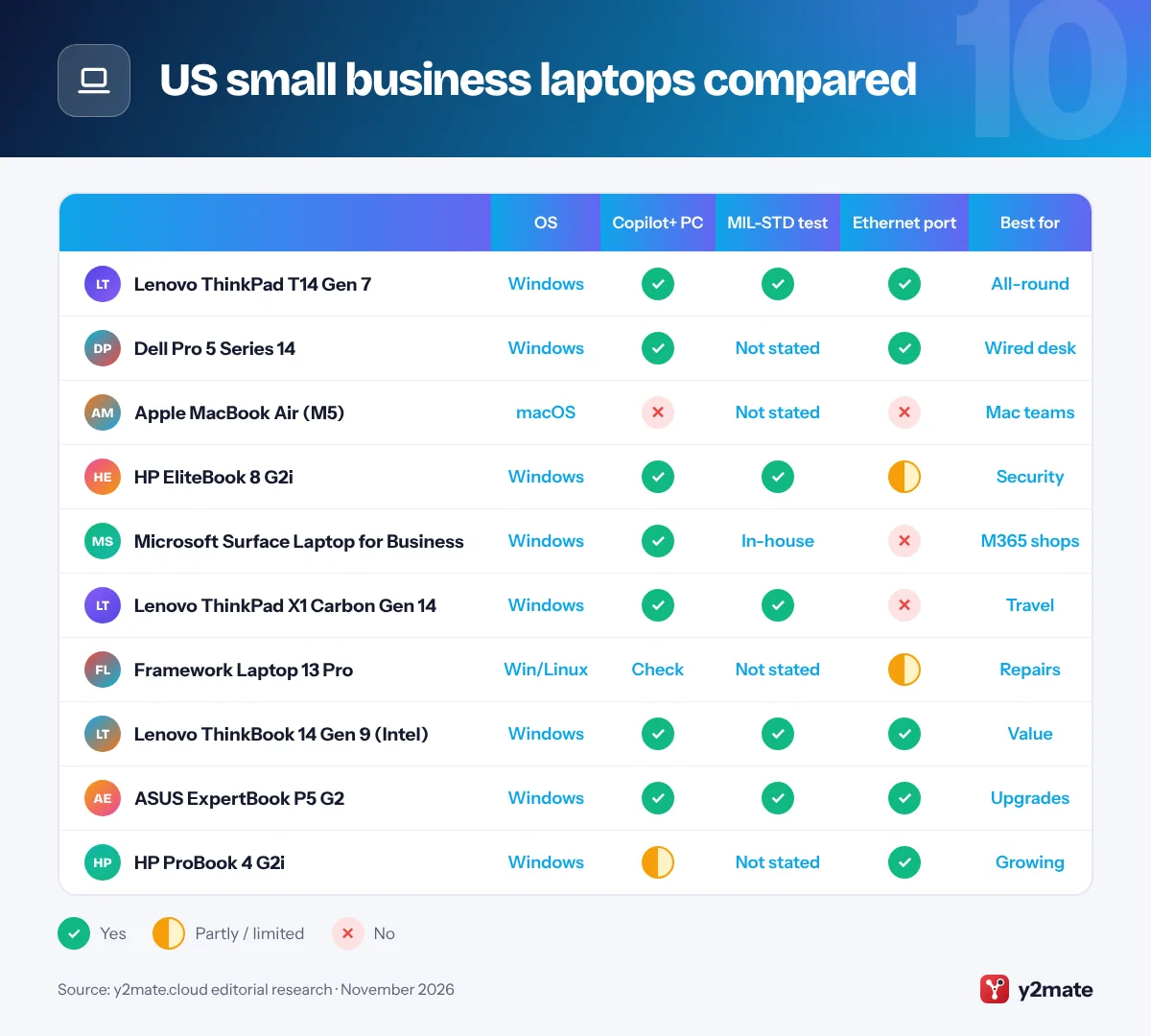
US small business laptops compared
How to choose laptops for small business in the USA
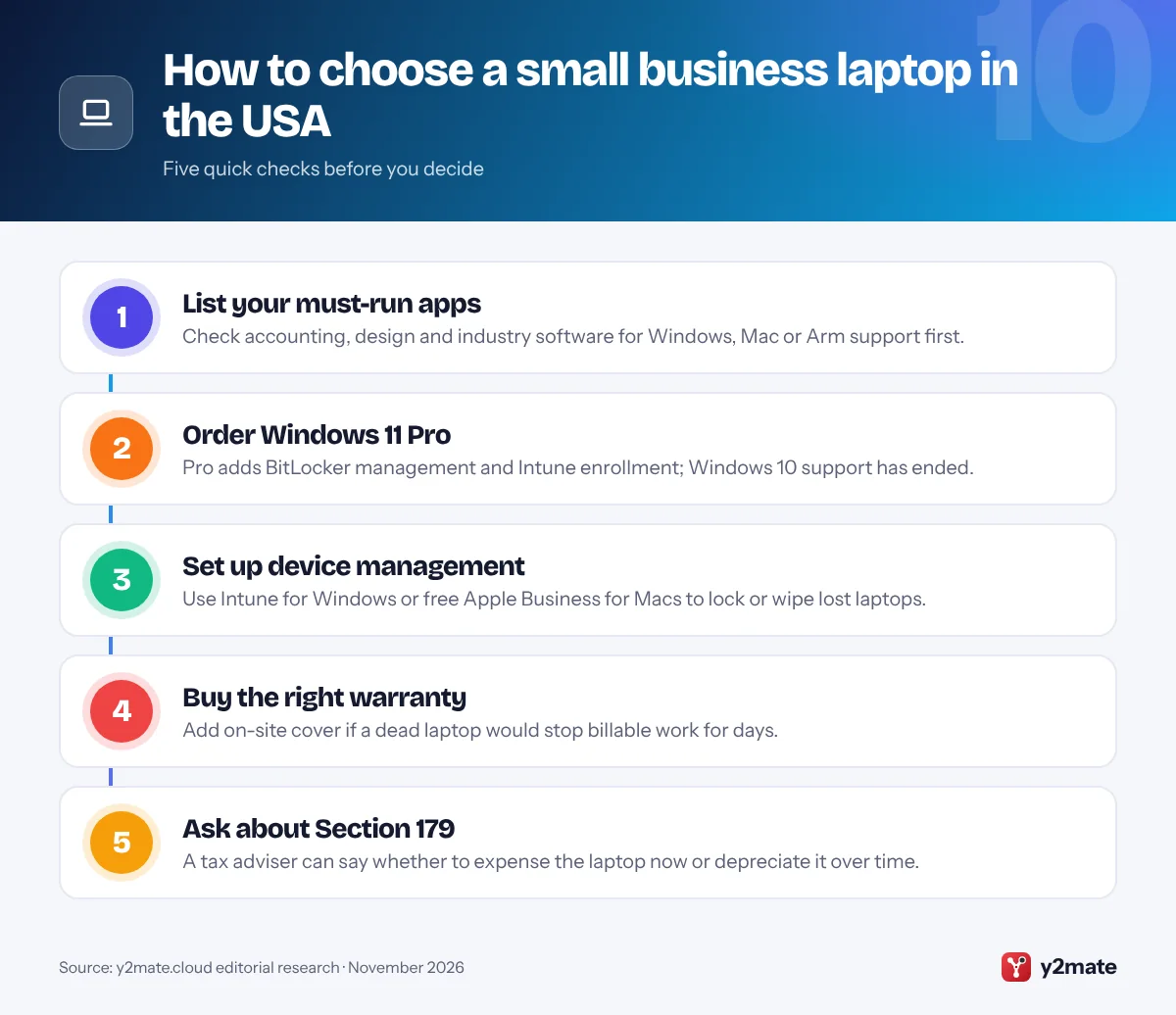
Start with the software you cannot work without. Most accounting, payroll and line-of-business apps run on Windows 11 with Intel or AMD chips, so check before choosing a Mac or a Snapdragon-based Windows laptop. Then pick a tier: a mainstream business model for most staff, an ultralight for people on the road and a value model for back-office work.
Windows 11 Pro, encryption and device management
Windows 10 reached end of support on October 14, 2025. Organizations can buy Extended Security Updates for a limited period, at a cost that rises each year, but replacing old PCs is usually the better plan. Choose Windows 11 Pro rather than Home: it includes BitLocker drive encryption management and can join Microsoft Entra ID and enroll in Intune, so you can push updates, enforce sign-in rules and wipe a stolen laptop. For Macs, the free Apple Business platform does the same job.
Section 179, bonus depreciation and sales tax
Section 179 lets a business elect to deduct the cost of equipment such as laptops in the year it is placed in service, as long as it is used more than half for business, and the 2025 federal tax law raised the yearly limit. The same law permanently restored full first-year bonus depreciation for qualifying property acquired after January 19, 2025. Sales tax you pay is part of the laptop’s cost basis, and some states do not follow federal bonus depreciation. Tax rules change, so check with a tax adviser or CPA before you buy.
Business stores and warranties
Lenovo Pro, Dell’s business store, HP for Business and Apple’s Small Business team all offer business pricing and financing options, and Microsoft sells Surface through its business store and authorized resellers. For on-site help, compare Dell ProSupport, Lenovo Premier Support, HP Care Packs and AppleCare+ for Business.
Frequently asked questions
What is the best laptop for a small business in the USA?
For most US small businesses, the Lenovo ThinkPad T14 Gen 7 is the best all-round choice because it combines MIL-STD-810H durability testing, Ethernet and HDMI ports, vPro options and strong security. The Dell Pro 5 Series 14 is an excellent alternative for Dell-based offices, and the Apple MacBook Air with M5 is best for teams that already work on Macs.
Can I deduct a laptop under Section 179?
Usually, yes. Section 179 lets a business elect to deduct the cost of qualifying equipment, including computers, in the year it is placed in service, if it is used more than half for business. The deduction cannot exceed your business taxable income, but bonus depreciation, permanently restored for property acquired after January 19, 2025, has no such limit. Ask a tax adviser which option suits you.
Do I need Windows 11 Pro for a business laptop?
For most firms, yes. Windows 11 Pro includes BitLocker encryption management, can join Microsoft Entra ID and can be managed with Microsoft Intune and Windows Autopilot, which Windows 11 Home cannot. Most business laptops ship with Pro, and Microsoft 365 Business Premium includes Intune. If a laptop still runs Windows 10, upgrade it or enroll it in paid Extended Security Updates.
What is Intel vPro and does a small business need it?
Intel vPro is Intel's business platform. On vPro Enterprise laptops, Intel Active Management Technology lets an IT administrator power on, repair or reimage a PC remotely, even when Windows will not start, and the platform adds hardware security features. It is most useful if a managed IT provider looks after your laptops. A freelancer who manages one laptop rarely needs it.
What does an on-site laptop warranty cover?
An on-site warranty sends a technician to your workplace to repair a faulty laptop, usually after the maker diagnoses the problem by phone or online. Dell calls this on-site service after remote diagnosis, and Lenovo and HP sell similar upgrades. It normally covers hardware faults rather than drops or spills, so add accidental damage cover, such as Dell ProSupport Plus, if you need it.
Final verdict
The best laptops for small business in the USA in 2026 are the Lenovo ThinkPad T14 Gen 7 for most firms, the Dell Pro 5 Series 14 for offices that want ProSupport and wired ports, and the MacBook Air with M5 for Mac-based teams. The ThinkPad X1 Carbon Gen 14 suits frequent travelers, the Framework Laptop 13 Pro suits owners who would rather repair than replace, and the ThinkBook 14 Gen 9 and HP ProBook 4 G2i stretch a tighter budget.
Whatever you choose, order Windows 11 Pro, set up Intune or Apple Business before staff start work, buy the warranty level your business depends on, and ask your tax adviser about Section 179 or bonus depreciation.
Sources and further reading
- IRS Publication 946: The IRS explains how to depreciate business property, including the Section 179 deduction and its current dollar limits.
- IRS guidance on bonus depreciation: Treasury and the IRS describe the permanent first-year bonus depreciation for qualifying property acquired after January 19, 2025.
- IRS Publication 551 on cost basis: The IRS explains what counts in an asset's cost basis, including the sales tax you pay when you buy it.
- Windows 10 end of support: Microsoft confirms that Windows 10 support ended on October 14, 2025 and explains the options for older PCs.
- Windows 10 Extended Security Updates: Microsoft Learn explains the paid Extended Security Updates program for organizations still running Windows 10.

Leave a Reply