
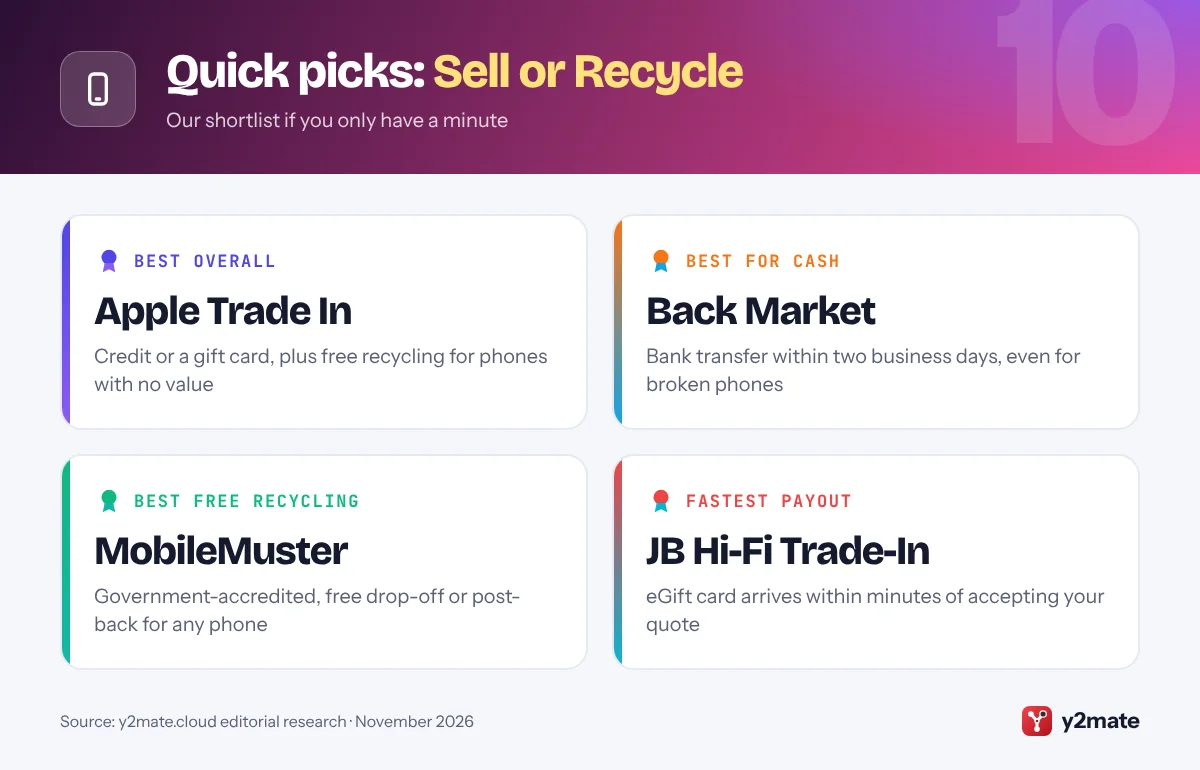
- Apple Trade In, Back Market and MobileMuster are the strongest all-round places to sell or recycle an old phone in Australia in 2026.
- MobileMuster is a free, government-accredited recycling program that accepts all brands of mobile phones at collection points or by free post.
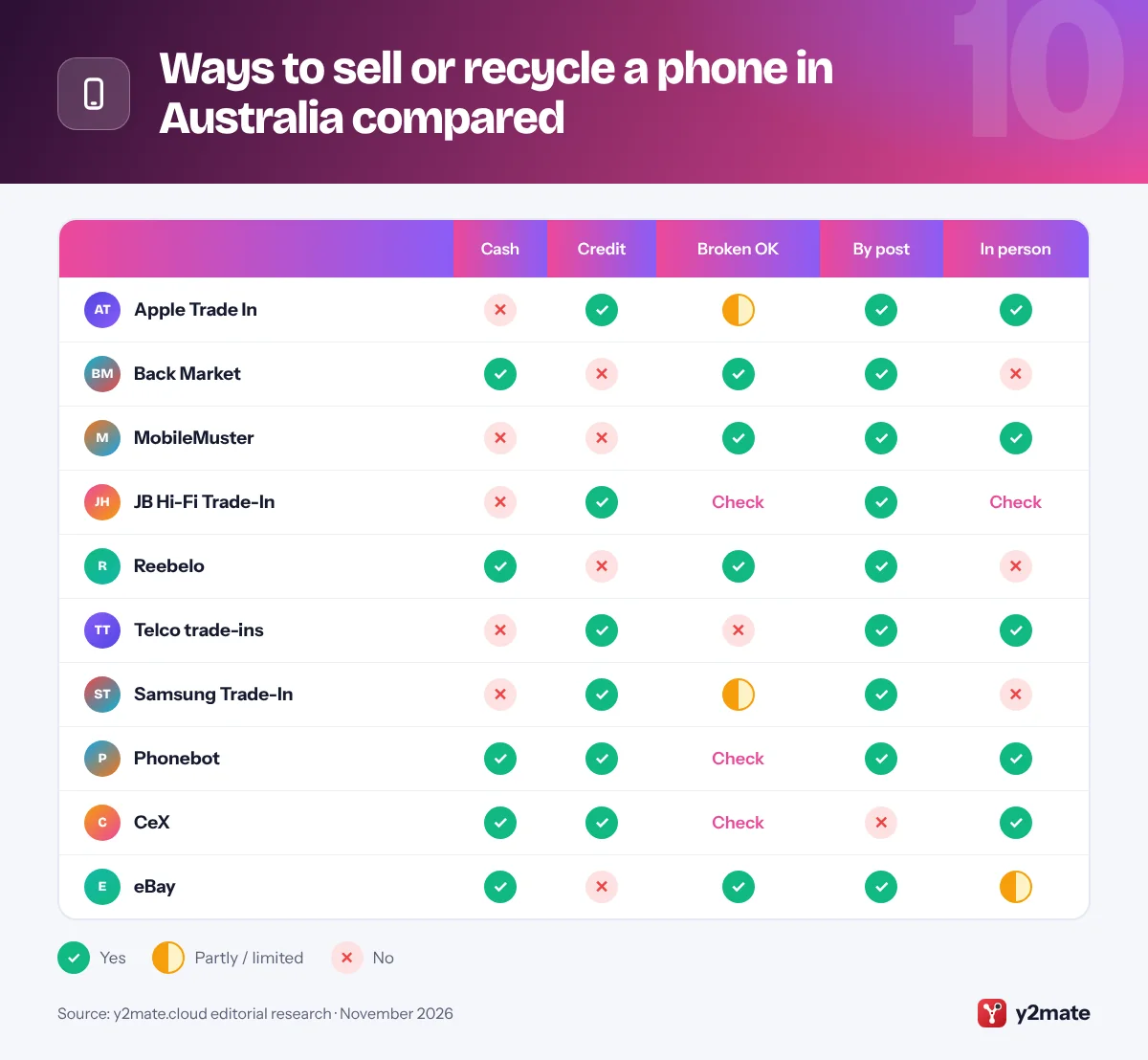
- Telstra and Optus trade-ins pay bill credit and need a working phone, while Back Market's trade-in pays by bank transfer and accepts broken phones.
- Victoria has banned e-waste from landfill since 1 July 2019, and the National Television and Computer Recycling Scheme does not cover mobile phones.
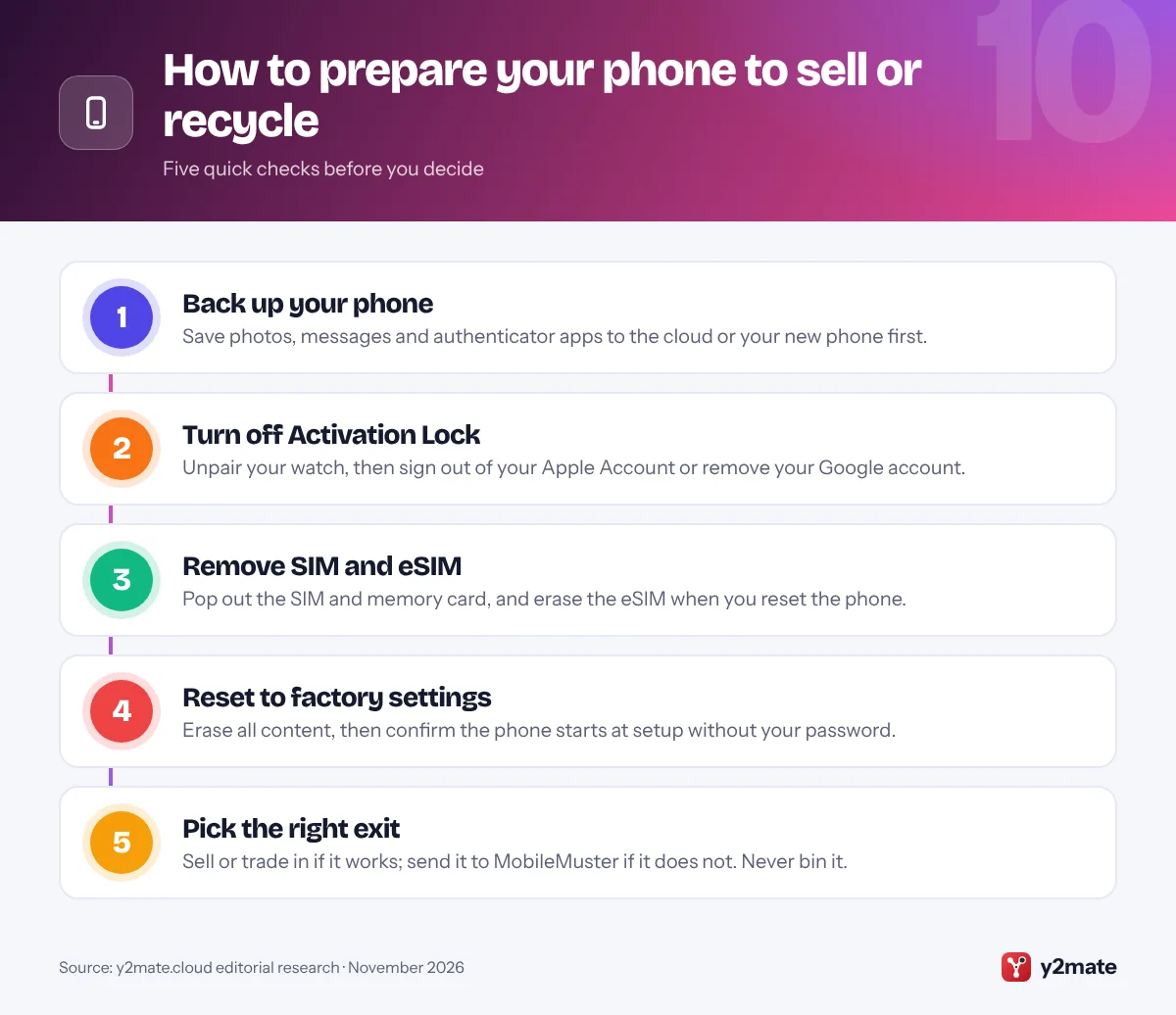
- Before handing over a phone, back it up, sign out of your Apple Account or Google account, remove the SIM or eSIM and factory reset it.
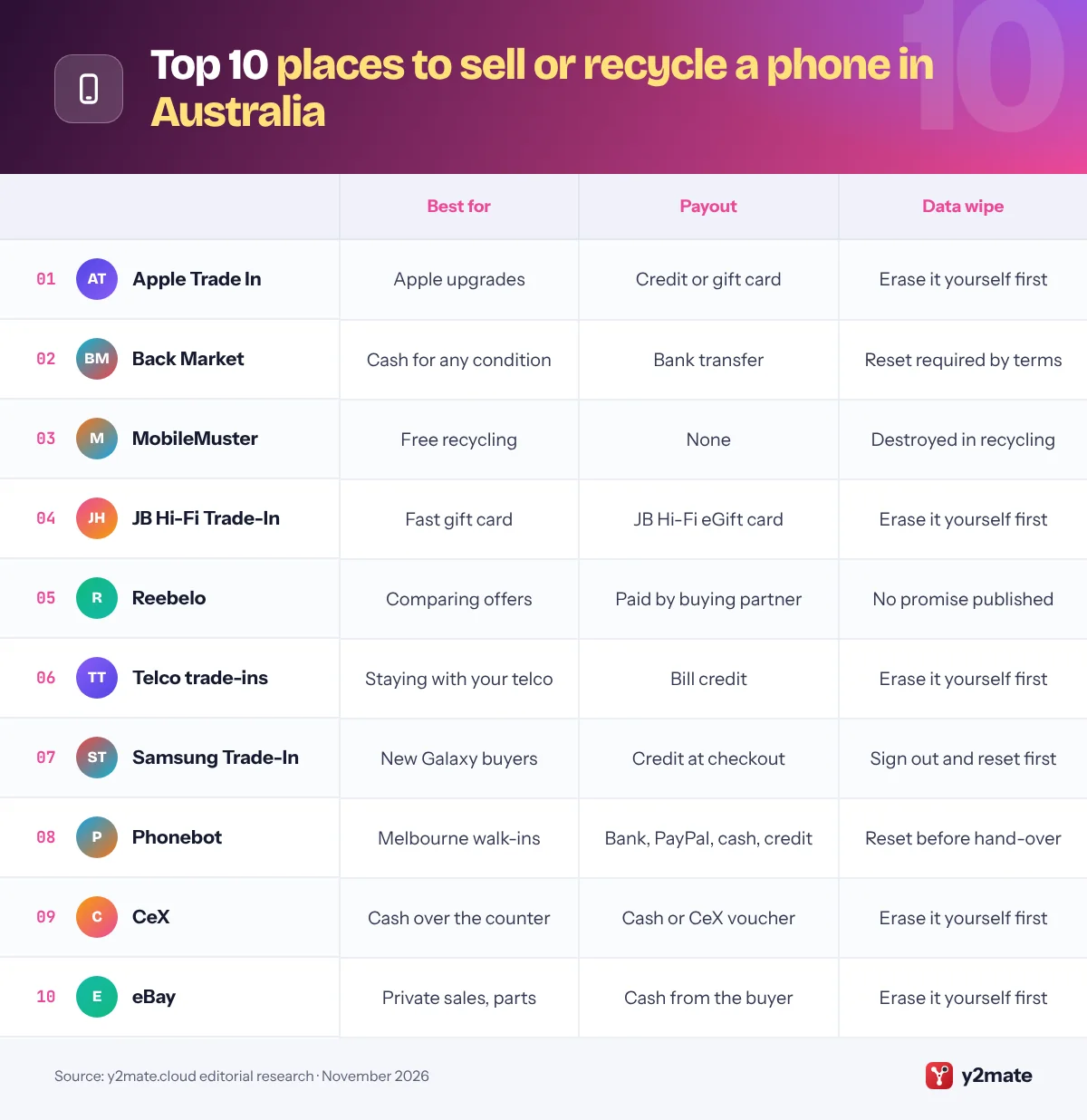
The best places to sell or recycle your old phone in Australia in 2026 are Apple Trade In for credit plus free recycling, Back Market’s trade-in for cash by bank transfer within days, even for a broken phone, and MobileMuster, the government-accredited program that recycles any mobile phone for free. JB Hi-Fi, Reebelo, the telcos, Samsung, Phonebot, CeX and eBay complete the list.
A few definitions help. A trade-in swaps your phone for credit, a gift card or bill credit with the business you are buying from. A buy-back service pays you for the phone with no purchase required. Activation Lock on iPhone and Factory Reset Protection on Android tie the phone to your Apple Account or Google account, so you must sign out before handing it over. E-waste is anything with a plug, battery or cord that has reached the end of its life, and Victoria bans it from landfill.
This list ranks ten options available to Australians, explaining what each pays in, how it handles broken phones and your data, and who it suits. It is for anyone upgrading, emptying a drawer of old handsets or holding a phone that no longer turns on.
How we ranked this list
We ranked each option on publicly documented criteria only: the type of payout (cash, credit, gift card, bill credit or nothing), whether broken phones are accepted, what the business publishes about erasing data, how you hand the phone over (post, store or drop-off point) and any government accreditation or environmental credentials we could verify. Every option was available in Australia in November 2026.
We did not sell or test any phones ourselves, and we leave out quotes, payout amounts and promotions, which change constantly. Online quotes are estimates until the phone is inspected, so compare several and read the terms before you post anything.
The Top 10 Sell or Recycle
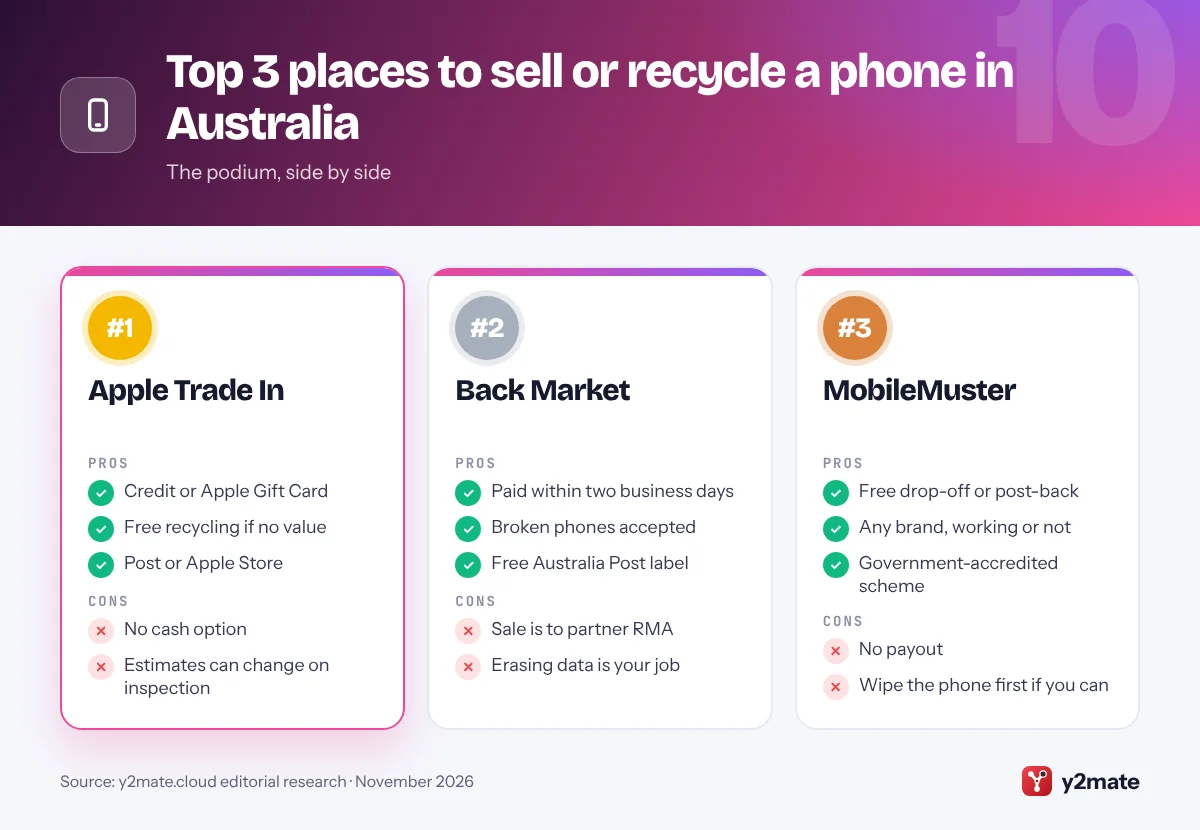
1. Apple Trade In
Best for: credit toward Apple gear, plus free recycling
Apple Trade In in Australia gives you credit toward a new purchase, or an Apple Gift Card if you are not buying today. You can trade in online and post the phone, or hand it over at an Apple Store, where a Specialist checks it with you. Apple also offers credit for some eligible smartphones from other brands, and values depend on the model, condition and year.
Apple ranks first because it covers the most situations well. A working iPhone earns credit quickly, and Apple says that if your device is not eligible for any trade-in value, you can still recycle it with Apple for free, which gives an old or broken phone a responsible exit. The service is provided by Apple’s trade-in partners, and you must be at least 18 to use it.
The limitation is the payout: there is no cash, and online estimates can change after inspection if the condition differs. Before handing over an iPhone, follow Apple’s checklist: transfer your data, sign out of your Apple Account to turn off Activation Lock and Find My, and erase the phone, including the eSIM.
Official site: Apple Trade In
- Credit or Apple Gift Card
- Free recycling if no value
- Post or Apple Store
- No cash option
- Estimates can change on inspection
2. Back Market
Best for: fast cash, even for a broken phone
Back Market’s Australian trade-in gives an instant online offer and pays cash rather than credit. It works differently from Back Market’s shop, though. When you accept an offer, you are selling your phone to its partner Renewable Mobile AU (RMA), which runs trade-in operations and customer support in Australia, and Back Market Australia is not a party to that sale.
Once the sale is confirmed, you receive a free Australia Post label by email, pack the phone with the invoice and drop it at a post office. Back Market says you are paid by bank transfer within two business days of your phone arriving. Broken phones qualify at a lower price, and if you reject a revised offer after inspection, the phone is sent back free of charge. Offers expire after 14 days.
The terms require you to back up and factory reset the phone before sending it, and they accept no liability for lost data, so treat erasing as your job. For cash with clearly published terms, it is the strongest buy-back option here.
Official site: Back Market
- Paid within two business days
- Broken phones accepted
- Free Australia Post label
- Sale is to partner RMA
- Erasing data is your job
3. MobileMuster
Best for: free recycling of any phone, working or not
MobileMuster is the mobile industry’s national recycling program, funded by the major handset makers and network carriers. It is accredited by the Australian Government as a voluntary product stewardship scheme, and its accreditation was renewed in late 2024 for another five years. It recycles all brands and types of mobile phones, along with their batteries, chargers and accessories, free of charge.
You can drop phones at a national network of collection points, including many Telstra, Optus and Vodafone stores, Officeworks stores through its Bring It Back program and some council sites, or post them free using a recycling satchel from Australia Post or a prepaid label from MobileMuster. That makes it the easiest safe option for a phone with no resale value.
MobileMuster pays nothing, because it is a recycler rather than a reseller. It says any data left on a phone is destroyed during recycling, but you should still wipe the phone first if you can and remove the SIM. Phones are not covered by the National Television and Computer Recycling Scheme, so MobileMuster is the dedicated national route for handsets.
Official site: MobileMuster
- Free drop-off or post-back
- Any brand, working or not
- Government-accredited scheme
- No payout
- Wipe the phone first if you can
4. JB Hi-Fi Trade-In
Best for: a JB Hi-Fi gift card within minutes
JB Hi-Fi’s trade-in program takes phones, tablets, laptops, smart watches, drones and gaming consoles. Its online calculator asks a few questions and gives a no-obligation quote, and if you accept, JB Hi-Fi says your eGift card arrives within minutes, so you can put the value toward a new phone straight away.
The speed comes with a safeguard you should understand. The program is run with Assurant, and you provide a payment card as security until your device arrives. Under the program terms, if the device is not received within seven days of your trade-in, Assurant may debit the trade-in value from your card, so post the phone promptly and keep proof of postage.
The payout is a JB Hi-Fi gift card, so it only suits you if you shop there, and promotions such as bonus credit on a new phone are usually separate from the trade value, with their own deadlines. Condition affects the quote, so check whether a damaged phone qualifies before you accept. Back up, sign out of your accounts and reset the phone before sending it.
Official site: JB Hi-Fi Trade-In
- eGift card within minutes
- Takes phones, laptops and more
- Simple online quote
- JB Hi-Fi gift card only
- Card can be debited if late
5. Reebelo
Best for: comparing buy-back offers in any condition
Reebelo is best known as a marketplace for refurbished tech, but it also buys phones, tablets, laptops and smartwatches. Rather than making a single offer, Reebelo says it compares prices across several Australian buy-back partners so you get the highest offer available through its network.
Condition is less of a barrier than at many trade-in schemes. Reebelo says it takes phones in any condition, including those with cracked screens or no charger, and shipping is free, with an Australia Post mailbag or prepaid label sent to you. After your phone arrives it is inspected, typically within one to two business days, and payment follows.
Because the buyer is one of Reebelo’s partners, read the quote carefully to see who is buying your phone and how you will be paid, and check its help centre for how condition affects the final price. We could not find a published data-erasure promise for sellers, so back up, sign out of your accounts and factory reset the phone before posting it. If you want several quotes in one step, it is a useful starting point.
Official site: Reebelo
- Compares partner offers
- Any condition accepted
- Free mailbag or label
- Buyer is a partner business
- No published wipe promise found
6. Telco trade-ins
Best for: bill credit when you stay with your telco
Telstra, Optus and Vodafone all offer trade-in credit when you upgrade, and the value is applied to your bill rather than paid in cash. Telstra’s trade-in is run by Assurant and handled through the My Telstra app: you complete an assessment, accept a quote and post the phone with Australia Post. You need an eligible Telstra postpaid service, and a device that will not turn on is not eligible.
Optus works in a similar way. It applies trade-in credit to your bill, usually on your next bill or the one after, only certain devices in good working order qualify, and you can trade in at a store or by post in a prepaid satchel. Optus can reduce or refuse the credit if the phone’s condition does not match what you declared. Vodafone also offers trade-in credit on eligible phones.
Telco trade-ins are easy if you are staying put, but the value stays with your telco account. If your phone is too old or damaged to qualify, Telstra says you can take it to a store to be recycled.
- Credit straight onto your bill
- Store or post options
- Old phones recycled in store
- Credit only, no cash
- Working phones only
7. Samsung Trade-In
Best for: Galaxy buyers who want credit at checkout
Samsung Australia runs a year-round trade-in program on its online store. You choose the device you want to trade in, receive an estimated value, and the credit is applied to your cart when you buy an eligible new Samsung product at the same time. Samsung describes it as a way to put an old or damaged device toward a new Galaxy.
The terms are worth reading. A temporary hold equal to the estimated value is placed on your card until the final assessment, and it can take a couple of weeks or more to be released. Asurion checks the phone when it arrives, and if the condition differs from what you declared, Samsung revises the value. The credit cannot exceed the price of the new product and cannot be redeemed for cash.
You must be an Australian resident aged 18 or over, and international or overseas models are not eligible. Samsung also runs the New Galaxy Club, a separate upgrade program. Sign out of your Samsung and Google accounts and factory reset the old phone before sending it.
Official site: Samsung Trade-In
- Credit applied at checkout
- Old or damaged devices quoted
- Value estimate before you buy
- Card hold until assessment
- No cash, Samsung only
8. Phonebot
Best for: instant in-store payment in Melbourne
Phonebot is a Melbourne-based specialist in refurbished phones that also buys used devices. Its standout feature for sellers is the walk-in option at its store in Reservoir, in Melbourne’s north, where Phonebot advertises instant quotes and payment in store with no appointment needed.
If you live elsewhere in Australia, you can get a quote online and send your phone in instead. Phonebot says mailed phones are inspected within one to two business days, and its sell page lists payout options including bank transfer, PayPal, cash and store credit. As with any buyer, the final price depends on the inspection.
Phonebot’s own advice to sellers is to reset the device and disable passwords before handing it in, and a phone still linked to your Apple Account or Google account will hold up the sale. Check its current terms for damaged phones before sending one. For Melburnians who want money in hand today and prefer dealing with a local business face to face, Phonebot is a convenient alternative to posting a phone.
Official site: Phonebot
- Instant payment in store
- Several payout options
- Local Melbourne business
- Walk-in only in Reservoir
- Check damaged-phone terms
9. CeX
Best for: cash or a voucher over the counter
CeX, the British second-hand tech chain, also trades in Australia through stores such as those in Belconnen and Woden in the ACT, and through its Australian website. As in the UK, it buys, sells and exchanges phones, games, consoles, laptops and other gadgets, and you can usually choose cash or an exchange voucher to spend in store.
The appeal is immediacy. Take your phone to a store, have it checked at the counter and leave with money, without posting anything or waiting for an inspection report. The final price depends on the phone’s condition, and a voucher locks the value to CeX, so decide which you prefer before you go.
CeX does not have a store in every city, so check its store finder first, and ask what identification you need to sell a phone. Whether a damaged phone is accepted can vary, so call ahead if yours is cracked or faulty. Wipe the phone, sign out of your accounts and remove the SIM before you go, because a phone that is still locked to your account cannot be resold.
Official site: CeX
- Cash or voucher on the spot
- No postage or waiting
- Phones checked at the counter
- Limited store locations
- Damaged phones may be refused
10. eBay
Best for: selling privately, including phones for parts
eBay Australia lets you sell a phone directly to another person by auction or at a fixed price, which gives you the most control over what you accept. It is also the most realistic place on this list to sell a broken phone to repairers, using the For parts or not working condition and a clear list of faults.
Selling privately takes effort. You photograph the phone, write the listing, answer questions and post it with tracking, and eBay charges selling fees when an item sells. Buyers can raise a claim if the phone is not as described, so mention every scratch, fault and lock status, and record the IMEI before you post.
A phone still linked to your Apple Account or Google account is of little use to a buyer, so sign out, remove the SIM and reset it before you list. Phones reported lost or stolen can be blocked from Australian mobile networks, which is why careful buyers often ask for the IMEI. If you would rather not deal with buyers at all, a buy-back service or MobileMuster is simpler.
Official site: eBay
- You set the price
- For parts listings
- Huge buyer audience
- Selling fees apply
- Buyer claims to manage
Ways to sell or recycle a phone in Australia compared
How to sell or recycle your old phone in Australia safely
Work out first whether your phone still has value. A working phone is better sold or traded in, so get a buy-back quote from Back Market, Reebelo or Phonebot and compare it with credit from Apple, Samsung, JB Hi-Fi or your telco. A phone that is dead, waterlogged or very old should go to MobileMuster or back to Apple for free recycling.
Credit, gift cards or cash
- Bill credit from Telstra, Optus or Vodafone only helps if you stay with that telco.
- Gift cards and store credit from Apple, JB Hi-Fi and Samsung are quick but lock the value to one business.
- Cash from a buy-back service, CeX or eBay can be spent anywhere.
Wipe it properly
Follow Apple’s guide on what to do before you sell or trade in your iPhone or Google’s steps to reset an Android device to factory settings. Remove your Google account before resetting, or Factory Reset Protection will block the next owner, and sign out of any Samsung account too.
E-waste rules and battery safety
Never put a phone in a kerbside bin. Lithium-ion batteries can start fires in garbage trucks and at waste facilities, and Victoria has banned e-waste from landfill since 1 July 2019. South Australia’s landfill bans also cover electronic waste. The National Television and Computer Recycling Scheme covers TVs, computers, printers and computer accessories rather than phones, so use MobileMuster for handsets.
Frequently asked questions
Where is the best place to sell my old phone in Australia?
Back Market's trade-in is the strongest cash option, paying by bank transfer within two business days of receiving your phone, even if it is broken. Apple Trade In is best if you are buying a new Apple device, because it pays credit and recycles phones with no value for free. JB Hi-Fi, Reebelo, Phonebot and your telco are also worth comparing.
Is MobileMuster free?
Yes. MobileMuster is a free, government-accredited mobile phone recycling program funded by handset makers and network carriers. It accepts all brands and types of mobile phones, along with batteries, chargers and accessories, at collection points such as telco stores and Officeworks, or by free post using an Australia Post satchel or a prepaid label. It does not pay for phones.
Can I put an old phone in the rubbish bin in Australia?
No. Phones contain lithium-ion batteries that can cause fires in garbage trucks and waste facilities, e-waste is banned from landfill in Victoria, and South Australia's landfill bans also cover electronic waste. Recycle phones through MobileMuster, Apple or a council e-waste drop-off instead, and wipe the phone first if it still works.
Does the National Television and Computer Recycling Scheme take mobile phones?
No. The National Television and Computer Recycling Scheme covers televisions, computers, printers and computer accessories such as keyboards and mice. Mobile phones are handled separately by MobileMuster, the industry's government-accredited recycling program, which accepts phones and their batteries, chargers and accessories at collection points or by free post.
What is Activation Lock and how do I remove it before selling?
Activation Lock links an iPhone to your Apple Account, so nobody else can set it up after a reset. Android phones have Factory Reset Protection, which works with your Google account. Sign out of your Apple Account, or remove your Google account, before you factory reset the phone, otherwise buyers, trade-in programs and stores will not be able to accept it.
Final verdict
The smartest way to sell or recycle your old phone in Australia is to match the route to the phone. Apple Trade In and Back Market lead for value, with credit and cash respectively, while JB Hi-Fi, Reebelo, Samsung, Phonebot, CeX, eBay and your telco suit more specific needs. For a phone that is past saving, MobileMuster recycles it for free.
Before you let it go, back it up, sign out so Activation Lock or Factory Reset Protection is off, remove the SIM and eSIM, and reset it to factory settings.
Sources and further reading
- DCCEEW: how to recycle e-waste: The federal environment department explains where Australian households can drop off e-waste for free recycling.
- National Television and Computer Recycling Scheme: DCCEEW describes the national scheme for recycling TVs, computers, printers and computer accessories, and how it is funded.
- Victoria's e-waste ban: The Victorian Government explains its ban on e-waste going to landfill and how to recycle items with a plug, battery or cord.
- Apple: before you sell an iPhone: Apple's official Australian checklist for signing out, turning off Activation Lock and erasing an iPhone before you sell or trade it in.
- Google: factory reset Android: Google's official instructions for preparing for and running a factory reset on an Android phone.

Leave a Reply