
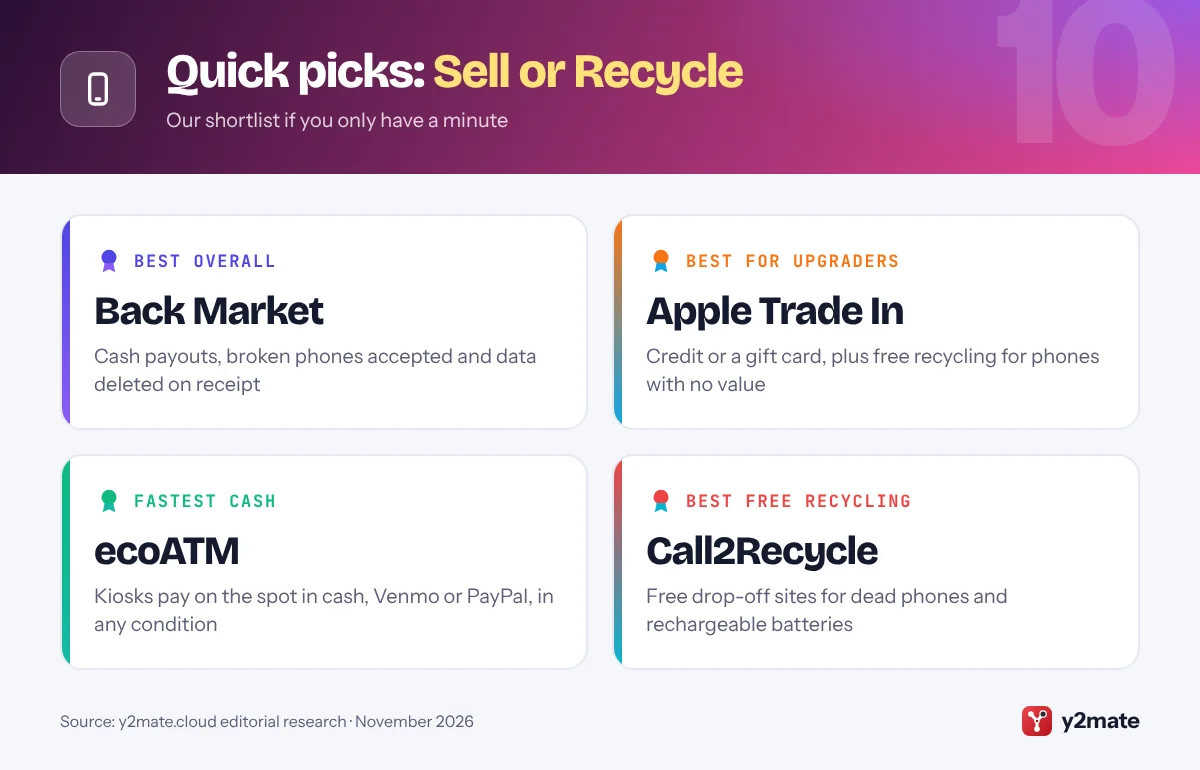
- Back Market, Apple Trade In and ecoATM are the strongest all-round places to sell or recycle an old phone in the USA in 2026.
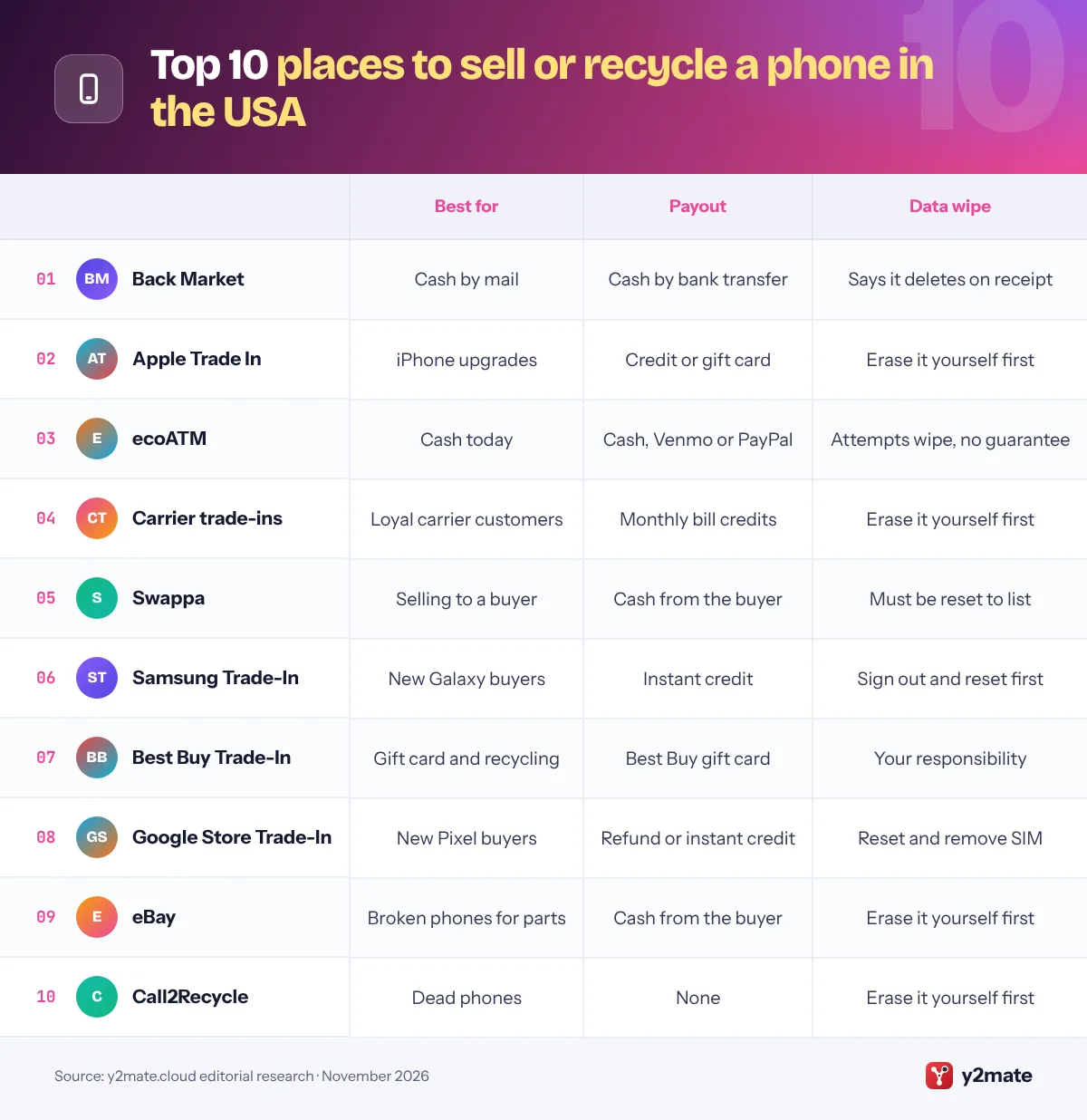
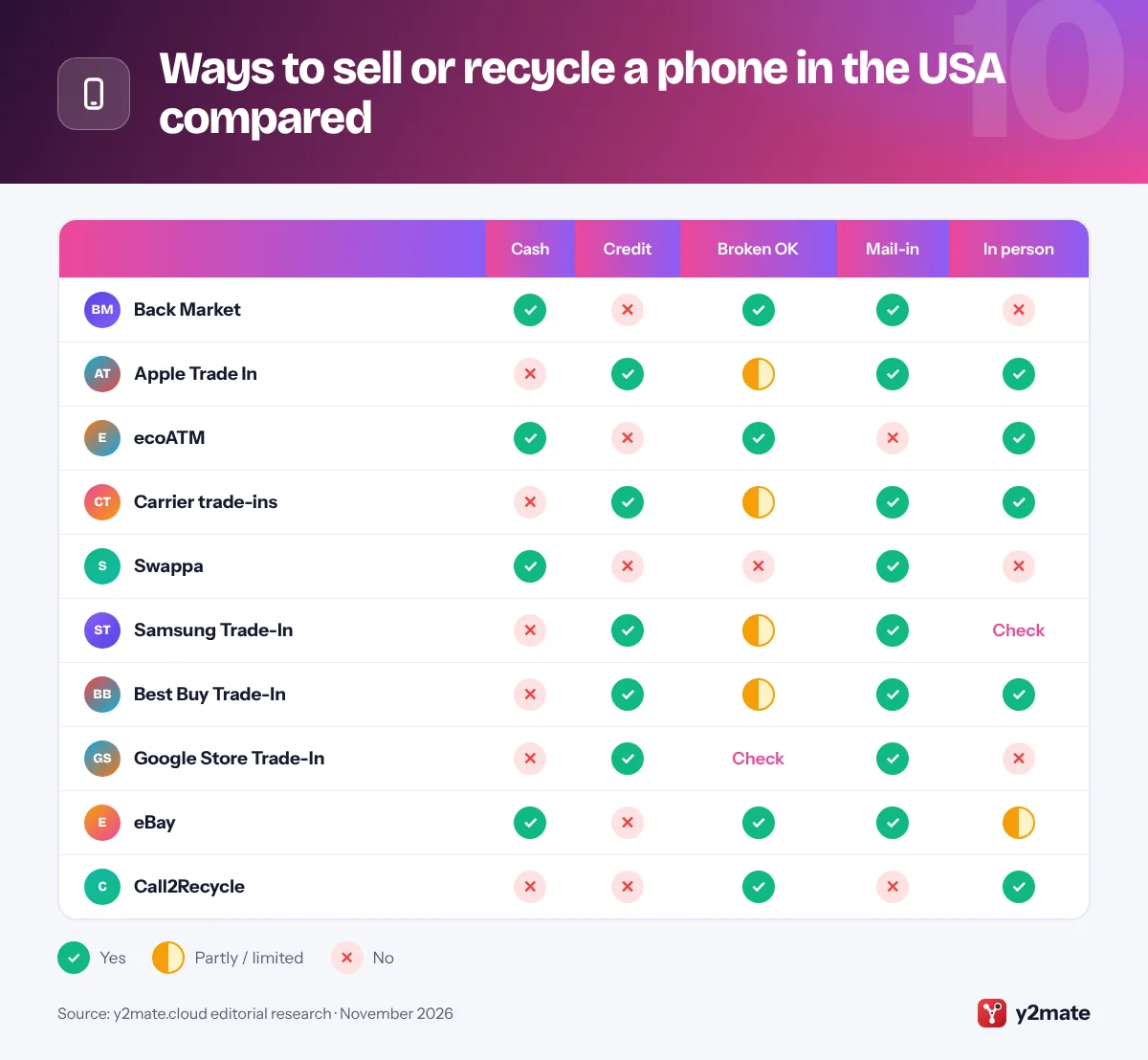
- Back Market, ecoATM, Swappa and eBay pay cash, while Apple, Samsung, Google, Best Buy and the carriers pay in credit, gift cards or bill credits.
- Carrier trade-in value usually arrives as monthly bill credits, which can stop if you leave, pay off the phone early or change plans.
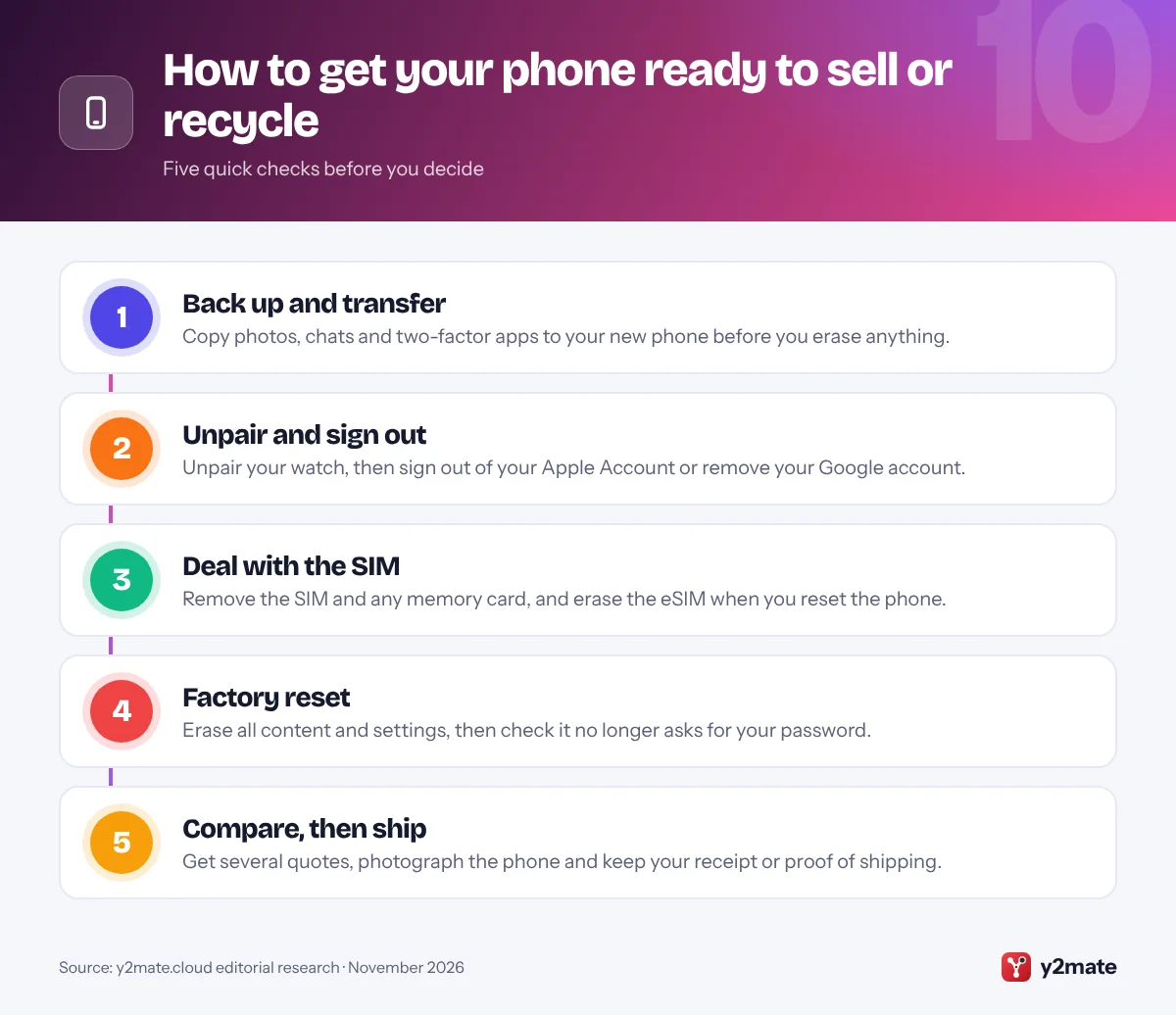
- Before handing over a phone, back it up, sign out of your Apple Account or Google account, remove the SIM or eSIM and erase it.
- The EPA recommends certified electronics recyclers, and the two accredited certification standards in the US are R2 and e-Stewards.
The best places to sell or recycle your old phone in the USA in 2026 are Back Market for cash with a published data-deletion promise, Apple Trade In for credit plus free recycling of anything it cannot pay for, and ecoATM for cash on the spot at a kiosk, even for a broken phone. Carrier trade-ins, Swappa, Samsung, Best Buy, the Google Store, eBay and Call2Recycle complete the list.
A few terms first. A trade-in swaps your old phone for credit, a gift card or a discount with the company you are buying from. A buy-back service pays you money for the phone, with no purchase needed. A marketplace such as Swappa or eBay lets you sell directly to another person. Activation Lock on iPhone and Factory Reset Protection on Android tie a phone to your Apple Account or Google account so nobody else can set it up, which means you must sign out before you hand it over. E-waste is discarded electronics, and phones count because they contain lithium-ion batteries and recoverable metals.
This list ranks ten options open to US residents and explains who each one suits, what it pays in and how it treats broken phones and your data. It is for anyone upgrading or clearing out old handsets.
How we ranked this list
We ranked each option only on publicly documented criteria: the type of payout (cash, store credit, bill credit or nothing), whether it accepts broken phones, what the company publishes about erasing data, how convenient the hand-over is (mail-in, kiosk or store) and any environmental certification we could verify. Every option was open to US consumers in November 2026.
We did not sell or test any phones ourselves, and we leave out quotes, payout amounts and promotions, which change daily. Offers are estimates until the device is inspected, so compare a few live quotes and read the terms before you ship anything.
The Top 10 Sell or Recycle
1. Back Market
Best for: cash for working or broken phones by mail
Back Market is best known for selling refurbished tech, but its Trade-in service also buys phones. You enter the model, storage and condition, and an offer from one of its partner refurbishers appears within about a minute. Once you accept, a prepaid shipping label arrives by email and in your account, so sending the phone costs nothing.
Back Market pays cash rather than credit, by bank transfer after the refurbisher has checked the phone. To get paid you add bank details and verify your identity. Back Market says broken phones can still be traded in, although cracks, scratches and faults lower the offer. If the refurbisher finds the condition differs from your description, you get a revised offer to accept or decline.
On data, Back Market’s help center says information is automatically deleted from traded-in devices once the refurbisher receives them but still asks you to sign out of iCloud, turn off Find My and reset the phone before shipping. For cash rather than credit, it is the strongest all-round option.
Official site: Back Market
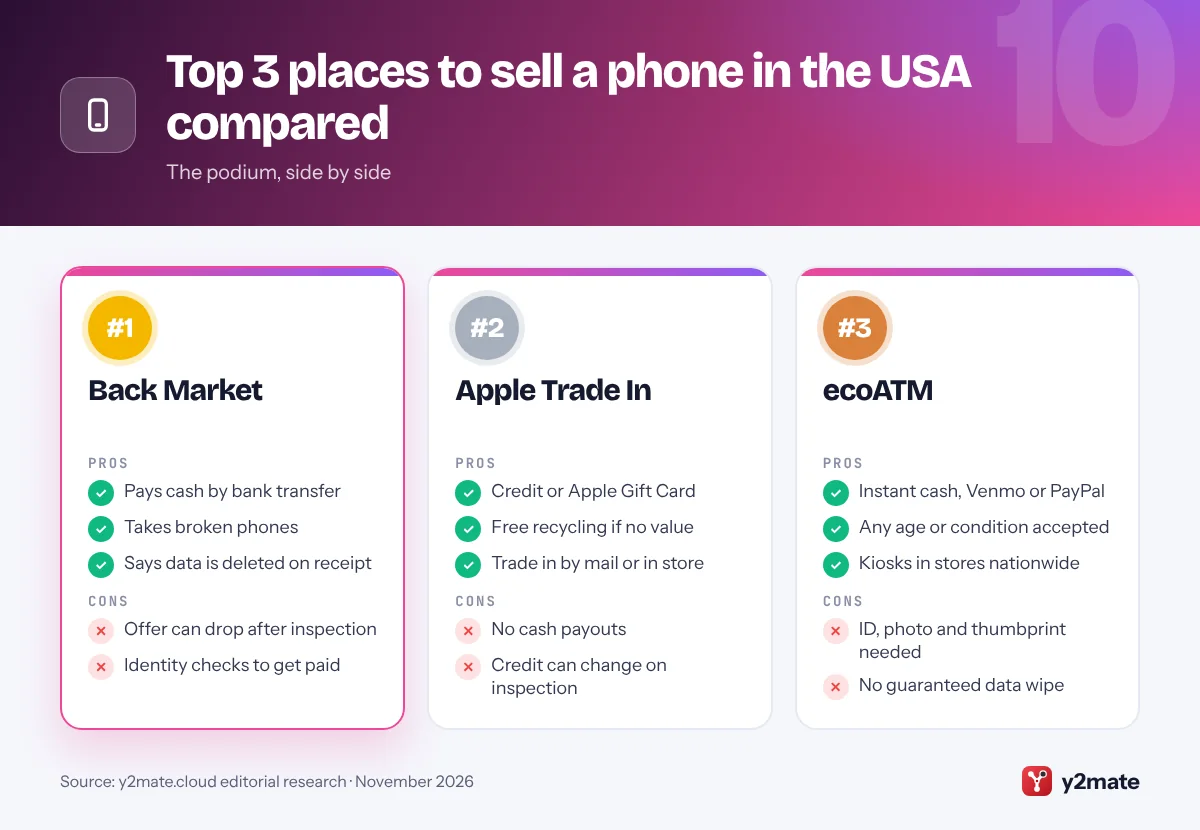
- Pays cash by bank transfer
- Takes broken phones
- Says data is deleted on receipt
- Offer can drop after inspection
- Identity checks to get paid
2. Apple Trade In
Best for: iPhone upgraders and free recycling
Apple Trade In gives you credit toward a new purchase, or an Apple Gift Card if you are not buying anything right away. You can trade in online and post the phone, or visit an Apple Store, where a Specialist checks it on the spot. Apple’s US program also accepts many third-party devices, including Samsung and Google smartphones, so it is not only for iPhone owners.
The online figure is an estimate. If the phone’s condition does not match what you described, the credit you receive can be different. The big advantage is what happens to phones with no trade-in value: Apple says you can still recycle them with it for free, a simple home for an old or dead handset.
Apple’s own guidance makes erasing the phone your job. Transfer your data to the new phone, sign out of your Apple Account, which turns off Activation Lock, then erase the old one. If you trade in at a store, Apple suggests stopping before the final erase so the Specialist can finish it with you.
Official site: Apple Trade In
- Credit or Apple Gift Card
- Free recycling if no value
- Trade in by mail or in store
- No cash payouts
- Credit can change on inspection
3. ecoATM
Best for: cash on the spot, whatever the condition
ecoATM runs self-service kiosks in stores and malls across the US, and it is the quickest way to turn a phone into money today. You can lock in an estimate in its app, then visit a kiosk, which inspects the phone’s model, battery and condition before making an offer. If you accept, ecoATM pays on the spot in cash, or through Venmo or PayPal.
It accepts phones of any age and condition, so a cracked or ancient handset can still go somewhere useful, although damaged phones earn less. The trade-off is the identity check, designed to deter the sale of stolen phones. You must be 18 or over and show an unexpired state-issued ID, the kiosk takes your photo and a thumbprint, and devices are checked against lost and stolen databases. Find My must be turned off on an iPhone.
ecoATM says it attempts to wipe devices once they reach its processing center but cannot guarantee your data will be erased, so reset the phone yourself before you go. Its sister service, Gazelle, buys newer phones online.
Official site: ecoATM
- Instant cash, Venmo or PayPal
- Any age or condition accepted
- Kiosks in stores nationwide
- ID, photo and thumbprint needed
- No guaranteed data wipe
4. Carrier trade-ins
Best for: big upgrade credits if you stay with your carrier
Verizon, AT&T and T-Mobile all take old phones when you buy a new one, and their promotional offers often look the most generous on paper. The catch is how the value arrives. Promotional trade-in value is usually paid as monthly bill credits spread over the length of your device agreement, often 24 or 36 months, rather than as one upfront discount.
Those credits come with conditions. The biggest offers are typically tied to premium unlimited plans, and if you leave the carrier, pay off the phone early or move to a plan that does not qualify, you can lose the credits you have not yet received. T-Mobile has said that credits on new promotions end if you pay off early. Some promotions accept damaged phones, while others need a working one.
You can usually trade in at a store or by mail. Before signing, read the promotion’s terms for the required plan, the credit length and what happens if you leave. If you might switch, selling for cash keeps you free to move.
- Often the largest promo credits
- Trade in at a store or by mail
- Some deals take damaged phones
- Credits paid monthly over years
- Leave early and lose credits
5. Swappa
Best for: selling a working phone directly to a buyer
Swappa is a marketplace for used tech where you sell directly to another person instead of to a company. Listing is free, and Swappa charges fees when a phone sells. Because you set the price, it takes more effort than a buy-back site but leaves you in charge.
Swappa’s rules are stricter than most marketplaces. Staff review every listing before it goes live, and the phone must be fully functional, so cracked glass, water damage or a battery that does not charge and discharge properly rules it out. Its free IMEI and ESN check confirms the phone is clean, meaning it has not been reported lost or stolen or blocklisted, and phones still being paid off on a carrier installment plan cannot be listed. The phone must also be fully reset and free of any activation lock.
Buyers pay through PayPal or Stripe, and you ship the phone yourself. If your phone is broken, Swappa itself suggests a trade-in, a buy-back service or a repair shop instead.
Official site: Swappa
- You set the asking price
- Staff review every listing
- Free IMEI check
- Working phones only
- You handle shipping and fees
6. Samsung Trade-In
Best for: Galaxy buyers who want an instant discount
Samsung’s trade-in program gives you an instant trade-in value toward a new qualifying Galaxy device bought from Samsung. The credit applies only to new Samsung devices, not certified pre-owned ones, so it suits people who already want a new Galaxy.
The order of events is helpful. Samsung ships your new Galaxy first, so you can move your data across before sending the old phone back. Samsung’s FAQ says that before resetting, you should log out of your Samsung, Google and iCloud accounts, because locks left on the device can stop it being accepted. The device must turn on and be factory reset, and Samsung says it occasionally accepts trade-ins with cracked screens at a reduced value.
The trade-off is flexibility. There is no cash option, and trade-in values change at Samsung’s discretion, so check the terms for what happens if the inspection finds a different condition from the one you declared. Compare it with your carrier’s offer and a buy-back quote before you commit.
Official site: Samsung Trade-In
- Instant credit at checkout
- New phone ships first
- Some cracked screens accepted
- Credit only, no cash
- New Samsung devices only
7. Best Buy Trade-In
Best for: a gift card plus free in-store recycling
Best Buy pays for eligible phones with a Best Buy gift card, and you can trade in online or at a store. It suits people buying their next device there anyway, but the value only works at Best Buy.
Best Buy’s trade-in FAQ is clear about data: you are responsible for removing your data and accounts before you hand over a device, and for Apple devices you must turn off Find My and remove the phone from your iCloud account first. If you want help, it suggests booking a Geek Squad appointment. Damaged phones are the weak spot, because trade-in value depends on condition, so a badly damaged handset may be worth little or nothing.
What earns Best Buy its place is recycling. US stores have recycling kiosks, usually near the entrance, that take cell phones and rechargeable batteries free of charge, with a limit on how many items each household can drop off per day. That makes Best Buy an easy and safe home for a phone that no longer works.
Official site: Best Buy Trade-In
- Trade in online or in store
- Free phone recycling kiosks
- Geek Squad help with wiping
- Gift card, not cash
- Damaged phones worth little
8. Google Store Trade-In
Best for: Pixel buyers who want credit on their order
Google lets you trade in an old phone when you buy a Pixel from the Google Store. Your credit arrives either as a refund to your original payment method after Google’s trade-in partner verifies the phone’s condition or, for eligible orders, as an instant credit at checkout.
Read the inspection rules first. At checkout you choose whether to accept a new value if it changes after inspection; if you do not, the phone is sent back and you get no credit. The old device must arrive within 30 days of receiving your new one. Google says a phone found to have a swollen or physically damaged battery gets no credit and cannot be returned, for safety reasons.
Google asks you to remove the phone from Find My Device, now Find Hub, remove screen locks, erase any eSIMs and take out the SIM, then factory reset it. If the phone asks for a password after the reset, the reset is not complete. It is smooth if you are buying a Pixel, but it is not a way to sell a phone on its own.
Official site: Google Store Trade-In
- Refund or instant credit
- Option to accept revaluation
- Clear preparation steps
- Only with a Pixel purchase
- Swollen batteries get no credit
9. eBay
Best for: selling broken phones for parts
eBay is the biggest general marketplace for used phones in the US, and it is the most realistic place on this list to sell a broken phone to another person. Its For parts or not working condition is designed for items that do not function as intended, which suits repairers looking for spare parts.
You can sell by auction or at a fixed price, and you choose how you ship. Fees apply when an item sells and vary by category, so check eBay’s fee page before you list. The key to a smooth sale is an honest description: list every fault, the carrier lock status and whether the phone powers on, because buyers can ask for a return or use eBay’s Money Back Guarantee if an item does not match its listing.
Unlock the phone from your accounts before you sell it. A phone still tied to your Apple Account or Google account is of little use to a buyer. If you would rather not deal with buyers, a buy-back service is quicker.
Official site: eBay
- For parts listings
- Auction or fixed price
- Huge buyer audience
- Fees and returns to manage
- More effort than buy-back
10. Call2Recycle
Best for: free drop-off for dead phones and batteries
Call2Recycle is a non-profit battery collection program, and in the US its drop-off network also accepts cell phones. You can use its locator to find a nearby site by ZIP code, and dropping off household batteries and phones there costs nothing. The EPA lists Call2Recycle among the places that accept cell phones and batteries for recycling.
This is the right choice for a phone with no resale value: one that will not turn on, has been in water or is so old that no buyer wants it. Recycling it properly matters because phones contain lithium-ion batteries, which can start fires if they are crushed in a garbage truck or at a waste facility.
Call2Recycle pays nothing, so erase the phone first if it still works, and remove the SIM and any memory card. If the battery is swollen, leaking or visibly damaged, do not put it in a collection box; ask the drop-off site or your local household hazardous waste program how to handle it.
Official site: Call2Recycle
- Free drop-off
- Takes phones and batteries
- ZIP code locator
- No payout
- Erase the phone yourself
Ways to sell or recycle a phone in the USA compared
How to sell or recycle your old phone in the USA safely
Decide first whether you want cash, credit or a safe exit. For a working phone, compare a buy-back quote from Back Market or ecoATM with the trade-in credit from your carrier or the phone maker. For a broken one, ecoATM, Back Market and eBay’s for parts listings are your best chances of getting something back, while Apple, Best Buy and Call2Recycle will recycle it for free.
Trade-in credit vs cash
- Store credit and gift cards only work with one company, but they are convenient when you are buying there anyway.
- Bill credits from carriers arrive monthly and can stop if you leave, pay off early or change plans.
- Cash from a buy-back service or marketplace is yours to spend anywhere, though you may need to verify your identity.
Before you hand it over
Follow Apple’s guide on what to do before you sell or trade in your iPhone, or Google’s steps to reset an Android device to factory settings. Remove your Google account before resetting, or Factory Reset Protection will lock the next owner out. Pay off any installment balance first, because financed or blocklisted phones are often refused.
Recycling dead phones and batteries
Never put a phone or a loose lithium-ion battery in the trash or curbside recycling, where it can start a fire. The EPA recommends certified electronics recyclers, and the two accredited US standards are R2 and e-Stewards. State e-waste laws differ, so check your state or local program for free collection points and events.
Frequently asked questions
Where is the best place to sell my old phone in the USA?
For cash, Back Market is the strongest all-round choice because it pays by bank transfer, accepts broken phones and says it deletes data once the refurbisher receives the phone. ecoATM pays on the spot at a kiosk, and Swappa lets you sell a working phone directly to a buyer. If you are upgrading, compare those offers with trade-in credit from Apple, Samsung, Google or your carrier.
Can I recycle a broken phone for free?
Yes. Apple says it will recycle devices with no trade-in value for free, Best Buy stores have kiosks that take cell phones and rechargeable batteries at no charge, and Call2Recycle runs free drop-off sites that accept phones in the US. Erase the phone first if it still works, and never put it in household trash, because its lithium-ion battery can cause fires.
Is a trade-in or selling for cash better?
It depends on your plans. A trade-in is easiest when you are buying a new phone from the same company, and carrier promotions can be generous, but the value is locked to that company and carrier credits are paid monthly over the agreement. Selling for cash takes a little more effort but leaves you free to spend the money anywhere and switch carriers whenever you like.
What is Activation Lock and do I need to turn it off?
Activation Lock is an iPhone security feature that links the phone to your Apple Account, so nobody else can set it up without your password. Android has a similar feature called Factory Reset Protection, tied to your Google account. You turn these off by signing out of your Apple Account or removing your Google account before resetting, otherwise most buyers and trade-in programs will reject the phone.
How do I wipe my phone before selling it?
Back up your data, unpair any smartwatch, then sign out of your Apple Account or remove your Google account. Take out the SIM card and any memory card, and erase the eSIM if you have one. Then run a factory reset from Settings and check the phone opens at the setup screen without asking for your password. The FTC also suggests removing the phone from two-step login lists.
Final verdict
The best way to sell or recycle your old phone in the USA depends on what it is worth and what you want back. Back Market and ecoATM pay cash, even for broken phones; Apple, Samsung, Google, Best Buy and the carriers turn your phone into credit toward the next one; Swappa and eBay let you sell directly; and Call2Recycle and Best Buy’s kiosks keep dead phones out of the trash for free.
Whichever you choose, back the phone up, sign out so Activation Lock or Factory Reset Protection is off, remove the SIM or eSIM and erase it before it leaves your hands.
Sources and further reading
- EPA electronics donation and recycling: The EPA explains how to donate or recycle used electronics, including cell phones, and why using a certified recycler matters.
- EPA certified electronics recyclers: The EPA describes the R2 and e-Stewards certification standards for electronics recyclers and how to find a certified facility.
- FTC guide to clearing your phone: The FTC sets out how to back up, remove personal information and handle SIM and memory cards before you sell, trade in or recycle a phone.
- Apple: before you sell an iPhone: Apple's official checklist for transferring data, signing out, turning off Activation Lock and erasing an iPhone before you sell or trade it in.
- Google: factory reset Android: Google's official instructions for preparing for and running a factory reset on an Android phone.

Leave a Reply