
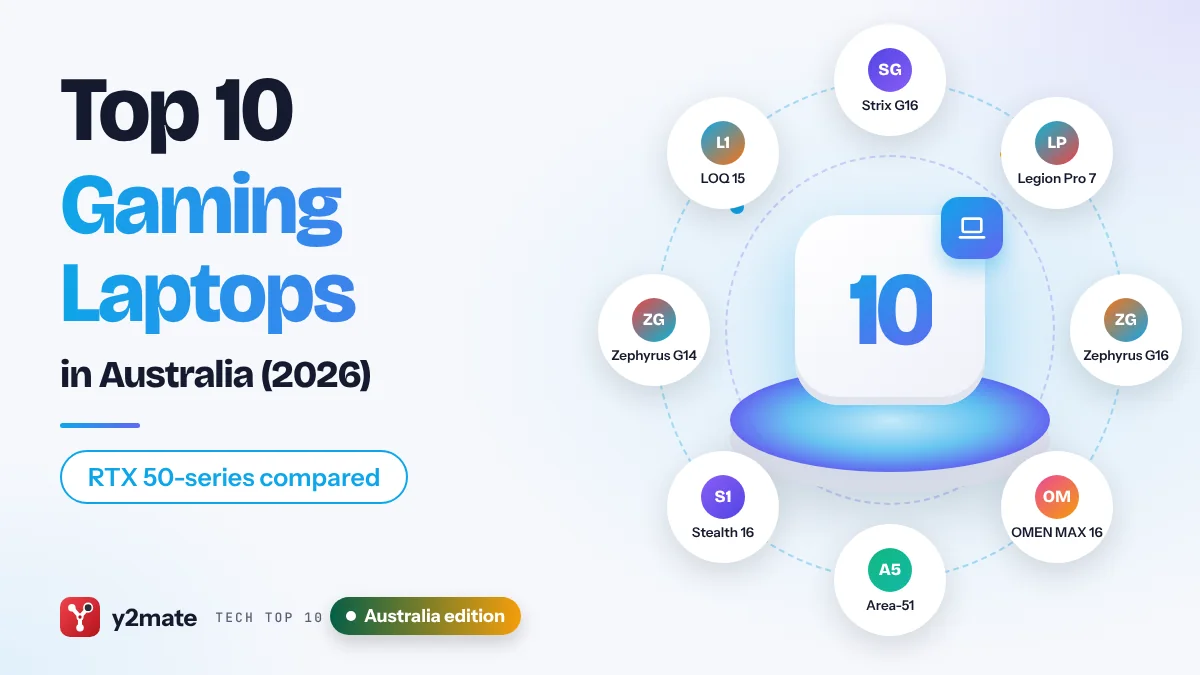
- The ASUS ROG Strix G16 (2026), Lenovo Legion Pro 7i (Gen 10) and ASUS ROG Zephyrus G16 (2026) are the strongest all-round gaming laptops sold in Australia in late 2026.
- ASUS Australia lists the 2026 Zephyrus G16 with graphics from the RTX 5070 up to the RTX 5090, and the Strix G16 with RTX 5070 or RTX 5080 graphics and user-upgradeable memory.
- Under the Australian Consumer Law, consumer guarantees apply automatically, and the ACCC says a warranty cannot replace, change or take away those rights.
- If you buy a parallel (grey) import, the seller must still meet the consumer guarantees, but the manufacturer's warranty may not apply in Australia.
- Australian retailers must show a single total price that includes GST, so compare local prices with overseas listings on a like-for-like basis.
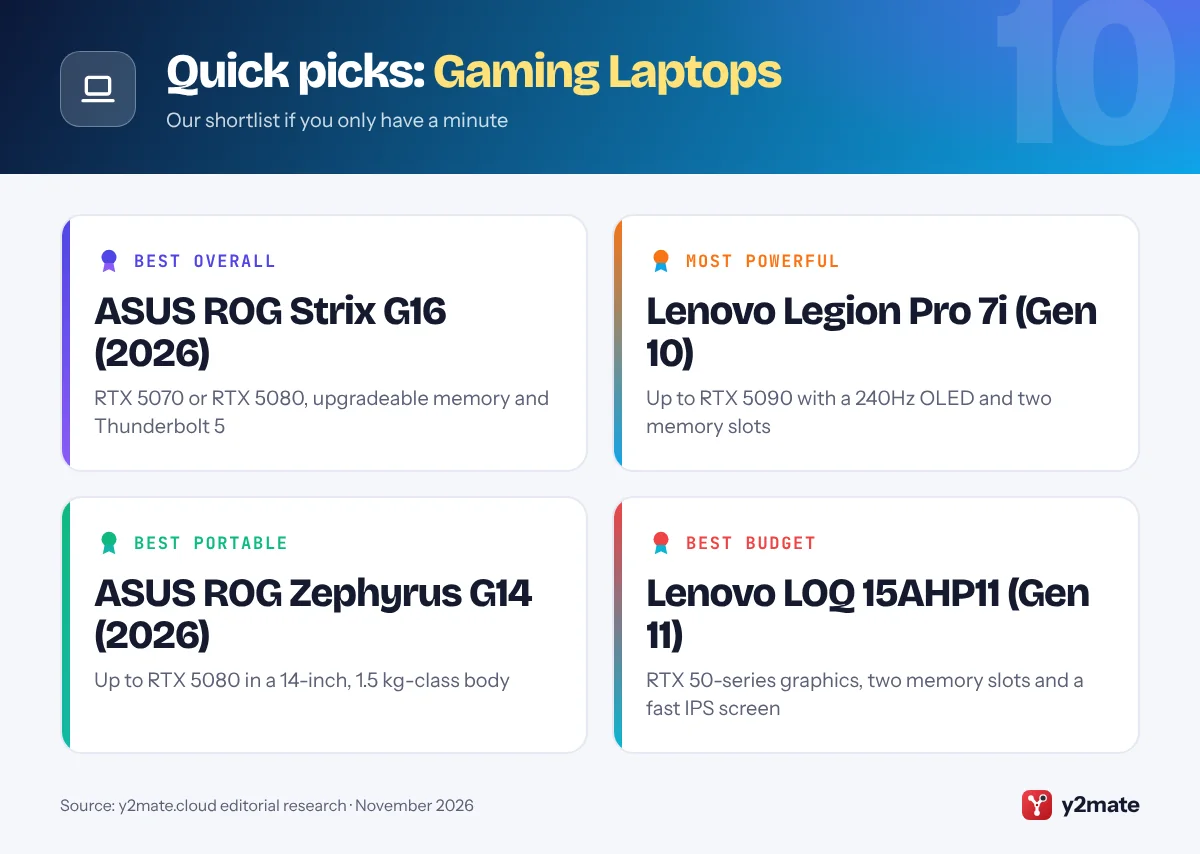
The best gaming laptops Australia shoppers can buy right now are the ASUS ROG Strix G16 (2026) for the best all-round value, the Lenovo Legion Pro 7i (Gen 10) for maximum power at a desk and the ASUS ROG Zephyrus G16 (2026) for a light, premium OLED machine. The HyperX OMEN MAX 16, Alienware 16 Area-51, MSI Stealth 16 AI+, ASUS ROG Zephyrus G14, Acer Predator Helios Neo 16S AI, Lenovo Legion 5i (Gen 11) and Lenovo LOQ 15AHP11 complete the list, from budget esports machines to RTX 5090-class flagships.
Are laptops OK for gaming? Yes, as long as they have a dedicated graphics chip, or GPU. That is the main difference between a gaming laptop and a business laptop: gaming models add a powerful GPU, a high-refresh screen and bigger cooling, while business laptops prioritise battery life, low weight and IT management features. Every pick here uses NVIDIA’s GeForce RTX 50-series laptop GPUs, from the entry RTX 5050 to the flagship RTX 5090.
All ten are sold in Australia through the makers’ own stores or retailers such as JB Hi-Fi, Harvey Norman, Mwave, Scorptec, PLE and Centre Com. The guide explains GST, grey imports and your Australian Consumer Law rights.
How we ranked this list
Our ranking is based on manufacturers’ published specifications, the range of configurations available in Australia, design and cooling approach, warranty and support in Australia, and widely reported owner feedback. We checked each maker’s Australian product pages and spec sheets for GPU options, processor family, screen type, weight class and memory upgrades.
We have not carried out hands-on testing or benchmarks, and we leave out prices, frame rates and battery-life figures, because they vary by configuration and change constantly during Black Friday sales.
The Top 10 Gaming Laptops
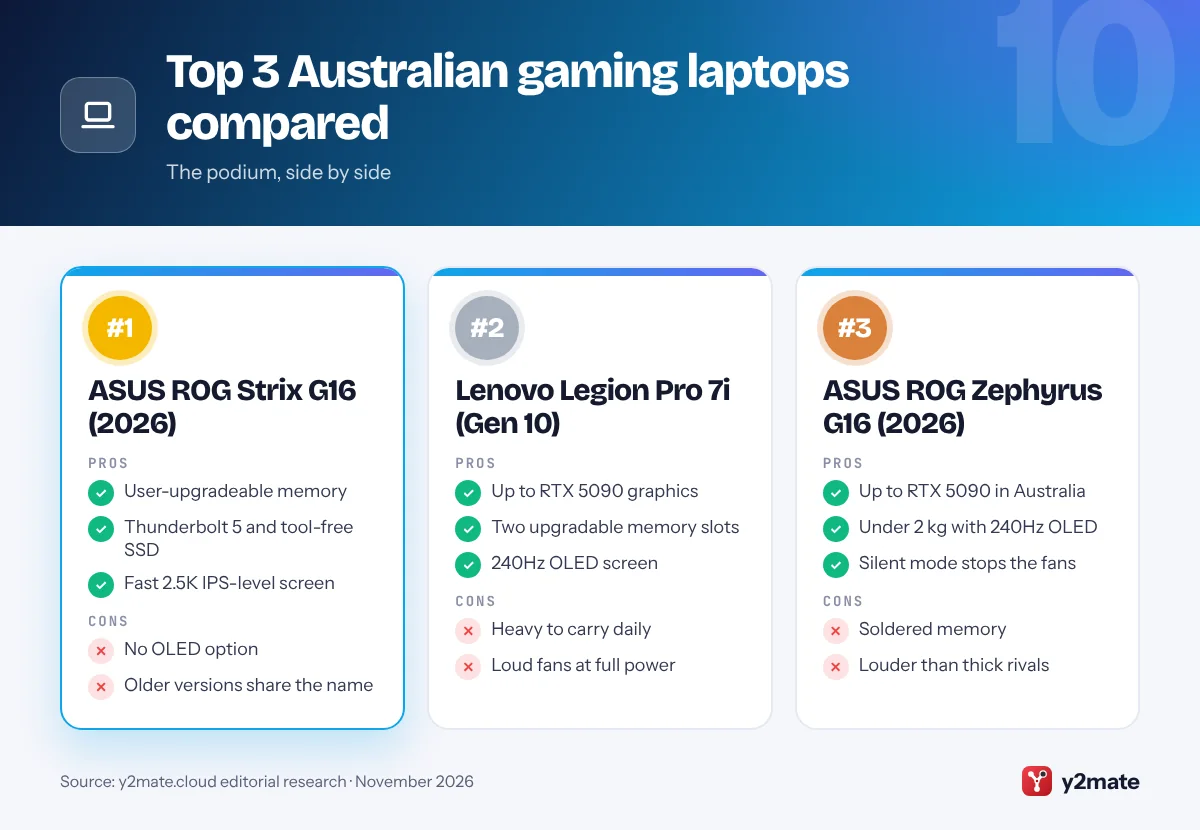
1. ASUS ROG Strix G16 (2026)
Best for: best-value all-rounder with upgrade room
The 2026 Strix G16 is the best gaming laptop for most Australian buyers who want strong performance without paying for a slim flagship. ASUS Australia lists it with an Intel Core Ultra 9 290HX Plus and GeForce RTX 5070 or RTX 5080 graphics, and its 2.5K IPS-level screen runs at 240Hz, rising to 300Hz in the Ultimate GPU mode.
It is built to be upgraded: both memory slots are user-upgradeable, the SSD uses a tool-free latch, and Thunderbolt 5 handles fast docks and drives. Cooling uses an end-to-end vapour chamber, with liquid metal on the graphics chip in higher-tier models, plus a MUX switch with Advanced Optimus.
Who should not buy it: it is a mid-weight 16-inch laptop rather than a commuter machine, and there is no OLED option. JB Hi-Fi and others still list earlier Strix G16 versions with the previous Core Ultra 9 275HX, so check for the 290HX Plus if you want the 2026 model.
Official site: ASUS ROG Strix G16 (2026)
- User-upgradeable memory
- Thunderbolt 5 and tool-free SSD
- Fast 2.5K IPS-level screen
- No OLED option
- Older versions share the name
2. Lenovo Legion Pro 7i (Gen 10)
Best for: top-tier AAA gaming at a desk
For players who want the highest graphics tiers and mostly game at a desk, the Legion Pro 7i (Gen 10) is the standout on Lenovo’s Australian store. It uses Intel Core Ultra HX-series processors with GeForce RTX 5070 Ti, RTX 5080 or RTX 5090 graphics and a 16-inch 240Hz OLED screen that suits fast shooters and big single-player games alike.
Lenovo’s Coldfront cooling combines a vapour chamber with large fans to sustain high power, two removable memory slots let you add RAM later, and Advanced Optimus switches to the integrated graphics for everyday tasks to save power.
Skip it if you need to carry a laptop between home, uni and work: it is heavy, the power brick is big and the fans are loud at full power. Lenovo Australia sells several configurations at once, and stock changes often around Black Friday, so compare the GPU, memory and storage on each listing rather than relying on the headline name.
Official site: Lenovo Legion Pro 7i (Gen 10)
- Up to RTX 5090 graphics
- Two upgradable memory slots
- 240Hz OLED screen
- Heavy to carry daily
- Loud fans at full power
3. ASUS ROG Zephyrus G16 (2026)
Best for: creators and travellers who game
The 2026 Zephyrus G16 is the premium pick for creators and travellers. ASUS Australia lists it with an Intel Core Ultra 9 processor and GeForce RTX 5070, RTX 5080 or RTX 5090 graphics, all with a 2.5K 240Hz OLED screen and G-SYNC, in a body under 2 kg.
Cooling pairs a vapour chamber with three fans and liquid metal, and a Silent mode can switch the fans off during light work, so it stays quiet in shared offices and lecture theatres. The colour-accurate OLED suits photo and video editing between games, and ASUS’s Australian spec sheet lists a MUX switch with Advanced Optimus so games can bypass the integrated graphics.
Who should not buy it: the memory is soldered, so buy enough at the start, and the thin chassis runs louder and warmer than a desktop replacement under heavy load. If you mostly game at home and want upgrade room, the Strix G16 or Legion Pro 7i will serve you better.
Official site: ASUS ROG Zephyrus G16 (2026)
- Up to RTX 5090 in Australia
- Under 2 kg with 240Hz OLED
- Silent mode stops the fans
- Soldered memory
- Louder than thick rivals
4. HyperX OMEN MAX 16 (2026)
Best for: maximum power with upgrade slots
HP has rebranded its OMEN gaming laptops as HyperX OMEN, and the HyperX OMEN MAX 16 is the flagship on HP’s Australian store. The Intel version pairs a Core Ultra 9 290HX Plus with graphics up to the RTX 5090, HP also lists an AMD Ryzen AI version, and screens go up to a 2.5K 240Hz OLED.
HP’s Fan Cleaner reverses the fans between sessions to clear dust, which is useful in dusty rooms, and the Cryo Compound is a liquid-metal hybrid designed to reduce leak risk. Two upgradeable memory slots let you add RAM later, and the OMEN Gaming Hub app controls performance modes and the Fan Cleaner schedule.
Skip it if portability matters: at around 3 kg it is one of the heaviest 16-inch laptops here, it is loud in its top performance mode, and the ports stop at Thunderbolt 4. Older stock may still carry the HP OMEN name, so check for the 2026 processor.
Official site: HyperX OMEN MAX 16 (2026)
- Up to RTX 5090 graphics
- Self-cleaning Fan Cleaner
- Two upgradeable memory slots
- Around 3 kg
- No Thunderbolt 5
5. Alienware 16 Area-51
Best for: a configurable desktop replacement
The Alienware 16 Area-51 is the desktop replacement to choose if you like configuring exactly what you buy. Dell Australia sells it with Intel Core Ultra HX Plus processors, up to the Core Ultra 9 290HX Plus, and GeForce RTX 50-series graphics, and you can choose an anti-glare 240Hz OLED screen.
Memory uses removable modules rather than soldered chips. Configurations with an RTX 5070 Ti or higher add Thunderbolt 5 and Dell’s glass-panelled Cryo-Chamber design, which shows off the fans. Buying direct means you pick the GPU, storage and support plan rather than accepting a retail bundle, and prices on Dell’s Australian site include GST.
Who should not buy it: it is heavy, at up to about 3.4 kg before the large power adapter, so it suits a desk more than a backpack, and battery life is not its strength. Dell’s Australian configurations change often, so check which graphics tiers are currently offered before comparing it with retail models.
Official site: Alienware 16 Area-51
- Removable memory modules
- Anti-glare OLED option
- Thunderbolt 5 on higher tiers
- Heavy, desk-bound design
- Configurations change often
6. MSI Stealth 16 AI+ (2026)
Best for: slim OLED with a two-year warranty
The Stealth 16 AI+ combines a slim, understated body with upgradable memory, which is rare at this weight. MSI’s 2026 version uses an Intel Core Ultra 9 386H, a 16-inch QHD+ 240Hz OLED screen and, in the Australian models on MSI’s spec sheets, GeForce RTX 5070, RTX 5070 Ti or RTX 5080 graphics.
It weighs just under 2 kg, yet has two memory slots and two M.2 SSD slots, plus Wi-Fi 7, Thunderbolt 4 and 2.5 Gigabit Ethernet. MSI’s Australian spec sheets list a two-year limited warranty, and PC specialists such as PC Case Gear stock it. The understated design also looks at home in an office or classroom.
Skip it if you want RTX 5090 power, because the Australian models MSI lists stop at the RTX 5080, or if fan noise bothers you, since the slim chassis is loud under sustained load. Do not confuse it with the AMD-based Stealth A16 AI+ that some big retailers stock.
Official site: MSI Stealth 16 AI+ (2026)
- Two RAM and two SSD slots
- Just under 2 kg
- Two-year warranty listed
- Tops out at RTX 5080 locally
- Loud under sustained load
7. ASUS ROG Zephyrus G14 (2026)
Best for: compact gaming between home and uni
The 2026 Zephyrus G14 is the most portable serious gaming laptop on this list. ASUS Australia lists it with an Intel Core Ultra 9 processor and GeForce RTX 5070, RTX 5070 Ti or RTX 5080 graphics, a 3K 120Hz OLED screen with G-SYNC and a weight of around 1.5 kg.
A MUX switch with Advanced Optimus, a Silent mode that can stop the fans during light work and a full-size SD card reader make it a practical everyday laptop for study or work, and the Slash Lighting on the lid can be customised or turned off in ASUS’s Armoury Crate app for a cleaner look.
Who should not buy it: 120Hz is slower than the 240Hz-plus screens competitive shooter players want, the memory is soldered, and the compact chassis gets warm and loud with the RTX 5080 under load. A 14-inch screen also feels small for long sessions at a desk.
Official site: ASUS ROG Zephyrus G14 (2026)
- Around 1.5 kg
- Up to RTX 5080 locally
- Sharp 3K OLED screen
- 120Hz limits esports appeal
- Soldered memory
8. Acer Predator Helios Neo 16S AI
Best for: a slim OLED laptop at a mid-range tier
The Predator Helios Neo 16S AI brings an OLED screen and a slim metal chassis to a lower tier than most premium rivals, and Acer said Australia would get the 2026 PHN16S-I51 version first, in early 2026. That model offers up to an Intel Core Ultra 9 386H with up to an RTX 5070, while the refreshed PHN16S-I71 goes up to an RTX 5080.
Cooling uses Acer’s AeroBlade 3D fan and liquid metal thermal grease, and the I51 includes Thunderbolt 4. Acer Australia lists the range on its website and sells it through its own online store, and the OLED panel gives deep contrast for darker games and films.
Who should not buy it: the earlier 2025 PHN16S-71 model is still around, sometimes as refurbished stock, so check the model code. Acer’s announcements do not say whether the memory is upgradeable, and at a mid-range weight it is slim rather than ultralight.
Official site: Acer Predator Helios Neo 16S AI
- OLED screen at a mid-range tier
- Slim metal chassis
- 2026 model reached Australia early
- Older versions still on sale
- Memory upgrades not stated
9. Lenovo Legion 5i (Gen 11)
Best for: mid-range OLED value
The Legion 5i (Gen 11) is the best-value OLED gaming laptop on this list. Lenovo Australia sells versions with up to an Intel Core Ultra 9 386H processor and a 15.3-inch 165Hz OLED screen, and the Gen 11 range spans GeForce RTX 5050 to RTX 5070 graphics depending on the processor version.
Both Gen 11 versions have two memory slots, so you can add RAM later, and the lighter version starts under 2 kg, which makes it easy to carry to uni or work. Thunderbolt 4 supports a single-cable desk setup, and Advanced Optimus switches to the integrated graphics to save battery.
Who should not buy it: the RTX 5050 and RTX 5060 versions need lower settings in demanding new games, and 165Hz is fine for most players but not for serious esports. Lenovo Australia lists two different Legion 5i Gen 11 product pages, so compare the processor and GPU before you buy.
Official site: Lenovo Legion 5i (Gen 11)
- OLED screen at a mid-range tier
- Two memory slots
- Lighter version under 2 kg
- Lower tiers need lower settings
- Two versions, easy to confuse
10. Lenovo LOQ 15AHP11 (Gen 11)
Best for: budget esports and 1080p gaming
The LOQ 15AHP11 is the best budget gaming laptop from a major brand’s Australian store. Lenovo’s Gen 11 LOQ uses AMD Ryzen 200 Series processors with GeForce RTX 5050, RTX 5060 or RTX 5070 graphics, and a 15.3-inch IPS screen at 165Hz or, on the sharper version, 180Hz.
Lenovo’s Hyperchamber cooling pushes hot air away from you, Advanced Optimus saves power on the desktop, and two memory slots let you start small and add RAM later. At about 2.1 kg it is manageable for a 15-inch gaming laptop, and the 15.3-inch screen keeps the footprint smaller than most 16-inch rivals. Lenovo also sells it to students and first-time buyers as a laptop that can handle coursework as well as games.
Who should not buy it: the cheaper graphics tiers need lower settings in demanding new games, and there is no OLED option or Thunderbolt port. If you can stretch further, the Legion 5i (Gen 11) adds an OLED screen in a lighter body.
Official site: Lenovo LOQ 15AHP11 (Gen 11)
- Two memory slots
- RTX 5050 to RTX 5070 choice
- 165Hz or 180Hz IPS screen
- No OLED or Thunderbolt
- Lower settings in new AAA games
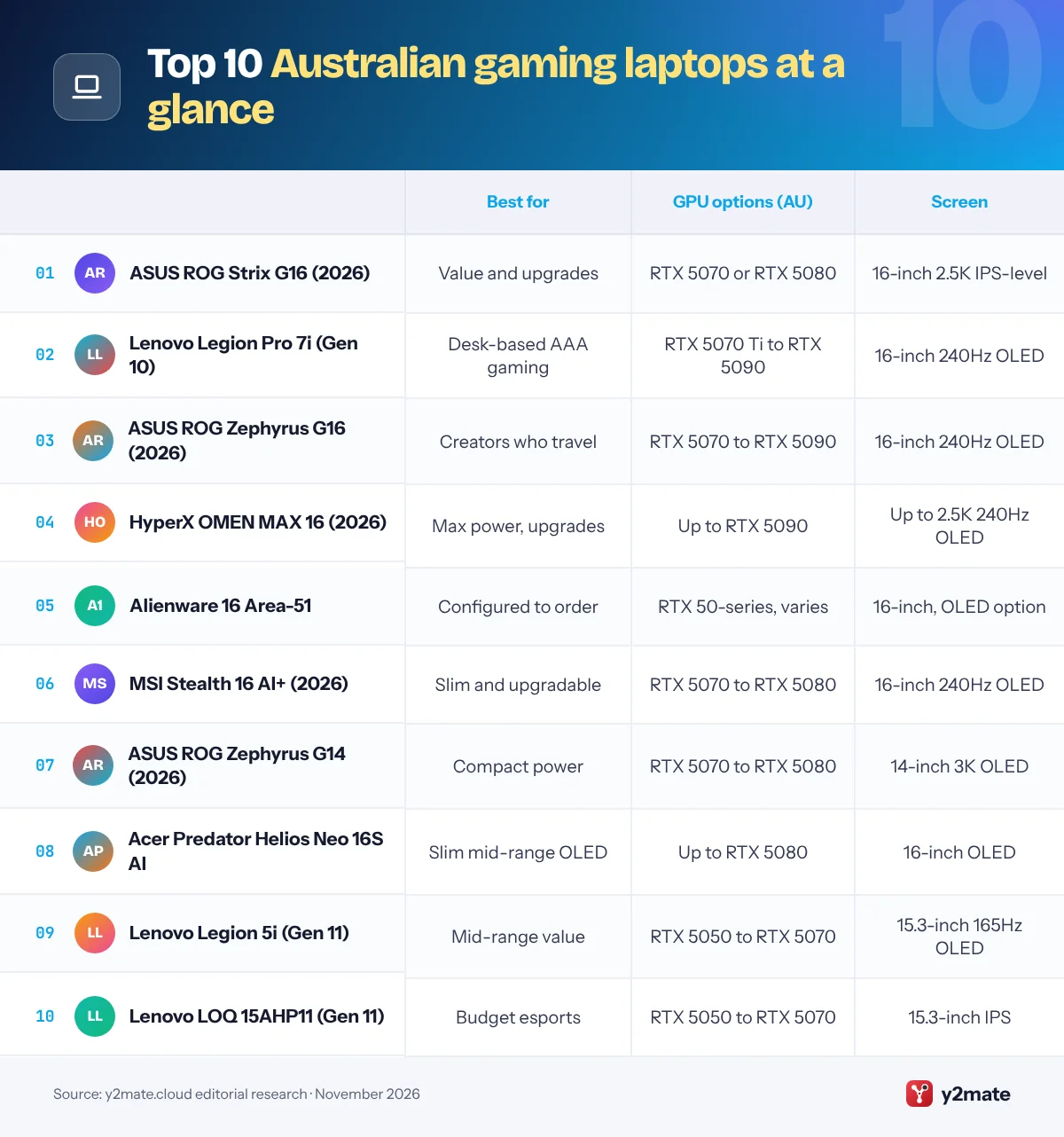
Australian gaming laptops compared
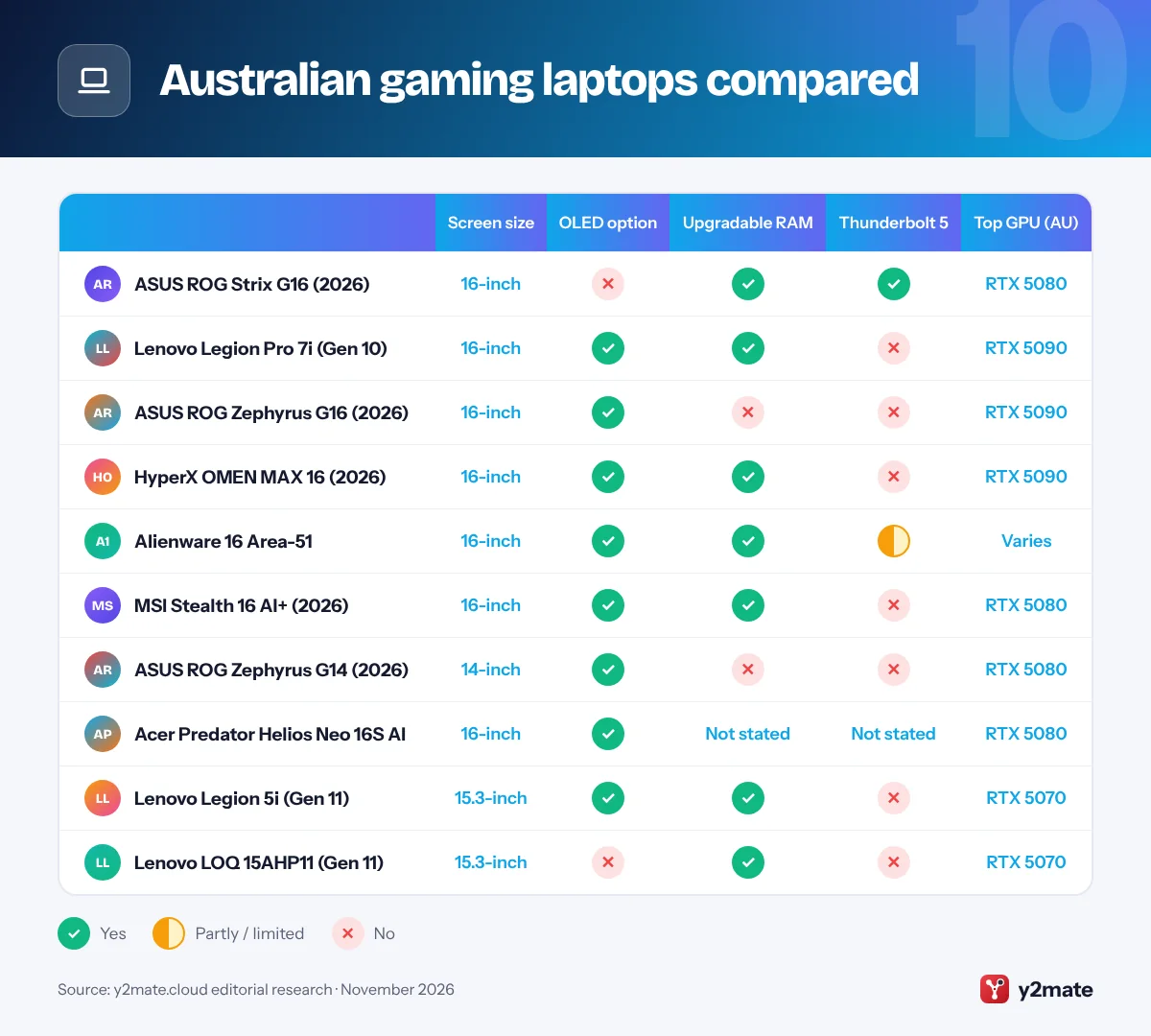
Gaming laptops Australia buying guide: how to choose and where to buy
Choose the graphics tier first. RTX 5050 and RTX 5060 laptops suit esports and 1080p gaming, RTX 5070 and RTX 5070 Ti handle 1440p well, and RTX 5080 and RTX 5090 are for maximum settings and heavy creative work. The best-value models usually pair a mid-to-high GPU with a plain but fast screen and upgradeable memory, as the Strix G16 and LOQ 15AHP11 do, while slim OLED bodies and the top GPU tiers add the most cost.
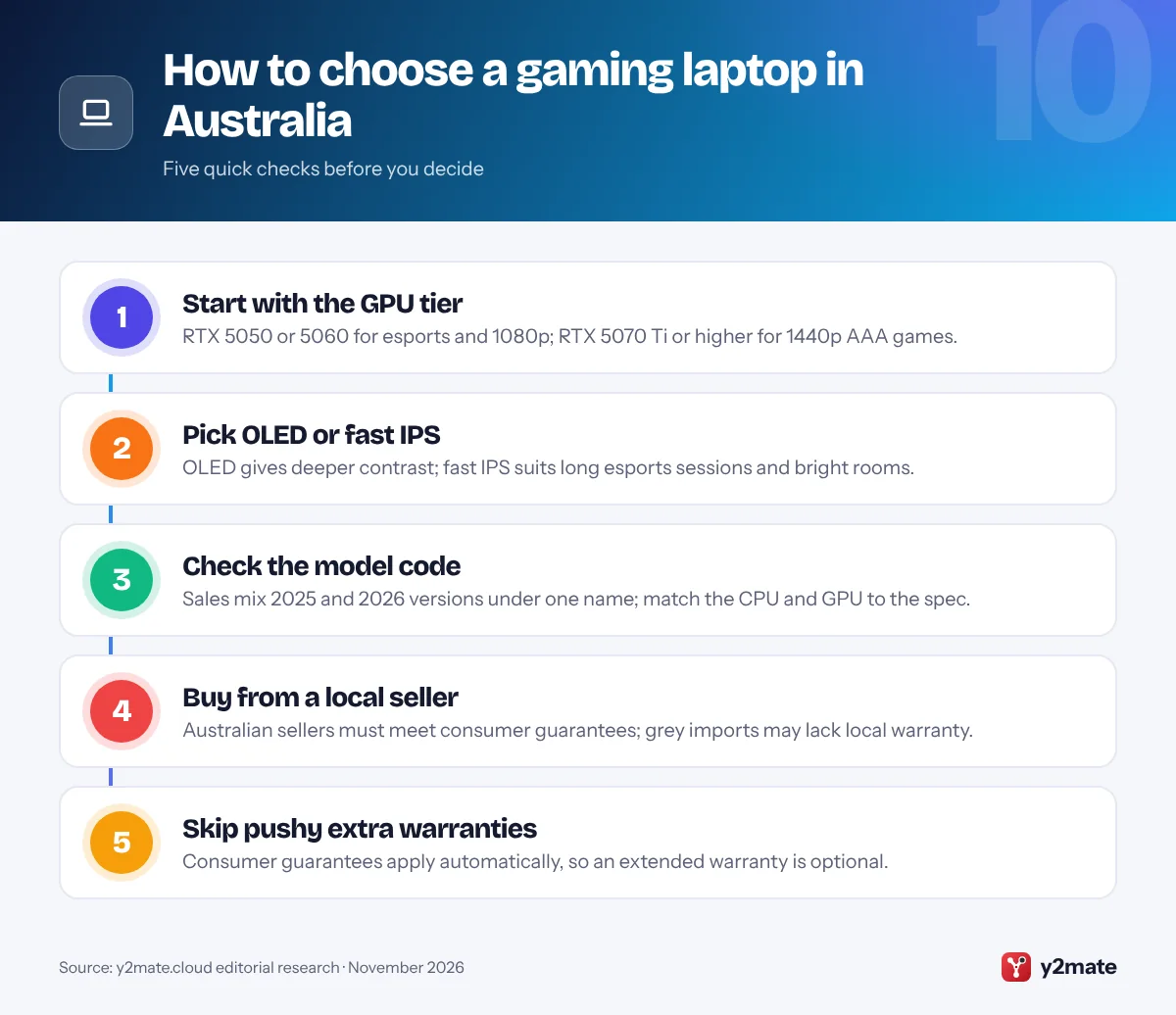
Where to buy gaming laptops in Australia
JB Hi-Fi and Harvey Norman let you see laptops in store, while PC specialists such as Mwave, Scorptec, PLE, Centre Com and PC Case Gear often carry more configurations. Lenovo, Dell, HP and Acer also sell direct through Australian online stores. Retailers often list 2025 and 2026 versions side by side during Black Friday, so match the processor and GPU to the maker’s spec page.
Are gaming laptops cheaper overseas?
Not necessarily once you compare like for like. Australian retailers must show a single total price that includes GST, and local stock comes with the consumer guarantees and local warranty service. The ACCC says that if you buy a parallel or grey import, the seller must still meet the consumer guarantees, but the manufacturer’s warranty may not apply in Australia, and enforcing your rights against an overseas seller can be difficult.
Consumer guarantees and warranties
Under the Australian Consumer Law, products must be of acceptable quality, and you are entitled to a repair, replacement or refund if something goes wrong. For a major failure you can choose a refund or replacement. The ACCC says warranties apply on top of these rights and cannot replace or reduce them, and the guarantees can last longer than a maker’s warranty, so an extended warranty is optional rather than essential.
Frequently asked questions
Where is the best place to buy a gaming laptop in Australia?
JB Hi-Fi and Harvey Norman are easiest if you want to see a laptop in store. PC specialists such as Mwave, Scorptec, PLE, Centre Com and PC Case Gear usually carry more configurations, and Lenovo, Dell, HP and Acer sell direct online. Buy from an Australian business so the consumer guarantees are easy to use.
Are gaming laptops cheaper in Australia than overseas?
Overseas listings can look cheaper, but Australian prices must include GST and local stock comes with consumer guarantees and local warranty service. With a grey import, the seller must still meet the guarantees, but the manufacturer's warranty may not apply here, and chasing an overseas seller is harder. Compare identical configurations, including delivery.
Are gaming laptops good for other things besides gaming?
Yes. The graphics chip that runs games also speeds up video editing, photo work, 3D design, streaming, coding and local AI tools, so a gaming laptop makes a strong all-rounder for uni and creative work. The trade-offs are extra weight, a bigger charger, louder fans under load and shorter battery life than a thin everyday laptop.
Are laptops OK for gaming, or should I buy a desktop?
A laptop with a dedicated RTX 50-series GPU is fine for gaming, including demanding new games on the higher tiers. A desktop with a similarly named graphics card usually runs faster, cooler and quieter, and is easier to upgrade. Choose a laptop if you need portability or have limited space, and a desktop if you always play in one place.
What is the difference between a gaming laptop and a business laptop?
A gaming laptop adds a dedicated graphics chip, a high-refresh screen and larger cooling, so it is heavier and louder but far better for games and creative software. A business laptop focuses on battery life, low weight, security and IT management features, and usually relies on the processor's built-in graphics, which limits gaming.
What is the best budget gaming laptop in Australia?
The Lenovo LOQ 15AHP11 (Gen 11) is the best budget pick from a major brand's Australian store, with RTX 5050 to RTX 5070 graphics and two memory slots. For better value at a higher tier, the ASUS ROG Strix G16 (2026) pairs RTX 5070 or RTX 5080 graphics with upgradeable memory and Thunderbolt 5.
Do I need an extended warranty on a gaming laptop in Australia?
Usually not. The ACCC says consumer guarantees apply automatically, cannot be negotiated away and can last longer than a manufacturer's warranty. An extended warranty is optional, businesses must not pressure you into buying one, and they should explain what it adds beyond your existing rights. Read the terms before paying, and keep your receipt either way.
Final verdict
Among the gaming laptops Australia retailers are selling this Black Friday, the ASUS ROG Strix G16 (2026) is the best choice for most buyers, thanks to its strong graphics options, upgradeable memory and Thunderbolt 5. Choose the Lenovo Legion Pro 7i (Gen 10) for maximum desk performance, the ASUS ROG Zephyrus G16 for a light OLED machine, or the Lenovo LOQ 15AHP11 if your budget is tight.
Buy from an Australian business, check the model code and GPU against the maker’s spec page, and remember that your consumer guarantees apply whether or not you buy an extended warranty.
Sources and further reading
- ACCC on warranties: The ACCC explains that warranties apply on top of the consumer guarantees and cannot replace, change or take away your basic rights.
- ACCC consumer rights and guarantees: The ACCC's guide to the automatic consumer guarantees and your right to a repair, replacement or refund.
- ACCC on buying parallel imports: The ACCC explains your rights when buying grey imports, including why a manufacturer's warranty may not apply in Australia.
- ACCC on price displays: The ACCC explains that businesses must show a single total price, including GST, when advertising to consumers.
- NVIDIA RTX 50-series laptops: NVIDIA Australia's official overview and spec table for GeForce RTX 50-series laptop GPUs, from the RTX 5050 to the RTX 5090.

Leave a Reply