
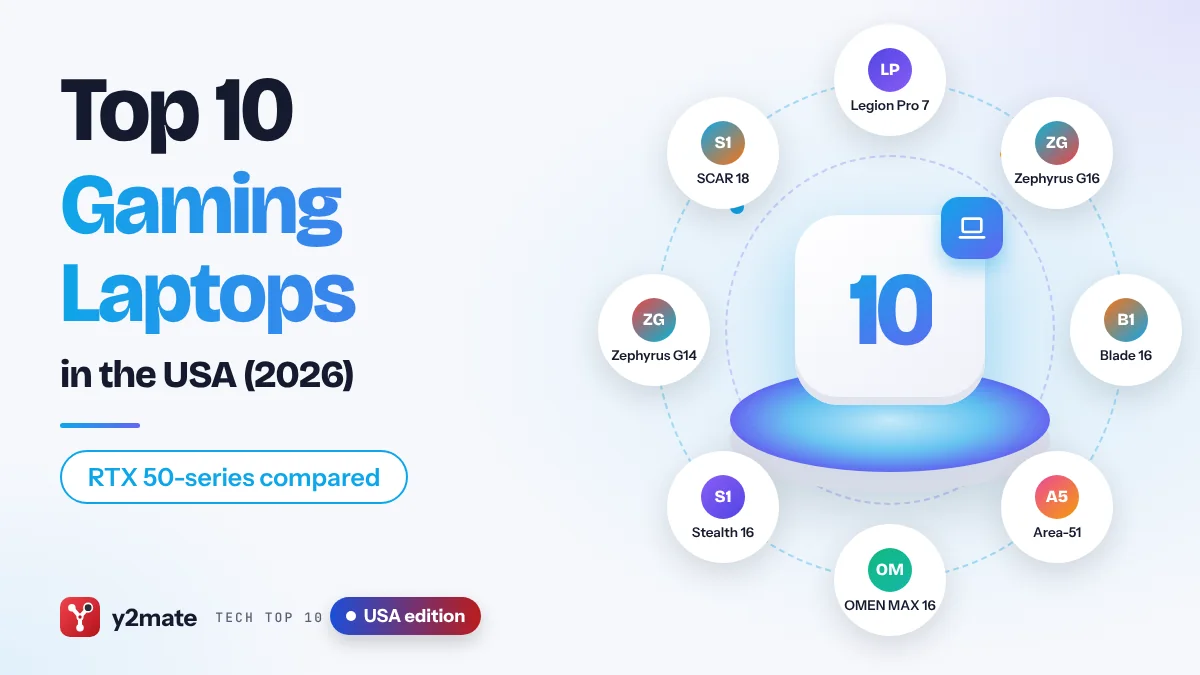
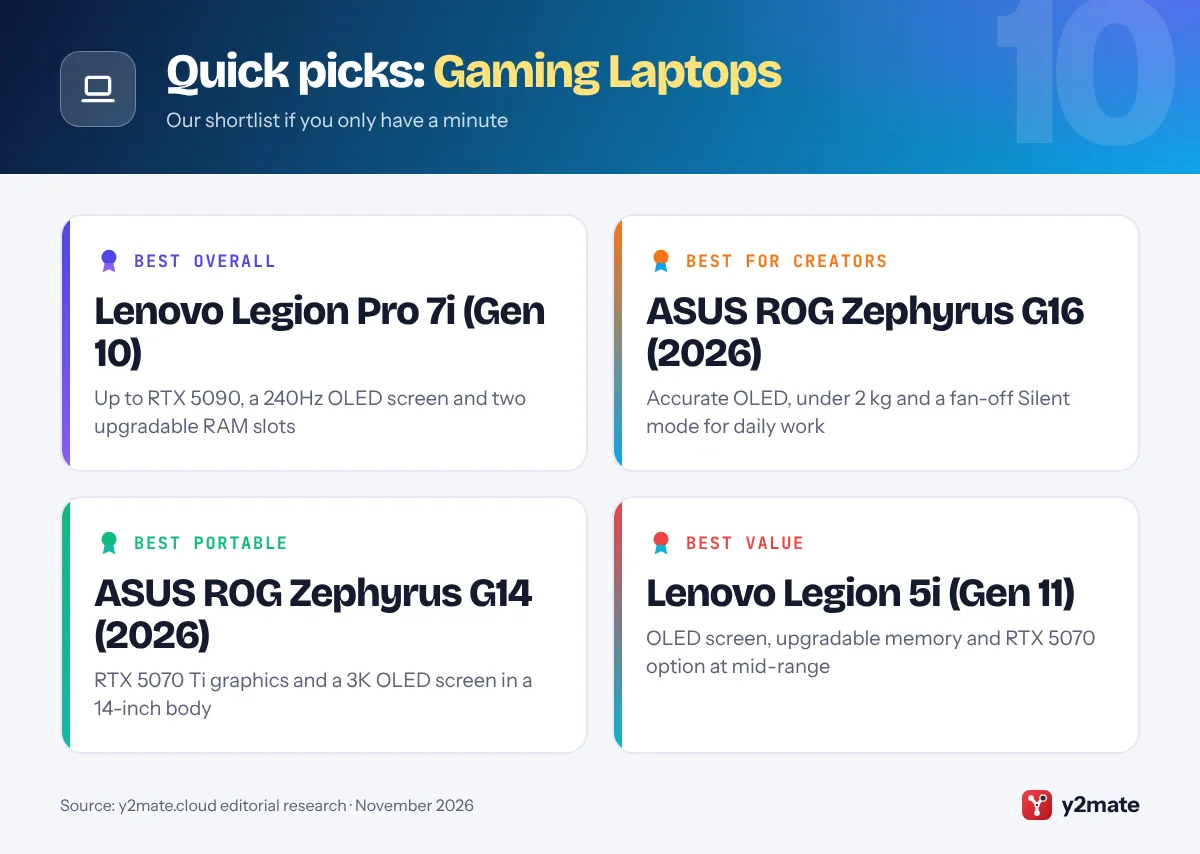
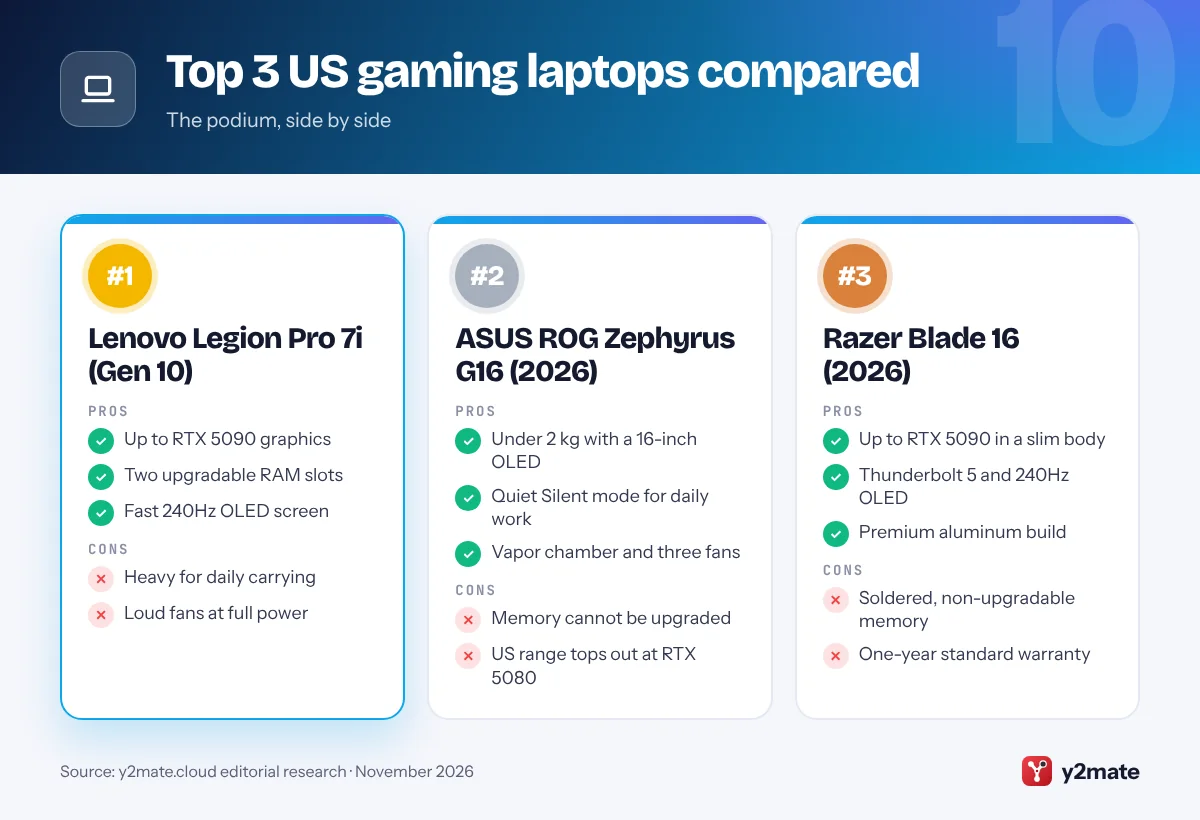
- The Lenovo Legion Pro 7i (Gen 10), ASUS ROG Zephyrus G16 (2026) and Razer Blade 16 (2026) are the strongest all-round gaming laptops on sale in the US in late 2026.
- Every pick uses NVIDIA GeForce RTX 50-series laptop graphics, which run from the entry-level RTX 5050 to the flagship RTX 5090.
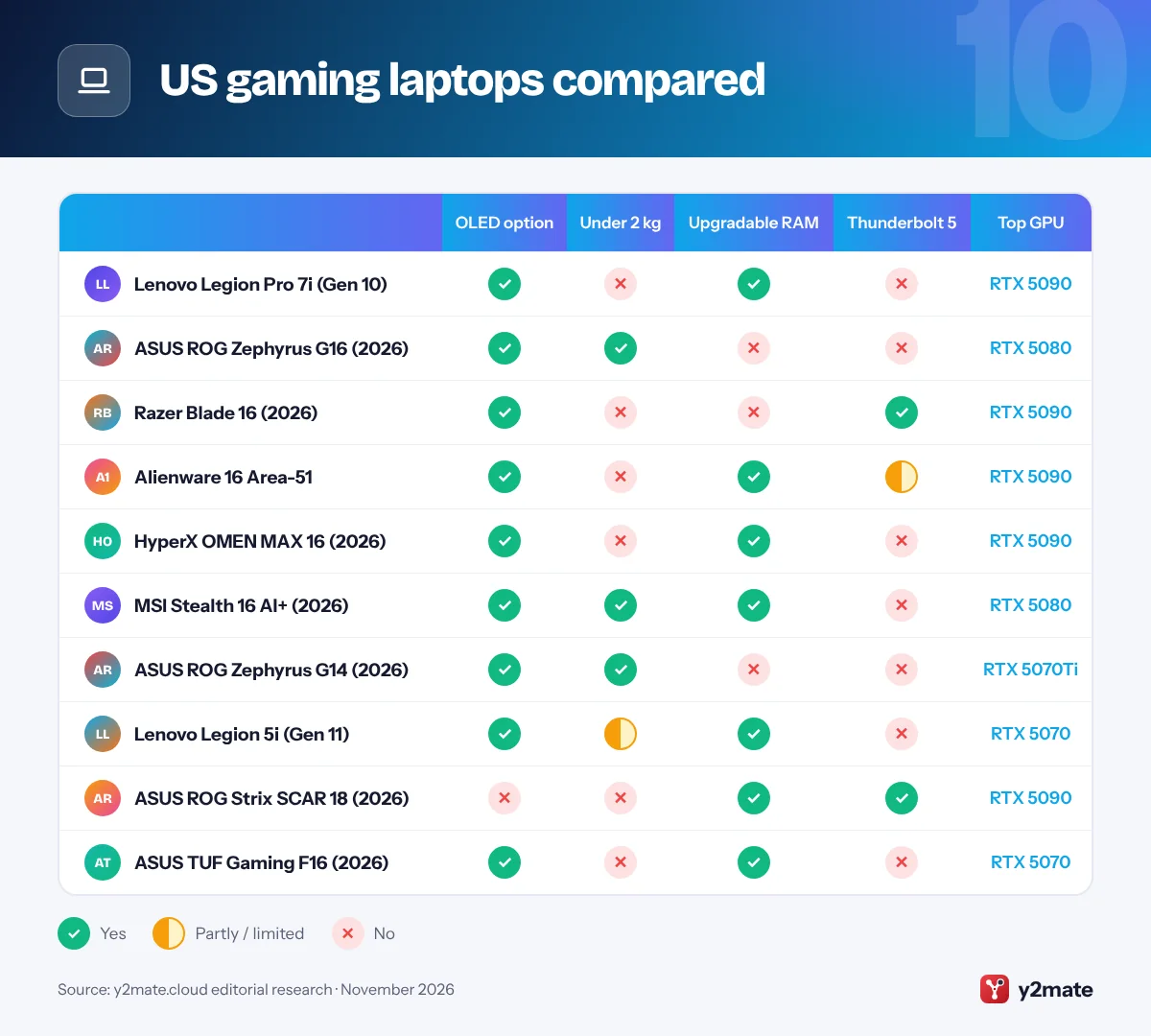
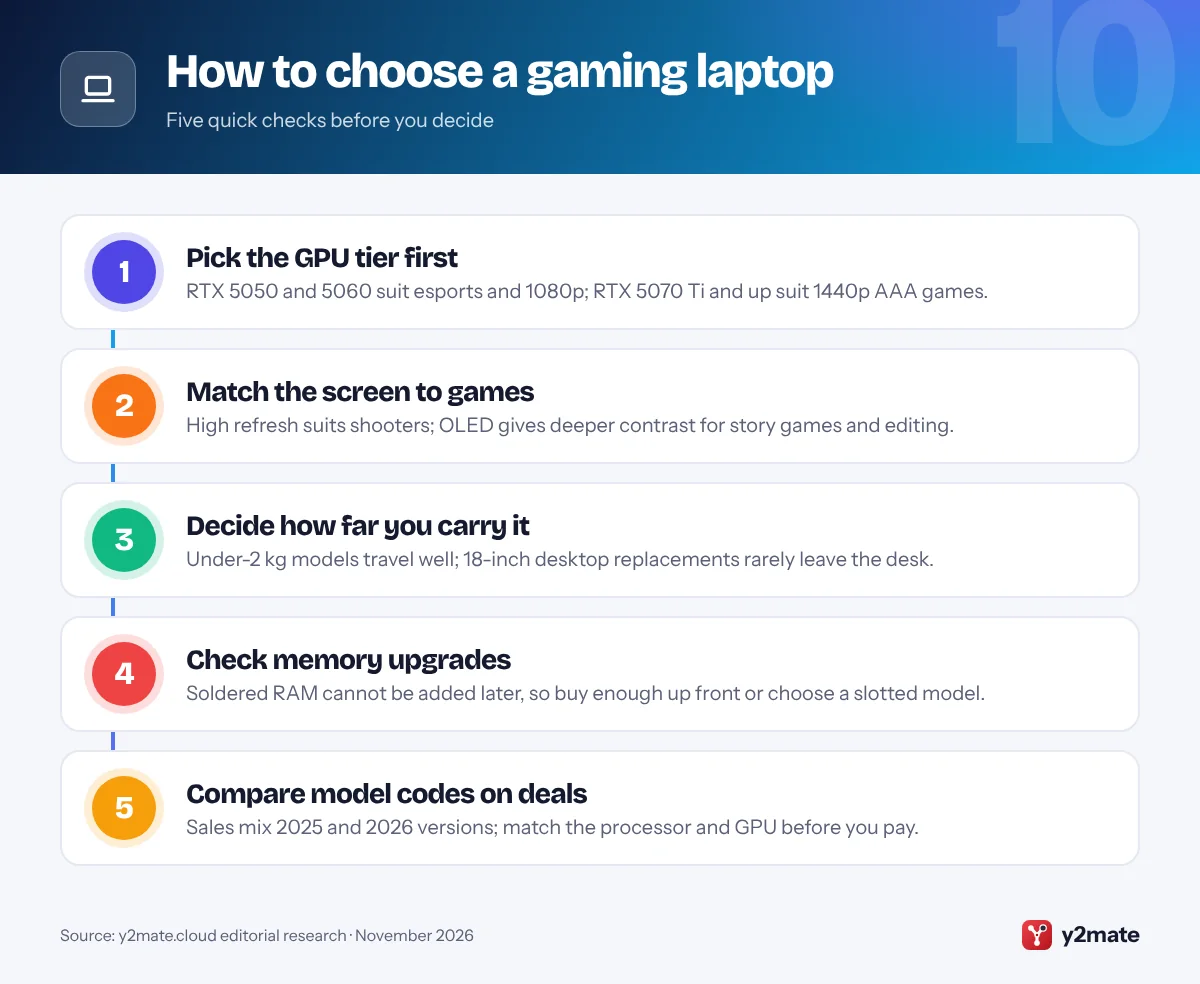
- Slim models such as the Zephyrus G14, Zephyrus G16 and Blade 16 have soldered memory, while the Legion Pro 7i, Strix SCAR 18, MSI Stealth 16 AI+ and HyperX OMEN MAX 16 have upgradable memory slots.
- Under the Magnuson-Moss Warranty Act, the FTC says a company generally cannot void your warranty just because you used third-party parts or an independent repair shop.
- Black Friday listings often mix 2025 and 2026 versions of the same laptop, so match the processor and graphics chip before you buy.
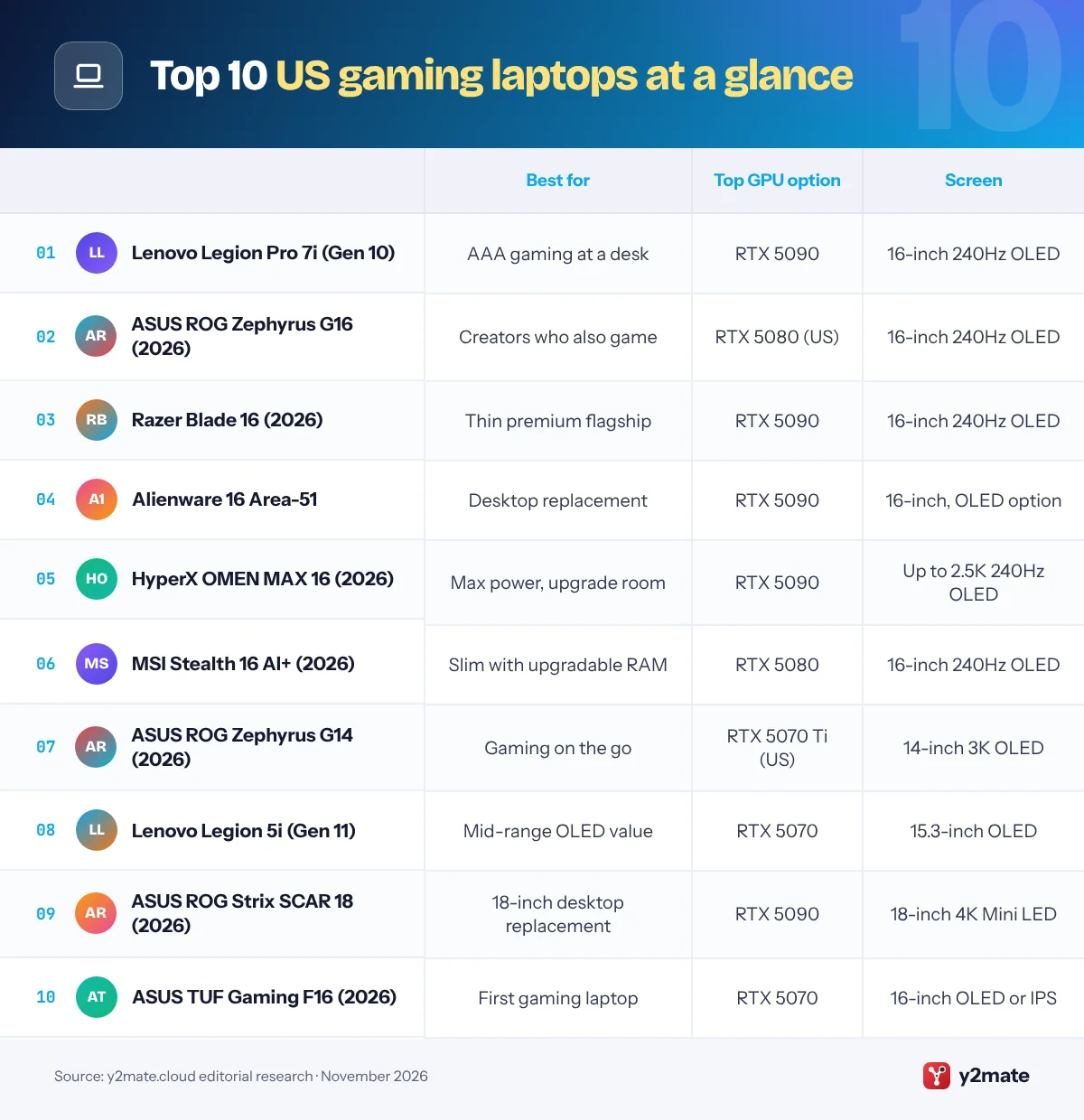
The best gaming laptops in the USA right now are the Lenovo Legion Pro 7i (Gen 10) for high-end gaming at a desk, the ASUS ROG Zephyrus G16 (2026) for creators who also game, and the Razer Blade 16 (2026) for the slimmest premium build. The Alienware 16 Area-51, HyperX OMEN MAX 16, MSI Stealth 16 AI+, ASUS ROG Zephyrus G14, Lenovo Legion 5i (Gen 11), ASUS ROG Strix SCAR 18 and ASUS TUF Gaming F16 complete the list, from bag-friendly 14-inch machines to 18-inch desktop replacements and first-time buys.
What is a gaming laptop good for? It is a Windows laptop with a separate graphics chip, or GPU, plus stronger cooling and a fast screen, and that hardware also speeds up video editing, 3D work, streaming and coding. Every pick uses NVIDIA’s current GeForce RTX 50-series laptop GPUs, from the entry RTX 5050 and RTX 5060 up to the RTX 5090. A MUX switch or NVIDIA Advanced Optimus sends game frames straight from the GPU to the screen, then hands over to the processor’s built-in graphics to save power.
This list is for non-experts shopping in the US before Black Friday. Every model is sold through its maker’s US store or major US retailers, and the guide covers warranties, returns and your right to repair.
How we ranked this list
Our ranking is based on manufacturers’ published specifications, the range of configurations available in the US, design and cooling approach, warranty and support in the US, and widely reported owner feedback. We checked each maker’s US product pages and spec sheets for GPU options, processor family, screen type, weight class and memory upgrades.
We did not run hands-on tests or benchmarks, and we leave out prices, frame rates and battery-hour figures, because they vary by configuration and change constantly during holiday sales.
The Top 10 Gaming Laptops
1. Lenovo Legion Pro 7i (Gen 10)
Best for: high-end AAA gaming at a desk
The Legion Pro 7i (Gen 10) is the best choice for most US buyers who want top-tier performance and mostly play at a desk. Lenovo sells it with GeForce RTX 5070 Ti, RTX 5080 or RTX 5090 laptop graphics and Intel Core Ultra HX-series processors, paired with a sharp 16-inch 240Hz OLED screen that suits both fast shooters and cinematic single-player games.
Lenovo’s Coldfront cooling uses a vapor chamber and large fans designed to hold high power through long sessions. The memory sits in two removable slots, so you can add RAM later, and Advanced Optimus switches to the integrated graphics on the desktop to save power.
Skip it if you carry a laptop every day: it is heavy, the power adapter is large, the fans get loud at full power and gaming on battery is short. It is sold through Lenovo’s US store and retailers such as Best Buy, so compare the GPU and model number on every listing.
Official site: Lenovo Legion Pro 7i (Gen 10)
- Up to RTX 5090 graphics
- Two upgradable RAM slots
- Fast 240Hz OLED screen
- Heavy for daily carrying
- Loud fans at full power
2. ASUS ROG Zephyrus G16 (2026)
Best for: creators who also game
The 2026 Zephyrus G16 is the pick for creators who also game and want one laptop that travels well. It pairs an Intel Core Ultra 9 processor with GeForce RTX graphics, and ASUS’s US spec page lists RTX 5070 Ti and RTX 5080 versions. Every model gets a 2.5K 240Hz OLED screen with G-SYNC that ASUS markets as Pantone Validated for accurate color.
It weighs under 2 kg, and its cooling combines a vapor chamber, three fans and liquid metal. A Silent mode can switch the fans off completely during light tasks, so it stays quiet for email, editing and video calls.
Who should not buy it: the memory is soldered to the board, so choose enough at checkout, and the slim chassis runs warmer and louder than thick desktop replacements when gaming. ASUS sells it through its US online store and Best Buy. If you want RTX 5090 power in the US, look at the Blade 16 or Legion Pro 7i instead.
Official site: ASUS ROG Zephyrus G16 (2026)
- Under 2 kg with a 16-inch OLED
- Quiet Silent mode for daily work
- Vapor chamber and three fans
- Memory cannot be upgraded
- US range tops out at RTX 5080
3. Razer Blade 16 (2026)
Best for: a thin, premium flagship
The 2026 Blade 16 is the slimmest, most premium-feeling flagship here. Razer machines the aluminum chassis from a single block, and it remains the thinnest Blade the company has made. Inside are an Intel Core Ultra 9 processor and RTX 50-series graphics up to the RTX 5090, with a QHD+ 240Hz OLED screen, a vapor chamber with dual fans and Thunderbolt 5.
Razer says the 2026 model is significantly more efficient than the 2025 version, which helps for work and video away from the charger, although gaming still drains the battery quickly. At just over 2 kg it is easy to carry for a 16-inch flagship.
Skip it if you want to upgrade later, because Razer states the memory is soldered. The standard warranty is one year, plus two years on the battery, and you pay a premium for the slim build. Older 2025 Blade 16 models with AMD processors are still listed, so check the CPU before you buy.
Official site: Razer Blade 16 (2026)
- Up to RTX 5090 in a slim body
- Thunderbolt 5 and 240Hz OLED
- Premium aluminum build
- Soldered, non-upgradable memory
- One-year standard warranty
4. Alienware 16 Area-51
Best for: desktop-replacement power from Dell
The Alienware 16 Area-51 is a desktop replacement for players who want maximum power and like buying direct from Dell. Its current version pairs Intel Core Ultra HX Plus processors with GeForce RTX 50-series graphics up to the RTX 5090, and Dell now offers an anti-glare 240Hz OLED screen as an option.
Memory uses removable modules rather than soldered chips, and higher-end configurations add Thunderbolt 5 ports for fast docks and drives. Dell’s configurator lets you pick the exact GPU, screen, storage and support plan, so you avoid paying for parts you do not need.
Who should not buy it: top configurations weigh more than 3 kg before you add the large power adapter, so it is built for a desk, not a backpack, and battery life is not its strength. If you want Alienware styling in a lighter, lower-tier package, look at the Alienware 16X Aurora.
Official site: Alienware 16 Area-51
- Up to RTX 5090 graphics
- Removable memory modules
- Anti-glare OLED option
- Over 3 kg in top configurations
- Large, heavy power adapter
5. HyperX OMEN MAX 16 (2026)
Best for: maximum power with upgrade room
HP moved its OMEN laptops under the HyperX brand for 2026, and the HyperX OMEN MAX 16 is the flagship. The Intel version pairs a Core Ultra 9 290HX Plus with graphics up to the RTX 5090, HP also sells an AMD Ryzen AI version, and screen options go up to a 2.5K 240Hz OLED.
Two owner-friendly touches stand out. Fan Cleaner reverses the fans between gaming sessions to push out dust, and HP’s Cryo Compound is a liquid-metal hybrid designed to lower the risk of leaks. There are two upgradeable memory slots, and the OMEN Gaming Hub app controls performance modes and the Fan Cleaner schedule.
Skip it if weight matters: at around 3 kg it is one of the heavier 16-inch models here, and it gets loud in its top performance mode. Ports top out at Thunderbolt 4. Older listings still say HP OMEN MAX, so check for the 2026 processor before you pay.
Official site: HyperX OMEN MAX 16 (2026)
- Up to RTX 5090 graphics
- Self-cleaning Fan Cleaner feature
- Two upgradeable memory slots
- Heavy at around 3 kg
- No Thunderbolt 5
6. MSI Stealth 16 AI+ (2026)
Best for: slim OLED with upgradable memory
The Stealth 16 AI+ is a rare slim gaming laptop that keeps upgradable memory. MSI’s 2026 version uses an Intel Core Ultra 9 386H processor and a 16-inch QHD+ 240Hz OLED screen, and the US configurations MSI lists range from GeForce RTX 5060 to RTX 5080 graphics.
It weighs just under 2 kg, yet MSI fits two memory slots and two M.2 SSD slots, so it can grow with you. Wi-Fi 7, Thunderbolt 4 and 2.5 Gigabit Ethernet make it a sensible work laptop too, and the low-key design does not shout gamer in a meeting. Best Buy carries several versions.
Who should not buy it: MSI’s US warranty depends on the exact model, with its spec sheets listing one-year and three-year terms, so check before buying. The slim chassis gets loud under heavy load, and the RTX 5060 version will need lower settings in demanding new games.
Official site: MSI Stealth 16 AI+ (2026)
- Two RAM and two SSD slots
- Just under 2 kg
- 240Hz OLED on every model
- Warranty length varies by model
- Loud under heavy gaming load
7. ASUS ROG Zephyrus G14 (2026)
Best for: portable 14-inch gaming
If you want real gaming power in a bag-friendly size, the 2026 Zephyrus G14 is the best 14-inch option in the US. It weighs around 1.5 kg, uses an Intel Core Ultra 9 processor, and ASUS’s US spec page lists it with GeForce RTX 5070 Ti graphics. The 3K 120Hz OLED screen is sharp and vivid, and G-SYNC smooths out uneven frame rates.
ASUS added a Silent mode that can stop the fans during light work, a Slash Lighting strip on the lid and a full-size SD card reader for photographers. It is sold through the ASUS US online store and Best Buy.
Skip it if you play competitive shooters seriously, because 120Hz is slower than the 240Hz-plus screens esports players prefer. The memory is soldered, the small chassis gets warm and loud at full power, and US buyers do not get the RTX 5080 version ASUS sells in some other countries.
Official site: ASUS ROG Zephyrus G14 (2026)
- Around 1.5 kg
- Sharp 3K OLED screen
- Full-size SD card reader
- 120Hz limits esports appeal
- Soldered memory
8. Lenovo Legion 5i (Gen 11)
Best for: mid-range OLED value
The Legion 5i (Gen 11) is the best mid-range choice for smooth 1080p and 1440p gaming without paying for flagship graphics. Lenovo announced it at CES 2026 with Intel Core Ultra processors and GeForce RTX 50-series graphics up to the RTX 5070, and it has a 15.3-inch OLED screen, a slightly smaller footprint than most 16-inch rivals.
Unusually for this class, the base model starts under 2 kg, yet it keeps two memory slots for later upgrades. Advanced Optimus handles the switch between integrated and NVIDIA graphics, which helps battery life during schoolwork or office tasks.
Who should not buy it: its mid-range graphics tiers need lower settings in the most demanding new games at high resolution, so serious AAA players should step up to the Legion Pro 7i. Sale listings often lead with the cheaper GPU tiers, so confirm which graphics chip you are getting.
Official site: Lenovo Legion 5i (Gen 11)
- OLED screen at a mid-range tier
- Starts under 2 kg
- Two memory slots
- Tops out at RTX 5070
- Check which GPU is in a deal
9. ASUS ROG Strix SCAR 18 (2026)
Best for: an 18-inch desktop replacement
The 2026 Strix SCAR 18 is the big-screen desktop replacement for players who want the largest canvas and the most cooling. ASUS announced it in May 2026 with an Intel Core Ultra 9 290HX Plus, a choice of RTX 5080 or RTX 5090 graphics and an 18-inch 4K Mini LED screen that runs up to 240Hz.
Cooling is serious: an end-to-end vapor chamber and liquid metal on both the processor and the graphics chip. There are two SO-DIMM memory slots, a MUX switch with Advanced Optimus, and Thunderbolt 5. Mini LED panels get very bright for HDR games and films, without OLED burn-in worries.
Skip it unless it will live on a desk. At roughly 3.7 kg plus a large power adapter, it is a portable desktop rather than a laptop you carry daily, and the fans are loud when it runs flat out. If 18 inches is too big, the Legion Pro 7i offers similar graphics tiers in a 16-inch body.
Official site: ASUS ROG Strix SCAR 18 (2026)
- 18-inch 4K Mini LED screen
- RTX 5080 or RTX 5090
- Thunderbolt 5, upgradable RAM
- Very heavy, desk-bound
- Loud at full power
10. ASUS TUF Gaming F16 (2026)
Best for: first-time and budget buyers
The 2026 TUF Gaming F16 is the sensible way into PC gaming for many first-time US buyers. ASUS pairs an Intel Core Ultra 9 290HX Plus with GeForce RTX 5060 or RTX 5070 graphics and offers two 16-inch screens: a 2.5K 165Hz OLED for rich colors or a 2.5K 300Hz IPS panel with an anti-reflection coating for esports.
You still get a MUX switch with Advanced Optimus, two SO-DIMM memory slots for later upgrades and a weight of about 2.2 kg, which is manageable for a 16-inch gaming machine.
Who should not buy it: RTX 5060 and RTX 5070 graphics mean turning settings down in the newest AAA games, and the OLED version’s 165Hz refresh rate is slower than the IPS option competitive players will want. ASUS still sells 2025 TUF models alongside it, so look for the 2026 name and the Core Ultra 9 290HX Plus processor.
Official site: ASUS TUF Gaming F16 (2026)
- OLED or 300Hz IPS choice
- MUX switch and two RAM slots
- Manageable 2.2 kg weight
- Tops out at RTX 5070
- 2025 models still on shelves
US gaming laptops compared
How to choose gaming laptops in the USA
Start with the graphics chip, because it decides what you can play and at what settings. RTX 5050 and RTX 5060 laptops suit esports and 1080p gaming, RTX 5070 and RTX 5070 Ti handle 1440p well, and RTX 5080 and RTX 5090 are for maximum settings and heavy creative work. The same GPU can run at different power levels in different laptops, so a thin model may not match a thick one. Then pick a screen: OLED for contrast and color, high-refresh IPS or Mini LED for brightness and long esports sessions.
Cooling, noise and battery life
These machines stay cool with vapor chambers, multiple fans and liquid metal on the hottest chips. To keep one quiet, use the silent or balanced mode in the maker’s app, such as ASUS Armoury Crate or HP’s OMEN Gaming Hub, keep the vents clear and play on a hard surface. Models built on Intel’s efficient Core Ultra 9 386H, such as the Zephyrus G14 and G16, Blade 16 and Stealth 16 AI+, are designed to last longer away from the plug than HX-chip desktop replacements, but all of them drain fast while gaming. For more speed, plug in, update drivers through the NVIDIA app and turn on DLSS in supported games.
Gaming laptop or desktop?
A desktop with a similarly named GPU generally runs faster, cooler and quieter, and is easier to upgrade. A laptop wins on space and portability. If you mainly edit video and play only a few games, a MacBook Pro is worth a look, but many PC games, especially online shooters with anti-cheat, do not run on macOS.
Warranty, returns and repair rights in the US
Standard warranties vary: Razer lists one year plus two years on the battery, while MSI’s US spec sheets show one or three years depending on the model. Return windows and restocking fees are set by each retailer, so read the policy before Black Friday. Under the Magnuson-Moss Warranty Act, the FTC says a company generally cannot void your warranty just because you used third-party parts or an independent repair shop, and in 2024 FTC staff warned several PC hardware makers about warranty-void-if-removed stickers.
Frequently asked questions
What are gaming laptops good for besides gaming?
The graphics chip that runs games also speeds up video editing, photo work, 3D modeling, streaming, coding and local AI tools, so a gaming laptop makes a strong all-rounder for students and creators. The trade-offs are weight, a bigger charger, louder fans and shorter battery life.
Are gaming laptops worth it?
Yes, if you need to game away from one desk, have little space for a desktop, or want one machine for gaming, study and creative work. If you always play in the same room, a desktop with a similarly named graphics chip usually runs faster, cooler and quieter, and is easier to upgrade.
What is the best gaming laptop brand?
No single brand wins at every tier. Lenovo's Legion line is strong on cooling and upgradable memory, ASUS covers the widest range from TUF budget models to ROG flagships, Razer leads on slim premium design, and Alienware and HyperX OMEN focus on desktop-replacement power. Pick the model, not the logo.
Which laptops have the best cooling for gaming?
Thick desktop replacements have the most room for cooling. The ASUS ROG Strix SCAR 18 uses an end-to-end vapor chamber with liquid metal, the Lenovo Legion Pro 7i uses Lenovo's Coldfront vapor chamber design, and the HyperX OMEN MAX 16 adds a liquid-metal hybrid and a self-cleaning fan feature.
Can you upgrade a gaming laptop?
Usually only memory and storage. The Legion Pro 7i, Legion 5i, Alienware 16 Area-51, HyperX OMEN MAX 16, MSI Stealth 16 AI+, Strix SCAR 18 and TUF Gaming F16 have memory slots. The Razer Blade 16 and ASUS Zephyrus G14 and G16 have soldered memory. The graphics chip cannot be swapped.
Which laptops on this list have Thunderbolt 5?
The Razer Blade 16 (2026) and ASUS ROG Strix SCAR 18 (2026) have Thunderbolt 5, and the Alienware 16 Area-51 adds it on higher-end configurations. ASUS's 2026 Strix G16 and G18 also include it. The other picks use Thunderbolt 4, which is fine for most docks and drives.
What is a good budget gaming laptop?
A budget gaming laptop usually pairs an RTX 5050 or RTX 5060 graphics chip with a fast 1080p or 1440p-class screen. The ASUS TUF Gaming F16 (2026) and Lenovo Legion 5i (Gen 11) are sensible starting points because both keep memory slots. Prices move a lot around Black Friday, so compare identical configurations.
Final verdict
For most US buyers, the Lenovo Legion Pro 7i (Gen 10) is the best pick this Black Friday season, thanks to its RTX 5090-class options, OLED screen and upgradable memory. Creators who travel should choose the ASUS ROG Zephyrus G16, and anyone who wants a slim flagship should look at the Razer Blade 16. On a tighter budget, the Lenovo Legion 5i (Gen 11) and ASUS TUF Gaming F16 cover 1080p and 1440p gaming well.
Before you buy, match the processor and GPU to the model year, check whether the memory can be upgraded, and read the retailer’s return policy and the maker’s warranty.
Sources and further reading
- FTC warning on warranty practices: The FTC's July 2024 announcement of warning letters to companies, including PC hardware makers, over warranty terms and stickers that restrict repairs.
- FTC guide to federal warranty law: The FTC's plain-English guide to the Magnuson-Moss Warranty Act, including the rules on tying warranty coverage to branded parts or service.
- FTC consumer alert on warranties: The FTC explains that using third-party parts or independent repair shops generally cannot, by itself, void your warranty.
- NVIDIA RTX 50-series laptops: NVIDIA's official overview and spec table for GeForce RTX 50-series laptop GPUs, from the RTX 5050 to the RTX 5090.

Leave a Reply