
- Xbox Game Pass Ultimate is the most complete gaming subscription in the USA in 2026, combining day-one games, EA Play, Ubisoft+ Classics, online console multiplayer and monthly cloud playtime.
- PlayStation Plus Essential unlocks online multiplayer in most PS5 games, Extra adds the Game Catalog, and Premium adds classics, game trials and cloud streaming.
- Nintendo Switch Online has a family membership for up to eight Nintendo Accounts, and its Expansion Pack adds Nintendo GameCube classics on Switch 2.
- The FTC's Click-to-Cancel rule was vacated in July 2025, so US cancellation rights rest on the Restore Online Shoppers' Confidence Act and state auto-renewal laws such as California's.
- ESRB ratings are voluntary industry labels, so console parental controls and spending limits are the main way to manage what children play and buy.
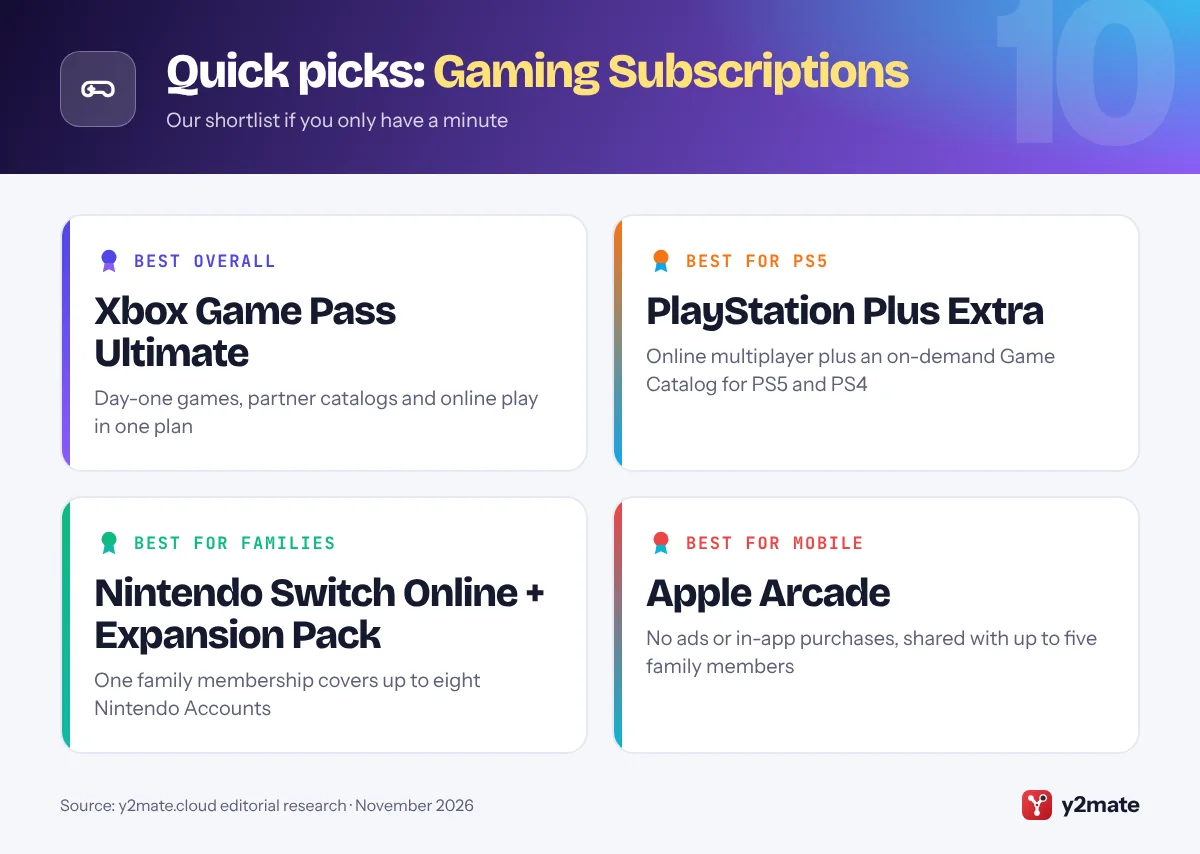
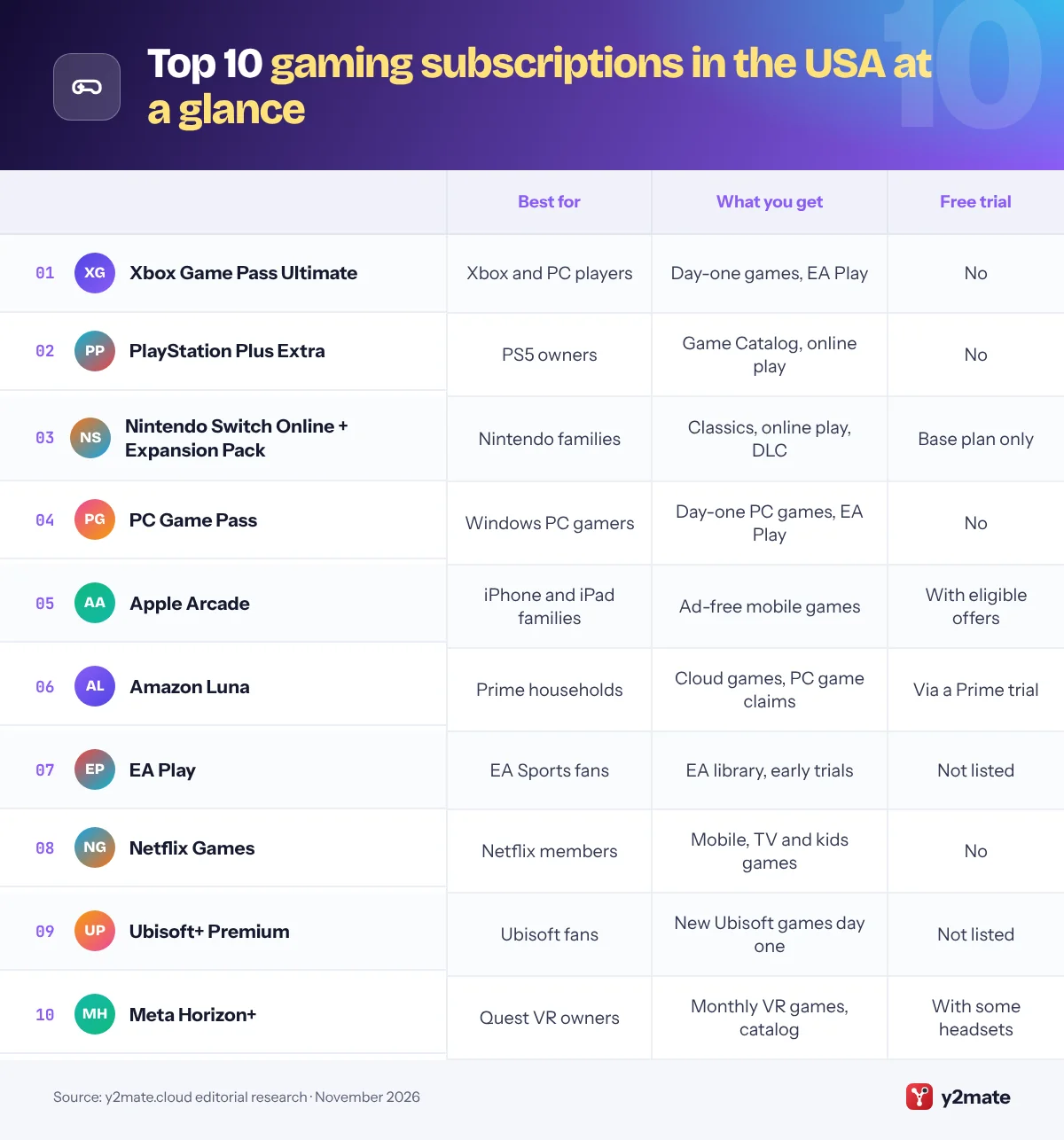
The best gaming subscriptions in the USA in 2026 are Xbox Game Pass Ultimate for the widest mix of new releases and extras, PlayStation Plus Extra for PS5 owners, and Nintendo Switch Online + Expansion Pack for Switch and Switch 2 households. PC Game Pass, Apple Arcade, Amazon Luna, EA Play, Netflix Games, Ubisoft+ Premium and Meta Horizon+ round out the list for PC players, iPhone families, Prime members, sports fans, casual players, Ubisoft fans and VR owners.
A few plain definitions help. A game library, or catalog, is a rotating set of games you can download and play while you subscribe; games can leave it, and you lose access when you cancel. A day-one release is a new game added to a subscription on the day it launches. An online multiplayer subscription is a membership that Xbox, PlayStation and Nintendo require before you can play most games online on their consoles. Auto-renewal means a plan keeps charging you every month or year until you switch it off.
Below we rank ten subscriptions offered in the USA in November 2026 and explain each tier, US cancellation rules after the FTC’s Click-to-Cancel rule was struck down, ESRB ratings and parental spending controls.
How we ranked this list
We compared these gaming subscriptions in the USA using publicly documented information only: what each plan includes (library, day-one games, online multiplayer, cloud play and perks), which platforms it runs on, whether the provider lists a free trial, and whether one membership can be shared with family members or other accounts on a console. Plans with broader benefits on more devices ranked higher, and we confirmed that each service is offered in the USA as of November 2026.
We have not tested the services ourselves, and we leave out prices, game counts and promotional offers because they change often. Libraries rotate every month, so check that the games you care about are included before you subscribe.
The Top 10 Gaming Subscriptions
1. Xbox Game Pass Ultimate
Best for: Xbox and PC players who want new games on day one
Xbox Game Pass Ultimate is the most complete gaming subscription in the USA. Microsoft’s top plan includes a large library of console and PC games, new games on day one, online console multiplayer and in-game benefits. It also bundles EA Play, Ubisoft+ Classics and Fortnite Crew.
Game Pass now has three console-and-PC plans. Essential covers online console multiplayer and a smaller library, Premium adds a bigger library with new Xbox-published games arriving within a year of launch, and Ultimate adds day-one games and the partner catalogs. Microsoft says new Call of Duty games are excluded from the day-one lineup. Since November 2026 every plan includes a monthly cloud gaming allowance: 15 hours on Ultimate, 10 on Premium and 5 on Essential.
Game Pass renews automatically, and Microsoft says it may raise charges with at least 30 days’ notice. If you forget to switch off recurring billing, Microsoft offers a one-time refund of the latest renewal charge when you cancel within 30 days. Setting a console as your home Xbox lets other accounts on it play your Game Pass games.
Official site: Xbox Game Pass Ultimate
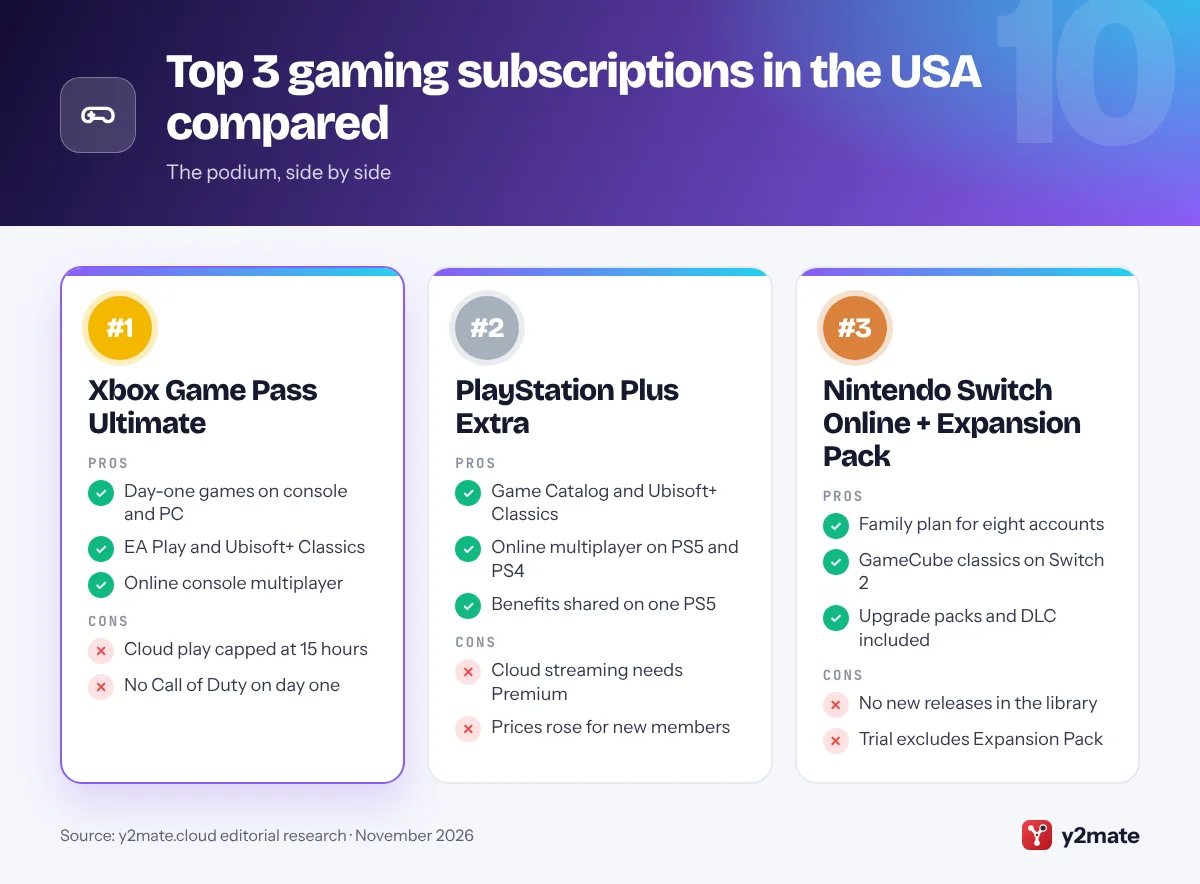
- Day-one games on console and PC
- EA Play and Ubisoft+ Classics
- Online console multiplayer
- Cloud play capped at 15 hours
- No Call of Duty on day one
2. PlayStation Plus Extra
Best for: PS5 owners who want a big on-demand catalog
PlayStation Plus is close to essential for PS5 and PS4 owners, because the entry tier, Essential, is needed for online multiplayer in most games. Essential also includes monthly games you can play while you remain a member, exclusive discounts, cloud storage for saves and Share Play. Extra, the tier we recommend for most players, adds the Game Catalog, an on-demand library of PS5 and PS4 games, plus Ubisoft+ Classics.
Premium, the top US tier, adds the Classics Catalog of older PlayStation games, timed game trials and PS5 cloud streaming to a PS5 or PlayStation Portal. Streaming works only with select games, so treat it as a bonus rather than the main reason to pay more.
Sony raised prices for new members in May 2026, so check the current rate before you renew or switch tiers. If several people share one PS5, turning on Console Sharing and Offline Play lets other accounts on that console use selected benefits, including online multiplayer and catalog games. Parents can set monthly spending limits for child accounts through PlayStation family management.
Official site: PlayStation Plus Extra
- Game Catalog and Ubisoft+ Classics
- Online multiplayer on PS5 and PS4
- Benefits shared on one PS5
- Cloud streaming needs Premium
- Prices rose for new members
3. Nintendo Switch Online + Expansion Pack
Best for: Nintendo families who play online together
Nintendo Switch Online is required to play most Switch and Switch 2 games online, although free-to-play games such as Fortnite do not need it. The base membership also includes NES, Super NES and Game Boy classics, Save Data Cloud backups for compatible games, GameChat on Switch 2, the Nintendo Music app and member-only offers.
The Expansion Pack is the tier to choose if you want more to play. It adds Nintendo 64, Game Boy Advance and SEGA Genesis libraries, plus a growing collection of Nintendo GameCube classics, such as The Legend of Zelda: The Wind Waker, that only runs on Switch 2. Members also get selected Nintendo Switch 2 Edition upgrade packs and DLC, including the Mario Kart 8 Deluxe Booster Course Pass and Animal Crossing: New Horizons – Happy Home Paradise, at no extra cost.
The family membership covers up to eight Nintendo Accounts. A free seven-day trial is offered on the individual base membership, not the Expansion Pack, and in the US it converts to an auto-renewing monthly plan unless you cancel. Nintendo’s Parental Controls app adds ESRB-based game limits and eShop spending controls.
Official site: Nintendo Switch Online + Expansion Pack
- Family plan for eight accounts
- GameCube classics on Switch 2
- Upgrade packs and DLC included
- No new releases in the library
- Trial excludes Expansion Pack
4. PC Game Pass
Best for: Windows PC players who want day-one releases
PC Game Pass is Microsoft’s plan for people who play on a Windows PC rather than an Xbox. It includes a large library of PC games, new games on day one, EA Play and in-game benefits, and you download and launch everything through the Xbox app for Windows. Online multiplayer is free on PC, so you are paying purely for the library and perks.
Compared with Ultimate, the gaps are clear. PC Game Pass does not include cloud gaming, online console multiplayer, Ubisoft+ Classics or Fortnite Crew, and it only works on Windows PCs, including Windows handhelds such as the ASUS ROG Xbox Ally. Like Ultimate, it leaves new Call of Duty games out of its day-one lineup.
It is the right choice if you already own a capable gaming PC and want to play big Xbox releases at launch without buying them, and EA Play adds a back catalog of EA sports and action games. The subscription is tied to your own Microsoft account, so there is no family option.
Official site: PC Game Pass
- Day-one games on Windows PC
- EA Play included
- Runs on Windows handhelds
- No cloud gaming
- Windows PCs only
5. Apple Arcade
Best for: iPhone and iPad families who want no ads
Apple Arcade is the best mobile gaming subscription for families in the USA because every game comes without ads or in-app purchases. That removes the pay-to-progress pressure common in free mobile games and makes it easy to hand an iPad to a child. The library mixes Arcade Originals with App Store Greats, which are ad-free versions of well-known mobile games.
Arcade Originals run on iPhone, iPad, Mac, Apple TV 4K and Apple Vision Pro, while App Store Greats are available on iPhone, iPad and Vision Pro. Many games work offline, the Apple Games app keeps your games and challenges in one place, and you can connect a game controller for console-style play.
With Family Sharing, one subscription covers you and up to five family members, and Ask to Buy lets parents approve other App Store purchases. Apple gives free months of Arcade when you buy an eligible new device, and Arcade is part of the Apple One bundle, which has its own free trial. The limits are Apple-only hardware and few big console-style releases.
Official site: Apple Arcade
- No ads or in-app purchases
- Family Sharing for six people
- Many games play offline
- Apple devices only
- Few console-style releases
6. Amazon Luna
Best for: Prime households that want casual games on TV
Amazon has folded its old Prime Gaming perks into Amazon Luna, so a Prime membership in the USA now includes a selection of cloud-streamed Luna games plus PC games to claim each month and keep. The included games lean towards family and party titles, including GameNight, where friends play together using their phones as controllers. Luna Premium, which replaced Luna+, is an optional paid upgrade with a larger rotating catalog.
Luna changed a lot in 2026. Amazon stopped selling individual games and third-party subscriptions through Luna in April, ended streaming of games you own on other stores in June, and added a Games tab to Prime Video on Fire TV in July.
Because the games are streamed, Luna works on Fire TV, select smart TVs, phones, tablets and computers without a console, but it needs a steady internet connection. It is not an online multiplayer pass for any console. If you already pay for Prime, it costs nothing extra to try, and the PC games you claim stay in your library even if you later cancel Prime.
Official site: Amazon Luna
- Included with Prime
- Phone-as-controller party games
- Monthly PC games to keep
- Casual-leaning catalog
- Needs a steady connection
7. EA Play
Best for: EA Sports fans on PlayStation, Xbox or PC
EA Play is Electronic Arts’ own subscription, and it matters most if you play EA Sports games. Members get unlimited access to a collection of EA titles, trials of up to 10 hours on select new games before launch, a member discount on EA digital purchases and monthly in-game rewards in games such as Madden NFL, College Football and Apex Legends.
It is sold on PlayStation, Xbox and PC, where you can join through the EA app, Steam or the Epic Games Store, but each membership applies to one platform only. EA Play Pro, sold on PC through the EA app, adds unlimited access to the best editions of EA’s latest games, including select new releases on day one.
Check whether you already have it before you pay. EA Play is included with Xbox Game Pass Ultimate and PC Game Pass, so many Xbox and PC players get it inside a bigger plan. For PlayStation owners, a standalone membership is the main way to get EA’s back catalog and early trials. EA Play Pro is not part of Game Pass.
Official site: EA Play
- 10-hour trials before launch
- Works on PlayStation, Xbox, PC
- Monthly in-game rewards
- One platform per membership
- Pro tier is PC-only
8. Netflix Games
Best for: Netflix members who want casual games
Netflix Games are included with every Netflix membership, so if you already subscribe you may have a game service you are not using. Netflix says its games come without ads, extra fees or in-app purchases, and the lineup now leans towards kids’ games, party games and games based on Netflix shows.
There are three ways to play. Mobile games download to iPhone, iPad and Android devices. On supported TVs, party games such as Pictionary: Game Night and Boggle Party stream from the cloud while each player uses a phone as the controller, a feature Netflix still calls a beta. Netflix Playground, a separate kids-only app launched in April 2026, gathers games based on shows young children know and supports offline play.
Netflix has trimmed its mobile library, and gamepads are not supported for TV games, so it is no substitute for a console subscription. There is no free trial, but profiles, maturity ratings and kids profiles give parents a familiar way to manage what children can open. It suits families who already pay for Netflix.
Official site: Netflix Games
- Included with membership
- No ads or in-app purchases
- Kids app with offline play
- Smaller mobile library
- No gamepads for TV games
9. Ubisoft+ Premium
Best for: Assassin’s Creed and Far Cry fans on PC or Xbox
Ubisoft+ Premium is the publisher’s top subscription and the one to choose if you play Ubisoft’s big series, such as Assassin’s Creed, Far Cry and Tom Clancy games, as soon as they launch. It includes new Ubisoft releases on day one, often in premium editions with extra content, plus a large back catalog. Ubisoft lists Premium for PC, through Ubisoft Connect, and for Xbox consoles.
Ubisoft+ Classics is the cheaper tier, with a curated library of older Ubisoft games. You may already have it, because Classics is included with Xbox Game Pass Ultimate and with PlayStation Plus Extra and Premium. Premium is the upgrade that adds new releases.
Ubisoft notes that premium editions in the subscription may not include every piece of premium content, so check each game’s page. Premium is not offered on PlayStation, and the official page does not list a free trial or a family option. It works best as a short-term plan: join for the month a new Ubisoft game launches, then switch off auto-renewal before the next charge.
Official site: Ubisoft+ Premium
- New Ubisoft games on day one
- Premium editions and extras
- Classics in Game Pass and PS Plus
- Premium not on PlayStation
- Single-publisher library
10. Meta Horizon+
Best for: Meta Quest owners building a VR game collection
Meta Horizon+ is the subscription for Meta Quest headsets and the simplest way to build a VR collection without buying every title. Each month members can redeem monthly games, which they can keep playing for as long as they stay subscribed, and they get access to a rotating Games Catalog of VR titles that Meta adds to and removes over time. Meta has also added free add-ons for some games.
In July 2026 Meta and Microsoft added an Xbox Game Pass starter perk to Horizon+, which includes a monthly allowance of Xbox cloud gaming for select games on a flat virtual screen. The catalog covers party, puzzle, action and multiplayer titles, and it runs on current headsets including the Quest 3 and Quest 3S. Meta has bundled trial memberships with new headsets during promotions.
The limits are typical of catalog services. Games can leave the catalog, monthly games stop working if your membership lapses, and the VR library runs only on Quest. Horizon+ renews automatically, so set a reminder if you join through a headset offer.
Official site: Meta Horizon+
- Monthly VR games to redeem
- Rotating Games Catalog
- Xbox cloud perk included
- Quest headsets only
- Monthly games need membership
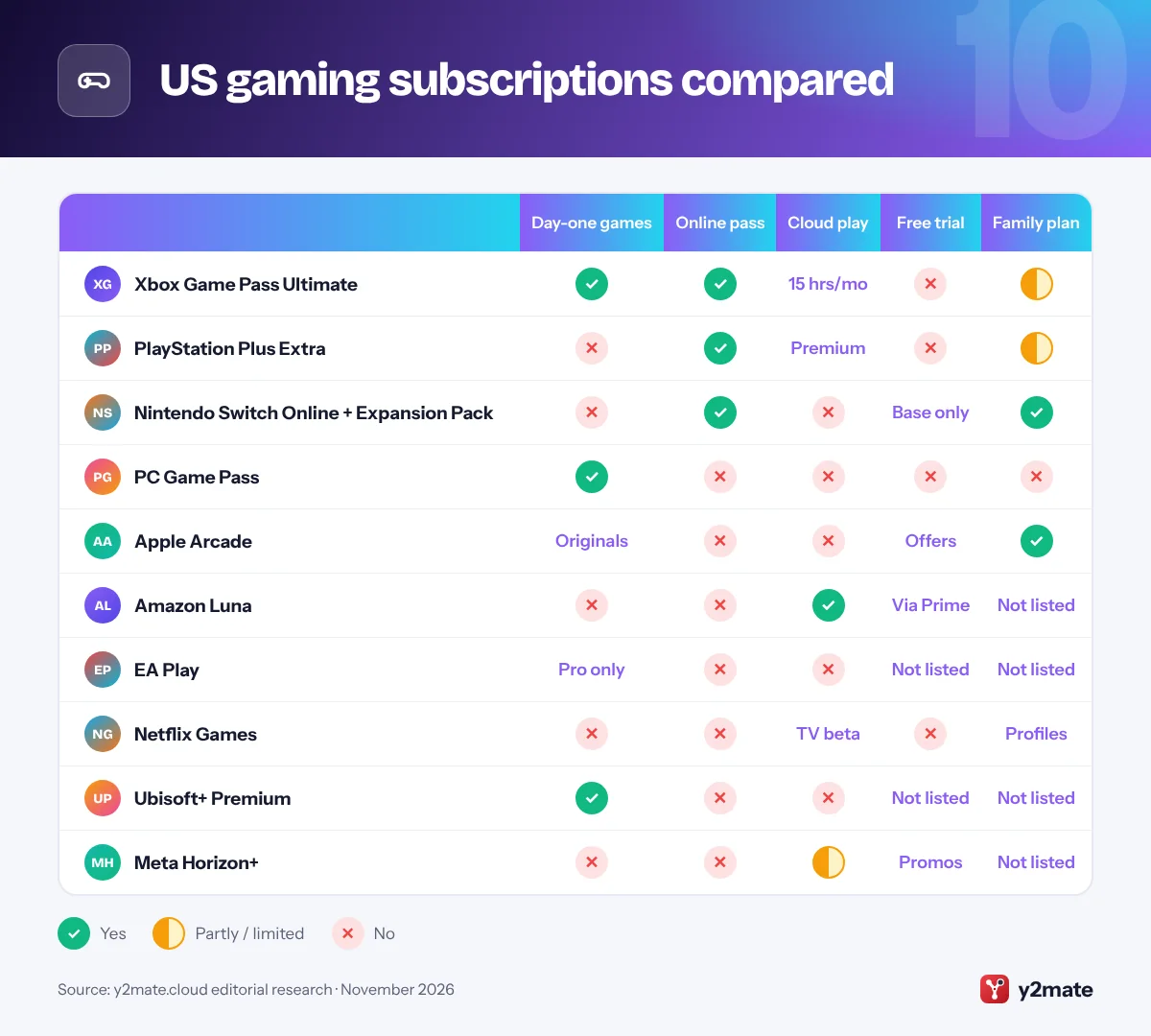
US gaming subscriptions compared
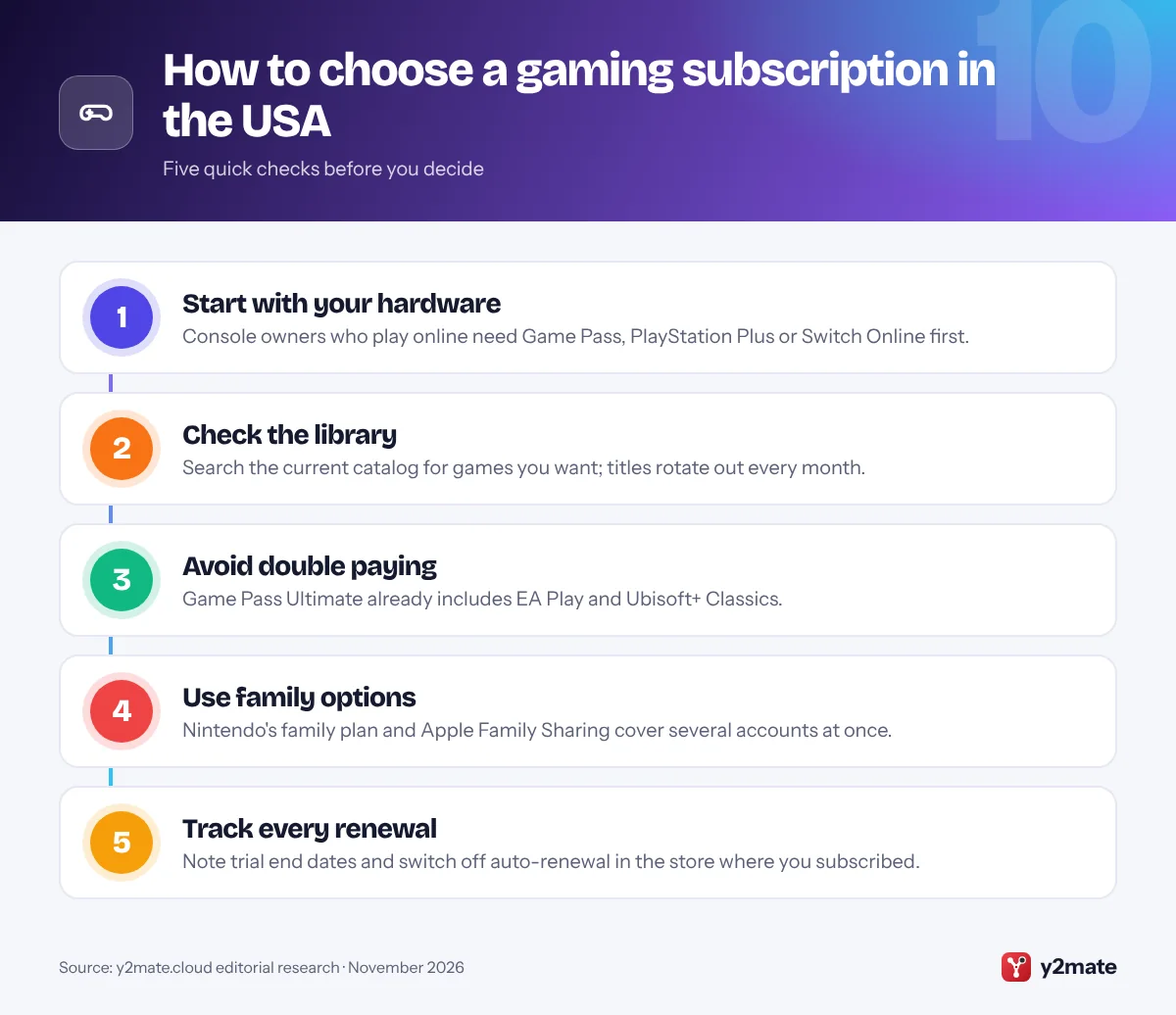
How to choose gaming subscriptions in the USA
Start with the hardware you already own. If you play online on an Xbox, PlayStation or Switch, the console maker’s own plan comes first, because Game Pass, PlayStation Plus and Nintendo Switch Online include the online multiplayer access those consoles require. Add a library service only if you will play enough of its games, and remember that catalog games disappear when you cancel or when they leave the service.
Cancellation and auto-renewal rules
The Eighth Circuit Court of Appeals vacated the FTC’s Click-to-Cancel rule in July 2025, before it took effect, and the FTC has restarted the rulemaking process. The Restore Online Shoppers’ Confidence Act still requires clear terms, express consent and a simple way to stop recurring online charges, and the FTC enforces it: in September 2025 Amazon settled the FTC’s case over Prime sign-ups and cancellations. State laws add more. California’s auto-renewal law, updated in July 2025, requires consent to renewal terms, annual reminders and online cancellation for online sign-ups.
Ratings and spending controls
ESRB ratings, including the In-Game Purchases (Includes Random Items) notice, are industry guidance rather than law, so set limits on each device. The Xbox Family Settings app, PlayStation family management and Nintendo’s Parental Controls app can restrict games by rating and cap spending, and Apple’s Ask to Buy covers App Store purchases. The FTC’s 2025 settlement with Genshin Impact’s publisher, which bars selling loot boxes to under-16s without parental consent, shows regulators are watching how games sell to children.
Finally, put renewal dates in your calendar, check when any promotional price ends, and cancel through the store where you subscribed.
Frequently asked questions
What is the best gaming subscription in the USA?
For most people it is Xbox Game Pass Ultimate, which combines day-one games, EA Play, Ubisoft+ Classics, online console multiplayer and cloud playtime. PS5 owners get more from PlayStation Plus Extra, Switch families from Nintendo Switch Online + Expansion Pack, and iPhone households from Apple Arcade.
Do I need a subscription to play online on Xbox, PlayStation or Switch?
For most games, yes. Xbox consoles need any Game Pass plan except PC Game Pass, PS5 and PS4 need PlayStation Plus Essential or higher, and Switch consoles need Nintendo Switch Online. Free-to-play games such as Fortnite are the main exception on all three. Online play on a Windows PC is free, so PC Game Pass pays only for the library and perks.
What is the difference between Game Pass Essential, Premium and Ultimate?
Essential includes online console multiplayer, a smaller game library and five hours of cloud gaming a month. Premium adds a bigger library, with new Xbox-published games arriving within a year of launch, and ten cloud hours. Ultimate adds new games on day one, EA Play, Ubisoft+ Classics and Fortnite Crew, with fifteen cloud hours and Microsoft's best stream quality.
What happens to my games if I cancel a gaming subscription?
You lose access to catalog games, such as those in Game Pass, the PlayStation Plus Game Catalog or Apple Arcade, but keep your saves and any games you bought. Monthly games from PlayStation Plus and Meta Horizon+ also need an active membership. PC games you claim each month through Amazon Luna with Prime stay in your library.
How can parents control spending in gaming subscriptions?
Use the console's own family tools. The Xbox Family Settings app, PlayStation family management and Nintendo's Parental Controls app let parents restrict games by ESRB rating, set play-time limits and cap or approve purchases. On Apple devices, Family Sharing with Ask to Buy sends purchase requests to a parent. Check the ESRB label for in-game purchases before buying.
Final verdict
The best gaming subscriptions in the USA in 2026 are Xbox Game Pass Ultimate for Xbox and PC players who want new releases, PlayStation Plus Extra for PS5 owners and Nintendo Switch Online + Expansion Pack for Switch families. PC Game Pass suits Windows gamers and Apple Arcade suits iPhone households.
Pick the plan that matches your main device, avoid paying twice for EA Play or Ubisoft+ Classics, set up parental controls before children play, and track every renewal date.
Sources and further reading
- Restore Online Shoppers' Confidence Act: The FTC's page on the federal law that requires clear terms, express consent and a simple way to stop recurring online charges.
- California auto-renewal law AB 2863: The official text of California's updated automatic renewal law, covering consent to renewal terms, reminders and online cancellation.
- Xbox Family Settings app: Microsoft's official app for setting screen time, content filters and spending limits on children's Xbox accounts.
- ESRB ratings guide: The ESRB explains its age rating categories, content descriptors and interactive elements such as in-game purchases with random items.
- ESRB parental controls guides: Step-by-step ESRB guides to setting spending limits, play time and age restrictions on consoles, PCs and mobile devices.

Leave a Reply